Neil Matthews

Category: How To

  • Are You Mobile Enough For Google?

    Are You Mobile Enough For Google?

    Google is up-ing the stakes for the mobile web.

    They have looked into their cavernous store of data and deducted that more and more web searches are done from mobile devices.

    They are threatening to penalise websites that do not have an optimised mobile site!

    Are you mobile enough for Google?

    Google Webmaster Errors

    A number of my clients have received warnign messages from Google along these lines.

    Google systems have tested 67 pages from your site and found that 100% of them have critical mobile usability errors. The errors on these 67 pages severely affect how mobile users are able to experience your website. These pages will not be seen as mobile-friendly by Google Search, and will therefore be displayed and ranked appropriately for smartphone users.

    I think the telling statement is that you will be “ranked appropriately” , get a decent mobile site or have the fawcet of Google juice turned off.

    How To Tell If You Are Mobile Enough For Google

    The easiest way to check you are mobile friendly is to use Google mobile friendly test

    https://www.google.com/webmasters/tools/mobile-friendly/

    I’ll wait while you go off and check.

    What Are Your Options

    You need to make your site responsive.  This means your site will resize  to fit a mobile screen.

    There are three main option that I can see to fix your site if it fails.

    1) Re-Code Your Existing Theme

    The first and most expensive option is to hire a developer to recode your theme and make it responsive.

    Pros

    You will get a mobile match for your existing site

    You will get exactly the theme and layout you desire.

    Cons

    This is very much the most expensive option.

    It will take some time to code and test, there are rumours that Google are implementing their penalty in April.

    2) Buy A New Responsive Theme

    Go to on of the theme markets such as themeforest.net and buy a new responsive theme.  You can demo most themes so enter the demo URL into the Google tester URL to make sure it passes their test.  The vast majority of new themes are responsive already.

    Pros

    Much cheaper than custom coding, expect to pay less than $100

    Cons 

    You will need to setup a new premium theme, and change the existing look of your site. Depending upon the theme some setups can be complex.

    3) Install One of The Mobile Ready Plugins

    The quickest route to a mobile friendly website and the route I have suggested to my clients who have been impacted,is to install one of the mobile theme plugins.  These plugins detect when a site visitor is from a mobile device and show a different mobile ready theme.

    Here are some of the plugins that can do this work:

    Pros

    Quick, about an hours work to install and configure.

    Cheap, from free to approx $59 for a premium version.

    Cons

    You are limited to the look and feel the plugins provide.  These themes are pre-built, you can change colours and add logos but your design options are limited.

    Further Reading

    Here is Google’s very own  documentation on configuring a mobile ready WordPress site.

    https://developers.google.com/webmasters/mobile-sites/website-software/wordpress

    Wrap Up

    As we start to consume more and more of our content from phones, we need to make content readable and usable from small screens.  Google know this and that is why they are penalising people without responsive sites.  I strongly recommend you embrace mobile browsing.

    We can implement a premium theme (option 2) or install a mobile plugin (option 3) as one of our $99 jobs if you need help.

  • Multi Language Error Messages

    Multi Language Error Messages

    Something that is often overlooked in the multi language build process are multi language error messages.

    If there is a problem with your site the vast majority of sites report issues in their base language, but how does this convey the issue to your site visitor that reads a different language?

    What Is The Problem?

    The problem is,  there is a problem and you need to convey this to your visitors in their own language.

    If you throw up a random error message in a language someone does not understand how can they possibly know what to do.  If you are running a commercial website there is a very real chance you will lose that visitor as a potential customer/client forever.

    You only get one chance to make an impression. Take an hour to ensure your error messages are in all the languages you support.

    Example

    A good example is the 404 page not found message.  Websites are fluid things, pages are added and deleted frequently.  Links get broken and people are sent to pages that do not exist.

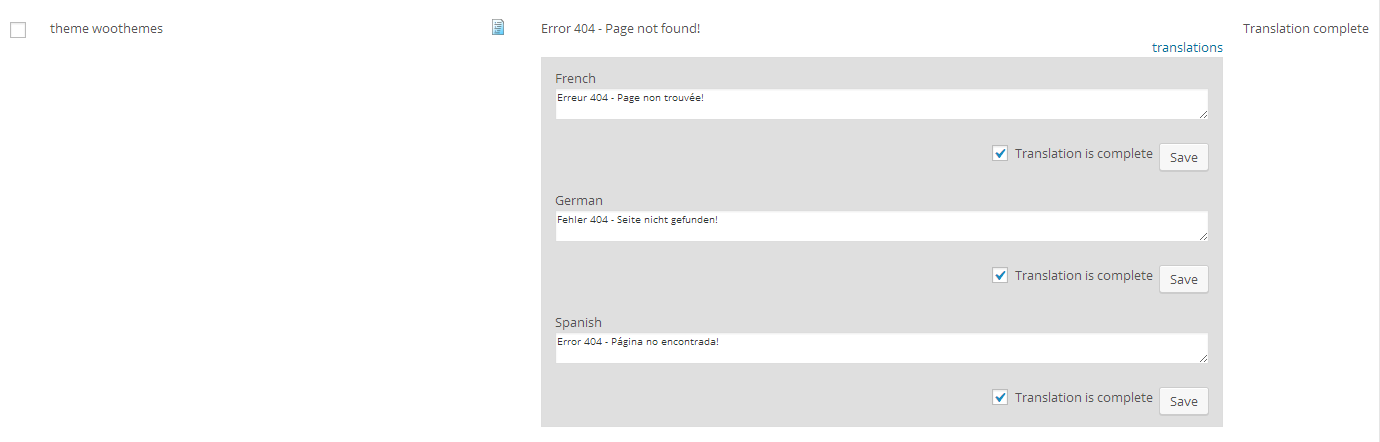
    Any website worth it’s salt will throw a 404 page not found message.  Here are mine in English and French.

    I’ve coded my site up to recognise the language a visitor is using and show error messages in that language.

    How I Solve This Problem

    I solve this problem on my clients sites using my old friend the WPML plugin.  For those not up to speed with WPML this is a comprehensive multi language solution, but one of it’s functions is called string translation. We can use this to translate error messages.

    If your theme is coded correctly, string translation allows you to search for specific text strings such as “Error 404 – Page not found!” and add a translation, then when that string is displayed it checks for the language and shows the appropriate translation.

    Click to see full size image
    Click to see full size image

    Super simple IF your theme is coded correctly.

    If you theme is not coded correctly to output strings with a context, this will not work and some re-coding of the theme is required.

    If you check your themes 404 file and see:

    echo “Error 404 – Page not found!”;  this will not work.

    But if you see:

    _e(“Error 404 – Page not found!” ,”webpolyglot”); this will work, we are outputting the string but instead of echoing the string directly we are sending the string through the translate() function.

    Error Messages You Need To Think About

    Here is a list of things you should be thinking about:

    • 404 file not found
    • Error messages on any contact forms, submission okay and submission not okay
    • Login errors
    • Search results returning no results

    Wrap Up

    If you need help making sure all your error and customer facing messages are translated why not get a no obligation quote.

    Photo Credit: rileyroxx via Compfight cc

  • How To Manage Multiple WordPress Sites

    How To Manage Multiple WordPress Sites

    My team and I manage many WordPress sites on a day-to-day basis because of our maintenance service, and I have tested most of the tools out there to help speed up the process.

    In this post I want to show you how to manage multiple WordPress sites and  what to look for in a site management tool.  I’ll also let you know which one I selected.

    Tools I Have Tried

    I’ve had a go at them all, we have given a test drive to:

    What Functions I Look For

    These were my criteria when selecting my tool:

    Automatic Backups – I want daily database backups and weekly full backups that send the files offsite to a cloud backup location like Dropbox or Google drive.

    One Click Plugin Updates – I want to be able to quickly update plugins across all sites from a central console.

    One Click WordPress Updates – and the same with WordPress updates.

    Security monitoring – I want to monitor the sites for security and potential hack attacks.

    Uptime Monitoring – I want to know when the sites are down so I can pro actively fix them.

    Database Optimisation – I want to keep my clients databases optimised and running quickly.

    Reporting – I want a tool to keep my clients up to date with the updates I’ve done on their sites.

    What We Use

    We opted for Managewp over the other two, it’s more expensive than InfinteWP but at the time of testing the backups were far more reliable.  They are both great tools that do the same thing, but reliable backups are a must.

    I remember as an eager young techie, my boss said to me “You are only as good as your last backup”. That stuck and the more robust backup of managewp won the day.

    WPRemote didn’t get much of a look in to be honest, their pricing structure ruled them out almost immediately.

    Wrap Up

    I think if you have five or more websites to manage then Managewp is an excellent tool for you, or you could outsource the maintenance of your site to us 🙂

    Photo Credit: Gabriel Rojas Hruska via Compfight cc

  • Are You Legally Obliged To Translate Your Website?

    Are You Legally Obliged To Translate Your Website?

    Most of the time I will tell you to create a multi language website to help get your message over as effectively as possible, but sometimes there are legal requirements to make your site available in more than one language.

    Consult A Lawyer Yaddah Yaddah Yaddah

    I cannot give legal advice for your locale so please consult a qualified member of the legal profession to see if you are legally obliged to translate your website.

    As a rule of thumb, if your country or province has a a large bilingual population, there is probably a need to translate your site.

    Case Study

    Here is a case study of a website I’ve worked on where there is a legal obligation to present content in multiple languages.

    UK Government Websites In Welsh

    The first multi language website I worked on was one for the government of the United Kingdom.

    I was working for the National Health Service and one of the services offered is a reciprocal arrangement with other European countries for health services.  Long story short you need to apply for a card to take abroad with you so the government will pay for your medical bills if you fall ill or have an accident.

    A small minority of people in the UK speak Welsh ( approx 3 million of the 65 million+ inhabitants of this small island I live on). This is a tiny minority and the vast majority of those 3 million Welsh speakers are  bilingual anyway.

    We went to a huge amount of effort ( the tools were not available then, this was about ten years ago) to translate the site so we could keep within the legal requirement for a UK government site.

    The bilingual nature of these websites was set into law to force agencies to provide information and electronic services to Welsh speakers.

    Put yourself in the shoes of the Welsh speaker, they should be able to have information from THEIR government in THEIR native language, but many of the agencies exist outside of Wales, and without legislation could I suggest that the Welsh population would be forgotten?  I think they would by English centric parts of the government.

    Wrap Up

    It may feel like the bureaucrats are forcing you to translate for no good reason, but the rules are in place because there is a large enough section of the population to make  this important enough to create the law.

    Does your country or province require multi language websites? Let me know more details in the comments below I’m really interested which areas are trying to preserve minority languages over homogenising majority languages.

    Further reading

    Canadian Site Owners Legal Requirements

    Oh the irony a consultation document about Welsh speakers and I cannot find the Welsh version.

    Photo Credit: SalFalko via Compfight cc

  • Multi Language Email Marketing

    It’s a very over used term, but the money is in the list, but how do you do multi language email marketing?

    How can you get the Dollars, Euros, Pounds or Yen from your list when the people on it are using multiple languages.

    The Sign Up Form

    The first port of call is the signup form.  Depending upon which provider you use signup forms are a little different. Aweber for example, asks you to embed a script for the form that is designed in their system and cannot be translated, whereas Mailchimp allows you to embed an HTML which can be edited per language.

    Either way what I suggest is you create multiple signup forms in the appropriate language then show them in your sidebar or other areas of your site based upon chosen language.

    Controlling content in your sidebar is a video post all of it’s own, I’ll create that soon, but using a plugin called widget logic we can set sidebar widgets and signup forms based on language, see this document while you are waiting for my video post:

    http://wpml.org/2011/03/howto-display-different-widgets-per-language/

    Popups

    Following up from sign up, we have the ubiquitous popup.  Love them of hate them, they do help to get people onto your mailing list.  Does your popup provider allow you to show a particular popup based upon location?

    I did some research on this and it looks like only Pippity has the tools to check for URL strings and popup dependant upon language,  Using their power filters functionality we could check for a language string in a URL e.g. /fr/ and show a popup based on that.

    http://pippity.com/how-to-get-help-in-pippity#/how-to-filter-your-popups

    We would create multiple popups in different languages and show them based on language strings.

    The Lead Magnet

    The lead magnet is that little carrot at the end of a stick to make people join your list.

    It could be an eb0ok, video series, email course, the list goes on.  Have you made a promise in language A only to deliver a lead magnet that they cannot read or understand in language b?

    Perhaps you could offer multiple downloads or control the lead magnet download based upon the popup or sign-up form you show above.

    The Messages

    The real problem with email marketing across languages are the email messages you send out to your list.  How are you going to ensure people get your marketing messages in the language they selected?

    There are two solutions to this problem, you can segment a single list into language or you can create multiple lists one per language.

    Segmentation

    Segmenting your email list is when you divide your list as a whole into groups of email addresses that are interested in different things.  One way to segment is via language. Segmenting is like adding a tag to each of your email signups to put them into a group, you can then send out email messages to these groups.

    Most email providers like Aweber or Mailchimp allow you to embed hidden fields in the signup forms which allow us to segment people at signup, one of these fields could be language.

    Once segmented you can create multiple emails for that list and end the French version to the French segment, German to the Deutsch segment etc.

    The downside of segmentation is that many features such as initial emails, redirect pages etc are limited to one setting per list,  which makes me think it’s better to run …

    Multiple Lists

    A better way to segment your email subscribers is with multiple lists.

    Instead of one big list, have multiple smaller but dedicated lists per language.  This ensures all autoresponders, welcome emails, redirect pages and email templates are in the correct language.

    You can control how people join lists from the signup form,  If you display a different signup form that links to dedicated language lists you can be sure that someone from language X gets their content and responses in that language.

    Often Forgotten

    Each email list has a number of forgotten areas that may need a revisit if you go multi language.

    • The auto responder sequence you set-up years ago,  what language is it in?
    • The unsubscribe links at the bottom of your emails is it perfectly clear in every language you support how to get off your list?
    • Once people join your list, they are often redirected to a page on your website, is this translated, will people know what to expect when they have joined, do they know they need to click the double opt in link?

    I highlighted the importance of testing in my recent post Importance Of Testing Across Languages, it couldn’t be more true with your email lists, join each list or segment, test the emails and responses you get at each step, stay on your lists so you can test what is being sent out over time.

    End Note

    The money is in the list, but you need to know how to speak to your list members using their desired language?

    Photo Credit: idogcow via Compfight cc

  • Multi Language Contact Forms

    For the vast majority of us, our website is a marketing tool and we want to generate leads from it for our business.

    The main way most people do this is via some sort of contact form, but how do you make multi language contact forms?

    I’ll teach you how I do it for my clients.

    Gravity Forms

    I use WordPress for all my client sites, so if you are into one of the other content management systems then this post is probably not for you.  As an aside, give WordPress a go for your multi language sites, the support for multiple languages is great.

    The process starts with a top quality contact form plugin.  I use gravity forms.  It’s a premium plugin and prices start at $39,  but this plugin is so useful I use it on all my sites and my clients’ sites too and the investment is well worth while.

    Not only will it solve your multi language issues, but it will link to your email provider, create quotes in things like Freshbooks, add the users to your CRM, the list goes on and on it’s the best contact form out there full stop.

    Multi Language Contact Forms Add-On

    I use a plugin called WPML for all of my multi language sites.  It’s a great tool and speeds up the development process greatly.

    The good people at WPML have also developed a multi language add on for gravity forms which makes it very easy to translate your forms. The addon is free and available here Gravity Forms multilingual.

    Making Your Form Fields Available To Translate

    The main thing the plugin does is to make your form fields available to translate.

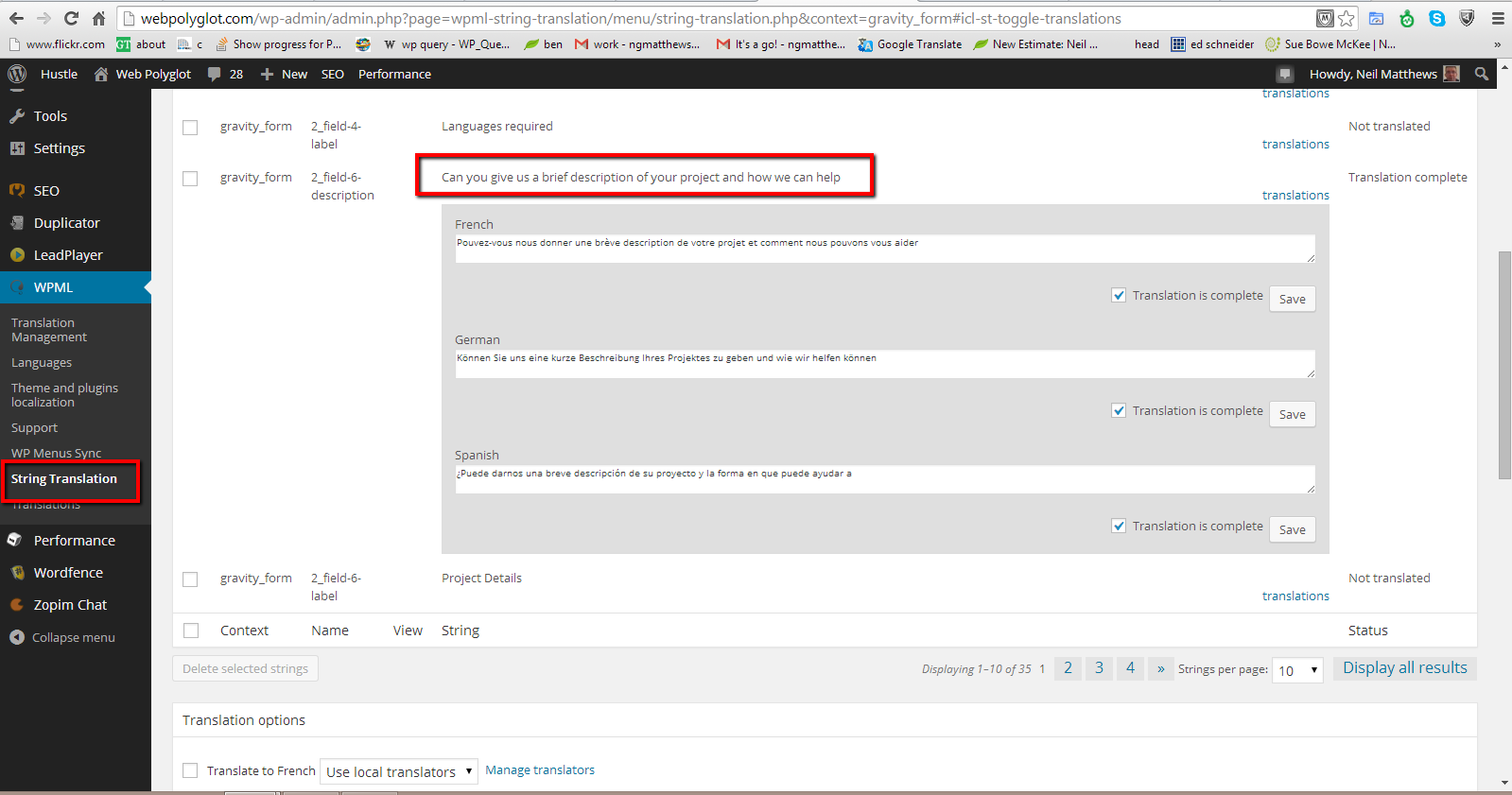
    As an example I have description on my hire us form that says  “Can you give us a brief description of your project and how we can help”.

    In WPML there is a string translation section, I simply go into that and search for the string above and I can add my French, German and Spanish translations.

    Click for full size image
    Click for full size image

    Sending Your Forms Out To Translation

    Another benefit of WPML is that you can send the content of your website out to freelance translators.  They receive text files and translate then, sending them back to your site in a seamless process.

    You can also do this with your forms so you can build multi language forms even if you have no language skills for your target translation.

    Route Responses Based Upon Language

    So you form is up and running in multiple language and the stream of leads is coming in as expected now what?

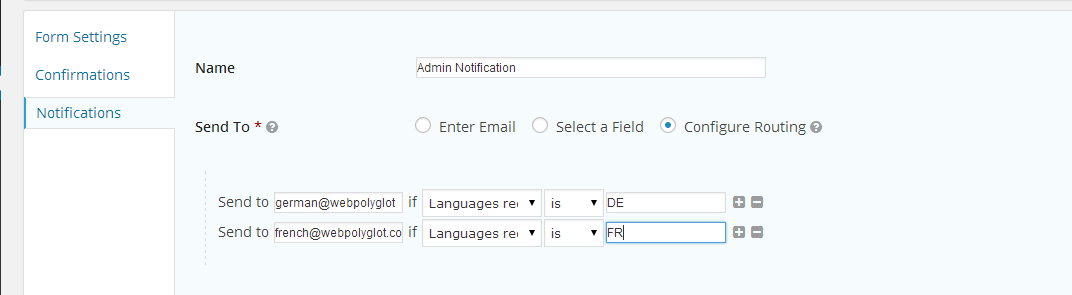
    You can route your leads to different addresses based upon the language selected when the form was completed.

    This is great if you have multiple team members dealing with leads from different countries.  Here’s a screen shot of the routing screen where I send forms to different addresses.

    Click to see full size image
    Click to see full size image


    The Only Thing Missing

    The only thing missing from this process is the ability to send form entries out for translation as we can for the forms themselves.

    My quick and dirty solution is to run any forms sent to me that are not English through translate.google.com.   The results are weird but I always get the gist of what is required.

    If anyone from WPML reads this please leave a comment to let me know if translating entries is on the development plan .

    Wrap Up

    For most websites, collecting leads is the main function, make sure this crucial part of your process is translated and easy for your site visitors to contact your business.

    What not jump over to my hire us page and see the contact form in action at the bottom of the page.

    Photo Credit: Robots are Stupid via Compfight cc

  • How To Verify Your WordPress Site On Pinterest

    How To Verify Your WordPress Site On Pinterest

    How To Verify WordPress On Pinterest

    In this video post I will show you how to verify WordPress on Pinterest.  It’s a short three minute tutorial to take you through adding a meta tag to  your site.

    Verifying your site shows that you are a trustworthy source, for more details check out the Pinterest page on this subject.

    http://business.pinterest.com/verify/

    Video

    [leadplayer_vid id=”51B993ABC4295″]

    Files Mentioned

    header.php

    Step By Step Guide – how to verify wordpress on pinterest

    1. Login to Pinterest
    2. Click Profile
    3. Click Pencil
    4. Click verify by meta tag
    5. Copy tag
    6. Paste Tag into header.php or script area
    7. Click on verify website

    Photo Credit: Jon McGovern via Compfight cc

  • How To Build A Multilanguage Site With WPML

    How To Build A Multilanguage Site With WPML

    In this video posts I will show you how to build a multi language WordPress site using WPML a premium translation plugin.

    WPML allows you to host multiple versions of your content, and provide a version of your site in a site visitors native langauge from a drop down button.

    This video post will take you through a basic site build.

    Video

    [leadplayer_vid id=”5062F57C8B8B5″]

    Links & Code

    WPML (AFF)

    Google Translate

    Widget Logic

    WPML Approved Contactor List

    ICL_LANGUAGE_CODE='en'

    Image by darkroses

  • [Video] Monitoring Banner Ad Performance With Google Analytics

    [Video] Monitoring Banner Ad Performance With Google Analytics

    On my site I have a number of banner ads which link to my WordPress technical support page.  I wanted to see if I could measure performance of  these banner ads.

    There are a number of plugins out there which will track clicks on ads, but I wanted to use Google analytic s which I use for all of my other monitoring needs.

    Here is a quick video posts to show you how to track clicks on your banner ads, be they internal links or off site links to affiliate or other sites.

    Video

    https://www.youtube.com/watch?v=2HlvEnC_tlI

    Links

    Google Analytics Plugin

    Google Analytics

    Code

    Here is a copy of the code I used in my sidebars

    <a href="https://dev.neilmatthews.com/wordpress-technical-support" onClick="_gaq.push(['_trackEvent', 'CTA', 'Click', 'Sidebar banner ad']);">
    <img src="https://dev.neilmatthews.com/wp-content/uploads/2011/05/WPDUDE_techsupp_250x250.png" /></a>
    
    
    Image by m4tik
  • What Is A CDN?

    What Is A CDN?

    You may have heard talk about CDNs they are all the rage for websites.  In this post I’m going to explain what a CDN is and what it can do for your site.

    (more…)

  • Pass The Damn Ham Please

    Pass The Damn Ham Please

    You probably already use anti spam plugins on your site, but sometimes Spam gets through, so how do you tell the difference between Spam (bad comments) and Ham (good comments).

    This post shows you the evaluation criteria I use before trashing or spamming a comment.

    The Difference Between Trash and Spam

    I have two routes for an unwanted comment, I either trash it or spam it, the differences are quiet important.  If I find a comment that is real but I don’t want it to appear on my site (more about why I do this later) I will mark it as trash and bin it, if it is an actual spam comment I mark it as spam, the difference being, trash comments allow further comments, but spam comments potentially put that person or site on the Akismet blacklist.

    I would ask you to use the Spam button aggressively to help combat this annoying and sometimes disastrous problem see When Too Many Comments Are Bad.

    My Site,  My Rules

    Everything that is published on my site including comments reflects my site and my brand, if I allow low quality comments  to be approved what am I saying to the world, I don’t care what crap is published?  As a result I’m pretty picky what I pass through.

    Also linking to poor quality sites, even through comments is thought to lower the value of your own site and could affect SEO rankings

    So here are my criteria for evaluating suspect comments that have come through the spam filter.

    It Needs To Add To The Conversation

    I’m very strict on this one, so sorry if you have attempted to say great post in the comments, but I bin anyone leaving congratulatory remarks and anything that does ont add to the conversation of the post.  You can disagree with what I have said, but your comments needs to add to the post.

    Click for full size image


    Bizzare content

    When you read the comment, it may look like it is written by a human, but it does not quite sit well with you, it’s too generic, whilst it could match your post, you are not sure.

    When in doubt, bin is my motto

    Click for full size image


    The site URL is Obviously Spammy

    Look at the target URL or the site, is it obviously for  a spammy site, mark as spam.  Look for references to pharmaceutical, or any site selling stuff.  Add this to the next point and you have a spam candidate.

    Click for full size image

    The Site URL Links To A Low Level Page Not Root

    This always starts the red flag-a-flapping why would you link to a sub page if you were not trying to harvest links back to your piece of spammy crap.  A legitimate comment links back to the root, you may want to link to a particular page in you comment to emphasise your point, but not in your site URL.

    Click for full size

    Irrelevant Links In Content

    If there are any irrelevant links in your comment, you are obviously trying to harvest links back to your site for SEO purposes.  You gonna get a spam for that.  If anyone links in my comments, it better make sense to the post and comment, I often remove links but approve comments if they add value.

    Click for full size image

    Foreign Languages

    I’m not being xenophobic, but why comment on a site in language X in language Y?  What are you trying to hide.  I don’t approve any non-English comments on my site.

    Further Reading

    I’ve written a lot about spam in the past, check out this search result, “Dealing with Trolls” found me on a rant so lets mark the language NSFW.

    Wrap Up

    You wouldn’t let people write on the walls of your house, so why let people write on the e-walls of your site?

    Obscure Reference Update: The title “Pass the man ham please” is from To Kill A Mockingbird by Harper Lee

  • How To Create A Multi Lingual WordPress Site

    I recently had the chance to work on a multi lingual WordPress  site for a client in Canada, and I want to tell you about an excellent plugin which will help you to keep multiple versions of your content in different languages.

    My client is based in Canada, so he needed a site which was accessible to English and French speakers, I got my first chance to use an excellent plugin I had seen in passing.

    Update Sep 2012

    Feel free to read the full post, but I’ve developed a video training to show you how to use WPML

    Links & Code

    WPML (AFF)

    Google Translate

    Widget Logic

    WPML Approved Contactor List

    ICL_LANGUAGE_CODE='en'

    Introducing WPML

    The plugin I used is WPML, this allows you to create content, and then to add a translation of that content. Then when the language is selected on the front end of your site the appropriate translation is provided. Very neat and very easy to implement.

    The plugin can be downloaded from wpml.org, it also supports multiple languages as you would expect so you can see the plugin in action.

    Installing The Plugin

    The installation is just like any other install, add the plugin and activate it.

    Once activated you need to add your language support.  This involves setting the base or default language, in my example this was english, then you need to add your additional languages.

    You can select multiple additional languages, and there are many to choose from.

    The Language Switcher

    There is a widget which can be added to your sidebar which provides a drop down to select your desired language.  There are a couple of styling options to add flags to represent languages.

    Adding Translated Content

    Here is the function I thought was really handy.  Instead of adding additional blog posts, you add a translation to an existing post.  This keeps the management of your content very neat. When someone switches language, then that version of the content is displayed.

    There is also a switch on your dashboard which switches the admin languages excellent if you have site contributors working in different languages.

    Translation Services

    The company behind WPML Icanlocalize also provides professional translation services, so if you want to provide multi language support but do not have the expertise to create the content, there is a service for this.

    It’s A Big Old Plugin

    I’ve only scratched the surface of WPML, there are many other features such as supporting themes, and plugins in multiple languages, if you have a requirement for multiple languages, I highly recommend this plugin.

    Here’s the link again wpml.org

    Plugin Price

    WPML recently went premium, you will have to pay $29-$79 for this plugin

    Still Need Help?

    My team and I are available to help you build a WPML multi language  site, get a no obligation quote from my WordPress Technical Support Page.