Neil Matthews

Category: Startup Journey

  • Software Stack – The Tools We Use At WP Dude

    Software Stack – The Tools We Use At WP Dude

    I love to read blog posts about the software stack other business use to manage their work.  As a globally distributed team with clients all over the world, we use online tools for all our work.

    I thought I would write a post to share the software stack we use, the cost and how we use them.

    Groove

    Groove is a helpdesk ticketing system, if you ask us to do any work for you, it will be raised as a ticket in Groove.

    We have a number of helpdesks or silos for our tickets. One for people asking for one-off projects and one for our maintenance clients to ask for ongoing support tasks.

    We also automate tasks such as downtime monitoring and security monitoring, if any issues are noted tickets are raised in the appropriate helpdesk.

    We have processes and canned responses in Groove so you always get a consistent working process from us.

    To our clients, Groove just looks like email, no logins, no creating accounts but a transparent way for us to collaborate on work.

    Check out my Review of Groove

    Cost – $15 per user per month.

    Trello

    Trello is my preferred tool of choice to manage our workload and get an instant view on who is working on what.

    I’ll write a post soon on Kanban, a project management system that has revolutionized the way we work.  But in essence we have different silos for different stages of a projects life cycle form new request, estimate process, accepted scheduling and service delivery.

    I use Trello to manage and move our work through those silos so I always have my finger on the pulse with regards to who is working on what.

    Freshbooks

    I’ve been using Freshbooks for about 6 years and I love it.  Freshbooks is an estimation, invoicing, expenses and reporting tool. We use it to:

    • Send quotations for projects.
    • Send out invoices for work.
    • Take Payment for projects.
    • Chase up late payments automatically.
    • Record expenses; recurring and one off.
    • Produce reports so I can prepare tax returns.

    If a tool cannot play properly with Freshbooks, it is not included in my stack.

    Cost – $29 per month.

    Skype

    I don’t have a telephone number for WPDude, all telephone communication is done via Skype. If you are not aware of Skype its a desktop and mobile app that allows voice over IP or internet calls.  There are no costs to make calls, which is great if you have international clients and team like me.

    I also use it for our Morning stand up meeting via IM with my team to distribute work and I’m available at any time during the day via IM for my team to ask questions and get support from me.

    Cost – FREE

    Managewp

    We have going on for 100 maintenance clients at the moment, and managewp is the tool we user to manage those sites.

    It stops us having to remember passwords when we want to login, it does transactional backups and allows us to do updates and monitoring.  A brilliant tool all round and the new iteration Orion is really good.

    Costs – depends upon the number of sites you manage

    Live Chat & Zopim

    I’m flip flopping between the two live chat serves at the moment, I’ll not go over old ground here is my review Experiements with live chat software.

    Costs – currently using free Zopim account

    Mailchimp

    My email management system of choice is Mailchimp, I use it to collect email from my lead magnets and clients are funnelled into a client list.

    I send out regular blog posts notifications and the occasional sales message.

    I have an automated email sequence attached to my lead magnet.

    I use mailchimp over the other because it integrated with everything else, are you getting the message I don’t like to do manually tasks when an automation can be setup.

    Costs – dependant on list size I pay $29 per month

    PayPal

    I take all payments via Paypal. It’s universally trusted online payment processor.

    I get to withdraw my payments as they are made, whereas other make me wait for a week (I’m looking at you Stripe.com).

    It integrated with everything, it’s a no-brainer when coming to payment processing in my opinion.

    Costs – transaction fee per payment $0.05 + 2%

    Zapier

    Not really a tool but the glue that holds everything together via automation.

    When you raise a call from the form at wpdude.com/wordpress-technical-support it creates a ticket in Groove.  At the same time a blank estimate is created in Freshbooks ready for me to complete.

    When a ticket is created in Groove a card is added into Trello so I can manage  my Kanban project management.

    I have daily scheduled tasks that tell my team to check backups and updates, these are created as tickets in Groove.

    It may sound small but these small integrations save me hours of tedious manual re-typing each week.  It also allows me to automate and control my process much better.

    Check out my Zapier review

    Costs – depends upon numner of zaps I pay $15 per month.

    My Search for A CRM

    My constant search for a good CRM continues.  I really like Contactually but it is so expensive.  I tried Highrise but there are no automated reminders I have to setup tasks.

    What I’m looking for is a tool that automatically adds new contacts from Gmail or a Zapier Integration and them prompts me to follow up every 90 days.

    All suggestions welcome.

    Notable Mentions

    There are a few tools I have trialled and are excellent but we are not using

    Basecamp 3 – I would move over to basecamp 3 in a second but there is no API yet.

    Helpscout – a great helpdesk system but a bit to heavy in addons compared to Groove.

    Wrap Up – Our Software Stack

    I’m constantly evaluating new tools with a view to improving our software stack and  project management processes.

    What is in your stack, what software as a service could you not do without, answers in the comments below I would love to know.

    Would you like to hear more about building a service agency like WP Dude? Again comment are open below.


    Photo Credit: Tavallai via Compfight cc

  • Experiments With Live Chat Software

    Experiments With Live Chat Software

    I’ve been making experiments with live chat software as a way of increasing the number of conversions we get for our WordPress technical support services.

    In this post I want to tell you about what has worked and what hasn’t for me in my experiments with live chat software.

    What Is Live Chat?

    It’s real time chat messenger where you can “speak” with an agent at a company.  Look at the bottom right hand corner of your screen and you will see a subtle indicator 🙂 start a chat with me if I’m online.

    I’ve experimented with a number of solutions, my two favourites are Zopim and LiveChat, I’ll explain why I went with Livechat over Zopim a little later.

    LiveChat costs from $19 per month, there is a 30 day free trial to try it out, I’m coming to the end of my free trial as I write this and will be signing up for an account.

    Installation

    Most of the live chat systems have a WordPress plugin, simply validate against your account and the chat box is added.

    There are lots of options to customise the look and feel, you can change colours, location, add photos of agents.

    You can control where your livechat appear e.g. only have chat on specific pages such as sales pages.

    You can control when the chat popup appears, you can customise messages for new and returning visitors.

    There are analytics and back-end tools to see who is on your site in real time.

    How I’m Using Live Chat

    When a visitor comes to the site, my live chat kicks in after 20 seconds and an invitation to chat is made, this is automatic, I’m not involved with the chat at this point.

    I have three chat invitations, if you are on a none sales page you will see “Hello, is there anything I can help you with?”.

    If you are on my WordPress technical support page you will see “Hello, can I give you more details about our WordPress technical support services?”

    If you are on our WP Insure page you will see “Hello, can I give you more details about our WP Insure service?”.

    If a site visitor interacts with the chat and replies I get a ping on whatever device I’m logged into and I can start chatting with my site visitor.

    Making Myself Available For Chat

    I can make my self available for chat, so I don’t have to be online 24/7 if I need to do something else.

    There are apps for desktop, phone and tablet.  I simply login to the appropriate app and make myself available or not.

    If I’m online chats come to the app if I’m not chats are saved and send to an email supplied. I send these emails into our helpdesk for action whenI’m online.

    Integrations

    LiveChat has a huge number of integrations. two I have added are Freshbooks so I can create a quotation directly from a chat session and Mailchimp so I can add a chat client into my mailing list if they are interested.

    I mentioned help desk integration above, LiveChat doesn’t directly integration with Groove my helpdesk software, but I can forward chats and transcripts to an email address associated with my help desk.

    Results

    The results of using live chat have been exceptional.  It gives me a chance to explain how our services work, how much things cost and overcome any objections potential customers may have .

    I’ve converted site visitors to client on the spot by being available to answer their questions. I’m pretty sure potential clients would have left the site never to return if I was not available to chat.

    Live chat creates a sense of trust in a potential client, you communicate with them directly, they get a feel for your “voice” in the chat and know there is a real human on the other side of the inter-webs.  Bare in mind I’m based in the UK and most of my clients are international.

    I can pre-qualify potential customers, this is great from my point of view sending quotes and following up takes up a lot of my time.  I can see the country of the visitors so I can guess if they can afford our prices or not.  If you have a local company this is even more useful to qualify visitors.

    Converting visitors to leads not just clients. I hate to classify people like this, but using live chat you can turn casual visitors into email list subscribers and potentially down the road into customers.

    Availability Across All Devices

    There are apps for desktop, mobile and tablet, I can be available on live chat wherever I am not just in the office.  My business stretches across multiple time zones I’m not always at my desk when requests come in.

    I said I trialled Zopim and LiveChat earlier and the reason I went with LiveChat was the quality of the chat box on mobile devices compared to Zopim.  The zopim popup was barely visible compared to LiveChat I was not getting any chat sessions from mobile visitors.

    Negative Feedback

    There are a few downsides to offering a live chat on your site.

    Time suck; answering queries takes time and there are a lot of tyre kickers out there.  I’m also offering to help people who have come to the site to read a blog post and clarifying issues in  a post takes time.  Some site visitors expect a lot from a live chat.

    I get that live chat needs to be staffed correctly as I act more as a project manager for WPDude, this is part of my job . One visitor even asked why I offer help like that for free, my answer to be seen as an authority with the potential

    Having the audacity to offer services on a none sales page!  I used to have a generic popup saying “Can I tell you about our services”, a guy from Australia was reading my post on migration to WP Engine and he lost his sh1t with me because I dared to try and sell him services, so I changed to more neutral can I help for none sales pages, sorry angry Aussie guy.

    Leaving myself logged in when I’m not available has caused some issues.  People understand what live chat is and if you mark yourself as online they want a chat now.  I’ve had negative feedback for note reposing to a chat request, the solution I’ve set office hours to automatically log me out after 7pm UK time.

    Wrap Up

    So those were my experiments with live chat software, live chat will pay for itself over and over.

    I love the way I can answer any objections to using our services almost instantaneously and I am positive it has increased sales.  BUT staff it properly be ready to answer questions.

    Check out a free trial of LiveChat.


  • Our No Fix No Fee Guarantee

    Our No Fix No Fee Guarantee

    When you work exclusively on-line as I do at WPDude.com, creating comfort with your clients so they will pay you is a huge thing.

    Once people have worked with you once, they see you are legitimate the task is not so big, but bringing on board new clients who have never worked with you is a tough thing, you need to create a feeling of ease.

    One of the ways I create client comfort is with our no fix no fee guarantee.

    How Our Guarantee Works

    It’s pretty simple, if after we have accepted your project and taken our standard 50% deposit we find that we cannot fix your problem,  I will refund your deposit payment.

    Times When I Have Invoked The Guarantee

    I’ve refunded clients for a few reasons, and they are:

    • We misunderstood the request, we recently worked on a plugin configuration project but the client wanted a plugin redevelopment
    • The site configuration does not allow us to create a fix, an example of this was with a performance tuning project, we simply could not speed up the site due to the hosting configuration.
    • The estimate we gave was wrong for the job, sometimes I’ll send out a quote believing the problem was X but in fact it it Y, where  Y is a much larger project, rather than trying to weasel out of a fixed price deal, I will give a refund.
    • We don’t have the technical skills to fix the problem, very rarely do we see this, but one time I was working on a custom plugin coding issue, and I simply did not have the technical chops to solve this woocommerce issue.  So I found a WooCoomerce extension expert, refunded the deposit and sent my client to someone who could fix it for them.

    Has A Client Asked for It?

    I’m struggling to think of a time when a client has initiated the guarantee, it has mostly been from our end.

    A number of clients double check this is true when ordering services from us but I cannot remember anyone asking for their money back.

    How Often Have We Done This?

    Unscientifically I’ve logged into Paypal and searched for the number of refunds I have made since 2008, the total was 17.

    This is a tiny tiny percentage of the jobs we have completed I’m happy to say.

    Other Ways We Create Comfort

    Our guarantee is not the only way we create client comfort, here are some of the other methods we use

    • Deposit / final payment, the final payment is only due when the client is completely happy
    • Client testimonials, we can prove we know what we are doing and our current clients like us
    • Blog full of case studies, I write up lots of real world case studies of problems we have solved
    • Fixed price quotes, no price creapage
    • Longevity, we’ve been doing this since 2008 we are not a fly by night organisation

    Does Comfort Work?

    I think so, this week I sent out my 4000th quote, so we must be doing something correct and creating ease and comfort in our potential clients.

    Wrap Up

    How do you overcome any objections with your online clients?   I would love to know other techiques people use.

    Photo Credit: Spin Spin via Compfight cc

  • Our Process For Working On Your Site

    Our Process For Working On Your Site

    Last week I wrote about the process we use for Working on Projects Across Timezones, in this post I want to talk about our process for working on your site.

    Service Delivery

    Once we have accepted your project, the invoice is paid and we have all the login details we need, the next step is to actually deliver the service you paid for.

    To ensure we deliver the same quality over and over again we have built a process that all our developers work to.

    Schedule Work

    The project manager looking afer your job (look at me pretending to be Billy Big Biscuits, you all know it’s me Neil doing that work 🙂 but one day there will be more than one project manager) will schedule the work, it’s added into our team diary in Trello.

    We assign the job to a team member,  and on the scheduled day work begins.

    Starting Work Email

    The first thing we do is send you an email letting you know we are starting work on your project.

    We feel this is important because we work across timezones and you may have no idea when we are working on your site.

    We introduce the team member working on your site and ask that you stay off the site while we are making changes to stop any conflicts.

    You Are Only As Good As Your Last Backup

    A mentor of mine from the bad old days in corporate IT, hammered this statement into me over and over, you are only as good as your last backup.

    The first thing we do when working on your site is take a full backup.  We then test that backup to make sure we can recover from it.

    We know we can get your site back to the way it was before we got our sticky fingers on it if there are any issues.

    Maintenance Mode

    If we are doing a job on your site that will impact on site visitors we will put your site into maintenance mode.

    We like this plugin https://wordpress.org/plugins/wp-maintenance-mode/ what it does is put up a maintenance mode screen that is shown to visitors visitors that are not logged in.

    We can see the changes being made and can test everything behind a firewall so you visitors never see a sub -standard in process build.

    If you run any advertising or promotions to bring in visitors it’s a good idea to stop these for the duration of our project or your fees will be wasted.

    Cloning Site

    If we are doing custom development work, we like to clone your site to a staging area and do all the work there.

    This means we never impact your live site.

    Development is exactly that, a series of changes that can crash your site or cause issues. Doing it on a staging area is industry best practise.

    Once we are done and you have tested and approved the work, we make that staging site live.

    Do The Work

    Depending upon the type of job we have internal processes.  We have procedures to:

    • Troubleshoot crashed sites
    • Fixed and harden hacked sites
    • Performance tune a site
    • Install and configure a multi language site
    • Build a new site

    I’m always looks at the trends of work we get in and will create new procedures if required.

    Want to see our troubleshooting methodology video?

    End Of Day Update

    If you live on the west coast of the US, mid morning is end of business for me in the UK.  We make sure we keep our clients appraised of the work done on their project at the end of the day if the job is rolling over to the next day.

    We send out a small email saying what is complete, and what we still need to do.

    Project Complete QA Time

    Once we have completed your job, we move into QA or quality assurance mode.

    We will write up a report of what has been done, and how we did it.

    We pass the site back to you for review and comment.  It’s at this stage you review the work and let us know if you are happy or if you want additional changes to be done.

    If there is additional things to be done, we cycle back into service delivery mode.

    We won’t close a project until you are 100% happy.

    This is an area I’m constantly reviewing to make sure we deliver with excellence but still take on new work.  I’m currently assigning one new task per team member per day and leaving them scope to work on QA tasks too for on-going jobs.

    Project Closed

    Once you are happy we mark the project as closed.  We all don ceremonial gowns and process towards the stone alter where we burn the papers containing your passwords .. nah not really I just click the button marked close

    Click for full size image

    Follow Up

    After three days your closed job is moved to a new queue where we do a quick courtesy follow up.

    We check in to make sure everything is still as it should be and that we have not missed anything. If there are problems we cycle back to service delivery.

    We also offer a free trial of our maintenance service WP  Insure as a thank you for working with us.

    We mark your job as checked and it is deleted (passwords gone for security reasons).

    Outro

    Hopefully this post has given  you a glimpse behind the curtains of how we work on your site and increases your confidence in working with us.

    If you want to work with us the first step is to tell us all about your issue on our WordPress technical support page.


  • How We Manage Projects Across Timezones

    How We Manage Projects Across Timezones

    One of the biggest problems inside of WP Dude is managing projects and people across multiple time zones. In this post I was to tell you about the systems we have put in place and how we manage projects across timezones.

    The Issue

    We have clients from every continent except Antarctica, but the majority of our work comes from the US.

    I’m based in the UK and I have developers in the UK and the Philippines.

    Often there is only a small online overlap between me, my clients.

    My developers in south east Asia are clocking off just as I come online in the morning.

    As a result there can be prolonged periods of quiet time when emails are not answered or answers to questions cannot be obtained.

    Too Many Dropped Balls

    As we have become busier, more and more projects were being juggled and we began to metaphorically drop the balls.

    Projects schedules were missed.

    Quotes were not sent out.

    Clients were not updated on progress of the projects.

    This will only get worse as our business grows even more so we needed a solution.

    The System

    We have a system for managing all our projects across timezones and making sure you the end client knows exactly where we are with your project.

    1. The Request

    The first stage of a project is the request.  A client requests one of our $99 jobs and a ticket is raised in our Groove helpdesk.  At that point an automated email is sent out saying:

    Thanks for contacting us about your WordPress issue, as you no doubt realise this is an automated email to let you know your request has been received.

    We aim to get back to you within 24 hours.  Our office hours are 8-am – 6pm Monday to Friday, if you contact us outside of those hours it may take a little time to get back to you, and we ask that you are patient with us.

    We look forward to working with you.

    We are setting expectation here and letting potential clients know we will get back to them within a day.  My first task of the day is to pickup and requests that have come in overnight.

    2. Do We Want The Job?

    At heart I’m a people pleaser and I try to say yes to everything, but that has to change as WP Dude grows.  We now have a rejection system.

    We don’t accept sites that are the three Ps  Porn, Pharmaceuticals or Pyramid schemes.

    We only take on small jobs now, so no custom theme development, no custom plugin development and no graphical design.

    We work via email so the many requests that come in simply saying “Call me (999) 999-99999” (yes some people are that rude) are rejected.

    Going with my gut is also something I’m going more now.  I can read between the lines on some requests and I know that project is not a great fit for us and I’ll politely decline.

    We reject projects with a polite canned response email. Saying no is hard but I want us to deliver with excellence to the people we say yes to.

    3. Getting More Information

    Sometime the request is a little too vague and we need more information, so step three is sending a canned response asking for more details.  This job is then marked pending and we have a process to check back in on these projects and follow up if we don’t get the info we need to start work.

    4. The Quote

    Even though we have fixed price jobs I still send out a quote.  This contains our terms and conditions, accepting the quote then accepts our T & Cs.

    Like step 3, jobs are marked as pending until the quote is accepted.

    When you the end client accepts the quote we get a notification in Groove which marks your job as live.  This is an integration in Zapier between Freshbooks and Groove.

    5. Login Details & Invoicing.

    Once you have accepted our quote we transfer that to an invoice and send it for online payment.

    At that point we also send out a canned response asking for login details.

    I need the following login information so I can begin work.

    admin level WordPress user ID and passwordI recommend that you change the password for the duration of this assignment, to do this visit the dashboard of your blog and click on users->authors & users -> click on edit for the appropriate user and at the bottom of the page is a change password option.

    FTP login ID, password and URL

    This information should come from your hosting provider, this will enable me to upload and download files should I need to .

    I may not need all of the passwords but I find if I have all of them to hand it speeds up the process.

    I will begin work once I have this information.

    The project is live at this stage so it remains open while we wait for the login details.  We are notified when login details are received.
    I’m at a cross road with points 4 & 5 I could automate these even more by taking payment when the request is sent, please leave feeback in the comments below about whether you feel better about a less automated payment process?

    6. Scheduling

    At this point we drop your project into our team diary and schedule the work.  We use a series of Google Calendars to schedule everything across the team.

    We send out a small  canned response saying when your work will be done. This may sound like a small item, but for some reason I completely missed this out of the project flow and many clients were left wondering when their actual project would be worked on.

    7. Starting Work

    We send out a courtesy note when we start work to ask our clients not to do anything on their site until we have completed our work.

    My name is %{agent_firstname} and I’m one of the Developers at WP Dude.

    This is a quick courtesy email to let you know I will be working on your project and that I am starting now.

    To avoid any conflicts can I ask you to please not add any new content or make changes to your site until the work is complete.

    I’ll be back in touch soon with a progress update

    Depending upon who is working on your project you may have a new team member working with you so a quick introduction is on order.  It is also a confirmation that the work is getting done.

    7. Service Delivery

    I’ll write up another post about actually doing the work at a later date, but this is where the work gets done.

    8. Quality Assurance

    Once we have done the work, we send it back to you the client for approval or updates. We will never close a project until you are 100% happy.

    This is complex part of our system  we send out another canned response saying it’s ready for review and it may be some time before the clients response.

    If there are additional QA tasks to perform we loop back to service delivery mode.  We need to build slack into our scheduling at point 6 to allows for QA work and not have it impact new jobs.  This is still something I’m struggling with and I’m looking at now. The need to quickly work on new projects but still attend to QA work is hard.

    9. Close project

    Once everything is done to your satisfaction we internally close the project down, delete any password we have.  Everyone puts their feet up and has a nice cup of tea 🙂 I wish.

    10. Follow Up

    We have a timed rule that after 72 hours your closed job is dropped into our follow up queue, we reach out and ask if everything is still okay.  It’s not uncommon for something to be missed in the QA or something else comes to light after a few days of use.

    We send a canned reponse checking in we also use this touchpoint to offer a 60 day free trial of our maintenance service as a thankyou and as a upsell.

    It’s been a couple of days since we completed your WordPress project, this is a courtesy check in to make sure everything is working as expected.

    This is an automated message, but if you reply to this email it will re-open your project and we will fix any issues you are having.

    As a thank you for selecting WP Dude as your WordPress support and development team, we would like to offer you a 60 day free trial of our WordPress maintenance service WP Insure.  For full details please visit https://dev.neilmatthews.com/wp-insure.

    Wrap Up

    Systematising and automating our process has saved my sanity I’m sure.

    Creating a repeatable process is key to expanding the team, it’s not in my head any-more.

    If you would like to see the system in action go to this page and leave a stage 1 request.

    Next up in the series about telling you how we work, I’ll show you how we attempting to deliver our service with the same quality over and over via a repeatable process.


  • Review Of Groove Helpdesk Software

    Review Of Groove Helpdesk Software

    Groove Helpdesk Software

    We are currently going through an evolution here at WP Dude.

    We are changing from being a single Freelancer (me Neil ) to a firm of WordPress developers. The tools we used to get us to our current position are not going to take us where we need to be.

    In this post I want to talk about how we are using the Groove Helpdesk Software to grow our startup business.

    Growth Issue

    We have been suffering growth issues, and I’m completely to blame for this as a bit of a control freak.

    All client correspondence came through me and was responded to by me.

    All feedback from my team to the end client again came through me and was forwarded to them.  I was the classical pinch in the hour glass.

    The results were;  lost calls from clients, slow responses, a long time to send quotes (again often lost) and a general lowering of quality in customer support.

    It was causing me lots of stress and stopping the growth of my business.  I needed to stop being the control freak, trust my team with client correspondence and get myself out of the loop.

    Mindset Change & Business Model Change

    I’m in startup mode now, I’m not thinking like a freelancer I’m thinking about someone growing a business and team.  I’m trying to get “off the tools” as we say in the UK and be a manger not a developers (but you’ll know I’m not doing a good job if you have raised a call with us lately).

    Instead of the old agency model of quote => acceptance => deposit => service delivery => QA =>  final invoice & project close, I’m doing something different.

    I analysed what we do and found that 80% of our work was small one off projects.  Smaller tasks such as fix a crash, install a plugin or theme, tweak the css of a theme, the list goes on.

    So instead of quoting number of hours I’m doing fixed price per job project (see wpdude.com/hire-wpdude for details). We will not be taking on complete site development jobs or plugin development jobs any more, just small jobs for existing sites.

    We will be doing lots of small jobs, so I was looking for a tool to match that model but one that also got me out of the way.

    Tools I tried

    Over the years I’ve tried numerous tools on the market.

    I love and still love Basecamp, but that’s for big ongoing projects, not the small half day jobs we are specialising in.  It is too cumbersomeness to add and update individual projects for my clients when you job is done in a few hours.

    I tried Trello. which works really well with my project flow, but dialling in clients means them creating an account and joining Trello, I’m not going to get buy in from people for that.  I’m still using Trello for my internal business development tasks.

    I tried a number of other help desk solutions

    • Zendesk – too bulky and expensive
    • Helpscout – excellent and very very similar to Groove, but I kept losing tickets, that might just have been me mis-using the tool, but if I’m losing tickets that makes me unhappy
    • Freshdesk – really really good, but heavy on features I don’t need such as gamification and more expensive than Groove.
    • Rhinosupport – Good, but I don’t get a good vibe about their long term future (sorry guys, stick to Wishlist Member)

    So after numerous trials and searches I eventually found Groove.

    What I Need From My Support Tool

    I had a picture in my mind of what I needed

    • Integration with Gravity forms so I could collect client requests but keep my other Gravity form integrations with  Mailchimp and Freshbooks.
    • Simple for the client, no signups no logins, I wanted something as simple as email.
    • The canned responses I have in gmail available to all the team.
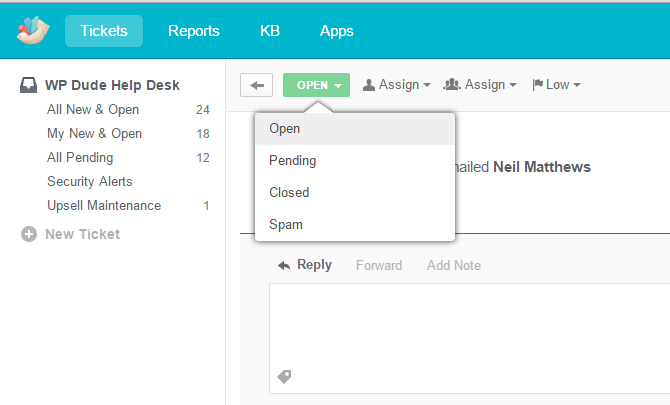
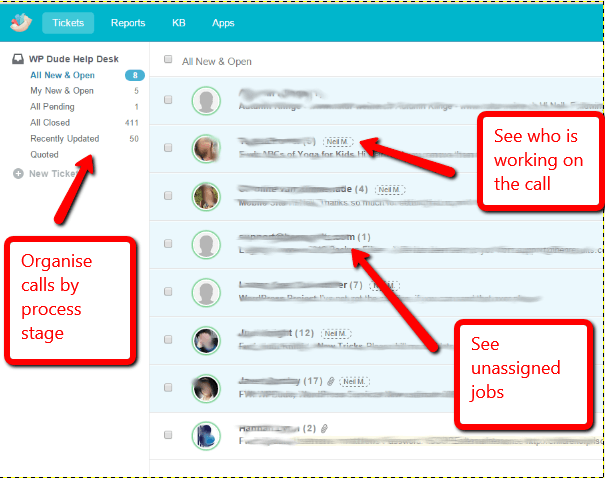
    • A view of calls as they move through our process of estimates, service delivery, QA and close down of projects.

    How We Are Using Groove

    Groove obviously met our requirements so I thought I would give you a feel for what we are doing.

    Click for full size image
    Click for full size image

    Canned Responses

    Canned responses in Groove are called common replies and they are really speeding up how the team deals with your requests.

    The beauty of canned responses is they allow the control freak in me to set the tone of our replies to you the end client but allows the team to communicate with the client they are working with and remove me as the bottleneck.

    Some of the canned resonses I’m using are for:

    • Getting login details to WordPress sites
    • Letting you know a team member is starting work on your project
    • End of day update – this is an excellent thing for us and our clients. If a project runs over onto the next day, we can send a quick canned response saying what we have done today and what will be done tomorrow.  Consider that we have team members in Europe and Asia and clients in US, Canada, Europe, Japan, Australia and New Zealand you can see how time zones get messy so a status update at end of play is crucial.
    • Project complete and asking for client review and feedback
    • Upselling maintenance service to clients after their project is completed.

    Rules

    Groove has a simple but very effective rules engine to automate tickets.

    I’ve used rules engines before in Zendesk but found them cumbersome, Groove’s solution seems far simpler to me.

    An example of a rule we are running is one where we move tickets into a folder if they originate from Wordfence, the security plugin we use, and are saying plugins need an update.  We do plugin updates daily anyway for our maintance clients so we don’t need a ticket for each plugin that requires an update so we mark those as closed.

    Feedback

    As other people do the service delivery in my business my finder is not on the pulse of feedback on the quality of the work done and if a client is happy or not.  When I was fielding the emails I knew when a client was unhappy.

    Groove has a rating system, I’ll be using that more and more to make sure we are delivery the best service we can.

    Integrations

    Like all SaaS products Groove cannot sit alone and all companies will want to integrate with other products.

    Groove has a suite of integrations, the only one I’m using at the moment is an integration with Mailchimp, where I can see what mailing lists a client is one.

    Zapier

    The really useful tool for me is Groove’s integration with Zapier.  I’ve written about Zapier in depth here.

    The way I’m using Zapier and Groove is to capture requests from my forms using Gravity Forms, I then push a full client request into Zapier with all the appropriate fields pre-filled – excellent.

    I’m also pushing notifications of accepted quotes from my older jobs into Groove so I can action pending jobs.

    Metrics To Measure Growth

    Something I’m very concerned about as we grow is speed of service.  That’s always something I have strived to do.  I want people to talk about how quickly we solved their problems.

    When I was “on the tools” as a solo freelancer I would juggle multiple projects so people could see fast results.

    What I will be doing is using the reporting tools in Groove and setting up some KPIs for internal performance.  I’m thinking I can use Average time to first response and Average handle time (the time before the ticket is closed) to get a feel for how longs things are taking.

    If those KPIs begin to drop and call volume is going up it’s time to recruit again.

    reporting
    Click for a full size image

    Cost

    I’ve touched on other help desks being too expensive, but Groove seems just right at $15 per agents where Freshdesk starts at that cost and Zendesk is mega bucks.

    Groove don’t have an affiliate scheme so I don’t get anything for sharing this story

    Most Importantly Why It’s Good For My Clients

    They don’t know it’s there.  It just looks like email to them.

    They don’t login, they don’t signup.

    All they get is a better customer service experience.

    Outro

    If you are looking for a help desk solution you would do well to check out Groove’s 30 day free trial.

    Do you want to hear more of my Startup Journey from freelancer to firm? Let me know in the comments.

    I’m keen to open the Kimono and show you how your projects are being handled by me and the team.

    Photo Credit: thebqe via Compfight cc