Neil Matthews

Category: Solopreneur Journey

  • Don’t Add Discomfort Hurdles

    Don’t Add Discomfort Hurdles

    As I’ve worked with my client’s sites over the years I’ve noticed other developers and agencies add discomfort hurdles into the way way they work with site owners.

    When I inherit these new clients, I have to stumble over these hurdles before I can start working with them

    This blog post is a plea to these people to NOT add discomfort hurdles when working with site owners.

    What Is A Discomfort Hurdle

    A discomfort hurdle is a technique used by some agencies and developer to lock in a client and make it difficult for them to move away and work with another developer.

    You create a level of discomfort a client has to jump over to move to a new service provider, for some it’s such a pain in the back side they will stay with their current developer even if issues have arisen.

    I’m going to get some push back on this post saying, it’s how you build the best site, but is it really? What you are doing is creating a few quid of recurring income in hosting and locking your client into your services making it painful to move away from you.

    I understand why the hurdles are there I get it, you want the best hosting, you want to build the best site you can but NO! Let the client buy their own hosting and licenses so they are not locked in.

    Example Hurdles

    Here are some example of the hurdles I have seen:

    • Developer or agencies owning domain names and holding them to ransom (don’t ever let someone control your domain!).
    • Being forced to use an agencies hosting when they build a site.
    • Owning software licenses and revoking them when they move away
    • Locking down admin user names and password.

    Why I Don’t Add These Hurdles

    I don’t add these types of hurdles into my service offering because of the following:

    • I don’t want the obligations, if the hosting goes down it’s me that gets the call in the middle of the night not GoDaddy.
    • I don’t want to lock in every client I work with, there are some weird people out there 🙂
    • I want my clients to move providers easily and quickly if they want
    • I lock in clients with the quality of my work not via discomfort.

    Wrap Up

    Your work should speak for itself, your clients should stay with you based upon the quality of the work done not some stupid discomfort hurdle.

    Talking about work, if you need help with your WordPress site or WooCommerce Store, get in touch.

    Photo by Quino Al on Unsplash

  • Enhance Your WooCommerce Store with Currency Converter Plugins

    Enhance Your WooCommerce Store with Currency Converter Plugins

    Introduction – Currency Converter Plugins

    Are you looking to expand your WooCommerce store’s reach to international markets? One of the essential features to consider is providing currency conversion capabilities. This allows customers from around the globe to view product prices in their preferred currency, enhancing user experience and potentially boosting sales. Fortunately, integrating a currency converter into your WooCommerce store is easier than you might think, thanks to a variety of plugins available. In this post, we’ll explore some of the top currency converter plugins for WooCommerce.

    1. WooCommerce Currency Switcher by WP Wham

    This versatile plugin allows your customers to switch between different currencies seamlessly. It automatically detects the user’s location and sets the currency accordingly, but users can also manually select their preferred currency from a dropdown menu. Additionally, it offers real-time exchange rates, ensuring that your prices are always up to date.

    Get WooCommerce Currency Switcher

    2. Currency Converter Widget

    If you’re looking for a lightweight solution, the Currency Converter Widget might be the perfect fit for your WooCommerce store. This plugin adds a simple currency converter widget to your site, allowing users to quickly convert prices without leaving the page. It supports multiple currencies and is highly customizable to match your store’s design.

    Get Currency Converter Widget

    3. WOOCS – WooCommerce Currency Switcher

    WOOCS is a feature-rich currency switcher plugin that offers extensive customization options. It supports over 200 currencies and allows you to set custom exchange rates if needed. The plugin also provides various display options, including dropdowns, flags, and inline converters, giving you full control over how currencies are presented to your customers.

    Get WOOCS – WooCommerce Currency Switcher

    4. WooCommerce Multi-Currency

    WooCommerce Multi-Currency is another powerful plugin that simplifies the process of adding currency conversion to your store. It automatically detects the user’s location and selects the appropriate currency, but users can also manually choose their preferred currency. The plugin supports both automatic and manual exchange rate updates and offers compatibility with popular payment gateways.

    Get WooCommerce Multi-Currency

    5. Currency Switcher for WooCommerce by PluginUs.NET

    This user-friendly plugin allows you to add a currency switcher to your WooCommerce store with minimal setup required. It offers automatic currency detection based on the user’s IP address and supports over 170 currencies. The plugin is highly customizable, allowing you to configure currency symbols, exchange rates, and more to suit your store’s needs.

    Get Currency Switcher for WooCommerce

    Conclusion

    Adding a currency converter to your WooCommerce store is a simple yet effective way to cater to international customers and improve their shopping experience. With the plugins mentioned above, you can seamlessly integrate currency conversion functionality into your store, helping you reach a broader audience and increase sales. So why wait? Choose the plugin that best fits your needs and start expanding your WooCommerce store’s global reach today!

    If you need help making your woocommerce store multi currency or multi language please get in touch.

    Photo by Jason Leung on Unsplash

  • What Will Happen To Your Digital Estate

    What Will Happen To Your Digital Estate

    Trigger warning, this blog post is a little dark and talks about death and what happens to your digital stuff after you are gone.

    One of my clients sadly died recently. Invoices were going unpaid, emails were being bounced. I only learned about his passing when an obituary was placed on the site I was maintaining for him. I’m guessing no-one knew I maintained his site for him.

    This has caused some introspection on my part, and has made me ask the question, what will happen to my digital estate when I finally die?

    The answer was a little bit worrying, my wife doesn’t know details of my Stripe account, she doesn’t know who my customers are or what I do for them. She doesn’t have any contact details for my team and how to keep the recurring income from my maintenance plans moving forward. This could be a valuable passive income stream for her and my kids.

    I have a feeling that my digital assets will just wither away or even be a liability (services being paid for but not delivered).

    What can I do to make sure these assets are passed to her via my digital estate.

    First of all, let’s define what an estate is:

    Everything owned by a person who has died is known as their estate. The estate may be made up of: money, both cash and money in a bank or building society account. This could include money paid out on a life insurance policy. money owed to the person who has died.

    Real estate, stock and share, money in the bank or possessions are things traditionally classed as your estate, but we have a series of new things that I am calling my digital estate, while these are virtual they still have value.

    Those of us building online businesses are creating digital assets that a) Have value and b) can be passed on in our estate.

    Here are some of things I’ve been thinking about as I write this blog post:

    • Websites
    • Email lists
    • Payment providers accounts (Stripe/Paypal etc)
    • Client/Customer lists
    • Contractor details
    • Suppliers
    • Social media accounts
    • Email accounts
    • Domain names
    • Access to my SaaS accounts (Trello, Freshbooks and Managewp)

    What Am I Going To Do?

    So I’m going to write up a document and keep it with my will. I’m going to think about the things that have value and how she can keep them or dispose of them as she needs (or my kids need if she goes first).

    I’m going to detail all the “digital things” I have with any monetary value. I’m thinking about areas of my business that have recurring income value and how they can keep working without me, I already have my maintenance plan largely running without me, can it run without me permanently and be passed on as an asset for example.

    I’m going to write up how these assets can be sold or retained for a recurring income.

    I’m going to document how to recover access to all these accounts, for example I found this to recover a google account.

    I’m going to include in that document any debts I have, recurring invoices for software, how to pay the contractors I use.

    And then finally we’ll have to sit down and go through this, that will be a fun session won’t it.

    Wrap Up

    That went dark pretty quickly didn’t it. Do you have a plan in place for your digital assets?

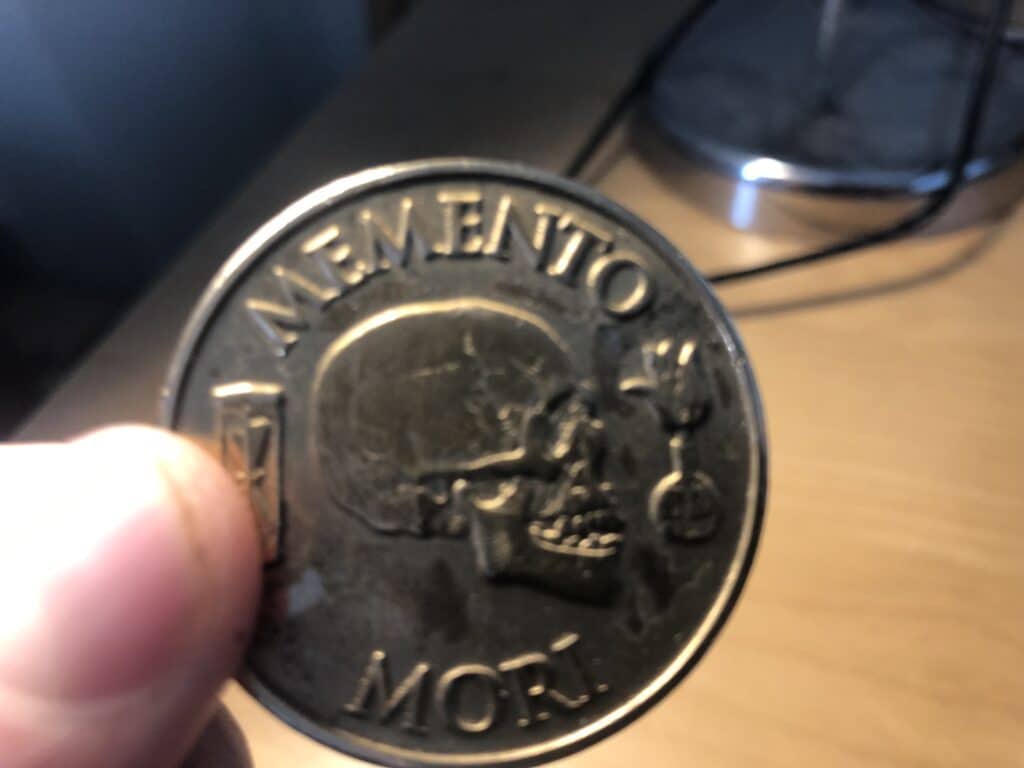
    I study stoic philosophy and one of their ideas is Momento Mori, remember you will die or my favourite translation remember you have to die, it’s the process of meditating on your own mortality. It’s a good thing not a macabre thing.

    If we think about our own mortality it helps us to put things into perspective, why am I worrying about that trivial thing when in the greater scheme of things it really won’t matter.

     “You could leave life right now. Let that determine what you do and say and think.”

    Marcus Aurelius

  • So I Got Hacked … Again!

    So I Got Hacked … Again!

    Malware was injected into my site this week, it’s fine I’ve removed it and everything is fine, I just thought I would write a cautionary blog post to explain what happened and to show getting hacked can happen to anyone, even a so called WordPress developer.

    You need to have tools in place to monitor for and react to malware injections. I offer this as part of my maintenance plan.

    I was planning to write my weekly post and I was getting a lot of weird errors, I started working on the usual trouble shooting issues to find out what was wrong, and I noticed a weird directory called .thumb scattered throughout my site. Then I realised my index.php has malware injected into it.

    Shite, I’ve been hacked!

    A Deactivated Plugin Was At The Root Of The Problem

    At the root of the problem is a plugin that was on my site called Memberpress. I’m not using this plugin, it’s deactivated and it does not have a license so no updates are being applied. That’s why it was vulnerable.

    Even a plugin that is not active can still be called and code injected.

    Thanks My Hacking Friend From Mauritius

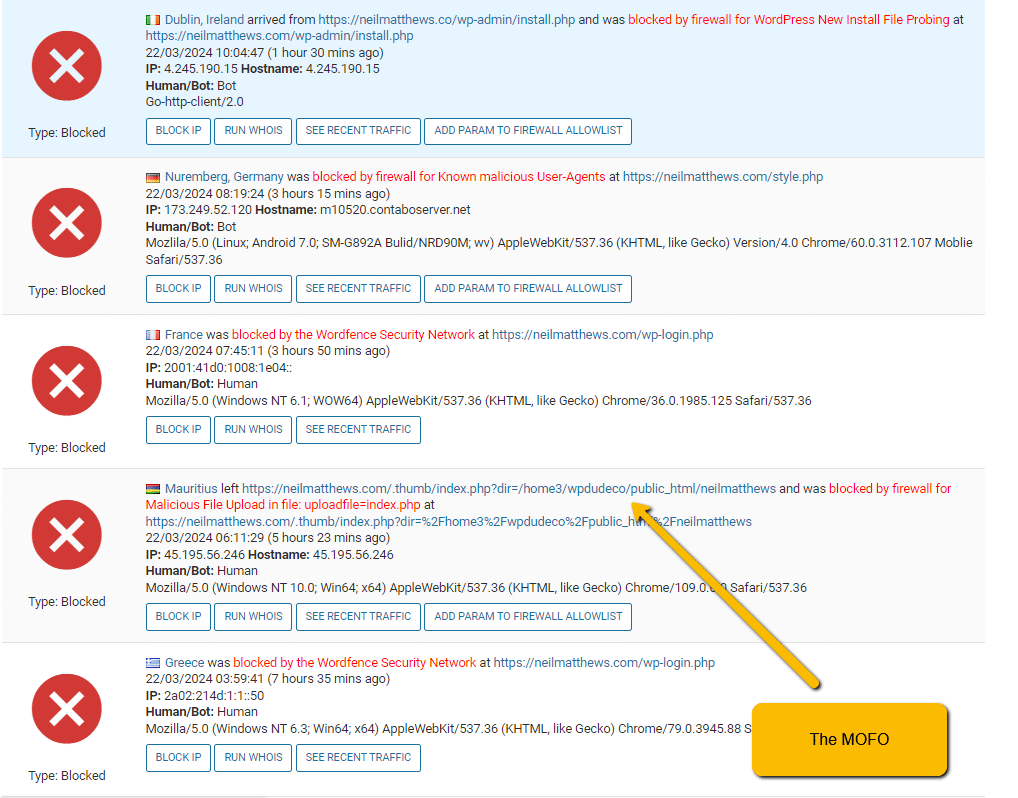
    I checked my logs and it looks like someone from Mauritius did the deed on me and injected the malware, I went to Cloudflare and added a firewall rule to block all people visiting my site from Mauritius.

    This may seem like a nuclear option, blocking all people from a country, but I’ve never had a client from Mauritius so it was the easiest route to keep the hacker at bay. I’ve done the same for China and Russia before due to problems like this.

    Was I Personally Targeted?

    No, they scanned my site and probably hundreds of others for the know weakness, stumbled across my site and opened the door I left unlocked. Install Wordfence the security plugin and see how many blocked attempts your site gets. It’s quiet alarming how often your site gets tested, see this screen dump, that’s just a couple of hours.

    They didn’t do anything malicious, they just injected code for fun I think. They did that because they could, that’s motivation enough for some people.

    I added My Own Site To My Maintenance Plan

    Once I realised I had been hacked I added my own site into my own maintenance plan. Why am I not doing that already you ask? Well as usual I’m so busy looking after other people site’s my own site is always relegated to second place. A rookie mistake.

    A scan showed up a vulnerability in the plugin mentioned above straight away, if I was doing proper monitoring of my site this would have been spotted sooner and fixed.

    Remember kids, do what I say not what I do :).

    Site Clean UP

    I patched the vulnerability, cleaned up my site and blocked countries access.

    Wrap UP

    Our sites are constantly being scanned for weaknesses but hackers, can I suggest you do what I did and sign up for my ongoing maintenance plan where I’ll monitor for and react to any security weaknesses on your site.

    This is not the first time this has happened and I’m sure it won’t be the last, make sure you monitor your site for security issues.

    Photo by Kasia Derenda on Unsplash

  • Why You Should NOT Sign Up For Your Developers Hosting Plan

    Why You Should NOT Sign Up For Your Developers Hosting Plan

    Here’s a word of warning from a WordPress developer. If your current developer suggests you sign up for their hosting plan say no!

    A lot of developers and agencies offer hosting plans for a slice of that delicious recurring revenue, it sounds like a great deal, fully managed hosting, and 99% of the time it will work out well, until there is an issue, that’s when the SHTF.

    I don’t offer hosting myself for that 1% of grief is just not worth the few quid I could earn each month.

    You Are Giving Away Control Of Your Site.

    Here’s the big take away from this blog post, once you pass your hosting over to your developer your lose control over your website.

    If you register your domain through your developers hosting account that’s even worse they have complete control over our website, domain name, email. This is a terrible place to be in.

    It’s Probably Going To Be Okay.

    I’m going to show you the terrible 1% in the rest of this post, most agencies and developer are legit and won’t hold you to ransom, what I’m suggesting is you always keep complete control over your website and domain name.

    Access To Your Site Can Be Revoked.

    If you give control over your website to your developer and have them host your site the upside is there are no hosting issues to worry about, the downside is access to your site can be revoked and your site taken offline.

    Failure to pay bills (by you and your developer to their hosting provider), a break down in your client / service provider relationship, illness or price rises are just some reasons that you may fall out with your developer and cause your site to be taken offline.

    Your developer can hold you to ransom, stop any future development you need and tank your website. The worst thing I have seen is sites taken offline due to issues between developers and clients.

    I’ve Seen The Client Developer Relationship Go Wrong So Many Times

    I’ve worked with hundreds of clients and (fingers crossed) most of my relationships have been great. But I’ve seen that relationship break down from my side and the clients a number of times. If that relationship breaks down you need to extract your site.

    Scope creap, difficult clients and lack of time can sour the relationship from developer to client.

    Increasing fees, poor quality work and lack of communication or availability can spoil the client to developer relationship.

    These working relationships can and will end, be aware of that and have 100% control over your site.

    I’ve seen developer dump their now ex-clients a zip file and send them on their way with no support to restore that to another hosting provider.

    It’s Not Hard To Host A Website

    With modern hosting companies it’s not that hard to host a website anymore, the tech support from that firm will help you to keep your site online.

    If that is still to much you can get your own hosting and registration then …

    Pay Your Developer To Manage Your Site On Your Hosting

    What’s the solution to this problem, setup your own hosting and registration of your domain name, then pay your developer to mange that hosting on your behalf. It’s not a problem for us developers to work on someone’s hosting account.

    If your developer tells you it is a problem, be wary.

    Case Study: The Developer Became Sick

    This blog post has been prompted by a real life issue one of my clients is seeing. The old developer has become seriously ill and was unable to provide their services. The huge issue is that the client also hosts their website with that developer. We are struggling with things like creating sub domains and managing hosting settings.

    The client had to contact the hosting company, provide proof they own the site and then move the site to their own hosting.

    It’s a huge pain so use this warning to host your own site on an account you control.

    Wrap Up

    Nothing to sell here, I don’t have a hosting package to flog, oh wait, if you need help migrating away from your developer to your own hosting account please get in touch I have a fixed price package.

    Photo by Stephen Phillips – Hostreviews.co.uk on Unsplash

  • Tending the Graves of abandoned ideas

    Tending the Graves of abandoned ideas

    I was doing some work on my hosting account today. Cleaning out things I no longer need. I was deleting unused databases and database users, letting old domain names I’m not using expire, deleting old installations of WordPress. It took me a lot of time.

    I’ve decided to name this process tending the graves of abandoned ideas 🙂

    If you have the entrepreneurial spark running through you, this is what happens. You have the amazing idea de-jour and immediately you start ferreting about for the perfect domain name.

    You buy the domain name and get to building a website.

    Website built you send traffic to your amazing new idea.

    You sit back and wait for the millions to start flowing in, and then, nothing happens and another idea dies a death.

    You idea does no resonate with the audience and another idea dies and is buried in a paupers grave.

    It’s emotional tending the graves of abandoned ideas, all that lost time, all the money you spent on plugins, domain names.

    There is a certain amount of mourning the domain name too. The URL will stay on your account for at least a year until it expires and gentle leaves you for good.

    Sometime I try to resurrect the dead and bring a project back online, ooh! That domain name will work for wacky idea xxx I’m currently having, lets renew for another year before I let the idea die AGAIN!

    How I’m Protecting Myself From This “Grief” Going Forward? I’m testing all my ideas on subdomains before I rush out and buy yet another domain name 🙂

    Wrap Up – Tending the Graves of abandoned ideas

    Is it just me or have you been guilty of rushing into a domain name purchase for a shiny new idea?

    Have you had to spend you precious time tending the graves of your once great idea?

    Photo by Sacre Bleu on Unsplash

  • Why I’m Using Sub-Domains To Test My Offers

    Why I’m Using Sub-Domains To Test My Offers

    I’ve started to create mini sites on subdomains to test my offers. I this post I’ll explain why.

    What Do I Mean By An Offer

    What I mean by an offer is something I am selling, in my case it’s mostly a service. I’m testing targeted services at the moment which are productised WordPress offering of various descriptions.

    Often I’m not sure if people need these services so I’m testing that offer.

    What Is A Sub-Domain Mini Site?

    It’s a very small website marketing a single offer on a subdomain e.g. offer.neilmatthews.com. It’s separate from your main site and acts as a website in it’s own right.

    It sets out my offer in detail and has a single call to action to direct people to interact with me in some way (see controlling the CTA below).

    A Targeted Message

    It allows me to create a targeted message about the service I’m offering without all the baggage the rest of my site brings. If I’m talking about an AI service such as my customer support solution at wpaics.neilmatthews.com I don’t want to be talking about hiring me for a generic WordPress project or joining my ongoing maintenance plan. That additional content just causes confusion, and a confused client never buys.

    Showing those other offers just causes confusion, so using a cut down mini-site with 2 or 3 pages allows me to give all the information needed.

    Plus I can create highly targeted SEO content for a single set of keywords and drive traffic to my offers.

    Monitor Traffic

    Because I’m sending traffic to the mini site I can gauge how well it’s working by analysing the traffic to that mini site and not have the analytics diluted by the other traffic to my main site.

    Some Offers Never Stick

    Some of the offers I create neve take off, they never stick, creating them in isolation means I don’t need to make big changes to my main site and my main offer of WordPress development services.

    If I find an offer does not resonate I can very easily take it down.

    If it does work, I can bring it to my main site or leave it where it is, no need to disturb my main offer if I don’t need to.

    Closing An Offer

    When I no longer want to make an offer it’s very simple to close it. All I need to do is take down the sub-domain and all references to the offer are gone.

    I recently has someone try to buy a hack recovery course I created in 2017 and that I no longer offer. I had to refund their payment and search around my site for the landing page that sold the course to take that down, it’s easier to close an offer if it is self contained.

    Controlling The CTA (Call To Action)

    Some of my offers are about taking a trial, some of my offers are lead magnets, some are to request a quote and some are to book a call.

    Having mini-sites for different offers means I can direct a potential client to the correct call to action rather than a generic contact me page.

    Different Sites For Different Audience Types

    If I have two different type of audience, sending them to the same site will cause confusion.

    By segmenting audience types and sending them to the correct mini sites mean better markeing.

    For example, I offer an ongoing support plan for WordPress sites, I also offer a white label version of that plan I sell to agencies, WordPress freelancers and designers. Sending both groups to the same marketing will not work, I’ll send people with a single site to my maintenance page and the others to my white label support mini site maintenanceplan.neilmatthew.com.

    Some Of My Offers & Planned Offers.

    Here are some of the offers I’ve spun out to their own sub-domain mini-sites.

    I’m thinking about spinning out a new type of asynchronous consulting offer and a WooCommerce optimization service but that’s for the future.

    Why Not Use A Landing Page

    A landing page is exactly that, a single page if I have a mini site solely focused on an offer I can create custom about pages, custom FAQs and custom call to actions.

    It’s like a landing page on steroids.

    Traffic To The Offers

    Another benefit of mini sites is controlling which traffic I send to which offer.

    I could send targeted traffic to a landing page but I can send targeted traffic to a mini site and get the same results and provide more information.

    Wrap Up – Why I’m Using Sub-Domains To Test My Offers

    As you can see creating mini sites is all about controlling confusion, give the right message to the right person to avoid confusion.

    Say it with me kids “A confused client never buys!”.

    If you need help building mini sites for your offers get in touch.

    Photo by Marc-Antoine Déry on Unsplash

  • This One Thing Will Make Your Projects Run More Smoothly

    This One Thing Will Make Your Projects Run More Smoothly

    As the title suggests, this one thing will make your projects run more smoothly if you implement it on a regular basis!

    Picture the scenario, you are a freelancer and you are providing a service to your client. You work remotely and never meet up in person with the people who contract you.

    The Problem is, it is very hard to see progress of a project with remote workers, it’s our duty as a freelancer to let your client know exactly where you are in the project so they have visibility of the work done.

    Add this small thing to add into your daily process and you will keep you client’s happy, and what do happy client’s create … more work.

    Drum Roll – End Of Day Update Video

    It’s super simple, record a one minute video of the work done using screencast software at the end of each day and send it to your client.

    Walk through the work done, show your client what you have achieved and how the project is moving forward towards completion.

    It’s a very simple thing, you show your client where you are, and how their money is being spent.

    Scratching My Own Itch

    I started to do this as a result of my work with sub-contractors on projects. I saw the problem live and wanted to scratch that itch with my own work.

    I would pass my freelancer a requirements and it would go very quiet. I did not know where they were in the timeline, and even if they were working on my tasks.

    Paying a contractor to do work for you takes a lot of trust, you are paying people to do a task for you and expect it to be completed on time and to budget.

    I would fret that with work was in progress, or even worse I would start to micro-manage my contractors to get status updates, nobody likes that.

    Add into this mix different timezones and things get messy quickly

    I realised my clients would be thinking this about my services delivery so I started to add and end of day update to my daily process.

    Example End Of Day Update

    Here’s an example of what I would send to a client, the project is my internal AI development projects but it’s a real example of what I would do.

    https://app.screencast.com/ZGw7zpO422Y7g

    It doesn’t need to be hugely in-depth, just a quick check-in to show progress is being made.

    Software I Use

    You don’t need expensive software to do add this process to your working day., my preferred tool is TechSmith screen capture (formerly Jing), there is a free version, but I pay $10 per month for the pro version.

    Another great alternative is Loom, again the free version is great and the paid version it not too expensive.

    Testimonial

    I got a testimonial from one of my clients Nate recently and he highlighted the end of day update and how it made our project run more smoothly.

    Neil stepped in when we had a contractor fail to deliver. Once Neil took over, I got daily update videos. I always knew where we were in the process and saw the product developing daily. The deliverable was perfect and easy to use. Neil understood what we were trying to do, implemented revision feedback seamlessly, and developed custom solutions that I didn’t even know were possible. Could not recommend Neil enough.

    Nate Banker – CEO Banker Creative

    Wrap Up – This One Thing Will Make Your Projects Run More Smoothly

    It’s a very simple thing, but implement this and you will thrill your clients. This makes you look very professional, keeps your clients in the loop and leads to more projects.

    I’ve heard so many horror stories about freelancers going AWOL, keep your clients updated!

    If you would like to work with me after learning a little more about my processes please get in touch.

    Photo by Aaron Burden on Unsplash

  • Elevate Your WordPress Site: The Impact of Number Counters as Social Proof

    Elevate Your WordPress Site: The Impact of Number Counters as Social Proof

    Introduction -Number Counters :

    In the competitive realm of online business, establishing trust and credibility is paramount. As visitors explore your WordPress site, they seek reassurance that your products or services have a proven record of success. An effective strategy to convey this is through the incorporation of numbers counters, showcasing metrics such as clients served and projects completed. In this blog post, we’ll delve into the transformative potential of numbers counters and how integrating them into your WordPress site can serve as compelling social proof, bolstering confidence in your brand.

    Harnessing the Power of Quantifiable Success:

    1. Instant Credibility:
      Numbers counters provide instant credibility by transparently displaying the number of clients served or projects completed. This quantitative data serves as concrete evidence of your experience and success, immediately conveying the scale and reliability of your business.
    2. Building Trust Through Transparency:
      The use of numbers counters promotes transparency, showcasing your business’s accomplishments openly. This commitment to openness and honesty builds trust, a critical factor in establishing a strong connection with your audience.
    3. Visual Impact:
      Numbers counters are visually impactful elements that capture visitors’ attention. The dynamic nature of counters, especially those that increment over time, creates a sense of momentum and progress, enticing viewers to delve deeper into your offerings.

    Leveraging Numbers Counters as Social Proof:

    1. Clients Served:
      Highlighting the number of clients served is a potent form of social proof, indicating that your products or services have successfully met the needs of a substantial customer base. This statistic implies a level of reliability and satisfaction that resonates positively with potential clients.
    2. Projects Completed:
      Displaying the number of projects completed showcases your business’s expertise and capability. It communicates that you’ve navigated diverse challenges, honed your skills, and consistently delivered results. This social proof is particularly influential in industries where tangible outcomes matter.
    3. Ongoing Success:
      Opt for dynamic numbers counters that increment over time to convey ongoing success. This creates a sense of momentum, communicating to visitors that your business is actively thriving and growing.

    Implementing Numbers Counters on Your WordPress Site:

    1. Select a Robust Plugin:
      Choose a reliable WordPress plugin that simplifies the integration and customization of numbers counters. Plugins like Count-Up or Digits offer user-friendly interfaces and versatile styling options.
    2. Strategic Placement:
      Feature your numbers counters prominently on your homepage, landing pages, or in your website’s header. Strategic placement ensures that visitors encounter this impactful social proof early in their journey, influencing their perception positively.
    3. Regular Updates:
      Keep your numbers counters up-to-date to reflect the latest statistics. Regular updates showcase ongoing success and demonstrate that your business is continually achieving milestones.

    Conclusion – Number Counters :

    Incorporating numbers counters into your WordPress site is a dynamic strategy to leverage quantifiable success as social proof. Whether it’s the number of clients served or projects completed, these counters create an immediate and lasting impact on your visitors. Elevate your brand’s credibility, build trust, and influence potential clients with the persuasive visual appeal of numbers counters. Turn your achievements into a powerful form of social proof with the help of reliable plugins like Count-Up and Digits.

    If you need help implemnting a number counter for social proof, please get in touch.

    Photo by Nick Hillier on Unsplash

  • Case Studies As Social Proof, Leveraging Success Stories

    Case Studies As Social Proof, Leveraging Success Stories

    Introduction – Case Studies As Social Proof:

    In the ever-evolving digital landscape, building trust with potential customers is a cornerstone of successful online businesses. While testimonials and reviews offer valuable insights into customer satisfaction, case studies take social proof to the next level. In this blog post, we’ll explore how adding case studies to your website can significantly enhance your brand’s credibility, influence customer perceptions, and ultimately drive conversions.

    Unveiling the Power of Case Studies:

    1. Real-world Application:
      Case studies provide a detailed narrative of how your product or service has been applied in real-world scenarios. By showcasing tangible examples of success, you bridge the gap between theory and practice, offering potential customers a glimpse into the practical benefits of choosing your offerings.
    2. Building Trust Through Transparency:
      Transparency is key in the digital age, and case studies serve as a transparent window into your business’s capabilities. By openly sharing the challenges faced by your clients and how your solutions addressed those challenges, you establish authenticity and build trust with your audience.
    3. Demonstrating Expertise:
      A well-crafted case study not only highlights successful outcomes but also showcases your expertise in your industry. It provides an opportunity to demonstrate your in-depth understanding of your clients’ needs and your ability to deliver effective solutions.

    How Case Studies Create Social Proof:

    1. Concrete Results Speak Volumes:
      Case studies present concrete evidence of the positive impact your products or services have had on your clients’ businesses. Quantifiable results, such as increased revenue, improved efficiency, or enhanced customer satisfaction, serve as compelling social proof of your capabilities.
    2. Relatable Success Stories:
      Unlike generic testimonials, case studies offer a deeper dive into the specific challenges faced by your clients and how your offerings provided solutions. Potential customers are more likely to connect with and be influenced by relatable success stories that mirror their own circumstances.
    3. Overcoming Objections:
      Case studies can address common objections or concerns potential customers may have. By showcasing how your offerings successfully addressed similar challenges faced by others, you proactively alleviate doubts and increase the likelihood of conversion.

    Integrating Case Studies into Your Website:

    1. Diverse Formats:
      Present case studies in diverse formats to cater to different preferences. Consider using written narratives, video testimonials, infographics, or a combination of these to make your success stories more engaging and accessible.
    2. Strategic Placement:
      Feature case studies prominently on your website, especially on key landing pages or product/service pages. Strategic placement ensures that visitors encounter social proof at crucial points in their customer journey.
    3. Encourage Sharing:
      Leverage the shareability of case studies to amplify their impact. Encourage clients featured in case studies to share their success stories on their own platforms, broadening the reach of your social proof.

    Conclusion – Case Studies As Social Proof:

    Incorporating case studies into your website is a strategic move that goes beyond traditional social proof methods. By showcasing real-world success stories, you not only build trust and credibility but also position your brand as a reliable solution provider. Take advantage of the persuasive nature of case studies to influence potential customers, overcome objections, and drive conversions. Elevate your online presence with the undeniable power of case studies, turning your success stories into a compelling form of social proof.

    If you need help implementing case studies on your site give me a call.

    Photo by Alexander Grey on Unsplash

  • Testimonials as social proof: Elevating Your WordPress Site with Social Proof

    Testimonials as social proof: Elevating Your WordPress Site with Social Proof

    Introduction – Testimonials as social proof:

    In the dynamic landscape of online business, establishing trust with your audience is paramount. As potential customers navigate through the virtual marketplace, they seek reassurance that your products or services are reliable and of high quality. One of the most compelling forms of social proof to achieve this is through testimonials. In this blog post, we’ll delve into the significance of testimonials as a powerful social proof tool on WordPress sites and introduce you to some standout plugins that can seamlessly elevate your testimonial game.

    The Role of Testimonials in Building Trust:

    1. Authenticity and Relatability:
      Testimonials are real-world narratives from satisfied customers, offering a glimpse into their experiences with your products or services. This authenticity and relatability resonate strongly with potential buyers, providing them with valuable insights into what they can expect.
    2. Establishing Credibility:
      Trust is built on credibility, and testimonials act as a virtual endorsement of your business. Positive feedback from happy customers serves as a testament to your reliability, professionalism, and commitment to customer satisfaction.
    3. Influencing Purchase Decisions:
      Testimonials play a crucial role in the decision-making process. Prospective customers are more likely to convert when they see others who have benefited from your offerings. Well-crafted testimonials can tip the scales in your favor, nudging hesitant buyers towards making a confident purchase.

    Enhancing Your WordPress Site with Testimonial Plugins:

    To make the most of testimonials on your WordPress site, consider integrating these top-notch plugins:

    1. Easy Testimonials:
      This user-friendly plugin allows you to collect and display testimonials effortlessly. With various customization options, Easy Testimonials seamlessly integrates with your site’s design, ensuring a polished and professional appearance.
    2. Strong Testimonials:
      Offering a versatile range of features, Strong Testimonials empowers you to showcase customer feedback in multiple formats. From text and images to video testimonials, this plugin adds a dynamic element to your site’s social proof.
    3. Testimonial Rotator:
      Keep your testimonials fresh and engaging with Testimonial Rotator. This plugin enables you to display a rotating selection of testimonials, preventing your site from becoming stagnant and adding a dynamic touch to your social proof strategy.
    4. WP Customer Reviews:
      WP Customer Reviews goes beyond traditional testimonials by allowing customers to leave reviews directly on your site. This plugin supports both star ratings and written feedback, providing a comprehensive view of customer satisfaction.

    Implementing Testimonials for Maximum Impact:

    1. Strategic Placement:
      Display testimonials strategically on your WordPress site. Consider placing them on product pages, landing pages, or even in the footer to maximize visibility and impact.
    2. Diverse Content:
      Include a variety of testimonials, including written quotes, customer photos, and even video testimonials. Diverse content formats cater to different preferences and add depth to your social proof.
    3. Regular Updates:
      Keep your testimonials up-to-date. Periodically refresh the testimonials showcased on your site to reflect recent positive experiences, ensuring that your social proof remains current and relevant.

    Conclusion – Testimonials as social proof:

    Harnessing the power of testimonials as social proof is a game-changer for your WordPress site. By incorporating authentic and compelling customer feedback, you not only build trust but also influence purchasing decisions positively. Explore the suggested plugins to effortlessly integrate testimonials into your site, creating a more persuasive and customer-centric online presence. Elevate your brand with the undeniable impact of social proof and watch as your audience transforms into loyal, confident customers.

    If you want to implement testimonials on your site, give me a shout.

    Photo by Mert Talay on Unsplash

  • The Different Types Of Social Proof You Can Show On A WordPress Site

    The Different Types Of Social Proof You Can Show On A WordPress Site

    In this blog post I’m going to take you through the types of social proof you can show on a WordPress site. This list is not exhaustive, but will serve as a good indicator of the types of social proof you should include on your site.

    What Is Social Proof

    I turn to my favourite virtual assistant, Chat GPT and asked the question “What Is Social Proof”…

    Social proof is a psychological phenomenon where individuals look to the actions and behaviours of others to guide their own decisions and actions, especially in situations where they may be uncertain or unfamiliar. It is a form of social influence that is based on the premise that people tend to follow the crowd or mimic the choices of others, believing that such behaviour is indicative of the correct course of action.

    In the context of business and marketing, social proof is often utilized to build trust and credibility. It serves as evidence that others have had positive experiences with a product, service, or brand, influencing potential customers to make similar choices. Common forms of social proof include customer testimonials, reviews, ratings, endorsements from influencers, and visible statistics such as the number of users, clients served, or products sold.

    Social proof is a powerful tool because it taps into the innate human tendency to seek validation and confirmation from others. By showcasing positive experiences and feedback, businesses can leverage social proof to enhance their reputation, increase trust, and ultimately influence consumer behaviour in their favour.

    In the case of a WordPress site, it means adding content to your site that can help potentials customers or clients buy from you.

    Why You MUST Have Social Proof On Your Site

    If you are working online and never get to meet your customers or clients face to face, often times all they have to judge you is your website.

    Anyone can build a website, why are you trustworthy enough to work with, that’s why we add social proof to the mix.

    You may move from a website lead to a face to face call (I always try to do this with new clients), but that initial hurdle of trusts needs to be jumped over to start the conversation.

    Here are my favourite types of social proof.

    Testimonials

    The first type of social proof I tell everyone to add to their site are testimonials.

    Ask the people who have bought your products or services if they are happy to give a testimonial, add these to your site using a plugin or the testimonials widget on your theme and prominently display them. I’ve got 80 testimonials on my site at the time of publishing this post. Don’t be shy, make asking for a testimonial part of your process when working with a client.

    As a bonus check out this post about automating the collection of testimonials.

    Case Studies

    Writing content for your site that is a case study is a brilliant way to add social proof that you can do “your thing”.

    Writing about your process to show how you accomplished X then sending that to your list or showing it prominently on your site shows potential and returning customer you know exactly how to do sometime and that you have a process to do it.

    Start documenting those interesting projects you have worked on and show them off on your website..

    Number Counters

    One of my favourites and often overlooked type of social proof is a glitzy number counter that counts up to an impressive number showing your numbers.

    Check out my about page, the social proof I have on my numbers counter is how many clients I have worked with over the years and the number of projects I have completed, I’ve grabbed this from my accounting software.

    Your Lead Magnet

    The lead magnet you create is also a great way to show social proof you know your stuff.

    Getting someone to download your eBook for free or view your training that you give away in return for contact details is a great way to show you can do your thing at very little risk to a potential customer or client.

    My own lead magnet my AI WordPress Developer for example gives people free code BUT it shows I can code up an integration between chat GPT and WordPress cementing my skills as a developer and providing social proof I can code.

    WooCommerce: Product Reviews

    Let’s move onto some e-commerce specific types of social proof and my favourite plugin WooCommerce, other eComm plugins have similar options so check their documentation.

    Activating the product reviews section of WooCommerce is great social proof. I like to make the settings “only allow reviews from confirmed purchasers” active so only people who have legitemalte bought the product can leave a review.

    Consider automating the collection of review with a plugin such as shop magic which can send out emails with “bribes” of a coupon of a review AI generated content.

    WooCommerce: Number Of Products Sold

    Another way to add social proof to your WooCommerce store is to show the number of products that have been sold on your single product pages.

    There are plugins to do this, but I’ve just asked my AI WordPress Developer to knock up a code snippet that will do this for you.

    ```php
    //prefix the functions with nm_
    function nm_get_total_sales() {
    global $product;
    $total_sales = get_post_meta( $product->get_id(), 'total_sales', true );
    echo '<p class="product-total-sales">Total Sales: ' . $total_sales . '</p>';
    }
    
    add_action( 'woocommerce_single_product_summary', 'nm_get_total_sales', 30 );
    ```
    
    Here, we are using get_post_meta() function to retrieve the total sales of a product. 'total_sales' is a WooCommerce's product meta key that holds the number of total sales for each product.
    
    The number (30) in the add_action function represents the priority. The lower the number the earlier it inserts. The priority for add-to-cart button in WooCommerce is 30. So using 30 will put our function right after the button.
    
    Next, we add some custom CSS to your theme's style.css file to style the 'Total Sales' text:
    
    ```css
    .product-total-sales {
    font-size: 18px;
    font-weight: bold;
    color: #333;
    margin-top: 10px;
    }

    WooCommerce: X Just Bought

    You’ve probably seen these popups as your browse the internet, Custom X has just bought Y from Location Z

    This is social proof that people are buying the products advertised on the store you are currently visting.

    Check out this plugin as an exmple: Live Sales Notification / Fake Sales Notification, please, please don’t show fake sales notifications, that’s anti-social proof and makes you a scammer!

    Wrap Up – Types Of Social Proof You Can Show On A WordPress Site

    So I’ve shown you seven type of social proof you can add to your WordPress site, there are others of course, but these are the types I like to add.

    Let me know in the comments if I have missed any of your favourites.

    If you need help implementing social proof on your WordPress site get in touch.

    Photo by Austin Distel on Unsplash