Neil Matthews

Category: Plugin Review

  • Revolutionize Your Payment Processing with the Square Gravity Forms Addon

    Revolutionize Your Payment Processing with the Square Gravity Forms Addon

    Introduction – Square Gravity Forms Addon:

    In the ever-evolving world of online transactions, ensuring a seamless and secure payment experience is paramount for the success of any website. For WordPress users, the Square Gravity Forms Addon emerges as a game-changing tool, allowing you to integrate the power of Square payment processing directly into your forms. In this blog post, we’ll explore the features and benefits that make this addon indispensable for enhancing your WordPress site’s payment capabilities.

    Gravity Forms: A Form Building Powerhouse

    Gravity Forms has long been recognized as a versatile and robust form builder plugin for WordPress. With an intuitive interface and extensive customization options, it empowers users to create forms tailored to their specific needs, from simple contact forms to complex surveys.

    Introducing Square Gravity Forms Addon:

    The Square Gravity Forms Addon takes the capabilities of Gravity Forms to the next level by seamlessly integrating with Square, a leading name in secure and efficient payment processing. This addon provides WordPress site owners with a direct gateway to accept payments, donations, and more, making it an ideal solution for e-commerce ventures, nonprofits, and service-based businesses.

    Key Features:

    1. Secure Payment Processing:
      The Square Gravity Forms Addon ensures the security of online transactions by leveraging Square’s advanced encryption and fraud prevention measures. Users can make payments with confidence, knowing their sensitive information is protected.
    2. Seamless Integration:
      Integration with Square is seamless and straightforward. Once configured, you can easily add Square as a payment option to your Gravity Forms, allowing users to complete transactions directly on your website.
    3. Recurring Payments:
      Unlock the potential of subscription-based business models by accepting recurring payments. Whether you offer subscription boxes, memberships, or online courses, the Square Gravity Forms Addon facilitates the setup of recurring payment options.
    4. Product and Service Sales:
      Transform your forms into powerful sales tools. Whether you’re selling products, services, or digital downloads, the addon enables you to seamlessly collect payments within your forms.
    5. Conditional Logic for Payments:
      Customize the payment experience based on user inputs. With conditional logic, you can show or hide payment options dynamically, ensuring a tailored experience for each user.

    Use Cases:

    1. E-commerce Websites:
      Enhance your online store by integrating the Square Gravity Forms Addon. Capture product orders and process payments seamlessly, providing a frictionless shopping experience for your customers.
    2. Donations and Fundraising:
      Streamline the donation process for your nonprofit or fundraising campaign. Create forms that allow supporters to contribute effortlessly through secure online payments.
    3. Service Booking and Appointments:
      Perfect for service-based businesses, the addon lets you accept payments for appointments, bookings, or reservations directly through your Gravity Forms.

    Conclusion- Square Gravity Forms Addon:

    The Square Gravity Forms Addon is a game-changer for WordPress websites that prioritize smooth and secure payment processing. By seamlessly integrating with Square, this addon empowers website owners to create forms that not only collect data but also facilitate transactions effortlessly. Elevate your online payment experience and build trust with your users by harnessing the power of Square Gravity Forms Addon on your WordPress site.

    If you need help collecting payments from forms connected to Square get in touch.

    Photo by Steven Wei on Unsplash

  • Elevate Your WordPress Payment Experience with Gravity Forms Stripe Addon

    Elevate Your WordPress Payment Experience with Gravity Forms Stripe Addon

    Introduction – Gravity Forms Stripe Addon:

    In the fast-paced digital landscape, websites must provide seamless and secure payment solutions to meet the expectations of both users and businesses. If you’re running a WordPress site and looking to enhance your payment processing capabilities, the Gravity Forms Stripe Addon is a must-have tool. Let’s delve into the features and benefits that make this addon a game-changer for anyone seeking to streamline online transactions.

    Gravity Forms and Its Power:

    Gravity Forms is a versatile and powerful form builder plugin for WordPress. It allows users to create a wide range of forms, from simple contact forms to complex surveys. With an intuitive interface and robust features, Gravity Forms has become a go-to solution for website owners aiming to collect and manage data seamlessly.

    Introducing Gravity Forms Stripe Addon:

    The Gravity Forms Stripe Addon takes the capabilities of Gravity Forms to the next level by seamlessly integrating with the Stripe payment gateway. Stripe is renowned for its secure and developer-friendly payment processing solutions, making it an ideal partner for WordPress websites seeking a reliable payment gateway.

    Key Features:

    1. Secure Payment Processing:
      The Gravity Forms Stripe Addon ensures secure payment transactions by leveraging Stripe’s industry-leading security measures. Users can make payments with confidence, knowing that their sensitive information is protected.
    2. Seamless Integration:
      Integration with Stripe is smooth and straightforward. Once configured, you can easily add Stripe as a payment option to your Gravity Forms, allowing users to make payments directly through your website.
    3. Recurring Payments:
      Unlock subscription-based business models by accepting recurring payments. Whether you offer subscription boxes, online courses, or membership plans, the Gravity Forms Stripe Addon facilitates the setup of recurring payment options.
    4. Product and Service Sales:
      Transform your forms into powerful sales tools. Whether you’re selling products, services, or digital downloads, the addon enables you to seamlessly collect payments within your forms.
    5. Conditional Logic for Payments:
      Customize the payment experience based on user inputs. With conditional logic, you can show or hide payment options dynamically, ensuring a tailored experience for each user.

    Use Cases:

    1. Online Stores:
      Enhance your e-commerce website by integrating the GF Stripe Addon. Capture product orders and process payments seamlessly, providing a frictionless shopping experience for your customers.
    2. Donations and Fundraising:
      Streamline the donation process for your nonprofit or fundraising campaign. Create forms that allow supporters to contribute effortlessly through secure online payments.
    3. Service Booking and Appointments:
      Perfect for service-based businesses, the addon lets you accept payments for appointments, bookings, or reservations directly through your Gravity Forms.

    Conclusion – Stripe Addon:

    The Stripe Addon is a game-changer for WordPress websites that prioritize smooth and secure payment processing. By integrating seamlessly with the Stripe payment gateway, this addon empowers website owners to create forms that not only collect data but also facilitate transactions effortlessly. Elevate your online payment experience and build trust with your users by harnessing the power of Stripe Addon on your WordPress site.

    If you need help adding stripe to any of your forms, please get in touch.

    Photo by Henry & Co. on Unsplash

  • Improving WordPress Search With Relevanssi

    Improving WordPress Search With Relevanssi

    Overview – Improving WordPress Search With Relevanssi

    Let’s face it, the out of the box search that comes with WordPress is not that great.

    Something I like to use on client’s sites is a plugin called Relevanssi, this extends WordPress search and improves the results your site visitors get when they do a search.

    It has a series of settings which allows us to fine tune your site’s search features and make the search results faster, more targeted. We can use the tool to track searches to improve our site and give a much better searching experience to our site visitors.

    Download Relevanssi

    By extending search with Relevanssi you can do the following

    • Improve speed of search results by indexing your content.
    • Target what content you allow people to search on.
    • Allow searching on custom fields.
    • Control the logic of searches, use AND or OR searches
    • Allow partial word searching
    • Log searches to see what your customers are looking for make changes to your UX/UI
    • Use weighting of content to highlight different content types
    • Extensions – Rest API, live search type ahead.

    It’s a freemium plugin, the free version is more than enough for most sites, the premium version which costs approx. $129 here’s a list of the features you get when you go pro.

    Video

    Here’s a walk through of Relevanssi free version.

    Wrap Up – Improving WordPress Search With Relevanssi

    If you find that the native WordPress search features are not working for you I would recommend you check out this plugin.

    The ability to tune your search and direct your site visitors to exactly the content they need is a really useful tools. If people can’t find what they need when they need it they are going to click away.

    If you need help improving the search on your WordPress site I can definitely help, get in touch.

    Photo by Marten Newhall on Unsplash

  • 10 Must-Have WooCommerce Plugins for Your Online Store

    10 Must-Have WooCommerce Plugins for Your Online Store

    Introduction : 10 Must-Have WooCommerce Plugins for Your Online Store

    When it comes to creating and managing an online store with WooCommerce, one of the strengths of this popular e-commerce platform is its flexibility and extensibility through plugins. WooCommerce plugins can enhance your store’s functionality, improve the user experience, and ultimately help you increase sales and conversions. In this blog post, we’ll explore 10 must-have WooCommerce plugins that can take your online store to the next level.

    1. WooCommerce SEO by Yoast

    Search engine optimization (SEO) is crucial for online visibility. WooCommerce SEO by Yoast is a powerful plugin that helps you optimize your product pages, category pages, and more. It provides real-time content analysis, helping you create SEO-friendly product descriptions and meta information.

    2. WooCommerce Subscriptions

    For stores offering subscription-based products or services, WooCommerce Subscriptions is a game-changer. It allows you to create and manage subscription plans, ensuring a steady stream of recurring revenue.

    3. WooCommerce PayPal Checkout Payment Gateway

    Payment gateways are a fundamental part of e-commerce. The WooCommerce PayPal Checkout Payment Gateway is a user-friendly and secure way to accept payments. It provides a seamless checkout experience, reducing cart abandonment rates.

    4. YITH WooCommerce Wishlist

    Enhance the shopping experience with the YITH WooCommerce Wishlist plugin. It allows customers to create wishlists, which can boost engagement and conversions as they come back to purchase their desired items.

    5. WooCommerce Bookings

    Perfect for businesses offering appointments, classes, or rental services, WooCommerce Bookings lets customers schedule and book services or products directly on your site. It’s a must-have for businesses with appointment-based operations.

    6. WooCommerce Product Add-Ons

    Customization is key in e-commerce. WooCommerce Product Add-Ons enables you to offer personalized options for your products, such as engraving, gift wrapping, or additional accessories, providing a unique shopping experience.

    7. WooCommerce MailChimp

    Email marketing remains a potent tool for e-commerce. WooCommerce MailChimp integration allows you to sync your customers with your MailChimp lists, making it easy to send targeted marketing emails and newsletters.

    8. UpdraftPlus – Backup/Restore

    Security and backups are paramount. UpdraftPlus simplifies the process of backing up your WooCommerce store, ensuring that your data is safe and can be restored in case of emergencies.

    9. WooCommerce Product Reviews Pro

    User-generated reviews and ratings build trust and influence purchasing decisions. WooCommerce Product Reviews Pro offers advanced review features, including the ability to include images and videos in product reviews.

    10. WooCommerce Customizer

    Customizing the appearance of your store is crucial. The WooCommerce Customizer plugin allows you to make design changes without the need for coding. You can modify buttons, labels, and other visual elements to match your brand.

    In conclusion, WooCommerce’s plugin ecosystem is vast and varied, but these 10 must-have plugins cover a wide range of needs for your online store. By incorporating these plugins, you can optimize your store for SEO, improve the customer experience, and enhance your store’s functionality. Keep in mind that the specific plugins you need may vary depending on your business model, but these are excellent starting points to consider for any WooCommerce-based online store.

    If you need help with your WooCommerce store get in touch.

    Photo by Clint Patterson on Unsplash

  • How To Switch User in WordPress

    How To Switch User in WordPress

    In this video I want to show you a deceptively powerful plugin that allows you to switch to a particular user and see your WordPress site as if you were logged in as that user.  I want to show you how to switch user in WordPress.

    If you have a membership site, a WooCommerce site or any other type of WordPress install where site visitors log in, you will be well aware of the customer support requests where you will get an email saying, “I’ve logged in but I can’t see xxxxxx!”.

    I’m going to show you a plugin where you can login or switch to that user and see the site as they do, so you can troubleshoot these type of customer support requests.

    Switch User Plugin

    The plugin we are going to talk about is called User Switching and you can download it from this link.

    User Switching

    Video

    In this video I’ll take you through installing and using the user switching plugin on a membership site.

    Wrap Up – How To Switch User in WordPress

    This is a great plugin for membership site or any other site where people login and you get painful customer support requests, you can see the site as your customer does and troubleshoot their problem and see issues you may not see when logged in as admin.

    Need help with your WordPress site?  Why not get a no obligation quote to see how much it will cost to fix your problem.

    Photo by Teo Zac on Unsplash

  • All I Want To Do Is Send An Email

    All I Want To Do Is Send An Email

    All I want to do is send an email, am I asking too much?

    I’ve got a bit of a bug bear, a Bette Noire, something that is really p*ss*ng me off.  All I want to do is send my past/current clients an email.

    I’m looking at you Mailchimp, Constant Contact, Active Campaign, et all, we are all too lardy dah to be an email service anymore, we all want to be a marketing platforms.

    Here’s What I Need From My Email Service Provider

    I’m a simple man, I have the following needs from my email people:

    • I want to send broadcasts when I write new blog posts and I have an offer to make.
    • I want to reach out to my past clients every 90 days using automation.
    • I want to segment my list with tags so I can email appropriate people.
    • I want to send out an email sequence to clients whom I’ve just completed a project with.  I want to check in after a few days, ask for a testimonial, ask for a referral and upsell my maintenance plan.

    That’s it, but I’m struggling to find a service provider that give me this, they all want to be more more more.

    What I’m offered

    The majority of email service providers out there are suffering from a need to play a bigger game, they cannot be “just email” they all have FOMO.

    They want to offer me:

    Websites – you can build a simple website to do your thing on these platforms now.

    Landing pages – okay I get that a simple squeeze page to collect addresses is a good thing. but nothing I can’t do on my website

    Popups – get in peoples face on each turn on your website to grab that email.

    Social Media ads – create lookalike audiences from your email list to advertise on Facebook

    Ecommerce – link your e-commerce platform to your email service provider for cart abandonment, product recommendations it’s good but I do services I don’t need this.

    Complex automation – multi step tag and jump automations, link clicking page visiting spying on your customers.

    Web Personalisation – change the content of your website depending upon a customers journey through your email list

    CRM – they all claim to act as a contact management platform but none do it very well.

    This is just a few of the offerings, all things I really don’t need.

    I Can’t Opt Out, I have To Pay For The Bloat

    The trouble is I need a fraction of these features but I’m paying for a marketing platform I don’t need.

    If I could add these features to my plan in an add-on fashion that would be great but I’m paying for the support and development of huge platforms that I simply don’t need.

    Keeping Up With The eJonses

    The trouble is,  once Johnny Mailchimp has the ability to create a look-a-like audience for Facebook advertising Jenny Constant Contact and Faye Active Campaign need to follow like sheep and add in Facebook advertising to their portfolio.

    I get a feeling these services are all looking at each other. They have this massive sense of FOMO and instead of providing an excellent streamlined product for their customers they are in an arms race with one another.

    Let Me Take You Back to the 90s

    I’m showing my age, but I was an IT technicians working for a large accounting firm.  I was looking after the PCs of a bunch of accountants.  They loved their spreadsheet software those bean counters did.

    Lotus 1-2-3 and later excel was installed onto a PC from a stack of 3 1/2 inch floppy disks.

    Those software companies also played the game of keeping up with the eJonses and I remember those stacks of floppy disks growing year on year and installation time taking longer and longer, we don’t need to return to those days of software bloat.

    I attach and image of a 3./5 inch floppy disk for the young-uns reading this.

    all i want to do is send an email


    Be Less Mailchimp and More Basecamp

    Basecamp the project management people (and recently an excellent attempt at email at hey.com) have a product development philosophy to not add every feature a user asks for.

    They are not bound to any huge clients forcing them to add bloat.

    They create software that does just enough to get the job done, nothing more nothing less.  Our SaaS providers should take a look a them and fix the problem they set out to solve and not more.

    Basecamp’s book Rework is a great read on this topic.

    Enter Creativemail

    I’m trialling an alternative to those big email providers called Creativemail.

    They provide a plugin for WordPress which give you cut down version of the constant contact on your WordPress site.

    Creative Mail – Easier WordPress & WooCommerce Email Marketing

    I came across this when I was building a development site and Bluehost did their annoying trick of auto-installing plugins.  I’m not usuauly a fan of this tactice but I was grabbed as soon as I saw this plugin.

    It styles itself as email for WordPress and WooCommerce.

    It’s a fraction of the price of my old email provider $29 as opposed to $79 for a list the size of mine.  There is  a free plan to test is out.

    It is really minimal and allows you to send broadcast emails, have automations (including time based).  It allows you to setup an RSS feed automation.  It seems to meet my minimal email needs.

    Email collection is via the common WordPress contact forms Gravity forms, Contact Form 7 Ninja Forms etc.  There doesn’t seem to be an HTML form you can paste into your site.

    It’s too minimal at the moment, there are no tags, but I can move a user to a new list and do tagging style automations in that way I think tags will come.

    There are no custom fields so I’m storing my clients websites URLs in a physical address field, and I’m storing my 90 day reach out trigger date in a birthday field

    I’ve not looked into the WooCommerce integration in depth, but you can use Creativemail to send you standard store emails and do some automation and cart abandonment work.

    If like me you are looking for a more simple this is worth a look.  That’s not a recommendation at this point I’m just trialling things at the moment, If I decide to use this full time I’ll create a video tour.

    Wrap Up- All I Want To Do I Send An Email

    Post cards! Post cards, why in all things digital would I want to send someone a post card from my email service provider?  I would love to have been able to sit in on that brain storming meeting.

    “I tell you what none of our competitors are doing ” said Freddy Marketing.

    “What’s that Fred?” Replied Lisa CEO.

    “Do what we do now, but send it out via snail mail and make it really expensive!”

    SILENCE FOR A FEW SECONDS OF CONTEMPLATION

    The room erupts and Freddy Marketing is carried out of the meeting room on the shoulders of his colleagues.

    AND BREATHE.

    Can you suggest a more streamlined service provider answer in the comments please.

    Envelope Photo by Anne Nygård on Unsplash
    Floppy Disk Photo by Brett Jordan on Unsplash
  • Plugin Review: reSmush.it Image Optimizer

    Plugin Review: reSmush.it Image Optimizer

     reSmush.it Image Optimizer

    Plugin Review: reSmush.it Image Optimizer

    I’ve written a few posts in the past about optimising images (lets get this out in the open up front, I’m British there is no Z in optimise in my dictionary).

    As part of a performance tuning process we should losslessly compress your images.  This is the process of making an image as small as possible while maintaining quality.

    If you run your site through gtmetrix.com there is a very good chance that one of their performance tuning recommendations is to optimise images, but what does that mean?

    We can reduce the size of the image by scaling it down.  Do we really need an image that is 6000px wide when the majority of monitors are less than 2000px wide.  Probably not so we can use image tools to sale the image size down that will reduce the file size.

    We can also compress the file by removing meta data and useless information in the file itself.  This a lossless compression.

    Enter The Plugins

    There are a couple of plugins out there that do this, but they have been hit and miss in my opinion.

    Some use a fremium model and large images are not compressed or the number of images you can compress per month are curtailed.

    I’ve recommended the following plugins with these freemium issues before

    reSmush.it Image Optimizer

    Enter my new favourite image compression tool reSmush.it Image Optimizer

    reSmush.it : The original free image compressor and optimizer plugin

    This is a great find, it does not limit the number of images you can compress in one sweep, so just click on the optimise button and let it run overright and your images will be compressed.

    There is a size cap of 5MB on this plugin which is pretty large for a blog post image, as you can see I have two files over that size.  In those cases I can use compressor.io to manually compress those images.

    What About New Images?

    As you upload new images to your site, they are automatically compressed, so the drawn-out process of optimising existing images is a one off process.

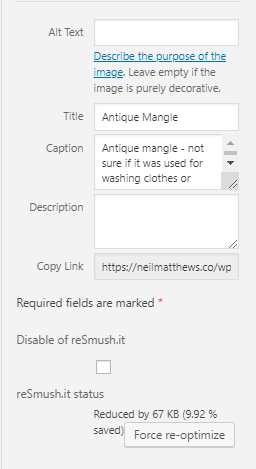
    Here’s a screen grab of the featured image I added to this post showing automatic compression.


    544 images How Long Did It Take?

    For the purposes of this post, there were 544 images that needed to be optimised.  I clicked on the button and continued to write this blog post.

    The total compression time was 1:45. It’s an intensive process and will take a lot of time.

    Wrap Up – Plugin Review: reSmush.it Image Optimizer

    Site load speed is very important, a slow site causes site abandonment from potential customers and clients.  Google penalises slow loading sites, so please add image optimisation to your performance tuning regimen.

    Optimising your images is a quick win and super simple with reSmush.it Image Optimizer

    Photo Credit: quinet Flickr via Compfight cc

  • Plugin Quality Control

    Plugin Quality Control

    How can you know if that new plugin you are about to install is of a high quality? How can you setup some kind of plugin quality control process to ensure all new plugins that are added to your site won’t break things?

    In this video post I’ll show you how to check the quality of any plugins you are about to use.

    Anyone can create a plugin an upload it to the WordPress plugin, there are approval processes but there is no rigorous checking of the codes compatibility with themes and other plugins, so sadly it’s a very common thing that I see that a plugin will crash a site.

    Use the techniques in my video to create some plugin quality control.

    Video

    The Process

    • Install from the WordPress dashboard, their search rules out a lot of plugins that are not being actively developed.
    • Visit the plugin page on WordPress.org to get a full list of stats.
    • Check last update to ensure the plugin is actively developed, plugins not actively developed can hold vulnerabilities or bugs.
    • Check the plugin is tested to your version of WordPress, check the plugin is compatible with your version if you are using an older version of WordPress.
    • Review the ratings avoid all 5 stars and lots of 1 & 2 stars. Look at the reviews to see what people are complaining about.
    • Look at the support forum ensure the plugin developer is actively engaging in support, avoid plugins where there are zero replies.

    Links Mentioned

    WordPress Plugin submission guide

    Contact form 7 Plugin Page

    Wrap Up – Plugin Quality Control

    Plugins clash with themes, and other plugins all the time, installing the wrong plugin will bring your site down and end up with you visiting this page to ask me for help.

    Do yourself a favour and do some plugin quality control before you click that install button.

    Photo Credit: classroomcamera Flickr via Compfight cc

  • Review of Grammarly

    Review of Grammarly

    On this day, at the 11th hour on the 11th day of the 11th month of 1918, the Great War ends.

    This coming Sunday, the 12th of November we observe Remembrance day in the UK (and other Commonwealth Countries) so in the spirit of peace and reconciliation, I want to end my war with the Grammar Nazis.

    To do this I’ve started to use a tool called Grammarly which will hopefully pick up more of my spelling and grammar errors and stop the Grammar Nazis in their tracks.

    What Is Grammarly?

    Grammarly is a spell checking and grammar correcting software service. grammarly.com

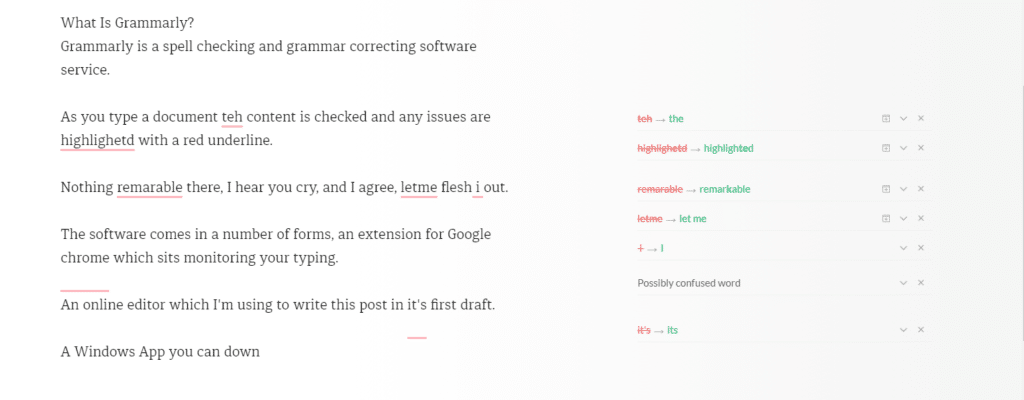
    As you type a document the content is checked and any issues are highlighted with a red underline.

    Nothing remarkable there, I hear you cry, and I agree, but let me flesh it out.

    The software comes in a number of forms, an extension for Google Chrome which sits monitoring your typing.

    An online editor which I’m using to write this post in its first draft.

    A Windows App you can download and run on your PC that acts as an editor.

    I’ll probably stick with the Chrome extension, but I thought I would use all the tools in the spirit of a full review of Grammarly.

    review of grammarly
    Click for Full-Size Image

    Freemium

    The software is free with a set of premium upgrades. The premium version is not cheap at £22.84 per month. I’m using the free version (cheap or frugal, you decide).

    The premium version has advanced features such as plagiarism checks, style guide and word choice tools.

    Why It Beats The Native WordPress Spell Checker

    The A.I. behind the scenes is far better than the native WordPress spell check, it’s picking up far more grammar issues with my writing.

    It has dictionary and grammar guides for British English which is different from US English used in many spell checkers.

    The punctuation correction is amazing, it spots missing commas before I do a read through which really helpful.

    It picks up on a lot of words I use which should be hyphenated, for example, I use the word setup a lot which should be hyphenated to set-up.

    I miss full stops (periods to my American chums) at the end of sentences an awful lot it turns out.

    It’s Not Just For WordPress

    It’s not just for my blog posts, any typed content in your browser can be checked, it’s working wonders for my email.

    Wrap Up – Review Of Grammarly

    A gushing review I’m sure you will agree. I’m a fan but would I pay £20 plus per month for the premium version? Probably not.

    Check out https://grammarly.com

    Photo Credit: Infomastern Flickr via Compfight cc.

    I’m doing the SEO density dance for Review of Grammarly.

  • Help Scout Review: How I Use Help Scout As A Project Management Tool

    Help Scout Review: How I Use Help Scout As A Project Management Tool

    I migrated my help desk away from Groove last year with a deep heart, it was great, but the mobile support was shocking.  Here is my Help Scout review.

    If my team and I were not on a desktop it was almost impossible to update tickets.

    I thought it was time to write up a review about the replacement system I now use Help Scout.

    Why I Use A Help Desk

    I’ve tried a number of solutions to manage the work at WP Dude. Project management software like Basecamp and Trello, email systems like Sortd, task managers like Asana, but I found that the nature of the work we do does not lend itself to that type of software.

    We do small technical support jobs and maintenance, I don’t want my clients signing up for software they will not know how to use, and probably never use again.  I want what we do to appear seamless, I want it to look like we are exchanging emails, no signup required.

    I’ve got a team of three so we need to co-ordinate and share work between us.  Our work cannot be stuck in someone’s email account, everything needs to be in a central place.

    The last reason I use help desk software is that I can build in processes via canned responses (more on that later).  We have a standard way we work, I have built a project management system using a series of canned responses.

    If you raise a technical support project via my gravity form or, if you are a maintenance client and send me an email at [email protected] , it will land in our help desk.

    Canned Responses

    The most useful thing about a help desk is that we can create a process for our clients via canned responses, Let me step you through it.

    A new project request hits my help desk …

    1. Do I want the project? If not I send a polite “no thanks” canned response
    2. Is there enough information to send a quot? If not send “ask for more information canned response”
    3. I want to take the project, send a “quote” canned response
    4. When the quote is accepted, send “get login details & deposit payment” canned response
    5. Just before starting work send “starting work” canned response
    6. Once the work is done send “project complete” canned response
    7. “Close project” canned response when everything is done

    I have others but as you can see I have a process built into the help desk so we handle all projects in the same way.

    click for full size image

    Gravity Form Support

    Help Scout has support for gravity forms, which is great for me, all of my contact forms are powered by Gravity forms.

    When a client submits a request it is automatically added into Help Scout, previously with Groove I had to create an integration using Zapier.

    Assigning Tickets

    A great feature of Help Scout is the ability to assign tickets to team members and have it drop off my queue.

    There is a lot of psychological baggage with a huge, long list of to-do items, when I assign a ticket to a member of my team it goes into their queue and off mine, until they need to pass it back to me.  That feels like a load off my shoulders.

    Once assigned I get an overview of who is doing what and who is available for new tasks.

    Mobile App – Woo Hoo!!

    Help Scout has a great mobile app.  I can work when I’m not at my desktop.

    Using the app and canned responses I can reply to clients, assign to team member and keep things running when out of the office

    Huge Number Of Integrations

    Help Scout has a huge number of integrations https://www.helpscout.net/help-desk-integration/

    I integrate with Freshbooks so I have an overview of a clients financial account next to a ticket

    I integrated with a number of chat software solutions such as Chatra so chat history was raised as a ticket.

    I use the beacon software from Help Scout on my WordPress site (see the question mark icon bottom right) so people can ask my pre-sales questions and that is sent into Help Scout automatically.

    Internal Knowledge Base

    Help Scout has a knowledge base that you could use as a client facing self service solution, but I don’t use it that way, I have my processes and procedures in a private knowledge base for team access.

    I also have a library to technical how to documents on how to fix common WordPress problems that my team can tap into.  I add new ones as issue occur.

    Cost

    Help Scout is charged per seat.  The current cost is $20 per seat.

    Downsides

    With groove I was able to add a star to a ticket and it made it sticky and bubbled that ticket to the top of my queue, these tickets were the ones I was currently working on.

    I like to do that because I often send a project back to clients for review and there can be some time between communications I can start and un-star as a ticket is worked on or waiting for a response.

    There is no calendar, this is not a Help Scout issue but a help desk software issue, I would love to be able to add a calendar event to a ticket to say when we are working on that project, and to have a calendar view.

    Wrap Up – Help Scout Review

    I only recommend software I use all the time and help scout is at the core of my business, all client communication flows through Help Scout.  All delegation of work is through Help Scout.

    This gets a big thumbs up from me.

    No affiliate links were harmed during the filming of this Help Scout review. This Help Scout Review needs more keyword exposure for SEO 🙂

    Photo Credit: SSAVE w/ over 7.5 MILLION views THX Flickr via Compfight cc

  • Canva Review

    Canva Review

    I’ve started to use an excellent tool called Canva.com to create images for blog posts, ads and other online needs, here is my video Canva review.

    Canva is a freemium online  image manipulation tool, I have been using it for about one month and as a non-designer I am very very happy with the results.  It is free to sign-up but there are some advanced options which costs $11 per month.

    I’ve struggled with very expensive and complicated image manipulation tools such as Photoshop. Canva solves that.

    I’m no designer, Canva also solves that with pre-made look and feels.

    Lets get into the meat of the review and check out my video review

    Video

    Wrap Up – Canva Review

    Canva has changed the way I create images for the web and for my clients, it’s simple and convenient, there is no endorsement or affiliate gain here, it’s just a tool I’m using regularly.

    Remember the attribution I mentioned in the video you can see that below.

    Photo Credit: archer10 (Dennis) 84M Views Flickr via Compfight cc

  • Plugin Review: Activity Log

    Plugin Review: Activity Log

    Do you need an activity log for your WordPress site?

    Are weird things happening on your website?

    Are things changing, but you never did anything?

    Is someone messing with your sites config?

    A great tool to monitor what is happening on your site is a plugin called Activity Log.

    https://wordpress.org/plugins/aryo-activity-log/

    What It Does

    It captures all activity on your site.  New posts, edits, starting and stopping plugins etc etc.

    It records the time and date, what happened, the user that made the activity and the IP address.  The IP address can be used to pinpoint the location of the user geographically if weird things are happening.

    It saves this data to your dashboard so you can review what is happening.

    Video

    See the plugin in action.

    When I’ve Used This Plugin

    • Hacks – I use this plugin when fixing hacked sites to monitor for the hackers getting back in
    • Multi user / admin sites – if there are multiple people editing or “admining” a site it is useful to know who did what./
    • Cover My Arse – This is a great fix for the you touched it last syndrome, using activity log you can see exactly who did what and when.
    • Bizzare plugin activity – one client was having their blog posts edited and no-one knew why, we found that an editorial calendar plugin was making changes

    Options

    There are a number of options for this plugin, the first is how much data to keep, this log will get large so having unlimited logging in place is a bad idea, the default is to keep 30 days.

    There is a notification engine where you can set email alerts when certain things happen, for example if you are monitoring when a user logs in, you can setup a

    Wrap Up – Activity Log

    If you need to monitor who is doing what and when on your site check out Activity Log https://wordpress.org/plugins/aryo-activity-log/

    Photo Credit: Kevan Flickr via Compfight cc