Neil Matthews

Category: General Blogging

  • R.I.P. WordPress Comments

    R.I.P. WordPress Comments

    Are WordPress comments dying?

    I think they are, lets have a discussion about this.

    What I’m Seeing

    I’m getting fewer and fewer comments on my blog posts.  I’m not suggesting I’m the greatest writer, generating thoughtful work that the whole internet wants to engage with, but I can see that I’m getting fewer comments on each post I publish.

    Personally I am not leaving any comments on blog posts anymore.

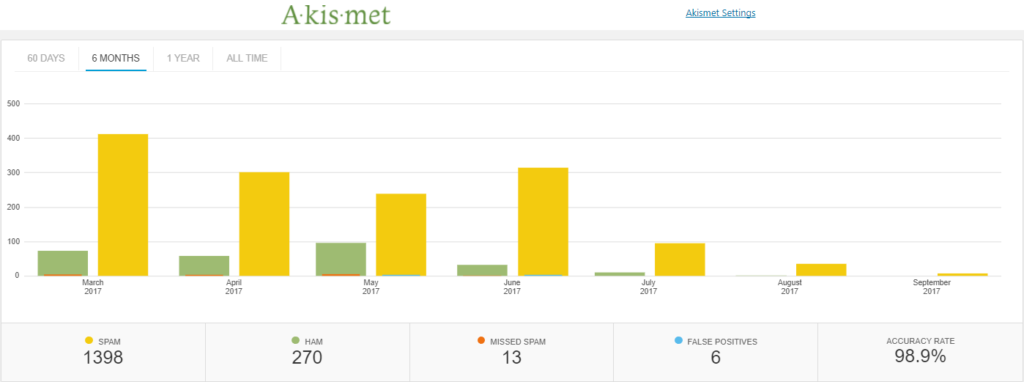
    Spam is going down.  I am seeing a trend on my comment spam that shows attempts to leave comments on my site that are spammy.  Here is a six month graph from Akismet,

    RIP wordpress comments
    click for full size image

    People are installing plugins to move comments away from their sites into the wider social sphere such as this one https://wordpress.org/plugins/comments-from-facebook/, or the are moving to centralised commenting systems such as Disqus.

    This is not a scientific study, but I’ve just visited Problogger, one of the most popular blogging sites out there and a post from the 4th (2 days ago at the time of writing) has zero comments, and other posts have less than 10 comments, in the past each post on Problogger would receive hundreds of comments.

    Why I Think This Is Happening

    People are still distributing great content they like, and sharing it with their circle, but they are sharing and discussing from social media hubs such as Facebook or twitter.  The distribution hub has also become the discussion hub in my opinion.  They will click through read your content and return to the distribution channel to comment.

    Dude! People need to keep their social feeds current, they need to be adding more content into the howling storm of the internet,why would they leave a comment on your backwater of the internet when they could leave a comment on their social media site of choice and build their own profile (please like my post).  Who is going to see their insightful thoughts on your site, 🙂

    My previous statement is a little tongue in cheek, but I do think people want their discussion to be seen more widely, where will this happen on social or at your site?

    Comment links are no follow so there is no benefit SEO wise for leaving comments.

    Comments were often used as a method to engage with the author, but this can be done on social more effectively.

    Wrap Up – R.I.P. WordPress Comments

    I think comments have moved to the distribution channel not the source.  I don’t think this is a bad thing, as long as discussion is happening does it really matter where is it hosted?

    What do you think? These are only my opinions,

    <irony>Let me know in the comments</irony> or the social platform of your choice @nmatthews on twitter, or on Facebook.

    Need help with your WordPress site? Get a no obligation quote.

    Photo Credit: benekliz Flickr via Compfight cc

  • WoodPecker Review

    WoodPecker Review

    I’ve been trialling a new tool to reach out to old clients this month and I wanted to share my Woodpecker Review.

    What Is WoodPecker?

    It’s an email outreach system where you can contact people on your list.

    It has a drip facility where you can send a series of emails, if someone replies they are taken out of the drip.

    It sends like a human would, a few requests per day not a bulk outreach.

    It sends from your gmail account.

    It monitors replies, auto replies, bounces and cleans your list up.

    I’m using woodpecker to reach out to old clients I have not contacted in some time, so it’s a “warmish” email to generate leads.  My main goal is to send out new quotes for WordPress technical support.

    Setup

    I exported all the entries from my gravity form database.  This contains a list of people who have contacted me in the past to get a quote for WordPress technical support.

    I took their name, email, WordPress site URL and the body of their last request (more about this a little later).

    The import process was really simple and I was able to quickly build a database of prospects to contact.

    It sanitised my contacts and removed duplicates.

    Campaigns

    At the core of Woodpecker is a campaign. A campaign is one ore more emails that are sent out to your list.

    You can control when the email is sent and upon which day.  I’m sending Monday to Friday 9am – 7pm my time.  I’ve set a block of time so I’m available to reply to any responses I get in a timely manner.  I’ve excluded weekends for the same reason.

    The campaign has a sending limit of 25 people per day.  The reasons for this are:

    1. It looks more like a human is sending the messages.
    2. It does not get me banned from gmail for sending too many emails, they limit to 250 per day.
    3. I am able to cope with the number of replies, generating quotes and the work this creates.

    A campaign can contain a series of emails, they are sent out in a drip fashion.  A really useful feature is that if someones replies they are not sent the nexy email in the series.

    I’m trying to generate leads, if I get the lead I don’t want to bug the client with another email.

    A gentle drip with a nudge is a great way to get on the radar of busy people who may need help but

    Personalisation

    The key to this type of outreach is personalisation.  I’ve got the persons name, website and their last interaction with me.  Using this information I can make the outreach much more personal.

    I’m personalising the email like this:

    Subject

    Do you need any help with {WEBSITE URL}

    Body

    Hi {FIRST NAME}

    I’m reaching out to see if you need any help with your WordPress site {WEBSITE URL}.
    If you do simply reply do this email with details of your project and I’ll send you a no obligation quote.
    Thanks
    Neil Matthews
    WPDude.com
    You are getting this email because you have requested a quote or worked with me on a previous project, see your last request to my business:
    {{SNIPPET_1}}

    The last bit is important for cold outreach, some people on my list have not been in contact for a few years and they might not even remember working wiht me

    Where It Beats Other CRMs I’ve Used

    There are a number of really good features which makes Woodpecker stand out from the crowd of other CRMs

    It manages bouces – people change emails all teh time, and old emails bounce, Woodpecker detects this and marks the contact.  This makes the quality of yoru prospect list that much better.

    It has an easy to use drip campaign system, that stops on reply.

    It has a unsubscribe feature.  CRMs don’t allow your list members to opt out for some reason, I’ve spent a lot of time managing contacts that don’t want or need my services.

    Stats, Woodpecker has really good stats on the performance of your campaign.

    Why This Beats Mailchimp Or Other Email Provider

    Setting up automation in mailchimp will give me the same results but they are really difficult to create in my experience.

    Mailchimp sends in one big batch, whereas Woodpecker is more graceful and sends in small batches which allows for control over creating quotes and replying properly to client requests.

    Integrations

    Although I’m not using the integrations, Woodpecker works with Zapier so potentially I could automate reachout to clients by adding people who reequest a quote to a campaign to reach out every 6 months or so.

    Pricing

    It’s about the same as other CRMs I’ve used in the past I’m on the $40 per month plan.  There is a $50 plan for the integration option.

    One thing I did not like was their charge per email I want to send from. Two emails = 2 x $40.

    Does It Work?

    I’m running two campaigns in tandem to test if Woodpecker works for my offerings,  One campaign is for a one off project quote, the other is for my maintenance service.

    I’ve generated 16 leads for quotes and several have been confirmed into live projects.

    I’ve had 21 requests for details of my maintenance plan and 9 signups.

    Does it work, YES!

    Downside

    I did not validate my list very well and I’ve reach out to people who have unsubscribed or do not wish to work with me.

    I’ve had a couple of angry replies, sorry about that if you are reading this, I hold my hands up I’m at fault there.

    14 Day Free Trial

    Woodpecker has a 14 days free trial, I would recommend you run a test campaign to see if this service will work for you.

    Wrap Up – WoodPecker Review

    I’m enjoying this, it is automated unlike my old CRM, it looks at replies and bounces and auto updates my list which was a huge time suck and it works, I’ve generated leads and new business.  It’s still early days but I’m liking what I have seen so far.

    I think the data I’m collecting on who opens and replies will make my future campaigns even more effective.

    Long term I think this will be a very useful tool to automate reach out to past clients to keep my name in their mind if they need WordPress help.

    If you are a service business with a list of past clients, reaching out to them regularlly with a check in to see if they need help is a no brainer.  This software automates that.

    Disclosure, all links to woodpecker are affiliate links and I’ll get a referral fee if you become a paying customer.

    Photo Credit: mjeedelbr Flickr via Compfight cc

    SEO nonsense to increase Woodpecker review density, woodpecker review 🙂

  • Why You Need To Store Your Backup Archive Off Site

    Why You Need To Store Your Backup Archive Off Site


    You are only as good as your last backup!

    That’s the phrase that was drilled into me over and over when I was a young systems engineer looking after huge corporate databases.

    Backup was such an important thing to us, we had rotas where it was someone’s sole job was to ensure backups were taken, they were valid and they were stored correctly.

    Part of that storage was to bundle up magnetic tapes into a fireproof box and send it offsite to a secure storage location.  It was physically offsite.

    As the owner of a WordPress site you need to ensure your backups are also stored off site but in the sense they are stored virtually off your website.

    The Majority Of Backups I See

    You do have a backup plugin installed don’t you?

    The majority of the backup plugins I see installed are taking backups each day or each week.  These backup archives are then stored locally under wp-content.

    Why Store Offsite

    Let me paint a doomsday scenario.  Your site has crashed.

    All of the files on your site have been deleted.

    Your archives are gone.

    Your hosting company cannot help you.

    You are stuffed!

    That’s why we keep a copy of your archive offsite so we can restore in a worst case scenario situation.

    Off Site Storage Options

    Your offsite storage options will be dictated by the backup plugin you use, but here are some of the more common options:

    Dropbox – not only can you save the pictures from your phone but you can also save you backups there too.  Large sites can be into the GB sized archives

    Amazon S3 – the good folk at Amazon not only sell you everything under the sun, but you can also rent part of their storage too.  It’s cheap and secure.

    Microsoft Azure – always late to the game it seems, but Microsoft have storage solution too.

    FTP – You can setup a manual process to FTP your archive files to a second location offsite.  Not my preferred method but definitely.

    Email – if your archive is small you can attach it to an email and send it to yourself each day.  Gmail for example, only allows a max file attachment of 25MB, so email will not be the best for a large site.

    Recommended Plugins/Services

    Here are some plugins that offer an offsite storage solutions that I recommend.

    • Backwpup – free
    • BackupBuddy – premium plugin
    • Managewp – freemium service
    • Vaultpress – premium service.

    What We Do For Our Clients

    We manage the backups for hundreds of our clients, we take a daily full backup of their site and we store it off site on Amazon S3 servers.  The backups are secured and encrypted.

    We get to select where, geographically we save the backups, so we store them as close to the clients physical location as possible.  We can select Amazon data centres in North America, Europe, the Far East or Australia.  This speeds up upload and restore times.

    We’ve had to restore from this solution numerous times and it works.  That’s the important part of backup, not taking a backup, not saving it offsite, being able to restore when the SHTF.

    Wrap Up – Why You Need To Store Your Backup Archive Off Site

    I would like you to review your backup solution today and make sure you are also storing you backups offsite, you will thank me if things go pear shaped.

    We have backup solutions starting at $9 per month, can we backup your site for you?  Get in touch.

    Photo Credit: Dave ‘FBI’ Gibbons Flickr via Compfight cc

  • The Difference Between Categories And Tags

    The Difference Between Categories And Tags

    There are two main ways to categorise WordPress blog posts, tags and categories, in this post I want to explain the difference between categories and tags.

    In this post I want to explain the differences between category and tags.

    What Are Tags & Categories?

    Both are ways to group related posts together, if someone is interested in your post about a cat, drop it into a tag or category about cats and people can find more content on your site about kitties.

    Adding a post into a cat or tag, adds it to the category page linking all the other posts together for example, I’m putting this post in General Blogging, you can also see it in this page https://dev.neilmatthews.com/category/general-blogging

    The Cook Book Analogy

    The best analogy I have heard for the difference between categories and tags is the cook book.

    Imagine the front of a cook book there are chapter listings with page numbers, think of categories are chapter lists.  The chapters in our analogy are breakfast, lunch, dinner and snacks.

    Now think of your blog post as a recipe, our post is a breakfast dish huevo rancheros, it is in the chapter / category breakfast.

    At the back of the book is an appendix, the appendix lists all the recipes by their main ingredients, this is a tag and helps to give much more detailed information about a post.  We would tag huevo ranchero with eggs, peppers, totillas etc.

    Both do the same thing to help you find a recipe but they both do it in slightly different ways. Tag are more detailed where as categories are more general.

    Do You Need Both?

    Each post needs to go into at least one category, that is why there is a default uncategorized category that all posts are added to by default, but you do not need to use tags, they are optional.

    What Is Best For SEO

    Having both for SEO is best, it increases the number of indexed pages you have in Google.  for each category or tag you add a new archive page is added, s there would be oursite.com/category/breakfast and oursite.com/tag/eggs, oursite.com/tag/tortillas.  The more tags and categories we have the more keyword rich links we have.

    Are There A Limit To The Number Of Tags / Categories

    Technically no, but there is a suggestion to limit the number to no more than 15 for anti-spam and seo reasons.

    Wrap Up – The Difference Between Categories And Tags

    Further reading, here is what the good people at WordPress.com have to say on this subject Categories Vs Tags.

    Photo Credit: ubrayj02 Flickr via Compfight cc

  • Blogging With The WordPress iPhone App

    As part of my holiday blogging efforts I decided to write a blog post 100% with the WordPreas iPhone app.

    You can download the WordPress app from your App Store of choice there is an iOS and android version.

    Writing Experience

    As you would expect the writing experience is the same as writing a text message.

    If you have young nimble fingers, used to sending large amounts of mobile text, you will be able to quickly knock out a blog post.

    This correspondent's fat middle age thumbs are not as Rapide as they could be but I'm coping writing this post.

    Personally give me a keyboard for anything over a short form post like this one.

    Adding Images

    You can post images from your camera which is a huge benefit for personal bloggers.

    You can add them inline and also save a featured post image.

    I'm in a water park as I write this so here is a random image of my kids.

    I'm going to download an image from compfight save that to my phone and add it as a featured image.

    Error correction

    Something really positive is the predictive text editing as my fat man fingers mash out this post, it's correcting as I go I've not had to type an apostrophe yet.

    When I create a typo the content is underlined, tap on it to correct.

    Downside

    If your theme has features that need to be set from the editor you cannot do that from the app, it's completely theme agnostic.

    It also ignores any plugins you have that add posts options, for example I use Yoast SEO to set my post options, I'll have to wait until I get home to optimise this.

    The menu was not very intuitive and I had to google how to add HTML for the image credit at the bottom of the post.

    People get really stroppy if you don't camel back WordPress but the app does not pick that up just saying some I don't plan to correct those typos.

    Wrap Up – WordPress iPhone app

    The app has surpassed my expectations, I've written a decent enough length post from my phone and yet another shackle of desktop work has been shed.

    If you need help with your WordPress site please request a quote when I get back on the 5th 😀

    Photo Credit: imherbsoap Flickr via Compfightcc

  • Does Website Design Really Matter In An Increasing Mobile World?

    Does Website Design Really Matter In An Increasing Mobile World?

    Does website design really matter in an increasing mobile world?

    I’m asking this question to start a discussion, my quick answer is I just don’t know, my heart says I hope it does, but my experience  with emerging technology says no.

    I’m asking myself “Have I been spending too much time looking for the perfect responsive theme when it just does not matter?”  As I said I’m starting a discussion here, please let me know what you think, in particular if you are a designer I would love your input.

    We Are Moving Towards A Mobile World

    Like it or not we are moving towards a world where our WordPress sites are primarily accessed by people using mobile devices not desktop.  Space is limited and something will have to go.

    Will the design aspects of the WordPress theme we take for granted on a desktop machine be slowly phased out?

    Big menus, popups, slide in, video background.  Do those types of feature have a place on the phone screen as they do on the desktop?

    What Do I mean By Design?

    Lets separate out two areas of design:

    1. UX or the placement of buttons, menus images etc, I call that functional design I still think this is very important on mobile.
    2. Prettyfication, colours, fancy page transitions, image backgrounds, header background videos.  This is the aspect of design I think might be on the way out.

    Limited Screen Real Estate

    The reason I think design will be greatly reduced on mobile WordPress themes is simply one of space.

    My iPhone is 13cm across about 5 inches, that’s limited real estate.  We need to build function and brevity into that space not fancy schamncy design aspects.

    We are constrained and if we add too much the screen becomes cramped and the website unusable.

    AMP

    Google are evolving a new technology called AMP.  It stands for Accelerated Mobile Pages.  The point of this is to reduce download times and speed up the use of websites on mobile.

    Here is a link to one of  my posts on AMP https://dev.neilmatthews.com/cdn/amp

    All I can do is set colours, a basic logo and that’s it, Google doesn’t want any more, all they want is the content.  Your JavaScript pop-up won’t work on AMP, your sound effects on click, don’t even go there.

    This technology is what makes me think design is being curtailed on mobile.

    App Design

    Another thing that is making me think design on mobile is contracting is App design,  click on any of your favourite apps and you will see a consistent design across all of the top apps, a hamburger menu, a gear icon for settings, lots of white space and not too much design, there is not enough space for anything else, just design for function.

    My Experience Looking For  A new Theme

    I’ve spent a lot of time recently looking for a new theme and a big part of that was seeing how the theme looked on mobile.

    Lots of desktop theme were really appealing to me but when I flipped to responsive mode there were design aspects that made no sense, popover navigation menus, page rendering graphics.

    The experience from desktop was replicated on mobile and it looked rubbish.

    Wrap Up – Does Design Really Matter In An Increasing Mobile World?

    No definitive answers I’m afraid just what I’m seeing, and the start of a discussion.

    Google doesn’t want bells and whistles when delivering a mobile experience they want function.

    Our apps are spartan.

    Screens are limited in space.

    So my question to you again, how much does website design really matter in our increasingly mobile view? To the comments with you …

    Photo Credit: byronv2 Flickr via Compfight cc

  • µAgency

    µAgency

    In my last post about building a business you love to work in and on,  I wrote about the idea of a µAgency, today I want to expand on that idea and explain just what this concept is and how it could possibly work for you.

    Remember I operate a no-guru policy so I’m giving pointers only.

    Definition

    µ – Greek letter micro, which in our definition means very small.

    A micro agency is you the principal consultant plus another person, so it’s a team based agency but a very very small one, as small as you can possibly be and still be considered an agency.

    You will continue to deliver your existing services but you will add some additional complimentary ones that are not delivered by you.

    Who Is It For

    The µAgency is for freelancers who are ready to take their business to a new level but don’t want to work solely on their business, they still want to be in the business chipping away at their client’s coal face.

    You are not looking to build something huge, just an amazing lifestyle business that delivers your income goals, is fun to run and creates massive personal freedom.

    You’ve probably tried other leveraged income ideas, but they were not a great match with your services business (info products, affiliates selling), what I’m suggesting is a companion service that goes with your main “thing” but is not delivered by you.

    You are not a manager, have no desire to be a manager, you want the smallest team possible while delivering an excellent µService.

    You’ve Done Your 10,000 Hours

    As a freelancer you have served your apprenticeship and have done your 10k hours of work to be called a master craftsman/woman of your thing.

    You know how to do your thing, how to deliver excellent service.

    It feels like you need to find another person with your skill sets to expand your business, and the costs and risk are very scary to you.

    You have reach a plateau and are looking to develop your business but the idea of finding another you is very intimidating, what I’m suggesting with a µAgency is that you don’t need another you with all your skills and associated costs, build a small service your clients needs which can be delivered by a junior team member.

    What It Solves

    It solves a number of the issues we as /solo freelancers selling services suffer from.

    Break the time = money limit – there is an upper limit on your income because of the finite number of available hours you have, the µAgency gives you leverage by using other people’s time, software tools and processes.

    Flattens the feast famine cycle – much like the above point freelancers have a rollercoaster of income, sometimes there is a lot of work we need to take on because we know down the line there will be a famine time where work is scare and we have limited income, this idea helps to create a more level income stream.

    Take time off and still earn – your agency will be bringing in money regardless of whether you are working or not.  This will  allow you holidays, sabbaticals and leisure time oh my!

    Recurring Revenue – If you develop the product your agency delivers properly you can develop a recurring revenue from your  µAgency.

    What The µAgency is Not

    It’s not a get rich quick scheme, it needs to be carefully nurture and sold to existing clients.

    It’s not 100% passive, you need to put lots of time in at the front end developing your agency, and a certain amount of time monitoring and managing your agency as it goes along (don’t panic it’s not going to be a huge time suck).

    For everyone,  if you get a feeling of worth from a massive business, this is sooo not for you, if you want 100% passive income remember you are still the principal delivering your “thing” service.  If you want to sell your business again it’s going to be hard to sell a job.

    µAgency Evolution

    With all that being said are you ready to evolve from a freelancer / solopreneur into a  µAgency?

    You may be happy where you are as solo freelancer but here are some key indicators you are ready to start your  µAgency.

    • Your income has plateaued and you are booked solid, you cannot earn any more
    • You struggle to take time off
    • If you do take time of there is a massive struggle before hand to get everything in a row and generate enough income to cover your costs.
    • You have had a couple of bad weeks with no income
    • You cannot do that thing because you are tied to your job
    • You want to level the income rollercoaster
    • You want a more passive income steam
    • You want recurring revenue so the start of each month is not dialled back to zero each 1st of the month

    µRetainer

    The first step in your evolution is to start selling  µRetainers.

    One of the problems I wanted to solve was the up and down  of income as a freelancer, and the best way I saw to do this was selling retainers.  A retainer is a recurring revenue stream where services are delivered each month to your clients.

    I call it a micro retainer because you will be selling lots of small pieces of work to many clients, not a big chunk of your time to a single client.

    This has a number of benefits:

    1. It’s a small piece of work so it is usually cheaper than a normal engagement with you and easier to sell.
    2. It’s sold to lots and lots of clients so there is no single point of failure if a client decides to stop working with you, or you decide to stop working with them if they are a pain in the arse. Remember this is all about building a business you love to operate, not have painful clients dictate what you are doing.

    The µRetainer is not an À la carte service where your client can call down you or your team’s time as they see fit, no it is a defined piece of work that is done on a recurring basis the same way to all clients, I call this a µProductized Service …

    µProductized Service

    Remember the goal is not to sell your time, you know how to do that already, that is your bread and butter, you are looking to sell a productise service that your client needs and can be sold as a retainer.

    The anatomy of a productized service looks like this:

    • As a backend upsell, a complimentary service to your main “thing”
    • Very useful and important to your client
    • Can be driven by processes
    • Is teachable to team members
    • Is repeatable and standard for all clients
    • Does not need your 10,000 hours of experise
    • Needs to be done on a recurring basis
    • Easy to manage
    • Does not need lots of your time – you should be spending time serving your clients with your front end services, not your back end product
    • Leverage people. sofware tools and processes to make it almost hands off

    I don’t know what you business is so I cannot say what your service should be but hopefully this points you in the right direction.

    Selling µProductized Service

    You might think I’m putting the cart before the horse here, there is no team to deliver the service yet, but  you should sell some µRetainers and deliver the service yourself before building your team.

    You need to document and create processes for your service so it is delivered correctly by doing it yourself you can understand the service completly, create processes, find the pain points and solve any issues before delegating the work.  You also get to set the quality levels you require so the service is delivered to your standards and does not impact upon your reputation.

    Pre-selling the service and delivering it yourself proves there is a need for the work, there is nothing worse than sacking people because you cannot cover their wage cost.

    I suggest you sell your retainer as a back end service not a front end one. This give you a chance to evaluate a client in a one off project before you work with them for a prolonged period of time, no one wants to work with a douche for the long term.

    It is far easier to sell a retainer to a happy client than it is to pitch an ongoing service to a new client.  I had a dream that I could sell a recurring maintenance plan to cold clients, it was very very hard, I now sell this service on the back end.

    µTeam

    Once you have your µService idea and have sold enough micro retainers to cover a team members salary it’s time to build your µTeam.

    Let’s talk about the size of your team. I’m talking about part time or maximum of a single person full time making up your micro team. This keeps the agency tiny and limits the amount

    What does this mean, you need to package your service so a single person can do it and still meet your income goals.  There will be an upper limit to what they can do too, so look at processes, software tools and automation plus a person to do the work.

    I don’t recommend employing someone in the traditional sense that they become employees of your business.  Personally I run my business under a UK business structure of Sole Trader. If I take on a traditional employee I have to incorporate, pay additional taxes, national insurance, PAYE, pension plans, the list goes on.

    Screw that I want as simple as business structure as possible so I choose to work with like minded entrepreneurs who have started their own business and work as contractors.

    Recruitment is far beyond the scope of this article but I’ll cover my ideas of Nearsourcing in a future post.

    No µManagement

    The beauty of the µAgency is the is no µManagement, your job is not to be a manager of the agency, it’s to set it up, create processes and rules so the delivery of that service works without you.

    Automate it as much as possible with software and tools. You can do this during the phase when you are delivering the process yourself.

    Document how the service is done, down the to

    Recruit a self starter who can deliver the service to your vision without a lot of hand holding.

    So when you are bulding your productize service create processes that are repeatable and “checkable” so you can ensure the quality of the services being delivered by your team member are

    Delegate don’t abdicate (hat tip to e-myth) make sure you are checking the work down regularly and it’s to your standards. That does not take a lot of your time.

    Remember your job is still to deliver you high end, front end services, the µService is a back end add-on delivered by your team member.

    Example My µAgency

    My µAgency is based around my productized service offering WP Insure.

    WP Insure is an ongoing maintenance plan where we look after the ongoing maintenance needs all WordPress sites.  It costs $29 per site per month, I have over 100 sites under maintenance. So I have lots of small payments from many sources on a recurring basis.

    We do the following:

    • Fix on fail – if anything breaks we fix it
    • Backups
    • Updates
    • Monitoring
    • Reporting
    • Email Support

    I use managewp software to control this work and I have my team member(s) monitoring the work fixing any exceptions and providing fix on fail services.

    I have help desk software where alerts are sent if we spot an issue automatically and an email address [email protected], to which my WP Insure clients can sends their fix on fail requests that we did not spot.

    I have two part time team members making up a single e-team member.  These are two contractors I worked with on a previous iteration when I was trying to build a maximal agency, but that is yet another story.

    I’ve built processes around canned responses in the help desk (which I use for my front end services too ) so issues are handled in the same way each time.

    We send weekly reports to my clients to update them on the work done.

    Payments are via a recurring invoice sent automatically from my Freshbooks account, Freshbooks also sends out automated reminders to prompt people to pay their bill if they forget.

    Inside the help desk is a knowledge base where I can distil my experience into solutions for fix on fail scenarios.  As time has gone on I need to create less and less of these articles.

    I spend very little time delivering WP Insure services, my team does the work.  I spend very little time managing my team they are self starters and know how to get things done. We communicate via our help desk when they need my help./

    I may sound cold about my team, but they know they can hit me up on Skype if they have an issues or need to chat.

    Wrap Up – µAgency

    None of this is new, the problems a µAgency solve are not new to freelancers.

    I’ve distilled the advice from a number of books and courses into my own best fit agency model, one that solves client problems, solves my freelancer problems and matches my temperaments, little team management, under control for my control freak tendencies makes money for me on a recurring basis, flattened my feast famine cycle, it’s a great model for me and I hope it can be useful for you.

    What do you think?  Is it a good fit for you.  What µRetainer could you offer your clients that could be outsourced?

    Should I ® µAgency, this could be the bestseller I’ve always wanted to write and my path to Gurudom 🙂

    For the geeks, you can use the html entity to show the micro sign &micro;

    Photo Credit: artsci.salon Flickr via Compfight cc

  • µAgency

    µAgency

    In my last post about building a business you love to work in and on,  I wrote about the idea of a µAgency, today I want to expand on that idea and explain just what this concept is and how it could possibly work for you.

    Remember I operate a no-guru policy so I’m giving pointers only.

    Definition

    µ – Greek letter micro, which in our definition means very small.

    A micro agency is you the principal consultant plus another person, so it’s a team based agency but a very very small one, as small as you can possibly be and still be considered an agency.

    You will continue to deliver your existing services but you will add some additional complimentary ones that are not delivered by you.

    Who Is It For

    The µAgency is for freelancers who are ready to take their business to a new level but don’t want to work solely on their business, they still want to be in the business chipping away at their client’s coal face.

    You are not looking to build something huge, just an amazing lifestyle business that delivers your income goals, is fun to run and creates massive personal freedom.

    You’ve probably tried other leveraged income ideas, but they were not a great match with your services business (info products, affiliates selling), what I’m suggesting is a companion service that goes with your main “thing” but is not delivered by you.

    You are not a manager, have no desire to be a manager, you want the smallest team possible while delivering an excellent µService.

    You’ve Done Your 10,000 Hours

    As a freelancer you have served your apprenticeship and have done your 10k hours of work to be called a master craftsman/woman of your thing.

    You know how to do your thing, how to deliver excellent service.

    It feels like you need to find another person with your skill sets to expand your business, and the costs and risk are very scary to you.

    You have reach a plateau and are looking to develop your business but the idea of finding another you is very intimidating, what I’m suggesting with a µAgency is that you don’t need another you with all your skills and associated costs, build a small service your clients needs which can be delivered by a junior team member.

    What It Solves

    It solves a number of the issues we as /solo freelancers selling services suffer from.

    Break the time = money limit – there is an upper limit on your income because of the finite number of available hours you have, the µAgency gives you leverage by using other people’s time, software tools and processes.

    Flattens the feast famine cycle – much like the above point freelancers have a rollercoaster of income, sometimes there is a lot of work we need to take on because we know down the line there will be a famine time where work is scare and we have limited income, this idea helps to create a more level income stream.

    Take time off and still earn – your agency will be bringing in money regardless of whether you are working or not.  This will  allow you holidays, sabbaticals and leisure time oh my!

    Recurring Revenue – If you develop the product your agency delivers properly you can develop a recurring revenue from your  µAgency.

    What The µAgency is Not

    It’s not a get rich quick scheme, it needs to be carefully nurture and sold to existing clients.

    It’s not 100% passive, you need to put lots of time in at the front end developing your agency, and a certain amount of time monitoring and managing your agency as it goes along (don’t panic it’s not going to be a huge time suck).

    For everyone,  if you get a feeling of worth from a massive business, this is sooo not for you, if you want 100% passive income remember you are still the principal delivering your “thing” service.  If you want to sell your business again it’s going to be hard to sell a job.

    µAgency Evolution

    With all that being said are you ready to evolve from a freelancer / solopreneur into a  µAgency?

    You may be happy where you are as solo freelancer but here are some key indicators you are ready to start your  µAgency.

    • Your income has plateaued and you are booked solid, you cannot earn any more
    • You struggle to take time off
    • If you do take time of there is a massive struggle before hand to get everything in a row and generate enough income to cover your costs.
    • You have had a couple of bad weeks with no income
    • You cannot do that thing because you are tied to your job
    • You want to level the income rollercoaster
    • You want a more passive income steam
    • You want recurring revenue so the start of each month is not dialled back to zero each 1st of the month

    µRetainer

    The first step in your evolution is to start selling  µRetainers.

    One of the problems I wanted to solve was the up and down  of income as a freelancer, and the best way I saw to do this was selling retainers.  A retainer is a recurring revenue stream where services are delivered each month to your clients.

    I call it a micro retainer because you will be selling lots of small pieces of work to many clients, not a big chunk of your time to a single client.

    This has a number of benefits:

    1. It’s a small piece of work so it is usually cheaper than a normal engagement with you and easier to sell.
    2. It’s sold to lots and lots of clients so there is no single point of failure if a client decides to stop working with you, or you decide to stop working with them if they are a pain in the arse. Remember this is all about building a business you love to operate, not have painful clients dictate what you are doing.

    The µRetainer is not an À la carte service where your client can call down you or your team’s time as they see fit, no it is a defined piece of work that is done on a recurring basis the same way to all clients, I call this a µProductized Service …

    µProductized Service

    Remember the goal is not to sell your time, you know how to do that already, that is your bread and butter, you are looking to sell a productise service that your client needs and can be sold as a retainer.

    The anatomy of a productized service looks like this:

    • As a backend upsell, a complimentary service to your main “thing”
    • Very useful and important to your client
    • Can be driven by processes
    • Is teachable to team members
    • Is repeatable and standard for all clients
    • Does not need your 10,000 hours of experise
    • Needs to be done on a recurring basis
    • Easy to manage
    • Does not need lots of your time – you should be spending time serving your clients with your front end services, not your back end product
    • Leverage people. sofware tools and processes to make it almost hands off

    I don’t know what you business is so I cannot say what your service should be but hopefully this points you in the right direction.

    Selling µProductized Service

    You might think I’m putting the cart before the horse here, there is no team to deliver the service yet, but  you should sell some µRetainers and deliver the service yourself before building your team.

    You need to document and create processes for your service so it is delivered correctly by doing it yourself you can understand the service completly, create processes, find the pain points and solve any issues before delegating the work.  You also get to set the quality levels you require so the service is delivered to your standards and does not impact upon your reputation.

    Pre-selling the service and delivering it yourself proves there is a need for the work, there is nothing worse than sacking people because you cannot cover their wage cost.

    I suggest you sell your retainer as a back end service not a front end one. This give you a chance to evaluate a client in a one off project before you work with them for a prolonged period of time, no one wants to work with a douche for the long term.

    It is far easier to sell a retainer to a happy client than it is to pitch an ongoing service to a new client.  I had a dream that I could sell a recurring maintenance plan to cold clients, it was very very hard, I now sell this service on the back end.

    µTeam

    Once you have your µService idea and have sold enough micro retainers to cover a team members salary it’s time to build your µTeam.

    Let’s talk about the size of your team. I’m talking about part time or maximum of a single person full time making up your micro team. This keeps the agency tiny and limits the amount

    What does this mean, you need to package your service so a single person can do it and still meet your income goals.  There will be an upper limit to what they can do too, so look at processes, software tools and automation plus a person to do the work.

    I don’t recommend employing someone in the traditional sense that they become employees of your business.  Personally I run my business under a UK business structure of Sole Trader. If I take on a traditional employee I have to incorporate, pay additional taxes, national insurance, PAYE, pension plans, the list goes on.

    Screw that I want as simple as business structure as possible so I choose to work with like minded entrepreneurs who have started their own business and work as contractors.

    Recruitment is far beyond the scope of this article but I’ll cover my ideas of Nearsourcing in a future post.

    No µManagement

    The beauty of the µAgency is the is no µManagement, your job is not to be a manager of the agency, it’s to set it up, create processes and rules so the delivery of that service works without you.

    Automate it as much as possible with software and tools. You can do this during the phase when you are delivering the process yourself.

    Document how the service is done, down the to

    Recruit a self starter who can deliver the service to your vision without a lot of hand holding.

    So when you are bulding your productize service create processes that are repeatable and “checkable” so you can ensure the quality of the services being delivered by your team member are

    Delegate don’t abdicate (hat tip to e-myth) make sure you are checking the work down regularly and it’s to your standards. That does not take a lot of your time.

    Remember your job is still to deliver you high end, front end services, the µService is a back end add-on delivered by your team member.

    Example My µAgency

    My µAgency is based around my productized service offering WP Insure.

    WP Insure is an ongoing maintenance plan where we look after the ongoing maintenance needs all WordPress sites.  It costs $29 per site per month, I have over 100 sites under maintenance. So I have lots of small payments from many sources on a recurring basis.

    We do the following:

    • Fix on fail – if anything breaks we fix it
    • Backups
    • Updates
    • Monitoring
    • Reporting
    • Email Support

    I use managewp software to control this work and I have my team member(s) monitoring the work fixing any exceptions and providing fix on fail services.

    I have help desk software where alerts are sent if we spot an issue automatically and an email address [email protected], to which my WP Insure clients can sends their fix on fail requests that we did not spot.

    I have two part time team members making up a single e-team member.  These are two contractors I worked with on a previous iteration when I was trying to build a maximal agency, but that is yet another story.

    I’ve built processes around canned responses in the help desk (which I use for my front end services too ) so issues are handled in the same way each time.

    We send weekly reports to my clients to update them on the work done.

    Payments are via a recurring invoice sent automatically from my Freshbooks account, Freshbooks also sends out automated reminders to prompt people to pay their bill if they forget.

    Inside the help desk is a knowledge base where I can distil my experience into solutions for fix on fail scenarios.  As time has gone on I need to create less and less of these articles.

    I spend very little time delivering WP Insure services, my team does the work.  I spend very little time managing my team they are self starters and know how to get things done. We communicate via our help desk when they need my help./

    I may sound cold about my team, but they know they can hit me up on Skype if they have an issues or need to chat.

    Wrap Up – µAgency

    None of this is new, the problems a µAgency solve are not new to freelancers.

    I’ve distilled the advice from a number of books and courses into my own best fit agency model, one that solves client problems, solves my freelancer problems and matches my temperaments, little team management, under control for my control freak tendencies makes money for me on a recurring basis, flattened my feast famine cycle, it’s a great model for me and I hope it can be useful for you.

    What do you think?  Is it a good fit for you.  What µRetainer could you offer your clients that could be outsourced?

    Should I ® µAgency, this could be the bestseller I’ve always wanted to write and my path to Gurudom 🙂

    For the geeks, you can use the html entity to show the micro sign &micro;

    Photo Credit: artsci.salon Flickr via Compfight cc

  • What Is Jetpack Photon?

    What Is Jetpack Photon?

    Jetpack photon, she’s a character from the new Star Wars film isn’t she?

    No Jetpack photon is an image accelerator you can use to speed up the load times of your WordPress site.

    You can add photon to your site by installing the Jetpack plugin.

    Jetpack – WP Security, Backup, Speed, and Growth


    How It Works

    Images uploaded to your posts and pages are duplicated to a super fast content delivery network hosted on the WordPress.com servers.

    Filters are added and your images are served up in parallel from that server rather than your local hosting server speeding up image delivery.

    As your page loads the scripts and files from wpdude.com for example, images will be loaded in parallel from wp.com reducing load and speeding up the total page load time.

    See it in Action

    The image attached to this post has been uploaded to wp.com via the photon plugin, it’s URL looks like this

    https://i1.wp.com/wpdude.com/wp-content/uploads/2017/03/14479013777_0c1abb1ccf_b-200x200.jpg

    Activating Photon

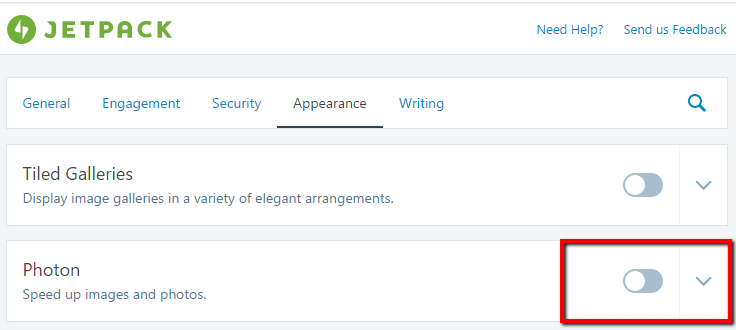
    To enable photon, install jetpack, and then go to jetpack -> settings, click on the appearance tab and enable photon.
    jetpack photon

    That’s it, Photon is a simple way to speed up your page load speed.

    There is a Downside

    Once they are uploaded that’s it, you cannot clear the cache if you need to edit the image you will need to rename the image and re-upload it.

    I have worked with a couple of clients where Photon has messed up posts because of this.

    No Compression

    Photon does not losslessly compress your images so it’s a good idea to do that before they are sent to the cloud (see my post on WP Smush)

    Wrap Up: Jetpack Photon

    Google rewards fast loading websites with better listing position.  Any thing you can do to improve page load speed is a good thing.

    Jetpack is super simple but if it messes up the only way to fix it is to disable the feature on the plugin.

    Photo Credit: IPASadelaide Flickr via Compfight cc

  • WP Owners Club

    WP Owners Club

    I’ve created a new Facebook group for my clients and readers of WP Dude called the WP Owners Club.

    It’s a closed group but I’m inviting all my clients and everyone who reads WP Dude to join.

    Gain Membership

    To join the club follow this link and request membership, I’ll approve everyone

    Join WP Owners Club>>

    What Your Can Expect

    It’s very early days but I expect to provide the following to club members.

    • Answer any technical questions posed to me
    • Upload video tutorials
    • Live webinar events on how to fix your big issues with WordPress
    • Club member website reviews
    • The list goes on just let me know

    It Your Club

    Tell me your struggles with WordPress as a website owner and I will create content that solves your issues.

    It’s All Free

    All the content, tutorials and live events will be 100% free.

    Is It Completely Altruistic?

    Of course not, if there are any major technical issues with your site I hope the WP Owners Club will promote you to request a quote for my services.

    Wrap Up – WP Owners Club

    I hope to see you in the club house over at Facebook

    When you join I need you to tell me what your biggest problem with WordPress is so I can tailor the tutoruals and free vents I provide.

    Join WP Owners Club>>

    Photo Credit: Basic LA Flickr via Compfight cc
  • It’s The Most Websity Time Of The Year

    It’s The Most Websity Time Of The Year

    Has another year streaked past us again? It’s The Most Websity Time Of The Year.

    It’s becoming a bit of a Christmas tradition in the WPDude e-household to write a blog post about the latest festive plugins out there.

    I’ve hung up the decorations on my home page and thought I would share my favoruite Christmas plugins to decorate your site.

    Xmas Lights

    My personal favourite, I jazz up the header of my website with this every year

    https://en-gb.wordpress.org/plugins/xmas-lights/

    WP Super Snow

    Add a snow fall effect to your site.

    https://en-gb.wordpress.org/plugins/wp-super-snow

    Xmas Decoration

    Add a classy festive banner to the top of yoru site with a jolly on-hover effect.

    https://en-gb.wordpress.org/plugins/xmas-decoration/

    Christmas Music

    Drive your site visitors to the very edge of madness with Jingle Bells on a recurring loop.

    https://en-gb.wordpress.org/plugins/christmas-music/

    Christmasify

    If you want to go the whole hog we have music, snow, Santa, festive fonts, the full monty.  Please send me a link if you use this one on your site please please please.

    Christmasify!

    VIDEO

    See these garish plugins in action in terrible hi-def video.


    Wrap Up

    If you cannot have a little bit of fun on your website at Christmas when can you, Merry Christmas or Happy Holidays whichever you prefer.

    If you need help with your WordPress site get a no obligation quote.

    Photo Credit: DaPuglet Flickr via Compfight cc

  • Canva Review

    Canva Review

    I’ve started to use an excellent tool called Canva.com to create images for blog posts, ads and other online needs, here is my video Canva review.

    Canva is a freemium online  image manipulation tool, I have been using it for about one month and as a non-designer I am very very happy with the results.  It is free to sign-up but there are some advanced options which costs $11 per month.

    I’ve struggled with very expensive and complicated image manipulation tools such as Photoshop. Canva solves that.

    I’m no designer, Canva also solves that with pre-made look and feels.

    Lets get into the meat of the review and check out my video review

    Video

    Wrap Up – Canva Review

    Canva has changed the way I create images for the web and for my clients, it’s simple and convenient, there is no endorsement or affiliate gain here, it’s just a tool I’m using regularly.

    Remember the attribution I mentioned in the video you can see that below.

    Photo Credit: archer10 (Dennis) 84M Views Flickr via Compfight cc