Neil Matthews

Category: General Blogging

  • How I Find Royalty Free Images For My Blog Posts – The Next Generation

    How I Find Royalty Free Images For My Blog Posts – The Next Generation

    This is take two of this blog post, I used to use a service called compfight.com to find image for my blog, but sadly it has been taken offline and redirects to paid stock photo company.

    Here’s the old post about compfight https://dev.neilmatthews.com/find-royalty-free-images-blog-posts/

    So I went on a search for a new service where I could search for free images for my blog posts.

    My search found unsplash.com which I’ve found to be even better than compfight.com

    Here’s a video tour of unsplash.

    Video

    Wrap Up – How I Find Royalty Free Images For My Blog Posts

    Like I said this is even better then the original service I used Compfight, and I’m really happy with my find, happy image searching to you all.

    If you need help with your WordPress site please head over to the work with me page to get a no obligation quote.

    Photo by Ryan Kwok on Unsplash

  • What Is Browser Caching

    What Is Browser Caching

    what is browser caching


    What Is Browser Caching

    In this video post I explain what browser caching is and how it can speed up your website.

    I’ll also explain why your Web Developer is always telling you to clear your browser cache: )

    Video


    Wrap Up – What Is Browser Caching

    If you need help speeding up your WordPress site by implementing browser cache (amongst other things) get in touch and I’ll send you a quote for my fixed price package to speed up your slow loading WordPress site.

    Photo Credit: trendingtopics Flickr via Compfight cc

    Doing the seo dance – what is browser caching.

  • How To Improve Email Deliverability

    How To Improve Email Deliverability

    How To Improve Email Deliverability

    How To Improve Email Deliverability

    I’ve been having deliverability issues with one of my email addresses [email protected].  I would send a client emails from that address and get no reply.

    I was not getting a reply because it was not being delivered. Not great I’m sure you will agree.  These were clients who had requested quotes, approve things and paid, then it would look like I had disappeared down a block hole with their cash.

    I would get in contact using my gmail account and the conversation would continue.  I’m red faced and my reputation is dented.

    The Investigation

    I began looking into why this was happening and it turns out big email providers like gmail or yahoo like you to jump through some hoops to prove your email is valid.  If you don’t jump through those hoops your emails may be discarded and never get to the intended recipients.

    Let me introduce you to some new terms SPF, DKIM and DMARC.

    These are the hoops you need to jump through.

    How To Check If Your Domain Is Okay

    Here’s a tool to check to see if your site / email has any reputation issues.

    mail-tester.com

    With this tool our send an email from your address to a special email.  The email is accepted by them and a report on your deliverability is created.

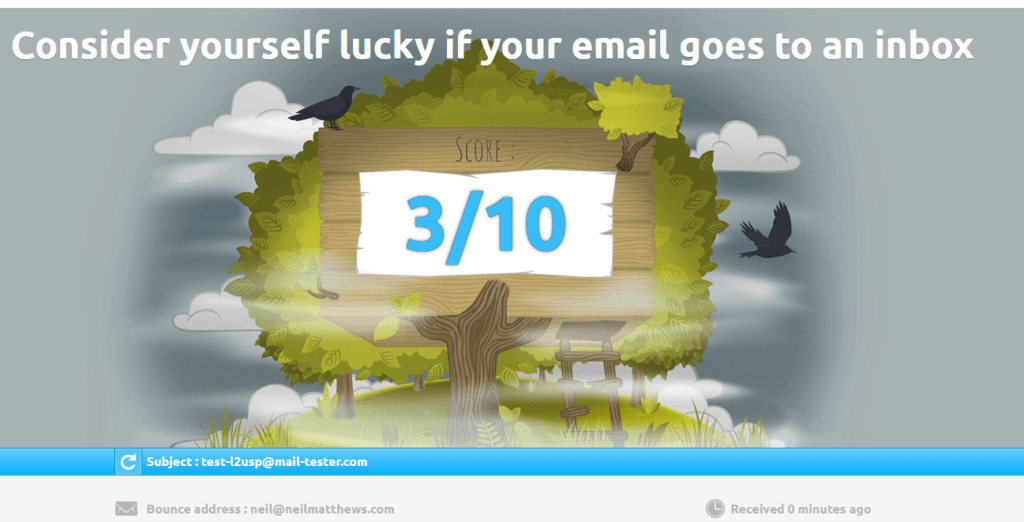
    I’m not using neil@neilmatthews.co so I’ve decided to run neil@neilmatthews.com through this process and ensure my new email is valid.  The results were unsettling.

    The issue is I have an invalid SPF record, no DKIM or DMARC records setup.  The rest of this post will be about setting up these records and hopefully I will have a much better score for my email by the end of this post

    Warning you only get three free tests per day of this tool, use them wisely.

    SPF – Sender Policy Framework

    SPF or sender policy framework is an entry on the DNS of you hosting server that says an IP address is valid to send on your behalf.  You can send an email with a from address of [email protected] from any server, but we are going to add a control that says only email sent from my servers IP are valid.

    To add this record we need to login to our hosting panel and find the DNS entries (see link below to explain how to do it for your host).  I’m with bluehost.

    So I need to add an SPF record which say include any IP from bluehost.com to allow as a sender

    v=spf1 a mx ptr include:bluehost.com ?all

    Don’t worry about the content of this record,.  on the link below you will find out what to add to the entry.

    If I used another email service.  that sends emails on my behalf would need to add this too, for example if I used Sendgrid for transactional emails.

    Here’s a very useful guide on a host by host basis https://www.mail-tester.com/spf/

    Here’s a video of me adding an SPF record to bluehost.


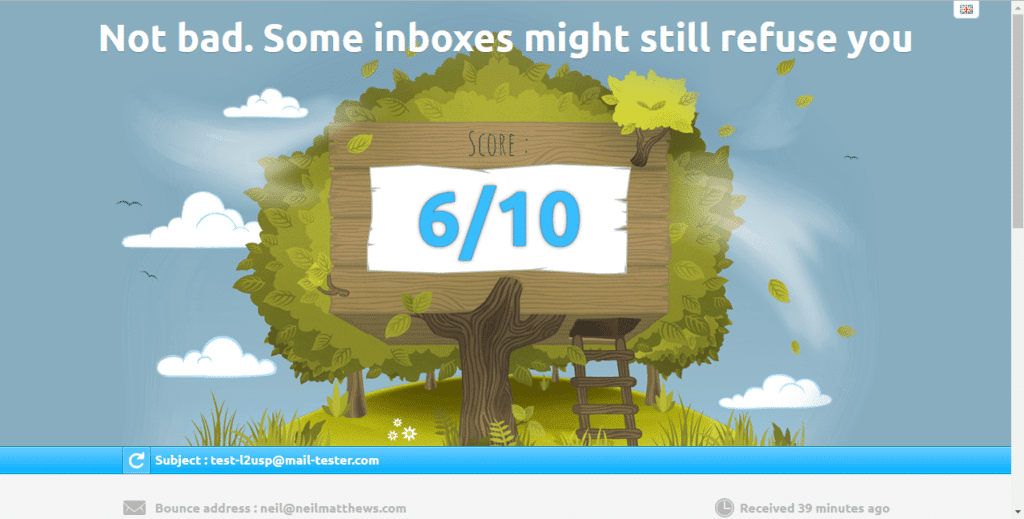
    My score after adding an SPF record.

    DMARC – Domain-based Message Authentication, Reporting, and Conformance

    We need to add another record to our DNS server a DMARC record

    This record tells the remote server what to do with an email if it does not authenticate correctly.  The options are none, reject or quarantine.  I’ve set my own DMARC record to be quarantine.

    We add a record for the domain _dmarc  with an entry like this v=DMARC1; p=quarantine.  Here’s a video of me adding a DMARC record.


    DKIM – Domain Key Identified Address

    Things are getting a little more squirrely here.  We are going to create a public private key pair to add some encrypted tests for our email domain.

    I found a number of documents to create your own DKIM records but to be honest I could not get them to work.

    In the end I contacted Bluehost support and asked them to create the key pair and add a DKIM record for me.

    There is a new txt record that looks like this

    _domainkey

    v=DKIM1;p=MIGfMA0GCSqGSIb3D{ A CHUNK OF THE KEY HAS BEEN DELETED FOR SECURITY REASONS }XxuU4iy1CI6KWLRhwIDAQAB


    The Results

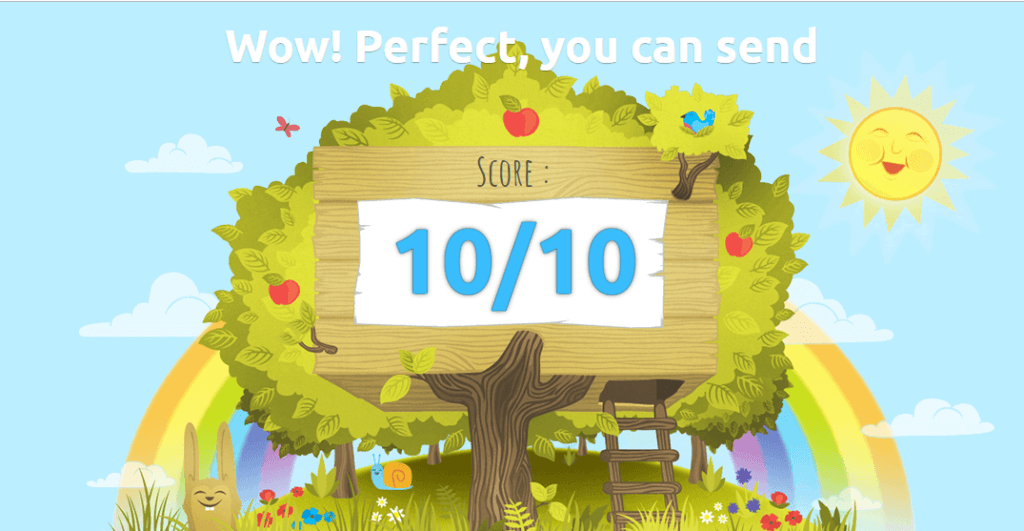
    Here are my final results things are looking good.

    UPDATE – Mailchimp

    As I went to send this email to my mailing list I realised I need to add an SPF record for mailchimp too.  I added this record:

    v=spf1 include:servers.mcsv.net ?all

    I also needed to add a cname record to setup DKIM for Mailchimp.

    Check out this docuemnt for full details https://mailchimp.com/help/set-up-custom-domain-authentication-dkim-and-spf/

    Wrap Up – How To Improve Email Deliverability

    My domain is now setup and hopefully I won’t lose any more emails.

    If you need help setting up email deliverability for your domain jump over to the work with me page.

    Photo Credit: IISG Flickr via Compfight cc

    Doing the seo dance how to improve email deliverability

  • Do You Need A Virtual CTO?

    Do You Need A Virtual CTO?

    Do You Need A Virtual CTO

    Do you need a Virtual CTO also know as a Virtual Chief Technology Officer?

    I’m offering a new consulting service that I’m calling the Virtual CTO package.  Let me tell you more about it.

    What Does A Virtual CTO Do?

    If you’ve worked with me in the past, you probably came to me with an IT issues you wanted me to fix.

    The Virtual CTO flips that on it;s head a little and I become an integral member of your team to build an IT strategy to deliver your business goals.

    You get access to my years of IT experience and knowledge to make IT work for your business.

    Why I Want To Be Your CTO.

    My favourite types of projects are consulting ones.  I’m called in with a problem to solve, I find a technology solution and implement that.

    Being your CTO is like a large ongoing consulting project where we have a series of business goals we need to achieve and lots of IT problems to solve.

    What We Will Do Together

    If you retain me as your virtual CTO we’ll do the following together …

    1) Create A Technology Strategy For Your Business

    We’ll get together in a virtual meeting a create a technology strategy to match your business goals.

    W’ll look at your business goals and we’ll create a plan to use technology to hit those business goals.

    I’ll document that and create an action plan.

    We’ll costs out the strategy to meet your budget, then the hard work begins.

    2) I’ll Implement That Strategy

    I’ll work to implement that strategy so we can hit your business goals together with tech.

    Some of the items I’ll do myself but we may need to outsource other aspects, but we’ll cross that bridge when we come to it.

    I’ll either do or manage the process to get our technology strategy full functional.

    3) Get Results

    The result of this ongoing consulting project is IT that works for your business.

    We can use IT to automate, streamline, scale and increase your bottom line.

    My Credentials To Be Your CTO

    I’ve worked in IT all of my career, that’s over twenty years.  I’ve spent a lot of time in large corporate IT departments before starting my own IT business.

    Here are some of the big corporate IT companies I’ve worked with PWC (Acconting), UK National Health Service, Nissan (Automotive), Santander (Banking), Aviva (Insurance).

    I’ve started my own IT company WPDude.com (as you probably know), more than 10 years ago.

    Here are some bullet points on my experience:

    • I’ve built websites (more than I care to remember)
    • I’ve built apps
    • I’ve built teams
    • I’ve outsourced work
    • I’ve built processes to make business run like clock work
    • I know how to market an online business
    • I know how to sell online
    • I can integrate across technologies
    • I can automate
    • I can program
    • I’ve built sales funnels
    • I’ve built ad campaigns
    • I’ve built lead magnets
    • and lots lots more …

    In short I can make IT work for your business.

    An Example

    Here’s a hypothetical example of what we could do together.

    You own an online e-commerce business that sells physical goods. We get together and create a strategy plan.  Your business goal is to increase sales from your WooCommerce store.

    We find that shipping is a bottleneck, that getting repeat business is an issue and cart abandonment is a problem.

    Our action plan looks like this:

    Outsource shipping to fulfilment by Amazon, implement extensions in WooCommerce to automatically send new orders to Amazon to send our from their warehouses for us.

    To get repeat business we implement an automated funnel in Mailchimp to reach out to current customers every 30 days with alerts about new products that we have that match the ones they have already purchased.

    We install tools that monitor for an alert to cart abandonment.  If a user adds an item to their cart and begins the checkout process and then abandons it we know about it.  We send an automated reminder to that person using WooCommerce extensions and Mailchimp.

    It will have details of their cart, and a nice 10% discount if they complete checkout, a single click brings them back to your store with their cart intact to checkout to increase sales.

    Who Is This For?

    This is for owners or CEOs of small online business that need help implementing an IT strategy.

    You are growing an online business but technology is getting away from you, you don’;t have time to know all the tech out there and don’t want to.  you don’t have time.

    You have money to invest in a team and technology but not the time to do it yourself.

    Your Investment

    If you hire me as your Virtual CTO it’s a monthly ongoing retainer model.  The minimum amount is five hours per month at my consulting rate of £50 per hour.  That’s £250 per month.

    If you want to get things done more quickly you can increase my retained hours.  If our strategy action plan calls for more work again you can increase that minimum.

    I have limited time available for this type of work, so I have opened up four Virtual CTO client slots.

    Limited Lifetime

    I don’t see this as a continuous engagement, rather we’ll build the strategy, implement it and there will be a natural end to the consulting and we’ll end the retainer.

    Application Process

    As mentioned I only have four two (slots are going quickly)  available slots for this type of work, so I have an application process, complete this form and tell me how I can help your business and we’ll book a call to start a conversation to see if I’m a good fit to  work with you as your Virtual CTO.

    Wrap Up – Do You Need A Virtual CTO

    I’m excited to work with people as their virtual CTO, if you need direction to get IT working for you get in touch.

    Apply for my Virtual CTO program.

    Photo Credit: ajmexico Flickr via Compfight cc

  • Give Away The What And Charge For The How To

    Give Away The What And Charge For The How To

    I’ve been using a marketing technique for many years, where I give away the “what” and charge for the “how to”. Using marketing content I’ll teach people the “what” and I’ll sell services or training to give the “how to”.

    Marketing content can be your blog posts, your YouTube videos or your free downloadable e-book.

    Then charge for the how to;  the technical implementation, details on how to do the “thing”.

    The “What” Shows You Are An Expert

    When you can articulate how something works with the “what” free content you are showing yourself as a subject matter expert.

    You can educate your audience that there is this “thing” and it may be useful to them in some way.


    The How To Makes The Denaro

    In the what phase you may show how to do the “thing”, but it might be too technical for many people, or people just don’t have the time to do it.

    Or, the how may be a new concept, people don’t understand yet, their appetite is whetted by the what and they choose to learn more.

    At this point, the person you marketed too for free can choose your premium option and pay for your services or premium products.

    EXAMPLE: Diary Mapping

    Here’s a real life example of this with my DiaryMapping.com course, which goes fully live today (what’s the chances of me writing this post on the day I go live, you can’t plan things like this).

    Diary Mapping brings in new potential students with a free Understanding Diary Mapping course and if they want to go deeper there is a premium How To Diary Map course for $9.00.

    The “What “For Free

    I’ve created a free course that brings the new concept of a diary map to people.

    I’m using this free “what” guide to introduce my concepts to people at no risk.  I’m explaining what Diary Mapping is, the terminology and how it can help people to tame their to-do list.

    If a potential student is interested they can move onto the how to, if it’s of no interest, no problem they can move onto the next thing in their day and ignore the premium course.

    The How To For A Fee

    I have a second premium course on the same site which goes much more deeply into the how to Diary Map subject.

    I explain how to build a diary map, how to control their to do list etc.

    The people who pay for this have been through the free “what” phase and have realised this is useful to them.

    It’s not too pushy and it gives a way to test what you have before anyone buys.

    Wrap up – Give Away The What And Charge For The How To

    Giving away the how and charging for the how to has worked for me in WordPress consulting jobs, Courses and other areas of my business.

    Give it a go, and remember to check out my free Understanding Diary Mapping course to see this process in action

  • Plugin Quality Control

    Plugin Quality Control

    How can you know if that new plugin you are about to install is of a high quality? How can you setup some kind of plugin quality control process to ensure all new plugins that are added to your site won’t break things?

    In this video post I’ll show you how to check the quality of any plugins you are about to use.

    Anyone can create a plugin an upload it to the WordPress plugin, there are approval processes but there is no rigorous checking of the codes compatibility with themes and other plugins, so sadly it’s a very common thing that I see that a plugin will crash a site.

    Use the techniques in my video to create some plugin quality control.

    Video

    The Process

    • Install from the WordPress dashboard, their search rules out a lot of plugins that are not being actively developed.
    • Visit the plugin page on WordPress.org to get a full list of stats.
    • Check last update to ensure the plugin is actively developed, plugins not actively developed can hold vulnerabilities or bugs.
    • Check the plugin is tested to your version of WordPress, check the plugin is compatible with your version if you are using an older version of WordPress.
    • Review the ratings avoid all 5 stars and lots of 1 & 2 stars. Look at the reviews to see what people are complaining about.
    • Look at the support forum ensure the plugin developer is actively engaging in support, avoid plugins where there are zero replies.

    Links Mentioned

    WordPress Plugin submission guide

    Contact form 7 Plugin Page

    Wrap Up – Plugin Quality Control

    Plugins clash with themes, and other plugins all the time, installing the wrong plugin will bring your site down and end up with you visiting this page to ask me for help.

    Do yourself a favour and do some plugin quality control before you click that install button.

    Photo Credit: classroomcamera Flickr via Compfight cc

  • Guten Tag Gutenberg

    Guten Tag Gutenberg

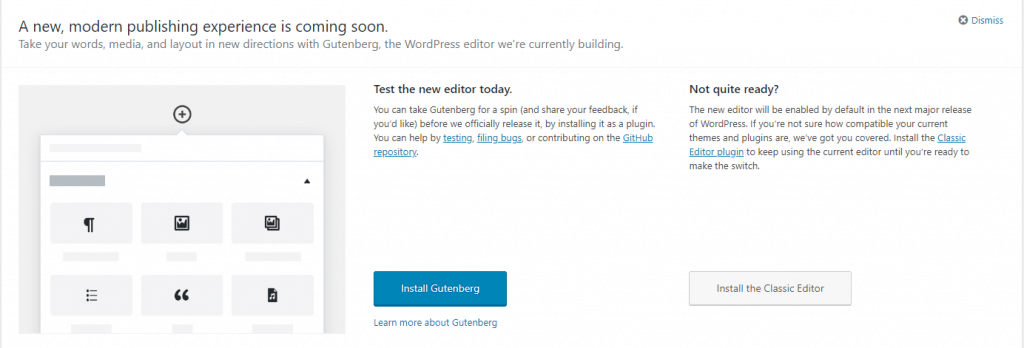
    You have probably seen the Gutenberg prompts on your website, letting you know that a new editor is coming to WordPress.

    In this post I want to tell you what Gutenberg is, how it will impact your WordPress site, and how to negate any problems it introduces.  Lastly I’m offering a testing service for you to trial the new editor in a safe environment.

    What Is Gutenberg?

    It’s a replacement for the standard WordPress text editor, it provides a visual way to drag and drop sections of content and arrange them on your page.

    If you have used one of the new themes on the market you will already be familiar with the idea of a visual editor.

    At the core of this process is the idea of a block.  You can drag and drop blocks and then put content into the block.

    There are text blocks, heading blocks, video blocks, galleries, images, the list goes on.  As Gutenberg matures more and more blocks will become available.

    For example gravity forms has developed a Gutenberg block so you can add and display a contact form with this new system https://docs.gravityforms.com/gravity-forms-gutenberg-block/.

    In the past a plugin developer may have created a shortcode to display content on the front end, in the future they will be encouraged to develop a content block.

    Blocks will be responsive out of the box, so you don’t need to worry about the size of the screen your site is being viewed on.

    You can easily add columns to your post or page.  So a three column row with different blocks will be easily achieved.

    Gutenberg is a visual builder so the design you make on the page will be reflected on the front end, not something we currently have with the

    Gutenberg will be merged into WordPress at version 5 coming later this year, but it’s a very big change so you should be ready for it.

    gurtenberg

    What If It Breaks My Site

    There is a high probability that some of the themes out there are not going to be compliant, this has been taken into account and at version 5 you can install a plugin which will revert to the classic editor.  You can download it from here:

    Classic Editor

    Video Demo

    Here’s a walk-through of what you can expect with the new editor.

    My Thoughts On Gutenberg

    I have my usual grumpiness about major changes being forced upon us (I’m still not happy with the theme customizer people), why Gutenberg cannot just stay as a plugin is beyond me.

    I’m glad there is a planned roll back route with the classic editor being made available as a plugin.

    But overall I think this will be a good thing.  I’ve been using visual editors with the modern themes for some time now and they are great.  They allow positioning and formatting of content in a much more visual manner.

    Here’s a quote from the WordPress site

    Gutenberg is more than an editor. It’s also the foundation that’ll revolutionize customization and site building in WordPress.

    I see a major shake up in the theme world coming because of Gutenberg.

    Staging Service

    I’m offering a staging and migration service if you want to test Gutenberg in a safe development environment.

    • I will, migrate your current live site into the test environment.
    • Activate the new editor.
    • Give you access to test your site and try Gutenberg.
    • Offer support for any issues you may have and offer suggestions as to whether the classic editor would be a good icea until your theme is made Gutenberg compliant.
    • You have access to that development area for one day.

    I’ve build 5 test beds that will be available on a first come first served basis, let me know if you want to book a slot.

    This service costs £29 for a day’s hire of my staging environments.

    My existing maintenance clients will get access to this service for free.

    If you want to book the staging areas, drop me a link from my WordPress technical support page.

    Wrap Up – Guten Tag Gutenberg

    Winter’s Gutenberg is coming I recommend you test your theme with the new editor to ensure this big update doesn’t break anything.

    It’s going to easier to build great looking posts and pages with Gutenberg, but expect some snagging issues once it’s first released while your themes and plugins are made compliant.

    Photo Credit: Guy dicarlo Flickr via Compfight cc

  • Good King Website-Las

    Good King Website-Las

    I cannot believe another year has sped past us.

    It’s the time of year when I write my annual post about installing festive plugins to decorate your website.

    There are dozens of plugins which allow you to jazz up your site, here are my favourites.

    WP Super Snow

    Have a flurry of snowflakes falling over the header of your website.

    https://en-gb.wordpress.org/plugins/wp-super-snow

    Xmas Lights

    Get a string of twinkly lights for the header of your website

    Xmas Lights

    Christmas Music

    Drive your site visitors to the very edge of madness with Jingle Bells on a recurring loop.

    https://en-gb.wordpress.org/plugins/christmas-music/

    Christmasify

    If you want to go the whole hog we have music, snow, Santa, festive fonts, the full monty.  Please send me a link if you use this one on your site please please, please.

    Christmasify!

    Xmas Decoration

    My preferred plugin is Xmas decoration, it adds a classy Christmas garland to the top of your site, a festive splash of colour on my minimalist site.

    Xmas Decoration

    Video

    Let’s pull that all together and see what it looks like

    Wrap Up

    If you cannot have some website fun at this time of year when can you.  Merry Christmas or Happy Holidays, whichever you prefer.

    Photo Credit: RomanK Photography Flickr via Compfight cc

  • Do You Need WordPress Web Push Notifications?

    Do You Need WordPress Web Push Notifications?

    As you are wondering the world wide interwebs, you may have noticed a new thing, websites are asking if you want push notifications when the site update. In this post I’m going to talk about WordPress web push notifications and do you need them.

    What Is WordPress Web Push Notifications

    When you visit a site with a supported browser such as Google Chrome a popup will appear on your screen asking if you want to get notifications.

    Already I’m annoyed yet another popup! I’ve gone for a simple red icon bottom right of the screen.

    You don’t need to enter any details, just click on the popup and it is saved.  This is saved in your browser settings.  A unique ID from your browser is sent to your push notification supplier, in my case OneSignal.com.  That’s the sign-up process.

    There is a console on OneSignal where I can send out a WordPress web push notification to my subscribers.  The push appears bottom right of my browser and looks like this.

    wordpress web push notification

    Setting Up WordPress Web Push Notifications

    I’m not going to recreate the wheel, here is a great tutorial to make your site use push notifications.

    http://www.wpbeginner.com/wp-tutorials/how-to-add-web-push-notification-to-your-wordpress-site/

    My Opinion

    This is just my opinion, and my feeling, but I don’t want all the sites I follow jumping onto my browser screen shrieking that there is a new blog post, I prefer to coral all my blog posts into my feed reader or get them in my inbox for later reading.

    Do we need another notification?  Think about your mobile phone, it beeps at me too many times, and I’ve deactivate a lot of mobile push notifications.

    Browser notifications are intrusive, they popup and demand your attention when you are working at your desktop, flow is broken no matter how focused you are.

    I’ve effectively used web push for my helpdesk software notification and live chat software which is client related.  I need that alert, but do I want an alert jumping onto my desktop when Johnny posts about his new pet cat?  No I don’t.

    Experiment

    I’m adding push notification onto WP Dude until Thanksgiving 2017.  This will allow you, the reader, to see push in action if you have not seen it, and get an update about my blog posts to see if you like it.  I might even try to sell you some services, how annoying.

    I’ll be monitoring sign ups to see how effective this technology is for marketing.  I’ll look at sign up rate and click through from my push notifications.

    I don’t like the technology so as I sit writing I don’t think I’ll keep it, but I may be surprised by how effective it is. I’m open to this experiment.

    Can I ask you to sign-up to test the system? Click on the red icon bottom right.

    I’ll write a follow up post at the end of the experiment.

    Wrap Up – WordPress Web Push Notifications

    As you can no doubt tell I’m not a fan of this technology.  It is far too intrusive in my humble opinion.  I’m prepared to have my opinion changed if it is effective, but there’s no lead magnet delivery in exchange for sign-up.

    Photo Credit: lenswrangler Flickr via Compfight cc

  • What Is Two Phase Authentication?

    What Is Two Phase Authentication?

    What is two phase authentication?  I’ll tell you, it’s an additional control you can add to you WordPress site to increase security.

    Phase One

    The first phase of authentication is your standard WordPress login user ID and password.

    Phase Two

    You are asked to enter a code which is sent to a device, usually your mobile phone.

    Types Of Phase Two Authentication

    There are a number of ways the code for phase two here are some examples:

    • An app that give you a code
    • You are sent a text message with a code

    Phase Two Has An Expiration Date

    The code sent your device has an expiration date, usually just a few minutes.  This means you have to act quickly and login with your code.

    If you try to use an expired code, you will not be able to authenticate correctly.

    Always With You Device

    The beauty of this process is that the code is sent to a very personal, always with your device, your mobile phone.

    A hacker could crack your user ID and password but they would have to go to another extreme level and find you and then steal your device to complete the process.

    I like to think of security as a series of layers of control, the more layers the more annoyance you give to the hacker.

    My Preferred Tools For Two Phase Authentication

    My preferred tool is from Google and it’s called Google Authenticator, it is an app you install on your phone and a plugin you install on your site.  Here are the links.

    https://en-gb.wordpress.org/plugins/wp-google-authenticator/

    Android App

    Apple App

    VIDEO – Two Phase Authentication In Action

    Here is a video walk though of me creating a user with 2 Phase authentication.


    Wrap Up – What Is Two Phase Authentication?

    It’s an additional level of authentication.

    Just because you have 2 phase authentication activated, does not mean you are 100% safe, if the hacker has ftp access they can deactivate the plugins or create a new user which is not authenticating.

    As I said previously I think of security as a multiple layer cake, the more layers, the tighter the security.

    Do you need help hardening the security of your WordPress site, why not get a quote.

    Photo Credit: drpeterrath Flickr via Compfight cc

  • Why Has MY Site Been Hacked?

    Why Has MY Site Been Hacked?

    “Why has my site been hacked?”. I hear this a lot from site owners who’s site has been attacked, and I inevitably tell them.

    “IT’S PROBABLY NOT PERSONAL”

    People feel violated about a hacked, and they have a need to know why this particular blog has been targeted.  In this blog post I want to shine a light on the motivation behind a hack.

    Why Sites Get Hacked?

    Sites are hacked for a number of reasons, here are the tops reasons I see:

    • For kicks – there is an intellectual challenge to hacking a site, and some people do it for kicks, they will leave a little defacement on your site. It’s not a direct attack it’s just a game to them.
    • For SEO – the hackers create links back to their site to improve their own SEO.  The more links the more Google will rank your site, so hackers add links.
    • For Traffic – the hackers add redirects to their site for more traffic and more business.  They capture hard-earned traffic from your site and send it to theirs.
    • Phishing – a hacker installs phishing sites on your site to con people into giving over their details.   The illegal activity is done on your site, not on one that can be traced back to the hacker.
    • It’s an attack – I said it’s probably not personal but sometimes it is a direct attack on your business.  I’ll talk about this a little later.

    Who Does The Hacking

    So the question is who is hacking your site, there are a few groups of people who attack sites.

    Black Hat Hackers

    These are the hard core hackers that find and open up new ways to exploit sites.  These people are frankly brilliant, their technical skills are high, they dig into code and server configurations looking for a route in.

    These people find the route into WordPress sites and pass it to the hacking community.

    Script Kiddies

    A derogative term for someone using the techniques found but a black hat hacker and exploiting them.  They don’t have any real skills, they just reuse other people’s work.

    In my experience these are the majority of hackers I come across.

    Brute Force Bots

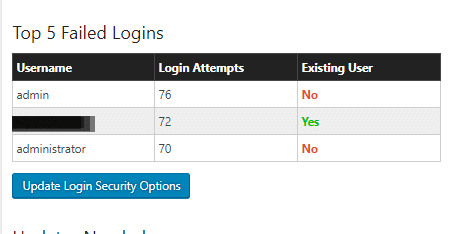
    Sometimes it’s not that clever and it’s simply a bot going to your login form and trying common user name and password combinations over and over again.

    Install Wordfence and you will see this is a very common thing.  Here is a screen dump of login attempts on my site.

    why has my site been hacked

    Vulnerabilities In Core, Plugins and Themes

    The main way people get into word press sites is through a bot network brute force or by exploiting vulnerabilities in WordPress core, themes or plugins.

    Using scanning tools they will look for a file on your site from a vulnerability, find it then exploit your site.

    There is a great tool called wpscan which can be integrated into systems to scan for issues, I have tools for my maintenance clients to do this, then I close the vulnerability.

    They keep a database of vulnerabilities which makes very interesting reading, I can bet a plugin or theme you have used is in the database. https://wpvulndb.com/.

    Remember that person I mentioned earlier, the back hat hacker, they are probing all the time for vulnerabilities and are always one step ahead of things.  The hacker does not add entries into this database, the security community needs to find these and publish them so the hacker is always ahead of the game.

    WordPress Is A Low Hanging Fruit

    WordPress powers 27%+ of the internet, it’s a low hanging fruit, finding a vulnerability in WordPress opens the door to more hacking potential than some obscure website scripting system.

    This is why WordPress does get hacked, more people are investing time finding loop holes.

    Unless It Is Personal

    I said it’s probably not personal, but sometimes it is.

    Look at your content, is it controversial?  Look at what your business does, would it upset people?  If the answer is yes hackers may be coming at you personally.

    I’ve seen LGBGT and religious sites get attacked.  I’ve helped a site supporting Charlie Hebdo with a request security review because they knew they were about to court controversy.

    Politics, religion, money difference of opinion opens you up to hackers.

    What You Can Do About It

    Here are some tips to keep your site protected.

    • Have full backups which you save offsite so you can recover from a hack.
    • Keep your site updated to close the vulnerabilities as they are found and fixed.
    • Harden security on your site, here is a great guide https://build.codepoet.com/tag/hardening-wordpress/
    • Install plugins like WordFence of iTheme security to monitor for attacks.
    • Use a decent hosting company, cheap hosting often does not have the best techs on their team to keep the servers secure.
    • Harden the passwords you use and change them often, consider implementing two phase authentication (I’ll write about this in my next post).
    • Give me a shout, I offer security hardening and monitoring as part of my maintenance plan or as a one off package.

    White Hat Hacking

    I hack people’s sites all the time in my capacity as a WordPress consultant.  I need to get access to fix things, it’s not hard you only need a little bit of access.

    It’s white hat and is benign, if I can do it then you can bet a black hat hacker on the edge of the technology can get in.

    Wrap up – Why Has MY Site Been Hacked?

    It’s probably not personal, it’s some punk kid in their bedroom getting access to your site for kicks probably, unless it’s not :).

    Photo Credit: nielskirkedal Flickr via Compfight cc
    SEO bullshote why has my site been hacked? No really why has my site been hacked?

  • When A Grammar Nazi Goose Steps Over Your Work

    When A Grammar Nazi Goose Steps Over Your Work

    You’ve just published your latest blog posts.  You are pretty happy with your work.  You are hoping it has communicated an idea you have well. A few moments later, PING! you get a message from the Grammar Nazi, reaching out from over the interwebs to chastise you.

    Here’s how I handle this type of particularly persnickety person.

    What Is  A Grammar Nazi?

    A grammar Nazi is someone who reaches out to a creator in a critical way.  They are obsessed with proper use of grammar and spelling, they fell almost physical pain if somethng is not right, and their major failing IMHO is their need to reach out and correct people, often in a deriding fashion.

    They will point out the typos in your content, grammar issues and other faults.

    They usually think they are doing a great service cutting you down to size, but more often it’s pretty hurtful.  There is very little thought given to the feelings of the recpient, as the image above suggests, they have found an error on the internet and they must correct it.

    Now I’m Holding My Hands Up

    I have shockingly little patience for spell checking, there have been many times when I’ve clicked publish and there are typos or grammatical errors.

    My thinking is, have I communicated my idea, have I created value with my content? Sloppy yes, but to shake your fist at me across the internets,  I think that is a little harsh.

    For the perfectionists out there this will cause the big vein in your head to pound, but hear me out, sometimes the reaction can be offensive and hurtful, I’m sharing my side of the story.

    Sometimes It’s A Genuine Offer Of Help.

    Not all communications I get are nasty, the vast majority are genuine offers of help “Hey dude there is a typo on the last line of your sales page”.

    I’m fine with that, if you have sent me that type of message I’m not getting at you, but there is a certain type of person out there, when confronted with a typo will erupt and e-march into your country.

    Sometimes It Is just Nasty

    It happens all the time.  Should you have the audacity to press the publish button, and things are not 100% correct.

    Here are some that stick in my mind.

    1. “You need to get your shit together!” said the Nazi, he told me he liked my content but there were some typos that I needed to address and get my Sh1T together or no-one would take me seriously. FFS it’s just a blog post not the declaration of Independence.
    2. I sent out an email blast, and the reply was “DO YOU EVEN SPEAK ENGLISH” I checked the blast and there was some missing punctuation.  Ouch, I followed your link and you were not creating anything.
    3. A copy writer sent me a harsh critique of my blog post and then tried to sell me his services.  Hell no!

    I’ve had dozens of other free critiques on the same line.

    How I Handle Their Missives?

    I have a two ways to handle a Grammar Nazi nowadays, in the past I would have girded my loins and gone into battle, but age has mellowed me.

    Stage one take a deep breathe, and remind myself, this is of absolutely no consequence.

    If they are mean, they are off the team, I unsubscribe them and never send them any of my future updates. It’s as simple as that, I have no time for angry people.  They are not getting the content I gave up my most finite resource for, time.  They are also banned from hiring me, but to date I’ve not had a Grammar Nazi also be a client.  They tend to lurk and consume free stuff not hire me.

    If the notification is in a nice spirit a simple “thanks for the heads up” reply is what they get.

    No drama, which leads me to my final piece of advice …

    Don’t Feed The Trolls Grammar Nazis!

    The last thing you should do is engage, don’t get angry, don’t confront, don’t even reply.

    Take a deep breathe, accept the criticism.  If you want, make their suggested change, if not so what, it’s your blog post.   You owe those sort of people nothing.

    To paraphrase, no-one raised a statue to a grammar Nazi.

    My favourite thing to do is just leave the offending typo for a few days, you know they will be watching, and you know their OCD will be making them uncomfortable 🙂

    Wrap Up – What To Do When The Grammar Nazis Goose Step Over Your Work

    I’ve been guilty of pointing out typos in the past, once you get a grammar Nazi on your case you realise how unpleasant that can be.  My plea to you is think before firing off your grammar critique and word it nicely, don’t be the Grammar Nazi.

    If you need help banning a Troll or Grammar Nazi from your site I have ways and means, get a no obligation quote.

    I is not goin to chaneg this sentance no mattir wot you sez, if you get the meaning that is all that iz importint

    Bonus reading Eats Shoots and Leaves.