Neil Matthews

Category: General Blogging

  • How Do You Solve A Problem Like a Plugin

    plugin

    One of the greatest things about WordPress is the huge community of individuals developing and supporting thousands of plugins for free.

    I am a plugin junkie, as soon as I notice a new plugin it’s downloaded and installed before you can say “Backup your database“.

    A problem I have seen with plugins is the support for them is provided free and on a best endeavours basis. What happens when the support is withdrawn and your plugin stops working.

    Plugin Unplugged What Now?

    A client of mine was very keen to use a particular plugin, but it was not working as it should have on his blog. The plugin installed and was activated correctly, certains parts of the code worked, but the principal part of the add-on did not work.  I was called in to make the plugin work.

    WP Dude to the Rescue, Cape-a-Flapping

    I thought this would be a very simple fix, find the root cause, search the developers support forum and apply the fix,  but to my horror, I found that the support site was down, and  it was down in a particularly weird manner, when I accessed the site, it returned a 403 forbidden error.  This means the owner of the site had secured the site so only authorised users could access the information.

    I suspected something was amiss with the plugin and the developer had shut down support after an avalanche of support calls.

    I could not find out what the problem was, or contact the developer, so how could I fix the problem?

    They Owe You Nothing, Nothing At All!

    If you are using a free plugin, and have not paid for a support contract, your use of the plugin is “as is”.  You cannot expect support.  Remember the developer has spent many hours developing this solution for free.

    Most plugins are released with a GNU license and the plugin in question states:

    This program is free software; you can redistribute it and/or modify it under the terms of the GNU General Public License as published by the Free Software Foundation; either version 2 of the License, or (at your option) any later version.

    This program is distributed in the hope that it will be useful, but WITHOUT ANY WARRANTY; without even the implied warranty of MERCHANTABILITY or FITNESS FOR A PARTICULAR PURPOSE.  See the GNU General Public License for more details.

    You should have received a copy of the GNU General Public License along with this program; if not, write to the Free Software Foundation, Inc., 51 Franklin St, Fifth Floor, Boston, MA  02110-1301  USA

    Search Outside of the Box

    The first thing I did was to search on Google for a solution to the problem, there are two possible outcomes to this:

    1. Someone out side of the support site is writing about and documenting solutions to your problem, Bloggers love to witter on about their successes, there is a good chance the solution is out there.
    2. The solution I used to investigate the problem was to view cached pages of the support site inside of Google to review the deveopers forum and lookup a solution to the problem.  Nothing is hidden on the net anymore.

    Ask Your Social Network

    The majority of bloggers also participate in social networks, why not fire out a question to your social network to see if anyone else has had the problem.

    I participate in Twitter and quite happily help people with WordPress problems if they stick a tweet out into the Twittersphere, fire off the question to your social network, you never know what will come back.

    Bring In An Expert

    Plugins are developed in PHP, a widely understood and used programming language, why not bring in an expert to reverse engineer the plugin and fix the problems you are having, post your problem to the many sites with freelance programmers such as Elance and get your problem solved.

    <shocking self promotion>

    If you need help with wordpress support problems check out my service page

    </shocking self promotion> 🙂

    Find an Alternative

    As I have mentioned there are thounsands of plugins out there.  A quick search will show that most problems requiring a plugin have been solved more than once.  If you cannot get support for your plugin, ditch it and install the competition.

    Am I Still a Junkie?

    I’m taking it one day at a time, for example today I delete three unsed plugins, I think I am on the mend, well until I look at the little widget pumping new plugin news into my head.

  • Cookies But No Millk

    Photo by inajeep
    Photo by inajeep

    I was approached by an artist in residence to a library in the US, he was developing a novel use of wordpress on a shared host which requested library users to leave comments.

    The Problem

    Using worcpress he was inviting users to review his artisit blog/site and to leave comments.

    The problme was that the shared machine in the library was leaving the comments of previous users visible to the next user.  The comments were to be  approved before display so seeing un-approved comments was not acceptable,

    The problem is that comments are held in a cookie and displayed to the commentor.  Because differnt users are using the same machine (and theref0re the same cookie) he data needs to be cleared down somehow.

    The solution

    No easy fix to this one, it was down and dirty and editing the wordpress code base to fix this one.

    A cookie is set in the file wp-comment-post.php, I edited this and added three lines to set the timeout of the cookies.  These lines set the timeout  to a point in the past.  I did it this way rather than removing the cookies as I was unsure how they were used in other parts of the code.

    I added the following three lines just before the wp_redirect command at the bottom of the file

    setcookie(‘comment_author_’. COOKIEHASH,””, time() – 3600);
    setcookie(‘comment_author_

    email_’. COOKIEHASH,””, time() – 3600);
    setcookie(‘comment_author_url_’ . COOKIEHASH, “”, time() -3600 );

    Things To Remember

    Whenever you update the wordpress code base with the next release of WordPress you will need to update the php file.  If the functionaltity I “hacked” is ever changed, a new solution will be required.

    Did It Work?

    Of course it did, my client was very happy with this neat solution, and I was frankly amazed it worked first time!

  • 6 Key Times You Should Backup Your WordPress Blog

    clock

    In my opinion there are six key times you should perform a backup of your wordpress blog.

    1. When You Update WordPress

    The WordPress code is updated regularly, but before you even consider FTPing the latest shiny version up to your host, backup the existing code base and database.

    2. When You Install a Plugin

    I am guilty of plugin addiction and I install loads of new and glittery plugins to my blogs all of hte time, and I often do not backup before I do this.  YOU SHOULD backup befire installing plugins.  Some of them amend your wordpress database, some drastically chaneg how your blog works.  Have a checkpoint to return to if the plugin causes problems.

    3. When You Install/Change Your Theme

    Changing your theme may not seem like a huge event, but consider that many people customise their themes, take a backup of your changes before you change themes and delete your hard design work.

    4.When You Have Written Some Quality Content

    The last post you clicked publish on was awesome and went straight to the front page of Digg.  You need to protect this asset by backing up your content.

    5.When You Install Other Applications

    Many blogs have systems other than WordPress installed on their websites.  I am thinking of things like forums and affiliate systems.  Many of these will share the MYSQL database that WordPress uses.  Backup your WP config and data before begining the install process.

    6.Regularly

    This is n0t really a point in time, but my last key timing for backups is to backup regularly.  Check out the many backup plugins such as Filosofo’s excellent utility and create a scheduled job to backup your blog.  I have my plugin create the backup and send it via email to me.  Then I simply skip the email to my archive.  I know I have a daily backup ready for any eventuiality.

    As a parting note backup often and soon.  Keep a number of checkpoints so you can recover to a point in time.

  • Blog Security: Part 1 Physical Access

    photo by mattimattila
    photo by mattimattila

    In the wider computer system community, security can be divided into five topics.  In this multi part series I would like to talk about these five areas and how corporate IT concepts can be applied to your blog.  The five subject headings are:

    • Logical Access
    • Physical Access
    • Segregation of Duties
    • Program Change Control
    • Continuity of Data Processing

    In the first part of this series, I will discuss logical access.

    What Is Physical Access Control

    Ensuring only authorised people can physically touch or be near to your server hardware.  In corporate IT, this is done by creating secured data centres with swipe card access and high security setups.

    I have worked with police IT departments where physical security is so important servers are hosted in armoured bomb proof data centres.  Your blog may not need a earth rampart around it,  but you should consider physical access controls if you are serious about blog security.

    What Can Someone do to your Service with Physical Access?

    With physical access comes physical damage or theft of hardware.   Dropping of power sources or removing of network cables.  Pulling out of hard disk drives or just running amok with a crow bar on your servers.

    With physical access comes threats to your finally crafted blog.

    Is It Really A Problem for a Blogger?

    Not really, the vast majority of us have our blogs hosted on hte physical hardware of hosting providers.  The problem of physical access control has been outsources to a thrid party.

    Ask Questions of Your hosting Provider

    How secure is their data centre, who has access to the servers which host your blog controlled.

    Ask these questions so you can be aqssured of decent physical access controls. If you are not happy with the answer from your host look around and take your blog elsewhere.

    If You Host Your Own Blog

    Well done, you are in the major leagues, Restrict access to your hardware, consider keeping your server is  a locked room or a purpose madeserver vault.  There are many of these locable, heavy duty server cabinets on the market.

    In Conclusion

    I think physical access control is not a major problem for bloggers, but check with your hosting provider to ensure your server is secured.

    Next in the series

    In the next part of this series, I will talk about logical access controls

    Previosuly – Series Introduction

  • The Five Factors of Blog Security

    padlock

    In the past I have worked in corporate IT as a computer auditor and security consultant.

    I thought I would take the lesson leanred from “enterpirse class” computing and teach you,the owner and author of a blog, how these principals can be used for a smaller but no less important computer sytem, your pride and joy blog.

    When I was auditing big enterprises, the security came in five catagories, they are:

    • Physical Access
    • LogicalAccess
    • Program Change Control
    • Segregation of Duies
    • Continuity of Data Processing

    Whilst on first impressions these may not seem appropriate for a blog, I think they are and in a series of posts I would like to take these subjects and show you how to apply them to your blog.

    If the security of your blog is compromised your work may be driven off line.  If your blog is used for professional reasons, you risk loosing money.

    Over a series of five posts I will be taking you through the five factors of blog security, I hope y0u enjoy this comparison of large computing and the perceived small time activities of bloggers.  Please leave comments if you feel

    I start the series tomorrow with a post on logical access control, why not subscribe to my RSS feed to catch all of the episodes.

    [private_WordPress Owners Club]

    WordPress Owners Club Restricted Content

    [/private_WordPress Owners Club]

  • Write Now Post Later

    Photo by Bexross
    Photo by Bexross

    One of the functions of WordPress many newbies miss is the post later function.

    What is The Post Later Function?

    In a nutshell it allows you to write a post, and set a publish date some time in the future or even the past (more on that later).

    Why Would You Use That?

    Rather than rattling out a large number of posts and publishing them all in one go, you can write a post, set a date in the future to make your article available.

    Some people also use this function topublish at an optimum time.  For example if the blogger lives in one time zone and the majority of his or her readers live in another, it makes sense to publish in line with the reader time zone.

    How Do I use the Function

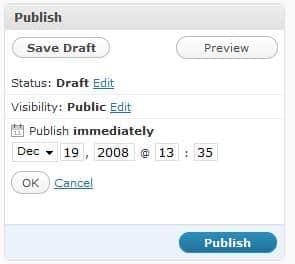
    Here is a screen dump from a wordpress 2.7 blog (this on in fact).  By default the publish time is set to immediately, but if you click on edit, you can set the date and time of  publication.

    publishlater

    Going Back In Time

    You can also set posts to be published in the past, I have used this for blogs which are building an archive of how to articles that don’t want to interupt the flow of more topical posts.

  • QuickPress and WP 2.7

    Photo by dorothyhess-pictures
    Photo by dorothyhess-pictures

    One of the new features of WP 2.7 is QuickPress, a small visual editor on the dashboard.

    I am using Quickpress to rattle off this post, as you can imagine it does not replace the main user interface to write content, but if you need to write a quick note for your blog, this is probably the place.

    Downsides, it does not have a facility to add categories or to use custom fields, something I need to do with the theme I use.

    All in all I will probably not use QuickPress to write posts, rather I will use it to quickly capture ideas as a draft post.

  • Should You Update Your Version of WordPress?

    I’ve been rattling on about the update to version 2.7 on twitter and in a post here on my blog, I just thought I would write up a post saying why I think it is important to keep your code up to date.

    Bugs

    Each new release will include a number of bug fixes.  These fixes tend to be rolled out as a 2.7.x update rather than a major staging update.

    What do I mean by that, 2.6 was a major staging update, and so is 2.7.  I will be expecting 2.7.1 in the not too distant future when the bugs found by releaseing the code to the general populace come to light.

    Security

    There are hackers out there constantly probing and testing hte security of WordPress blogs.  Since there are millions of them in existence, it is fairly easy to test the security measures of WP.

    Keeping your code base at the latest level ensures that any security breaches found in the code can be patched and the hackers can be kept at bay (at least for a short while until they find the next vulnerability).

    New Features

    This is for the geeks out there who need the latest and greatest features.  WordPress is not a static platform, it is constantly upgraded and improved.  Upgrade to the latest version and there will be a suite of new toys to play with.

    Support

    If you keep your code level too far behind you risk putting the level of support available to you down a peg or two.  WordPress is a whole community of people developing plugins and themes, most of this development is done near or close to the latest version.  You may find that your favourite plugin stops working if you do not keep up to date.

    Downsides of Keeping up with the Jones

    All the latest bells and whistles of an update also come with a cost.  There are two main downsides:

    Compatibility issues – your update may cause your plugins or theme to stop working.

    Introduction of errors – as you update code, there is an increased chance of corrupting your wordpress install or your backend database.  Always backup before you upgrade.  I will cover this in depth in future posts

    Auto Update in 2.7

    Just a quick note on the new autoupdate feature of WP 2.7.  We have had the ability to download and automatically update plugins for some time now.  This has been updated to include the code base as well.   I haven’t seen this in action yet, but I look forward to this and blogging about it very soon.

    My Thinking on Updates

    I don’t take part on beta schemes on my production blogs, they are too “bleeding edge”, but I am considering creating a devblog.wpdude.com to play with new features.  But what I will do is upgrade or patch my wordpress code to the latest version when it is made generally available to the community.

  • Understanding the WordPress Database:Introduction

    [gravityform id=”5″ name=”Contact Me”]

    [private_database]

    At the core of your WordPress installation is a MYSQL database, in this part of the course, I want to teach you about the database, it’s function, it’s structure and how to keep it optimised.

    This is an advanced tutorial in the course and comes with screencasts to help explain the content in detail as part of the WordPress Owners Club.

    What Is The Database Used For?

    [/private_database]

  • Performance Tuning Your Blog: Introduction

    [private_performance]

    As your blog growns in popularlity and content size, you may suffer from performance problems loading up all of your excellent blog posts.  I will show you how to tune various parts of your blog to make loading faster.  I will also teach you about the dreaded slashdot effect and how you can guard against this phenomenon.

    A picture tells a thousand words, and a screen cast video is more like five thousands to help you understand an issue, there will be video on this tutorial as part of the WordPress Owners Club.

    Peak Performance to Protect Posts & Pages

    [/private_performance]

  • Building a Multi Media Blog: Introduction

    [private_multi media]

    Modern blogs are so much more than text.  I will teach you how to use video, podcasts, images and visual effects on your blog in this series of posts.

    As always I will expand on my posts with screen casts to show you exactly how to use multimedia on your site as part of the WordPress Owners Club.

    What Other Media Can WordPress Serve Up?

    [/private_multi media]

  • Plugins Like A Pro: Introduction

    [private_plugins]

    Plugins are extensiosn to the base functionality of WordPress.  There are hundreds of them out there, I want to teach you how to find them, install them, update them and work with them

    This wordpress tutorial comes with screen casts to show you exactly how to work with plugins as part of the WordPress Owners club.

    Using Plugins Like A Pro

    [/private_plugins]