Neil Matthews

Category: General Blogging

  • I’m A Raving Fan Of WishList Member

    The name of the game when you run an online business is trust and establishing yourself as an authority in your niche.  When you work over the net as I do, chances are you will never see the people you are doing business with, most of the communication is via email, IM, Twitter or on the odd occasion via a telephone (you remember the thing on your desk that makes a noise, no not your iPod the other thing, yes that’s the one).

    One of the ways I do this is to over deliver when supplying my WordPress services, it makes people talk about you and  you establish a reputation as someone client focused, not just in it for a quick buck. People give you testimonials, tweet about you, tell their friends link to your site and all of that good word of mouth for the Internet age stuff.

    With that in mind I am going to rave about the customer service I have just received from the tech support team at  WishList Products.

    I am using their membership site plugin to power the WordPress Owners Club, and I was having an issue when potential members were returned from Paypal, it was not registering their details correctly and giving people access t0 their content.  A potential show stopper for me.

    I dropped a tech support request onto their ticketing system, and I was very quickly given various support steps to try.  None of these worked. I was then passed an incredibly detailed step by step( with videos and screen dumps) document to work through,  The effort that has gone into the support docs of WishList Products is very high indeed.

    Again none of this worked, the final solution, talk about going the extra mile, they requested login details and did a review of my configuration.  They gave me a suggestion, which I implemented and which fixed my problem. I hasten to add it was a clash with another plugin not a bug with WishList member.

    The bells and whistles on teh sales page make you buy the product, but quality after sales support make you go out of your way to sing the praises of a company from the rooftop or in my case write a blog post.

    If you are interested in creating a membership site with WordPress wishlist member is my recommended solution, it has all of the features you could need from a membership site solution

    • Integration with payment processors
    • Integration with email list
    • Time released content protection
    • Multiple levels of membership and updating of members to those levels
    • The list goes on.

    I could have been supplied lack lustre support, dug into the code, and figured it out myself, and come away with a neutral or negative opinion about Wishlist Products, but now I am a raving fanboy.

    Check Out WishList Member NOW!!

  • Poll: What Is Your WordPress Expertise Level

    It is very important for every blog owner to be in-tune with their readers, are you pitchng your blog posts at the correct level and interest of your average reader?

    With this in mind, every now and again I like to poll you the readers of this blog to make sure I am pitching my posts at the correct level, I want to run that poll again to find out what the majority of readers class their expertise in WordPress at.

    If you could take the time to quickly click on your level it will help me to write future blog posts with you in mind.  If I am writing beginners guides, and most of you are code masters, then my blog needs to change direction,  or the other way if most of you class yourself as beginners, posts on writing plugins would not be appropriate.

    If you are reading this from your RSS reader you will need to come over to the site, the url of this post is https://dev.neilmatthews.com/what-is-your-wordpress-level

    Thanks for taking the time.

    [poll id=”2″]

    If you would like to know how to add a poll to your blog like this, I’ve written a post about it at https://dev.neilmatthews.com/adding-poll-blog

  • Integrating WordPress with phpBB

    I came across a fabulous integration tool for WordPress and phpBB that I though I would like to share with you.

    UPDATE March 2011: Please see comments, it looks like this project has been closed down, I recommend SimplePress forum if you need a WordPress forum

    The problem many blog owners have is that they want to share the user database of WordPress with a forum so they only have to administer one set of users.  This is possible via a WordPress forum plugin, bit these are often quite cumbersome and effect performace , or using Automattic’s own forum solution bbPress (Automattic are the company behind WordPress), but one of the leading and most robust forum systems is phpBB, people want an integration solution for that.

    I wrote a post called Case Study: Adding A Forum To Your WordPress Blog about the various forum solutions for WordPress.  This may act as a good primer for this post.

    wp-united

    It sound like an English football team, but it is actually a plugin for phpBB which allows you to share the users and theme of wordpress with phpBB.

    The plugin is available to download for free at www.wp-united.com.

    Installation

    Please note, this install is not for the faint hearted, you will need to be happy editing html and php code.  Please remember to backup your install before begining a complex integration project such as this.

    This plugin is a php mod not a WordPress mod, it is assumed that you have an existing WordPress and phpBB installation.

    I downloaded the package from www.wp-united.com and uploaded the files to the root of the forum as instructed, next there is a tedious task of editing about a dozen files from the bulletin board installation to work with the new mod.  The documentation is fairly good to walk you through the process but take your time. It is fiddly, and an incorrect change may effect how your bulletin board works.

    Once the upload and edit are complete an installation script is run from the root of the forum, this then creates a new integration tab on the bulletin board’s dashboard.

    Integration

    There are numerous integration options. including:

    • Integrating users, add a new user to WordPress when a phpBB user registers and vice versa
    • Import existing WordPress Users to phpBB
    • Share the phpBB theme with WordPress or imbed the forum unside of the WordPress header and footer
    • Create automatic forum posts when a new blog post is added

    My Opinion

    I used this plugin because a client had an existing phpBB install, I would no go this route if I was begining a new installation, rather, I would go with bbPress which is already closely tied to WP and will only be more closely integrated in the future, but that is my personal preference.  PhpBB is an extremely powerful, and well supported product, think WordPress plugins and themes for a forum solution.  Many people swear by it over the simplicity of BBPress.

    I found the installation a bit tricky, not as smooth as working with WordPress.

    If you have an existing phpBB installation that you want to integrate with WordPress then you cannot go wrong than to use wp-united.

  • Run A StumbleUpon Ad Campaign To Increase Your Blog Readership

    Many of you will be aware of the social bookmarking site Stumbleupon, but do you know that it has a paid advertising option?

    Running a stumleupon campaign is a good way to bring a lot of people to your blog in a short space of time  and hopefully convert them to readesr or buyers of your products/services.

    Pay Per Stumble

    The advertising model used by SU is a pay per stumble model, that is, you pay for the priviledge of having your selected page presented before someone using the SU system.

    What Is A Stumble

    Stumbleupon is a bookmarking service which allows you to share content with your “friends” and to stumble over pages which you may find of interest.

    You tell SU what you are interested in, install a toolbar on your browser and click stumble.  This then presents a random page to you.  You can read it and perhaps engage with the site or click stumble again for another page.  Are you up to speed yet?  No, check out this video

    http://www.stumbleupon.com/productdemo/

    I think ofStumbling (as it is know) as channel surfing on the net.

    Fixed Price

    There is no bidding price war as there is on pay per click advertising you pay 5 cents per display.  You charge up your account in advance using paypal and the campaign runs until your funds are depleted.

    You can control your daily spend by setting how many displays per day you want, for example 500 views is $25

    Demographic Targeting

    You can target your audience with the following demograpohic items:

    • A stumbleupon category – these are created by SU and can be limiting
    • Sex of stumbler
    • Age of stumbler
    • Country
    • State
    • City

    Large Amounts of Traffic Quickly

    If you place your campaign in a popular category and set your number of views to be high, you can rapidly expose your blog to a new very large audience.

    Thumbs Up or Down

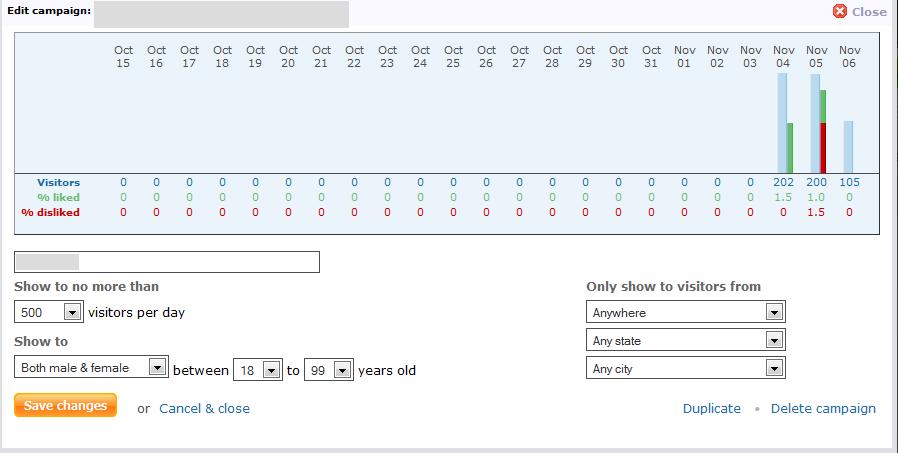
    You can monitor how well your audience are reacting to your page by the number of thums up or down it receives:

    su

    Don’t Go Straight for The Services Page Jugular

    Stumbleupon is a bit sniffy about service promtion (but they are happy to take a payment for a visit – go figure) so you may be better dropping people into your sneeze page or to a piece of pillar content. Then use your standard blogging techniques to bring them to your services page.

    Quality Of Visits

    This is a tough one to call, it is all dependant upon your niche and whether there is a StumbleUpon category to match.  I used to own a mountainboarding site, I matched this to the exteme sport category and got greate results. I also used to have a very specialised site on pay per click, click fraud , this bombed on SU because there is not match.

    I wrote a blog post on Problogger about monitoring the quality of yoru SU monitoring the quality of paid stumbleupon campaigns, check this out for more details on monitoring quality.

    Conclusion

    It’s not for everyone, if you niche does not match the Stumbleupon categories, it will be hard to find your right people.  But if you can get the match you can very quickly bring lots of targeted people to your blog a lot cheaper than pay per click.

    Check out the service at stumbleupon.com/ads

  • Using Amazon S3 with WordPress

    Recently  I wrote a post on Keeping Fat Content Off Your Site, in that post I mentioned the service Amazon S3, today I want to expand on that post and tell you in more detail what S3 is and how you can integrate S3 with your Blog.

    What Is S3?

    S3 is the acronym of Amazon’s simple storage service.  Using this service you can store files on the Amazon infrastructure and access them from your WordPress blog.

    But Amazon Sell Books Not IT Infrastructure!

    Yes they are an e-tailer first and foremost, but they have built an absolutely fabulous back end solution for their IT requirement.  It is incredibly robust and scalable so that can roll out new functions and products to their vast website quickly and easily.

    They knew that were onto a good thing and thought that they though they would sell that as well.

    The Amazon web service (AWS) family of products comes directly from what they were doing to host and sell all of their myriad of products.  They had to have an incredibly flexible way to expand their capacity quickly and easily.  It is these systems that Amazon have packaged up and made available to the wider online community.

    What Can You Do With s3

    S3 is a storage container, you can host all or part of your WordPress site on S3,  The majority of people reading this post will want to host their pillar content on s3.  This can be big e-books, videos or other content that you are expecting a lot os people to access.  This is what I will concentrate on in this post.  If you are interested in hosting your entire sites please check out Amazon EC2 http://aws.amazon.com/ec2/.

    Drop It In  A Bucket

    The individual unit of storage is called  a bucket.  You create a bucket on your s3 account and upload files to that bucket, these files can then be accessed via a URL like this http://{yourbucket}.s3.amazonaws.com/filename.

    You Can Secure Your Files

    S3 comes with a number of security features so you can secure your uploaded files and control who can access the information.

    Access to your storage space is granted via a public and private key pair.  A blog on WordPress is not the place to go into PKI cryptography, but in brief you get two long strings of characters, one public that people use to decrypt your messages, and the other private which you use to encrypt messages, these are used instead of login IDs and passwords.

    Using an access control list (ACL) you can set permissions on the file, the permissions are read, write and full control.  There are also two other permission levels to allow people to set ACL privileges.  Permissions can be set for everyone, authenticated users or the file owner you, via the email address of another s3 user. The acl can be set at a bucket level or on individual files.

    Full details of the security model can be seen at http://docs.amazonwebservices.com/AmazonS3/latest/index.html?S3_ACLs.html

    ACL & Pre-signed URLs

    Another security feature of S3 is a pre-signed URL, using this and an ACL, you can create a link to a secured file with time limited access.  This is excellent to provide secure controlled access to your content.  Your reader gets a link, that can only be used for a set time, if that link is shared withs.  WordPress membership sites owners with premium content I am looking at you here.

    Let me paint a scenario, you have a WordPress membership site with premium videos for example, you d’n;t want to share it on YouTube because you want people to pay, then upload it to S3, slap on an ACL so only authenticated users can see the content, then provide a link to that video with a pre-signed URL which last for an hour.  Your member views the video but decides to share the info with non-paying members, the link will only be valid for one hour, any attempt to access the link after one hour will return a access denied message.  Problem solved.

    Cost of Storage

    You pay for your storage in three ways:

    1. When you transfer in or upload files to your account
    2. You pay an ongoing storage cost for your files
    3. You pay when people download your stuff

    This may seem a bit harsh to be hit three ways, but consider this,  the charges are pennies the cost as of November 2009, you pay 0.15 cents for the first 50TB of storage, that is not a typo 50 terra-bytes, you need to write a lot of e-books to fill 50TB see update below.  10 cents per GB to upload files to your buckets and 1 cent per 10,000 gets or downloads of your file.  That is not a lot of money for the potential infrastructure you could build.

    UPDATE: You pay $ 0.15 per GB for the  forst 50TB of storage per month, my mistake thanks for the heads up Markus, still not a bad deal, but not as good as I outlined appologies.

    For current pricing see http://aws.amazon.com/s3/#pricing

    Tell My Why is it such a Big Deal in 100 words or less

    You can store and deliver huge amounts of content securely, robustly, and very cheaply.  You can distance yourself from performance problems when delivering content, and not impact other areas of your site streaming fat content. (35 words)

    Are there any plugins? You Betcha!

    I have used the following plugins in line with S3.

    Amazon S3 Plugin For WordPress – http://tantannoodles.com/toolkit/wordpress-s3/

    This plugin allows you to upload content directly to your S3 buckets from inside of WordPress.  It allows you to host your entire uploads directory on S3 so everything you add to yoru blog be it images, video podcats etc will be hosted and served from Amazon’s site.

    Amazon S3 URL Generator – http://codepolice.net/2008/12/08/generate-expiring-urls-for-amazon-s3-via-a-wordpress-plugin/

    Now this one comes with a caveat, it is an experimental plugin, the developer clearly states that and I had to re-code it a little to meet my needs, but it dynamically creates a presigned URL link to your content.  I am using this on the WordPress Owners Club to secure my screencast videos.  If you are happy with a little coding this is an excellent plugin.

    Amazon S3 Firefox Organizer – https://addons.mozilla.org/en-US/firefox/addon/3247

    Whilst not a WordPress plugin, this FireFox plugin is an excellent little tool upload and download files to your buckets, it lets you set ACLs and create new buckets on your account, create test presigned URLs and in fact you can do most things on your S3 storage area with it you would want to, my must have tool for using S3.

    Why I am Using S3

    When you start adding fat content to your blog, your hosting account will quickly become swamped with requests, your blogs performance will suffer.  I wanted to off load this larger content to a more robust platform but did not want the cost of an individual virtual private server.  S3 provided this for me.

    Computing in the cloud is the way forward for bloggers, very few of us host our own sites on physical boxes we own, we are using hosting providers and their limitations.  As big net based companies start providing cloud infrastructure that is cheap and robust I can see many of us moving away from Godaddys and the like.  I expect to see Microsoft, Google and the big online boys and girls following Amazon in the future.

    Wrap Up

    If you are concerned that your latest fat content will go viral and kill your site, check out  S3 so your site does not kick the bucket (see what I did there ? What a clever use of the word bucket, our storage unit and the euphemism to die I am soooo funny I am.)

  • It’s Been Quiet At WP Dude

    As the title suggests it has been quiet, content wise at WPDude.com for a number of weeks.  I have beem working very hard on something in the background.  I want to applogise to the reasders of this blog, normal service will be resuming over the next few days, I also want a quick chance to tell you what I have been up to.

    The WordPress Owners Club Is About To Open

    I am about to open the doors of my WordPress administrators training course, which I call the WordPess Owners Club.  If you want to learn how to administer your blog like a pro, this may be for you.

    What is the WPOC

    The WPOC is a premium section of this site where I give you detailed tutorials on the key admin activities to keep your blog up and running, these are supplemented by video screencasts of me performing those admin tasks.

    Some of the things I will cover are backup and recovery, managing content, performance tuning your blog and keeping your blog safe by implementing security controls.  Check out the syllabus list on the main WordPress Owners Club page for details.

    Want To Join The Club

    I am opening the doors of my training course on Monday 9th November, there is an early notification email signup for the the club page.

    Not For You?

    This training is not for everyone, for those of you interested in my existing free blog posts, you can rest assured I will be bringing you more of that in the very near future.

  • WordPress Training: Backup and Recovery

    I am running an online training session to teach all WordPress blogs owners how to create a robust backup of their site, and probably more importantly how to recover the archive in the event of a failure.

    If you would like to learn how to protect your blog posts, hard earned comments and links from a blog failure and then how to recover them, then this is the course for you.

    Format

    The training will take the form of an online webinar using gotomeeting.com with me delivering a presentation on backup and recovery along with practical sessions showing you how to backup and recover on a real WordPress installation.

    There are limited placed of 15 seats on this course due to limitations of the software I use, so please book early to avoid disappointment.

    Agenda

    The agenda for the course is:

    Introduction

    Backup

    • Why Backup
    • What to Backup
    • How Often
    • How to Backup – practical session
    • Backup Plugins
    • Archiving Backups
    • Testing Your Backup

    Recovery

    • When to recover
    • Before You Recover
    • How to recover – practival session
    • Testing Your Recovery has worked

    Q & A Session

    After Course Support

    I will supply a  video recording of the training session to all participants, so you can review the training at your own pace, I will also provide email support on backing up and recovering your site.

    It is expected that the session will take approximately one hour for the training plus the Q & A session at the end.

    Training Details

    Date: Thursday 29 October 2009

    Time: 17:00 London time, 12:00 New York, 09:00 Los Angeles

    Cost: $29

    Guarantee

    If you are not completely satisfied with the course, I offer a no quibble money back guarantee.

    Book A Slot

    To book a slot on the course click on the course, click on the buy now icon below, upon receipt of your payment I will confirm your place on the course.

    Sorry course full

  • Keeping Fat Content Off Your Site

    To make sure your blog works as efficiently as possible, it is a good idea to keep fat content off you site and to host and stream that content from a more robust platform.

    What is fat content

    Fat content is content from your blog which takes up a large amount of bandwidth to serve up.  Multiply this large bandwidth requirement with a large number of blog readers and you could be in trouble.

    Examples of fat content are:

    • Video
    • Audio files e.g. podcasts
    • large documents such as PDF files
    • Large images

    These are usually very large files and steaming/downloading them to your audience takes substantial amounts of resource compared to a static blog post or page.

    Why Keep It Off Your Site

    These types of files take up huge amounts of bandwidth, if you hosting account is not of a high quality (that’s my way of saying you are cheap and bought the least expensive hosting product) your bandwidth allocation will be throttled and access to your site will slow or even, in extreme cases, crash because there is not enough band width to serve up your content

    Another reason to host content off-site is that your server will have a finite number of users sessions allocated to it, serving up a web page takes a session, sends the static content then releases the session back to the pool, a video will hold open that session for much longer increasing the chance that you will run out of sessions and your server will start to reject new users.

    Where to keep it

    If you are not going to host it on your blog, where else can you host this fat content?   There are a number of options, you can host it on one of the many free web 2.0 type services or you can take advantage of more robust hosting solutions which charge a fee, let’s look at these options in depth.

    Free services

    The free services at your  disposal are sites such as Youtube, Vimeo, Flickr and Google docs, these systems allow you to upload your fat content to their services,make them to take the hit to serve up the work you have produced and then to embed this on your blog.

    There are plugins to embed content from the more popular systems on your blog.  This means that the content will appear on your system as if you are hosting it, but the third party takes all the pain of serving it up.

    Paid Services

    To create a more robust hosting solution, you may want to invest in a more expensive hosting program from your hosting provider. Look at virtual private servers or for hosting solutions offering unlimited bandwidth.

    Another system to consider it Amazon S3.  Amazon have create an incredibly robust infrastructure to host their e-commerce platform.  They have now opened up this infrastructure for people outside of their organisation to use, one component of their service called Amazon Web Services is S3.

    S3 allows you to create your own bucket or internet facing container where you can store your fat files. These are then served up from their infrastructure.

    The beauty of S3 over the free services is that you can secure your files as well.  For example if your fat content is for a premium audience, you can use pre-signed URLS and access control lists to control access.

    The  cost of S3 is very low, you pay by the amount downloaded, current pricing can be seen at  http://aws.amazon.com/s3/#pricing

    I will be writing more about s3 in the near future.  Please subscribe to my RSS feed to be notified when I do this.

    Examples Of Where to Host Your Content

    Over and above S3 which can host any type of content, here are some examples of the sites you could use to host your fat content.

    Video – Youtube, Viddler, Vimeo

    Images – Flickr, Picassa

    Documents – Google docs

    Further Reading

    If you are having performance problems, you may want to read my blog post on performance tuning WordPress.

  • Migration Complete

    Sorry for any problems my hosting migration may have caused you when trying to access the site.

    I know I have missed a couple of emails, my redirections were not working correctly.

    I will be writing up a post about my migration I had a couple of real issues and hopefully I can stop anyone else out there having the same problems.

    Now I am on my new server, I can move forward with my new projects including the WordPress Owners Club, more about that very soon.

  • Selectively Closing Comments On A Post

    WordPress has a function to selectively close down comments on a single post, here’s how you do it.

    Why Close Comments on Just One Post?

    You may have written a particular blog posts which has caused controversy and sparked a particularly heated debated and you don’t like the language being used in your comments section.

    You may have a troll on one particular post.

    You may be getting an awful lot of spam on one particular comment and want to stop this.  This is what happened to me on my post Guest Posting Makes You Attractive To The Opposite Sex Fact, for some unknown reason I was getting a lot of porn spam comments on this one – go figure 🙂

    How To Close the Comments

    It’s pretty simple really, from your edit post screen scroll down to the following section, and click off “allow comments on this post”.  That’s it.

    closecomments

    It’s Your Blog

    If you don’t like the direction comments are going on a particular posts, it is your prerogative to delete or close down comments.

    Remember kids, you are the super user, use your power for good never for evil.

  • Hiding WordPress Pages

    I recently wrote a blog post on changing the order of your WordPress pages, as an extension to this post I thought I would write a little article on how to hide your blog pages if you don’t want them to appear on your main navigation bar.

    Why Hide Pages

    There is a good chance that you do not want to have every page you have created shown on your sites navigation section.  You may have private pages, that you only want to direct certain people to, or you may have so many pages that your navigation will overwhelm users.

    Using the techniques below you can decide which pages your site visitors will see.

    Examples of My Hidden Pages

    I hide a number of pages on my Nav bar to keep my sites look and feel clean.  I do this because when people are visiting your site for the first time I think it can be overwhelming if there is too much information.  I also want to funnel people onto certain pages of my site so if I can keep their attention away from certain pages unless I want them to go there that is very useful.

    I also have a number of hidden pages which run scripts for example I have conversion tracking pages for affiliate and payment processors.  I don’t want these to appear on the navigation bar.  I only want them to be used after a Paypal payment or to record an affiliate visit.

    Here is one of my hidden pages

    https://dev.neilmatthews.com/welcome

    I use this as my sneeze page from twitter or other social sites.

    How To Hide Your Pages

    There are two main ways to hide your pages, editing your theme, or using theme functionality or using a plugin.

    Theme Specific

    If your theme already has functionality to exclude pages just follow your theme instructions (mine does, so does Headway and Thesis) .  But if you are not lucky enough you may need to hack your theme code.

    DISCLAIMER: I am not responsible for any crashed sites because you edited your code incorrectly.  If you don’t have the techie credentials don’t do this or get some WordPress help from  someone who does.  Please progress to the plugin section below if you are not a code monkey – thankyou and have a nice day

    Inside of your theme files, most likely the header.php file there will be some code which lists your pages, it will probably look like this:

    <ul>
      <?php wp_list_pages(); ?>
    </ul>

    To exclude a page, you need to add some parameters to the wp_list_pages function, and that is an exclude command with the post ID of the page to hide.  To find a page’s post ID, go to the  page editor and take notice of the URL in your browser bar.  Below is an example of my about page, as you can see my post ID is 2.

    https://dev.neilmatthews.com/wp-admin/page.php?action=edit&post=2

    Now add this parametre to your wp_list_pages function as shown below:

      <?php wp_list_pages('exclude=1,2,3'); ?>

    Where 1,2,3 are a comma delimited list of all the pages you want to hide.

    Bonus Hide

    If you take advantage of the parent/child page functionality of WordPress you can set your list page function to only show top level pages by adding the depth parameter.

     <?php wp_list_pages('exclude=1,2,3&depth=1'); ?>

    Plugins

    If coding your theme is a bit too much, don’t worry there is nearly always a plugin to solve every problem.  My favourite is the Exclude Pages plugin.  This adds a checkbox to the bottom of each page in the editor which allows you (as the name suggests) to exclude that page.  You can download it from the following link:

    http://wordpress.org/extend/plugins/exclude-pages/

    K.I.S.S (Keep It Simple Stupid)

    Don’t bombard your blog readers with a huge number of pages that they may never need to see, keep your site design neat and tidy.  Less is always more in my book

  • Skinning Headway; The Future of Theme Design

    The new breed of framework themes such as Headway and Thesis are going to change the way new WordPress themes are designed.

    In this post I want to tell you why I think this is and how it will effect your theme purchasing or theme development habits in the future.

    Most of my experience is with Headway, so I will concentrate on this theme, but I am sure Thesis has the same functionality, please feel free to comment all Thesis fans.

    So What’s The Buzz With The Framework Themes?

    Framework theme is the name I give to the new breed of themes which allow a designer to skin with their own look and feel whilst using the underlying code to provide the functionality they want without a complete redesign and new theme development.

    You cannot fail to have missed the buzz about Headway or Thesis in the Blogosphere and on Twitter, people are all saying which is the best and how fabulous both products are.  In truth both are excellent themes, they allow people without any CSS or coding skills to develop a highly personalised blog look and feel.

    An example of this can be seen from the following sites, which are all built around the headway theme, but look very different.

    They are all the same base theme, but they have been designed to the owmers specification, and they are all very different.

    Why I think This Will Chaneg the Future of Theme Design

    The functionality I really want to talk about, is the ability for people to Skin the Headway theme and then to pass the skin onto another person using Headway theme and to completely change the look and feel of the base HEadway appearance.  In the examples above, these are custom configuration jobs, but their modifications could be put into a skin and easily re-distributed.

    How A Skin Works

    A skin is a set of custom style sheets,  images and function code which can be packaged up and installed very easily into an existing Headway config.  These sets of files will be developed by traditional web designers, packaged up and installed into a Headway install, from the skin configuration options in headway select that skin and a whole new custom look and feel will be given to headway.

    Where Designers Come In

    In the future a designer will create a skin for Headway (or thesis I am sure it’s the same from their camp) rather than developing a theme from the ground up.

    How do I know this is happening?  I asked. I put a query out on twitter and several design companies came back and confirmed my suspicion that this was their way forward.  One designer was quite sad about this as it took a lot of the challenging (read fun for a geek) work away from the whole theme development process.

    I think the role of a web designer will be to think about design rather than underlying code and functiuonality.

    Do I think this is a good thing?  Yes I do, there are going to be some pretty fantastic looking sites coming out if all of the time is spent on the presentation of a site rather than the gadgets which power a site.

    I Still don’t get Why It Is So Radical

    Most of the hard work is already done by Headway.  All a designer needs to do is create their look and feel, do the designing, logo creation, wizzy look and feel effects, style the widgets and gee-gaws.  Thrust them into a headway theme skin and send it off to their client.

    Development time is hugely reduced, quality is the same, theme designers can earn the same cash for less time investment, or they can reduce their costs to make custom themes much more accessible to bloggers.

    Premium skins rather than themes

    It is my opinion that people will be asking for custom or premium skins in the future rather than a whole new premium or custom themes.

    As a client you will go to your designer and say “My framework of preference is Headway, I have spent time learning how to use the back-end functionality of my theme but I want a custom look, create me a skin please”

    As a designer you will spend you time building premium skins and selling them to existing Headway customers, or developing your own premium skin shop where you develop mulitple skins and sell them many times using the same model as premium themes.

    What Is This Skin Market Worth

    I have been thinking about this a lot, if you have already forked out $87 dollars for your basic Headway theme, you are not going to want to spend premium theme money on a skin.  I can see skins being sold for $50 – $80 as a premium skin or $400-$500 dollars for a custom skin.  Much less than a premium or complete custom designed theme.

    This reduction in cost will come from efficiencies in development time.

    How Must Will it Cost A Designer To Get Into This Market?

    For a web designer to get into this market they will need to buy a Headway developers license.  At $164 the barrier for entry into this new market is very low, your first skinning gig will probably pay for your investment.  Add onto this, the fact that dev. license holders can provide their clients with a copy of the Headway free of charge means their is no initial theme investement for their clients.

    Here is what the Headway team say about their dev license:

    If you are a developer or need/want to install Headway on multiple websites, the Headway Developer Option is for you. The Headway Developer Option allows you to install Headway on any number of websites that you or your company operates or developed. You are also allowed to remove the footer attribution/credit with the developer option (woot!).

    UPDATE: I missed something in the small print you need to buy an add-on license for each client site you develop at the cost of $40 per site, here is the small print, thanks to James NomadRip for the heads up

    Install on unlimited websites that you or your company owns. If you develop client sites on Headway you must pay [or have your client pay you] an additional $40 per add-on license.

    Will There Be A Skin MarketPlace?

    I was pondering on whether there would be a central place to sell skins using the same business model as ThemeForest.net , a market place for premium themes.

    I have been in twitter/email communication with Grant Griffiths one of the people behind Headway.  I was keen to see if there would be and official Headway sanctioned skin marketplace.

    His answer was that a couple of domains have been purchased for a Headway Skin marketplace.  He is hoping to build a community of web designers who would market their skin designs from there.

    I can only see this as a bright future for people wanting to develop skins for Headway.

    All Aboard

    The skinning express is about to leave, get your development license now, get your skills up to speed and be part of this new theme design revolution.

    I don’t plan to do any more bespoke development, all future sites for me and my clients will be skinned via Headway.

    Get A Copy Of Headway Developers License

    Want To Learn How To Create A Skin?

    I am in the process of creating a video tutorial course to show you how to create your very own headway skin, please leave your email details and I will notify you when the course is ready.  This is a premium course and will cost in the region of $147


    join our mailing list
    * indicates required


    My Skin Site

    With the release of Headway 1.6, Skins have taken a massive leap forward, I have joined forced with talented designer Jonathan Woodward  to start creating some exciting new Headway skins, check out our Headway Skin Site

    PremiumHeadwaySkins.com