Neil Matthews

Category: General Blogging

  • 14 Day Free Trial Of My WordPress Training and Support Community

    14 Day Free Trial Of My WordPress Training and Support Community

    I’m offering you the good readers of my site a 14 day free trial of my WordPress training and support community the WP Owners Club

    What Is The WP Owners Club

    The WP Owners Club is my members only training and support environment.  When you join the club you get access to my expertise in three ways

    1. Twice monthly live training webinars
    2. An ever growing library of self paced training video in the members area
    3. Access to me for ad-hoc support via the members only helpdesk

    It’s probably Easier If You Come And See

    People don’t quiet get how effective group coaching is until they give it a try on a webinar that’s why I have setup this 14 day free trial.

    Hop Over And Sign Up For Your Trial

    Full details of the community including how to sign up can be seen at

    https://dev.neilmatthews.com/wp-owners-club

    I hope to see you in the club house.

    Image by fragiletender

  • WordPress SEO

    WordPress SEO

    Course Details

    In this course I will show you how to make your site as friendly as possible for the search engines to help get more people to your site.

    All 0f the techniques I show are white hat, and will not get your site barred.

    (more…)

  • WordPress SEO Webinar Replay

    WordPress SEO Webinar Replay

    Thanks to everyone who joined me yesterday on my WordPress SEO, the questions and the interaction made it a great event. I hoped you learned something new and will be implementing that on your site.

    Here is a replay of the webinar if you could not attend the live event or if you want to review the session. I will keep this replay up until 12pm Sunday before moving it into the members only area in the WP Owners Club.

    Something I missed was details of the sitemap, the WordPress SEO by Yoast plugin uses. It does not create a file called sitemap.xml it creates a file called sitemap_index.xml, see this post for full details http://yoast.com/xml-sitemap-in-the-wordpress-seo-plugin/

    Video Replay

    SORRY YOU MISSED THE DEADLINE THE REPLAY HAS BEEN MOVED INTO THE MEMBERS AREA, LEARN HOW TO GET A 14 DAY FREE TRIAL AND SEE THE WEBINAR AT

    wpdude.com/wp-owners-club

  • Mary Beth Gaiarin -Gaiarin.com

    Neil does good work, is fast and responsive. He understood my problem and fixed it. I highly recommend him!

    Mary Beth Gaiarin -Gaiarin.com

  • WordPress How To: Add An Image

    WordPress How To: Add An Image

    WordPress How To Add An Image

    In this tutorial I will show you how to add an image into a WordPress post or page.

    Download the how to tutorial  WordPress How To: Add An Image

    What Are My WordPress How To Posts?

    I am building a library of small how to tutorials to solve common WordPress issues, check out the library of how to tutorials.

    If you need a particular how to just drop me a line using the contact form above.

    Pictures Tell A Thousand Words

    Adding images into your blog posts and pages adds a huge visual impact to your text only post or pages.  Images can be used to add a graphic into your post or   a product shot or one of a hundred different applications.

    The following screen shots show you how to add images into a post

    Download the how to tutorial  WordPress How To: Add An Image


  • Test Drive My Coaching Program

    Test Drive My Coaching Program

    I’ve come to the conclusion that it is very hard to write a ales page for WordPress group coaching so I think the easiest way to explain what it is, is to invite you to a free coaching session.

    Join A coaching Session For Free

    I am inviting all readers of wpdude to attend a free coaching session to get a feel for what I do inside of the WP Owners Club.

    This Months Free Coaching

    This months free coaching is all about configuring your site for the search engines and is called the WordPress SEO Workshop.

    Join The Coaching

    For full details of the coaching including how to join the session check out this page.

    wpdude.com/group-coaching

    Image by 34128007 Care of Wells Fargo Illinois for the Calamity Jane fans.

  • Hosting Video For WordPress Use

    Hosting Video For WordPress Use

    This is the second part of a three part series on using video with WordPress.  In part one I talked about Using Video With WordPress. Why you should use video and the benefits it gives.

    In this part I would like to talk about where to host your videos.

    Videos Are Big

    Videos pack a lot of data into their files and as a result they are huge.  You need to give extra special consideration to where to host these very large files.

    Slow loading or juddery (is that a real word) videos are very annoying to watch, and your quality video content could be impacted by poor service from your hosting choice and turn off your viewers.

    Host It Locally

    You could upload your videos to your local hosting account and serve them up from there, but if you have a limited use hosting service you may use up all of your space and bandwidth, worse you could incur huge overuse charges,  please check your hosting agreement before you host video files locally.

    The extra bandwidth and resource you use could also slow down your entire site, so hosting your video files locally is not recommended.

    Video Services

    There are a number of video hosting services out there.  A far better idea is to upload your video to one of them and let them take the bandwidth hit and resource usage.  Let them stream your video smoothly, it’s what they do, their hardware is design to cache and play video correctly.

    Here are some of the major video services out there.

    YouTube – The big player in the video hosting world, YouTube is a great palce to host your videos.  It’s free but the downside is that you can only have videos of up to 10 minutes, if you want longer videos, you need to look at something else.

    Viddler & Vimeo– these are premium video hosting services, with a free option for shorter videos.  This may be a good altenative to YouTube if you want longer videos, but you will have to pay for the subscription.

    Amazon S3 – I bet you didn’t know the online retailer Amazon also sells storage and hosting solutions.  I use Amazon S3 to host my videos for the WP Owners Club.  These videos are typically up to an hour long so YouTube is no good to me, so I have opted for them.  It’s a premium service that you pay by usage rather than a subscription.  I host huge files and pay a fraction of the price for a viddler or vimeo account.

    Keep Copies

    If you are hosting your videos on third party sites I always recommend that you keep copies of your content.  If you break T & Cs you may find your account closed down and your videos lost to the world.

    Next Up

    The next post in the series will show you the plugins and tricks I use to add video to WordPres posts, pages and into your theme files.

    Image by adpowers

  • Using Video On WordPress

    Using Video On WordPress

    In this three part series I will be talking about using video on your WordPress site.

    In part one I will talk about why you should use video on your site, in part two I will talk about the hosting considerations of video and in the lat part I will show you how to add videos to your posts pages and theme.

    Why Use Video?

    There are a number of reasons why you should use video on your site, including:

    • If a picture tells a thousand words, then a video is the unabridged version of War and Peace, video enables you to pack so much information so densely into a short format.
    • A large percentage of our communication is none-verbal, when you appear on a “talking head” video, people can clue into your nonverbal communication and your message can be conveyed much more clearly.
    • The ability to show someone how to do something should never be underestimated, here’s an example, try writing a text only blog post on how to tie your shoe laces. No images or videos, text only description of looping and swooping your shoe laces.  Not an easy thing, now consider a short thirty second video that demonstrates the process and you get an idea of the power of video.
    • Video can be your unique selling point.  If everyone in your niche is creating text only content, and you start a vlog (video blog) you are going to immediately differentiate yourself from your competition.
    • It’s easier to stand out with video.  There are not as many videos as there are text pages, so search engine ranking is not as difficult as text only rankings.
    • It enables people to put a face to a site, this is an incredibly powerful trust tool if you are selling good or services over the internet.

    Types Of Video

    There are three main types of video you can add to your WordPress site.

    The Talking Head

    This is when you or another presenter talks at the camera to present your content, think of the classic scenario of a news show, where the talking heads tell us the days news.

    Behind The Camera

    This is when you create a video shooting footage of content and provide a voice over to annotate the footage, think of a wildlife show or a sports event with a commentator

    The Screencast

    Record the content of your computer screen to demonstrate some process of record a presentation

    Other Peoples Videos.

    I have talked about the three types of video you could create for yourself, but you can also use other people’s content to enhance your own site.  YouTube and the other video hosting sites are a treasure trove of content, much of which you can use and embed on your own site.

    I used to run a site called mountainboard.net, a magazine style site for the mountainboard community (think of the love child of a snowboard and a skateboard).  As a feature at the top of my site I would add a weekly video from YouTube.

    I was curating content from YouTube with full attribution and presenting it to my readers in an easy to view format. Curating is the new black apparently, others people’s content is king (but don’t get me started on that one).

    It Doesn’t Have To Be Broadcast Quality

    Don’t get stuck up on broadcast quality content.  People are not expecting 3D/HD Hollywood blockbuster from your blog, they just want content in a

    This means a web cam, a cheap microphone or a few hundred dollars on a flipcam.

    Throw into the mix video editing software like camtasia and you have recorded and edited together a video you can add to your blog.  More about the hosting options in the next post.

    Video As A Product

    Video is not only free content, it can be a very powerful product you can sell from your site.

    Many people are creating information products using video which they can sell and people can download or stream from their sites.  The density of content and the relatively easy way in which it can be produced in contrast to an e-book for example makes it an ideal tool for those of you out there who procrastinate over writing a 100 page e-book.

    The Success Of YouTube

    YouTube is one of the busiest sites on the net, this proves the popularity of on-line video.  I think all WordPress site owners should be embracing multimedia in their content, a combination of text, images and videos help to get your message out much more effectively.

    Video Works; My Examples

    I talk from personal experience that video works, here are my examples.

    My Services Sales Page

    People come to me cold when they are hiring me for my WordPress technical support services. They may not have hired someone to work on their site before and I wanted to show people how my services work.

    I added a talking heads video of me explaining how working with me operates.  I give potential customers a chance to see me “in person” and let them know there is a real person at the other end of the site. I explain what I will need from them, what the expected turn around will be and how my payment process works.

    The result, I saw a definite increase in teh number of quote requests I receive, I put this down to establishing trust with people through the video.

    It’s not great quality, the sounds not great it’s jsut me talking into my webcam, but it puts a human face into the equation and we as humans are much happier dealing with people than yellow highlighted sales letters

    My Coaching

    Part of the service I offer my group coaching clients in the WP Owners Club is a library of recorded video tutorials.   These are screencasts from my live webinar events.  I take the recording, and run it through an editing process to add zooms and close ups to help highlight the presentation and demonstrations I am giving about WordPress.

    This give my coaching clients a permanent record of the live events they attended, along with an ability to review their trainings in their own time.

    I have found that video is an excellent coaching tool, far more effective than text only or screendumps.

    Next Up

    Next up in this series I will talk about hosting your videos.

    Lets talk about your plans to use video in the comments, are you using video yet?  Is it in your plans, let me know.

  • Top 5 Must-Have WordPress Plugins

    This is a guest post by Michael Scott

    WordPress is easily one of the most popular and user-friendly content management and blog publishing tools available online today. Hundreds of thousands of websites utilize this publishing tool to submit blog postings and for Search Engine Optimization (SEO) purposes. Some popular blogs that operate on WordPress include The Wall Street Journal Blogs, Time Magazine Blogs, CNN Blogs and Forbes Blogs.

    As you can see, WordPress boasts an impressive clientele of leading companies and organizations. The easy-to-use blog sharing tool also features an impressive array of elegant and stylish themes, as well as powerful plugins that extend the features of WordPress. Let’s take a look at the top 5 must-have WordPress plugins that will enhance your overall experience with this powerful blogging platform.

    WPtouch

    The world now has an astounding 6 billion mobile phone users. So many of these users are using their sophisticated smartphones to browse the web. This is why it is so important that your blog is optimized for smartphone users. The WPtouch plugin will help you accomplish this. This plugin will help transform your website into a sleek, stylish and user-friendly destination for mobile users. The best part about this plugin is that it will not modify any bit of coding or alter your regular desktop theme and appearance.

    Social Media Widget

    The Social Media Widget is a simple, yet stylish, sidebar widget that displays your different social media profiles, which may include Facebook, Twitter, Google Plus, Digg, Reddit, StumbleUpon and Pinterest, for example. This is a highly customizable widget that you can use to even create your own icons.

    Social Metrics

    As a blogger, you will absolutely want to understand how well your posts perform on the various social networking sites that you should be using for promotional purposes. Social Metrics is a highly regarded analytics tool you can use to track and monitor your WordPress blog performance on popular social media sites, including Facebook, Twitter, Pinterest, Google Plus, StumbleUpon, Reddit, Digg and LinkedIn. As you observe and understand which networking site seems to deliver the best results for you, you can adjust and tweak your promotional strategies.

    FontPress

    FontPress is a must-have WordPress plugin that will allow you to incorporate customized fonts within your website. This plugin boasts an impressive variety of font styles that you can preview before using. You can play around with different font sizes, colors and shadows with FontPress. The best part about this plugin is that you get to avoid having to deal with any coding when customizing your fonts.

    All in One SEO Pack

    SEO is so incredibly important to the success of your blog, as it is a tool that must be implemented to improve the ranking of your site on major search engines, including Google, Yahoo and Bing. The All in One SEO Pack plugin automatically generates Meta tags, optimizes your post titles for search engines and helps you detect and avoid using duplicate content. If you have limited experience with SEO, this plugin will help you with the basics.

    WordPress is an incredibly user-friendly blog publishing tool that hundreds of thousands of websites use today. You can create a sleek, stylish and elegant website in minutes with WordPress. Be sure to utilize these 5 plugins that will really help optimize your blog.

    Michael Scott is an online instructor and coordinator for College City. Michael also manages several niche blogs through WordPress and uses these plugins and more to optimize his content.

  • Performance Tuning Workshop

    Performance Tuning Workshop

    Course Details

    In the WordPress performance tuning workshop I will show you how to speed up slow running sites.  My methodology takes you through baselining you site, finding bottlenecks, testing themes and plugins, investigating memory and database bottlenecks and finally installing cache plugins to speed up your site.

    (more…)

  • Case Study: 404 Errors When You Change Your Permalinks

    Case Study: 404 Errors When You Change Your Permalinks

    I have had a number of clients come to me with this problem, so I thought a case study was in order.

    Here’s the Problem

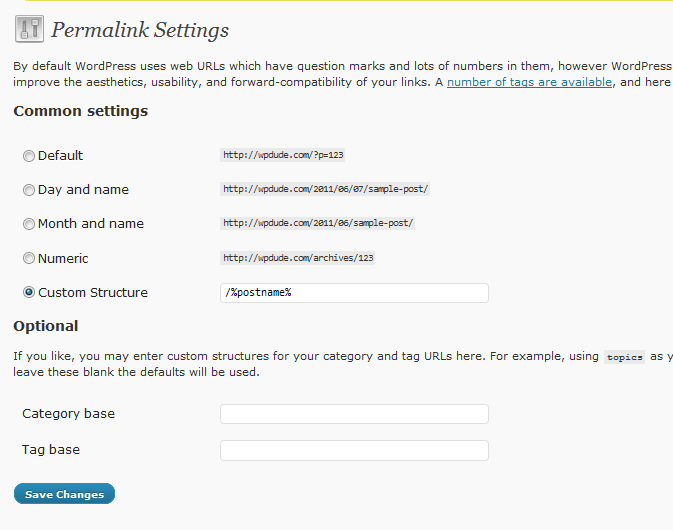
    When you change the permalinks from the default to something more pretty and SEO friendly, you click on a post or page link and all you get is a 404 file not found error. This is done from the settings-> permalink page.

    The home page will be fine, but you cannot access any of your content off of the home page.

    What Is A Permalink

    A permalink is the URL of your blog post or page, the bit after your domain name for example the permalink of this post is case-study-errors-when-change-your-permalinks.

    By default the permalink for a post or page is set to the post ID, so if I was using default permalinks, this post would look like this wpdude.com/?p=5770

    What Having Pretty Permalinks Matters

    It is a good idea to change your permalinks from the default to a pretty permalink (pretty is the technical term BTW, don’t believe me check out http://codex.wordpress.org/Using_Permalinks) for SEO purposes.

    You can stuff valid keywords into the permalinks of your post to help the search engines match your content with searchers.

    So What Has Happened?

    When you change from the default to pretty permalinks WordPress needs to setup a redirect to the new URL, it does this by adding some commands to the file .htacess.   This file lives in the root of your site.

    What Might Cause the Problem?

    There are a couple of reason why this might not work, the first is that mod_rewrite is not installed on your hosting,  Check with them to see if they have this redirection technology in place.  I have not seen many hosting setups where this is not in place so you can probably move onto the next point.

    Another reason I have seen 404 problems is when the .htaccess cannot be written to.  This might be file permissions or the file does not exist and WordPress cannot create it.

    The Fix

    Connect to your site using ftp and open up the .htaccess file.  NOTE some ftp client do not show hidden files by default so you may need to enable this. anything starting with a period/full stop is marked as hidden.

    Edit the .htaccess file and see if it contains the following set of commands:

    # BEGIN WordPress
    <IfModule mod_rewrite.c>
    RewriteEngine On
    RewriteBase /
    RewriteRule ^index\.php$ – [L]
    RewriteCond %{REQUEST_FILENAME} !-f
    RewriteCond %{REQUEST_FILENAME} !-d
    RewriteRule . /index.php [L]
    </IfModule>

    # END WordPress

    If they are not present, you probably are having problems writing to the .htaccess file you can either change the permissions of .htaccess and try to regenerate the permalinks (you do this by setting it back to default, then setting it to pretty permalinks again) or you can manually edit and add the commands.

    Please note if you are running WordPress in a subdirectory, you will need to reflect this in the command you add to the .htaccess file. Upload the file again and the 404 errors should be gone.

    Wrap Up

    So if you get 404 file not found errors when you change your permalinks, you need to manually edit your .htaccess file, if that doesn’t work check mod_rewrite with your hosting company, you can always roll back to the default permalink structure until you get this fixed to get your site back online

    Image by everdred

  • Replay Of My Webinar Introducing the WP Owners Club

    Replay Of My Webinar Introducing the WP Owners Club

    WP Owners Club Webinar

    Here is a replay of the webinar I ran yesterday introducing the WP Owners Club.

    Please don’t hesitate to contact me if you have any questions.

    [flowplayer src=’https://s3.amazonaws.com/WP_Owners_Club/sales_videos/wpocjuneintake.mp4′ width=640 height=480]


    wpdude.com/signup