Neil Matthews

Category: General Blogging

  • New Type Of Hack

    New Type Of Hack

    I’ve been working with a client on a performance tuning project, and it looks like this was in fact a hack that is slowing down the site, this is the first time I have seen this hack technique so I thought I would document it for the wider WordPress community.

    The hack is in two parts, the first is a php directive in .htaccess the second is a base64 encoded file which holds the payload.

    .htaccess

    The hacker has added hundreds of white spaces at the bottom of the .htaccess and then buried a directive in there so a casual look at .htaccess won’t show the code up.  At the bottom of the file I found:

    php_value auto_append_file /var/www/html/{SITEDETALSREMOVED}/wp/Thumbs.db

    This directive tells the webserver to append the file Thumbs.db to all php pages it loads up.  This means that a little piece of code is added to each web page served up.

    Thumbs.db

    Thumbs.db is normally a thumbnail file often included on windows servers, I have uploaded this by accident a number of times, so it looks like an un-needed but safe file. in the case of this site, it has a base64 encoded payload of malware.

    CODE DELTED BECAUSE MY MALWARE SCANNER KEEPS THINKING I HAVE BEEN HACKED 🙂

    So this malware was being loaded onto each page as an additional footer.

    Check Your Site Now

    If you are seeing a performance hit, please check your .htaccess for this hack.


  • WordPress Security Training

    WordPress Security Training

    This week I’m running a live training event to teach people how to secure their WordPress site.

    Would you like to learn more about hardening the security of your site and keeping hackers at bay?

    WordPress and Security

    WordPress is NOT inherently insecure, rather it is a victim of it’s own success. There are millions upon millions of WorPress sites, and the hackers are probing the defences of these sites for weaknesses that can be used upon this very large community for their nefarious reasons.

    This training will make your site security more robust and less prone to attack.

    When Is The Training?

    The session is on Thursday 29th September at the following times

    • 11am – 12pm Pacific
    • 2pm-3pm Eastern
    • 7pm-8pm UK Time

    What Will I Learn?

    You will learn my WordPress security hardening techniques to make your site much more resilient to hack attacks, including

    • Why WordPress is a victim of security attacks
    • WordPress security options
    • Changing defailt table prefix
    • Change default admin name
    • Using security keys
    • SFTP not FTP
    • HTTPS not HTTP
    • Using hard password across your installation
    • Security Plugins
    • Other security services
    • Demo of a site being hardened

    How Much Does It Cost

    The training is normally only available to members of my WordPress training and support community, but this week I’m offering a 14 day free trial of the WP Owners Club, so you can test drive the club, join the live security training webinar and see all of the other member benefits.

    If you like the club, leave your membership as is, if it’s not for you cancel your Paypal subscription before the 14 days are up and there will be nothing to pay.

    Test Drive  Today

    To test drive the WP Owners Club and join the security training at no cost, click on the button below.  You will be taken to a signup page where you can create a login ID, then go to http://wpownersclub.com/live-events to signup for the live training.

    Image byellasdad

  • WordPress Training: Understanding wp-config.php

    WordPress Training: Understanding wp-config.php

    I’m running a live training event this week on Thursday called “Understanding wp-config.php”.  If you would like to learn more about this small but powerful configuration file read on.

    What Is wp-config.php?

    wp-config.php is the configuration file central to WordPress which tells your site how it should behave.

    Most of us know that is contains database information, but there are a multitude of other uses such as securing your site, changing domain names, setting debug options the list goes on.

    This training is to teach you more about this incredibly useful little text file and how it can help your WordPress site.

    When & Where Is The Training

    The training is on Thursday 15th September at the following times:

    11am-12pm Pacific, 2pm-3pm Eastern and 7pm-8pm UK Time

    The session is held online using a webinar format, so you can view the training from the comfort of your own computer, no travel or accommodation costs and limited time away from your day job.

    What Will I Learn?

    You will come away from the session with a deep understanding of what wp-config can do to your site including:

    • What is wp-config
    • Database settings
    • Language settings
    • Debugging with wp-config
    • Changing domain names
    • Security settings
    • Memory settings
    • Autosave and revisions
    • Other advanced settings
    • Securing wp-config

    Cost

    The session costs $29.00, for that you get access to the live event, and a recording of the event and pdf downloads of all the associated materials and links.

    So the choice is yours, join live or get the recording to view at a time convenient to you.

    Sign up For The Training

    To join the training, click on the link below to go to Paypal IMPORTANT, after paypal has confirmed your payment, you will be redirected to another page to register for the event.

    Seats are limited by the webinar software I use so join now to reserve your slot.

  • Andrew Mann – TropicalImaging.com

    Short version
    I don’t want to tell you about the wpdude because then he will get too busy  -if I have a WP problem – he is now my gotoguy..he’s simply that good at what he does.

    Longer version
    Our website was hacked.
    It took a week for the hosting company to “scale it up” to the senior support staff and then two days to say our site was ‘all clear”.
    Except it wasn’t – it was slow, buggy, but the hosting company didn’t want to help. The three other security and “WP” experts I googled, either didn’t get back to me or could not solve the problem.
    WPDude found the problem and sorted it out in 24 hours….
    Andy

  • A Video Tells A Million Words

    A Video Tells A Million Words

    If a picture tells a thousand words, then I think a video comes in at well over a million.

    Adding video content into your WordPress posts and pages adds huge impact.  We are visual creatures, we take clues from body language to help communication something missing from text only posts.  Information can be tightly packaged into video, something that would require a huge amounts of copy to convey.

    Would you like to learn more about adding video into your site?

    WordPress Video Training Session

    I am running a live training event for my training community the WP Owners Club all about using video with your WordPress site. I’m offering a 14 day free trial of the WP Owners Club so people can join this training at no cost and test drive the other club benefits.

    When & Where?

    The training will be held as an online webinar on Thursday 1st September at the following times

    11am-12pm Pacific, 1pm – 2pm Eastern and 7pm-8pm UK (Please note there is an option to select your local time when you register)

    What You Will Learn

    I will be teaching the following during the live training session:

    • The benefits of video
    • Type of video you can use
    • Video hosting options
    • Embedding video in WordPress
    • Video analytics
    • Video SEO
    • A Note on mobile devices
    • Demo
    • Q & A

    Here’s What You Need To Do Next

    If you would like to take me up on my offer, here’s what you need to do:

    1. Go to wpownersclub.com/sign-up (click on the big orange button at the bottom)
    2. Create your free trial account by creating a Paypal subscription
    3. Go to http://wpownersclub.com/live-events and signup for the webinar.

    The trial is no cost, but seats are limited so join up now to reserve your spot.  I hope to “see” you on the call.


  • Build Your Own Custom Theme: Hello Headway Course

    Build Your Own Custom Theme: Hello Headway Course

    Jonathan and Lea Woodward are running a five day course to teach people how to build a custom WordPress theme using Headway.  If you have always wanted a custom look and feel for your site but cannot afford a custom design costing several thousand dollars this course is for you.

    Who Are Jonathan and Lea?

    I’ve worked with this dynamic duo on a number of projects as client, as their contractor and as business partner on a couple of joint ventures and they are a great team, Jonathan is a design guru ( he did the custom design for my site) and Lea is a marketing and tech side of the partnership.

    Between them they have an excellent set of skills which makes this course sound so interesting.

    Why A Custom Theme

    Headway is the theme framework I use for all of my sites and clients sites, it allows you to create a custom theme using drag and drop designer.  You get a custom look and feel without the need for coding skills, this course will teach you how to do that.

    I Was Looking Into This Option

    I was planning to build my own Headway course like this but I felt I lacked the design skills to pull it off, I’ve shelved that idea and now I’m going to direct everyone to Jonathan and Lea’s course if they want to learn Headway.  Jonathan’s design skills and Lea’s tech coaching skills will make this a great course.

    What On Offer

    A five day live training course which will step you through the process of building a custom theme with headway. I’ve swiped this copy from their sign-up page

    Day 1: Today we’ll be making sure your site structure is “just so” with the right pages, basic page designs and layouts all set up and ready to style on day 2. We’ll be making sure you have WordPress configured for maximum effect and installing any additional plug-ins which will really power up your site. And of course, we’ll be formally introducing you to Headway :)

    Day 2: Today we’ll dive right in and learn how to apply your site colours and the design to your site, including how to style all the text on your site and use custom fonts to really give your site some personality.

    Day 3: Today we’ll show you how to set up custom page layouts with Headway – you’ll learn how to set up your pages exactly how you want them (yes, each page could be completely different if you wanted it to be), including stuff like pages with no headers or navigation bars (ideal for landing pages), pages with several columns, pages with a different sidebar on each page and more.

    Day 4: Today we’ll be showing you how to add and style the content and other bells & whistles on your site such as sidebar widgets, footers, sign-up boxes and more to get your site exactly how you want it.

    Day 5: Today it’s all about making the final tweaks and learning some nifty tricks and advanced skills to help you take your Headway powers to the next level.

    Book Your Slot

    To get more details about the course including times/dates and cost visit their Hello Headway Page (affiliate link)

  • Troubleshooting WordPress

    Troubleshooting WordPress

    Course Details

    This WordPress training course will teach you how to troubleshoot and isolate problems with your WordPress site.

    I will teach you a methodology to move through the various layers of your WordPress site to isolate, diagnose and fix problems with WordPress.

    (more…)

  • Top 5 (free) Mobile-Builders For WordPress

    Top 5 (free) Mobile-Builders For WordPress

    This is a guest post by Carol Wilson of http://www.businessinsurance.org/

    According to the most recent statistics available, more than 35 percent of the U.S. populations owns asmartphone—a majority of which heavily depend on their device for immediate internet access. Thus it’s important that your WordPress blog has a mobile version as well—if not, you can be missing out on a
    huge pool of readers and costumers. If you’re worried because you don’t have the slightest clue about how to build a mobile-friendly version of your blog however, don’t be. There are tons of mobile-builders and plug-ins that can do all of the hard work for you. And the best part? All of the ones listed below are free.

    That said, to learn some of the top free mobile-builders in the biz, continue reading below.

    1. WordPress Mobile Edition.

    This free mobile plug-in allows users to choose from four different Carrington “themes” in order to select the best one that will correlate with your desktop version. In either case, all four selections are specifically designed to present your mobile WordPress in a clear and crisp way. The plug-in works with all major smartphones, including the iPhone, Blackberry and Android operating systems.

    http://wordpress.org/extend/plugins/wordpress-mobile-edition/

    MobilePress

    This mobile-builder, which also allows users to choose from customized themes (or create their own), works hand-in-hand with Aduity so that users can post ads on their mobile version from some of the biggest ad agencies on the web including Admob, Quattro Wireless, Buzzcity and InMobi.

    Of course, users can also post their own managed ads. Just be careful with the ones that use Flash as they slow up mobile-uploading time and may not appear at all. This plug-in also allows its users to keep track of analytics.

    http://mobilepress.co.za/

    WordPress Mobile Pack.

    This crafty plug-in, in addition to offering an array of mobile themes that can specifically correlate with each unique visitor, also allows users to add widgets and a “mobile switcher.” This switcher will give mobile browsers the option of viewing the mobile, compacted version or the desktop version of your site. If the user chooses the mobile version, the plug-in will automatically rescale all of the images and articles to fit the tiny screen of a smartphone and will remove any media that cannot be supported on the mobile version.

    http://wordpress.org/extend/plugins/wordpress-mobile-pack/


    Mobify

    While this mobile-builder typically charges for its services, it does offer a “Studio Basic” package at no cost. The free basic version will easily send mobile users to the correct site for an easy and pleasant browsing experience—and the interfaces are exceptionally sleek and professional-looking.
    But in exchange, the company will place their logo on the footer (no worries it is tastefully done and isn’t distracting). The only downside is that the free version will not give you access to information regarding analytics or statistics, so you’ll never know how many people view your mobile-site. This mobile-builder works with all major operating systems, including Android, Blackberry and the iPhone.

    http://mobify.com/


    Zinadoo

    This mobile-builder is only available for free for a 14-day-trial period, but that might be all the time you need to get hooked and purchase the real thing. This service allows its users to create widgets, keep track of analytics, have an unlimited number of pages and as a bonus users can optimize their site for Google Mobile with keywords and tags.

    http://www.zinadoo.com/


    Byline:

    This is a guest post from Carol Wilson who writes for business insurance guide. She contributes articles about a variety of marketing, business, stock market, small business topics. She can be contacted at: wilson.carol24 @ gmail.com.

    Neil’s Two Pennies Worth

    Two things I have found when using mobile devices & mobile theme plugins

    1. Can I just add a nugget of wisdom if you are planning to use a mobile theme and use a performance cache plugin such as wp-supercache or w3-total-cache, they don’t work too well, so reject the user agents of mobile devices http://www.user-agents.org/
    2. iPhone and Ipad DO NOT SUPPORT flash video, so if you use WordTube or one of the many video plugins that use flash, they will not display on those devices, go for jetpack to dispaly video or some other html5 compliant video plugin

  • WEBINAR: Integrating WordPress With Social Media

    WEBINAR: Integrating WordPress With Social Media

    I am running a webinar on Thursday to teach people how to integrate their WordPress site with the main social media platforms Facebook, Twitter, LinkedIn and the Upstart Google+.

    Social media can be a real time suck, but if you follow my simple step by step plan you can push blog posts out to the social media sites automatically.

    In this webinar I will be teaching:

    • Why you should integrate WordPress & the social media platforms.
    • Integrating WordPress & Twitter.
    • Integrating WordPress & Facebook.
    • Integrating WordPress & LinkedIn.
    • Automating the process.
    • Setting up your sidebar for follows
    • Getting people to favourite your posts
    • Q & A session
    This webinar is the content I normally ONLY deliver to the members of my training community WP Owners Club. I would like to offer you a 14 day free trial of the WP Owners Club so you  can attend the social media integration webinar and test drive the rest of the members benefits at no cost.
    For full details of the WP Owners Club including how to sign up for your free trial go to https://dev.neilmatthews.com/wp-owners-club
    I hope to see you in the club house.
  • WordPress How To:Disable Comments

    WordPress How To:Disable Comments

    WordPress How To Disable Comments

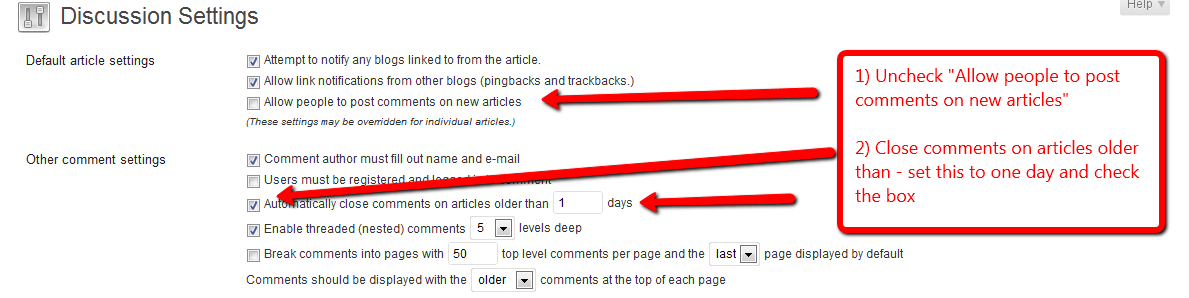
    In this post I want to teach you the two ways to disable comments on your site.  You can disable comments site wide or you can disable comments on a post by post (or page) basis.

    What Are My WordPress How To Posts?

    I am building a library of small how to tutorials to solve common WordPress issues, check out the library of how to tutorials.

    If you need a particular how to just drop me a line using the contact form above

    Site Wide

    To disable comments across your entire site you need to make two changes go to settings -> discussion and uncheck “

    Click to see full size image

    Post by Post

    If you would rather disable comments on a post by post (or page) basis you can do this too.

    Open up your post in the visual editor and scroll down to the discussion box and uncheck “Allow comments.”  See screen dump for full details

    Click for full size image

    Image by hmk

  • neil-matthews.com Launched

    neil-matthews.com Launched

    I’m going a little off topic in this newsletter, apologies if this is of no interest.

    I have launched a new project that may be of interest to some readers of wpdude.com and I want to let you know all about it.

    My new blog is called neil-matthews.com and, as the name suggests it is a much more personal project where I can step out from behind the wpdude brand and talk about things none-WordPress.

    I will be writing about the the tools. tips and techniques you need to employ to market, grow and run an online service business.  I will be drawing upon the experience I have gained building wpdude.com and my WordPress technical support and coaching services.

    I’ve got a lot of information I want to share that just doesn’t sit under a WordPress umbrella, so if you are looking for information to help you grow your business please check out my new site.

    I am also starting an “Inner Circle” group coaching program to help people who want to go deeper with me and find out how build and grow their own online services business.

    Please take a visit at: neil-matthews.com

  • WordPress Multisite WorkShop

    WordPress Multisite WorkShop

    Did you know that WordPress has an in-built function which allows you to run multiple sites from one install of WordPress? This is called WordPress multisite.

    The beauty of this functionality is that you can have multiple sites, but only one set of WordPress code, plugins and themes. You can greatly reduce your maintenance burden if you have lots of sites update and administer.

    I’m running a webinar this week to introduce people to WordPress multisite. I will cover the following topics.

    • What Is Multisite
    • Building a network
    • Network models
    • Domain mapping
    • Managing your new sites
    • Network themes and plugins
    • The super admin user
    • Q & A

    This webinar is part of my members only WordPress training and support community the WP Owners Club.

    I would like to give you a 14 day free trial of the WP Owners Club so you can attend the multisite webinar and test drive the rest of the members benefits at no cost.

    For full details of the WP Owners Club including how to sign up for your free trial go to

    https://dev.neilmatthews.com/wp-owners-club

    I hope to see you in the club house.