Neil Matthews

Category: General Blogging

  • How I Blog For My Business

    How I Blog For My Business

    I’m not a problogger by any stretch of the imagination, I blog to support the WordPress Technical Support business I run here at WPDude.

    After four years of blogging I’ve been able to switch off all paid advertising and support a team of two (soon to be three techies) in more work than they can handle, all because of blogging.  This post talks about how I’ve done this.

    It’s Sure As Hell Not Get Rich Quick

    Flip back to the previous paragraph.  Four years of blogging to get where I am.

    If you think blogging is going to generate a ton of leads overnight, I’m sorry to upset you, blogging is a slow but sure marketing method. Once you get traction, and the search engines have a body of work for you, it’s a very low impact, always on and free form of marketing.

    Blogging is passive (except the actual writing part) so I can market to people without actively being engaged, I can prove the expertise of me and my teams in WordPress through my posts and hopefully be in that persons mind when they need to engage a team to help with their site.

    You need to be into blogging for the long haul, if you are still with me then please read on.

    Blogging And SEO

    As I write this I have 299 posts published on WPDude, that’s 299 chances to lure people into my site with a bite sized piece of my knowledge and a chance for me to expose them to my sales page.

    I’ve written about a broad spectrum of WordPress topics so I can bring people into my sphere of influence and hopefully help them with my free content, and if they need it, help them on a paid basis too.

    The large number of posts match to a large number of search queries and a wider range of people’s WordPress problems.

    I have a couple of posts that bring me a lot of traffic, but I also have many many posts that bring a small trickle of traffic.  I’m pretty sure that the large body of work I have has contributed to my sucess with the search engines.

    As I have blogged for such a long time, I’ve established authority with Google (I think – who really knows what they think) and it looks like I get good rankings for most things WordPress I talk about.

    I’m not going in depth about seo in this post other than to say I use WordPress SEO by Yoast.  I write for people first then tweak slightly for search engine happiness.  Which leads me nicely to …

    Who I Write For

    Whenever I write a new blog posts I’m always thinking “Will this benefit the type of people who buy my services?”.  So for this posts for example I’m thinking, my clients have blogs, but they also have businesses, so they are using blogging as a lead generation strategy, bingo a match I can provide you free useful information and keep my name at the front of your mind.

    I made the mistake in the early stages of this site of writing technical articles about WordPress, I was getting great traction with the WordPress development community, but they are not the type of people who want to do business with me, they can fix their own sites.

    If you have one take away from this post, always think about your client when you post a blog.

    What I Write

    I write about things that will keep my clients informed about WordPress, show them what can be done with their sites and keep them abreast of the latest developments.

    I always write from experience.  This is important, everything I write about I’ve used or done for real in my business of for my clients.  There is not theory, it’s all experienced based.

    I like to write plugin reviews of new and interesting plugins I find that may be useful to my audience.

    I also write articles on fixing the types of problems I see in the field, I call these case studies and they are great. They showcase my expertise while informing the reader, an under the radar marketing technique.

    I write how to articles which will step you through fixing a problem.  These are good for showing your expertise and also showing your reader what can be done on their site.  If it is slightly technical it also shows your reader their knowledge gap, a gap they might like to plugin with expertise for hire,

    I write direct sales articles when I’ve got a course or a special offer on.  This is where investing in you blog pays off, you have an audience willing to read your stuff, then when you have a sales or offer to give, your people will be engaged.  For example every year I run a holiday sale.  I’m based in the UK and we don’t celebrate Thanksgiving so I run a sale to plug that gap when I usually don’t get any work.

    I also go off topic sometimes and write about online business, something I’m passionate about.

    Blogging And Email Marketing

    My blog feeds my email list too.  It makes being on my list a worthwhile thing.  I send out free updates to inform and educate then once in a while I send out a marketing offer.

    Another thing with email and blogging is that it keeps your name and business in the fore front of peoples minds, Whenever I send out an email broadcast about a new posts I usually get a reply asking for a quote or two to fix a problem on someone’s site.

    Guest Posting

    I blog not only on my own site,  but I guest posts on other people sites too in an effort to increase my profile.  If you guest posts for someone with a bigger audience it’s a great way to expand your reach.  Busy bloggers or business owners are always happy to accept a high quality guest post.

    This is something I’ve picked up again with a passion, tapping into someone else’s already established audience is a great way to boost your own profile.

    I also accept guest posts here if you are interested.

    Exposing Your Sales Funnel Through Blogging

    This is where I’m spending a lot of my time at the moment, I’m analysing my traffic and finding ways to introduce people new to my blog to my sales page (It’s up at the top right in big red letters Hire Me, just in case you were wondering.)

    It’s no good having a ton of traffic if people are completely missing the fact this is a business blog not a hobby blog or a pro-blog looking for advertising clicks.

    Here are some of the techniques I use.

    • Constant reference, in a subtle way to my service.  I’ve done this in the first paragraph.
    • Differentiated menu items.
    • In posts ads.  I’m testing a plugin at the minute that inserts ads after x paragraphs.
    • Banner ad at the bottom of my posts.
    • Sidebar banner ads.
    • Reference to my services in the email update I send out about posts.  I have image banners.
    • RSS footer links to my sales page.
    • Hello bar, popups and welcome gates oh my (these may or may not be active when you visit due to split testing)
    The idea is to provide people free content but also alert them to the fact they can hire me and my team.  Don’t be shy, this is a business.  It makes me shake my head when I see business blogs with nothing but a lonely services link at the top of their page.

    Frequency Of Blogging

    I post once per week, and a little more if I’ve got some sort of launch on.  That’s all I need.  I’m not running a magazine style site where I need constant eyes on my sites for advertisers, I need a constant trickle of people into my sales funnel to keep me and my team busy.

    I like to write longish posts so it takes me a couple of hours to write up, check and send out an email alert about a new posts.  Not a bad time to results ratio in my opinion.

    Blogging Mistakes

    I made a couple of blogging mistakes in my early days, here are a few:

    RSS over Email – I just presumed that because I like RSS over email that everyone else will too, and I put off starting an email list for about 18 months (fool of a wpdude).  Get your email list up and running now.

    Losing momentum – as the work starts to come, blogging gets dropped off, I had too much work for clients and my blogging efforts dropped off, big mistake. When the projects are done I had to turn back to paid advertising rather than have a steady stream of leads ready to turn into projects.

    Blog on home page – I know I’m still making this mistake but your home page should advertise your business not your blog.  I’m working on this at the minute.

    Giving a damn about non-clients trolls – I used to get caught up in criticism about my blog posts from people who would never buy my services (other techies for example) or from out and out trolls.  You need to spend your time on clients, not these type of people. Actively direct them away from your blog, these are not paying your way they are wasting your time.

    I would love to hear you blogging mistakes in the comments.

    Wrap Up

    All of my business comes from new clients finding me via my blog or from referrals from people who have used my services,  this is a great place to be in.  It takes a long time and perseverance, but it’s well worth the blogging journey.

    Can I leave you with a tongue in cheek quote

    Advertising is Like Sex: Only Losers Pay for it. – Chris Guillibeau $100 Startup


    Image by 66356408@N07

  • Consulting

    Want to hire my brain for a short while

    My packages are coming soon

  • Case Study: How To Troubleshoot WordPress Crashes

    Case Study: How To Troubleshoot WordPress Crashes

    Me and my team get called in a lot to troubleshoot WordPress sites that have crashed .  Here are my four top ways to help diagnose and fix WordPress sites that have crashed.

    White Screen Of Death

    When I talk about a crashed WordPress site, I usually mean the dreaded white screen of death.  You make a change or install a new plugin then all of a sudden your site does not work any more.

    All you can see is a white screen, what is more you cannot login to undo your changes because wp-admin also give you the same white screen.

    Troubleshoot WordPress

    This is the methodology I use to troubleshoot WordPress, I have a video tutorial at the bottom of this post if you would prefer to see the process in action.

    Disable Plugins

    Nine times out of ten crashes are caused by problem plugins.  You need to disable all your plugins and find which one is causing you problems.

    WAIT: I cannot login, how do I disable plugins?

    You need to access the file system of your site.  Login to the control panel of your hosting company and find the files manager.  In my experience all hosting companies supply a file manager of some sort.

    Navigate to wp-content and then rename plugins directory to plugins_temp.  This will fool WordPress into thinking that there are no plugins installed.

    If it is a plugins problem, you site will jump back into life and you will be able to login.  Go to the plugins section, and all of your active plugins will be marked as inactive.

    Go back into the file manager and rename plugins_temp to plugins then enable your plugins one at a time testing as you go to see which once caused the crash, then remove it.

    Activate Default Theme

    Sometimes crashes are caused by issues in your theme, my next step when troubleshooting is to activate a default theme.

    In much the same way as we disable plugins, we can disable themes.  Go to the theme folder wp-content/themes then rename the active theme directory.  Hopefully this will allow you to login now.

    Go to your appearance -> theme section and activate one of the default themes such as twenty eleven.  If you site comes back online, you have an issue with your theme.

    Re-Install WordPress

    Manually re-installing a clean copy of WordPress is often a good way of fixing corrupt core files.

    To do this, first obtain a clean copy of WordPress from the download section of WordPress.org and copy it to you local machine.  Unpack the zip file and the attach to your site using FTP.

    Upload the clean copy of WordPress ,overwriting your existing files.

    Please be careful not to overwrite wp-content this contains your theme, plugins and any uploads you may have.  If in doubt call in a professional to do this for you.

    Enable Debugging

    The fourth item I recommend to people is to enable debugging and see if WordPress is trying to tell you what ails it.  Enabling debugging will allow WordPress to show any errors or messages that are being generated.

    To enable debugging go to your file manager and edit wp-config.php, add add this command and save. This will enable debugging and verbose messages and errors will be displayed.

    define('WP_DEBUG', true);
    To disable debugging switch to false or remove this line.

    An example when debugging helped me; one of my clients had run out of memory and was not seeing any errors.  I enabled debugging, increased available memory via php.ini and the site came back online

     Video Tutorial

    Here is a tutorial I recorded some time ago to take you through how to troubleshoot WordPress sites  in more depth

    [leadplayer_vid id=”50753A7F726BC”]

    Image by soundiron


  • Making Your Site Mobile Ready

    Making Your Site Mobile Ready

    Overview

    In this session I will show you how to configure your WordPress site so that it displays a cut down theme

    As mobile usage grows and more and more people consume blog content on small screened devices we need to setup our sites to cater for their special browsing needs.

    Video

    [leadplayer_vid id=”506436C5D8884″]

    Downloads

    Download the presentations slides

    wp-touch

    mobilepress

    WordPress Mobile Pack

     Google Analytics

    http://www.devirtuoso.com/2010/08/20-mobile-device-emulators

    Mobile One Studio

  • Top Essential Website Features You Can’t Afford to Lose

    Top Essential Website Features You Can’t Afford to Lose

    This is a guest post by Claudia Somerfield

    An important aspect of website development plan is to decide which features you are going to incorporate while constructing your website. Identifying these aspects would vary from one niche area based sites to other; however, there are several common features which are a must for every website category. It can be a time taking business to plan your competent website design by keeping all the elements in a careful balanced fashion. But with some of the top essential website features as discussed under, you can arm your site to bring the best outcome for your business. The below are the top essential website features which you cannot afford to miss.

    The social sharing buttons

    The social media has a great importance in the lives of millions of users. Hence incorporating this feature in your website is imperative. It has the capacity to give your website a better social media exposure. It can help you in rendering a path for visitors to your website to share your content to your plethora of friends. The more the number of share count seen over your site, the more good impression it gives about your website content to new visitors. Lastly, it also acts like an important SEO tool which helps in boosting your rankings over search engines like Google.

    The mobile version of your site

    With the popularity of devices like smartphones where you are competent to access internet, the mobile website is gaining lots of momentum. People prefer watching different videos, accessing social media, checking emails, etc. over their smartphone devices. Hence considering this paradigm shift, developing a mobile translation of your site right from scratch along with adding several new applications would certainly going to add a new edge to your website. This aspect is among the top feature which you cannot avoid missing in your website thus giving the mobile users an enhanced level experience and eventually increasing your site hits.

    Adding up a Blog in your site

    By incorporating a blog in your website can help you in boosting the search engine rankings for your site. It also helps you in giving your site content a new edge in terms of regular updates. The search engines like Google simply loves quality and updated content over sites coming via blogs. The content plays a good role in getting links to your site thus helping it promoted in a wide web spectrum. Once you decide to incorporate this important feature to your site, you are supposed to have several things to make your blog effective. These include having a comment scheme, a proper spam protection system, RSS feed, search engine optimized URLs, social sharing buttons, etc. Without having a blog, the quality content over your sites will hardly find its ways to new visitors.

    Email subscription

    The more big email subscription list you have, the greater is the opportunity you have for your sales conversion. Every website owners aspires from the visitors to buy something which he or she is offering or at least the visitor coming at their site must fill the contact form. However, if a visitor simply walks out without giving his or her contact info then you do not get the chance to contact them. Hence it is important to incorporate this feature by explaining that you would inform the visitors with the latest offers on your products or services in the coming future. In this way, you end up getting response to your email subscription which eventually plays an important role in expediting your sales conversion.

    Wrapping up

    In order to embark with an effective website design, adding these above discussed features could be called as a must for everyone. These would help you in giving your website a better exposure to your targeted audience irrespective of your website category. Hence at any point of time you cannot afford to miss these features while designing your site.

    About The Author: Claudia is a writer. She loves writing, travelling and playing. Recently she did anarticle on website features. These days she is busy to write an article on essential website tricks.


    Image by paulk


  • Performance Tuning Course Is Go

    Performance Tuning Course Is Go

    I wrote a post  last week asking if people are interested in a WordPress performance tuning course, to learn how to speed up a slow  loading site.  It looks like that course has been given the green light.

    I’m planning to teach people the process I use to speed up slow sites.  Go and check out the post now if you missed it I’ll wait here for you WordPress Performance Tuning Course

    I had a lot of response to the post and the email I sent out, so the course has been given the green light.

    Format Survey

    Before I start work on the content and inviting people to join me, I want to know what you think the best format for a course is.

    I can offer the course in the following formats:

    • Live webinar
    • Self paced video tutorials
    • Self paced video plus Q & A webinar
    • Self paced video plus members only forum for questions
    • E-Book
    • Audio program
    A note on webinars, timezone differences sometime cause issues with people wanting to join a live event, I’m based in the UK and I do webinars between 7pm-8pm which is the following times in other areas
    • Pacific Timezone USA – 11am – 12pm
    • Eastern Timezone USA – 2pm-3pm
    • Sydney Australia – 5am-6am
    If you cannot attend for work reasons, or that it is stupid-o-clock where you live go for one of the self paced options.

    Free Seat On Course

    I’m running a competition alongside my survey and the winner will get a free seat on the new course.  I’m asking you to simply answer the following question:

    Explain why this training will help you

    I’ll review the replies and the best answer will get a free seat on the course.

    Take The Survey & Enter The Competition


    [gravityform id=”84″ name=”Performance Tuning Course” title=”false” description=”false”]

    Image by a_of_doom

  • WordPress Performance Tuning Course

    WordPress Performance Tuning Course

    I get called in a lot to help speed up slow loading WordPress sites.  This is important for both user perception and for search engine rankings(Google doesn’t like slow sites).

    I thought it would be a good idea to create a video course to show people how to move through the step by step process I use to speed up slow loading sites.

    This post is a toe in the water to see if this course is required. If I get enough response I’ll create the course and make it available as a downloadable video course.

    What Will I Be Teaching?

    I’ll be showing people who sign up my proven method for moving through a WordPress site and speeding up the various layers of a site..

    This is what I have done on numerous client sites, I know it works, and I have been able to successfully get sites to run at a much faster speed.

    Who Is It For?

    This course will be for people who’s WordPress site is running slowly and need it to run more responsively.

    This course is also for professionals who want to speed up their clients site.  If you would like to supply this type of service this is for you

    It will require a certain level of technical knowledge so this is not for the absolute beginner.

    Planned Modules

    Here are the seven modules I’m planning on covering:

    Performance Tuning Methodology – I will take you through my proven methodology to speed up sites layer by layer

    Finding theme bottlenecks – This module takes you through performance tuning your theme.

    Finding plugin bottlenecks – plugins often don’t play well together I’ll show you how to troubleshoot your plugins.

    Finding WordPress Core & Database bottlenecks – the final layer to test is WordPress itself and the database.

    Trouble shooting your hosting account – sometimes cheap hosting is the root of your problem I’ll show you how to check this out

    Cache plugins & CDN Usage – in the final module I will show you how to speed up your site with cache plugins and offload content with a CDN

    Do You Want To Know More?

    If I get enough response I will be inviting a small group of pioneer members to work with me very closely.  I’ll build the course out and make it available as a stand alone product.

    Would you be willing to join me for this course.  All I’m asking for right now is your email address, join the list below to let me know the level of interest.

    [gravityform id=”83″ name=”Performance Tuning Course” title=”false” description=”false”]

  • Plugin Review: Embed Plus

    Plugin Review: Embed Plus

    This is a guest post by Tay Omojokun, the developer of this plugin so he may be a little biased in his reporting, take it away Tay:

    EmbedPlus: Advanced YouTube Embedding in WordPress

    Bloggers looking to customize video embedding in WordPress should check out a unique plugin for YouTube offered by EmbedPlus. Beyond the basic ability to embed a YouTube video using links, EmbedPlus adds several customizable features that the standard YouTube player does not provide. Below is a couple of screenshot illustrating some of these features.

    The EmbedPlus player with a call-to-action annotation

    Sweet spot marking adds social chapters

    Features

    Here are the important features listed:

    • DVD-like controls
      • Chapters (custom and social)
      • Instant Replay
      • Slow Motion
      • Looping (scene and whole video)
    • Video Reactions/Comments (optional)
      • Reddit (Highest scoring submissions)
      • Google+ (Most recent posts)
      • Twitter (Most recent posts)
      • Digg (Most “Dugg”)
      • YouTube (Most recent comments)
    • Timed-Annotations (with link support for calls-to-action)

    Demo

    Before installing the plugin, take a look at the demo provided on the EmbedPlus homepage that enhances a popular TED Talk video on deep sea creatures. There, you can directly play with the listed features and see how they might help engage your visitors. For example, as the home page demo and screenshot above show, the annotations feature can be used to support calls-to-action that can motivate visitors to take part in a given campaign (e.g. mail list signup).

    Beyond the demo, you can experience these features with other videos using the service’s new Chrome Extension for YouTube and a video-rich language learning project the team is exploring: How to pronounce words / Pronunciación en Inglés / Pronuncia in Inglese

    Usage

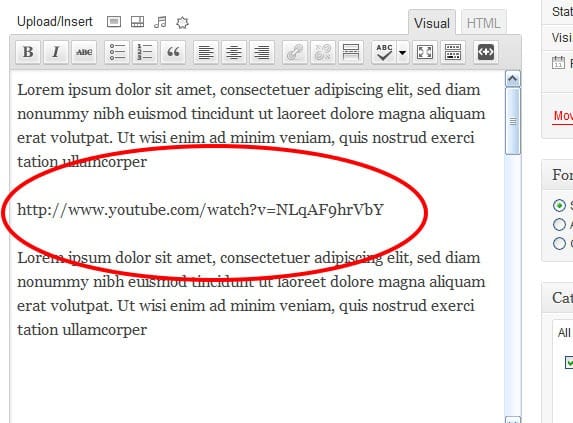
    To install the plugin, simply download it from here and within seconds, you’re up and running. Using it becomes a matter of just pasting links in the rich-text editor as displayed below.

    Paste a YouTube link like oEmbed

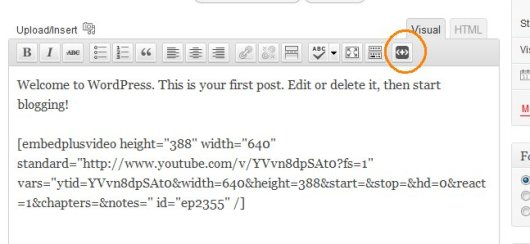
    To make customizations like annotations and chapters, simply click the added EmbedPlus button on the editor toolbar and a wizard is launched right within your WordPress interface. After entering your edits (e.g. chapter times), you’ll get short code to paste on your blog that encapsulates them. Below, you’ll see a screenshot of the wizard’s start button and an example short code that is generated at the end of the wizard.

    Example smart code generated by our wizard to paste

    The EmbedPlus team is eager to get feedback here. You’ll see a Google chat badge that the team will be checking for questions, frequently and periodically.

    Neil’s Two Pennys’ Worth

    I wish I had seen this plugin when I was first building my coaching videos.  They are an hour long and the ability to skip to a chapter would be brilliant for my coaching clients.  Is it youtube Only??  Perhaps I could chunk up my videos and upload them to youtube so I can save on Amazon S3 costs.

    Thanks Tay I’ll be giving this a trial very soon.


  • Google Suggest And WordPress SEO

    Google Suggest And WordPress SEO

    Did you know that you can use the Google suggest function on a search to improve SEO and match blog post titles to what people are actually searching for?

    Match Your Blog Post Titles To Real Searches

    Imagine this, you go to Google and search for something, and the title of the page that is returned exactly matches what you have typed in.  That is the link you will click first not some related search result Google has seen fit to provide you with.

    Using the technique I’m about to explain that is what you can do for all your blog posts.

    Use What People Are Searching for, Not What You Think They Are Searching for.

    You may spend hours crafting quality content, but if you don’t match your SEO settings such as title and meta description to what people are actually typing in as search queries there is very little chance you will get click throughs from Google and Co.

    What you think people will be searching for when trying to match up your content and what they actually type are sometimes completely different.

    Google suggest give you real time data on what people are typing.

    How It Works

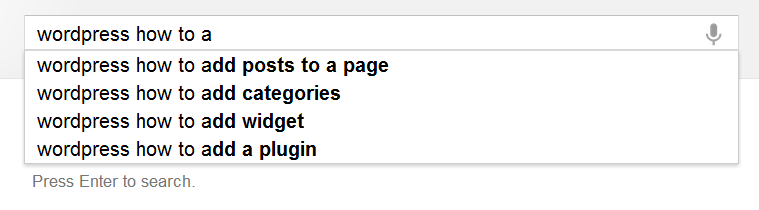
    If you go to a Google search page and start typing, you will see a suggestion appear, see this screen grab where I started to typing in “WordPress How To”.  The top four most searched for queries are shown to me.

    I can see that “WordPress how to use” is the top search and I could use this as my post title, and match my content directly to the most popular search. Google indexes my content and serves it up (hopefully) when that query is typed in.

    Using This Technique To Plan Content

    Not only can I use this technique to give my post a relevant title, I can also use this to plan my content.  If, for example, I was writing a series of WordPress how to articles, I can get a series of relevant posts titles using this technique, but adding a – z onto the end of my “WordPress how to”  query and I suddenly get 26*4 article suggestions.

    WordPress How To A give me these, continue with WordPress How To B, etc etc.

    Caveat

    As with all SEO techniques, make sure you are writing for humans first and for the search engines second, if you post titles don’t make sense, people will notice and assume you are gaming the search engines rather than creating content for people.  Here is an example, if I’m writing my WordPress how to series, by adding some abbreviation (human readable, but ignored by the search engines) I can make the post title make sense.

    “WordPress How To: Add A Widget”

    instead of

    “WordPress How To Add A Widget”

    Hat Tip

    A huge hat tip to Skelliewag who first suggested this technique in one of her blog posts.  Sorry I cannot find the original, but she proposed that you use this when creating a brand new blog to get traction with posts that match what people are search for in your niche.

    WordPress SEO Workshop

    I’m running a WordPress SEO workshop on Thursday 21st June where I will show you how to use this technique along with many other tips and techniques.

    The workshop is no cost, but seats are limited, check out this post for details.

    SORRY WEBINAR CLOSED


    Image by jeffanddayna

  • WordPress SEO Course

    WordPress SEO Course

    WordPress is a great tool for publishing your content, but out of the box it is NOT 100% optimised for SEO or Search Engine Optimisation.

    I thought it would be a good idea to create a video course to show people how to move through the step by step process I use to setup my clients sites for the best SEO.

    This post is a toe in the water to see if this course is required. If I get enough response I’ll create the course and make it available as a downloadable video course.

    What Will I Be Teaching?

    I’ll be showing people who sign up my step by step approach to making your site as appealing to the search engines as possible.

    This is what I have done on my own and numerous client sites, I know it works, I’ve got multiple posts at position one in Google.  These posts send me a ton of free traffic.

    Who Is It For?

    This course will be for people who’s want more organic traffic to their site through on-site white hat only techniques (no spamming or underhand tactics here).

    It’s not technically demanding, but it involves a number of techniques that change the way your site talks to the search engines.

    The Format

    I will be building a members only site where you can get access to the video tutorials, supporting content and support from me.

    Planned Modules

    Here are the  five modules I’m planning on covering:

    SEO Overview – what is it and how it can help you bring more people to your site

    WordPress SEO Config –  the WordPress config changes and plugins that make all the difference

    Optimising Posts and Pages – how to ensure your message is correctly understood by the search engines, whilst maintaining human being readability

    Keyword Research – learn what keywords people are searching for in your niche, and plug them into your site.

    Monitoring Your Efforts – once you’ve done all the hard work, how can you be sure your changes have made a difference, I’ll show you how to monitor your SEO efforts.

    UPDATE: Course Running This Week

    You can sign up for this no cost webinar from the register link below

    https://dev.neilmatthews.com/members/webinar/


  • 11 Principles to keep in mind while Designing a Great WordPress Theme

    11 Principles to keep in mind while Designing a Great WordPress Theme

    This is a guest post from Claudia Sommerfield see here bio at the bottom of the post.

    While creating web pages on WordPress, the assortment of capabilities can make you a proud owner of one of the best designed websites on the Internet. However, if you forget to look into some simple basics, you may find yourself on the receiving end. This makes it extremely vital to remember some vital points while designing a web page on the WordPress platform.

    Listed here are certain principles to follow before you design an awesome WordPress theme:

    1. Validate your code properly

    This is one of the basic principles to follow before designing a WordPress theme. You need to validate your work and ensure proper validation of the code too. HTML, CSS is the other areas to pay attention to where proper validation is concerned. This will be definitely appreciated by a knowledgeable surfer who is on the lookout for great and systematic validation of the WordPress themes.

    2. Make your design work across browsers

    It is always wise to make your WordPress theme work well in any of the popular browsers. You need to keep in mind the important browsers such as Internet Explorer, Firefox, Opera while preparing your WordPress theme. It is a well known fact that compatibility with popular browsers will fetch you an increasing number of visits across various browser platforms.

    3. Comment your code regularly

    This is a healthy practice in WordPress theme especially if you have made major modifications to your basic WP theme. This is akin to regularly servicing your code, so that you know what changes you have made along the way from the initial designing of the WordPress theme.

    4. Be original

    It is always wise to come up with something original if you want to attract visitors to your web pages. Internet surfers are more intelligent than you think and can easily identify a basic WordPress theme that is simply modified to the basics. This makes it unimpressive and the net savvy users may simply ignore your website. With thousands of websites built on the WordPress platform, you cannot expect web surfers to visit your page unless there is something eye catching or unique about your theme.

    5. Be prepared for a test run

    While formatting your content code, make sure it can handle all the default content of the Wordpress theme without any hassles. This can be achieved by a Test Run that will give an accurate feedback of your newly designed WP theme. If you feel that your design looks awkward in the Test Run then it definitely needs to be given a second look.

    6. Make content a top priority

    A beautifully designed WordPress theme with no quality content is like an empty vessel that makes more noise. Therefore, it is extremely important to put in some valuable content and quality stuff on your WordPress theme, if you want to run a long race. It is pointless having too many images with hardly any content to match it. Give top priority to the content on your WP.

    The latest trend is to make your WP theme widget ready to keep up with the stiff competition amongst good websites. Most of the techno savvy web users love to use widgets and are impressed if you provide them with the same. Widgets have become an important means of cross communication and reference on the Internet and need to be given their place.

    8. Customize the 404 page

    This is one of the most vital principles to be followed since any bad experience by the user will keep him or her away from further ventures to your website. You should make it a point to always customize the 404 page to improve the user experience. Remember, once bitten, twice shy!

    9. Provide Support and quick response

    It makes sense to follow user response in order to keep upgrading your themes. For this, you need to provide the user with a quick user response and adequate support. If you respond quickly, chances are that the ser will keep coming back to your page and remain there for a longer time. You can do this by constantly administering your web pages and regularly reviewing them.

    10. Customize unimportant pages

    To have a good WP theme, you need to customize all the easy pages such as main index templates, search result page, attachment template etc. Make a detailed check list and customize all the easy to forget and unimportant pages for a better user experience. All these pages are always required but remain in the background. However, lack of customizing these pages may result in shoddy work and keep visitors away from your website.

    11. Like it yourself

    Before finalizing your theme, make a trial run and visit it yourself through any browser to check whether you like it or not. Simply put, unless you like what you have designed, chances are that other users may not like it too. This will give you positive feedback and you can make the necessary changes that are required. Following this principle will definitely help you in bringing out the best in you and give way to an increased web viewership to your WordPress themes.

    To design a great and outstanding WordPress theme requires you to follow certain guidelines before you come up with the final theme. This will not only bring out the best in your creativity and innovation, but it will also help in attracting the choosy customers.

    About the author: Claudia is a blogger by profession. She loves writing on luxury and technology. She recently read an article on nautical theme that attracted her attention. These days she is busy in writing an article on facebook themes.

  • When Google Marks You As Suspect

    When Google Marks You As Suspect

    Did you know that when Google indexes your site and copies your content for the index, it also checks your site for malware?

    If you are marked as suspect,  you get a suspect site tag, and it will affect your sites rankings.

    A common side effect of a WordPress hack is malware being inserted into your site to download viruses or redirect your innocent site visitors to a nefarious site.

    Chaka Khan Let Me Rock You

    Singer Chaka Kkan’s site was hacked and marked as suspect, when this happens, you will see this additional line added to your search results


    Click for full size image

    Browsers

    Certain browsers like Google chrome and Firefox are keyed into this suspect site system and if you click through to a site marked with malware a huge red screen appears warning you that malware may infect your machine.

    Imagine if your clients or site visitors see that?  It only takes seconds to ruin your reputation and that definitely would ruin you.

    Check To See If You Are Marked As Suspect

    There is a very simple way to see if Google has marked you as suspect, and that is to use the following URL, replacing the red text with your own domain.

    http://www.google.com/safebrowsing/diagnostic?site=http://neilm.wpengine.com/

    What Do You Need To Do

    You need to clean the malware from your site and then ask Google to reconsider your site and remove the malware stigma.

    If you open a Google webmasters account from google.com/webmasters, under the diagnostics->malware tab is a reconsideration request form.

    Hack Recovery Course

    I cover this topic in much more depth in module nine of my hack recovery course.  Check out this page for full details WordPress Hack Recovery Course