Neil Matthews

Category: General Blogging

  • CASE STUDY: Building Widgets For Mobile Devices

    CASE STUDY: Building Widgets For Mobile Devices

    In this case study I want to show you how I created a set of widgets for mobile devices and a different set for desktop and tablet devices. Building widgets for mobile devices is not too hard once you know the procedure.

    Background

    We all know that mobile device browsing is growing at a huge rate, and that  your website had better support mobile devices.  It is incredibly important that your site has a good responsive theme, but sometimes settings for a desktop site aren’t quiet right on the responsive side of things.

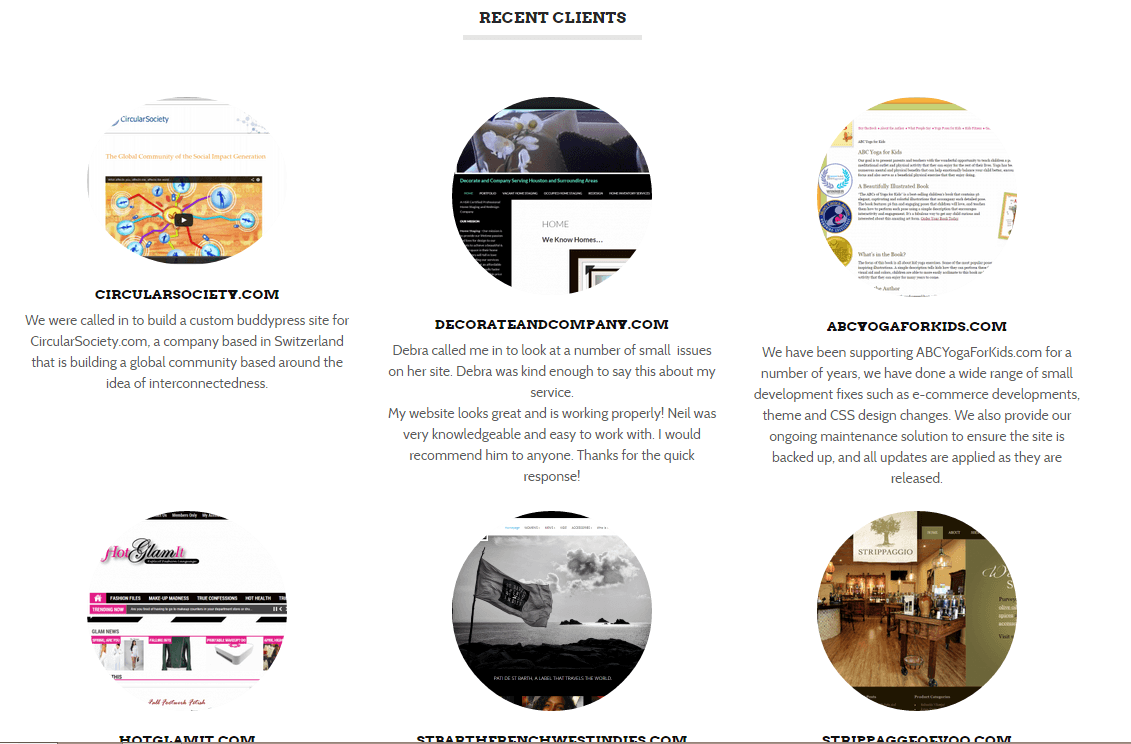
    This case study is for my own site wpdude.com, on the home page I have  a series of widgets, I use them to show my client portfolio and my recent blog posts.  I’ve got nine random client listings, which looks great on a desktop or tablet.

    Click for full size image
    Click for full size image


    You can very easily scroll down through the nine items with a wheeled mouse, the problem arises when I look at my site on my phone, I’m scrolling through acres of screen real estate to get past nine testimonials, so my problem was how to limit that number on mobile phones only and keep that valuable social proof for larger screens.

    Enter Widget Logic

    I’ve written about the great plugin widget login in this post, but in summary widget logic allows you to apply logical conditions to sidebar or in my case home page widgets and only show those widgets when the condition is met.

    If only there was a condition that allows me to show only when a device is mobile …

    Enter WP_IS_MOBILE()

    There is a function inside of WordPress called wp_is_mobile(), what this does is examine the user agent of the device browsing a website and will return TRUE or FALSE depending upon whether the device is a mobile one.

    The user agent is a piece of data all browser send to a website, so you desktop will send the fact you are using Google chrome from  windows machines, your Mac will say safari, and your phone does exactly the same.  This is how WordPress knows there is a phone browsing your site.

    WP_IS_MOBILE()  defines mobile devices as phones only, larger screen tablets will return FALSE.

    What I Did

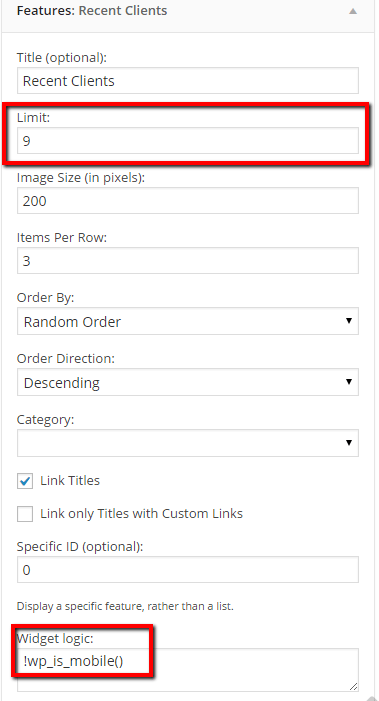
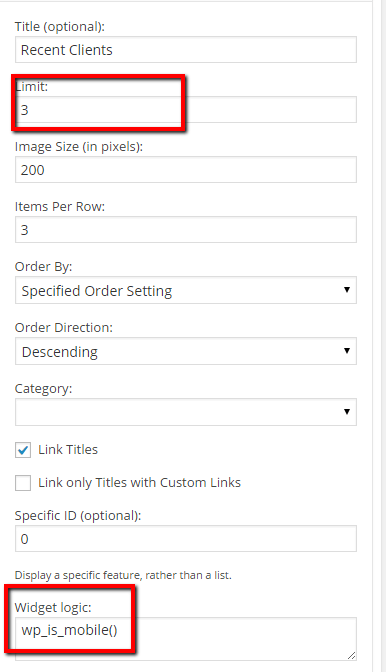
    I created two widgets to show testimonials, one had widget logic set to !wp_is_mobile() and the other set to wp_is_mobile(), it might not be immediately apparent what the difference is, but adding translates to IS NOT mobile.  Here are screen dumps of both widgets

    !ismobile
    click for full size image
    ismobile
    Click for full size image

    If you check my site on a mobile device you will only see three featured clients.  What is happening is that the wp_is_mobile is returning TRUE so that widget is displayed.

    Wrap Up

    Mobile is incredibly important, ignore configuring your site for optimal mobile browsing and you risk loosing potential customers for your products or services.
    Photo Credit: rmtx via Compfight cc

  • Zapier Review: Integrate WordPress With Almost Anything.

    Zapier Review: Integrate WordPress With Almost Anything.

    I’m a huge fan of automating those tedious repetitive tasks that are part of everyday business.  If I don’t automate them, they will get stockpiled and sometimes not done at all, my brain is hard wired to look for the shiny new object and repetitive tasks are a real problem with me.

    What’s that got to do with WordPress I hear you cry, what is Neil spouting on about …

    There’s A Cool Service That Lets You Automate almost Anything (Digitally Anyway)

    I’ve been using a great software as a service tool called Zapier that lets me automated all those tedious little data entry jobs between the various software tools I use.

    It has automated many of the tasks that bore me stupid, but are an essential part of running a business, the type of thin that takes up lots of our time by stealth.

    Enough of that onto my Zapier review.

    How It Works

    Once you sign up for Zapier you can create something called a zap, a zap is an integration between two services.

    Service A sends it’s data into the zap, and the zap then sends that same data automatically to service B so you don’t have to retype that data.

    No data is lost, and no effort is expended at your end. The robots are taking over the world at last and our jobs are at stake :).

    Examples

    I’m always a fan of an example to help understanding.  Here is an example of a Zap I’m using.

    When you sign up for my maintenance service you create a recurring subscription in Paypal.  I want that data to be sent to my accounting service Freshbooks.

    I’ve created a zap so that when a payment is processed for me by Paypal that data is sent into zapier.  That data is then processed and sent to Freshbooks as a new invoice.  It adds a new customer, the invoice amount and then marks it as paid, as the money is already in my PayPal account.

    The invoice is added into the sales section of my accounting package and the tax man is kept happy, all automatically, all without me lifting a finger to my keyboard.

    Many of my paypal invoices are already added to freshbooks so part of the zap allows to me filter what is sent to Freshbooks.  I check to see if the item description in paypal matches a certain string and only then data is sent to my accounts.

    Loads Of Integration Services

    At the time of writing there are 300+ apps that are integrated with Zapier,  There are a vast array of service types covered:

    • Social media
    • Payment processors
    • CRM systems
    • Project management
    • Helpdesk software
    • Email
    • Instant messages
    • WordPress has lots of integrations

    The list goes on and on, in fact, here is the list https://zapier.com/zapbook/apps/

    Costs

    The pricing model is based upon how many zaps you create and how often that zap is called per month .  It starts at $0 and goes up to $125 per month for the big package, here is the pricing page https://zapier.com/app/pricing

    The free entry level pricing option is a bit of a con, only certain services are available on the free plan, Paypal for example is not included boo to Zapier on that little stunt.

    In My Day We Had To Program Our Own Integrations

    Back in the day * we would have to program our own integrations using the API or application programming interface of each service.  I’ve done this for my own business and clients, and it costs a lot in time and effort to code up robust solutions like this.

    To me $20 per month is a huge saving in programming time and manually data entry time.

    *circa 2012

    Wrap Up

    Running a small business as a solopreneur is all about running lean and keeping your operation as stream lined as possible,  automating small repetitive tasks is one of my favourite ways to do this and zapier.com provides a great solution to those data integration problems.

    If you need help bringing your disparate systems together why not get a no obligation quote.

    Photo Credit: id-iom via Compfight cc

  • Case Study: Cleaning Up Comment Spam In The Database

    Case Study: Cleaning Up Comment Spam In The Database

    I was working on the site of one of my regular maintenance clients, his site was running very slowly, both on the front end and the back end dashboard.

    I was also unable to run a backup correctly so I began to dig a little deeper to keep the site on-line. This is when I found the site was not cleaning up comment spam correctly.

    Dodgy Database

    It’s long been my experience that if the dashboard of a WordPress site is running slowly, there is probably an issue with the database so that’s where I began my investigation.

    I opened up the database and found something very unusual …

    Comments Meta Table

    The comments meta table was absolutely massive.

    The comments meta table contains the actual text content of the comment.  There is a corresponding part of the comments system which contains email, date left etc, but comment meta contains the actual message.

    The total size of the database was approx 250MB and the comments meta table took up over 220MB of that space.

    When there are lots of spam comments with heavy amounts of comment content, it ends up the in the comments meta table creating a big performance hit on your site.

    Deleting Spam Comments

    Now the difficult part of the problem was this, there were very few comments in the system, all the spam comments had been caught and deleted BUT the comments meta table was not tidied and optimized.

    There were tens of thousands of orphaned meta entries taking up all that space.

    A great plugin to use to see how large your database tables are is WP-DBManager https://wordpress.org/plugins/wp-dbmanager/.

    This plugin allows you to see a list of tables and how large they are.  Here is a screen dump of my comments tables, you can see I have 13MB in my comments meta table (security note always hide your table prefix).

    dbmanager
    Click for full size image


    How I Fixed This

    I installed and configured a secret weapon in my tool kit, the wp-optimize plugin https://wordpress.org/plugins/wp-optimize/.

    wp-optimize is a cool little plugin, it does a great job of cleaning up orphaned data which is left in the database, I’ve written more about it here when I talk about optimising your database.  Check out that post on details on how to use wp-optimize.

    Super Speedy Site

    Once the orphaned meta data was removed, the site kicked back into normal speed, I could take my maintenance backups, “Jobs a good un” as they say in the north of England where I live.

    Wrap Up

    If you are suffering from a slow loading website in the dashboard as well as on the front end of a site, it may be an issue with your database, check out these optimisation procedures.

    If you want a team of pros to manage little issues like this then why not take out a maintenance plan.  There is a lot more than just updating plugins in this service package.

    Photo Credit: Grumbler %-| via Compfight cc

  • Apps Versus Responsive Themes For WordPress

    Apps Versus Responsive Themes For WordPress

    I’ve been doing a lot of research recently into systems that take WordPress content and package them as apps for iPhone, iPad and Android devices. So who wins in the apps versus responsive themes for WordPress battle?

    The reason I am doing this is because I think native apps are a far better solution for mobile devices than responsive themes.

    Don’t believe me read on.

    First Some definitions

    Let’s define the differences between a native app (app from now on) and a responsive theme.

    Responsive Theme – there is some coding in your standard WordPress theme that recognises you are accessing the site on a mobile device and it automatically resizes your site.  Check out WPDude on a mobile phone to see a responsive theme in action.

    A Native App – this is a piece of code that is generally distributed from the apps stores such as iTunes or the Google play store.  It is specifically written for mobile devices.  It’s not a website but in the examples I’m going to show you it can pull content from your existing WordPress site to populate the app.  The app can also tap into the features of your phone, something responsive themes cannot do.

    My own native app is in development,  I’ll update this post once it is in the apps stores.

    I’m not talking about the next Angry Birds, what I’m talking about is a marketing tool for you business much like your website but specifically tailored for a mobile device.

    They Do The Same job

    Apps and responsive theme do essentially the same job, they make your content and marketing messages easier to read on a mobile device, but I think apps trump responsive themes in a number of ways, and that is why I’m planning to pin my digital future to apps not mobile themes and I think you should too.

    It’s A Smaller Pond

    There are tens of millions of websites but only a few hundred thousands apps, get in early and you can corner your market.

    My experience has been that people are searching for app solutions, if you can offer that and get your app on people’s devices you will be at the top of people’s minds and get that business.

    Mobile Device Marketing Features

    I bet you didn’t realised your mobile phone or iPad have built in marketing tools that your business can utilise.  Responsive themes cannot tap into these features only native apps written in the specific language of the devices can do this.

    Some of the marketing features are:

    Push Notifications – send messages to the device people nearly always have about their person.  you can make your app send notifications when you update content, or when you have a special offer.  Think of it as email direct to a device people hardly ever ignore. Inboxes are swamped but people don’t ignore their mobile notifications (yet but this may change).

    Push To call – It’s a phone, you can create a massively simple and literal call to action, have a big button saying call us to take bookings and leads for your business.

    Carry With You Features

    The portability of your mobile device should also not be underestimated.  There are ways you can tap into the “always with the customer” mode.

    Loyalty app –  people check in with their mobile phone to get benefits such as money off building brand loyalty.

    GPS Features – the positioning system built in to most smartphones allows you access to a persons location, using that you can market to people in a number of special ways

    Directions – give me a  map and step by step instructions to get to your physical location.

    Geo-Fencing – If you have a message you want to push out to your app, but only to a set location, you can use geo-fencing.  Geo-fencing is a pretty new field of marketing, but essentially you set a fence around a physical location and only send push notifications in that area, perhaps an example is in order.  Say you have four physical locations and you are having a special offer in location A.  Set up a geo-fence or catchment area and send out messages only to people in that area about your offer.

    GPS Couponing – if someone is in your location with their app, you can target them and send out a coupon.  With many bricks and mortar business, it’s all about bringing people through the door.  Targeting people in your current area can do this.

    Photo capture – smart phones are also cameras, you can use camera functions to have your customers send you images.  For example if you run a Law Practise you could get your clients to photograph a car accident to add to your case file.

    The Lay Back Device

    I first heard this phrase describing iPads a couple of years ago, and I cannot agree more.  We are using our tablets for more detailed reading where we can step away from our desktop machines and really absorb text or video.

    You settle down or lay back to consume stuff on your tablet, websites are fine for this, but if you have an app specifically designed for a tablet you can make that information consumption a better experience.

    Control The Layout For The Device

    When you code up a native app, one of the best features is the ability to exactly control the user experience.  Using buttons and gestures people are familiar with on their other apps makes your app wrapped website work really well.

    Can you think of a time when you have been frustrated with a mobile website, I can, apps stop that frustration because they are designed and coded to work on that particular platform.

    Other Things You Can Do With An App

    The solutions I have been investigating also allow you to do the following:

    • Display content from your website, YouTube, podcasts etc
    • Capture emails into Mailchimp aweber etc
    • Sell things online
    • Coupons and offers
    • loyalty schemes
    • GPS functions such as route finders
    • Social media integration
    • Mobile scheduling for services or restaurants
    • Email forms to collect leads
    • Event attendance
    • Social media functions – think Facebook wall on your own app
    • … the list is growing as these systems advance.

    You Have To Deliver Value With An App

    Getting an app download requires a little more effort than visiting a website so you need to answer the question “what’s in it for me” loud and clear.

    • It could be money off with a loyalty app or discounts
    • It could be education with videos or posts
    • It could be ease of use such as mobile booking

    what ever it is you need to add value before you can start to market to people via apps.

    Once you have that download you have a great new avenue to sell your business through.

    The Shiny New Thing Factor

    There is definitely an aspect of shiny new thing, and an app is shinier than a website but does a very similar job.  but I recommend you get into the app game now so your app is on people’s phones before your competitions.  Stake your claim to a piece of their screen real estate now. I particularly recommend this if your target demographic is youthful and uses their mobile a lot.

    Advertising Revenue

    If you are a producer of content rather than a business with products or services, then mobile advertising may be for you,

    In my experience, mobile ads perform much better than website ads by a large factor.

    My Own Experience

    – if there is an app for my preferred sites I’ll use that over a browser experience.  Here are some of the apps I use over the website

    • Basecamp
    • Freshbooks
    • Evernote
    • Mailchimp
    • WoedPress
    • Skype
    • Paypal
    • Domino’s Pizza (yes I know that says a lot about me)
    • Odeon (that’s our local cinema app)
    • Feedly – so I can consume feeds in my lay back mode.

    That’s The Why Now The How

    I know this has been a long posts and  I have only just scratched the surface of apps for business, I’ll be going much deeper on the topics in the coming month if there is an appetite for this topic.

    In my next post on the subject I’ll tell you the various tools I have been experimenting with, and how you can get your very own business app.

    Are you interested in apps for your business? Leave your comments below if you have any questions about apps that I can answer from my research.

    Photo Credit: tausend und eins, fotografie via Compfight cc

  • Multi Language Social Media

    So you’ve gone to all the trouble of building a multi language website, now you need to start brining people to your funky new site.

    Social media, as we know, is a great way to get your message out there.  In this post I want to talk about how you can create a multi language social media presence.

    I’m not going to go into the mechanics of social media marketing, that’s far beyond the scope of this post, but I will talk about how you can segment your social media efforts over different languages.

    There are two main ways you can approach multi language social media, they are multiple accounts or single account multiple languages.

    Multiple Social Media Accounts

    The first approach is to have multiple social media accounts, one per language you support.

    For example I could have the following twitter accounts @webpolyglot, @webpolyglot_ft, @webpolyglot_de.

    Linking People To The Correct Account

    The way I like to code up social media widgets to point to a specific URL is to use a great plugin called widget logic https://wordpress.org/plugins/widget-logic/.  So I will build the site using WordPress, install WPML the multi language plugin then setup a series of social media widgets and control which one is shown dependant upon the language code that is set.

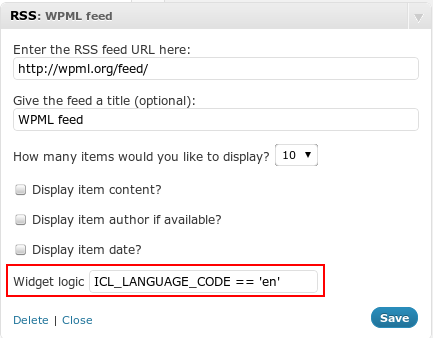
    With WPML when a language is selected, a constant called ICL_LANGUAGE_CODE is set, we can test this with widget logic to decide if a widget should be shown.


    wpml-language-code

    Pros And Cons Of Multiple Accounts

    The benefits of multiple accounts is they are dedicated to one language.  People will be more likely to share your content if it is in the languages your followers and their peers use

    The downside of this approach is you are diluting your social media efforts, the reach of a tweet for example doesn’t go as far if you only have 100 followers in Italian.

    Single Account with Content In Multiple Languages

    The second is to have a single social media account and to have multi lingual staff look after that account.  This could be a single polyglot or it could be a team of people looking after updates for a particular language.

    You could send out a tweet in English, then French then Spanish, or you could batch Facebook updates in English, then a little later translate those updates to French.

    Schedule Your Content To The Appropriate Timezone.

    If your multi language work is for a particular geographic area, perhaps you could schedule updates to happen at a particular time.  If you support Japanese and all your tweets go out during European working times, you are defeating the point a multi language social media.

    Pros And Cons Of  A Single Account

    You may need multiple people to have access to one account which can cause scheduling issues and update confusion.

    People may be turned off by updates in a language they do not understand, and you could see follower loss as a result.

    On the plus side there is a single account with a much larger reach to  your message gets out there more easily.

    Social Media Landing pages

    On most social media accounts,  you can setup a landing page where people go to, to learn more about your “thing” make sure you have these in multiple languages, and if you go the multiple account route, link to a landing page in their language.

    Wrap Up

    Next up I’ll talk about running ads in multiple languages so you can bring paid traffic to your site in multiple languages.

    Need help setting up multi language social media?  Get a no obligation quote.

    Photo Credit: ePublicist via Compfight cc

  • Plugin Review: Jetpack Availabiliy Monitoring

    Plugin Review: Jetpack Availabiliy Monitoring

    One of the most useful suite of WordPress websites tools comes bundled under the plugin Jetpack.  In this post I want to talk about one feature of the many available and that is availability monitoring.

    You can download Jetpack from this URL http://wordpress.org/plugins/jetpack/.

    What Is Availability Monitoring

    Availability monitoring is the process of checking your site is up and reporting if it goes down.

    There are many tools out there such as Uptimerobot that do this, some premium some free,  but Jetpack is a very lightweight and simple way to monitor the availability of your site for free.

    Why It’s so Important

    The majority of site owners I know do not spend 100% of their time on their site.  Unless they have an availability monitor they don’t know when their site is down.

    More importantly the message sent out to potential clients or customers about their products and services is impacted if your site is down when they visit, you only get one chance to impress and a down site will ruin that chance.

    Examples:

    I’ve had my site down when running pay per click campaigns, every click through to my down site was costing me money, and there was no way to recoup that money via leads.

    I’ve had a client running their site on a poor quality hosting supplier, the availability monitor proved how poor their service way.

    How Jetpack Monitoring Works

    The good people at WordPress.com will ping your site on a recurring basis testing to see if it is up and running, if it detects error messages or the correct responses are not sent, an email is activated saying your site is down.

    The point of this is that it’s an external site that is checking your site just like a user would.  It’s not something internal on your site that will fail when the rest of the site is down.

    Your site will be pinged again and alerts will be sent every few minutes saying you are still down until your site comes back up.  Then you get an all clear message.

    See this page for full details http://jetpack.me/support/monitor/

    How To Setup Jetpack

    Install and config the plugin from the URL at the top fo this page.

    Create an account and WordPress.com and sync jetpack with that account.

    Go to Jetpack -> settings, scroll down to monitor and activate it.  Set your email address and it’s as simple as that.  Here is a quick video to show you how.

    [youtube http://youtu.be/5KgoQWMBiOc]

    Wrap up

    Jetpack has a host of really useful tools like an improved spell checker which used to be known as After The Deadline , Infinite Scroll and Carousel to name just three, Jetpack is something I recommend for all site owners.

    Photo Credit: sebilden via Compfight cc

  • How To Build A WordPress Development Environment

    How To Build A WordPress Development Environment

    A number of our maintenance clients have asked us to build development environments for them, I thought it would be a good idea to outline how we create development environments, in case you wanted one too.

    What Is  Development Environment?

    A development environment is a clone of your live site that you can work on without impacting your live site.  You could use your development site for any of the following reasons:

    • Installing and testing new themes without changing live.
    • Adding new plugins and testing if they work with your live site.
    • Coding up changes to themes or plugins, such as CSS tweaks.
    • Load testing your site with thousands of users

    The point is, it’s a clone of your live site you can play with and not harm your live site.  This is a tried and tested principle of software development, you develop and test in the development environment, then promote to live once you are happy.

    The Process.

    I’m going to teach you how to build a development environment in the following format.

    Your live site is at yourdomain.com.  We are going to build a completely separate site at yourdomain.com/development.

    Step 1: Create A New Database

    We are going to build a  new database for development so any impact on the database does not affect your live site.

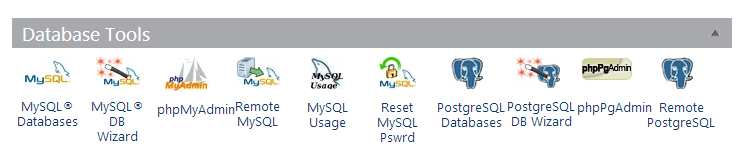
    To create a new database login to you hosting account and look for the control panel.  Under there will be a number of database tools.  I cannot give you exact details as each hosting company does things slightly differently.  If you host uses cPanel, which the majority do, the tools will look like this.

    dbwizard
    Click for full size image


    Run the MYSQL DB Wizard, this will step you through creating a new database.  Remember to note the database name, user name and password you will need them later in the process.

    Step 2: Clone Your Live Site

    The next step is to clone your live site, I like to use a plugin called duplicator to do this.

     https://wordpress.org/plugins/duplicator/

    Install the plugin and create a duplicator package, this is an archive of all your files and your database.   Here is a quick video to show you how to create an archive with duplicator.

    [youtube http://youtu.be/eiiKFhDfGZw]

    Step 3: Build The Development Area

    Connect to your site using ftp and create a subdirectory called development.

    Upload the installer.php file you just created along with the archive files you have downloaded to the subdirectory /development.

    In a web browser open the file yourdomain.com/development/installer.php.  This will run a script to duplicate your site to /development.

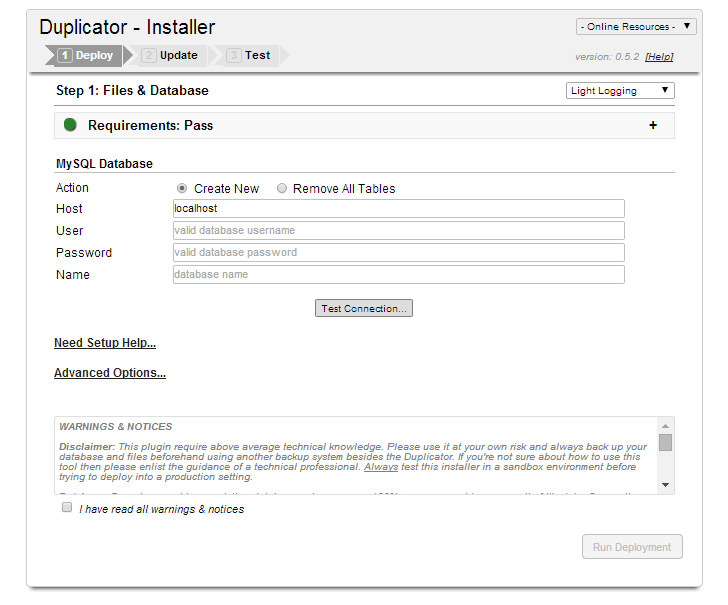
    The first thing the script asks for are the database details you created in step one .

    Click for full size image
    Click for full size image

    Once you can connect to the database click run deployment and the script runs duplicating your site.

    What is so cool about duplicator is it changes all the URLs in your site so if anything was pointing to yourdomain.com/image.png it would be changes to yorudomain.com/development/image.png.  In the past I used to write database scripts to do all this for me.

    That’s it, your site is cloned.

    Mark It As Private

    The last thing to do is mark your new development site as private.   You have cloned all your post and pages so you don’t want Google slapping you with a duplicate content penalty do you?

    On the new development site go to settings -> reading search engine visibility and click on “Discourage search engines from indexing this site”

    Click for full size image
    Click for full size image

    Test To Your Hearts Content

    You now have a clone of your live site that you can mess around with to your hearts content.  Sometimes these sites are called sandboxes after the kids play area where you can mess around, build castles, poor water everywhere and not worry about your live site.

    Wrap Up

    Want you own development site but are not confident to do it?  Why not join our maintenance program and we can build one for you.

    Photo Credit: ansik via Compfight cc


  • Multi Language Website Readiness Review

    I’m offering a new service called the “Multi Language Website Readiness Review” and I want to tell you more about this service and why it can help people thinking about building a multi language website.

    What Is It?

    This service is part consultation, part technical review of your website.

    I will book a Skype call with you to discuss your potential multi language website build, get details of your project and an understanding of your problems.

    I’ll ask for access to your current website to technically review it and see if you are ready for a site that can support multiple languages.

    Is This Service For Me?

    This service is for people considering building a multi language website.

    You have a problem in your business that needs your website to support multiple languages it could be:

    • Expansion into a new territory
    • Making your site more usable for existing clients in different countries/territories
    • Statutory Requirement to make your site multi lingual

    If this is you then the service can really help.

    What WIll I Get?

    The output of this consultation and technical review is a detailed report.  The areas I will cover are:

    • Can your current infrastructure work with multi language, do you need to invest in new technology?
    • Cost benefits analysis, will the investment in development create at least a x2 return on that investment?
    • Detailed breakdown of the investment cost to implement a multi language website?

    You also get the consulting call where you can pick my brains about multi languages websites.  This is a two way consulting call, not just me collecting details of your project.  If you have any questions or concerns about supporting multiple languages, prepare them for our call.

    Why Do I Need A Readiness Review?

    I’ve created this low cost service so people can get a real feel for the investment they need to make to build a multi language website.

    Many clients I work with greatly underestimate the work and requirements for this type of site, use this entry level service to avoid costly mistakes down the line.

    The areas people are not aware of are

    • Infrastructure – do I need new coding or hosting
    • Translation costs, many people have no idea what professional translators costs, and how much content they have.
    • Development costs to make a website work with multiple languages.
    • On-going costs, websites are not static, how can you keep your site up to date in all languages.
    • Hidden costs, what happens when I start to get lots of new leads from customers using foreign languages.

    Cost

    This service is a fixed price package of GBP 99.00

    Book A Review

    If you would like to book a review please complete the form below.

    [gravityform id=”3″ name=”Readiness Review” title=”false” description=”false”]

    Photo Credit: kevin dooley via Compfight cc

  • Is Your Email Newsletter Mobile Optimised?

    Is Your Email Newsletter Mobile Optimised?

    Many of us have an email provider such as Mailchimp or Aweber attached to our WordPress sites.

    Are you sending out an image heavy, highly styled newsletter or are you optimising for mobile devices?

    Would it surprise you to hear that a large percentage of your newsletter readers are using mobile devices?

    Are you yourself reading lots of email on a small hand held device, and do you find it frustrating?

    I think it’s very important to optimise your email newsletters for mobile.

    Optimise For Mobile Devices

    What do I mean by optimising for mobile?  I mean that when someone opens your email newsletter on their phone, they can very easily read and understand your message.

    They are not bombarded by huge images.

    They don’t have to re-size and swipe left and right to read your message because your template is too wide.

    It means removing a barrier to entry so your message (be it information or sales) gets to people on whatever device they choose to use.

    Cut The Fluff

    Here are the things that will drive your mobile readers mad:

    • Sidebars
    • Wide formats that requires swipes left and right to read
    • Tiny fonts
    • Huge images taking up all the screen

    Cut out everything that you don’t need in your email, it should be a short message that leads people to a bigger call to action on a blog post, landing page or sales page.

    Test It

    Once you have optimised your email for mobile, please read it on your mobile device.

    Test it, make sure it looks good and is easy to read on a small screen.

    Test it on larger tablet screens too, doe it still look good.

    Finally test is again on a desktop screen, is it responsive to a bigger screen too, you don’t want to alienate the rest of your readers.

    What I Did

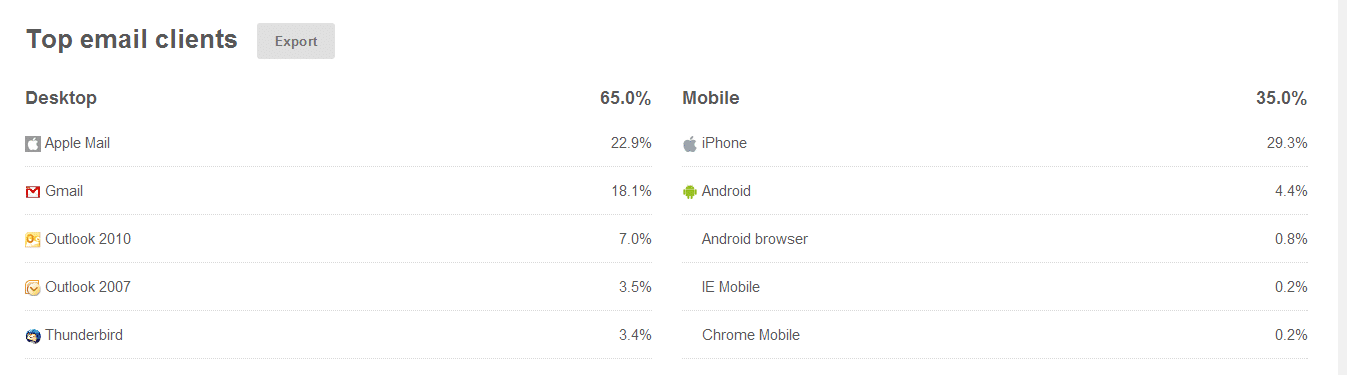
    I found out from stats in Mailchimp that over 35% of my readers were on mobile devices, that is a third of people who would struggle to read my newsletter.

    Here’s a screen shot to show the break down.

    click for larger image
    click for larger image

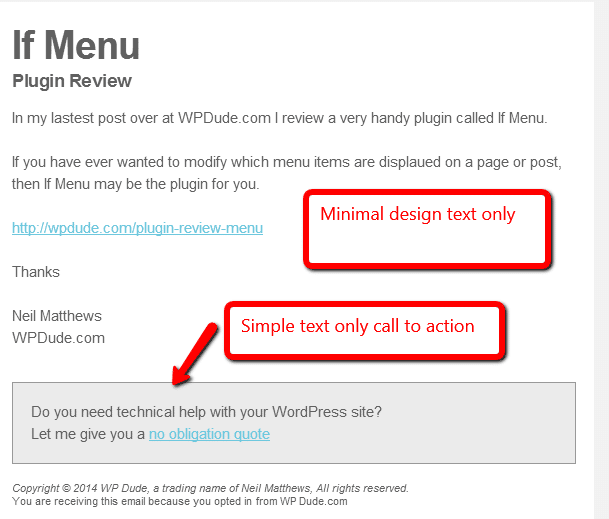
    So I redesigned the template on my newsletter, I cut out the sidebar and the images, leaving only a minimal template that shows off a header, a brief description of my post or offer and link to my main site.

    I also have a call to action to sell my services

    This is plain black and white and shades of grey text, nothing fancy but it is very easily read on all types of device.  Here’s a screen dump of my new template.

    Click for full size image
    Click for full size image

    Remember A Responsive Website

    What’s the point in making your email template readable, but when your reader clicks through to your main site you have an unresponsive main website that they cannot easily read on their phone.

    Select a theme that is responsive or go for one of the many mobile ready plugins such as wp-touch that do the job for you https://wordpress.org/plugins/wptouch/

    What You Should Do

    My advice to you is look at the various templates your email provider has and select a responsive one, Mailchimp and Aweber both have these and I’m pretty sure the other main email providers will too.

    If they don’t there is always the option to have a text only email.

    Wrap Up

    We are moving away from our desktops at a rapid pace, responsive websites and native iPhone/iPad and Android apps are taking over from our websites.  We need to embrace the mobile device or our desktop optimised websites will not serve us.

    Photo Credit: zappowbang via Compfight cc

  • Retainer Packages Available

    Retainer Packages Available

    I’m often asked if I offer monthly retainer packages, and the answer is yes I do.

    I’ve never had a formal page detailing my retainer packages so I’m going to write one up first as a blog post then move it over to a full time page.

    What Is A Retainer Package

    It’s when you have an on-going requirement for WordPress development and  support and would like to retain my services for a prolonged period of time.

    I’ll set aside X hours for you per month and you pay a recurring invoice for that number of hours each month until your project is completed.  Tell me how many hours you need and we can setup a recurring payment.

    I Offer This On A Limited Basis

    I only book about 30% of my time out to retainer clients so I have time to manage my team, grow my business and take on one off projects too.

    I limit myself to five retainer clients per month.  I have two slots currently available.

    What Do you Get As  A Retainer Client

    I offer the following benefits to my retainer clients:

    • Discounted rates – because you are buying my time in bulk I offer a discounted rate.
    • Priority On Your Projects – I’ll set aside time for your project.
    • Direct Access to project updates on Basecamp  – I will give you your own secure area on my project management tool where you can send me tasks to do on your site, this will also be the central place all updates will be stored.
    • Access to a timesheet to check on your available hours – I’ll give you a link to my Freshbooks account so you can see what I have been working on and how many hours you have left on your retainer.
    • Free Maintenance And Updates – all my retainer client also get free access to my maintence service.  My team will backup your site, monitor and maintain security.  Update WordPress and any plugins as updates become due and give you a weekly report.  That’s a saving of $39 per month.
    • Skype access so you can ping me about your projects

    Retainer Packages

    I have retainer packages of 5, 10 and 15 hours respectively.  The more hours  you buy the more discount is available, get a quote below.

    Frequently Asked Questions

    Q) Can I have you working on multiple sites?

    Y) Yes you buy a a package of hours not dedicated to any one site.

    Q) What if I go over my X hours?

    Y) You can buy an additional package or I can bill you on a per hour basis, this is all at the same discounted rate.

    Q) Is there a minimum number of months I need to commit to?

    A) No, you can take on a one month retainer and end it after your hours are used.

    Q) Do I pay up front?

    A) Yes it’s like a pre-paid mobile phone contact, you buy X hours and use those until they are done.

    Q) Is there a minimum usage?

    A) I record time in in 15 minute increments I’ve found that allows you to call down small jobs like a plugin install and not burn through your hours too quickly

    Q) Can I roll over hours I don’t use in a month?

    A) No they don’t accumulate, but that being said if you go over your X hours and didn’t use all last months I’m not  going to nickel and dime you for an hour here or there.

    Q) What about when you are on holiday / vacation?

    A) I do take time off, but I will let you know well in advance, and there are other members of my team available to deal with any emergencies that might crop up while I’m away.

    Still Interested in A Retainer Package?

    If you are interested in a retainer package complete the form below and I’ll prepare a quite for you.

    [gravityform id=”90″ name=”Retainer Package” title=”false” description=”false”]

    Image of Don Quixote and His Loyal Retainer Sancho Panza  by Picasso

  • Translate WordPress Dashboard

    Translate WordPress Dashboard

    I’ve come across a number of sites which publish their content in English, but the maintenance of the site is done by someone who speaks and reads a different language.

    In this post I’m going to show you how to translate the dashboard of your WordPress website.

    There Are Two Way To Do This

    There are two ways to accomplish this, you can install a translated version of WordPress or you can use WPML and host multiple languages on your site.  Let’s look at both of these solutions.

    WordPress In Your Language

    By far the easiest way to solve this problem is to download and install a copy of WordPress that has already been translated.

    https://codex.wordpress.org/WordPress_in_Your_Language.

    Once you have your code upload it to your site overwriting the existing files (please take a full backup first I accept no responsibility for crashed sites).

    There are a couple of small downsides to this

    1) 1-Click Installs – if you have used a one click install from your hosting company chances are you have installed the English version, you will have to manually re-install your new version of WordPress, and manually update going forward your 1-Click install update will overwrite with English.

    2) Not every language is available.  The vast majority of commonly spoken languages have been translated, but there are some missing, here is a list of translated languages http://wpcentral.io/internationalization/

    Use WPML To Host Multiple Dashboard Languages

    If you need more than one language for your dashboard, then WPML (my preferred translation tool) may be a good choice.  This is a little more involved but you get more functionality.

    Here are the step to allows for multiple dashboard languages.

    1) Download hte version of wordpress you want to support, in my example I downloaded French from fr.wordpress.org

    2) Extract the files from wp-content/language of the downloaded zip file.

    3) Upload them to your site’s wp-content/language directory

    4) From WPML language, we can scroll down and set the admin language

    5) From a user profile we can set the default admin language at a user level, so a multi author / admin site can have different languages per registered user.

    Here is a video to show this in action.
    [youtube=http://www.youtube.com/watch?v=uXvqdkG6L7o?rel=0]

    Wrap Up

    For a bi-lingual team, allowing the admin of your WordPress site in multiple languages makes their job simpler.  Managing a site is already complex enough without having to translate each dashboard menu item.

    If you need help setting up your dashboard in multiple languages, please contact us for a quote.

    Photo Credit: downhilldom1984 via Compfight cc

  • Are Hackers Testing Your Defences?

    Are Hackers Testing Your Defences?

    Are hackers testing the defences of your website right now?

    Do you even know how to test for hack attempts?

    I know they are testing wpdude.com right now, and in this posts I will show you the tools I use to test for brute force hack attempts and how to stop the hacker getting in.

    Security At NeilMatthews.com are Constantly Tested

    There are people out there trying to login to wpdude using a technique called brute force hacking.  They send a login request over and over with a dictionary of commonly used passwords.

    They use the common admin user name along with the password dictionary via scripts to crack your site.

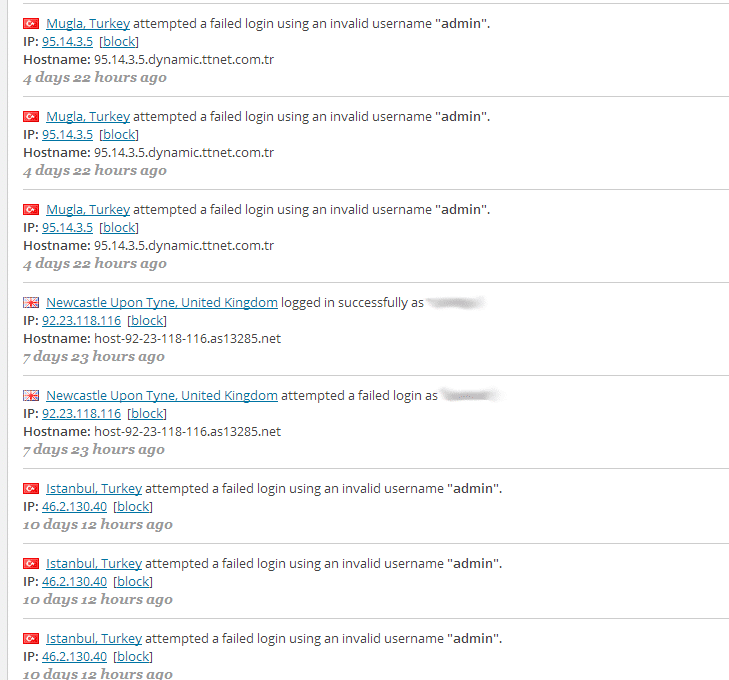
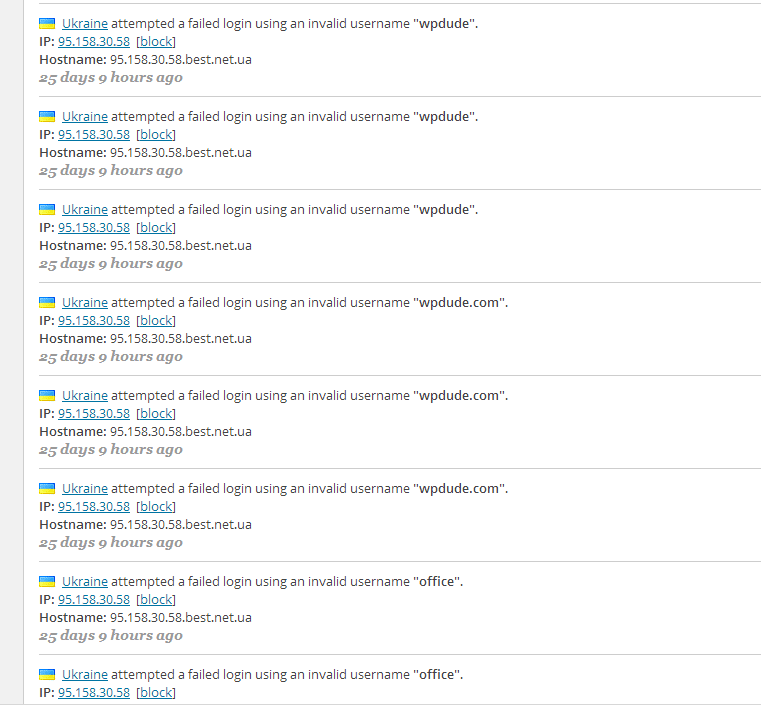
    This happens at wpdude at least once per day, don’t believe me, here are some screen grabs of the hack in action.

    Click for full size image
    Click for full size image

    You would think this person from the Ukraine had more pressing things to worry about than trying and hack a WordPress blog, but as you can see they are a little more sneaky  and are trying to use different combinations of user names.

    Click for full size image
    Click for full size image


    My Not So Secret Weapon

    I have a plugin called WordFence installed on all of my own and all of  my maintenance clients site.  This tool monitors for and reports on login attempts like the ones show.

    Using this plugin I can see the attempts and block the offending IP address.  From WordFence go to live traffic -> logins logouts.

    Tightening Security

    So what can you do to protect against brute force hack attacks?

    1. Rename your admin to something more secure, see this post for details
    2. Use strong passwords.
    3. Limit failed login attempts, I use WordFence for this, so if someone tries to login X times the user is locked out for an hour. but you could also opt for login lockdown
    4. Password protect wp-admin.  Personally I don’t do this, but you can get details here if you are ultra cautious.
    5. Add some sort of captcha to the login form so scripts cannot be run.  Captcha on login plugin will do this for you.
    6. Monitor for and block people trying to get in, WordFence has a big old button to do just that.

    Install WordFence Now

    You will be surprised how many times people try to get into your site, go and install WordFence now to see what is happening on your site.

    30 Day Trail Of Maintenance

    One of the things we do for our maintenance clients is a security hardening process, where we lock down WordPress and make it much more difficult to get in.

    I’m offering a 30 day free trial of our maintenance service, why not sign up and get your site secured at no cost. No credit card is required, it could save your site from a hack attack.

    Take a 30 day free trial of our maintenace service today

    Photo Credit: spanaut via Compfight cc