Neil Matthews

Category: General Blogging

  • Abandon Your WordPress Ship, Here Comes Medium

    Abandon Your WordPress Ship, Here Comes Medium

    I’m seeing a trend where bloggers seem to be moving over to Medium.com rather than looking after their own websites.

    From my own personal reading list, the team at Basecamp have done it, they no longer run their blog Signal versus Noise on their own servers.

    Is is time to abandon the good ship WordPress and take sail with Medium? Psst I’ll save you some reading the answer is no.

    What Is Medium.com

    Medium.com is a publishing platform.  It allows you to publish blog posts. It is aimed at thought provoking long form pieces

    Medium is a startup without a monetization policy at the moment, no ads, no paid subscriptions, but they will have to start making money eventually and my guess would be a subscription of some sort to publish content to their large audience.

    Medium is free at the moment

    The Benefits Of Medium

    Medium has lots of reader –  If you publish there you are using their readers and platform to get more readers for your message.  It’s easier to get lots of eyeballs on your message where there us already a large audience.

    No tech skills – Medium doesn’t require any programming, hosting or setup skills.   It just works.

    What It Is Not

    It’s not yours – you could be kicked off and lose control of your content at any time

    It’s only a publication platform – all you get to do is add your content, no control over sidebars, links, widgets or anything else.  No e-commerce, no email signups, no contact forms.

    Tending Other Peoples Gardens

    Yet again we see the rise of a third party site people don’t own and have not control over and people are telling us to abandon our own sites to rush and build someone elses.

    Facebook, twitter, instagram, foursquare, wordpress.com and now medium, you are putting content on there so other people can monetise your work.

    Use Medium as it is meant, put some pillar content onto Medium and use it to draw people to a web property you own.

    Wrap Up – Medium.Com

    I’m sure you are thinking it’s sour grapes that a WordPress developer would talk down Medium, but please remember they are a business, a business that wants you to create content for them (for free) so they can monetise your writing at a later stage.

    It’s not a complete publishing platform like WordPress, you cannot extend their site to do any of the useful things you need.

    Use their readers to promote your main site but don’t treat medium as your main platform.  I’ll be publishing on Medium with my next post as an experiment.

  • Do One Thing

    Do One Thing

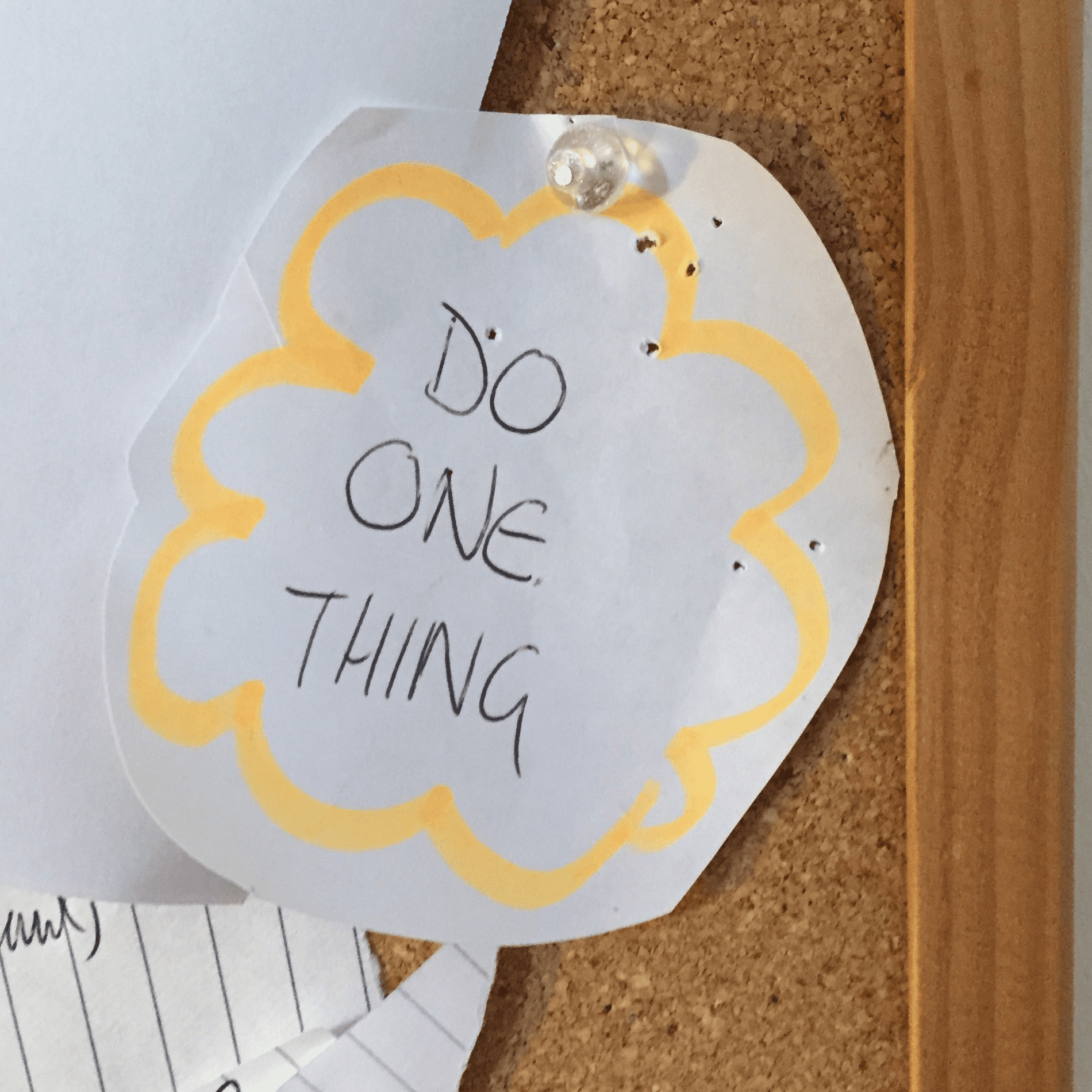
    There is a piece of paper on my cork board right in my eye line where I work.  It says “Do One Thing”.

    This is a personal note to myself to keep on target and stop veering off with every new idea that pops into my mind.

    I Like The Shiny & New

    My problem is I love that feeling of new investigation, building something brand new and chasing the shiny object.  It happens to me at least once per week and my sign pulls me back from the brink.

    The idea of building a repeatable, scalable business at WPDude.com sounds great, but in effects it’s a lot of hard work.

    My mind plays tricks with me and tells me there is money to be made in the latest technique or gadget.  That I should follow that and change course from my one thing.

    What Is My One Thing

    My one thing is providing WordPress technical support to small business that do not have an in-house technical team.

    We do small technical projects that are beyond the skills or time demands of the site owner.

    It’s simple, not particularly glamorous, but there are huge demands for these skills and it is my job to package the technical savvy of my team into an easily consumable product.

    At the time of writing we have been involved in 4239 projects, that’s a lot of work inside of my one thing. It works, people need it. I need to focus on that one thing and make it as accessible to my clients as possible.

    My sign on the wall tells me I need to do that one thing until I can make an exit.

    One Thing Two Packages

    Our one thing comes in two packages:

    • One off small projects– we will take on fixed priced small projects to provide technical support to fix a single issue (I’m looking at making this a single price to make it ever simpler).
    • On Going Maintenance – we will provide ongoing WordPress technical support for a monthly fee.

    I would love to provide a single type of packaging, but you, as the client has told me you want the choice of how you get your WordPress technical support so I’m okay with that.

    One Team To Do One Thing

    I’m building a team to provide that do one thing in the most cost efficient manner possible.

    I’m looking to make providing WordPress technical support to my clients more like a household trade you would call in,  people are happy hiring a plumber to fix their leak, I want to make hiring technical support for your crashed website a similar experience.

    Mistakes I’ve Made Not Doing My One Thing.

    When I veer away from my one thing, I always lose focus, and as a result WPDude is impacted.

    I’m not good at juggling many balls so my focus will go to the shiny new object, marketing and sales at wpdude.com go down as a result.  I wrote about this in Have We Reached Peak Podcast.

    Here are some of the side projects I have tried and ultimately closed down:

    • WordPress Owners Club – this was my membership site to teach people how to use WordPress, remember everyone was telling us to sell productised coaching.
    • WebPolyglot – I was building a service business to only focus on web site owners who need multi language websites, remember we were told to go deep niche (I’ve merged this back into my one thing).
    • WPPing – I thought a software as a service that would alert you when your website was down or running slowly was a winner, a recurring Software as a service is the next shiny thing I was told.
    • Custom theme and plugin development – we offered these but they are not really required by my core audience of small businesses, we had minor wins but not enough to keep the lights on.
    • App Development – I’m still keen to pursue building an agency to develop apps, but that will be after exit.
    • Dozens of purchased then lapsed domain names – every new idea starts with a $15 purchase then lapse of a domain name, in my to sunset domain list are wpguard.co, wpping.com, theknowledge.co, bright ideas with no implementation.

    When Can I Move Onto The Next Thing?

    I can move onto the next thing once I have made an exit from this one thing, what do I mean by an exit?

    An exit to me is when I automate, systematise and reduce my input to WPDude, so I don’t need to be there on a day to day basis to deliver our one thing service.

    This will take some time, so my exit it not coming soon, so I’m still focusing on this one thing.

    How I Scratch My “Need For The New” Itch

    I’ve got a lifelong desire to learn new things, so I’m putting my energies into learning how to run a business . The shiny new things I’m focusing on:

    • Building a team.
    • Creating processes and systems to replace myself.
    • Learning to be a business owner not a freelancer.
    • Spending more time marketing and growing my brand.

    All these things are brand new to be and are definitely feeding my desire for new, but are inside my do one thing.

    Wrap Up – Do One Thing

    Do you have the same tendencies as me to chase after the new shiny thing?

    If you are not careful is there a chance you will never fulfill your business potenti …. look a squirrell!!!


  • 8 Hints & Tips To Spice Up Your Nav Menu

    8 Hints & Tips To Spice Up Your Nav Menu

    Do your nav menus need a little love?  Are you worried people are not navigating your site well, here are 8 hints and tips to make your menus look better.

    1. Responsive Menus

    Don’t treat your menus on mobile devices the same way you would on a desktop device.

    Real estate is at a premium on a smaller screen so if you have a long meandering menu it will wrap and look poor on a mobile device.

    The plugin responsive menu https://wordpress.org/plugins/responsive-menu/ allows you to show a small unobtrusive menu icon on mobile device rather than a full menu.

    2. Icons In Your Menu

    Add a little flair to your site with some Font Awesome icons to highlight what each menu item does.

    With Fontawesome 4 Menus plugin https://wordpress.org/plugins/font-awesome-4-menus/ you can add a little icon at the start of each

    3. Jazz It With Custom CSS

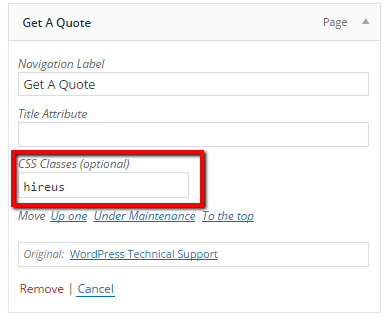
    You can add a custom class to each menu item in WordPress.  Once you have added the custom css you can style the menu item as you wish.

    nav menu

    On WPDude I style my main call to action for WordPress technical support by making it red.  I’ve styled clients menu items to look like buttons, the list goes on.

    4. Split Testing

    Do you know what copy really works with your menus?  With a little bit of split testing you can be sure what works.

    Nelioabtesing offers WordPress A/B split testing, one of their tools allows you to split test menu items and see which option converts best.

    It’s not cheap, being the bootstrapper I am I would probably code up a solution using Google split testing.

    5. Images in Menus

    One of my clients sells industrial welding tools, they have a wide array of kit and use images in their navigations to highlight what they are selling or hiring.

    They do this with the Menu Images  plugin https://wordpress.org/plugins/menu-image/

    This plugin adds a neat little upload option to add images to your menus.

    6. Conditional Menus

    How about offering menu items based upon what a site visitors condition is.  Logged in logged out, mobile device etc etc. you can do that with a plugin called If Menu https://en-gb.wordpress.org/plugins/if-menu/

    I wrote a complete post about IF menu so I’ll not dig too deep, Plugin Review: If Menu.

    7. Export Menus

    Not really a jazz up tool but a very useful tool if you are moving large menus between sites, this plugin allows you to export your menu structure as an XML file then import it at your destination site. https://wordpress.org/support/view/plugin-reviews/menu-exporter

    If you have ever had to build large menus you will know what a tedious pain that is.

    8. Circular Nav

    I’m running out of ideas at the end of this post, but these effects are just coooool!

    https://en-gb.wordpress.org/plugins/fixed-circular-navigation-menu/

    Wrap Up – Spice Up Your Nav Menu

    Give your menus  a little TLC this weekend to keep your site visitors navigating with ease.

    Photo Credit: tesal22 via Compfight cc

  • Keep Up Content Marketing When On Vacation

    Keep Up Content Marketing When On Vacation

    As you read this I’m on a few days holiday with my family, but I want to keep up my content marketing when on vacation.

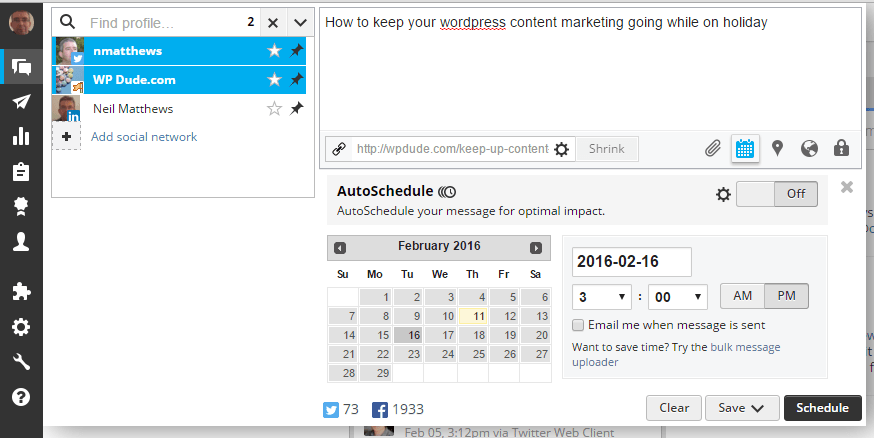
    Consistency in content marketing is key, I wanted to keep posting while I was away but didn’t want to take time out of my break to actually write a post.  So back on Februrary 11th I wrote this post and scheduled it’s publication and marketing for the 16th, here is how I did it.

    Scheduled Posts

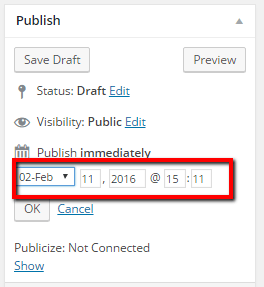
    Instead of just publishing a post there is also an option to schedule the publication at a date and time in the future.

    schedulepost

    Once you have set a future date and time for publication and click publish, the post is not made live there and then, it is marked as scheduled.

    scheuledpost

    Marketing Your Future Post

    Publishing a post is not the only thing you can do in the past, you can also schedule your post promotion.  I promote in three ways

    • An email to my subscribers
    • A couple of tweets
    • An update on my Facebook page

    Mailchimp

    In mailchimp I create a campaign each week with a small overview of the post I have written and send it out to my list to promote my posts.

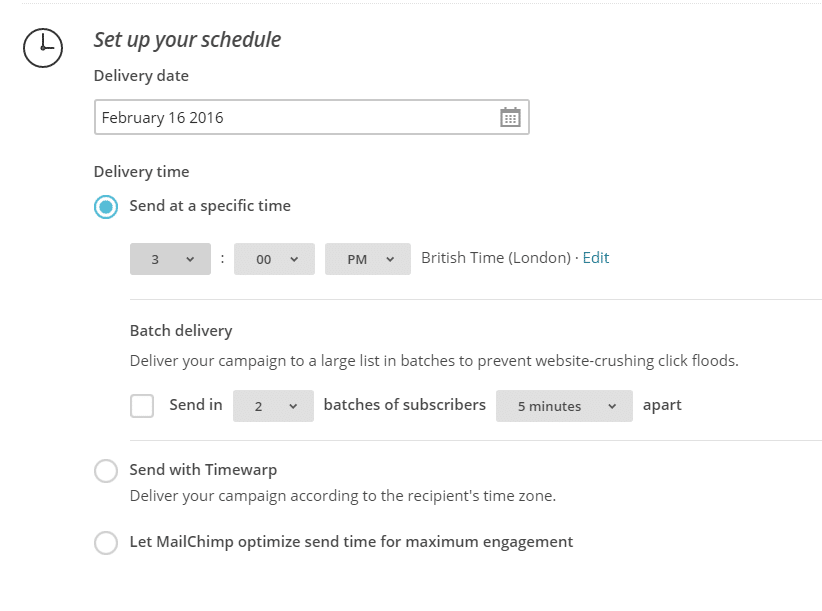
    Mailchimp has a very useful feature where I can schedule the send of the campaign, I set it for the 16th at 3pm, a couple of hours after the actual publication.

    mailchimpschedule

    Social Media

    I put a link on my social feeds when I publish a new post, I work with Twitter and Facebook WPDude page.

    I use a tool called Hootsuite for social updates, and one of it’s tools is a schedule tweet/post.

    socialschedule

    Wrap Up – Content Marketing When On Vacation

    You don’ have to be present to publish a blog post, a little bit of preparation and your content marketing can continue even when you are away.

    It’s lovely where we are, wish you were here.

    Photo Credit: Accidental Hedonist via Compfight cc

  • On Working From Home

    On Working From Home

    I run WP Dude from my home office. I thought I would write a post on my thoughts on working from home.

    I’ve been working from home for going on eight years now, so I’ve accumulated lots of pointers.

    About My Home Office

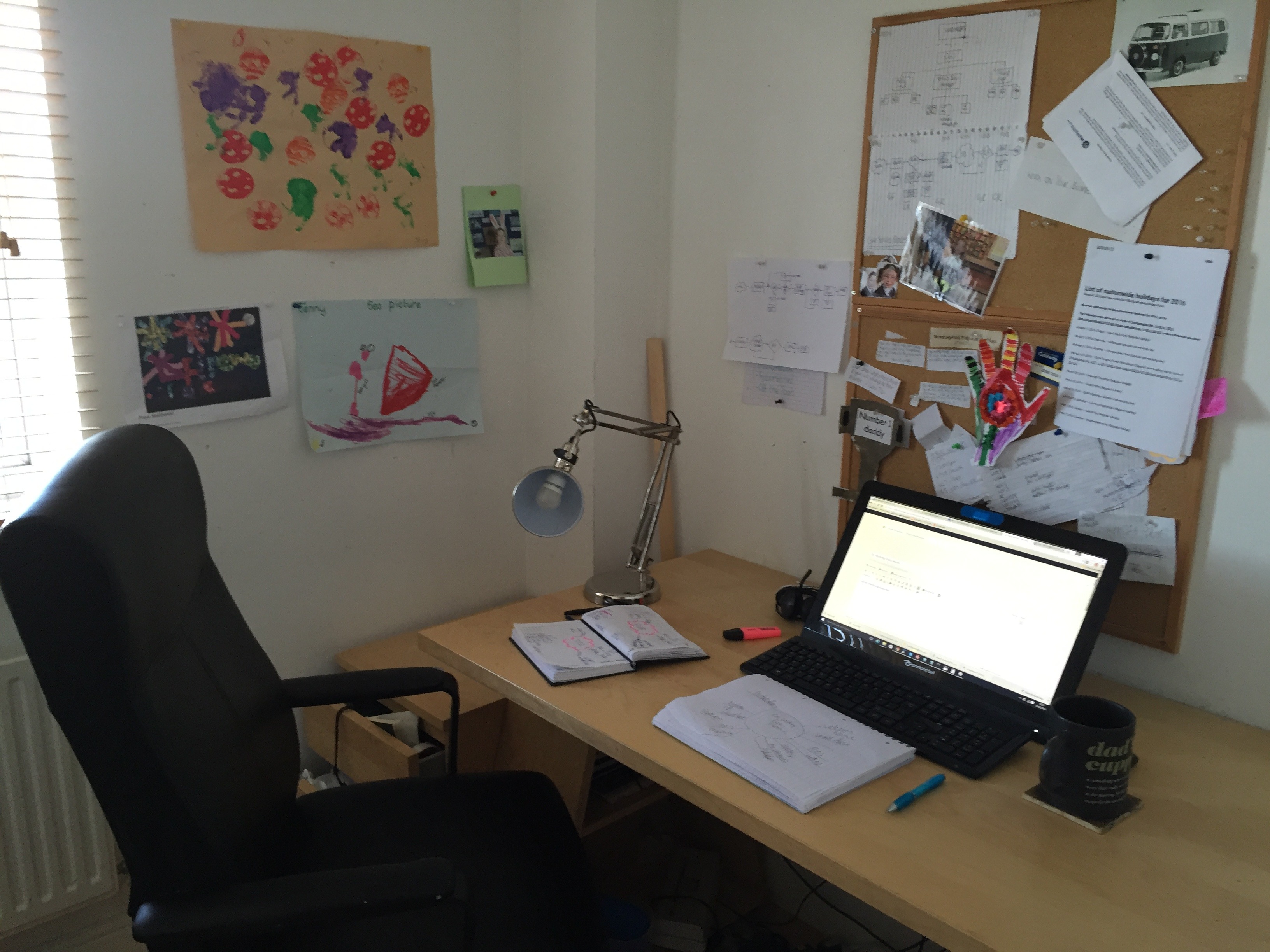
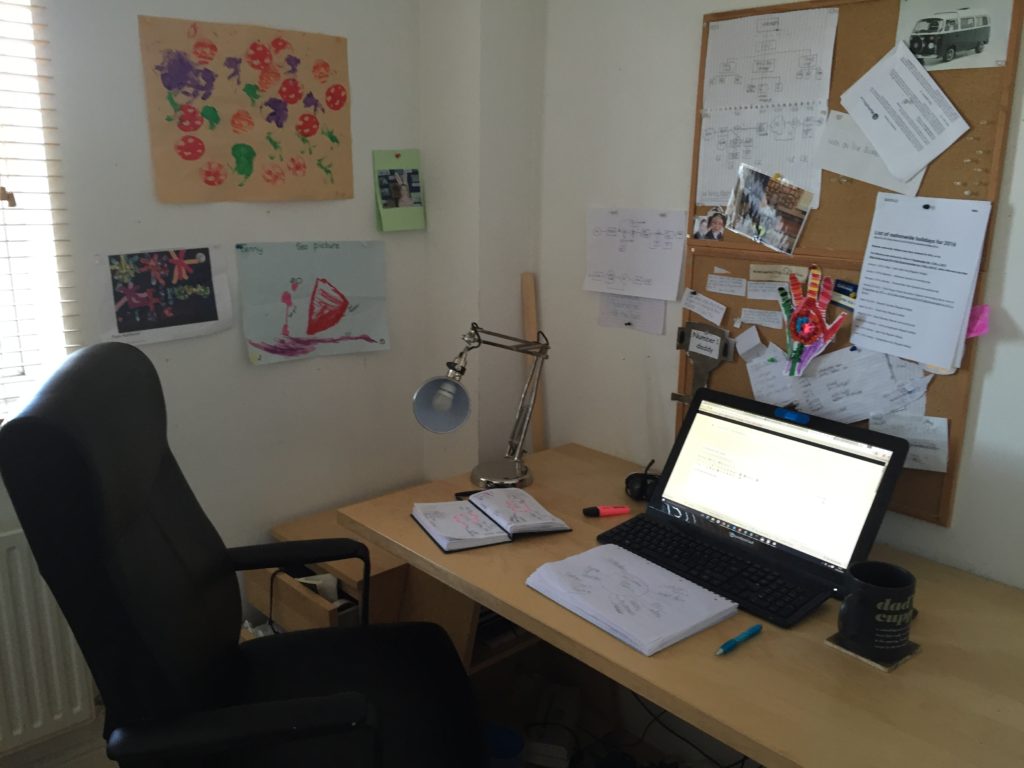
    My home office is a dedicated room in our house just for me to work in. It’s a tiny space at about 2m x 2m (7ft x 7ft) but it is perfect for me and more than enough room to run a global WordPress development agency.

    It’s painted white (and needs re-decorating it’s looking a little shabby ) and is minimally furnished.  A desk, a chair,  some draws, a lamp, a cork board, a bin and pictures from my kids. Computer, diary, notepad and that’s about it, that’s all I need to run my business.

    The myth about bricks and mortar buildings with all staff working in one place died about ten years ago, and any company saying this will not work really means they don’t know how to manage a remote company.

    Why should we be marching like automatons to the meat grinder factory when you can work from home?

    Here’s a picture I just took with my back right back against the wall, so what you see is nearly all of my office space.
    working from home

    In No Particular Order..

    Here are a lists of the pros and cons of working from your home office

    No Commute

    I used to give up two hours of my life everyday sitting on a bus.  I live in a small but busy city in the North of England, the city is over 900 years old.  Like most old European cities, the  streets and infrastructure are not designed for cars, so driving to work is an even longer journey.

    I was forced to be penned up in a bus with other grey faced commuters coughing and sputtering, creating a cocoon of my own with Kindle and iPod to blot out the terrible nature of other people’s dire conversations.

    Now, the five second stroll across the landing is my commute and the hop skip and jump back to my couch is a breeze.

    Put A Door On Your Space

    If at all possible create a physical barrier between you, your workspace and the rest of the world.

    At the end of my working day, my kids are also sharing the space where I work (or as they selfishly call it home 🙂 ) my home office has a door on it, the rules are when the door is closed keep the noise down and leave me alone, I’m on the phone or doing something like narrating a video that needs quiet.

    I can also close that door as an end to the working day to create a physical end to my days work (I talk about this more later).

    Having a barrier on your work space rather than using communal spaces is really useful

    Ergonomic Setup / Standing Desk

    You will be spending a lot of time with your ass in that chair, buy the best one you can.

    Lookup ergonomic posture and try and get your desk / chair / computer setup the best it can be.

    Seriously consider a stand up /sitting down desk setup, I’m currently looking at one that will allow me to be up and down due to lower back aches and strains at times.

    Eating

    Be careful.

    Eat well

    Take the time to prepare fresh and nutritious food.

    Family

    I’m married with two kids.

    I had full time jobs where I used to head out early morning, do my thing, then come home late exhausted. I spent more time with colleagues than my young family.

    I gave that up and started to contract as a self employed person.  I used to work away during the week and only see them at the weekend.

    I hated both models and wanted self employment, but from home,  building wpdude as a home base business has been one of the best things I have ever done.

    I’m present with my kids during their morning , rather than dashing off at dawn to catch a bus. We spend time over breakfast I help them get ready and see them off to school.  My wife drives them there and then heads off to work herself.

    It’s my job to collect them from school,make them their tea as we say in northern England (dinner or evening meal to the rest of the world) listen to their stories, have a laugh and do a few more hours work before finishing for the day.  Sometimes we sit down to watch a movie, in the warmer months we might go to the park or go on an “adventure” walk somewhere.

    I’m always present at their events, because I make my own schedule and can juggle it.  I don’t have to be at someone else’s location.

    Establish A Routine and Stick To It

    This is a big one, create and set a routine, then stick to it.  My current routine

    • 8:00 Kids and Wife Leave
    • 8:00-9:00 Project management, stand up meeting with my team
    • 9:00-12:00 Project work
    • 12:00-13:00 LUNCH break a full hour may seem excessive but I exercise, meditate cook and eat real food in that time.  This is my mid day oasis.
    • 13:00-15:00 Project work
    • 15:00-15:00 Collect kids from school
    • 15:30-18:00 Sales & Marketing or admin work

    It’s a 10 hour day but I can honestly say it never feels like one, that big break in the middle really helps keep me energised.

    Know Your Energy

    My peak energy times are 9-12 and 13-15 that’s when I focus on client work.

    Sales and marketing or admin which tend to be less taxing for me are done outside of those hour with the exception of my blog posts which are written during the 9-12 timeslot.

    When you make your own schedule working from home, schedule the hard work when you perform best, not when the boss tells you.

    Weekends

    I don’t work at weekends, no more to say on that.

    On Loneliness

    I’m an introverted chap and I don’t mind my own company, but there are times when I crave human contact.

    Make sure you get out of the house at least once a day.

    Make sure you schedule social time away from home.

    Fill up your weekends with other people and other places, you can get cabin fever.

    Dealing With Interrupting People

    There is a mindset with some people that equates working from home as being available.

    I’m not available to grab a coffee at 9am Monday because you are off work,  I’m at fecking work!!!

    You have to be a little harsh and let people know your working hours and make people stick to that.

    Self Discipline

    A lot of people say “I couldn’t do that I don’t have the self discipline to work at home!”.

    My answer is simple continue working at your shitty office doing something that does not create a spark in you.  If you want to work from home (probably self employed) you need self discipline.

    I’m building a business, it’s hard, really hard, some days are crappy but on average I really love what I do, building a business and a team is fun.

    I’ve created my own self discipline to get the work done.  If I don’t I don’t get paid simple as that.

    Switching Spaces

    I switch spaces to create mental gaps in the type of work I do.

    If I’m managing WP Dude projects or doing WordPress technical support I’m in the office pictured above.

    If I’m doing research,  reading a business book, doing planning or taking a course, I switch spaces so I’m not at the computer where Skype or email ping will distract me.

    We have a space where the kids keep their toys and other junk, but it has a couch I can use as a separate thinking space.

    Shabbiness

    When I first started working from home  I drifted into a period of shabbiness, I would get up, get into my inbox and work would ensue, the beard grew and work was done in Jammies.

    Nowadays, the inbox is untouched until the personal grooming has been done.

    I’m not putting on a suit and tie any more (in what universe was it decided that wrapping a piece of cloth around your neck makes you professional)  but you can descend into shabbiness when you think no-one is looking.

    Get Some Exercise!

    You can quickly become very sedentary when you work from home.  Make sure you take some exercise.

    For me it’s a combination of walking to collect my kids from school each day and using the 7 minute work out app.  The app gives you a series of body weight exercises to do in 30 seconds sprints with 10 second recovery, you do seven minutes or multiples thereof.

    I used to run, but the act of getting my kit on and getting out the door was very easy to put off when the projects stack up.  The 7 minute work out is only ( as the name suggests duh!) 7 minutes, you just need to find some space to do it, the mental objections are less and the workout gets done.

    Meditation

    I used to think meditation was woo-woo nonsense, that’s until I started to do it.

    My practise is not spiritual,  although I understand it can be, it’s a a tool to create calm in what can sometimes be a roller coaster ride as an entrepreneur.

    I use an app called Headspace, it provides a guided meditation to clear your mind for 20 minutes, and focus only on your breathing, that’s all, no chakra clearing, no mantras just a little bit of calm to help you deal with a busy world.

    Because I work from home I can squirrel myself away from the world and do 20 minutes meditation and the rest of the world does not look at me as if I’m mental. It is one of my favourite parts of the day.

    End Of Day Shut-down

    As a digital worker it’s very easy to be always on.

    I’ve created a process where I shut down at the end of the day.

    At approximately 6pm and sometimes earlier that’s the end of business day for me.  I’ll shift devices from computer to iPad to catch up on some social reading such as the new and blogs I follow.  That shift in device is a mental signal that I’m in a different mode not work mode.

    The computer is switched off.  The iPhone is put on charge and left beside my computer so I don’t check email all the time.

    But what about text messages from friends or family, they know to catch me before 6pm after that they can call the land line or contact me through my wife.  The people who really need me out of office hours know how to get me.

    If I’ve got access to email or my work apps, I’ve got access to work and there is always a temptation to jump back into work, because it is so easy.

    The door to the office is closed.  The working day is shut-down.

    Costs Of Working From Home

    The cost of running a home office is absorbed into my home running costs, electricity, water, heating etc.  You should not underestimate this.  You will use more of your utilities.

    In the UK there is an allowance we can add to our tax return to cover these costs, check to see if you can do that also.

    Bunking Off

    When I’m really not in the mood for work I can bunk off.

    Friday afternoons are my guilty pleasure, whenever possible I don’t book client work after 3pm so I can bunk off, listen to my podcasts or have a snooze, working from home gives me this benefit.

    Eight Years In Bare Feet

    I’ve spent the last eight years walking around my house in bare feet.

    I’ve developed weird calluses on my toes and wearing a pair of formal shoes for any length of time is a nightmare.  You have been warned 🙂

    Wrap Up – On Working From Home

    The world of work has changed so much in the past 10 years.

    Digital work has allowed so many of us to work from home, create our own schedules and have a much more balanced life.  Work is returning to an older village setup where people work from their living spaces rather than the grey industrial monster where we are consumed by factories and offices.

    Working from home is a blessing and joy to me,  I know everyone cannot do that based upon their job choice, your thoughts on working from home in the comments.

    Photo Credit: Hey Paul Studios via Compfight cc

  • Kanban Saved My Sanity

    Kanban Saved My Sanity

    I started to use the Kanban project management methodology just before Christmas 2015 and I can honestly say it is one of the best things I have done for my business.

    It has given me huge amounts of clarity into who is doing what, when and how much progress is being made.  It allows me to confidently schedule new projects without killing myself and my team with too much work.

    Using a combination of Trello boards and Groove helpdesk to do the actual work, calm has descended on WP Dude HQ.

    The Problem

    At WPDude we do a large number of small projects.  A typical project is about a day in length.

    These types of project don’t fit into the existing model of a helpdesk which has large numbers of small tickets that take a number of minutes to fix, and they are not large multi day/week projects that need lots of client interaction and use a normal project management tool like Basecamp.

    We use a helpdesk ticketing system to do the actual work and communicate with our clients, that’s great when doing the work, but as a project manager, trying to figure out who is working on what and when I can schedule in a new project is not something I can do with helpdesk software.

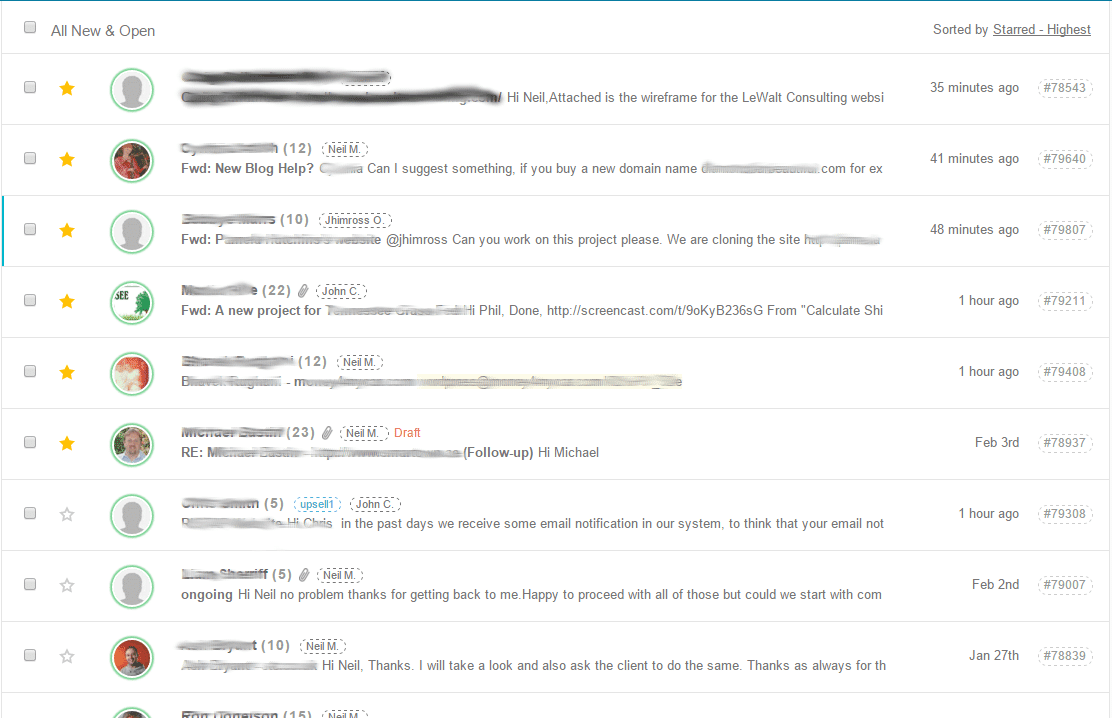
    The typical list generated by a helpdesk is  completely overwhelming.  Here is the view of the top of my tickets,  Groove gives me, it’s just a huge long list of work to be done and it goes on and on.

    Kanban

    Overwhelm

    At times I would groan when I saw the list, how can I schedule this work, how can I streamline and get this done without piling up massive amounts of work on myself and my team?

    Enter Kanban.

    Huge Hat Tip

    Not just a hat tip, I prostrate myself at the feet of Frank Degenaar for showing me the light of Kanban in this post  http://www.productivitymashup.com/blog/2014/7/17/kanban-calendar-preamble

    What Is Kanban

    Kanban is a project management methodology that allows us to visualise the work to be done, and make it manageable by limiting the work in progress at any one time by a member of that team.

    Kanban came out of the Just In Time processes developed at Toyota, here is a good Wikipedia article for more history about Kanban.

    It’s not a rigid set of rules like Prince Methodology, rather it’s a flexible way to break down your work (or even a single big project) into human understandable and manageable chunks of work, it gives you an overview and limits overwhelm.

    The First Rule About Kanban …

    The methodology has two cardinal rules

    • Visualise your work
    • Limit Your Work In Progress

    Visualise your work – break your work down into visual representations, I use Trello with small cards to represent projects (see video below), other people use whiteboards on the wall or pages in a diary with post-it notes, what ever method you use, the work must be visualised

    Limit your work in progress – focus on the work you are doing now, not what is coming up, only have a small number of the tasks to focus on.

    Backlog Items

    When you cannot work on a particular piece of work due to constraints from other team members or clients, move it into a backlog area so it is out of your work in progress.

    We have a visualisation of what needs to be done, but is on hold.

    Pull Don’t Push Into Work In Progress

    Work is gently pulled into the work in progress using Kanban rather than trying to forcefully push work into an already busy schedule, this is a little bit of a weird concept to grasp but check out the video hopefully it will become clearer.

    How Much Time Does This Take

    My first task each morning is to get all new items into Trello, pull new projects into work in progress and have a stand up meeting with my team to assign jobs and allocate time.  That is less than an hour per day for me, something that used to have me pulling my hair our throughout the day.

    Video: How I use Kanban With Trello

    Enough of the the theory, here is a practical look at Kanban  (apologies about the black out at approx 4:25).

    Further Reading

    For more background into Kanban I recommend this book Personal Kanban: Mapping Work | Navigating Life

    Wrap Up

    Having visibility of all our work is an amazing break through to me, it has take a lot of the stress away from managing a large number of small projects.

    As my team grows they will slot easily into this system for more scale, I love Kanban, when I first found it, it really felt like a veil being lifted from my eyes.

    Photo Credit: bunnygoth via Compfight cc
  • Software Stack – The Tools We Use At WP Dude

    Software Stack – The Tools We Use At WP Dude

    I love to read blog posts about the software stack other business use to manage their work.  As a globally distributed team with clients all over the world, we use online tools for all our work.

    I thought I would write a post to share the software stack we use, the cost and how we use them.

    Groove

    Groove is a helpdesk ticketing system, if you ask us to do any work for you, it will be raised as a ticket in Groove.

    We have a number of helpdesks or silos for our tickets. One for people asking for one-off projects and one for our maintenance clients to ask for ongoing support tasks.

    We also automate tasks such as downtime monitoring and security monitoring, if any issues are noted tickets are raised in the appropriate helpdesk.

    We have processes and canned responses in Groove so you always get a consistent working process from us.

    To our clients, Groove just looks like email, no logins, no creating accounts but a transparent way for us to collaborate on work.

    Check out my Review of Groove

    Cost – $15 per user per month.

    Trello

    Trello is my preferred tool of choice to manage our workload and get an instant view on who is working on what.

    I’ll write a post soon on Kanban, a project management system that has revolutionized the way we work.  But in essence we have different silos for different stages of a projects life cycle form new request, estimate process, accepted scheduling and service delivery.

    I use Trello to manage and move our work through those silos so I always have my finger on the pulse with regards to who is working on what.

    Freshbooks

    I’ve been using Freshbooks for about 6 years and I love it.  Freshbooks is an estimation, invoicing, expenses and reporting tool. We use it to:

    • Send quotations for projects.
    • Send out invoices for work.
    • Take Payment for projects.
    • Chase up late payments automatically.
    • Record expenses; recurring and one off.
    • Produce reports so I can prepare tax returns.

    If a tool cannot play properly with Freshbooks, it is not included in my stack.

    Cost – $29 per month.

    Skype

    I don’t have a telephone number for WPDude, all telephone communication is done via Skype. If you are not aware of Skype its a desktop and mobile app that allows voice over IP or internet calls.  There are no costs to make calls, which is great if you have international clients and team like me.

    I also use it for our Morning stand up meeting via IM with my team to distribute work and I’m available at any time during the day via IM for my team to ask questions and get support from me.

    Cost – FREE

    Managewp

    We have going on for 100 maintenance clients at the moment, and managewp is the tool we user to manage those sites.

    It stops us having to remember passwords when we want to login, it does transactional backups and allows us to do updates and monitoring.  A brilliant tool all round and the new iteration Orion is really good.

    Costs – depends upon the number of sites you manage

    Live Chat & Zopim

    I’m flip flopping between the two live chat serves at the moment, I’ll not go over old ground here is my review Experiements with live chat software.

    Costs – currently using free Zopim account

    Mailchimp

    My email management system of choice is Mailchimp, I use it to collect email from my lead magnets and clients are funnelled into a client list.

    I send out regular blog posts notifications and the occasional sales message.

    I have an automated email sequence attached to my lead magnet.

    I use mailchimp over the other because it integrated with everything else, are you getting the message I don’t like to do manually tasks when an automation can be setup.

    Costs – dependant on list size I pay $29 per month

    PayPal

    I take all payments via Paypal. It’s universally trusted online payment processor.

    I get to withdraw my payments as they are made, whereas other make me wait for a week (I’m looking at you Stripe.com).

    It integrated with everything, it’s a no-brainer when coming to payment processing in my opinion.

    Costs – transaction fee per payment $0.05 + 2%

    Zapier

    Not really a tool but the glue that holds everything together via automation.

    When you raise a call from the form at wpdude.com/wordpress-technical-support it creates a ticket in Groove.  At the same time a blank estimate is created in Freshbooks ready for me to complete.

    When a ticket is created in Groove a card is added into Trello so I can manage  my Kanban project management.

    I have daily scheduled tasks that tell my team to check backups and updates, these are created as tickets in Groove.

    It may sound small but these small integrations save me hours of tedious manual re-typing each week.  It also allows me to automate and control my process much better.

    Check out my Zapier review

    Costs – depends upon numner of zaps I pay $15 per month.

    My Search for A CRM

    My constant search for a good CRM continues.  I really like Contactually but it is so expensive.  I tried Highrise but there are no automated reminders I have to setup tasks.

    What I’m looking for is a tool that automatically adds new contacts from Gmail or a Zapier Integration and them prompts me to follow up every 90 days.

    All suggestions welcome.

    Notable Mentions

    There are a few tools I have trialled and are excellent but we are not using

    Basecamp 3 – I would move over to basecamp 3 in a second but there is no API yet.

    Helpscout – a great helpdesk system but a bit to heavy in addons compared to Groove.

    Wrap Up – Our Software Stack

    I’m constantly evaluating new tools with a view to improving our software stack and  project management processes.

    What is in your stack, what software as a service could you not do without, answers in the comments below I would love to know.

    Would you like to hear more about building a service agency like WP Dude? Again comment are open below.

    Photo Credit: Tavallai via Compfight cc

  • Stalked Across The Internet

    Stalked Across The Internet

    Have you ever visited a website only to be greeted with a feeling of Deja Vu as you move between websitess. Have you ever had the feeling a website it following you?

    Why are you being stalked across the internet?

    Re-targeting

    This type of paid advertising is called re-targeting, the idea is to acknowledge you have visited a site and to give gentle reminders to you as you browser other properties that the other site exists and you may want to return.

    You may have thought about buying the product of service from that website, but never got around to finalising your purchase for whatever reason. Re targeted ads are a way to remind you of that visit and perhaps entice you into pulling out your credit card.

    How It Works

    When you visit a website that is doing re-targeting marketing, your browser will have a small piece of code added called a cookie.

    This is added from a script added to the target site.

    You then visit another property that is running ads, the ad script on that site spots you have been to site X and displays a relevant advert for site X.

    Here’s an example; I visited the home page of Freshbooks.com (an excellent service I highly recommend and use for all my quotes and invoices) I was looking for their integration guides to see if I could connect up a CRM tool I’m evaluating.  I then went to read some stories on clientsfromhell.net and this is what happened.


    Why It Work

    I’m no advertising guru but I think it’s based on the same principle that people need to be exposed to the same message 7 times before they make a purchasing decision.

    By gently prodding people with an ad for a site they have just visited this principle is.

    Who Does It?

    There are a number of companies doing re-targeting, the two big players are

    • Google  – the example you saw was Google re-targeting.  I visited a site and a site running Google Adsense shows an ad
    • Facebook – when I visit a site and then return to my Facebook feed, ads for that site will start to appear.

    Wrap UP

    Re targeting is a very effective if a little sinister was to keep you companies products or services at the forefront of people’s minds, give it a go.

    Photo Credit: Jake Sutton via Compfight cc

  • Is Your WordPress Site Small Screen Ready?

    Is Your WordPress Site Small Screen Ready?

    Is Your WordPress Site Small Screen Ready? This is a question all WordPress site owners should be asking themselves.

    Mobile access to content is soaring people are using their phones more and more to consume web pages.

    You need to be able to cater for these site visitors, you need to create a quality user experience

    Don’t Be Precious About Design

    Mobile user don’t give a rat’s ass about your perfectly proportioned, white space positive, pixel perfect desktop design, they need functionality.

    Think functional not beautiful design.  Think user experience, not does it look pretty.

    Want proof, pull out your phone right now and open your favourite app.  Things are close together, much is reduced in the native app that might be available on the web app. UX or user experience wins on a small screen. I’m not saying design does not matter on a mobile experience it does, but it takes second place to usability.

    Think About Fingers Not Mice

    On a small scene people are going to be touching, and swiping not accurately positioning with a mouse.

    A finger tip and it’s pointing ability is massive compared with a tiny mouse pointer, can it be touched as easily as it can be clicked?

    Menus

    On desktop we have wide ranging even sprawling menus, that driop down and expand into hgue amouts of white space ont eh desktop

    That is just not something you have the liberyty to do on mobile.

    Create a cut down responsive menu (check out this plugin https://en-gb.wordpress.org/plugins/responsive-menu), additional tip I would consider this for my tablet view too.

    Consider not showing certain menu items that are not useful to mobile viewers.

    Buttons

    I’ve already mentioned the use of fingers rather than mouse pointer, you should give lots of thought to the size and positioning of any buttons your site may have.

    I’ve mashed my way through too many bad experiences with my own sausage like fingers on my phone.

    Fonts

    Your font sizes on desktop may work but could be wrong for a mobile device

    Images

    My current bug-bear are blog post images that are too wide for my portrait phone screen, I have to go into landscape, pinch and pull at images to resize and view them.

    How To Achieve A Quality mobile experience

    There are two main ways to get a quality mobile experience and that is via plugins or well written themes.

    Check out the phone version of sites on popular theme marketplaces like themeforest.net.

    My favourite quick fix for this issue is to install wp-touch plugin.

    Check Your Site Today

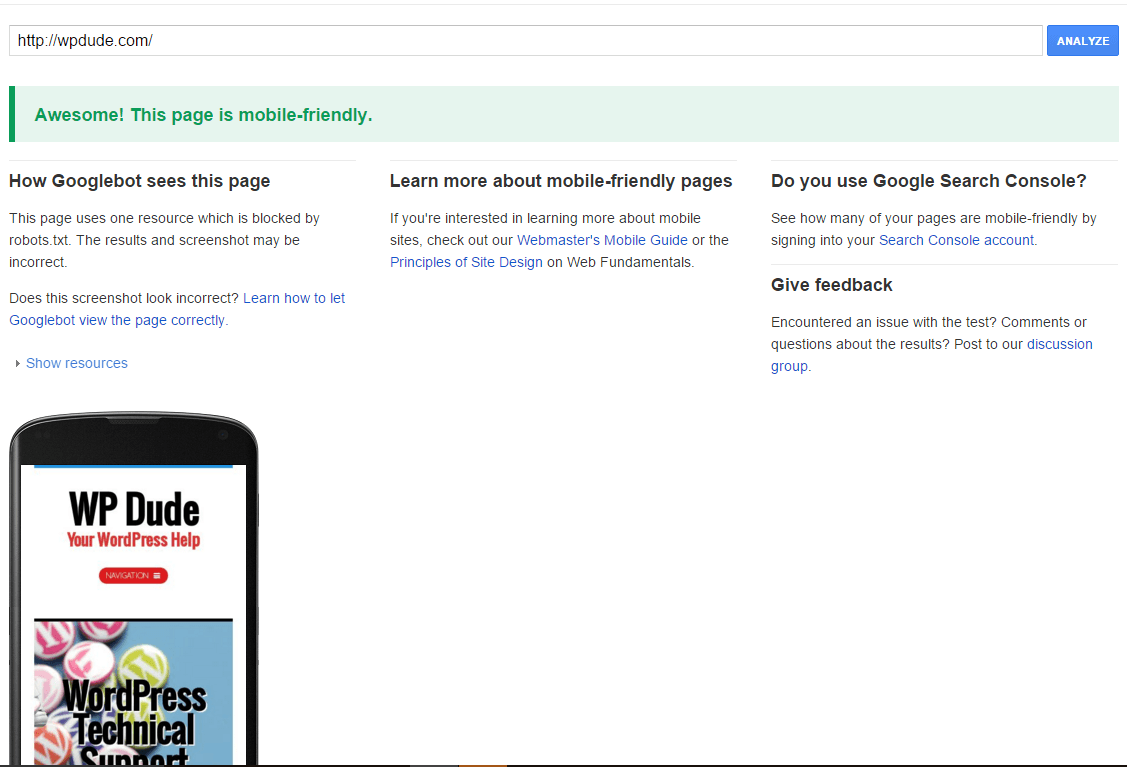
    Is Your WordPress Site Small Screen Ready? Go and test it on the Google mobile readiness checker.

    https://www.google.co.uk/webmasters/tools/mobile-friendly/

    Is your WordPress site small screen ready
    WPDude,com results.

    If Google go to the trouble of creating a toll like this it tells you mobile readiness is a factor in their rankings, Remember mobilegeddon?

    Going Native

    Just a parting word, is it worth while thinking about creating an App from your site rather than using a responsive website?

    Apps work natively with iOs or Android and are design with small screens in mind. I’ve been thinking about this a lot recently, will we be moving away from browser based sites, will WordPress act as a back end system to power content to native apps that we will install on our phones.

    The user can gain the benefit of native functions but still read their content.  I think we will be going that way.

    Personally I don’t consume content from a native website, I pull the content into my Feedly reader and consume it that way.  I much prefer a native view of content to a website.

    Wrap Up – Is your WordPress site small screen ready?

    Is your WordPress site small screen ready? Like it or not our well designed and thought out websites are moving away from desktop browsers to tablets and phones, we need to give those people a better experience.

    Test your site and get it mobile ready as soon as possible.

    Photo Credit: theilr via Compfight cc

  • WordPress Memory Management

    WordPress Memory Management

    Is your website running slowly, are there sometimes out of memory errors on your site like this one? You may need some WordPress memory management.

    Fatal error: Out of memory (allocated 11272192) (tried to allocate 77824 bytes)

    WordPress Memory Management

    What is WordPress memory management I hear you cry and why should it effect me?

    Hosting companies want your to use as few of their resources as possible, and often the default configuration you are given, is not enough to run a WordPress site effectively.

    I would say the minimum you need is 128MB with a view to something nearer 1256MB for ecommmerce or busy sites.

    What Uses Memory

    All of the modules that make up your WordPress site, and the more you have the more memory is used.

    The WordPress core service take memory, plugins take memory , your theme takes memory, making calls to the database takes memory and the more of these processes (read more site visitors) you spawn the more memory is used.

    How Much Memory & How Is It Used

    My favourite way to view memory limits and usage is to install this plugin:

    https://en-gb.wordpress.org/plugins/tpc-memory-usage/

    Once installed it provides a useful admin area widget that shows maximum available memory and how much is currently used.

    It also has a useful alerting tool that sends an email if you get spikes in memory usage.

    How To Fix The Issue

    Simple, increase available memory to WordPress.  You can do this in a number of ways.  Your results may vary with these techniques depending upon which company you host with.

    Increase Memory Limit Plugin

    The easiest way to increase available memory is with this plugin, install it and set the new memory limit.  I’ve had mixed results with this plugin not all hosts will work with this method.

    https://wordpress.org/plugins/change-memory-limit/

    Edit WP-CONFIG.PHP

    In the root of your site is a file called wp-config.php, this is a configuration file for WordPress, and one of the configuration options is to set

    Connect to your site using FTP or the file manager in your hosting dashboard, navigate to the root of your site and edit wp-config.php, and add the following line

    define(‘WP_MEMORY_LIMIT’, ‘128M’);

    WARNING – you can break your site if you edit this file incorrectly

    Edit PHP.INI

    The last method I’m going to talk about is editing a file called php.ini.  This file contains the configuration for php the scripting language WordPress uses, and one of the configuration options is to set memory.  PHP.ini is held in different directories based upon your hosting, most often it is in the root directory.

    Again, connect to your site using FTP or the file manager in your hosting dashboard, navigate to the root of your site and edit php.ini , and add the following line:

    memory_limit = 128M;

    If In Doubt

    Contact your hosting company they can advise you on the best way to increase available memory.

    Wrap Up

    This is a very common problem and is caused by hosting companies being stingy with their resources, check what memory is available to you and increase it to at least 128MB.

    Photo Credit: PinkPersimon via Compfight cc

  • Detox Your Website

    Detox Your Website

    It’s that time of year again, waist bands are a little too tight and we are feeling the results of holiday over indulgence. Many people turn to a body detox in January, but can I also suggest a detox of your website.

    Why Detox Your Website?

    Just like a body, a website can accumulate waste that it does not need, this waste takes up disk space, database space and can impact the performance of your site.

    Here are four areas of website detox and some health checks you can do to start 2016 with a sprightly clean website.

    Remove Unwanted Plugins And Themes

    Look through your installed plugin and theme list, and delete any that are unused. Even if they are not in use they are taking up disk space and harbouring potentially harmful code if not updated regularly.

    Look at your list of active plugins and ask your self “Do I really need this functionality”?

    If not disable and delete the plugin in question.  Every plugin enabled is taking a small slice of your available memory.

    Delete Old Content

    I’m currently in the middle of removing old content that does not serve my business any more.  I’m removing things such as:

    • Old sales offers.
    • Offers for services I’m no longer doing (custom plugin development anyone).
    • Reviews of plugins that are no longer available.
    • Anything from my old archive (pre 2010) that is not evergreen.

    Optimize Your Database

    Your poor old database goes through a hard time, and is very often neglected. I recommend at least on a quarterly basis you optimize your database.

    I wrote a detailed article on optimizing your database so I’ll not cover ground I’ve already walked.

    Check For Broken Links

    The interwebs are a fluid place, and links out from your site to other articles can sometimes break.

    We also change links internally on our site (for example when deleting post for detox purposes)

    Links break so it is good practise to check your links on a regular basis.  The good news is that there is a plugin called Broken Link Checker which will trawl through all your pages and create a list of broken links for you to fix. Here is a video to show you how.

    https://en-gb.wordpress.org/plugins/broken-link-checker/

    Three Site Health Checks

    Once you have done your tidy, here are three health checks to ensure your site is in top top condition.

    Google mobile check – run your site through this checker to make sure it is mobile compliant and works effectively on phones

    Google page speed insights – is your site loading fast enough in the eyes of Google

    Google malware checker – has your site been hacked or is your site free of malware?

    Wrap Up

    Start 2016 with a fit and healthy website to power your business through this coming year. Why not detox your website.

    Photo Credit: Robert Gourley via Compfight cc

  • Deck The Website With Plugins Of Holly

    Deck The Website With Plugins Of Holly

    It’s the most wonderful time of the year, or so the song tells us.  The majority of us decorate our homes this time of year, why not spruce up your website with some festive cheer.

    Deck The Website With Plugins Of Holly

    The team at WPDude have been working tirelessly all year, and this does not stop at Christmas, we have scoured the interwebs to bring cheer to your website this Yuletide.

    In this post I’ll show you some plugins to add some Christmas bling to your site.

    Tinsel Time

    Fancy adding a decorative touch to the header of your site, you can with Christmas Ball On Branch.

    This plugin adds a tiny splash of festive cheer in the top corner of your site (here is where the kids go Ooooooh! when they see your site).

    christmasball
    Click to see full festive feast for the eyes

    https://wordpress.org/plugins/christmas-ball-on-branch/screenshots/

    Snow Balloons And More

    It’s does exactly what is says on the tin, is pours festive fun all down your site, want Santas? Got that, want Christmas trees? Check.  The “and more” feels like a special present waiting to be opened.

    snowbaloonsandmore
    I imagine the metting went like this”We need Santas ‘n’ shit cascading down the screen”.

    Sing-A-Long-A-Website

    Even the most hardened Grinch cannot resist a sing-a-long, why not start the singing off from your website.

    Christmas Music plugin plays some jaunty Christmas tunes as people browser your site

    https://wordpress.org/plugins/christmas-music/

    Christmas Lights

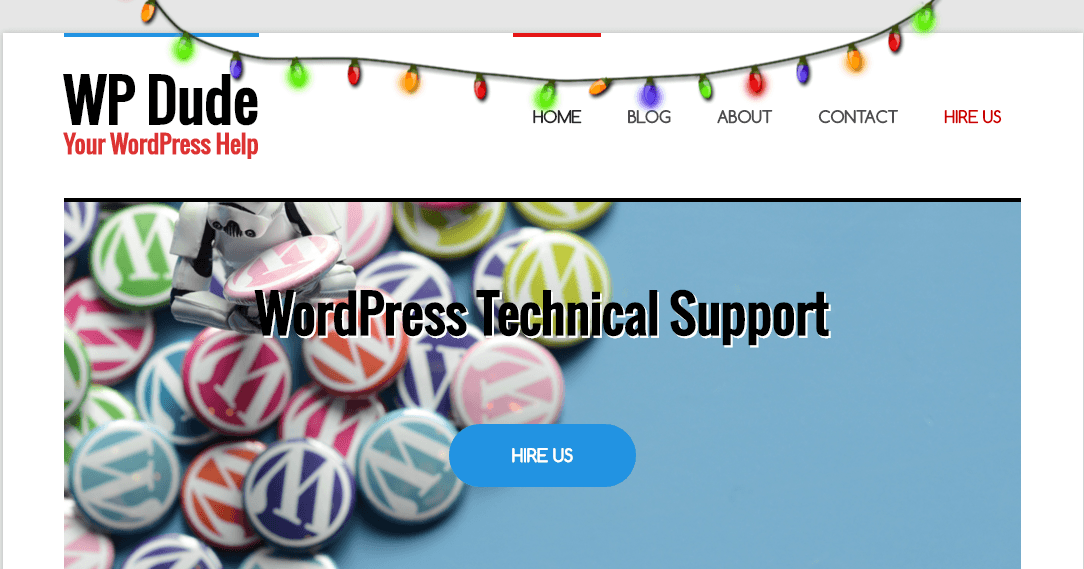
    My own personal favourite and the one I perk up wpdude.com with is  Xmas lights.  It adds a simple string of gaudy Christmas lights at the top of your site, no untangling, no annoying bulb checks just lashings of Christmas fun.

    xmaslights
    I don’t care if WPCurve has an entire Nativity scene on the front of their website Margory, we put up these Crumy lights every year and that’s the way it’s going to be, Christmas is about tradition damn it!

    I’m deliberately going for a cheap fun look, I like to think if it had audio it would be going Fzzzz as if the bulbs are about to pop:)

    https://wordpress.org/plugins/xmas-lights/

    Bringing It all Together

    And on three ! Two ! One click the video (if only you could hear the music better).

    Need More!!!

    These are my favourite plugins, but believe me there are more, for a full cast list check out:

    https://wordpress.org/plugins/tags/christmas

    Wrap Up

    Not very professional I know, but jollying up your website shows to the outside world you can have some fun and injects a little personality into your business, add the screen shots of your decorated website to the comments, the tackiest will get a free website job in 2016.

    Merry Christmas!

    Photo Credit: donielle via Compfight cc