Neil Matthews

Category: Case Study

  • 7 Things Often Forgotten On A Multi Language Website

    When we build multi language websites, the focus is usually on the main parts of our site;  copy, menus, footer, logo, sidebars etc.  But it has been my experience that there are a number of hidden parts to your site that are often overlooked and not translated.

    These missed items are jarring and can impact on a site visitors experience if not translated.

    In this post I want to give you my top 7 list of things that are often overlooked on a multi language website.

    1) 404 Page

    This is the page that is shown if a page cannot be found, it is very frustrating if a site visitor is given an error message that they cannot understand.  A confused visitor will not become a customer.

    2) Images

    If your images contain text, do your site visitors a favour and translate them too.

    Common issues I see are call to action sliders with one language through the site. Go that little further and create multiple copies of your images.  I understand this may cost a little more in graphic design fees, but the rewards of new customers from brand new markets should be factored into these costs.

    Another thing to think about with your imagery is cultural sensitivity.  One image that may be suitable for one market may not be suitable for another.

    An example;  you may have an image of an emergency ambulance, in the west traditionally we use the Red Cross, but in Islamic countries the Red Crescent is the accepted symbol.  I’ll write about cultural sensitivity more in other posts, but be aware one set of images may not be acceptable in other countries.

    3) Specialised Scripts

    If you have special scripts or plugins running on your site, you may need to ensure they are fully translated.

    A great example is a shopping cart script.  Have you been through the entire buying process with the eye of a foreign language customer.  Does you add to cart script translate, is your checkout in the desired language?

    If your customer cannot understand the checkout process, the cart will probably be abandoned.

    4) Downloads

    Are your downloadable media files translated?

    I’ve been working with a company to ensure their PDF downloads are available in multiple languages.  They understand it’s not just the website but all their electronic media that needs to be translated.

    Does that free gift you offer people as an ethical bribe to join your mailing list have different language versions?  It should.

    5) Error Messages

    I’ve touched on this already with 404 pages, but are the error messages your site displays in the appropriate language?

    Imagine you have a contact form that requires people to add their phone number, if someone submits without adding their phone details, and they see an error message they cannot understand, how do they know what to do?

    6) SEO Meta Information

    This is a biggie, if we are spending a l0t of time and effort translating your content, why do people not go that extra step and translate their SEO meta information so they can match their content to the searches?

    The great people at iCanlocalize.com offer SEO meta data translation services, check out their service page for details.

    7) Video

    This is often overlooked because of the cost of video production (I hold my hand up and say my video is only in English).

    Why not get a new voice over or add subtitles to your videos and create multiple versions to show to people with different languages.

    YouTube has a captioning system where you can add subtitles fairly easily.

    Wrap Up

    It’s the little missing pieces that jar with people when visiting your site.  Missing translations and small errors are the difference between a sale or a cart abandonment, show your site visitors you care.

    Do you need a second pair of eyes to review your translated site to find and fix the missing translations? Get a no obligation quote today.

    Photo Credit: Di’s Eyes via Compfight cc – A knotted handkerchief, is a method used in the UK to remind you to do something.
  • Case Study: Problems With Chinese Excerpts

    I was working on a client site which was built with English and Chinese languages.  The theme they were using showed excerpts of larger blog posts on the home page, it was working fine in English but when we switched over to Chinese we were getting issues.

    The Chinese version of the site, instead of showing a Chinese excerpt was showing all of the Chinese content, this is not what we wanted.

    What Is An Excerpt

    An excerpt is a cut down teaser of your full content, it is often used in a list of content to show what is available on your website.

    A site visitor can scan the excerpt and then choose if it is of interest then click through to read the full content.  Instead of filling your homepage with huge blocks of content you can show more digestible chunks.

    Why Chinese Excerpts Don’t Work Too Well

    The problem is the way WordPress, the software I was using for this build, creates excerpts.  It looks for the first X words and then cuts off the content and creates an excerpt.  By default this is 55 words.

    Why is this a problem? WordPress looks for spaces, and often there are very few spaces in Chinese text, so the software does not know how to calculate a word and huge chunks of text are returned.

    The Solution

    The solution was to count characters rather than words to make an excerpt.

    This could be custom coded, but luckily there are plugins out there that can do this for us.

    The one I eventually went with was Advanced Excerpt, this allow us to set a character count rather than a word count.

    https://wordpress.org/plugins/advanced-excerpt/

    Here is a screen dump of the settings page we get with Advanced Excerpt.

    Click to see full size image

    Another very useful function of this plugin is that we can tell it to count character then find the end of the next word which stops the English excerpt begin cut off mid wor… (only joking word of course :)).

    Another option that seemed to work (but I struggled to read the Chinese documentation) was this one.

    https://wordpress.org/plugins/wp-chinese-excerpt/

    Wrap Up

    This was a brand new situation to me, and just goes to show that we often take the way languages work for granted.

    What works on your website with your native language may not always work when you add an additional language.  The challenges of building multi language websites are not always clear cut.

    If you need help with some odd issue on your multi language site like this please contact us for a quote.

  • Two Countries Separated By A Common Language

    There is a famous quote attributed to George Bernard Shaw, Winston Churchill or Oscar Wilde depending upon the source you use that says:

    England and America are two countries separated by a common language.

    This is of real interest to many people who are building multi territory websites and may be a case for having a multiple language website with two versions of English!

    English Is English Surely?

    No not really, the way British people and American people use English is slightly different and if you want to sell into both territories it is a very good idea to modify and localise your English copy to match the country.

    People are very sensitive to copy and if you are using American style English to sell into a British market the locals will notice and your message may not be received very well.

    Spelling

    The obvious difference is the way many words are spelled.  There is wide use of the “ize” ending in the US which is very noticeable to a British person who usually goes with “ise”.

    The British English grammar police will be up in arms if you “ize” a word, even though it is technically correct,the word can be spelled both ways, they will dramatize the issue to the nth degree believe me I’ve seen it.

    Cultural Differences

    There are cultural differences, in the UK we don’t like hyperbole but in the US it’s acceptable.

    If I had a pound for every time someone from the US said I was awesome for fixing a technical issue I would be rich, but to the British mind, awesome is the scale of the pyramids or the power of the ocean crashing against the shore.

    The Technicalities

    Using multi language software you can install multiple languages on a website, but different versions of English can also be seen as different language even though they are both English.

    We can install the language en-us or en-gb and make them act as different languages, you can then “translate” English to English for your target market.

    I had a client that used this very effectively to sell into US, Canadian,British, Australian and New Zealand markets.

    It’s Not Just English

    You would be wrong to think this is a snooty English thing, the French speaking Canadians and their mother country also have differences, check out this post for details http://www.fluentin3months.com/quebecois/

    Wrap Up

    English is being homogenised (or is that homogenized) because of the widespread enjoyment of US television in the UK, my kids think everything is awesome, but there is a hardcore of people who don’t like Americanized English in their copy.

    Cultural differences between the way countries use English is a very real thing to consider when planning your multi territory website. You need to write copy that resonates with your target market to help make that sale.

    If you need help building a multi territory website including multi currency, please visit this page for a no obligation quote.

  • One Man Multinational

    I run a one man (read person if that term bugs you) multinational business, and we all can, thanks to the levelling effect of the internet.

    The Internet Has Brought People Together

    The internet has brought people together like no other medium in the past.

    I can communicate with people across the planet at almost zero cost.  There are tools that allow me to provide services as if they were sitting next to me, and other tools to take payment in their local currency and deposit it in my bank account with almost no effort. In short the world is my market, I’m a multinational player not a local small business, and I think you should build your empire in the same way so you can tap into a huge global audience not a small sheltered local one.

    An Unusual Day

    Let me tell you about an unusual day I had last week that sparked the idea for this post.

    I came to work in my home office in the UK, and my first task was to catch up with some emails to a client in Australia there is a small window when we are both online so I dealt with them as a priority so we could bat a couple of ideas back and forth about a Chinese version of his site before he turned in for the night.

    I took a 10am skype call from a client in Dubai, we had to juggle our times around his visit to the Mosque, but it worked out well, he gave me final instructions for a multilingual site we would be working on together.

    I went through my morning routine of sending out quotes to potential clients around the globe. Then I knuckled down and did some real work.  morning is my prime time, it is usually very quiet, but not today.

    The majority of my work comes from the US. Early afternoon sees the east coast rise, and my inbox comes to life, I start shooting replies to queries, sending out invoice the usual day to day client interaction. As the afternoon wears on I can feel the rest of the states waking from their slumber, my last client interaction is from a Canadian on the Pacific coast needing help with a bug in her French and English site.

    That evening I gave a webinar attended by people in multiple time zones, I always start my webinars by saying “Good morning, good afternoon or good evening depending upon your timezone”.

    I love the way my work seems to follow the sun throughout the day.

    The Majority of My Clients Are International

    The majority of my clients are not local to me in the UK, even though this could be beneficial to me.

    I deliberately position myself as an international player. This allows me to tap into a huge global market, not just a local one. I don’t do local networking events (that leaves me cold) I’m  not hunting down local companies so I can physically pitch to them, rather I have a 24/7 website selling my wares to anyone who cares to call. When I run ads I target the english speaking world, where ever they may be.  I can and do service people where ever they may be, the internet has made global trade a very easy thing.

    There Are Downsides

    Of course it’s not all shiny happy people, there are downsides. Paypal kicks me in the nuts with exchange rates every time I draw down cash (bastards). Timezone limitations. many of which are self impose mean many potentially lucrative 1-1 consulting gigs drift off because I cannot or will not take a call at 10pm. I’ve been at the pointy end of Xenophobia and short sighted people who accept quotes then later come back and say they found someone local.  WTF this goes both ways people, you don’t need to search for mediocre local talent, you can hire from the global community as easily as you can the local community.

    Go Global

    There is an global audience out there waiting for your products an services, you just need a way to reach them. A multi language website is a great way to start.

     Image by toasty

    Photo Credit: Sudhamshu via Compfight cc

  • Misadventures with Google Translate

    Many people think that running their website copy through Google translate is enough to make their website multi-language.

    I’m here to tell you that’s not good enough and the resultant copy will be jarring and amateurish to the foreign language reader.

    What Is Google Translate

    It’s tool you can see at translate.google.com.  You cut and paste your copy into the left hand side, select the output language and voila translated content.

    But is it any good?

    The Technology Is Too Young

    It’s taken us thousands of years to make our language as complex as possible, and it takes us as humans many years to learn the complexity of our own language, developing translation algorithms is in it infancy, Google and Co. have a long way to go before they perfect this technology.

    Think about your kids, they are exposed to your native language daily, and we still need to pick them up on problems with the way they speak or write.

    I think it will come, but until that day we need human translators not robots.

    Computers Don’t Have The Context

    A person translating some copy can read it and understand the context.  A robot translator will just see a word and try to pick a matching one from it’s database.  It cannot read and understand the meaning of your content.

    Here’s an example, you are selling a feel good spa day, talking about relaxation, luxury, high end accommodation, log fires, intimacy with your partner.

    When you read this you are already picking up the emotions, you are imagining the scenario of crackling log fires, the smell of the smoke.

    A robot would translate this to be “there will be burning bits of wood in your room, this will give off smoke” that’s not the feeling or context you want to portray.

    The Nuance Of Your Message is Lost

    If you say one thing in English, simply translating the words into French can lose the nuance.   There are some English phrases with no direct translation into French and vice versa.

    A great example of this is the French term L’esprit de l’escalier.  It’s that feeling that you get once you have stormed out of an argument and you think of the perfect riposte to their words about five minutes later.  You kick yourself and wish you had said that thing during the argument.

    See it takes a sentence to explain that in English, but just a short phrase in French, there is no way a robot translator can pick up that nuance.

    So What’s The Answer

    I’m sure the Google translate people will eventually crack the translation algorithm, but I’m 100% sure we will have to have a real person proficient in the language to proof read (and correct) the copy, language is too complex for a computer for the next 10 years as far as I can see.

    I use Google translate to find single words, for example menu items, otherwise I always use skilled human translators.  My preferred translator company is iCanLocalize, their team of freelance translators can plug directly into the multi language software I use.

    I can select a block of copy and send it out for translation in any number of languages, and a translation is sent back ready to plug directly into the website I am building. No cutting and pasting, just translations straight into my site ready to display.

    I’ve been Guilty Too

    When I first setup this site, I ran a couple of pages through Google translate to act as holding pages before I passed them out to translation (I may still have some French pages like this, do as I say not do as I do I’m afraid 🙂 )

    A native German reader read them and was laughing at some of my turns of phrase, if I remember I think I said I was selling people or something like that.

    Wrap Up – Misadventures with Google Translate

    Translation is expensive, but it is far better than a mixed message translation as supplied by Google translate.  Check out iCanLocalize and their translation services.

    If you are starting 2014 with plans to build your own multi language website, then please let me give you a no obligation quote

    Photo Credit: legoalbert via Compfight cc

  • Translate To Show You Care

    I was in discussions with a client about building out their multi language website. We were talking about why he wanted to serve up his site in multiple languages and his answer really struck a chord with me and I wanted to share it with you.

    The Normal Reasons to Translate

    The two usual reasons people translate their sites are.

    1) To increase the reach of their sales

    By translating your content, it makes it easier to make sales as people can understand the benefits and features in their own language.

    2) They have to due to legal requirements

    Certain countries force website owners to host their sites in multiple languages, certain Canadian states and UK based government sites have to have a Welsh language option.

    I Want To Show We Care – Translate To Show You Care

    My clients reason was very different, he told me that most of his clients speak excellent English, but he wanted to:

    Show we care enough about them to translate into their language

    I’ve filed that away as an example of excellent customer service.  This client is going to the length and expense of translating their site just to show they care for their clients (and potential clients) who have English as a second language.

    English is the Lingua Franca of international business, most people speak and read it, but translating into other languages can show you care.

    Photo Credit: Gerrit…! via Compfight cc

  • Reconcile Content Across Languages

    One of the big issues facing a site owner who has content in multiple languages,  is that they need  to ensure they have translated all content into all languages.

    Missing or or out of date content reflects badly on you as a site owner. But how do you reconcile content across languages?

    Moving Target

    Keeping up with your website content is difficult enough if there is only one language;  content is deleted, links are broken, new stuff is added and changes are made.

    Multiply this by the number of languages you support and it get complicated.

    Add on mulitple authors using different languages and the task of ensuring you have all of your content correcct in all of your languages gets exponentially worse.

    There are two solutions to this problem:

    Manual Reconciliation

    You setup some sort of manualy reconcilliation system with check boxes, and auditing to ensure your content is up to date.

    For anything above a small website this will be a tedious time consuming process.

    If only there were an automatic way to do this …

    How I Solve This Problem For My Clients

    There is always a plugin is my mantra.  When I build client sites, I use a couple of plugins that checks on all content in a website and alerts me if:

    • New content is added needing translation
    • The original piece is updated and I’ve not added an update to the other languages
    • If I’m sending content out to a translation team I can set a deadline and get alerts if the work has not been done on time

    The plugin I use are WPML translation management and WPML translation analytics.

    They are both part of the WPML suite of plugins, and you need the full premium version to do what I am discussing.

    Translation Analytics

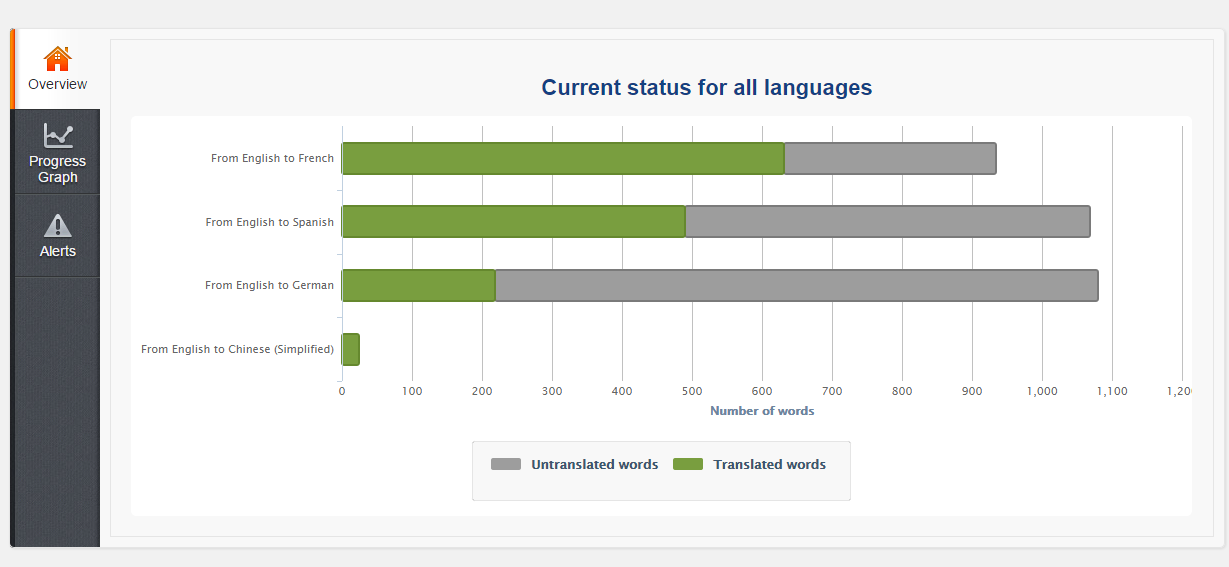
    Transltion analytics is a pluign that gives a visual representation of how your translation project is progressing, it shows you

    There is also a dealining system built into this pligin so you can set a timescale to compelte your project.  This is really useful if you are working with other translators and have a tight timeframe for completion.

    Buiklting into the dealining system is also an alertying tool which will let you knoe if uyou are dropping behjing with your translation work

    Here is a screen shot from the translation analytic tool. As you can see I’m pretty far behind on my Chinese work.

    Click for full size image
    Click for full size image


    Translation Management

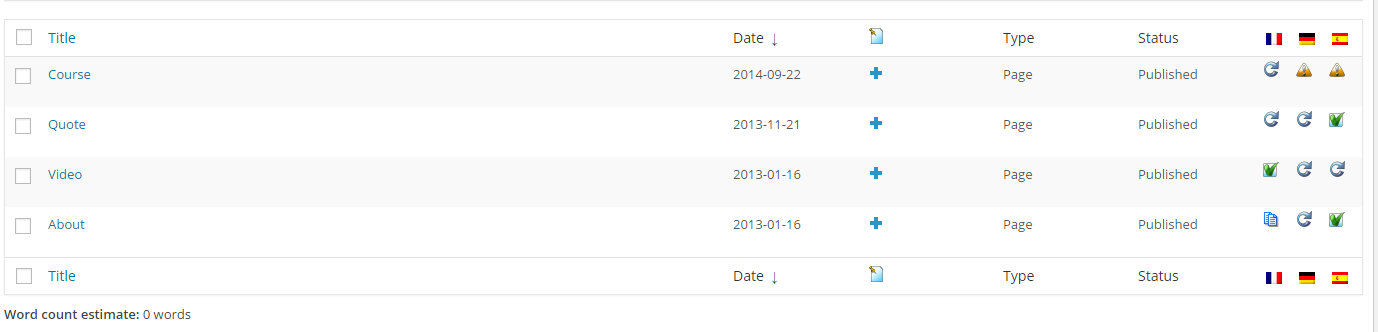
    This is my favourite tool for reconcling content, translation managemeent shows you a list of posts pages or other content that needs to be translated or is in need of an update.

    Using this I can see where I need to focus my attention and what needs to be translation.  here is a screen dump of the managements screen.  you can see my pages are in need of some updates and translations

    translation_management
    Click for full size image


    Wrap Up

    Reconciling content across languages is a tricky thing I recommend WPML to automate that process so content doesn’t slip through the cracks of yoru

    Disclosure: if you buy a copy of WPML through my link I will receive an affiliate commission.

    Photo Credit: Daniel Kulinski via Compfight cc

  • Importance Of Testing Across Languages

    Something happened on my own site here at Web Polyglot, that has highlighted the importance of testing across languages as you initially build your site and as you apply changes over time.

    The Angry Spaniard And The Missing Contact Form

    I got a very angry email from a Spanish chap because there was no contact form on the Spanish version of my quotation page .  A complete stranger felt the need to tear me a new one because he was unable to get a quote from me.

    What I learned from this is that people are very territorial about their language choice and if your site is under performing in their language you are going to annoy them and miss sales.

    Imagine you had a single language site and it did not work correctly, what sort of message is that sending to your potential clients or customers, it’s exactly the same if, when, someone clicks over to another language and they find missing content and or functionality missing or not working.

    It makes them think they were a secondary thought tagged onto the main site, not a real concern of the business.

    Invisibility Of Secondary Languages

    It is very easy to miss changes on secondary languages if you don’t speak or read that language yourself.

    We think once the site is built that is it, we don’t need to check the other languages but you are wrong, a website is an ever evolving thing, new content is added, new marketing techniques and social media platforms arise requiring changes.

    I know exactly what happened, I was translating my contact form and forgot to re-add the new form on all pages. School boy error!

    If, as I am, you concentrate on one language, the others become invisible, ask yourself when was the last time I flipped the language switch and tested my site?

    Website Audit

    On the back of this I’m running a details website audit to ensure I have multi language compatibility across my site, and this is something I suggest you do also to make sure you have not missed anything.

    I’ve created a list of pages and posts and website functions, I’m going to manually test each one and tick it off my list.

    Wrap Up

    Treat your secondary languages as well or better than your main language, ensure everything is working correctly and test test test as you add new functionality.

    Sorry angry Spanish dude.

    Photo Credit: thebarrowboy via Compfight cc

  • Are Attachment Pages Affecting Your SEO

    Are Attachment Pages Affecting Your SEO

    Something  WordPress does by default that Google does not like for SEO reasons came to my attention recently. In this post I want to tell you about a potential SEO hit you may be taking but you may be completly unaware of. Are attachment pages affecting your SEO

    Attachment Pages

    Every time you upload and attach an image to a post or page it creates a new page called an attachment page.  For example the image attached to this post creates this page.

    https://dev.neilmatthews.com/?attachment_id=8978

    The problem is that Google can also index these pages and add hundreds of very low quality pages into the index for your site.

    Thin Content

    If you add 1-2 images per post that is an additional 100-200% of pages that are classed as thin content by Google.

    On these pages you will see  a single image, a few lines of title text and that is all, if Google sees your site stuffed with thin content pages it will assume your site is of low quality and apply a penalty.

    To add context it is recommended that there are at least 300 words per page to keep Google happy.

    How To Fix It

    The way to fix this problem is to create a redirect from your attachment pages back to the parent page where the image is attached.

    Enter WordPress SEO Plugin

    I strongly recommend you install and configure the WordPress SEO Plugin by Yoast, http://wordpress.org/plugins/wordpress-seo/ .

    One of the functions of this plugin is to redirect to the parent page.

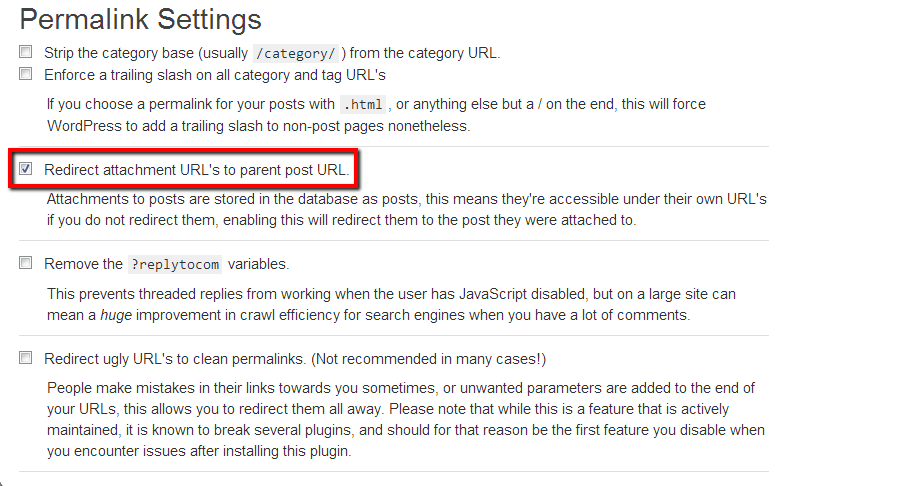
    Go to SEO -> permalinks and on that page check Redirect attachment URL’s to parent post URL

    imageattachments


    What happens is that the plugin sets up a 301 redirect from the attachment page which in turn tells the Google index that the page has been moved and to update the index to point at the parent page thereby removing all the unwanted image attachment pages from your index.

    It’s a five second fix that could increase your traffic.

    Wrap Up – Are Attachment Pages Affecting Your SEO

    My organic traffic has taken a hit in recent months due to the recent Panda update at the end of May and I’m slowly working through the cause, I’ll be writing more about my findings in later posts that will hopefully help you if you have seen a reduction in traffic.

    Further Reading

    Here is a very good article which I’ve been using in my reasearch.

    http://arwebzone.com/google-panda-effect-on-wordpress-causes-and-solutions/

    Photo Credit: Keith Marshall via Compfight cc

  • What Are Custom Post Types

    What Are Custom Post Types

    You may have heard of a custom post types for WordPress and wonder what they are all about (or is that just me, I sometimes forget the real people who live outside tech-land sometimes don’t think in geek), but what are custom post types.

    In this post I’ll give you a run down about custom post types and how they can help you.

    What Are Custom Post Types

    You can extend the way data is saved in your WordPress database by adding custom post types.  Instead of the standard post or page layouts, you can extend the database and store data in a way that is more meaningful to you and your requirement.

    An example is probably required here.  Imagine you want to extend your site and have custom posts types of events.  An event has a title, details, location and a date.  This is a little different from a standard post, so we need a custom post type.

    Lets Step through this example and talk about how this events custom post.

    How To Create Custom Post Types

    There are a number of ways you can create custom post types:

    Code them up in your theme – you can write a function for your themes function.php file which creates a new custom post type.

    Write a plugin – you can write a custom plugin which creates your custom post type and loads them up when the plugin is activated.

    Plugins – there are plugins out there there that allow you to create your own custom post types.  They allow you to create CPT without the need to understand the coding required.  My favourite is this GUI custom post type creator.

    http://wordpress.org/extend/plugins/custom-post-type-ui/

    All of these approaches do the same thing.  Some code will be created and this will  run when you site loads, new posts types are created and a menu item added to allow you to add content.

    They use the register post type function, here are full details if this your thing.

    http://codex.wordpress.org/Function_Reference/register_post_type

    Adding Custom Post Type Data

    Once your code has been added, there will be a menu option to add, edit and amend your custom post type data.

    You will get a version of the post editor that allows you to add your content.  It is the same editor we use for posts and page so there is not learning curve to add custom content.

    Displaying Custom Post Type Data

    Depending upon how your current theme is coded, your existing archive templates will display custom post types, but if you want something specific you will need to code up a template or add a custom query to existing pages templates.

    For example if you want to show custom post types on your home page rather than blog posts, you would need a custom query loop.

    If you don’t have the coding skills to write your own custom templates, Loop Buddy may be of help.

    Re-Using Existing Post Functionality

    We can re-use existing post functionality in our custom post types, for example if you want comments on your data, you can re-use that functionality.  This is setup when you create your custom post type.

    Extending Post Data With Custom Fields and Meta Boxes

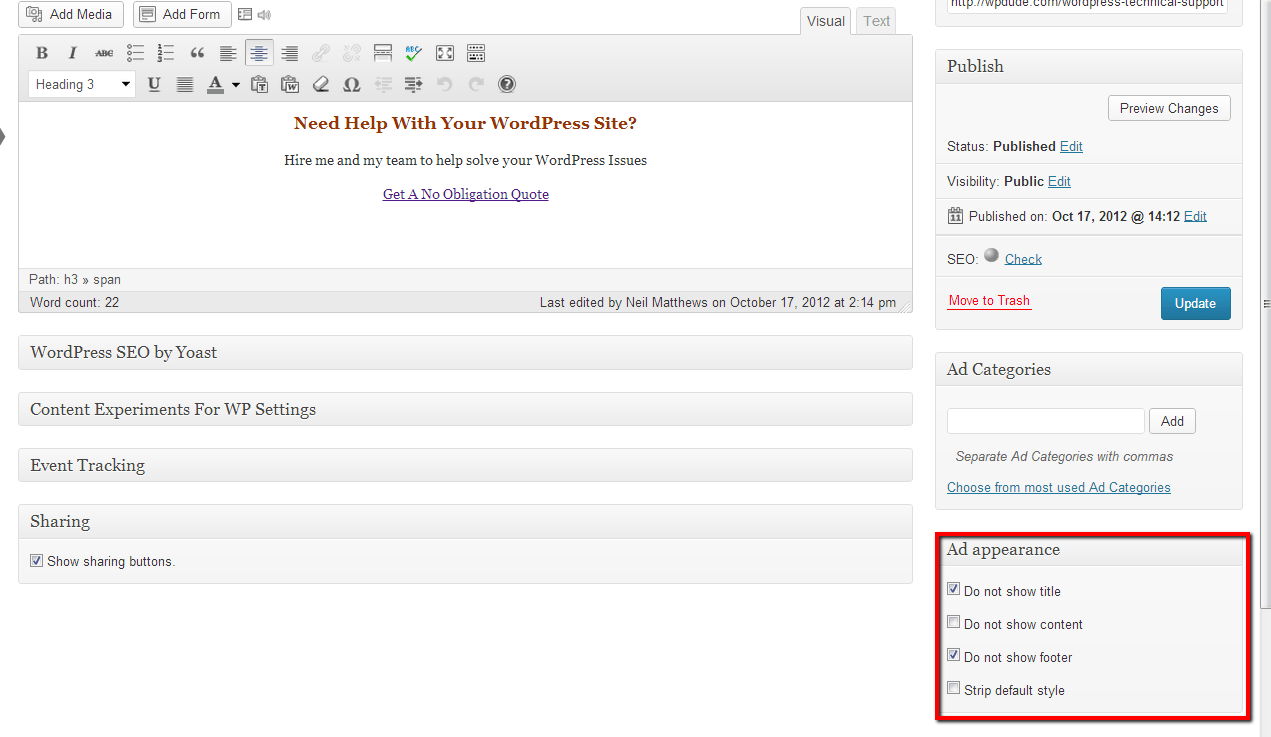
    You can also add new data types of your custom post types and have meta boxes.  Here is an example from a plugin I use called In Post Ads which has some custom meta boxes.

    Click to see full sized image
    Click to see full sized image

    As you can see a custom meta box has been added which gives us a series of check boxes.

    It’s Not For The Feint Hearted

    As you can no doubt guess adding custom post types requires a certain level of technical skill to code up theme files, plugins or to create templates to display content.

    Some Examples I Have Built

    The way you can use custom post types is limited only by your imagination.  Here are some of the projects I have worked on:

    • Events – the event has custom coding to have an event date and sort on that date, as opposed to the published date which will not show future events
    • Guides – I wrote a custom plugin to add and manage downloadable PDF guides
    • Bibliography – I wrote custom code to modify a bibliography for scientific journals and publications.  This has lots of custom meta for citations and references.

    Wrap Up – What Are Custom Post Types

    Custom post types move WordPress away from being just a blogging platform to being a fully functional content management system.

    I don’t want to throw too much at you in one post, but next up I’ll talk about custom taxonomies.  You can create custom ways to organise your custom post types.

    If you need help adding a custom post type config to your site jump over to my WordPress technical support page and I’ll give you a no obligation quote.

    What are custom post types,  well this is an SEO excise to improve keyword density.

    Photo Credit: L. Marie via Compfight cc

  • Case Study: How To Troubleshoot WordPress Crashes

    Case Study: How To Troubleshoot WordPress Crashes

    Me and my team get called in a lot to troubleshoot WordPress sites that have crashed .  Here are my four top ways to help diagnose and fix WordPress sites that have crashed.

    White Screen Of Death

    When I talk about a crashed WordPress site, I usually mean the dreaded white screen of death.  You make a change or install a new plugin then all of a sudden your site does not work any more.

    All you can see is a white screen, what is more you cannot login to undo your changes because wp-admin also give you the same white screen.

    Troubleshoot WordPress

    This is the methodology I use to troubleshoot WordPress, I have a video tutorial at the bottom of this post if you would prefer to see the process in action.

    Disable Plugins

    Nine times out of ten crashes are caused by problem plugins.  You need to disable all your plugins and find which one is causing you problems.

    WAIT: I cannot login, how do I disable plugins?

    You need to access the file system of your site.  Login to the control panel of your hosting company and find the files manager.  In my experience all hosting companies supply a file manager of some sort.

    Navigate to wp-content and then rename plugins directory to plugins_temp.  This will fool WordPress into thinking that there are no plugins installed.

    If it is a plugins problem, you site will jump back into life and you will be able to login.  Go to the plugins section, and all of your active plugins will be marked as inactive.

    Go back into the file manager and rename plugins_temp to plugins then enable your plugins one at a time testing as you go to see which once caused the crash, then remove it.

    Activate Default Theme

    Sometimes crashes are caused by issues in your theme, my next step when troubleshooting is to activate a default theme.

    In much the same way as we disable plugins, we can disable themes.  Go to the theme folder wp-content/themes then rename the active theme directory.  Hopefully this will allow you to login now.

    Go to your appearance -> theme section and activate one of the default themes such as twenty eleven.  If you site comes back online, you have an issue with your theme.

    Re-Install WordPress

    Manually re-installing a clean copy of WordPress is often a good way of fixing corrupt core files.

    To do this, first obtain a clean copy of WordPress from the download section of WordPress.org and copy it to you local machine.  Unpack the zip file and the attach to your site using FTP.

    Upload the clean copy of WordPress ,overwriting your existing files.

    Please be careful not to overwrite wp-content this contains your theme, plugins and any uploads you may have.  If in doubt call in a professional to do this for you.

    Enable Debugging

    The fourth item I recommend to people is to enable debugging and see if WordPress is trying to tell you what ails it.  Enabling debugging will allow WordPress to show any errors or messages that are being generated.

    To enable debugging go to your file manager and edit wp-config.php, add add this command and save. This will enable debugging and verbose messages and errors will be displayed.

    define('WP_DEBUG', true);
    To disable debugging switch to false or remove this line.

    An example when debugging helped me; one of my clients had run out of memory and was not seeing any errors.  I enabled debugging, increased available memory via php.ini and the site came back online

     Video Tutorial

    Here is a tutorial I recorded some time ago to take you through how to troubleshoot WordPress sites  in more depth

    [leadplayer_vid id=”50753A7F726BC”]

    Image by soundiron


  • Case Study: Increasing Email Opt-In

    Case Study: Increasing Email Opt-In

    I’ve been experimenting with various ways to increase email opt-ins here at wpdude.com and I thought I would share some of my findings with you.

    Why Experiment?

    People are suffering from information overload and just because you add an email opt-in to your sidebar does not mean you are going to get people to join your list, you need to stand out.

    New techniques are becoming available to get your opt-in message in front of people in a more effective manner.  If you have a valuable “thing” to swap in exchange for an email address be it an ebook, video or other valuable resource, you are going to be able to increase opt-ins and get your marketing message out.

    Level playing field

    I created a level playing field on my site, I’ve gone pretty minimal and removed all sidebars and opt-in forms to give my experiments the best chance of success. All opt-ins will come from the specific experiment. not my standard sidebar

    I ran one test at a time in isolation to make sure I was testing just that technique. I  also created separate email lists per experiment so I could measure effectiveness.

    I also ran each experiment for only one week to judge effectiveness and to give myself objective results.  The email ,list with the most sign ups after one week equals the most effective technique.

    Here are the various methods I tested:

    Home Page Gateways

    If you have not heard of a home page gateway, can I direct you to mixergy.com, I’ll wait here while you check out their home page gateway.

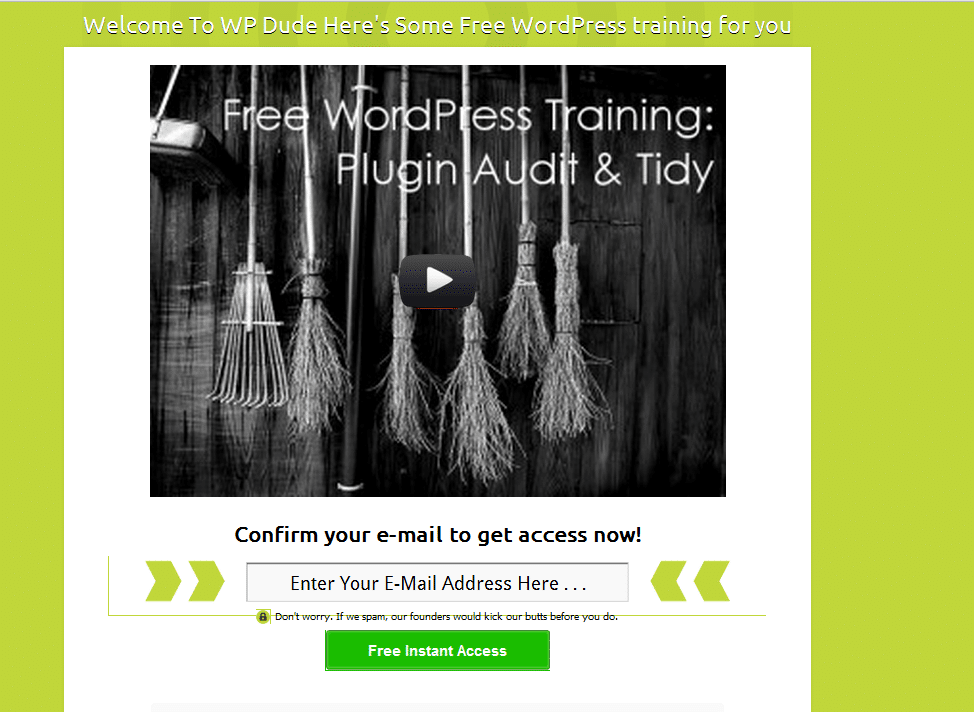
    I setup a home page gateway on my own site using the plugin Welcome Gate, I’m sending you over to a marketers site, but he is one of the good guys so don’t worry.

    Here is a screen grab of the welcome gate I setup.

    Click For Full Size Image


    You can use text or videos in your welcome gate (see video opt in plugins below).  It works by storing a cookie on your browser, if the cookie is not present you are prompted to opt in before you are shown the home page.

    You can add various options including a “skip this” step so people do not have to opt in.

    My results were mixed, I got some opt ins, but it was not my most effective test, added to this I don’t like this technique so I’m loathe to put my site visitors through this experience.  I would love to hear comments below from people using the technique who have had great results.

    Popup Plugins

    I first started using popups about 18 months ago with great results.  I setup a free video download popup in exchange for an email address.

    I was using the Popup Domaination plugin, software I no longer recommend so no link.  They are an internet marketing company not a software development company.  Their plugin broke after a WordPress update, their reply, update to the latest version (at a cost) to get the plugin to work – shocking support

    I moved over to Pippity ( so incensed was I that they would not support their software).  I’m glad I did, it is an excellent popup plugin.  It has split testing and great metrics to judge how effective your popups are.

    If you have a high value freebie such as an e-book or video download to offer popups are a great tool.

    My results are more to do with my technical audience not being too happy with popups (I think) and I was seeing 3-4% opt in on my popups, okay but not great.

    Site Top Drop Down

    You’ve probably seen these before, a drop down banner at the top of the screen appears after a few seconds and grabs your attention.

    Here is a screen grab of a test I was using to send people to my WordPress technical support page

    Click for full sized image

    I’ve used  Hello Bar in conjunction with this plugin http://wordpress.org/extend/plugins/hellobar/

    Hello bar is free for a small number of impressions, you then need to move over to the premium version.   The free impression level is not enough to give this system a test you only get 100 clicks.

    Hello bar works by taking people through to a sub page with an offer or opt in. box  I was seeing 0.33% click through, very very poor, hello bar does not work for my audience.

    Video Opt In

    This is a new one for me, if you go to this post, you can see the video optin in action. What Is WordPress Multisite

    I’m using a brilliant (but premium plugin) called Lead Player.  This is made by the same people who created the Welcome Gate plugin above.

    It allows you to provide people with great free content but insert an optin for them to get the video goodies.  I have a lot of video tutorials and some high traffic pages that match that content.  I’ve put these video there and I’m seeing great results.

    Using Leadplayer I can set the opt in to appear at the start, after a set amount of time or at the end of the video

    It also has a call to action function to send people to a specific page too.  I’m using the call to action to send people to my services page.

    It integrates with all the main email providers and Google analytics, so I can see exactly how effective the plugin is.

    The results have blown me away.  I’m seeing 20% opt in rate.  This is the current leader of my tests.

    By adding real value through videos people are happy to opt in.

    Free membership Site

    This is my current experiment.  I have a large number of video tutorials. I’ve put them in a membership site that is free to join.

    Using the new membership site features of Premise I’ve built out a members only section of my site.  Premise integrated with my email provider so all people who sign up are added automatically to my list.

    Go to https://dev.neilmatthews.com/members

    I’ll write up a review of Premise soon, but in brief I’m liking the new membership site features.

    I’m still mid experiment, but the massive value provided along with the free sign-up nature is working well.  but my gut feeling is that video opt-in in combination with a membership site may be the way forward

    Wrap Up

    All of these techniques have improved signup rates, but the final two are showing great results for me.  Be warned email op in techiques will always drop once people get tired of them

    If you would like to see a live demo on how to setup these  various options, I’m more than happy to run a webinar, let me know in the comments if that is of interest.

    Image by aisforangie