Neil Matthews

Category: Case Study

  • Plugin Review: Revive Old Posts

    Plugin Review: Revive Old Posts

    Lets admit it, feeding the social media beast with new content is a huge time suck.

    I don’t have time to be continually sending links to Twitter, Facebook et al, so I’ve been experimenting with an automation tool to keep a continual stream of content going into my social media accounts.

    That tool is a plugin called Revive Old Posts https://wordpress.org/plugins/tweet-old-post/

    How Revive Old Posts Works

    Once installed a number of links are created to the application programming interface (API) of the social media platform of your choosing.

    The free version gives you Twitter and Facebook, the pro version gives you Linked In, Tumblr and Xing (no I’ve got no idea either).  I’ve only used the free version so I’m not going to dig into pro features at all.

    Twitter is a simple setup, login to your account and authorise the app

    Facebook is a bit more complex, you need to create an app on Facebook and link your website to it, sounds complex but there is a pretty good step by step guide to get you setup.

    Scheduling Posts

    Once you have linked up your accounts it’s time to select your content and set a schedule.

    You can select posts pages or any custom posts types.

    You can select one or more categories for your posts.

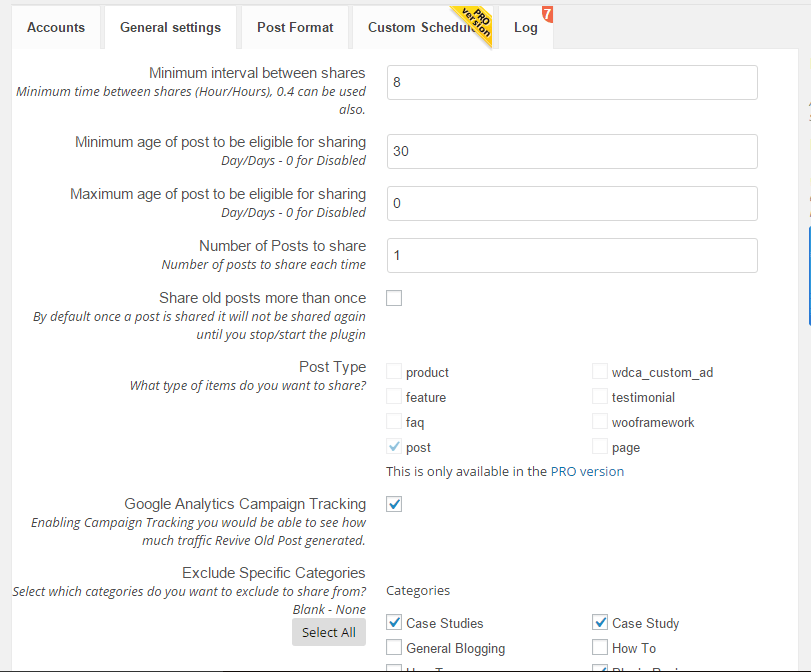
    You can set minimum age of your content, so, for example only post content more than 30 days old.

    You can set how many to post.

    You can set the hourly interval between posts.
    Click for full size image
    Click for full size image

    The Pros

    The plugin works flawlessly, posts were pushed up to Twitter and Facebook as expected.  I cannot fault the plugin.

    The Cons

    If you have hundreds of posts, not all of your content is suitable for automatic revival. I had posts about offers I’m no longer offering pushed up.

    I had posts about plugins that have been sunsetted and are no longer available. I had old members only content pushed to Facebook.

    I had to go through a laborious process of setting up a category of classic posts I wanted to revive.  It was pretty tedious but only a one time thing.

    I was running a test using webpolyglot too and I don’t have a huge number of posts so the revivals were getting a little repetitive.

    People know it’s old stuff so you had better be present to make some in person social posts or it looks a little canned.

    Don’t go mad, one post a day is more than enough.  I had it scheduled to push every 7 hours and there was a lot of automation and not much social chatter it didn’t look great.

    As you can see the cons are about content not Revive Old Posts the plugin.

    Wrap Up

    If like me you are too busy doing client work to spend huge amounts of time feeding content to the social media beast revive old posts is a great tool,

    Spend a little time to curate your old content to only push your best stuff out.  Then sit back and enjoy one less thing on your daily to-do list.

    Will I continue using Revive Old Posts? Yes, but I’m planning on creating a group of my top 50 posts and pushing them out one per day as part of my broader Facebook marketing plan.

    Photo Credit: bbaltimore via Compfight cc

  • It’s Not Just Backups and Updates …

    It’s Not Just Backups and Updates …

    As we have developed our maintenance service WP Insure we have added some additional features that are pretty hard to describe in sales copy.

    Over and above our maintenance services of backup, updates, monitoring and security we also offer little support jobs we call tweaks.

    Our clients will call in support for a tweak usually when something goes wrong with their site.  In this post I want to talk about the hard to describe feature of our plan.

    The Tweakmeister

    There is a dedicated member of the team at WP Dude (John) who looks after tweaks for our client sites.  If anything goes wrong or you need help it’s probably him you will be dealing with.

    Clients get access to a members only help desk where they can send in their issues.  They send the tweak into that and we take care of it.

    Example Tweaks

    Here is a short list of the kind of things we will do for our clients.

    Memory Full – we’ve been called in when memory capacity is exceeded when new plugins are added or the site becomes busier, we will update memory settings to make more available to WordPress

    .htaccess issues – .htaccess is a configuration files that is used by WordPress in a number of ways, it holds permalink details, redirection details, cache plugin details, the list goes on, we are at hand to make changes to this file

    Email Consulting  – sometimes our clients want to know what is the best way to do “X” on a WordPress site, we act as consultants via email to our clients.  We’ve worked on thousands of WordPress sites and have probably done what you want to do on other sites.

    Hack Recovery – we have recovered hacked client sites before.

    Database Optimisation – many site owners are not aware they need to optimize their WordPress database on a regular basis,  tables fill up , junk gets left over from unused plugins, it’s good practise to spring clean your database regularly, we do this as a matter of course.

    Crash Recovery  if your site goes down we will recover it.  Nothing more to say on that point.

    Plugin Install and Config – We’ve helped clients with troublesome plugin installs.  This tends to be complex plugins such as e-commerce or multi language plugins.

    Premium Theme installs  – the call usually sounds something like “I just bought a new theme and installed it and it looks nothing like the demo”.  We are available to wade through the documentation, find out about short codes and custom post types to make your site look like the one on the advert.

    Hosting migration – We’ve already got the tools in place to clone your site to a new hosting company if you are our maintenance client.

    Backup Restores – Should anything go wrong and you need to roll back to an earlier point in time, we can do it with one click.

    Weird PHP errors – Once we get into trouble shooting PHP ( the scripting language used by WordPress), most site owners don’t want to know, we will look into the issues, be it file upload size too small, headers already sent errors, just send it to the help desk.

    Plugins broken after updates – Sadly this is a fairly frequent issue, WordPress is updated but the plugin is not and it breaks, we roll back updates, work with plugin developers to find solutions or install alternative plugins that do the same job but work.

    Theme tweaks  – want to change the colours, use a snazzy new font, we are the team to tweak your CSS file of your theme.

    Training – In the same vein as email consulting we also create small training videos for our clients to show them how to so that thing they need to do, We record screencasts using Jing and send them over to clients.

    Script Integrations – we’ve linked up WordPress sites with third party scripts such as Facebook, Pinterest, Zapier and Google Analytics.

    The list goes on – just ask we can probably do it for you (the not so small print we don’t do custom theme development, custom plugin development or graphic design as part of the maintenance plan).

    Outsource Your Technical Hassles

    When you sign up for our maintenance plan you are getting access to a team of WordPress experts.  Outsource the worry of maintaining and supporting your site to us. Concentrate on the real work of building your business.

    Wrap Up

    Our maintenance service is not just backups and updates it is support when things go wrong, or just when it gets too technical for non-techie site owners we are there.

    If you are looking for hassle free technical support for your WordPress site, then we are the team, for full details and a 30 day free trial check out our maintenance service WP Insure.

  • Ignore Cleaning Up Spam At Your Peril

    Ignore Cleaning Up Spam At Your Peril

    There is a small maintenance task that most WordPress site owners ignore at their own peril!

    That is the task of cleaning up spam comments.

    The Problem

    As we all know there are spammers out there trying to leave comments on our WordPress sites in the hope of getting a link back to their hapless sites and improve search engine ratings.

    At the time of writing I have had 242,034 spam comments blocked by my anti spam plugin.  I’m pretty mean I disable comment on my posts after 14 days so there are very few posts to leave spam comments on.  So my spam issue whilst huge is pretty small compared to some people.

    The problem is those spam comments all take up valuable resources on your site and if they are not cleaned down it can crash your site.

    Spam Bots

    Spam is automated via scripts and if a spam bits finds a chink in your armour, you can be sure they will blast your site with repeated spam attempts.

    This automation can lead to problems with massive database tables, I’ve seen sites with millions of rows in their comments tables because spam comments have been left in the system.

    Impacts Site Performance

    Massive databases are very often the root cause of many slow loading WordPress sites.

    If we go back to the Spam bots above, as they continue to smash your site with spam, they hit an already slow loading database and the problem becomes  a vicious cycle.

    Case Study – The Site that Crashed

    One of our maintenance clients came to us with stability issues, they could not quiet put their finger on why, but their site kept behaving erratically.  They had 60K+ spam comments in their queue.

    This in turn had created a database table that was 130MB in size and had  become corrupt.  As comment crons tasks were running, it was causing his site to crash.

    I fixed the table with phpmyadmin, removed the spam comments and optimized the database, weird unstable issues vanished.

    What To Do

    Enough with the waffle already how do I fix it?

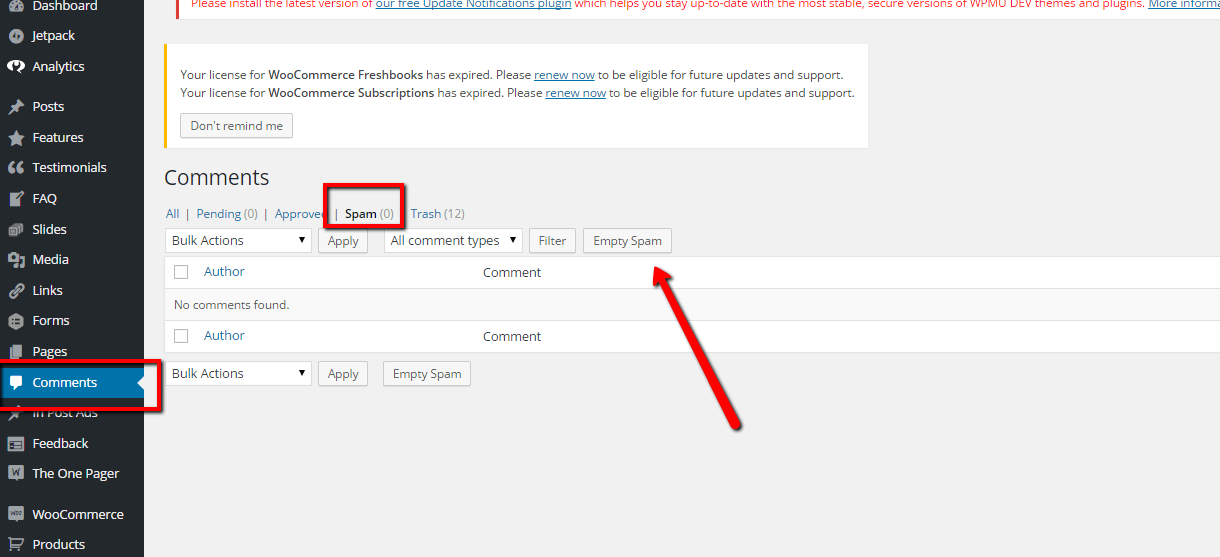
    Empty you spam and purge all spam comments. See screen shot

    Click for full size image
    Click for full size image

    If you have a huge number of spam comments, this might time out and you will have to click empty spam a number of times.

    The optimize your database to remove references I like a tool called wp-optimize to do this, check out this post for details on optimising.

    Wrap Up

    Why not take a 30 day free trial of our maintenance service, we will clear up your comment spam and harden your security just as a thank you for signing up.


  • We Are Oh so Vulnerable To The WordPress Vulnerabilities

    We Are Oh so Vulnerable To The WordPress Vulnerabilities

    This week has been a big week for security flaws showing up in WordPress.   There have been a number of WordPress vulnerabilities surfacing.

    Firstly we had news that a huge number of plugins were using a feature of WordPress incorrectly due to poor documentation and exposing WordPress sites to script injection hacks. You can get full details here http://wptavern.com/xss-vulnerability-affects-more-than-a-dozen-popular-wordpress-plugins

    The plugins in question were big name ones.   Plugins that I use on almost every site I build, so this was a BIG  issue.

    Secondly WordPress itself released a security patch to close another loop hole that had been found. Again full details here http://wptavern.com/wordpress-4-1-2-is-a-critical-security-release-immediate-update-recommended

    We spent a lot of time updating and testing sites this week.

    I recommend you finish reading this post, backup your site and apply any updates your site needs now.

    I Cannot Stress The Importance Of Updating

    I recommend to all site owners that they apply updates to WordPress, plugins and themes as they are made available.  The eco-system of WordPress is vast with a huge combination of plugins, themes and versions of WordPress, you need to keep everything up to date to keep hackers at bay.

    I check client sites daily for updates, over and above updating I also harden security on WordPress sites.

    My Security Regimen

    Here’s what I do to my clients sites and my own.

    • Take daily backups so i can recover in the event of a hack
    • Update everything regularly (we check daily on our sites)
    • Delete unwanted / unused plugins, just because they are not active does not mean hackers cannot exploit code
    • Install a security monitoring solution to spot hack attempts and send alerts. My current favourite it iThemes Security
    • Harden security to stop hackers making changes – again use iThemes security to do this

    Check Out WP Insure

    Yes this was all a thinly veiled sales pitch, our WP Insure service which was designed to keep your site up to date and secured.We keep everything update to date, harden security and monitor your site for any issues. Why not take our a 30 day free trial to test drive our service.

  • Are You Mobile Enough For Google?

    Are You Mobile Enough For Google?

    Google is up-ing the stakes for the mobile web.

    They have looked into their cavernous store of data and deducted that more and more web searches are done from mobile devices.

    They are threatening to penalise websites that do not have an optimised mobile site!

    Are you mobile enough for Google?

    Google Webmaster Errors

    A number of my clients have received warnign messages from Google along these lines.

    Google systems have tested 67 pages from your site and found that 100% of them have critical mobile usability errors. The errors on these 67 pages severely affect how mobile users are able to experience your website. These pages will not be seen as mobile-friendly by Google Search, and will therefore be displayed and ranked appropriately for smartphone users.

    I think the telling statement is that you will be “ranked appropriately” , get a decent mobile site or have the fawcet of Google juice turned off.

    How To Tell If You Are Mobile Enough For Google

    The easiest way to check you are mobile friendly is to use Google mobile friendly test

    https://www.google.com/webmasters/tools/mobile-friendly/

    I’ll wait while you go off and check.

    What Are Your Options

    You need to make your site responsive.  This means your site will resize  to fit a mobile screen.

    There are three main option that I can see to fix your site if it fails.

    1) Re-Code Your Existing Theme

    The first and most expensive option is to hire a developer to recode your theme and make it responsive.

    Pros

    You will get a mobile match for your existing site

    You will get exactly the theme and layout you desire.

    Cons

    This is very much the most expensive option.

    It will take some time to code and test, there are rumours that Google are implementing their penalty in April.

    2) Buy A New Responsive Theme

    Go to on of the theme markets such as themeforest.net and buy a new responsive theme.  You can demo most themes so enter the demo URL into the Google tester URL to make sure it passes their test.  The vast majority of new themes are responsive already.

    Pros

    Much cheaper than custom coding, expect to pay less than $100

    Cons 

    You will need to setup a new premium theme, and change the existing look of your site. Depending upon the theme some setups can be complex.

    3) Install One of The Mobile Ready Plugins

    The quickest route to a mobile friendly website and the route I have suggested to my clients who have been impacted,is to install one of the mobile theme plugins.  These plugins detect when a site visitor is from a mobile device and show a different mobile ready theme.

    Here are some of the plugins that can do this work:

    Pros

    Quick, about an hours work to install and configure.

    Cheap, from free to approx $59 for a premium version.

    Cons

    You are limited to the look and feel the plugins provide.  These themes are pre-built, you can change colours and add logos but your design options are limited.

    Further Reading

    Here is Google’s very own  documentation on configuring a mobile ready WordPress site.

    https://developers.google.com/webmasters/mobile-sites/website-software/wordpress

    Wrap Up

    As we start to consume more and more of our content from phones, we need to make content readable and usable from small screens.  Google know this and that is why they are penalising people without responsive sites.  I strongly recommend you embrace mobile browsing.

    We can implement a premium theme (option 2) or install a mobile plugin (option 3) as one of our $99 jobs if you need help.

  • How To Stop Scrapers

    How To Stop Scrapers

    One of my maintenance clients was having an issue with a scraper stealing his content and
    posting it on their site as original content without attribution, he asked me via email how to stop scrapers stealing his content.

    What Is A Scraper?

    A scraper is one of the dark denizens of the internet along with trolls and spammers.

    Scrapers steal other people’s content and add it to their own site passing it off as original content, and usually monetise it in some way.

    They might sell it as original guest post content or they may own the target site and wrap it in ads or sell products or services.

    Steps To Stopping A Scraper

    The first step is to identify that you are being scraped.

    One good way is to setup a Google alert for you content.  You can go this at google.com/alerts.  With google alerts you can get an email alert if certain things appear on the net.  Add an alert for something you have in your content such as a post title of your most popular post and you will be alerted if a scraper takes your content without asking.

    Once you have a hit record the URL of the offending site

    Look at your logs.  In your hosting account there will be an option to look at your webserver logs, search for referrers of the offending URLs and you will be able to find the IP address of the scrapers.  Record these for the next step.

    Plugins To Stop Them

    RSS Footer – the majority of scrapers will grab your content with one of the autoblogging plugins out there.  This will grab your rss feed and add it to their site automatically.  I personally use rss footer on my site and add an image link advert back to my hire me page so the scraper becomes my unpaid advertiser.  But you can use this plugin to add a footer to your rss posts so people know it’s from your site.

    WP Ban – once you know a scrapers IP address or referral site, you can add them to wp-ban a plugin that locks particular IP addresses out of your site and stops them scraping your content.

    .htaccess – if you are more tech savvy you can do exactly the same thing by adding the following statement.

    order allow,deny
    deny from 192.168.44.201
    deny from 224.39.163.12
    deny from 172.16.7.92
    allow from all

    Getting Scraped Content Removed From The Internet

    Probably the best way to get scraped content removed is to send a DCMA notice to the offender.

    If that doesn’t work approach the hosting company and get them to remove it.  Remember you have copyright of all your content, here is my  hosting companies policy https://www.bluehost.com/copyright-claims-policy

    Please note if the offender is outside of your Jurisdiction you probably won’t get remedy.

    My Personal View – Let It Go

    In the words of Elsa from Disney’s Frozen, I let it go … (an apology to any parents of Girls from the age of 0-10 you’ve heard enough of this already 🙂 )


    The effort of monitoring for and chasing down people who are scraping your content is just too much, I’ve already got too many things on my plate and policing the internet is not one I want to take on.

    Adopt the mindset that it’s a compliment, people only steal good content and that the massive heads at Google will be able to spot a real authority site rather than a shoddy pasted together one.  They will know when article X was published and when article X+scrape is indexes I’m sure they can see through it.

    Wrap Up

    This kind of email consulting / help is something I offer to all my maintenance clients, so not only are you getting backups, updates security and monitoring, you also get a WordPress expert on your team for consults via email at a very reasonable fee.
    Photo Credit: Tjook via Compfight cc

  • CASE STUDY: Building Widgets For Mobile Devices

    CASE STUDY: Building Widgets For Mobile Devices

    In this case study I want to show you how I created a set of widgets for mobile devices and a different set for desktop and tablet devices. Building widgets for mobile devices is not too hard once you know the procedure.

    Background

    We all know that mobile device browsing is growing at a huge rate, and that  your website had better support mobile devices.  It is incredibly important that your site has a good responsive theme, but sometimes settings for a desktop site aren’t quiet right on the responsive side of things.

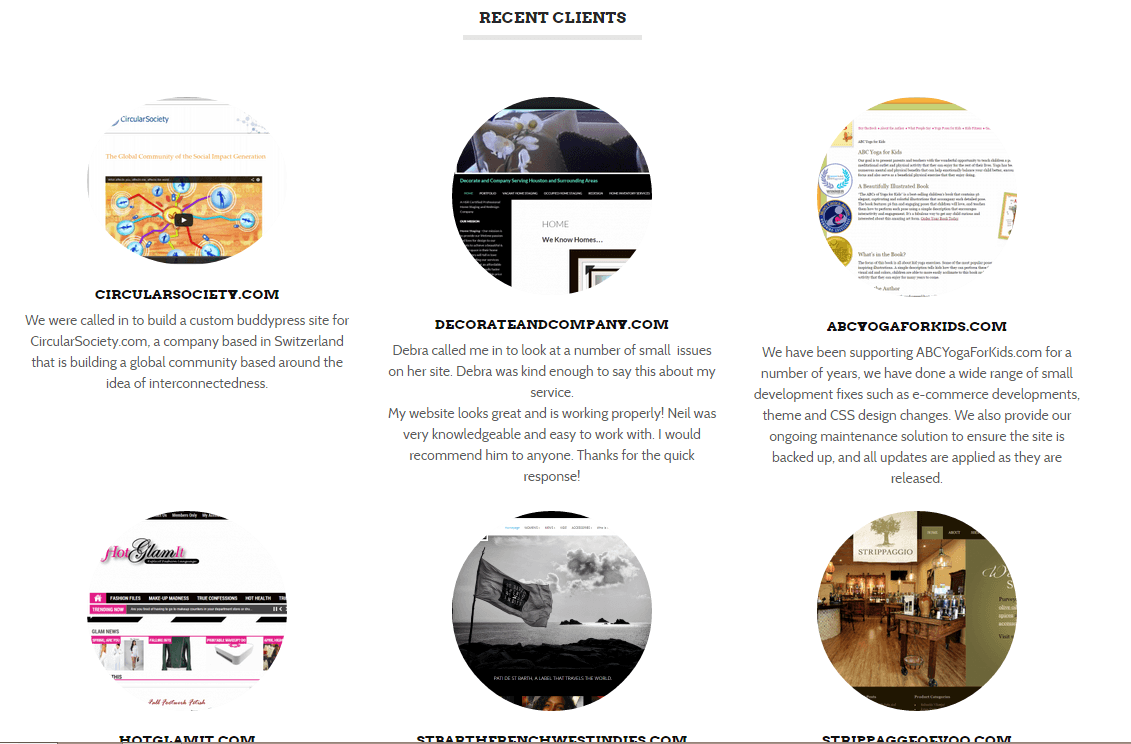
    This case study is for my own site wpdude.com, on the home page I have  a series of widgets, I use them to show my client portfolio and my recent blog posts.  I’ve got nine random client listings, which looks great on a desktop or tablet.

    Click for full size image
    Click for full size image


    You can very easily scroll down through the nine items with a wheeled mouse, the problem arises when I look at my site on my phone, I’m scrolling through acres of screen real estate to get past nine testimonials, so my problem was how to limit that number on mobile phones only and keep that valuable social proof for larger screens.

    Enter Widget Logic

    I’ve written about the great plugin widget login in this post, but in summary widget logic allows you to apply logical conditions to sidebar or in my case home page widgets and only show those widgets when the condition is met.

    If only there was a condition that allows me to show only when a device is mobile …

    Enter WP_IS_MOBILE()

    There is a function inside of WordPress called wp_is_mobile(), what this does is examine the user agent of the device browsing a website and will return TRUE or FALSE depending upon whether the device is a mobile one.

    The user agent is a piece of data all browser send to a website, so you desktop will send the fact you are using Google chrome from  windows machines, your Mac will say safari, and your phone does exactly the same.  This is how WordPress knows there is a phone browsing your site.

    WP_IS_MOBILE()  defines mobile devices as phones only, larger screen tablets will return FALSE.

    What I Did

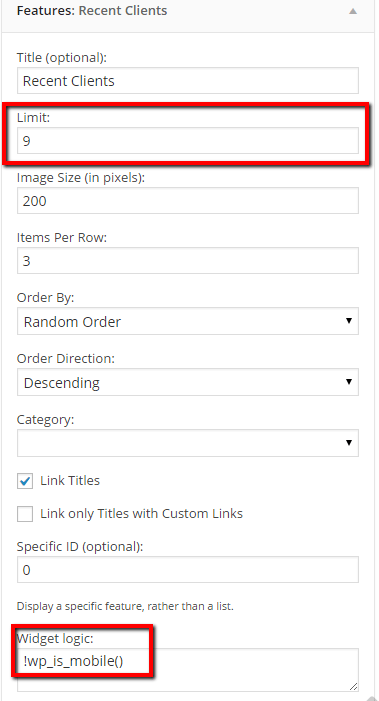
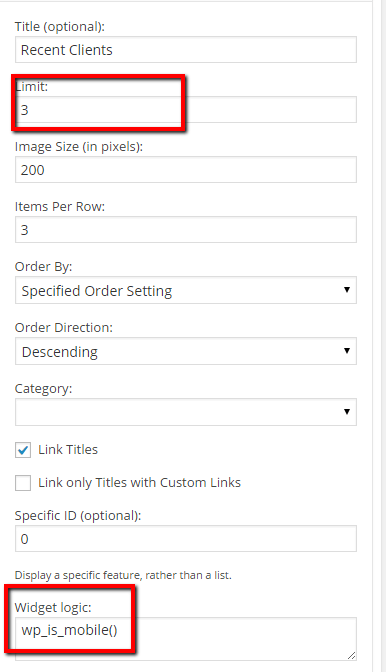
    I created two widgets to show testimonials, one had widget logic set to !wp_is_mobile() and the other set to wp_is_mobile(), it might not be immediately apparent what the difference is, but adding translates to IS NOT mobile.  Here are screen dumps of both widgets

    !ismobile
    click for full size image
    ismobile
    Click for full size image

    If you check my site on a mobile device you will only see three featured clients.  What is happening is that the wp_is_mobile is returning TRUE so that widget is displayed.

    Wrap Up

    Mobile is incredibly important, ignore configuring your site for optimal mobile browsing and you risk loosing potential customers for your products or services.
    Photo Credit: rmtx via Compfight cc

  • Case Study: Cleaning Up Comment Spam In The Database

    Case Study: Cleaning Up Comment Spam In The Database

    I was working on the site of one of my regular maintenance clients, his site was running very slowly, both on the front end and the back end dashboard.

    I was also unable to run a backup correctly so I began to dig a little deeper to keep the site on-line. This is when I found the site was not cleaning up comment spam correctly.

    Dodgy Database

    It’s long been my experience that if the dashboard of a WordPress site is running slowly, there is probably an issue with the database so that’s where I began my investigation.

    I opened up the database and found something very unusual …

    Comments Meta Table

    The comments meta table was absolutely massive.

    The comments meta table contains the actual text content of the comment.  There is a corresponding part of the comments system which contains email, date left etc, but comment meta contains the actual message.

    The total size of the database was approx 250MB and the comments meta table took up over 220MB of that space.

    When there are lots of spam comments with heavy amounts of comment content, it ends up the in the comments meta table creating a big performance hit on your site.

    Deleting Spam Comments

    Now the difficult part of the problem was this, there were very few comments in the system, all the spam comments had been caught and deleted BUT the comments meta table was not tidied and optimized.

    There were tens of thousands of orphaned meta entries taking up all that space.

    A great plugin to use to see how large your database tables are is WP-DBManager https://wordpress.org/plugins/wp-dbmanager/.

    This plugin allows you to see a list of tables and how large they are.  Here is a screen dump of my comments tables, you can see I have 13MB in my comments meta table (security note always hide your table prefix).

    dbmanager
    Click for full size image


    How I Fixed This

    I installed and configured a secret weapon in my tool kit, the wp-optimize plugin https://wordpress.org/plugins/wp-optimize/.

    wp-optimize is a cool little plugin, it does a great job of cleaning up orphaned data which is left in the database, I’ve written more about it here when I talk about optimising your database.  Check out that post on details on how to use wp-optimize.

    Super Speedy Site

    Once the orphaned meta data was removed, the site kicked back into normal speed, I could take my maintenance backups, “Jobs a good un” as they say in the north of England where I live.

    Wrap Up

    If you are suffering from a slow loading website in the dashboard as well as on the front end of a site, it may be an issue with your database, check out these optimisation procedures.

    If you want a team of pros to manage little issues like this then why not take out a maintenance plan.  There is a lot more than just updating plugins in this service package.

    Photo Credit: Grumbler %-| via Compfight cc

  • CASE STUDY:Extending WordPress Roles

    CASE STUDY:Extending WordPress Roles

    I want to present a case study from a project I did with one of my clients where standard WordPress roles were not enough and we needed to extend the editor role.  I’ll show you the process for extending WordPress roles in this post.

    What Are Roles

    Roles are the access control system of a WordPress site, they say what a person can do once they are logged into the dashboard, for example the admin role can do anything on your site, but the editor role can do anything regarding content, but cannot do admin style tasks such as installing plugins or themes.

    Standard Roles

    WordPress has a number of predefined roles that users of your site can be assigned to, from most permissions down to least, the default roles are:

    • Administrator
    • Editor
    • Author
    • Contributor
    • Subscriber

    One Size Does Not Fit All

    For the vast majority of people the six standard roles are more than enough, but there are certain scenarios where they are not quiet right, that is where we need to create a new role or extend an existing one.

    The Editor That Needed More

    In the case of my client, they were building a multi language site, they had a number of people on staff to create content for their site, and organised them into admin and editor roles.

    The problem was that they wanted to send out content for translation to a third party translation company that was integrated into their site.  Because there is a cost involved in this, the plugin in question WPML sets this function as an admin level task.

    What we needed to do was extend the editor role and grant them a capability of wpml_manage_translation_management.

    Capabilities

    WordPress roles are assigned capabilities, there a hundreds of capabilities, some are default WordPress ones like activate_plugins whilst others are added by plugins and sometimes themes.

    Here is a list of default capabilities to give you a feel for the granularity of control in WordPress.

    http://codex.wordpress.org/Roles_and_Capabilities#Capabilities

    User Role editor

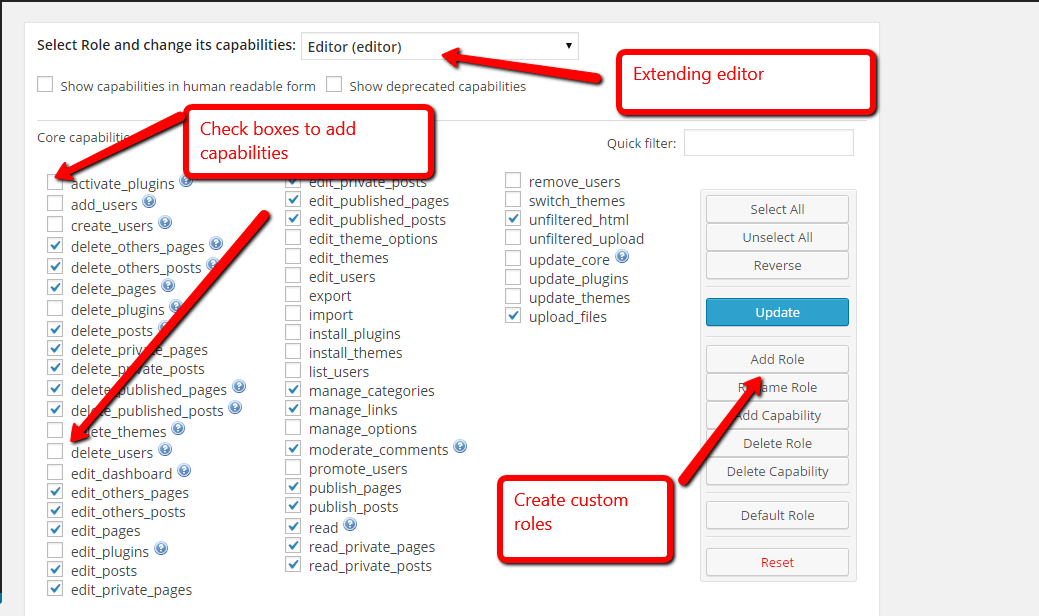
    The plugin I like to use to create custom roles is User Role Editor,  This is a great little visual tool that allows us to create new roles or extend what we already have.

    Once installed, under users -> user role editor you get this screen

    Click for full size image
    Click for full size image

    To fix my clients problem, I simply opened up the editor role, and under the custom capabilities section I checked wpml_manage_translation_management.  Simple as that.


    Editors could see the translaton tool set and send out jobs for translation.

    Wrap Up

    The roles ad capability system within WordPress allows for a lot of granularity on what someone can and more importantly cannot do once they are logged in.  Consider using roles to stop the less technically able members of your team from breaking your WordPress site.

    If you need help setting up custom roles for you WordPress site please feel free to request a quote from us.

    Photo Credit: Nick in exsilio via Compfight cc

  • Doing Business Across Languages

    Doing Business Across Languages

    So you have setup your multi language website and you are taking orders for your products or services from multiple territories.

    But are you really setup to do business across languages?

    The Website Is Just A Gateway

    Your multi language website is just a gateway to new markets, there are some back end issues to consider once you open your business up to people who speak a different language to you.

    Handling Multi Language Leads

    You work in English, have a French version of your contact form and your potential customer has the audacity of filling that form in using French, what do you do?

    Do you staff your sales department with bi-lingual skills or do you have some sort of translation service on hand ready to field your requests and replies.

    This all adds to your bottom line.

    Customer Service

    When customers come to you for customer service, there is normally a problem.

    Imagine the scenario of an unhappy customer on the phone and no-one can speak their language.  They have a problem and that is exacerbated but a break down in communication.

    My suggestion are the many translation conference call services that are out there.  You dial in to the conference call, add your customer and a translator on the other end acts as a go between.

    Here is a UK based company that does exactly that http://www.absolutetranslations.com/en/telephone_interpreting_services_company, but you may want to find a company local to you that does the same thing.

    Contracts

    Are your business contracts valid across borders, do you need to get a local lawyer to draw up contracts for different territories you do business in?

    I’m in no way qualified to give out legal advice to please consult with a professional in the target market or a local law firm experienced in import / export law.  Which leads me to…

    Import / Export Rules

    If you supply a physical product can you export them to your country of choice?

    If you send staff to perform services can they can visas to enter that country?

    What’s the point in selling into a country and the expense of writing up a website if you cannot deliver your products or services?

    Local Tax Rules

    Do you understand the local tax rules of selling into your target market?

    There are certain countries which have tax withholding rules, which mean they have to keep a portion of your payment and return that as tax to their local government.

    You could find your self with a nasty shock when a large chunk of your payment is withheld as tax.

    Understanding these rules means you can price your services appropriately.

    What I Do

    The first thing that I do is to tell potential clients that all correspondence and phone calls will be conducted in English.  this sets an expectation.  I have high school French language skills and Italian / German holiday skills (I can buy a meal and book a hotel room).  I cannot conduct business in any language other than English.

    If I get a foreign language request, I send it out to my translators at ICanlocalise.  I do this pretty easily because my website it plumbed into their translation system.  I create a draft post, and send it out for translation, I get the reply  and create another post with my reply, also stating that I prefer to use English if possible.

    All of my contracts are written with England and Wales as the jurisdiction,  I have no idea if they will stand up to scrutiny in a foreign court, but in all my years in business I have not had to test that.  I mitigate this risk by taking deposits on my projects.

    I sell knowledge services so there is no import export restrictions on that yet.  I’m sure our governments would love to tax what is between our ears:).

    Wrap Up

    Setting up a multi language website is just the first step in doing business across languages, be prepared and have your back end in place too.

    Photo Credit: Glyn Lowe Photoworks. via Compfight cc

  • What Are Tweaks?

    What Are Tweaks?

    In my maintenance service package I talk about site owners having a number of tweaks per month over and above the standard maintenance work we do.  These tweaks can be called down as and when required, but what are tweaks?

    In my mind they are small packages of development work to enhance your site.  In this post I want to clarify what tweaks are to potential maintenance clients.

    Example Tweaks

    Probably the best way to show you what a tweaks are is to list out some examples we have done for our current clients:

    Install and Configure Plugins

    We have been asked by our maintenance clients to install and configure plugins that are too complex for them.  We have installed simple plugins like widget logic, up to more complex ones like s2member.

    We have been asked to replace plugins that no longer work as expected, for example one client was using a search plugin that was no longer supported, we swapped that our for Google search.

    Fix plugins that have stopped working; our client spotted that a post rotator plugin was not working after an update to WordPress. We fixed a jquery conflict.

    The list goes one.

    Managing Complex Content

    We don’t look after your normal posts and pages content, but some plugins such as e-commerce have very complex content in them, we have added new products to plugins if our client is struggling.

    Theme Changes

    We are often asked for small tweaks to our clients site theme, we will happily make small changes to css to change colours fonts etc.

    We have also been asked to completely replace themes with new ones.

    Theme Updates

    When a theme has been customised it’s a tricky thing to apply the latest theme update, we will get the latest theme files, apply updates and re-apply customisation.

    Building Development Environments

    We have been asked to clone live sites and build development environment so our clients can test things out without impacting their live sites.

    Errors On The Site

    When a client spots an error on their site and reports it to us we raise a tweak call to fix these too.  Errors such as warning notes appearing, malware reports, missing PDF files.  Again the list of errors goes on and on, as long as it’s an error to your existing site we can fix it.

    Fix Database Issues

    One of our new clients, had an absolutely enormous database due to spam comments that weren’t being deleted we fix that database issue and optimised their database for performance.

    Fix Menus

    We have been called in to setup and fix menus, such as creating new menu areas, adding new menu items or changing text.

    Add Third Party Scripts

    We have been asked to install third party scripts, for example Google Analytics javascript code and Facebook like widget code.

    Consulting

    Client will ask us what is the best way to do X, and with our years of experience we can suggest a solution.

    We Spot Errors Too

    As part of our maintenance work we often spot errors and fix them too, we will raise them and treat them like a tweak but they are not part of your monthly draw down of work.

    Some of the things we have spotted are

    • Backups not working
    • Security issues
    • User permissions wrong
    • Hosting run out of disk space
    • Issues with domain registration

    What Are Not Tweaks

    Anything that involves a large amount of development work such as coding up a plugin, or creating a custom theme.  These would require a separate project over and above your maintenance agreement.

    Just ask us, we will let you know if it is a tweak or not,

    How Tweaks Work

    When you sign up for our maintenance service, over and above plugin updates, backups, WordPress updates, security monitoring and database optimisation, we will give you access to a support email address.

    Send you tweak request to that address and Rod will raise and manage a tweak project and our team will fix your problem.

    Wrap Up

    If you would like to take a test drive of our maintenance service and have us do some tweaks to your site then why not check out our 30 day free trial.  There is no credit card required and nothing to cancel if you don’t want to go forward.

    Sign up for a free trial now>>

    Photo Credit: Elsie esq. via Compfight cc

  • Automating Testimonial Collection

    Automating Testimonial Collection

    I’m a big fan of client testimonials as social proof you can do what you say you can do.  I’ll not rehash the whole subject here, but I wrote a post called the Power Of Testimonials.

    I’m also a big fan of automating repetitive tasks, and typing in testimonials I’ve solicited for clients manually is a big old pain in the backside, so I looked at automating the whole process.

    A Tale Of Three Plugins

    I’m using three  plugins to automate the whole process:

    1) Testimonials By WooThemes

    I’ve selected this testimonials widget over the plethora of others out there because it is compatible with my theme and it’s incredibly easy to add testimonials to pages, sidebar and the home page too.

    Before anyone starts I know there are other testimonials plugins that offer this functionality out of the box, but none fitted with my theme as well as this plugin.

    2) Gravity Forms

    Ah probably my favourite plugin, and so well worth the investment in a developers license all those years ago.  Gravity form does so many automated tasks excellently, like add emails to Mailchimp, adding client details to Freshbooks.  But it also allows us to add testimonials with it’s post creation functionality.

    3) Gravity Forms + Custom Post Types

    This final plugin is the key, it allows the gravity forms functionality that adds posts add custom posts types.

    How It Works

    I’ve set up a form on this page https://dev.neilmatthews.com/add-testimonial using gravity forms, but it is a special type of form.

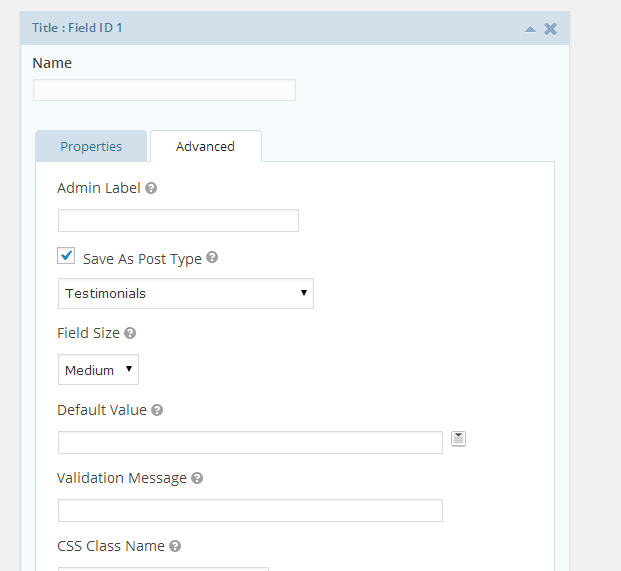
    When someone adds an entry it creates a draft post on my site, but not just any old post a custom post type of testimonial.  So entering data on that form automatically generates a testimonial entry on my site that I need to review and publish.

    Click for full size image
    Click for full size image

    No more re-entering text, automated testimonials woo-hoo!

    Automating The Ask

    I’ve als0 automated the request for a testimonials.  I use Freshbooks for my invoicing, and there is an automated email sent out to clients when their invoice is paid.  I’ve added the following text.

    If your project is complete and you enjoyed working with me a testimonial is always appreciated, you can leave one automatically here https://dev.neilmatthews.com/add-testimonial

    Automation Rocks

    Whenever I find myself grumbling about a routine task in my business processes I always looks for at three things remove, automate, systematise.

    Can I remove this from my business – answer no testimonials are very important, can I systematise it so it can be outsourced, well yes I could but why pay a VA to add testimonials when it can be automated.

    Results no more tedious copying and pasting of testimonials plus more testimonials coming in because I’ve automated the ask and don’t forget to do it.

    Wrap Up

    What are you automating in your business?  I’d love to hear what you have done in the comments.

    Photo Credit: studentofrhythm via Compfight cc