I just wanted to say thanks for going above and beyond my expectations with our wordpress consultation the other day. You not only fixed my screw ups, but you also showed me where I was going wrong and how to properly operate the new blog template on a day-to day basis, as well as showing me some cool new tricks I probably never would have found out on my own. You’re obviously skilled and dedicated to what you do, and it comes through in your work… many thanks!”
I must say that Neil AKA WP Dude is customer service oriented and commited to building a strong and honorable relationship with his clients. I’m far from tech savy and was in need of assistance with updating my version of word press. WP Dude went above and beyond the necessary, by updating all of my pluggins and widgets as well as went back in the following day and made some adjustments I mentioned in my list of questions. WP Dude did not charge me and refused to accept additional payment for his additional work.
Thanks again WP Dude and i will be sure to pay for your services throughout my blogging adventures.
Feel free to contact me if you have any questions about WP Dude
Mike Bluestone www.missionpossibledp.com
After spending 3 months setting up my new site I was stuck on the last details to get the site up and running. I was thrilled to find Neil Matthews who took care of the technical stuff to make my site work better so I did not have to spend another 3 months learning things I did not even want to know. Now I can concentrate on writing content for my site instead of getting frustrated trying to figure out what Neil can do in an hour. And the fees are very reasonable as well.
I highly recommend the services of WPDUDE and know you will be happy with the service.
I ran a poll last week asking if you were planning to , or already had integrated your blog with Twitter. The results polarised into two camps, either you were already inhtegrating or you were looking into it. This post is for the later group of readers.
Why Integrate WordPress with Twitter
Darren Rowse from Problogger brought to my attention the idea of a Homebase and Outposts approach to blogging and social media sites. This is something I strongly belive in this approach, read the post for a full descrption, but in brief it says that yoru home base (or blog) is your main property from where you do your main work, and the outposts are areas you push your work to. Using twitter integration tools you can simplfy pushing blogs posts from your home base out to your outputs.
The three main reason I integate with twitter are:
The main reason I integrate with Twitter is to market my blog content to a wider auduence, this is made much more steamlined with Twitter plugins.
Increasing productivity is another reaso0n to integrate, most bloggers spend a huge amount of time developing and marketing their site, if this can be made more efficient that time can be spent on other more important taks such as content development.
You do not own our content on Twitter/facebook or any of the other social sites, you need a place to call your own where you house your original content. If you have a business blog, this will be where your call to action to generate income will be.
Enter The Plugin
There is always a plugin, and my Twitter integration plugin of choice that I use it Twitter tools by Alex King, it is a bi-directional post to tweet, tweet to post and tweet to widget fun fest
Download and install the plugin as you would any other, then the only other bit of configuration is to add your twitter user ID and password.
If you use other plugins, please feel free to tell me about them in teh commnets of thsi post.
Posts as Tweets
The main feature I use in this plugin is the ability to push posts as tweets into Twitter. Using this fucntionality I create a tweet which says “new at my blog Integrating Twitter with WordPress http://tinyurl.com/xyc” this tiny URL then send Tweepl back to the original post.
You can push all posts to Twitter, or opt them out. I only push out my key work in this way not every little post I publish on my blog.
Tweets Summarised into A post
The plugin allows bi-directional updates so you can then republish your tweets as a post.
Due to the small nature of tweets you can opt to publish single tweets or a digest of daily or weekly tweets into a post.
This is not a function I use, but If you are pushing out a lot of short valuable content into Twitter it will make sense to expose this to yoru non-twittering readers.
Tweets in a Sidebar Widget
Last but by no means least is the ability to push your tweets into a sidebar widget rather than a blog post.
BONUS Integration
I don’t want to sound like an infomercial, but you get all of the twitter integration plus a bonus Facebook integration when you read thsi post.
Twitter has created a Facebook application. If you install the app on your Facebook page it will pull your tweets and stick them on your Facebook profile as updates.
I have decided which outpost to concentrate on (Twitter) but I always like an automated outpost with which I can expand my blogs audience.
UPDATE: WordPress Social Media Integration Training
I have recorded a video training session of this social media integration methodology for my WordPress training and support community the WP Owners Club.
I’ve got a 14 day free trial at the moment, why not take out trial membership and check out the training, here’s what you need to do
1) Sigup for a 14 day free trial account at wpownersclub.com/sign-up
2) Go to http://wpownersclub.com/integrating-social-media-with-wordpress and watch your training
I have been running a poll this week on my blog (and on Twitter) asking the question, are you integrating your blog with twitter?
The results were quite interesting, approximately 50% of respondants were already integrating their blog posts into twitter using plugins, another 50% were looking into how to do this, and one grumpy Guss said NO, I’m not integrating.
So with this in mind, in the very near future I will be writing the definitive guide (not to put too much pressure on my shoulders) on how to integrate your blog with twitter. Post to tweets, tweets to posts, widgets full of Twittering and a bonus guide on how to integrate all of this into your facebook account.
Stuff that one one in your pipe and smoke it 🙂
Can I suggest you subscribe to my RSS so you don’t miss out on this earth shattering experience.
You may have noticed very weird comments appearing on your blog. The comments usually don’t make sense and they link to bizzare domain names. These comments are probably spam left by people (or automated spam bots) in an attempt to increase the target domains visibility on the search engines.
Why Do People Commit Comment Spam?
In one word links. Every comment on a blog creates a a link back to the target blog. The game is to create as many links back to a site as possible in an attempt to improve organic rankings on search engines. This is a black hat SEO technique.
What Do Links Mean?
It sounds like a game show host’s catch phrase, what do links mean? (audience reply) Google Juice! One of the measures of a site to improves it’s position on the search engines is the number of links it has from other sites.
How Much Of A Problem is It?
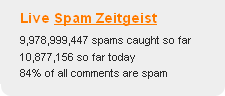
The numbers are huge, a picture tells a thousand words, so see this screen from Akismet (more about this later).
How To Spot Comment Spam
It is usually very easy to spot comment spam, the comment usually is meaningless or off topic, the domain names will be random connections of letters or look very suspect.
What Can You Do About It
As always if there is a problem in WordPress, there is a plugin to solve it. In this case my preffered anti spam plugin is Askimet.
This excellent little plugin analyses all comments left on your blog and any suspect ones are quarantined in a holding area to be deleted (automatically after 30 days if you configure it so) or to be marked as not spam (or ham as it is know).
The system reports back to a central database so the spam engine is always adapting to new methods of spamming.
Review Your Commenting Configuration
Another way to control comment spam is to ensure you control who can comment and how.
From your WordPress dashboard review settings -> discussion
Review these configurations and tighten these controls if you are suffering from a lot of comment spam.
Conclusion
If 80% of comments left on blogs are spam, there is a huge problem which must be helping sites gain traction on the search engines. Help to can the spam by installing pluigns such as Akisment and delete all spam on site.
I’ve been added to the Automattic list of WordPress consultants.
Who Are Automattic?
Automattic are the company behind WordPress. They have this to say about their list:
In response to a steady stream of requests, we’ve compiled a list of web design and software development firms who have experience with WordPress based projects.
I’m a plugin junkie, I am forever installing new plugins to test them out and see if they can help my blog.
The trouble with my obsession is that I install and often do not use the plugins. As a result I need to give my blog a regular plugin audit. Any plugins I am not using, I deactivate and delete.
Why Should you Audit Your Plugins
Every plugin you add to you blog comes with an overhead. The overhead can come in three types:
A page load overhead
A database overhead
Disk Space
Performace of Page Load
Certain plugins add additional components to the page, and every extension of the normal page load will comewith an ocerhead. If you don’t need it remove it and speed up page loads.
There is school of though in SEO land that Google will rank a fast loading page over a slow loading page.
Data base size
Plugins with database functions will write data to tables, and increase the size of your database. The bigger the database, the longer it will take to recover data, backup and require more disk space.
If your hosting company limits your database size, you may exceed your quota more quickly with the plugins installed.
Disk Space
The more plugins you stuff onto your blog, the more disk space they will require. Some plkugins are tiny, but others are quite large, your disk quote may be at risk if you don’t keep an eye on your plugins.
Deactivate and Delete
Once you have have identified the unwatned plugins, deactivate and delete them. Disabling a plugin still leaves the files on disk, so not all of your problems are fixed.
Deleting the Tables
When you remove plugins they don’t always delete the tables from your database. Using an admin tools such as MyPHPAdmin, review your database and delete any unwanted tables.
CAUTION: If You don’t understand the WordPress database layout, do not delet tables without the help of a techie chum.
Audit Regularly
Audit on a regular basis and you will be surprised how many redundant plugins you have installed over time.
Most users of WordPress are fairly well acustomed with the plugin tab glowing red telling them to update on of their plugins, but do you know why it is important to keep your plugin versions up to date?
Why Would A Plugin Developer Update Their Code?
There are a number of reasons a plugin developer will update their code they are:
To fix bugs
To add new functionality
Bug Fixes
As you can imagine, a plugin which has bugs is not a good thing, once a developer finds a bug in his or her code, they will develop a fix and then deploy it to the community. If a plugin requires a bug fix, update it to the new version ASAP or you risk having a failing plugin.
Additional Features
It is not necessatry to update a plugin for a feature release, this is an expansion of existing functionality. If you are happy with your plugin as is don’t update, but lets admit it, bloggers love their tech, and if there is a new watch-u-me-callit we want it. You will probably be updating.
How Do you Know Type The Release Is?
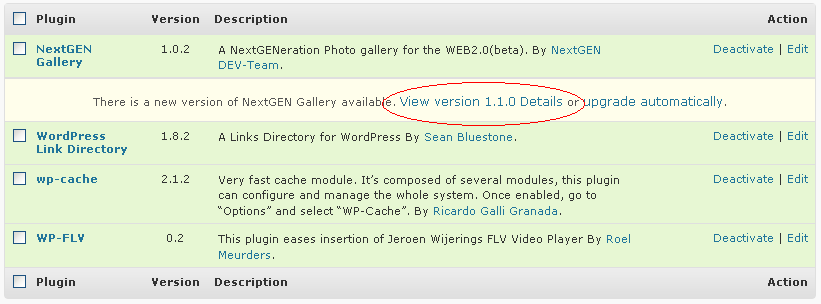
When you view the plugin page, underneath the plugin to be upgraded will be a link saying something along the lines of View version x.y.z details, click on the link and all will be revealed.
A Word On WordPress Updates
I have seen a number of plugins fail after an upgrade of WordPress. The plugins use depreciated functions within WordPress which means that when an upgrade occurs, the functions they call will fail and the plugin will no longer work.
If your plugins stop working after an upgrade check your plugin devlopers site, see of there is a know issue with the WordPress version and update to the version they recommend, note this may require a manual install.
It’s Been A While Since I last Said It But ….
Backup your system before you update any plugins. A few plugins make changes to your database. It is highly advisable to have a backup of your database before installing or updating a plugin which could potentially corrupt your database. Check out my post 6 Key times you should backup your blog.
The Upgrade Process
After WordPress 2.7, updating your plugins is an incredibly simple process, once the alert is raised, click on teh button, the plugin is downloaded to your server and automatically installed, it’s as easy as pie.
My Advice
If a plugin tab goes red backup and then update. If you have problems with software the developer will always say upgrade to the latest version.
There was a time (not too long ago) when a WordPress theme was a very simple thing. You uploaded a few files, selected the theme and bingo you had a new look and feel for your blog.
Things have changed, battalions of dedicated and skilled theme designers are creating more and more excellent, but complicated looks for your WordPress blog. I thought a post was in order to talk about how these advanced themes should be used.
RTFM
RTFM or read the “effing” manual is something I advise to everyone who has purchased a premium theme with a wide range of functionality. The small print will show you how to use your shiny new theme to the best of it’s ability. I have had a number of clients pulling their hair out trying to get a theme to work, thinking it is just like their old install and forget look and feel.
Plugins
Many of these themes are reliant on plugins. The plugins are usually packaged with the theme, so install and activate them as instructed.
Custom Properties
Another popular thing amongst theme designers is to use custom properties. Next time you write a post, scroll down to the bottom of the page and you will see an area to create custom properties. These are little pieces of variable information which are specific to the post, in the case of my theme design (Ice Cream Dream from WordPrezzie), they are used to add little flourished to each post. My theme may look fairly simple, but to have the list of thumbnail images running down the page, I need to add a custom property called thumbnail to each post, this is populated with the URL of my thumbnail images so.
Categories
Many themes take advantage of certain categories to place content in specific areas, pay attention to these cats, and remember the spell the category name exactly as it says in the documentation, I recently spent hours trying to fix a theme which required videos to be in a videos category rather than video as had been configured by the blog owner.
My thoughts On Themes
Themes are hugely important to entice readers into your blog, spend time on the initial build of your blog to get the right look and feel, and then let it go, spend time on your content rather than tweaking every little nuance of design. It is important to understand that your long term readers will probably sign up for your RSS feed, and this never looks pretty.
I have been away for a week with my family and when I check my stats,I noticed traffic coming in from a link on the Blog WP Themes Gallery. I checked it out and I have been added to their top 40 blogs about WordPress. I am pretty stoked about this.
I would just like to thank my manager, my agent (WP Dude begins to cry) my wife, my family without whom none of this would be possible .. {FULL ACCEPTANCE SPEECH AVAILABLE FOR DOWNLOAD FROM ITUNES}