Neil Matthews

Blog

  • Beginners Guide To WordPress RSS

    Photo by n0seblunt
    Photo by n0seblunt

    I thought I would write a beginners guide to RSS for WordPress, this is designed for new comers to WordPress and RSS.  The post will talk about what RSS is, it’s benefits and how to monitor your feed with services such as Feedburner.

    What Is RSS

    RSS stands for really simple syndication and it is a way to publish your blog posts as a syndicated feed.  Your posts are translated into an XML file which can be pulled into other applications.

    WTF is a Syndicated Feed

    This is a cut down version of your posts without your theme, widgets and doo-dahs which can be syndicated from your site and republished elsewhere.

    Your Not Selling This Very Well

    It is a way to allow your true fans to subscribe to your site and pull your new posts to them on-demand to a feed reader (see below) without the need to visit your site, so they are always up to date on your latest content.  Trust me when I say you want RSS, it’s going to replace news papers in the not too distant future, and you want your blog to have this function.

    Why Do People Want to Syndicate Your Site

    If you engage a reader with your content and they know about RSS, they do not want to bookmark and return to your site every few days to see your latest stuff.  They want to subscribe to your RSS feed and aggregate your content to a central point from which they can read your work at their pleasure.

    People using RSS ususually follow a numnber of blogs, and they pull all their feeds into one place to read at ta time convinient to them.

    You’ve seen the Symbol

    Nearly every blog will have symbol like this on it:

    feedicon

    This is the generally recognised RSS feed symbol and I know if I click on this I can subscribe to a site and have all the past and upcoming posts added to my feed reader.

    If you are serious about getting your writing out there, your blog should have an image like this somewhere.  Mine is at the top right in a jolly green colour, feel free to click on it.  You may need to edit your theme to add the logo, but get one on your front page and in a prominent position.

    WordPress Does It By Default

    You will be very glad to hear that WordPress provides an RSS feed by default, if you type one of the following URLs into your browser you will see what the XML file of your RSS looks like (NB don’t do this on my site, I have plugins in place and you will not see the raw RSS feed).

    • http://example.com/?feed=rss
    • http://example.com/?feed=rss2
    • http://example.com/?feed=rdf
    • http://example.com/?feed=atom

    As you can see there four different flavours of feed going on by default, since this is a beginners guide to RSS  I will not bore you with protocol details, I will simply tell you that these are four very similar methods to distribute your RSS feed.

    Tweaking Your Feed Settings

    There is one settings you need to conisder  when setting up your feed over and above the default and that is how much of your post you will push out.

    From the dashboard click on settings->reading . There is a settings marked For each article in a feed, the options for this are full text or summary, meaning send out the complete text of your post versus a summary with a link back to the original source.  You may think that you want people running back to your site to click on your adsense or to view your banner ads, and a couple of high profile bloggers swear by this approach (I am thinking Aaron Wall’s seobook.com or Yaro Starak’s entrepreneurs-journey.com) but if you are reading this article it is unlikely that you are a AAA blogger to so I would go with a full feed to stop annoying people and preventing unsubscription. Full text is set by default.

    RSS Syndication Services

    So you have an RSS feed, there is a highly visible rss feed link on your site, now what?  Well you will probably want some stats on how many subsribers you have, what content they are reading.  Step forward the RSS Syndiation service.

    These third party services take your feed and wrap them with statstics and other services to make monitoring the usage of your content away from your site easier.  The majority of these services are free with some sort of for a fee additional advanced services.

    I use the Feedburner, a company which was aquired by Google. I am going to stick my neck on the line and say it is the most widely used feed service.  Feedburner recently made some big changes and there was a blip in their service with the ususal twitter (@wpdude) outcry.  That aside I still think it is an excellent service.  It tells me how many people have subscribed to my feed, what they are reading, and clicking through onto.

    Alternatives to Feedburner are Feedblitz and Rapidfeeds.

    A word or warning checking your RSS stats can become addictive don’t get hung up on your reader count.

    Feed Readers

    Many people use feed readers to get updates from their favourite blogs.  Using a feed reader, you add their RSS link to your reader and as new content is added, it is pulled into your reader of choice.

    A small list of RSS readers could  include

    Some of the readers are clients you install on your machine, whilst others are internet servces you access from a website.

    I use Google reader, it allows me to categogorises feeds into different interest sections, and to mark favourite  articles.

    RSS Plugins

    As with any problem in WordPress there will be a multitude of plugins to solve the issue.  Here is a link to the various RSS plugins from the WordPress plugin directory

    The ones I use are the Feedburner Feedsmith which pushes my feed into Feedburner without too much configuration, I also use RSS Footer which I use to put a link back to my site in case anyone is scraping my content.

    Get Your RSS out There

    Get your RSS feed sorted, place a link to subscrive about the fold on your front page.  Belive me when I say it is the future of publishing.  It allows reader to select the content they are really interested in and pull it into a personalised steam of content, a DIY newspaper.


  • How To Control You WordPress Comments

    Photo By Tim Morgan
    Photo By Tim Morgan

    As your  blog begins to gain momentum and you receive more and more comments, you may want to impose some controls over what is written as a footnote to your post.

    This how-to post shows the various comment controls available to a blogger using WordPress.  All settings unless stated are under the settings-> discussion section in the dashboard.  It is assumed that your blog is at version 2.7.x

    Kill The Conversation

    The quickest way to stop any comment control issues you are having is to close comments on your blog, in other words to stop all comments on your posts.  Think long and hard before killing the conversation, feedback to bloggers via comments is incredibly useful to extend the converstation.

    To close comments on your blog check the box marked Allow people to post comments on the article.

    All Things In Moderation

    WordPress comes with comment moderation settings, this means that all comments need to be approved before they are shown on your blog.

    They are held in a moderation queue until the blog admin clicks on an approve, reject or spam link.

    To enable moderation, click on the check box An administrator must always approve the comment.

    Pre-Approved Commentors

    You can pre-approve commentors so that anything they subsequently comment upon will automatically be approved and displayed as a valid comment.

    This is great if commentors are legitimate, but sometimes comments are raised manually as a precursor to a spam attack.  I personally do not like this setting, prefering manual moderation just in case they are bi-polar in their comments.

    To enable comment preapproval click on Comment author must have a previously approved comment

    Plugins

    There are always a bag load of plugins to help control your comments, the one I rely upon to catch spam comments is Akismet, this excellent plugin analyses your comments against it’s database of offenders and marks anything it catches as spam and holds it for moderation.

    There are many other comment plugins including ones which will show a captcha form before submission, ones asking questions to prove you are not a spam bot, others to make the conversation more advanced, please feel free to leave a comment with your favourities.

    Here is a link to the comments section of the WordPress plugin directory

    Keyword Moderation

    You can send a comment directly to moderation if it contains certain keywords.  An example of this could be spammsters leaving comments trying to link to their male enhancement site, if you add viagra or cialis to your list, any comments with these words in will be moderated.

    To enable keyword moderation, type the keywords into the blacklist box at the bottom of the discussion screen.

    Links Schminks

    Most of the trouble you will have in comments will come from people trying to use your blog as a forum for their own products or services.  There is an option to send comments for moderation if more than x links are spotted in a comment.  I have this set to 2.  If someone has a legitimate need for a link in a comment, my thinking is that there will only be one, multiple links spells spam in my book.

    To enable link counting,set the number of links in the section entitled. Hold a comment in the queue if it contains
    or more links.

    Your Going On The List!

    If someone is repeadtely spamming or trolling your comments, you can add them to a blacklist which will automatically send their missive to the spam queue.

    You can add someone to your blacklist via their email address, blog URL or the originating IP address

    The blacklist is located towards the bottom of the settings-> discussion screen, add one rule per line e.g.

    • wpdude,com
    • 192.168.101.1
    • @wpdude

    You can put parts of]j,ge a string for example the above email rule will stop all emails from the wpdude.com domain.

    If Your Names Not Down You Can’t Get In

    There is a function withing WordPress which forces users to register and login to your blog before they can leave a post.  This is a very powerful control process, but it is also a huge turnoff to commentors, many people will not comment on a blog, that said only people with a real urge to comment will register, click on the email verfiication link, login and then comment (I’m worn out writing it never mind doing it.

    To enable this function click Users must be registered and logged in to comment

    Comment Editing

    You may have a comment that you want to publish, but some part of the comment is causing you concern, as the blog owner you have the right to edit anything on your blog, feel free to extend this to the comments.

    An example of when I have done this was with a recent comment which had a link in it.  Links are like a stamp of authority, and I was not 100% sure of the product in question, so I edited the comment and removed the link, leaving a human readable way to get to the product in question, but removing my sites validation.

    A Parting Word – Control WordPress Comments

    Commenting and the discussion it promotes is one of the best things about blogging.  Try not to make people jump through hoops join the conversation, but be ruthless with Trolls, and low quality comments.

  • Guest Posting Makes You Atractive To The Opposite Sex – Fact!!!!

    Photo by Fienna
    Photo by Fienna

    No of course it doesn’t, just drawing you in, sorry for the false advertising, feel free to leave if you are looking for sexual conquests through blogging (sheesh get a life!).

    Guest posting is an excellent way to market your blog and personal brand, in this post I want to talk about the benefits, mechanics and purpose of guest posting.

    What is A Guest Post

    A guest post is a post you write for another blog in an effort to build awareness of your own blog or to market yourself within the niche of that blog.

    The guest post is usually written for a blog within the same niche as your own, and probably for a blog which has a bigger readership, you are trying to ride on the tide of “other peoples traffic” in an effort to boost your own visitor stats.

    One more thing, you do it for Free.

    What Is The Benefit

    For the guest blog, the benefit is a piece of quality content written for free by someone else, leaving the blog owner time to do one of the million other things they have in their life.

    For you the guest poster the benefits are:

    • Heightened Exposure
    • Chance to build your authority
    • Traffic

    How To Get A Guest Posting Gig

    Ask nicely, simple as that.

    Well kind of, if your blogger is a AAA list blogger they will get thousands of guest posting requests for exactly the reasons stated above, so I recommend, getting to know the blog in questions, join the conversation by leaving comments (see 7 reasons to leave blog comments) and gaining the attention of the blogger then go in with a pitch.

    The Pitch

    Understand that your guest post is not the most important thing in the target blogger’s life, you need to sell your guest post to them.  I try to do this with as much brevity as possible to take up as small amount of time of my target blogger as possible (target sounds a bit sinister by hey ho).  Be polite and do not demand space on their site.

    Dear Blogger

    My name is Joe Blogger and I own and write for {myblog link}  which is in the same niche as your site {target blog}

    Do you accept guest posts, if so can I pitch you a guest post idea I would like to write for you blog.

    Following up your post on xyz I would like to write a guest post of why w is always left out of the xyz conversation.

    Thanks in advance for any time you spend on this unsolicited approach.

    Regards

    Potential Guest Blogger

    Click send and wait.  Remember you don’t automatically get that slot, if they say no, take it on the chin and find another place to guest, if you went right to the top of the blog food chain in your niche, it is likely you will fail, try a medium size blog first.

    Write Your Best Post Ever!

    You may settle for substandard on occasion on your home blog, but never on a guest posting slot.  Research well, write well, double check your spelling and grammar before you send off the post.  I like to write a guest post and sit on it for a day, double check it the next day with a clear head and then post it.

    Go easy with the self promotion, a simple heading saying who you are and a link back to your site should be enough, if the post is up to scratch, people will want to know more about you and click on your link. Here is what I like to us:

    In a guest post, Neil Matthews of WPDude.com discusses why guest posting can increase you attractiveness to the opposite sex.

    Brace! Brace! Brace! Here Comes The Traffic

    If you do guest posting correctly, there will likely be a large wave of traffic coming to your site, you need to be prepared to ride this wave:

    Have quality posts visible on the front page of your blog to engage your new readers

    Consider creating a specific landing page and link to that from the guest post with a welcome messagers

    A warm welcome to readers from {insert guest post blog here}, thanks for visiting I hope your enjoyed my guest posts, here are a list of some of my favourite posts here on {enter your blog name} I hope your enjoy them, if you do please consider taking out a subscription to my RSS feed.

    If it’s a really big blog consider installing a cache plugin so your cheap hosting account does not failunder the load.  My preferred cache plugin is wp-cache.

    Join The New Conversation

    If your post is interesting enough you will generate comments on the guest blog, remember to engage in that converstation and leave your own comments in reply to the queries or suggestions.  Little touches like this stay in people minds, all helping to reinfoce the benefits mentioned above.  You also get a chance to whip the comment trolls into shape.

    Other Benefits

    If people see your writing there are other benefits than just a visit.  Personally I have been offered paid blogging gigs and gained consulting clients from guest posting.  It is one of my favourite marketing methods.

    Following Up A Guest Slot

    I like to thank the blogger for the opportunity, say how well it has served my own blog.   The leaves the door open to future guest slots.

    Wrap Up

    Make guest posting a regular part of yoru blog marketing until you reach the crucial tipping point where the momentum of your blog begins to market itself.

    Guest posters are always welcome here 🙂

  • PLUGIN REVIEW: What Would Seth Godin Do

    Photo By Seth Godin
    Photo By Seth Godin

    In a new category of my blog I will be reviewing and recommending some of my favourite plugins, in this post I review What Would Seth Godin Do (WWSGD from now on).

    Who Is Seth Godin?

    Where ya been!  Seth Godin is the ubiquitous internet marketing guru.  He literally wrote the book on a lot of internet marketing techniques such as permission marketing, dips and purple cows.  Here is a link to his section on Amazon, Seth Godin’s Books On Amazon this is an affiliate link because I highly recommend a lot of his books (I was “yeah so what” about Tribes though).

    He has this to say about using cookies to differentiate the offering  your blog has for each visitor:

    One opportunity that’s underused is the idea of using cookies to treat returning visitors differently than newbies. It’s more work at first, but it can offer two experiences to two different sorts of people. (Source: In the Middle, Starting)

    What It Does

    There is nothing earth shattering about WWSGD, but it allows you to customise the message you send to your visitors on their first visit (or first x visits) then once they have come back a couple of times you can give them a second message.

    The message can be placed on each page, post or anywhere within your theme by using a PHP function.

    Why is this such A Big Deal?

    The plugin does this via a cookie which is checked each time a visit is made, the message is changed with the cookie count. This means you can customise a welcome greeting for each visitor depending upon the number of visits they have made. It’s a very simple but useful tool which can make something click in people minds to convert them from one off visitor to customer or RSS subscriber.

    In other words you can suck up to your visitors and make them feel special, in the hope they will do an action of your choosing.

    How I Use It

    On their first visit to my site I use WWSGD to tell people about my coaching services.  I do this because many users arrive at my site via a search engine query and may have no idea that I offer these services. On subsequent visits I suggest they subscribe to my RSS feed so I can push them future posts.

    You can see WWSGD in action at the bottomn of each individual post.  If you clear your cookies you will see the first message, press f5 and you will see the next message.

    Where To Get It

    The plugin can be downloaded from:

    http://richardkmiller.com/wordpress-plugin-what-would-seth-godin-do

  • WordPress 2.8 Upgrade Webinar

    Image by wpdude (can't you tell)
    Image by wpdude (can't you tell)

    The latest version of WordPress version 2.8 is due for release any time now.  I am being vague about the date because so are the developers, on their site is says 2.8 is due for release on April xxth 2009.  Full details of the release can be seen at:

    http://codex.wordpress.org/Version_2.8

    Learn How To Upgrade to WordPress 2.8

    I will be offering a Webinar showing you exactly how to upgrade your installation of WordPress and more importantly how to backup and recover your blog in case of problems.

    I will also discuss the main new features of the upgrade.

    When Is It?

    I will be running the Webinar on April xxth plus a couple of days :).  I am not 100% sure when that will be, but I will try to schedule it mid week as soon after the release as possible.

    How Much Is It?

    It’s free, but I may do a soft sell on you at the of the session 🙂

    Reserve A Place

    To reserve a place, drop your email address into the form below and I will contact you once the final release date has been made.

    {wpmloptin_5}

  • Do You Pay For Plugins?

    Photo by cheesepicklescheese
    Photo by cheesepicklescheese

    I am very interested to know if people pay for their plugins.

    There are many free plugins which offer the chance to make a donation to support the development of the plugin, there are also an increasing number of plugins which come at a fee.  Let me know if you have coughed up any cash for a plugin either through a donation or buying a premium piece of code.

    [poll id=”5″]

  • Dealing With Comment Trolls

    Photo by Benimoto
    Photo by Benimoto

    There are a group of low life people out there on the tinterweb who like to leave hurtful and derogatory comments on people’s blogs in the hope it will elicit a reaction.  These people hide behind layers of anonymity and strike out at people for fun.

    This post gives you my coping strategy for trolls, check it out, it may work for you.

    You Are In The Public Domain

    Unless you click on the check box to stop your posts being added to Google, once you click on publish that post is in the public domain.  With that public nature you are inviting people to read and comment upon your posts.  You should never forgot this, anything you write is open for criticism, what annoys me is when people attack without just cause just to get a reaction from me.  This is know as a bite where I come from.

    Zero Tolerance Policy

    I have a zero tolerance policy for Trolls on my sites.  My blogs are exactly that, mine, they represent me and my business, if I don’t want to deal with a person I will not, I invite you to read and enjoy or disagree with what I write but I will not let you disrespect me.

    I would not invite someone who was unpleasant into my home or social circle the same goes with the community I build on my blogs through the commnenting function. That is why I have zero tolerance for trolls.

    Grow a Thicker Skin

    When I first started on my blogging journey, I used to let these scum bags bother me and effect the way I posted in the future, then I said no, this is my voice and I will write what the f*ck I like.

    I grew a thicker skin and will review troll comments for anything useful to help me develop as a blogger, else I shrug it off.

    Constructive Criticism

    I am not adverse to constructive criticism on my posts, but it must be that adding to my posts a simple “you suck” or even worse is not criticism or helpful.

    Add to the conversation as I said in my post 7 reasons to leave comments expand on it or even disagree but keep it civil and act like a member of the human race not a knuckle dragging numpty.

    A Mantra For You

    Whenever you get a troll, simply mark it as spam (hopefully there is some sort of AI in Akismet which will start marking the troll as a spammer) and delete it and say the following tantric soothing mantra:

    fuck you, you fucking fucker who the fuck do you think you are, you fuckwit!

    Say it with passion, say it out loud then drop the whole subject, they are not worth your sweat :-).  It helps to get the frustration out in the open.  I am sure there are some hippy words for this such as externalisation of rage.

    Parting Word

    I don’t get a lot of comment trolls (none here at WPDUDE but some on larger blogging sites where I guest post) and they sometime get my back up, but I have learned to grow a thicker skin and let it wash over me, trolls return to your spot under the bridge before I call in the Billy Goats Gruff.

  • What’s This WordPress Turbo Stuff

    Photo by Pilax
    Photo by Pilax

    If you look in the top right hand corner of your WordPress dashboard (for later versions of WP only) you will see a link marked Turbo, I thought I would spend some time explaining what this is and what uses it can be put to.

    What Is Turbo

    Turbo is WordPress’ implementation of Google gears, a technology which allows most of the static scripts, images and CSS files of your WordPress installation to be downloaded to your local machine and run locally rather than over the network.

    Come on The What is the Point, Speak English

    It makes your WordPress admin faster!

    If you have the majority of the file you need to add posts, moderate comments and all of those crucial admin tasks held locally on your machine, they run faster due to lack of network latency.  I’m sorry I cannot help but talk geek, but if you have to go off to the internet, collect the script files process them remotely on your hosting providers server, then return a result it will a slower than going to your local machine and doing the same.

    Can You Do Stuff Without A Network Connection?

    On of the great benefits of  working with Google gears on other systems such as Google docs or Gmail is that you can do a lot of tasks offline without a network connection, only when you need that connection (such as sending a mail) are things stopped.

    The answer to the question, unfortunately not, Turbo does not give you resilience for your network connection only increased performance.

    If you want to develop posts off line, you may want to check out Microsoft Live Writer which gives you a word processing environment to develop your posts offline plus a button to push the post to your blog for publishing.

    I am sure there are hundred of offline blog post writers, if you know of others please leave details in the comments section.

    A Cautinary Note

    Only use the Turbo function on a secured unshared computer, you will be downloading potentially security leaking scripts onto a share machine which could be used to hack your blog.

    Wrapping Up

    If you are experiencing performance problems using your dashboard consider hitting the turbo link and downloading the static content and scripts locally.

  • Feck Arse, and Google Cache

    Photo by James Cridland
    Photo by James Cridland

    Imagine the scene, your blog has gone to hell in a hand cart and all of your posts have been lost, your blog backup is FUBAR or you simply don’t have one!

    FECK ARSE

    All is not lost, the nice boys and girls at Google may have a solution for you.

    Enter The Google Cache

    Google holds a cached copy all of your web pages as part of its indexing and analysis process.  Now isn’t that hepful.  If you know how you can recover your lost posts from Google and re-enter them into your blog.

    Before you get all overexcited, this will only work for blog posts which have been published and then indexed by Google, so if you loose a brand new posts, it is probably gone, but anything a couple of days old will possbly be there.

    Recovering From The Cache

    Here is the fun bit, you can recover your lost posts by using some clever search phrases and selecting data from the cache.

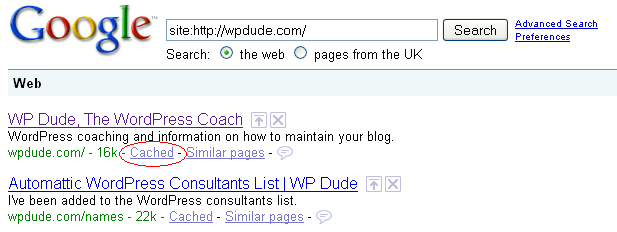
    Go to Google and type in site:{my domain name} for example site:wpdude.com

    This will bring back a list of all pages indexed by Google for your site.  If you look closely, there is a link marked cache next to each article, click on this and there you have it a copy of your post.

    googlecache

    Simple cut and paste the text into a new blog post and  re-publish it.  Take pains to have the permalink in the same format ot avoid duplicated content on the Google index.  The peeps at the Googleplex don’t like that.

    From FECK ARSE to WOOT!!! in a few easy steps.

    Now Says after Me..

    I {enter your name} do hereby swear to take regular backups.

  • 7 Reasons To Leave Blog Comments

    Photo By Tim Morgan
    Photo By Tim Morgan

    Consistently leaving high quality comments on other blogs is a great way to market and grow your own blog (and your personal brand). Here is my list of seven reasons why I think you should make commenting part of your blog development strategy:

    1.) Link Building

    As long as the blogger has not set nofollow tags on their comments, every little nugget you leave will be a link to your blog which will help with your SEO efforts.  The theory goes build as many links as possible from high quality sources and your SEO will improve.

    2.) Attract Attention

    If you are leaving comments on a bigger more established blog, there is a very good chance you will attract the attention of the blogger. Use this exposure to pitch guest post ideas, or gain attention by the blogger posting about one of your articles

    3.) Disagree or Add to the Post

    If you are able to disagree or add to a post, this will increase yoru profile as a subject matter expert. Adding quality comments arguing against or extending the origional post.

    I would add one thing to this, and that is be nice, coming across as a troll when you attack someone you disagree with is weak and pathetic, bring someone round to your side of teh argument with quality analysis no name calling.

    4) Extending the Converstation

    leaving comments extends the converstation, it helps to build a community on yourfavourite blog, and if you are conversing a lot, your profile can onlyy increase.

    5.) Give The  Blogger Some Support

    When a blog is new, it feels like you are posting into a void, no-one is leaving comments or giving you feedback.  If you come across a new blog give them a little boost by leaving them a comment, tell them you like their work and give supprot on their posts.,  Be nice youre-karma can only increase.

    6.) Increase your Profile

    I have already touched on the fact that commenting can increase your profile, the mechanics of this depend upon your chosen blog to comment upon, selecting high profile blogs in your niche, and adding valuable content can increase your profile to the readers of that blog, who in turn may visit your own blog and hopefully become one of your readers.

    7.) Make New Friends

    Lastly, leaving a comment is just like saying hello in the real world, it can be the start of a beautiful new realtionship, say hello today instead of skulking in the background.

    Wrap Up

    Add copious comments, DO NOT just say “nice post” that is sooo lame,  and it is obvious to everyone reading the comments that you are link building, add value, be useful and have a converstation.

    Got anything to add to this post, please leave a comment below, let’s chat!

  • How To Change Your Slug For SEO

    Photo by arnj
    Photo by arnj

    One of the most important things to change on your blog for seach engine optimisation or SEO is your slug.

    Just in case you have been living under a stone like our erstwhile friend the slug and do not kjnow what SEO is, then a quick definition is in order.  Search engine optimisation is the the process of making your blog or website as attrative to Google and it’s chums yahoo and MSN so that when someone type in a phrase, for example wordpress coaching (give it a go and see who is there) you come out on the first page near the top.

    What is A Slug

    The slug is the bit that follows your domain name and points to your post, for example:

    wpdude.com/this-is-a-slug

    By default on a WordPress blog, the slug looks something like this:

    wpdude.com/?p=22

    As far as a search engine is concerned this is not a very useful, it says nothing about the post, there are none of the key phrases people would type in to identify the post, in short, you are going to have a very hard job to drag people in from Google with a slug like that.

    Changing Your Slug To Something Useful

    All is not lost, you can change the default slug to something far more useful.  From your WordPress blogs’ admin console, scroll down to settings and  click on permalinks.

    From there select a custom permalink structure and set it to be /%postname%

    What this does is to change the default slug configuration to be the title of your post, for example this post would have the slug:

    how-to-change-your-slug-for-seo

    The search engine has been fed much more information about what my post is about.

    Removing Useless Words

    There is a school of thought in SEO circles that you should remove all useless words from your slug and leave only hardcore keywords.  The things to remove are “a, the, it, then” etc etc.

    There is a plugin to do this for you, imaginatively called Seo Slugs, download it and activate the plugin.  From that point forward your slugs will be trimmmed down by default. My new slug for this post now becomes:

    change-slug-seo

    The superflous words are cut down and hopefully Gooogle juice will flow in plenty.

    Quick Get The Table Salt It’s Eatin’ The Lettuces

    Don’t pour salt on your slug and kill it off, treat is nicely and you will be rewarded with organic search traffic from Google.

    Get creative, think what people will type into google to find a post like yours, and match this to your slug.

    The How To Video

    I have created a screencast video of me doing the config on a real WordPress blog, enjoy.

    [local /wp-content/uploads/2009/04/seo-slugs.wmv]

  • Rich Usini – imwithrich.com

    A couple of weeks ago, I was at my wits end.  My blog posts were not showing up in Firefox and I needed help, more than you can imagine.  None of the tech people that I know good provide me real assistance so, I used my good friend Google.  I found WordPress Dude, Neil Matthews.  His website was straightforward and I felt very comfortable after reading it.  I was not wrong!  Neil provided timely, knowledgeable assistance and has gotten things moving forward for me.  Neil provided me with various levels of sources for a Theme which I will be selecting and Neil will install for me.

    The thing I liked the most was the fact that Neil responded to e-mail quickly and provides quality. I am a generally impatient person and that was never put into play.  Anyway, my recommendation is HIGH.  If you would like to visit his website For WordPress HELP go to:

    imwihrich.com