Neil Matthews

Blog

  • Group Coaching: Integrating WP and Twitter

    Group Coaching: Integrating WP and Twitter

    I am opening up registration for a group coaching session I think may be useful to WordPress site owners.

    Integrating WordPress And Twitter

    The session I have been planning is a live webinar taking  you through integrating your WordPress site with twitter.

    The session will show the mechanics of integrating your blog with Twitter, how to find readers for your site on twitter and how to promote your content on twitter.

    Agenda

    Here is the agenda for the session

    • How to link WordPress to twitter, plugins and themes
    • Promoting your posts on twitter
    • Finding Readers for yoru blog on Twitter
    • Using Twitter to find ideas for blog posts
    • Your Twitter landing page
    • Your twitter background
    • Q & A Session

    How It Works

    The session will be conducted using gotomeeting, an on line meeting tool which will allow me to share my desktop with you.  I will give a presentation and demonstrate the techniques on my test twitter account and WordPress site.

    The session will be recorded and made available to you for download, so you have a reference of our session.

    It is expected that the session will last for approximately one hour.

    How Much

    I will be charging $19.99 for this session.

    When

    I am planning to run this session on Tuesday 6th April.   11:00 – 12:00 PST, 14:00 – 15:00 EST and 19:00 = 20:00 UK Time,

    Book Your Slot

    If you are interested in joining this session, please leave your details using the form below.

    Places are limited to 15 because of the version of gotomeeting I use, so book early to avoid disappointment.

    [gravityform id=9 title=false description=false]

  • Use SFTP For Flip Sake

    Use SFTP For Flip Sake

    If you do only ONE thing to secure your site, then please consult with your hosting provider and see if you can access your site to upload and download files via SFTP rather than FTP.

    What is SFTP

    SFTP stands for secure file transfer protocol,  it is a method of transferring files to and from your site in a secure manner.  The link between your local machine and the remote hosting computer is encrypted so nothing can be intercepted and used to hack your site.

    Think about credit card transactions in a browser, you use the secure http protocol https, you will see a small lock logo which tells you your credit card details cannot be captured, it is the same thing with SFTP at a file level.

    Why Is There A Problem with FTP

    Using FTP all of your login information is sent in “the clear” to your site, this means your login ID and password are sent over the internet in plain text format that can be intercepted and understood.

    It is a fairly easy task for hackers to “sniff” packets of data going across the internet in the clear, if they setup a filter looking for particular strings, for example the ftp login command, they can harvest login information and gain access to your site.

    How To Use SFTP

    Your first port of call will be your hosting provider.  Check out their documentation to see if you can switch from ftp to sftp, it is a very poor company that does not care enough about it’s customers security to provide this small security courtesy.

    How you change from FTP to SFTP will depend upon the ftp client you use.  I like Filezilla, and all I need to do is prefix a host name with sftp://, please check the documentation of the tool you use.

    When you connect for the first time your FTP client will ask you to accept a key from the remote machine, this is used in the encryption process

    You may find you file uploads and downloads ar ea little slower, this will be caused by the overhead of encrypting the traffic, but this is a small price to pay for security.

    VIDEO: See how easy it is to capture a password

    A while back I create a screen cast video of me capturing login details from an ftp session to show you how easy it is to capture this data.

    [youtube=http://www.youtube.com/watch?v=DjqMCneUR10]

  • Poll: What Is Your WordPress Problem?

    I run irregular surveys on my site, I use the results to develop content and services, please can you take a moment to click on the answer to my survey, what is currently your most pressing wordpress problem.  If you answer other, please take the time to leave a commetn telling me what your issue is.

    [poll id=”4″]

  • Adding Music To Your Blog

    I was asked by a client to add some background music to a WordPress site, this is my quick how to.

    That Mall Shopping Experience

    The site in question was using WordPress as a CMS rather than a blog, the site is an e-commerce site selling designer jewelry, so I guess the browsing and shopping experience can be improved by adding music.

    Real Music Not Musak

    It also helps that the site owner is also a musician and has their own stash of quality and unique tracks to play over the top of the site.

    Adding A Command To The Header

    Here’s the nitty gritty on how I plan to add the music file and have it play when the site is opened.  You need to add a command to your themes header file.

    Depending upon your chosen theme you will have to either edit your themes header.php file, or if you have a funky new theme like headway or Thesis add this to the header script section.

    I recommend you add it just before the </head> command.

    The code you need to add is:

    <embed src=”YOURMUSCICFILE” autostart=”true” loop=”true” hidden=”true” ></embed>

    I used this method instead of one of the many available media players because the site owner did not request a player control to be visible.

    A Word Of Warning

    Music is a very subjective thing, adding your latest death metal recording to a personal development blog may not be the best thing.

    Give people an option to stop what they see as a cacophony, the option above does not supply that.

    Music files will consume bandwidth like a group of sturdy Americans at and all you can eat Las Vegas buffet, be wary of this and look to your hosting provider before adding music.

    Wrap Up

    Adding music to a WordPress site may be great for your blog if it matches your audience, why not give it a try, now where is my MP3 of Billy Ray Cyrus; Achey Breaky Heart.

  • Another Hacked WordPress Site!

    Whilst working on a client site recently, fixing some theme issues, I stumbled upon some dubious code, the site had been hacked.

    This is not a one-off occurance, I see sites that have been hacked on an all too regular basis.

    I have had site owners coming to me worried or embarrased by the hack attack.

    I have found that sites are hacked and the owners has no idea there is a problem.

    I have had enough of this.

    Enough is Enough, It’s Time To Secure Your Sites

    I have created a new service to ensure that your site is not another victim of  the hackers out there.

    I will review your current installation and prepare a detailed report showing where the security flaws are, and how to fix them.

    Why Target WordPress

    WordPress is not inherently insecure, rather it is a victim of it’s own success.

    There are millions of WordPress sites out there, and many are run by people with little or no IT security training.

    This combination means hackers put a lot of effort into finding vulnerabilities in WordPress and targeting these sites for their attacks.

    Whats In The Report

    Upon completion of the review, I will pass you a pdf report of my findings.  It will incliude:

    • Areas where your security needs to be tightened
    • The reason why this is an issue
    • A detailed description on how to fix this issue and remove the security loophole

    Making The Technical Changes

    I will also include a quote for wordpress serivce to fix all of the issues I find, just in case you are not interested in doing the technical work yourself.

    How Much Is The Review?

    The review comes at a fixed fee of $197.

    Get On The Waiting List

    I am pretty sure this is going to be a very popular service, so book now using the form below to get your review.

    I will be offering this service on a first come first service basis.

    UPDATE This has been moved to my consulting pages https://dev.neilmatthews.com/wordpress-consulting-services/wordpress-security-audit

  • Plugin Review: Gravity Forms

    Plugin Review: Gravity Forms

    I recently changed the contact form plugin I use on my site and I want to let you know about a great new plugin I have found called Gravity Forms.

    DISCLOSURE: links to gravity form are affiliate links.

    What Was I Using

    I was happily using contact form 7, an excellent and slick little plugin which provides most of the contact form requirements I need, but there was still the last 20% i needed which  couldn’t get from my current plugin.

    What Was The Problem

    I need a little more from a contact form than contact form 7 supplies me.  I needed the following:

    The ability to capture the php referer variable and the query string to see where my contact requests were coming from, is something I really wanted, there is no simple way to code contact form 7 to do this.

    Redirection to another page upon completion.  I need the redirection to enable a conversion tracking script. I was able to hack the plugin and re-code it to do this, but every time I updated the plugin, I had to re-code it,what a pain.

    What Gravity Form Brings To The Table

    Gravity form is a premium plugin that meets my needs and then some, using Gravity form will greatly streamline my service business estimation process by adding new clients to my Freshbooks system, and creating a draft estimate, add all new potential clients to my mail chimp mailing list, let me capture where my leads are coming from, let me automate my referral payment system, redirect to my conversion script page, send out an autoresponder message to my clients to let them them know they are in the system, I am one happy bunny.

    This is one feature rich plugin,a full list of Gravity form features can be seen at Gravity Forms.

    Integration Movement

    There is an excellent thing going on in the software as a service industry which allows service to integrate with one anther, this is where Gravity Forms really won me over was that I can integrate a contact form with the other systems I use to run my business.

    From one contact form I can:

    1. Add the person to my mailchimp email list
    2. Create a new user and prepare a draft estimate in my freshbooks account.
    3. Capture the querystring – I use this to mark my estimates with affiliate IDs (want to join my affiliate system)

    This may not seem a big deal to you, but I prepare quite a few quote each week for my services business and having to re-type contact details into freshbooks and then importing these contacts into my email list is a time consuming and dull, and if you are anything like me dull tasks get overlooked.  As a result I was not recording new clients some of the time.

    Cost

    This is a premium plugin,but I think the functionality it adds over free plugins makes it worth the while.

    • single site: $39
    • multi site: $99 (up to 5 sites)
    • developers: $199 (unlimited sites)

    Need A Better Contact Form?

    I purchased the developers license of Gravity Forms so I can build my clients cool interactive forms, request a quote for me to do this for you on my WordPress helpdesk (powered by Gravity Form)

    Alternatively why not buy a copy if you found this review useful please use my affiliate link – buy Gravity Forms.

  • Take Out The Trash

    There is a new function in WordPress that has been causing me some headaches, and I want to spare you the same grief.

    Here’s how my story begins

    I was deleting a page on my site, with the idea of completely recreating it with new content.

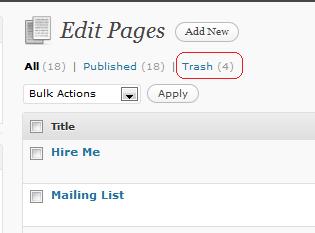
    I deleted the page, and began to create a new one only to find the post name was being appended with -2 for example contact-2, I could not for the life of me work out why this was happening, I tried deleting the page again and recreating it, I was banging my head against a brick wall, when I noticed a new link on my edit pages section:

    Since When Was There A Trash Can in WordPress?

    I am not sure when this trash can was added, I think it was in 2.9.x.  Please leave a comment if I have been dim and trash has been around for an age.

    My problem was that a reference to the page I wanted to create was still there, the page had been moved to trash awaiting the final step of me emptying the trash can.  Arrghhh!! nearly one hour chasing my tail.

    Recover From Trash

    In the same way you can recover deleted files from your mac or PC by recovering items from trash you can now recover deleted post and pages from the trash if you are a bit too click happy with the delete button.

    A cool new feature, as long as you know it is there and what repercussions it will create.

    The Dizzy Highs and Lows of WordPress Admin

    If you are having weird issues with duplicate names when creating pages and posts, have a quick look in trash, this may be the root of your problem.

  • How To Manually Delete Spam Comments

    How To Manually Delete Spam Comments

    I was recently working on a clients site, and that site has accumulated over 8000+ spam comments. Unfortunately the site did not have an anti-spam plugin activated, so the comments were being held in the moderation queue making comments on the site unusable.

    Akismet to the Rescue

    I thought I could install and activate akismet, then run the re-check queue function. In essense this procedure re-runs the akismet check against all unmoderated comments, and any that match spam profiles are binned.

    Due to the large number of spam messages, the re-check queue function timed out and would not perform the check.

    Getting Down and Dirty

    The only thing for me to do was to run some sql commands directly against the database and delete the unmoderated comments tbat way.

    Because I don’t do things easily, I did not have access to the backend database, I would have to find a solution inside of WordPress.

    My Solutions

    First thing was to install a plugin which allows me to run comamnds directly against the wqordpress database, the Plugin I like to use for this purpose is wp-dbmanager, you can download this plugin from http://wordpress.org/extend/plugins/wp-dbmanager/

    Once installed there are various options to maintain your database, optimise table, but the main function I wanted was the ability to run a query, there is an option to do this.

    The Query

    I ran the following query against my clients database:

    DELETE from `wp_comments` WHERE `comment_approved` = ‘0’;

    This is a powerful command, make sure you understand it before you go ahead, what it is saying is delete all rows from the table wp-comments where comment_approved = 0 or where a comment is not moderated. This will not delete approved comments, only comment sitting in the moderation queue.

    The Result

    The 8000+ spam comments were gone, akismet is installed and my client now has the confidence to re-open comments if they so choose. A neat little fix.

    Once you know about wp-dbmanager there are a hundred and one admin tasks you can perform, but please use with caution and after a backup because you can also irreparably harm your site, that was my polite way of saying if you don’t know SQL commands don’t mess 🙂

  • Time Travelling With WordPress

    Time Travelling With WordPress

    Sometimes you want to add some content to your blog, and you don’t want it to appear on your front page.  Here is a time travelling tip for wordpress.

    Why The Fudge Would I want To Bury Content?

    You may not want content to appear on your front page for a number of reasons:

    • It is supplemental to your blog, not a main post
    • It’s an update to an old post
    • You may publish date specific posts
    • You want to pretend you blog is older than it is 🙂
    • How the heck do I know it’s your blog, I am sure you can see a need

    My example is, I was creating members only content on my site and I did not want it to appear on the main page, to distract none members, so I buried in the archives.

    Use Your WordPress Tardis

    For those of you who do not follow Dr Who, the Tardis is a time travelling machine, and WordPress comes complete with it’s own tardis so you can make post appear back in history.

    Add Your Content in The Normal Way

    To take advantage of this trick, create your post in the normal way and save it as a draft.

    Here’s The Trick

    There is a little box called publish immediately under the save draft button, click on that and a time and date of publication is shown.

    You can set a post to be published in the past, and it drops into your archives and off the front page.  Neat-o!

    The WordPress Tardis Can Take You Forward In Time

    I wrote a post about time travelling to the future with wordpress here Write Now Post later

    I’m Off To Defeat the Daleks

    If you want to mess about with your blog’s time space continuum this is a great trick.

  • Dana Wood, Momover.net

    “He solved my problems, explained why I had them in the first place, and gave me excellent advice for avoiding future mishaps. Yay, yay, yay!””

    Dana Wood, Momover.net

  • Creating A Multi-Writer Blog

    Creating A Multi-Writer Blog

    Using native WordPress functiuonality it is very easy to create a controlled environment where multiple writers can add and publish posts on your blog.

    Roles

    The main technology behind this are WordPress roles.  As you add users to your blog, assign them to roles and this then controls if they can write blog posts and more importantly if they can publish them without your intervention.

    Roles are available at users -> authors and users from yoru dashboard.

    The Admin – I am the media moghul

    This is the main user that is created when you install wordpress. it can do everything, from creating posts , publishing posts to doing technical tasks on the blog, we are note really interested in admins for multi writer purposes.

    The Editor – Damn it, just write it up

    This is the boss of your blog writers, this role shouts stop the press (or don’t click the publish button) can add content, publish it, delete it and have compelte editorial control of blog posts and pages.  They can delete old posts from anyone.

    What the editor cannot do it effect technical aspects of your sitem ad plugins change themes that type of thing.

    The Author – I cannot reveal my source

    This role could be thought of as a staff writer on a national newspaper.  Your typical hack, cigarette out of the corner of his mouth, ringing his contacts, chasing the story dreaming of the Pulitzer, hang on did I just go off on one there.

    This is someone you trust to write on your blog, they have writing and publishing permissions, the editor can cut them off at the knees with one swift unpublish click, but there stuff will go live without editorial intervention.

    The Contributor – I write therefore I am

    This is your lowest level of writer,  think of them as a freelancer on a newspaper, they write their piece and send it in to the editor for publication.  Contributors can login and write their blog posts and submit them for review, that is it.  they cannot delete their old posts that have been published or publish new posts.

    If you have occasional guest posters, this may be the role for them, they add a post, then you review and decide if it is ready for publication.

    The Subscriber – it must be true I read it on a blog

    For completeness I thought I would add subscriber, this is the end reader with a twist, this is someone who has created an account on your site, think of this as someone who has a magazine regularly delivered, they have a little more access to your site than a casual purchaser of a magazine.  They cannot create posts.

    Further reading

    Here is a detailed description of the various WordPress roles in WordPress Roles Explained

  • When Your Blog Fronted Business Takes Off

    When Your Blog Fronted Business Takes Off

    If (like me) you run a business which is fronted by your blog, and that business really takes off, you will find yourself in the annoying  but pleasant position of not having enough time to keep your stream of blog posts going.

    I find myself spending the majority of my time serving my clients needs and have very little time left over to write quality blog posts, this is an enviable position to be in,  but if people are coming to you because of  your blog,  you also need to keep that quality content going, here is my list of things to do to lessen the burden of writing so you can concentrate on your  clients/business.

    Let Your Blog Readers Know

    If people are used to a certain posting frequency from you, then it is only fair that you let them know, a quick blog post disguised as a list of things to make up for you lack of time will do.

    Here we go; my business has taken off and I will only be posting once per week.  Thanks for your understanding, I have a large archive of useful posts feel free to browse through them in the mean time.

    Reduce Posting Frequency

    Look at your current posting frequency, if you are finding the burden of writing quality content and serving the needs of your business are too much, then cut back on your posting frequency.  No one is going to worry too much if you post five times per week and cut it down to three, but remember to let your readers know.

    Stockpile Posts

    When you have a quiet period, run off as many blog posts as you can, keep them in draft mode and publish them in line with your new posting schedule.

    I find I don’t always have time to write the full post so I outline the idea I want to write about, with paragraph headings and quick notes and what I want to write.  You will be surprised how much this speeds up the writing process.  You have a blog post already researched and thought about which just needs some flesh on the bones.  This stops the dreaded writers block when you need to crank out a post with little time to dedicate to the writing process.

    Recycle Posts

    You may have a post languishing in your archive that no-one visits, that you were not too happy with, or that needs an update.

    Get this post out, rework it and re-publish it by setting a new published date.  This will bring that article back to the top of your blog for people to read.

    Warning, your long term readers may smell a rat, be transparent about what you have done.  For example I could recycle one of my plugin reviews, and add an updated header like this:

    Plugin XXX has been updated and the functionality has change quite a bit, so I have updated my plugin review and brought it back to the top of my blog post list, I hope you enjoy it ….

    Create Series Posts

    This is another way to recycle your blog posts, and that is to create a series link list of related posts. An example from my site would be to bring together all of my posts on comments, write an introduction on the benefits of comments, and then link to all of my other posts.

    A bit of a cheat, but a very useful resource for people wanting to learn more about WordPress commenting.

    Run A Poll

    Polls are very quick to create, and are great ways to interact with your audience.  I wrote a blog post on Adding a Poll to Your Blog

    [poll id=”3″]

    Get Guest Posters

    If you don’t know the benefit of guest posting, check out Guest Posting Like A Pro, but as the blog owner if you invite guest posting, you have a ready made blog post, fresh content with a new voice, a brilliant way to keep your blog current.

    I am open to enquieries on guest posting, please send me a message from my contact page with details of the post you would like to write.

    Hire a Writer

    If you business is booming, surely you have some spare cash to bring in a blogsmith?  Pay by the post freelance bloggers are not that expensive, check out the Problogger Job Board for ideas of costs and as a way to hire writers.

    For me this is something I am not that interested in, I am very protective of my blog, it has my voice and I want it to stay that way (or am I just too cheap, who knows 🙂 ).  Would bringing in staff writers dilute that?  I don’t know your comments would be appreciated.

    Make Time

    If your business took off because of your blog, and you are getting clients because of the expertise you display on your blog, you need to invest time in writing and marketing your blog.

    I have blocked out one session per week for writing blog posts, I am not writing with the same frequency I used to when my business was not as developed, but I want to keep the quality up and build my blog subscriber base (and potential client base) to a much higher level.  Hopefully I have the right mix of frequency and quality.

    What’s Your Take

    I would love to hear what you think about this subject, and it’s cousin of keeping your social media makreting going when  all of yur time is being given over to your client requirements.

    Drop me a message in the comments section below.