Neil Matthews

Blog

  • WP Owners Club Launched

    WP Owners Club Launched

    I’m pleased to announce that my WordPress coaching and training program the WP Owners club has been officially launched.

    What Is The WP Owners Club

    The WPOC is a group coaching and training program where you can learn to use WordPress with me as your coach and tutor.  The training comes in a number of formats on my members only site.  The formats are:

    • Weekly Live Webinars – I will be hosting weekly live webinars to teach you about a particular aspect of WordPress, this is an excellent way to learn as it has interactive Q & A along with the presentation
    • Knowledge Base of Video Tutorials – I am building a large knowledge base of video tutorials all about WordPress, use these self paced videos to teach yourself more about WordPress.
    • Forum – I have a members only forum where you can ask your WordPress questions of me and get the support and training you need if it is not covered in my webinars or video tutorials.

    Want More Information

    I have created a video where you can meet me and take a look inside of the WP Owners Club, come on over and check the video out on my Group Coaching Page

    I hope to see you inside of the club house.

    Image by stevendepolo

  • The WordPress Owners Club Opens Thursday

    The WordPress Owners Club Opens Thursday

    I’m pleased to announce that my WordPress group coaching program is going live on Thursday 28th October and I would like to invite you to a webinar on Thursday to show you around my coaching program and to answer any questions you may have.

    Webinar Details: Thursday October 28th 10-11am Eastern (30-45 minutes)

    https://www2.gotomeeting.com/register/232186155

    Introducing the WordPress Owners Club

    My group coaching program is called the WordPress Owners Club, and it is a members only site where you can learn all about building your WordPress site, keeping it secure and administering it going forward.

    Who Is It Aimed At

    It is aimed at beginner to intermediate WordPress site owners who are keen to learn how WordPress works, and how to develop their own sites with the help of an expert coach (that would be me).

    There will be a wide variety of content for site owners at all levels delivered in a number of formats.

    Group Coaching Format

    The WordPress Owners Club is a members only site, but the coaching comes in a number of formats:

    Weekly live webinar – learn aspects of WordPress in a live tutorial with Q & A

    Video tutorials – review self paced video tutorials on a wide variety of topics

    Forum – Ask questions of me in the forums,get replies or have you questions elevated to video tutorials or webinars.  This is your coaching on demand resource, if it’s not in the video knowledge base or planned as a webinar, ask it in the forums.

    How Much Will it Cost?

    The WPOC is a monthly club membership, this will be only $44 per month.  For that you get a weekly webinar, access to the video tutorials, on demand coaching in the forums and bonus items that will only be available to people joining this webinar.

    The Webinar Agenda

    Thursday October 28th 10-11am Eastern (30-45 minutes)

    In this webinar I will show you:

    • What is the WordPress Owners Club
    • How the coaching works
    • The Weekly Webinar
    • Video Tutorials
    • How the forum system works
    • Demo – look inside the club house.
    • Early bird bonus
    • Q & A

    Join the Webinar

    I will be offering special bonuses to people who join the club from the webinar, so signup for the webinar now.

    Space is limited, I only have 100 seats on my webinar system. Reserve your Webinar seat now at:

    https://www2.gotomeeting.com/register/232186155

    I look forward to speaking with you then.

  • How My WordPress Coaching Works

    How My WordPress Coaching Works

    I’m moving away from doing WordPress technical support to concentrate on WordPress coaching and consulting work.  I’m doing this because this is the aspect of my business that I like best and it gives me a great feeling of satisfaction to pass on my technical expertise.

    Here is a quick video of me explaining how my coaching service works, if you want more details of the full service, please head over to my services pages.

    I show how gotomeeting works, and how I can coach your through your WordPress issues.  You also get a chance to see me in the flesh (that’s the first time in years I have worn a shirt to work when I recorded the video 🙂 )

    [media id=10 width=600 height=400]

    Image by ell-r-brown

  • Webinar: Making Your WordPress Site iPhone Ready

    Webinar: Making Your WordPress Site iPhone Ready

    I’d like to invite you to a webinar entitled

    “Making Your WordPress Site iPhone Ready”

    Thursday 21st October 13: – 14:00 Eastern (45-60 minutes)

    It is no cost but lines are limited.

    https://www2.gotomeeting.com/register/681953786

    In this webinar I want to show you how to use plugins to optimise your site for people following your content on an iPhone or other smart phone.  The webinar will give you an insight on how popular mobile internet has become, installing and configuring plugins to optimise your site and using emulators to test the results.

    Here is a taste of what I will cover …

    • Why making your site mobile ready is important
    • How to analyse your mobile traffic
    • How to use WP Touch
    • How to use emulators to test your site
    • Demo
    • Q & A

    Follow the presentation using your computer and speakers or using the telephone. All the details are sent to you after you register using the following link …

    https://www2.gotomeeting.com/register/681953786

    Looking forward to seeing you on the call 🙂

  • A New Look For WP Dude.com

    A New Look For WP Dude.com

    I’ve just completed the rebrand of my site with a brand new shiny custom designed theme.  If you are reading this via RSS, come on over and take a look.

    Why The Change?

    I have been running a custom version of the Headway theme for some time, but it was designed by me and looked exactly what it was an amateurs attempt to create a custom theme, not very slick, and miles of text on a green page.

    I’m making some business changes so I needed a new theme to match my business, so I bit the bullet and made a re-design.

    Service Changes

    I’ve changed my service offering too, I’m moving away from the implementation type work I have done in the past to focus on my coaching, consulting and training services.  I needed a more prominent way to market these services and products, this is the major reason for the design.

    You will see from the home page, I have three main offering, they are:

    Coaching – one on one session where I show you how to solve your WordPress problems using screen sharing technology.

    Group Caoaching – this is my new offering, soon to open, this will be a combination of members only site, video tutorials, email access to me and live coaching via webinars.

    Information Products – I will creating a series of self paced training tutorials, and making them available in my new store page.

    Bring In A Pro

    If you want a quality look and feel I think you need to bring in a professional I did just that.  I hired Jonathan Woodward to create a new design for me.

    This was an eye opening process, I’ve never commissioned any design work before, luckily Jonathan has worked with many noobs like me, and he has a very thorough design brief process, and very professional over my little melt down when I asked for a change, I thouigh was minor but in fact required additional art work design (you live and learn).

    Implemented By Another Pro

    I cannot be complexly hands off in my new design, I took Jonathan’s design and I did the implementation in Headway (version 2 BTW, it’s excellent) I’m very pleased with my site, even if I say so myself.

    It may look simple, but there is a lot of custom coding and integration to get a look like this.

    Email Freebie.

    I’ve also created a downloadable freebie to entice you to join my email list, and that is some free video coaching called the Seven Step WordPress Security Audit.  I will show you how to close down the seven most common security loopholes in WordPress.  Just pop your email address in the forms provided and you can get the download.

    Tell Me What You Think

    I would love to hear what you think about the new design, and my planned new services offerings.

  • How to Get WordPress Support for $10

    How to Get WordPress Support for $10

    I would like to invite you to my latest WordPress group coaching webinar entitled,

    “How to Get WordPress Support for $10 per hour”

    This webinar is on Tuesday 12th October at 12:30 – 13:30 Eastern and will last from 45-60 minutes.

    This is a no cost webinar, but pace is limited.

    Reserve your Webinar seat now at:
    https://www2.gotomeeting.com/register/858993634

    This webinar is about using the oDesk system to recruit and work with quality contractors, many of whom will be only too happy to work for $10 per hour.

    In this session I will show you

    • What ODesk is
    • How to create projects on oDesk
    • How to recruit contractors
    • How to monitor their work
    • How to ensure you only pay for the hours worked
    • Q & A Session on oDesk

    If you are looking for cheap high quality people to support your WordPress sites, then this Webinar should not be missed.

    To book a seat on this webinar, goto https://www2.gotomeeting.com/register/858993634 and leave you email and name.

    I look forward to seeing you on the call 🙂


  • Plugin Review: Login Lockdown

    Plugin Review: Login Lockdown

    Here’s a screen cast presentation demonstrating the security plugin login lockdown.  This is one of my recommended security plugins

    This is my first attempt at screen casts to demonstrate plugins, please let me know how this format works for you.

    About Login LockDown

    Security plugin to stop mullitple unauthorised access attemps

    Download from http://wordpress.org/extend/plugins/login-lockdown/

    Image by chrissy575

  • Webinar: WordPress SEO Copywriting

    Webinar: WordPress SEO Copywriting

    I’d like to invite you to a webinar entitled

    “WordPress SEO Copywriting with Scribe SEO”
    Tuesday , 5th October 12:30 – 13:30 Eastern (45-60 minutes)

    It is no cost but lines are limited.

    https://www2.gotomeeting.com/register/692597651

    In this webinar I want to show you how changing your blog post copy can increase your chances of the search engines ranking your content.  Using the Scribe SEO plugin you can be sure you have the right copy techniques working every time.

    Here is a taste of what I will cover …

    • What is SEO copywriting
    • Installing Scribe SEO
    • Analysing your content
    • Understanding the results
    • Optimising your copy
    • Q & A Session

    Follow the presentation using your computer and speakers or
    using the telephone. All the details are sent to you after
    you register using the following link …

    https://www2.gotomeeting.com/register/692597651

    Looking forward to seeing you on the call 🙂

  • WordPress Training

    WordPress Training

    One of the things I like most about my business is teaching people how to use WordPress.

    I often get people coming to me and asking for a  session to teach them how to solve a problem rather than passing the problem to me to solve.  I’ve always been happy to oblige.

    I am seeing more and more demand from people asking me to help them learn how to solve their WordPress issues, so I am adding a new service to my portfolio; WordPress training.

    How My Training Works

    I use a tool called GotoMeeting to create a virtual meeting between us.  This tool allows me to share my computer screen with you over the internet,  Using this feature I can take you through your problem area and show you how to solve your problem.  If you like we can connect to your live site and I will show you how to fix the problem in real-time.

    All of my training sessions are bespoke and tailored to you so you get exactly the training session you need.

    Book A Session

    If you would like a training session, check out my new services page

  • WordPress Hacked! How Do I Fix It?

    WordPress Hacked! How Do I Fix It?

    WordPress hacked?  Don’t panic, this post will help you fixyour hacked site.   In a previous post I wrote about 10 signs you have been hacked, I want to extend this post and tell you how to clean up a hacked site.

    Don’t Panic!

    I say don’t panic because people immediately go into crisis mode when their site has been hacked, they think the world is out to get them. I’m here to tell you it’s probably not personal and it can be fixed.  WordPress is so widespread that people spend time probing and trying to find weaknesses in WP and hosting companies that host WordPress.  It’s an easy target, that is probably why your site has been attacked.

    It’s only a website, and it can be fixed, we can get this back up and running quickly.  Take a deep breath and read on, Uncle WP Dude is gonna make it all better …

    UPDATE November 2012 

    Feel free to read the whole post, but I recently starting working with a hack recovery specialist.

    I’ve been working with Sucuri.net on a number of hacked WordPress sites for my clients.  At $80 their hack recovery and security monitoring package is absolutely excellent, get them on the case for a fast hack recovery.

    Sucuri.net


    Stop The Rot

    The first thing to do is stop your site from upsetting any of your readers or clients, often a hack attack will contain a payload your site visitor does not want such as a redirection to a dubious site or a malware download.

    I recommend installing the plugin Maintenance Mode, it will close down access to your site and only give a maintenance message.

    If you are still getting issues, rename the file index.php in the root of your site.  Your visitors will get errors, but that is better than malware downloads.

    Change Your Passwords

    Your passwords may have been compromised, so immediately change all passwords.  Here is a list to check off

    • Your hosting account password – see hosting account for details
    • Your ftp password – see hosting account for details
    • All admin level WordPress passwords – change in the dashboard -> users section
    • Your WordPress database password – this will be changed on your hosting account and needs to be updated in wp-config.php

    I also recommend you use strong passwords that are hard to guess, I like to use this site to create random passwords http://www.pctools.com/guides/password/

    Backup The Site As-Is

    Create a backup of your database and files as they are now, the rest of this process will require files to be edited and deleted, we need a fall back point just in case, even if it is to a hacked state.

    Backup your database, this can be done from your hosting account

    Connect to your site using FTP and copy all of the WordPress files to your pc.

    WARNING: We are going to be doing some fundamental changes to WordPress you could damage your site if you do some of these changes incorrectly, you have been warned.

    Install a Clean version of WP

    Download a clean copy of WordPress from http://wordpress.org.  We are not going to do any auto-upgrades, we need complete control of this process to ensure all infected files are removed.

    Connect to your site using ftp and delete wp-admin and wp-includes, this will make sure any rogue files in these directories are removed.  DO NOT delete wp-content, this is where all your theme, plugin and uploads are held.  We will deal with these separately.

    Unpack and upload your clean version of WordPress to your site overwriting all of the existing files.

    Disinfect Your Plugins

    Go into the dashboard and disable all of the plugins you have installed, taking care to make a note of which are active.

    Download clean versions of your plugins.

    Connect to your site using ftp and delete the contents of the directory wp-content/plugins

    Re-install all of your plugins, and then re-activate them from the dashboard.

    Disinfect Your Theme

    Get clean copies of your theme files from your theme developer.

    NOTE:  If you have made changes to your theme, adding plugin code, changing footer code etc this will be removed, and will need to be re-created./

    Make a note of what makes up your sidebar widgets, take copies of any code, and what types of widgets you are using.

    connect to your site using ftp, and delete your theme files from wp-content/themes

    Upload the clean theme files and make sure it is activated correctly, if it is not goto appearance -> themes and activate the files.

    Check and correct your widgets, and re-add any changes you have made.

    Check your wp-config & .htaccess files

    Review all wp-config and .htaccess files on your site to ensure they do not have rogue code inserted.  Remove any unwanted code.

    Audit your Uploads Directory

    Sometimes hackers leave malware scripts in the uploads directory.   This is because there are so many sub directories amd files

    Install WP-Malwatch

    I wrote a plugin review of wp-malwatch, get this installed as soon as possible and do a scan, this is particularly helpful to audit your uploads directory.  This plugin will check various files and locations for known hack attack signature and inform you.

    Audit Your Database

    Get access to your database and review it for unusual entries

    Things to look for

    • Unusual tables,
    • Unusual users in th wp_users tables
    • Unusual entries in wp-options table

    I’m sorry I cannot be more specific, you need an understanding of the WordPress tables and what plugins you have installed to spot issues.

    Re-Check after a couple of days

    Re-check your site after a couple of days, you may have missed a back door and your site can get re-infected.

    Do A Post Mortem

    Shout at your hosting company, ask them to analyse your logs, ask them to identify how the hackers got in.  Many of the hack attacks I have fixed recently have been because of poor hosting security, the hackers found a back door on the hosting setup, and infiltrate many sites.  If it was an issue with hosting, consider migrating to a new company.

    Check you logs to look for unusual activity, try and see how they got in.

    Secure your system

    Once the hack attack and it’s payload it gone, you need to secure your system, but that is for another post.  Please subsrive be my RSS feed or join my mailing list to be informed when that post is available.

    Do You Still Need Help?

    I offer a wordpress hack recovery and security review package, I would love to help you solve your WordPress hacked issue.

  • Andy Ellwood – Iquate.com

    Neil was flexible, knowledgeable and very easy to deal with.  He tailored the initial session to our specific requirements and then was able to respond to all questions that arose during it.  This was a very efficient and effective mechanism for us to quickly get the information we needed to help us in a major web development project

    Andy Ellwood – Iquate.com

  • WordPress Inbuilt URL Shortner

    WordPress Inbuilt URL Shortner

    I guess we are all very familiar with URL shortening services which shrink the length of a URL, but did you know that WordPress has a built in shortlink service?

    In this post I will show you how to use this, and give some examples of why you may want to do this.

    Why Shorten A URL?

    There are a couple of good reasons to shorten a URL and they are:

    To save character space, if you are using services such s twitter with limited space, shortening a URL allows you to get your message over in a more complete fashion.

    To cloak a URL; if you are sending out an affiliate link for example you may want to cloak the link to hide the ugly nature (or even hide the fact it’s an aff link) so all you target sees is the end URL.

    Creating A Shortlink

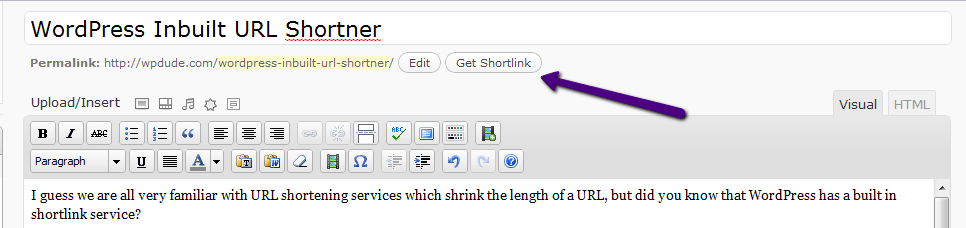
    TO create a shortlink inside of WordPress, you need to go to the post editor and create a new post or edit an existing one.  At the top of the screen you will see a button

    When you first create a new posts, the button does not show up, you need to save a draft first.

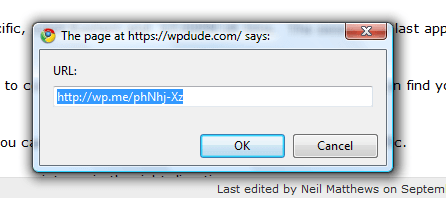
    Click on the link, and a popup will appear with your shortened URL ready for use.

    How Does IT Work

    A redirection is created on the wp.me domain, which matches your unique URL, when this URL is entered into a browser, you are taken to the wp.em website and an immediate re-direction occurs taking you to the full URL on your WordPress site.

    The links are monitored for SPAM so anyone planning to use this service to blast offers to people should be wary, your spam activities may affect your legitimate blog posts in the future.

    The link does not have a set lifetime, so as long as WordPress is around, your shortened link will be around so there should be no concerns with broken links in the future.

    Missing Link

    There is one missing link in all of this configuration, and that is a monitoring option.  I like to use bit.ly because it allows me to monitor how many clicks I am getting on my shortened URL, perhaps this is in the pipeline I don’t know, but if you need a simple URL shortner that can be used inside of your WordPress dashboard, then you cannot go wrong with Get Shortlink.