Neil Matthews

Blog

  • No More One to One Consulting

    No More One to One Consulting

    About three months ago I stopped offering one-on-one hourly WordPress coaching services so I could concentrate on building up my team of “techies” to help service the wordpress technical support side of my business.

    I was not happy about this, I love working one on one with people like this,  but I needed to concentrate on building that side of my business.

    Now that I have built my team and it is running very smoothly I am re-opening the coaching side of my business, but with a difference.

    I will no longer be offering hourly consulting instead I’ll be working with a small handful of people (six to be exact) for six months at a time

    I will do everything in my power to help you build a top class WordPress site or improve your existing one.

    I know this might not be the right coaching model for everyone, but it definitely makes more sense for me.  I can still manage the technical support side of my business whilst providing a top class coaching service to those who need it.

    Anyway, if you’re potentially interested in snagging one of the six spots now then email me at [email protected] and I’ll send you more information.

    I look forward to working with you

    Neil Matthews

  • Could Twitter Search Be The Most Powerful Business Tool?

    Could Twitter Search Be The Most Powerful Business Tool?

    I’m stepping away from WordPress in this post, I hope you don’t  mind, I want to talk about twitter for a moment.

    Your WordPress site is probably acting as a hub with spokes connecting your social media profiles at twitter, Facebook et al so the link is not that tenuous.

    I want to explore why I think twitter search or search.twittter.com could be one of the most important tools for businesses to find new leads and monitor customer satisfaction.

    Search.Twitter.Com

    Search.twitter.com allows you to perform a search on the live twitter stream.

    What’s the big deal about that, and why should it matter to businesses?  I’ll tell you why, it gives you real time access to the problems and frustrations that people are having right now!   I’ll let that sink in for a moment, you have access to something so frustrating to the person involved that they have gone online and expressed their annoyance with a tweet.

    If you can step in with a solution to that problem you are going to be seen as a pretty cool dude.

    It’s About Making A Connection Not Spamming

    Let’s make it plain and clear here, making connections with strangers through twitter search should be done gently.  It’s about making a connection, it’s about starting a conversation, it’s not about giving someone a hard sell just because you have foundd their tweet.

    Let make a real life analogy.  You are sitting in a bar and you can overhear the conversation of the people on the next table.  They don’t know you.   The conversation turns to automobiles, you overhear that the people on the other table need a new car.  It just so happens you are an auto-dealer, you jump up, push your business card at the target and start your hard sell.  They were talking to a friend not you.  Now imagine twitter being the same you need to be subtle.

    Tools To Monitor Search

    You can go to search.twitter.com and do manual searches, but if you want to continually monitor the twitter steam for particular queries you will need a different tool.

    I use tweet deck, a free tool which allows me to setup a series of searches which I can monitor throughout the day, and if I can be of help, I respond to that tweet.

    Another tool I have been trialing is Sprout Social, an  online tool which also allows you to setup searches for phrases.

    Give An Answer To A Question

    I often see queries about WordPress that I am in a position to answer.  People may ask what is the best plugin for this or can I recommend a solution for that, I am more than happy to jump in with an answer. A quick reply or a link to the appropriate plugin is usually very well received, and it is a great way to open an online conversation.

    Send A Link To A Post

    Again this is another full post, but twiter is an excellent way to market your blog one qualified reader at a time.

    If someone is asking a question that you have the answer to, then send them a link to a blog post, which answers that problem.  This may then make them dig deeper into your blog archives and perhaps become an email or RSS subscriber

    Don’t Spam But If Your Product Or Service Fits

    Don’t make your first contact with someone be a pitch, that’s not social, that’s just slimy but I add this caveat, if someone explicit asks for your products or services you can get away with your first contact being a pitch, but be pleasant about it.  Here is an  example

    Potential lead: Do you know anyone in the north east of england supplying WordPress technical support

    In reply: Hi, I’m based in Newcastle, and WordPress is all we do, check out our site wpdude.com/wordpress-technical-support

    The person is asking explicitly for what we do, so I point them to our sales page, no pressure selling.

    Monitor Your Brand

    If you monitor twitter search for your brand of product, you have an excellent opportunity to put right any negative feedback before it build any momentum.

    For example if someone went onto twitter and said “those idiots at wpdude wrecked my site” (not that this has ever happened) I would be able to quickly engage with that person, find out what the problem was and put out that fire by fixing the problem before my reputation is brought down by one tweet.

    That imaginary tweeter goes from frustrated to listened to and helped in a short space of time.

    I’ve done this a couple of times and when a representative gets back to me I’m usually overwhelmed and my attitude is given a 180 degree spin from unhappy to satisfied customer.  @zendesk, @socialsprout and @gotomeeting are three fairly big companies who do this, I have tweeted about problems with their systems and have received support, I’ve gone so far as to mention them in a blog post, their customer service standards are in my mind even now.

    It goes the other way if someone says something good about you, monitoring for your brand or products/.services means you can favourite the tweet and build up a series of tweet testimonials which you can send people to, but more about that in another post.

    My Examples

    This is how I use twitter search for my wordpress technical support services.  I have a number of searches setup which match what I do.  So if someone types in “wordpress help” or “wordpress problem”.  I am monitoring for it, and if I can help I send them a link to a solution, answer their query if it will fit into 140 chars or invite them to email me via my contact form for a longer answer if it takes more than 140 characters.

    Please note I don’t jump in and say Yep I can fix it, go to my services page and I will prepare a quote, I give away freely without expectation.  I am looking to build up my credibility as a WordPress thought leader.  Once that link is established in peoples mind, they may come back to my site and explore the fact that I provided support services.

    To be really successful on twitter you need to give before you receive, it’s not about pushing your message 100% it’s about making connections.  Being social, these relationships may then develop into projects, they may also blossom into an online referral engine where people send others your way for services or products.

    A great quote from the book Un-Marketing (amazon aff link) is this:

    You wouldn’t open a business bank account and ask to withdraw $5000 before depositing anything.  The banker would think you are loony.  Yet people go onto social media, open their account, send out a few pitches for their mediocre e-book, and then complain to me that “this social media stuff does not work”.

    Twitter search Would Be A Huge Timesuck

    Yes it could be if all you do is answer question after question all day long and never do you day job (unless fielding twitter tech support questions is your thing, and many businesses are recruiting for just such roles)

    I treat it as a 10-20 minute networking session one time during the day, I will go through my twitter searches responding and helping if I can.  It is an excellent way to start a conversation, and to reinforce the point that I’m an expert in my chosen field.

    Wrap Up

    Are you using WordPress as the hub of your social media?  I recommend you do, check out this posts, it’s on the front page of Google and has become quiet popular.

    Let me know in the comments if you would like me to write more about social media and integrating WordPress with it.  It’s a subject I’m pretty keen on and I will happily write about it if you want me to.

    If you need help building your social hub with WordPress at the centre give me a shout.

    Image by nathanmac87

  • WordPress Technical Support Sale Ending Soon

    WordPress Technical Support Sale Ending Soon

    Over the holiday period I ran a sale and dropped the price of my wordpress technical support services to get past the notoriously slow period throughout November and December.

    This is a quick post to say I will be raising my hourly rate back to the normal price point very soon.

    If you want to lock in a block booking of time at my sale price rate now is the time to do it.

    I’m selling packages of time which you can buy now and call down at any time during this year in increments of 20 minutes.

    The Package

    I’m selling blocks of five hours of time at $50 per hour, using my extensive mathematical training gained at school tha tells me the price is $250.

    If you would like to pre-order a block of time please contact me

    Image by roland

  • Plugin Review: Widget Logic

    Plugin Review: Widget Logic

    Here’s a very hand little plugin for you, it’s called widget logic http://wordpress.org/extend/plugins/widget-logic/ and it lets you control where or when a particular sidebar widget is displayed by adding some conditional logic to the widget config.

    WTF Give me Some Examples

    It’s probably easier to use examples to explain what the plugin can do:

    • You may only want an email sign up widget to appear on the home page
    • You may only want your twitter link to display on a blog post not a page
    • You may want your categories widgets to appear on your contact page (running out of examples already)

    WordPress Conditional Logic

    Sorry but this plugin requires a little understanding of WordPress conditional logic to work, but once you have mastered that you can control which widgets appear where.  Full details of WordPress conditional logic can be seen using the following links

    http://codex.wordpress.org/Conditional_Tags

    Some Examples

    Here are some examples of the logic in action

    • is_home() – this will check for the home page
    • is_page(‘contact’) – check for the page called contact
    • is_sigle() – this will check for an individual blog post

    Hello Operator

    There are a number of operators available in WordPress so you can join logical statements to create more complex tests, here are some example operators.

    • && – and
    • || – or
    • ! – not

    So you could say I want to display a widget on the home page or the contact page, the statement would look like this

    is_home() || is_page(‘contact’)

    Installation & configuration

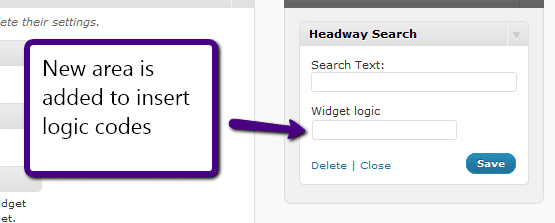
    The plugin is install as any other plugin, once activated a new form field is added to the bottom of your sidebar widgets.

    Compose a logical statement and add it to the widget logic form field and you will only see that widget when the conditions are met.

    Wrap Up

    Widget logic is an excellent plugin to help control where widgets are displayed, if you are using WordPress as a CMS, and not a blogging platform this is an excellent tool to add to your toolbox.

    If you need help building your logical statement you know which link to follow hint this one https://dev.neilmatthews.com/wordpress-technical-support

  • 2011 Webinars

    2011 Webinars

    I’m in planning mode for early next year, and one of the things I am planning to do is run a series of free webinars to teach people how to solve particular problems in WordPress.

    If you haven’t been on one of my webinars before, let me explain how they work. A webinar is a live events held over the internet where I can share my computer screen with you and show you how to solve a WordPress problem.

    Can I ask you to participate in my survey so I can find the problems people are having with WordPress.

    Can you leave your replies as comments on this post answering the following questions.

    1. What free WordPress webinar would you love for me to create JUST for you?
    2. What is your biggest fear or frustration when using WordPress?
    3. What is your ideal, perfect outcome when you return to your site after the webinar?

    If your problem is a big sticking point for a number of people I will build that into a webinar.

    Thanks in advance for any time you spend on this survey

    Thanks

    Neil Matthews

    Image by iuniquefx

  • WishList Member 2-4-1 Sale

    WishList Member 2-4-1 Sale

    I received an email today from the good people over at Wishlist telling me that they are having a sale on of their excellent Wishlist member plugin.

    What Is WishList Member

    It’s a membership plugin for WordPress that allows you to protect certain posts or pages on your site for members only. The visitors needs to login to see that content.

    You can integrate WishList member with payment processors such as Paypal so you can charge for your content, I’ve used it on some of my own projects and I heartily recommend it.  In my opinion it is the best membership plugin out there.

    It’s a premium plugin so there is a charge, but the offer is buy one license get one free.

    Check It Out

    To take advantage of the 2 for 1 sale you need to use this link

    WishList Member 2 For 1

    Already Got WLM

    My team and I are experienced working with WLM so if you need help integrating with a payment processor or email list, give us a shout out over at our service page

    Disclosure

    I’m not bound by the FCC draconian reporting measures being British, but I always think transparency is key, so yes this is my affiliate link, but you already knew that didn’t you.

  • Zferal For New Referral Program

    Zferal For New Referral Program

    I’ve been trying to find a suitable system for my referral program for some time now and I think I have found it in Zferral.

    What I Need From A Referral Program

    I need a couple of things, this is why my search has taken so long

    1) The ability to reward my existing clients with a reward for the referral, many people have suggested they would prefer free support rather than money.

    2) The ability to provide a monetary reward to internet marketers who want to refer me.

    Enter Zferral

    Zferral is a software as a service system which allows you to create an affilaite program.

    There is no need for sofyware isntalls and it is a fraction of the cost of services such as Commision Junction.

    Zferral is brilliant it allows me to deal with both types of reward, monetary and none monetary.  So I am currently offering a referral fee of $10 per wordpress technical support quotation request or 30 minutes of free technical support. The referrer can choose which campaign they prefer.

    Zferral also allows me to supply twitter links, banner ads and the ability to create an automated email list of affiliates so I can send out updates to my “team” to tell them how best to promote my service.

    Sign Up For My Referral Program

    If you are interested in taking up wither of my offers, please visit my affiliate page for more details

  • Plugin Review: My FTP

    Plugin Review: My FTP

    One of my favourite tools as a WordPress techie is a tiny plugin called MY FTP, is has helped me too many times to remember, I thought a quick post on this excellent utility would be a good idea.

    Here is the download link http://wordpress.org/extend/plugins/myftp/

    What Is MY FTP

    It is a plugin that creates an FTP console inside of your WordPress dashboard.  FTP standard for file transfer protocol, and once this bad boy is installed you get the ability to navigate your WordPress file system, upload files and even edit files.

    One limitation of MY FTP is that it uploads only, there is no download function.

    The Real Power of MY FTP

    The real power of MY FTP is not it’s FTP capability, rather it is that is allows you to edit WordPress files without the need to have FTP credentials.

    Imagine you need to edit the wp-config file and don’t have ftp access to a site, just install MY FTP and there you go, open up the file browser, navigate to the file in question and click on the edit button, excellent.

    Imagine you need to add some plugin code to a theme file, but cannot get access to that file because it is buried deep in the file system, bingo fire up MY FTP browse to that file and make your changes.

    Installation

    The plugin has a standard installation, either search for “my ftp” note the space there is a clone with no space from the plugin dashboard or download it from http://wordpress.org/extend/plugins/myftp/

    A Word Of Warning

    Absolute power corrupts absolutely, you can really screw up your site with MY FTP if you don’t know what you are editing. Use it with caution, if you don’t know what you are doing, call in the experts, you have been warned.

    Wrap Up

    As I have said MY FTP has gotten me out of all sorts of technical support pickles, check it out.

    Image by trainor

  • What Is A Theme?

    What Is A Theme?

    In a back to basics post, I want to answer the question “What is a theme?”.

    I am very guilty of assuming everyone understands the WordPress concepts of themes, plugins, updates and all that jazz, so I am taking a step back and writing a series of posts to describe the building blocks upon which WordPress is built.

    So What Is  A Theme?

    In a nut shell it is the front end look and feel of your site.  When a person visits your site they do not access the backend dashboard, all they see is the front end of your site and the content you have published.

    The way people see your content, the layout, the typography, the colours, the logos, the banner ads, they all go to make up the theme.

    It Is  A Layer Above Your Content

    A number of people find it hard to grasp the idea that themes are independent of your content.  Themes sit above your posts, pages and comments.  Themes pull your content from a database and display it, they do not create or amend any of your data, it is purely a way to show your data to the outside world.  As we techies call it, a Presentation Layer.

    If you change a theme, your content is still there, all you are changing is the look and feel, one of our clients was very concerned that if she changed her theme, her posts would need to be re-entered.  This is not the case.

    What Types Of Theme Are There?

    I like to classify themes into four separate categories:

    Free themes – there are hundreds of free themes available to download and install on your site, there is a free theme directory on the WordPress site at http://wordpress.org/extend/themes/.

    Premium Themes – there are many companies out there developing premium, very professional themes to modify your look and feel.  Because these have been designed and coded to a more professional and higher standard than standard free themes, they have a charge associated with them.  This is usually in the range of $50-$100.  Some examples of premium themes developers are woothemes.com or themeforest.net

    Theme Frameworks – the next step up is a theme framework, these are premium themes, but they are different from the category above in that the theme is not static, you can change the look and feel of your site to create a DIY custom theme.  Examples of theme frameworks are Headway and Thesis.  I use Headway on this site because of the ease with which I can create my own custom look and feel.  These tend to cost $80-$200 depending upon the license version you buy.

    Custom themes – the luxury end of the market is to get a custom theme designed for you.  This is the high end, and will cost you several thousand dollars, but you will get exactly what you want.  Custom theme design is a combination of excellent graphical design skills and custom coding skills to bring  your idea to life.

    What Can My Theme Look Like?

    The sky really is the limit, if you can design it, you can probably code it up as a theme.  Take a look at the home page of Headway they have a theme gallery of the implementations made with headway, they are all completely different, this is the point of a theme, it creates a layer of abstraction between your front end and your back end content data so it can be displayed in any way you like.

    What Comprises A Theme

    A theme is made up of a number of script files and CSS style sheets.  They will also include custom images.

    Typically there will be a script to display:

    • Header
    • Footer
    • Home page
    • individual blog posts
    • individual pages
    • Archives page; categories, archives or search results

    Unless you are happy coding php script files, you probably want to leave theme files alone.  The good new is there are thousands of themes out there pre-written to choose from, there are also many people providing WordPress technical support who are only too happy to help you install and amend your theme.

    How Are Themes Delivered?

    When you download a theme it will come as one zip file.  This is a package inside of which will be stored all your script files, css files and images.

    Installing A Theme

    To install a theme you can either manually upload and activate the theme or use the theme upload function.

    From your dashboard go to appearance -> themes and then click on install theme

    Click to see full size image

    You can also manually unpack the theme zip file and upload it to wp-content/themes/{themename}

    Switching Themes

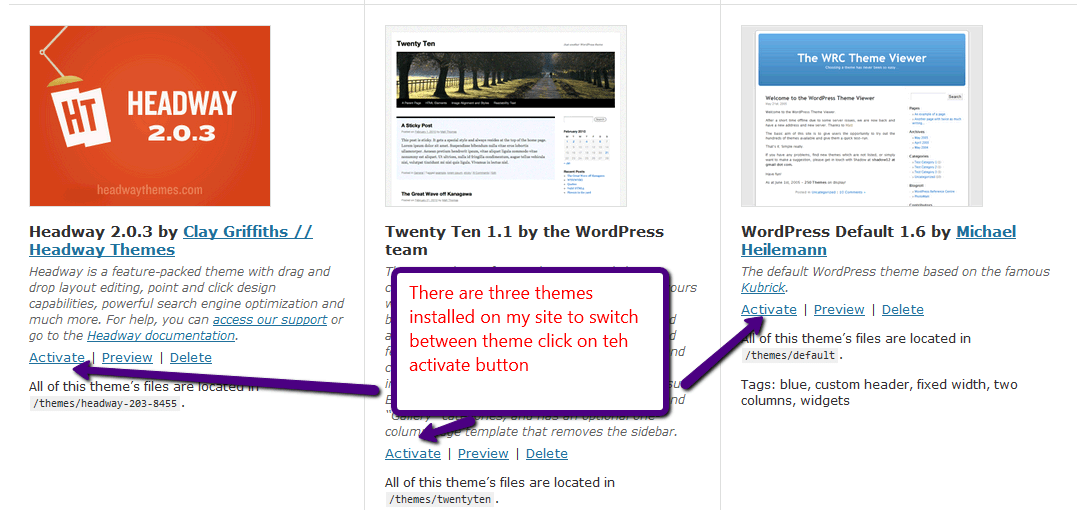
    Once your theme is installed, you have the option to activate it.  You can store many themes on your site at once, but there can only be one active at a time.  You can switch between themes at will.

    To activate or switch a theme again go to appearance-> themes where you will be displayed a list a available themes

    click for larger view

    You can also preview a theme before activating it.

    Themes In A Nutshell

    So that is your noobs guide to themes, this incredibly flexible way of displaying content on the front end of your site is one of the reason WordPress has gained such support and is used so widely.

    If you have any theme questions I have not covered, please ask them in the comments section.

  • Webinar: Create A Custom WordPress Theme With Headway

    Webinar: Create A Custom WordPress Theme With Headway

    I would like to invite you to a webinar on Wednesday 17th November at 12:00-13:00 Eastern, 9-10am Pacific, 17:-18 UK.  The webinar is entitled:

    “Create A Custom WordPress Theme With Headway”

    The Headway theme framework allows you to create a custom look and feel for your WordPress site without the need for programming skills, a designer or knowledge of the complicated theme layout system.  I use headway on my own site and many of the client sites I have worked on.

    Having a unique look and feel for your site can make you stand out from the thousands of other blogs out there.

    The webinar is no cost, but seats are limited, sign up now to avoid disappointment.

    Book your seat

    https://www2.gotomeeting.com/register/285289987

    On this session I will show you:

    • What is Headway
    • How it can be used to create a custom theme
    • Installing Headway
    • The visual editor to create a custom look
    • Demo of the headway theme framework
    • Q & A

    Book your seat

    https://www2.gotomeeting.com/register/285289987

    I look forward to seeing you on the call.

  • Webinar: How To Backup A WordPress Site

    Webinar: How To Backup A WordPress Site

    One of the problems I see with many people’s WordPress site is that the do not do a backup or they do not do a complete backup.  It’s often overlooked and it’s not until that stomach churning moment when you need to restore yoru site do you realise your archive does not existing or is incomplete.

    Join my no cost webinar to learn how to backup your site correctly.  Seats are limited so join now

    Wednesday 10th November 10-11am Pacific, 1-20pm Eastern and 6-7 UK (duration 30 mins)

    Learn how to correctly backup your WordPress Site on my webinar, I will show you

    • Why a backup is important
    • What Needs to be backed up
    • How to backup A WordPress site
    • Demo
    • The WP Owners Club
    • Q & A

    https://www2.gotomeeting.com/register/216842098

    This is a free sample of the coaching work I am doing in my members only site the wp owners club, try the coaching format to see if it suits you.

    Photo by Tim Evans on Unsplash

    I used to have another image I downloaded from Flick from topgold but it looks like it was someone elses and a lawyer sent me a cease and disist note, cheers that was your image I’ve taken it down

  • WordPress; It’s Not Just Blogging Software

    WordPress; It’s Not Just Blogging Software

    In this series of posts I want to tell you why I think WordPress is a valid business tool as a website content management system and not just a blogging platform.

    People Think It’s Just  A Blog

    Too often people dismiss WordPress as “oh, just that blogging platform, I couldn’t run my website on that.”

    Throughout this series of posts I want to dispel that myth and many others which are stopping businesses taking up WordPress as a serious website content management tool.

    Business Is Scared Of Open Source

    It has been my experience that a lot of businesses are scared of open source solutions, they like the idea of accountability,  that there is someone to shout at if things go wrong, that there is someone there to cover IT arses if things to t*ts up.  You don’t get that with open source, there is no expensive support contract, and no one to haul across the coals if things go wrong.

    I used to work in a multinational that was happy to pay it’s content management provider 10k per processors per year for software, let’s just look at that again, 10 thousand GBP, about 15 thousand USD per processor (each server was multi processor) per year for a solution that was not too dissimilar from WordPress.

    I know many businesses are coming around to open source, but it is my experience that they are still the minority, please feel free to contradict me in the comments, this is my opinion, and the corporations I have worked in were just not into free software.

    The small and micro business, which make up the majority of my clients are more than  happy to use free open source software, but why not medium to large?

    It’s Small Business Software, It Won’t Scale

    Yes it is, if it’s installed on small business hosting, which is what the majority of bloggers use, but if you need a high volume CMS solution, you simply need to look to a service like VIP hosting from Automattic, the people who developed WP http://vip.wordpress.com/

    You can scale your site up to millions of hits per day and have the good people who wrote the software support it for you.  WordPress scales.

    It’s Insecure

    WordPress has it’s fair share of security issues, but it is not inherently insecure.  It is a victim of it’s own success, there are millions of WP sites, find a vulnerability on WordPress and you have the keys to millions of sites.

    I’ll add to this and say the majority of hacks I see are not due to WordPress, they are issues with

    • Insecure hosting
    • Badly configured sites
    • Sites not updated when a security flaw is identified

    Solutions To All The Problems

    There is a vibrant community developing the core of WordPress and tens of thousands of plugins

    • Need a mailing list sign up – there’s a plugin for that
    • Need members only content – there’s a plugin for that
    • Need a job board – there’s a plugin for that too, the list goes on and on

    WordPress is an evolving beast there are features being added all the time, it gets better with each new plugin I find and release I install.

    Unique Design

    If people think they cannot get a unique look and feel for their WordPress site, they are highly mistaken.  Hire a good designer, I recommend Jonathan Woodward by the way – http://jonathanwoodwardstudio.com.

    WordPress theme design can create a unique look and feel for your site, be it an avant garde art site or a conservative business site, a good designer and coder can create the look you need.

    There are excellent companies out there developing premium themes, Headway, Woo themes and Thesis to name just three.   For a small cost you can get a very professional looking theme.

    Multi User

    You can have a content creation team of any size, if you leverage WordPress users and roles you can have many people adding and editing content for your site securely and with pre defined permissions on what they can and cannot do.set

    Support Is Plentiful

    There are a lot of people out there who can support your WordPress site.  You are not buying into a niche service that will cost you thousands of dollars per day for support.

    Just look at me as an example, I’m based in the UK, but have clients throughout the world.  The beauty of WordPress is that it can be administered from the same interface that is used to display content to your users.You don’t need contractors in your office behind your firewall to do work for you.

    Most Importantly Of All

    It’s cheap as chips, the hosting is standard and easy to obtain, the software is free, themes can be free or a premium theme can be obtained for a few tens of dollars.

    If that is not reason enought for business to start using WordPress as their CMS I don’t know what is.

    What It Can be

    In the rest of this series I want to take a look at the other things WordPress can be other than a blog, including:

    • A fully grown CMS
    • An e-commerce Site
    • A multi Media Platform
    • A Membership site

    Leave links to sites in my comments section of WordPress isntalls doing ununsual non-blog things.