Neil Matthews

Blog

  • Top 5 Must-Have WordPress Plugins

    This is a guest post by Michael Scott

    WordPress is easily one of the most popular and user-friendly content management and blog publishing tools available online today. Hundreds of thousands of websites utilize this publishing tool to submit blog postings and for Search Engine Optimization (SEO) purposes. Some popular blogs that operate on WordPress include The Wall Street Journal Blogs, Time Magazine Blogs, CNN Blogs and Forbes Blogs.

    As you can see, WordPress boasts an impressive clientele of leading companies and organizations. The easy-to-use blog sharing tool also features an impressive array of elegant and stylish themes, as well as powerful plugins that extend the features of WordPress. Let’s take a look at the top 5 must-have WordPress plugins that will enhance your overall experience with this powerful blogging platform.

    WPtouch

    The world now has an astounding 6 billion mobile phone users. So many of these users are using their sophisticated smartphones to browse the web. This is why it is so important that your blog is optimized for smartphone users. The WPtouch plugin will help you accomplish this. This plugin will help transform your website into a sleek, stylish and user-friendly destination for mobile users. The best part about this plugin is that it will not modify any bit of coding or alter your regular desktop theme and appearance.

    Social Media Widget

    The Social Media Widget is a simple, yet stylish, sidebar widget that displays your different social media profiles, which may include Facebook, Twitter, Google Plus, Digg, Reddit, StumbleUpon and Pinterest, for example. This is a highly customizable widget that you can use to even create your own icons.

    Social Metrics

    As a blogger, you will absolutely want to understand how well your posts perform on the various social networking sites that you should be using for promotional purposes. Social Metrics is a highly regarded analytics tool you can use to track and monitor your WordPress blog performance on popular social media sites, including Facebook, Twitter, Pinterest, Google Plus, StumbleUpon, Reddit, Digg and LinkedIn. As you observe and understand which networking site seems to deliver the best results for you, you can adjust and tweak your promotional strategies.

    FontPress

    FontPress is a must-have WordPress plugin that will allow you to incorporate customized fonts within your website. This plugin boasts an impressive variety of font styles that you can preview before using. You can play around with different font sizes, colors and shadows with FontPress. The best part about this plugin is that you get to avoid having to deal with any coding when customizing your fonts.

    All in One SEO Pack

    SEO is so incredibly important to the success of your blog, as it is a tool that must be implemented to improve the ranking of your site on major search engines, including Google, Yahoo and Bing. The All in One SEO Pack plugin automatically generates Meta tags, optimizes your post titles for search engines and helps you detect and avoid using duplicate content. If you have limited experience with SEO, this plugin will help you with the basics.

    WordPress is an incredibly user-friendly blog publishing tool that hundreds of thousands of websites use today. You can create a sleek, stylish and elegant website in minutes with WordPress. Be sure to utilize these 5 plugins that will really help optimize your blog.

    Michael Scott is an online instructor and coordinator for College City. Michael also manages several niche blogs through WordPress and uses these plugins and more to optimize his content.

  • Performance Tuning Workshop

    Performance Tuning Workshop

    Course Details

    In the WordPress performance tuning workshop I will show you how to speed up slow running sites.  My methodology takes you through baselining you site, finding bottlenecks, testing themes and plugins, investigating memory and database bottlenecks and finally installing cache plugins to speed up your site.

    (more…)

  • Case Study: 404 Errors When You Change Your Permalinks

    Case Study: 404 Errors When You Change Your Permalinks

    I have had a number of clients come to me with this problem, so I thought a case study was in order.

    Here’s the Problem

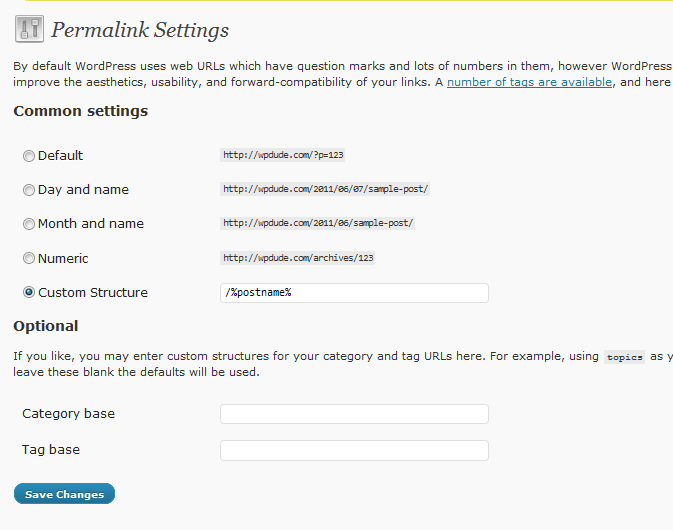
    When you change the permalinks from the default to something more pretty and SEO friendly, you click on a post or page link and all you get is a 404 file not found error. This is done from the settings-> permalink page.

    The home page will be fine, but you cannot access any of your content off of the home page.

    What Is A Permalink

    A permalink is the URL of your blog post or page, the bit after your domain name for example the permalink of this post is case-study-errors-when-change-your-permalinks.

    By default the permalink for a post or page is set to the post ID, so if I was using default permalinks, this post would look like this wpdude.com/?p=5770

    What Having Pretty Permalinks Matters

    It is a good idea to change your permalinks from the default to a pretty permalink (pretty is the technical term BTW, don’t believe me check out http://codex.wordpress.org/Using_Permalinks) for SEO purposes.

    You can stuff valid keywords into the permalinks of your post to help the search engines match your content with searchers.

    So What Has Happened?

    When you change from the default to pretty permalinks WordPress needs to setup a redirect to the new URL, it does this by adding some commands to the file .htacess.   This file lives in the root of your site.

    What Might Cause the Problem?

    There are a couple of reason why this might not work, the first is that mod_rewrite is not installed on your hosting,  Check with them to see if they have this redirection technology in place.  I have not seen many hosting setups where this is not in place so you can probably move onto the next point.

    Another reason I have seen 404 problems is when the .htaccess cannot be written to.  This might be file permissions or the file does not exist and WordPress cannot create it.

    The Fix

    Connect to your site using ftp and open up the .htaccess file.  NOTE some ftp client do not show hidden files by default so you may need to enable this. anything starting with a period/full stop is marked as hidden.

    Edit the .htaccess file and see if it contains the following set of commands:

    # BEGIN WordPress
    <IfModule mod_rewrite.c>
    RewriteEngine On
    RewriteBase /
    RewriteRule ^index\.php$ – [L]
    RewriteCond %{REQUEST_FILENAME} !-f
    RewriteCond %{REQUEST_FILENAME} !-d
    RewriteRule . /index.php [L]
    </IfModule>

    # END WordPress

    If they are not present, you probably are having problems writing to the .htaccess file you can either change the permissions of .htaccess and try to regenerate the permalinks (you do this by setting it back to default, then setting it to pretty permalinks again) or you can manually edit and add the commands.

    Please note if you are running WordPress in a subdirectory, you will need to reflect this in the command you add to the .htaccess file. Upload the file again and the 404 errors should be gone.

    Wrap Up

    So if you get 404 file not found errors when you change your permalinks, you need to manually edit your .htaccess file, if that doesn’t work check mod_rewrite with your hosting company, you can always roll back to the default permalink structure until you get this fixed to get your site back online

    Image by everdred

  • Replay Of My Webinar Introducing the WP Owners Club

    Replay Of My Webinar Introducing the WP Owners Club

    WP Owners Club Webinar

    Here is a replay of the webinar I ran yesterday introducing the WP Owners Club.

    Please don’t hesitate to contact me if you have any questions.

    [flowplayer src=’https://s3.amazonaws.com/WP_Owners_Club/sales_videos/wpocjuneintake.mp4′ width=640 height=480]


    wpdude.com/signup


  • The WordPress Support Conundrum

    The WordPress Support Conundrum

    Conundrum, it’s a great word isn’t it. Here is the definition “A confusing and difficult problem or question.” Here’s the WordPress Support conundrum as I see it.

    Free Software => No Formal Support

    WordPress is free to download and install on your server or hosting, but there is no formal support arrangement in place.  All support is from volunteers in the forums at http://wordpress.org/support/. You take your chances with WordPress, if you get a problem, you may or may not get a reply.  There is no guarantee you will.

    I am not attacking the great folk who provide support in the forums in their own time and for no reward.  This is not a WordPress issue, it’s an open source issue.  All open source platforms supply the software as is.  Some have a paid option, others such as WordPress do not.

    Premium Software & Support

    When I was working in the corporate world, it was not uncommon to pay huge annual maintenance fees just so the company had access to software support.  Support that was fairly similar to the support forums at WordPress.com (just saying IBM), the difference is that there is a guarantee that someone will investigate your issue and elevation and service level agreements on how your problem will be addressed.

    This is a huge stumbling block to many companies thinking about adopting open source software, there is no-one to go to (read there is no one to blame and ass-cover) if something goes wrong,

    Volunteer Support

    The support available for WordPress is from an army of volunteers, people who monitor the forums and give their advice.  They do this for the love of the platform, to display their expertise and to raise their profile in the community.

    There isno service level agreement, no 24 hours to reply and start working on the problem. There is no guarantee that you will get a reply (but you probably will).  It is not some bodies day job to answer your support queries.  There is no formal support. When I have gone to the forums myself I usually get support but it can take a couple of days to get a reply.

    It Goes Two Ways

    I see users of WordPress and free plugins lambasting the developers if a solution is not forthcoming within three minutes of them placing a support request.  They seem to think that they are owed support for using someone’s free software.  They are not.

    Plugins, free themes and WordPress  are provided as is with no support implied, but the majority of people writing WordPress core and plugins and themes provide very good support to people using the software they have developed.  BUT it is not their day job, they are not getting paid, this is a labour of love.

    A Certain Level of Expertise Is Expected

    This is not a WordPress only problem but many open source projects support sections are “staffed” by people who assume you need a certain level of expertise to be allowed the privilege to use the software.  If you are not up to speed with the jargon beware.

    I see many support requests starting “I’m a newbie be nice to me ..” or other such phrases, people are aware of the sometimes harsh replies people get if they are not up to speed with the technicalities of WP.  This annoys me, we were all newbies once and expecting everyone who uses the software to be a php developer and to understand a MYSQL database is wrong.

    I would estimate that 80% of all WordPress functions can be done by noobs, it’s the last 20% that is complex and requires technical skills, so why not accommodate the 80% in the forums without ridicule.

    The Rise Of The Premium Aspect

    The reason why we have seen a rise in premium themes and plugins is to offset the conundrum.  People are more invested in supporting and helping people if they can make it a priority by charging for a product and creating a customer support function.

    This means that you CAN expect support if things go pop,

    This Is Why The WP Owners Club Was Created

    I created the WP Owners Club to solve this problem.  By creating a premium solution to the training and support conundrum, I can provide my expertise and experience to members whilst paying my bills.

    What Is The WP Owners Club?

    It’s a members only training and support community where you can learn WordPress and request support from me amongst a community of like minded site owners.

    Would you like to know more?

    I’m running a webinar to explain more about the WP Owners Club, if you would like to join this free event click on the link below

    The webinar is on Thursday 2nd June at 11am-12pm Pacific, 2pm-3pm Eastern and 7pm-8pm UK Time.

    Seats are limited so book your slot now by clicking on the link below.

    https://www1.gotomeeting.com/register/847311041

    I look forward to seeing you on the webinar.


  • Hack Recovery Course

    Hack Recovery Course

    Has Your WordPress Site Been Hacked?

    Do You Need Help To Recover And Secure It Again?

     WordPress Hack Recovery Course

    I’ve developed this WordPress hack recovery course to teach people how to qiuckly fixed their hacked site, and to secure their site to stop this happening again.

    I will take you through a detailed ten step process to methodically and quickly recover your site from a hack attack.

    About Me

    My name is Neil Matthews, and I’m a WordPress consultant.  I’ve been brought in by clients to fixed hacked WordPress sites on more times than I care to remember.

    This course is real world experience transformed into a video course to show you how to fix your hacked site.

    Why I built This Course

    WordPress sites get hacked, FACT, I’m called in all to often to clean up hacked sites.  It’s very costly to clean up and the act leaves the site owner feeling violated and upset.  I want to combat this problem.

    WordPress is not inherently insecure, rather it is a victim of it’s own success.  It is estimated that 13% of the net uses WordPress so there are millions of sites for the hacker to practise on and find vulnerabilities.

    There is no hack recovery course on the market, your options are to search the web and piece together a solution, or hire in a consultant for a high cost, this course will fill that gap.

    I’m aiming to give you the skills and knowledge to fix your site if you get hacked, or to have the tool set to fix your clients site in the event of an attack.

    My Methodology

    I will be teaching you the step by step methodology I use to clean up and secure a hacked WordPress site.

    This is not a theoretical process, this is what I do when I am called in to clean up a site.  It works, it has been tested many times in the field after real hack attacks and it works.

    Course Modules

    There will be ten modules in the course, it is incredibly in-depth, this is what you will learn:

    Module One: Understanding A Hack Attack

    This is the introductory module where I give you a background on why hacks occur, what the nefarious people hope to gain by attacking your site. I will look at why WordPress is so often a victim.

    Module Two: Identifying Hacked Files

    Module two will show you how to identify that your site had been hacked, and diagnosing the type of hack you have been the victim of.  Once you are armed with this information you can move onto cleaning the site up.

    Module Three: Cleaning Up Your WordPress System Files

    The first phase of the clean up process is to clean up and re-install a fresh set of WordPress files.  I’ll show you how to ensure you have a clean version and how to remove the old infected version

    Module Four: Cleaning Up Your Theme

    Malware is often injected into your theme files, I’ll show you how to clean up your sites front end.

    Module Five: Cleaning Up Your Plugins

    Many hack attacks go pretty deep into your site and find often called plugin files to infect and help spread their malware or hack signature.  I’ll show you how to find and remove these back doors.

    Module Six: Cleaning Up The Database

    A couple of hacks I have seen also infect the database.  I’ll show you how to spot these hacks and tidy up the database.  As part of this module we will give your database a spring clean to remove any unwanted tables.

    Module Seven: Misc Cleanup Items

    There are several other small areas where hacks live, these include the .htacces file, wp-config,php, permalink settings, your uploads directory and certain third party scripts like timthumb, I’ll show you how to find and close these loopholes.

    Module Eight: Hardening WordPress Security

    Now that your site is clean, we need to harden security so the hacker cannot get back in.  I’ll take you through several techniques to make your site a much more difficult nut to crack.  I’ll show you some useful plugins and services too.

    Module Nine: Keeping Google Happy

    If the malware or hack has been spotted by Google, you can be blacklisted and have your site marked as dangerous.  There are also hack signatures out there that change  your index and list pharmaceuticals instead of your real content (the pharma hack).  I’ll show you how to clean this up and get a thumbs up from Google.

    Module Ten: Monitoring for Future Attacks

    At this point your site is secured and recovered, but hacks are constantly evolving, I’ll show you how to monitor and be vigilant of your sites security moving forward.

    Delivery Method

    The course will be delivered via ten self paced video tutorials.

    Students will be given instant access to a members only site, where the course modules will be made available to you.

    Ongoing Support

    I realise that recovering a hacked WordPress site is difficult, that’s why I also offer email support to all courses members.  If you have any issues with your recovery, drop me a support call from the members area, I’ll help all I can.

    Cost

    This course costs $99.

    For that you get ten detailed hack recovery modules plus the on-going support during your hack recovery.

    Guarantee

    If you are not 100% happy with the hack recovery course let me know for a no quibble refund.

    Enroll Now

    If you want instant access to the hack recovery course, click on the button below.

    IMPORTANT: You will be taken to my members only site to create a login ID once you have completed the Paypal checkout.

    SORRY THIS COURSE IS NO LONGER AVAILABLE

  • New Student Intake for the WP Owners Club

    New Student Intake for the WP Owners Club

    I’m opening the door of my WordPress training and support environment to new students again over the next week or so. Full details can be seen here

    wpdude.com/wp-owners-club

    My program called the WP Owners Club will start again on the 9th June.

    I would like to invite you to a webinar to tell you more about the club, the training modules and the ongoing support available to members.

    I will give you full details of the syllabus in the webinar, but in brief, the six course modules are:

    1. WordPress Overview
    2. Content; Post, Pages and Comments
    3. Theme Masterclass
    4. Understanding Plugins
    5. Users and Roles
    6. WordPress Maintenance

    The webinar is on Thursday 2nd June at 11am-12pm Pacific, 2pm-3pm Eastern and 7pm-8pm UK Time.

    Seats are limited so book your slot now by clicking on the link below.

    https://www1.gotomeeting.com/register/847311041

    I look forward to seeing you on the webinar.


  • Social Media Hub; Video Demonstration

    Social Media Hub; Video Demonstration

    This is the last part of my WordPress socail Media Hub series, in the first part I laid the ground works, in the  second I gave you the nuts and bolts to build a social media hub.

    In this final part of the series I would like to give you a video demonstration to show you how all of the integrations work together.

    Video Demonstration

    [flowplayer src=’https://s3.amazonaws.com/WP_Owners_Club/sales_videos/socmediahub.mp4′ width=630 height=480 ]

    WordPress Social Media Hub WorkShop

    I would like to invite you to join me in a live workshop where I will teach you how to build your very own social media hub.

    • Thursday 26th May (duration 60-70 minutes)
    • Time
      • 11am-12pm Pacific
      • 2pm-3pm Eastern
      • 7pm-8pm UK Time

    The Agenda

    The agenda for the Workshop looks like this:

    • Why create a social media hub
    • Plugins and applications to automate the process
    • Pushing Posts to the social media sites
    • Pulling social media activity to your blog
    • Creating social media friends from your site
    • Setting up your sidebar for success
    • Marketing your content on social media

    The Format

    The workshop will be an online webinar,l part presentation, part live demonstration by me on my development site where I can take you through the process of setting up your social media hub.

    There is no travel of accommodation costs and time away from your day job is limited to the hour of the workshop, it’s a great way to get training without the headaches and interruptions of a normal course.

    Recorded For Future Review

    The session will be recorded and made available to you in a members only part of my site.

    You can review the workshop at any time in the future to jog your memory and review what you learned in the live event.  So note takin gis not required it will all be made available for you.

    I’ll also transcribe the workshop as a pdf document to review and and audio only so you can choose what format you review the session in.

    On-Going Support

    I’ll also give you on-going support for your social media hub building activities through a members only support forum.  If you have any queries or questions about social media integration just ask me in the forums.

    Cost

    The workshop costs $77, for that you get the live event, access to the recordings in the members only area and on-going support from me in the members only forum.

    Guarantee

    If you are not completely happy with the workshop for whatever reason just let me know for a full no quibble refund of your money

    Book Your Seat Now

    To join the workshop click on the add to cart button below, seats are limited by my webinar software so join now to avoid disappointment.

    IMPORTANT after checkout you will be redirected to the webianr registration page where you need to leave your name and email so you can join the live event.  I look forward to working with you on Thursday.



    My 100% Money-Back Guarantee

    My guarantee is very simple…

    Join The Workshop.

    Go through all the content (this way you’ll know whether or not it’s for you).

    If at any time within the first thirty days you don’t feel like you’ve gotten the absolute best deal in your entire life, just ask for your money back and I’ll give it to you . . . no hassles and no hard feelings.

    I want you to feel 100% confident that you’re going to be able to try the program out before you commit to it.

    A few words from REAL clients I have worked with . . .

     

    “Problems solved with my theme on Momover.net – Dana Wood”

    He solved my problems, explained why I had them in the first place, and gave me excellent advice for avoiding future mishaps. Yay, yay, yay!”Dana Wood, Momover.net


    “Neil helped me with a number of sites in my portfolio – Jason Lane”

    I just wanted to say thanks for going above and beyond my expectations with our wordpress consultation the other day. You not only fixed my screw ups, but you also showed me where I was going wrong and how to properly operate the new blog template on a day-to day basis, as well as showing me some cool new tricks I probably never would have found out on my own. You’re obviously skilled and dedicated to what you do, and it comes through in your work… many thanks! – Jason Lane


    “Digging into CSS is not something for the feint hearted, Neil did this – Paul Dixon – Macsessed.com”

    Although I have used WordPress to build a number of websites in the past, I recently discovered a problem where the layout of one of my latest projects was breaking when viewed in Firefox. After spending a frustrating afternoon trying to resolve the issue myself and getting nowhere, I decided to contact Neil. Besides fixing the problem promptly, he was a pleasure to work with. I would happily recommend Neil to anyone who needs some help with their site, and I am sure I will be using his services again in the future.Paul Dixon – Macsessed.com


    “Hacked Site recovery- Neal Finkle”

    Neil literally saved my site. I spent 2 years of hard work building up traffic and revenue them some low-life hacker infected it with a pharma hack. Almost immediately my traffic fell 85% and I lost all my rankings.
    I paid 2 other consultants to fix the problem and they were stumped. Neil was recommended by Chris Garrett or Problogger fame and I am super grateful. Neil took over and fixed the problem quickly. He cared about what I was going through. He was fast, professional and got the job done. I would recommend him highly and would only use Neil for any problem w/my site. Thanks Neil.

    Neal Finkle – Wealth Pilgrim


    “Security is one of Neil’s specialialisms- Jacqulient Stewart”

    I asked Neil to look at an WordPress security problem that has been bugging me for quite a while and needed some help with.

    I was very impressed with the quick and professional help that I received and would not hesitate to recommend Neil to anyone needing help with their WordPress installation.

    He even pointed out and installed an excellent security plugin that I hadn’t heard of, which I think is great customer service.
    If I need any WordPress help, in the future, I will be contacting Neil again. – Jacqueline Stewart

     

    My 100% Money-Back Guarantee

    My guarantee is very simple…

    Join The WP Owners Club for one month to try it out.

    Go through all the first month’s worth of content (this way you’ll know whether or not it’s for you).

    If at any time within the first thirty days you don’t feel like you’ve gotten the absolute best deal in your entire life, just ask for your money back and I’ll give it to you . . . no hassles and no hard feelings.

    I want you to feel 100% confident that you’re going to be able to try the program out before you commit to it.

    A few words from REAL clients I have worked with . . .


    “Problems solved with my theme on Momover.net – Dana Wood”

    He solved my problems, explained why I had them in the first place, and gave me excellent advice for avoiding future mishaps. Yay, yay, yay!”Dana Wood, Momover.net


    “Neil helped me with a number of sites in my portfolio – Jason Lane”

    I just wanted to say thanks for going above and beyond my expectations with our wordpress consultation the other day. You not only fixed my screw ups, but you also showed me where I was going wrong and how to properly operate the new blog template on a day-to day basis, as well as showing me some cool new tricks I probably never would have found out on my own. You’re obviously skilled and dedicated to what you do, and it comes through in your work… many thanks! – Jason Lane


    “Digging into CSS is not something for the feint hearted, Neil did this – Paul Dixon – Macsessed.com”

    Although I have used WordPress to build a number of websites in the past, I recently discovered a problem where the layout of one of my latest projects was breaking when viewed in Firefox. After spending a frustrating afternoon trying to resolve the issue myself and getting nowhere, I decided to contact Neil. Besides fixing the problem promptly, he was a pleasure to work with. I would happily recommend Neil to anyone who needs some help with their site, and I am sure I will be using his services again in the future.Paul Dixon – Macsessed.com


    “Hacked Site recovery Neal Finkle”

    Neil literally saved my site. I spent 2 years of hard work building up traffic and revenue them some low-life hacker infected it with a pharma hack. Almost immediately my traffic fell 85% and I lost all my rankings.
    I paid 2 other consultants to fix the problem and they were stumped. Neil was recommended by Chris Garrett or Problogger fame and I am super grateful. Neil took over and fixed the problem quickly. He cared about what I was going through. He was fast, professional and got the job done. I would recommend him highly and would only use Neil for any problem w/my site. Thanks Neil.

    Neal Finkle – Wealth Pilgrim


    “Security is one of Neil’s specialialisms- Jacquline Stewart”

    I asked Neil to look at an WordPress security problem that has been bugging me for quite a while and needed some help with.

    I was very impressed with the quick and professional help that I received and would not hesitate to recommend Neil to anyone needing help with their WordPress installation.

    He even pointed out and installed an excellent security plugin that I hadn’t heard of, which I think is great customer service.
    If I need any WordPress help, in the future, I will be contacting Neil again. – Jacqueline Stewart

    Image byuselessid

     

  • Social Media Hub; The Nuts and Bolts

    Social Media Hub; The Nuts and Bolts

    Here is post two in my series on building a social media hub centred around your WordPress site.

    In the first post in this series I outlined what the social media hub is, if you missed that post check out Building A Social Media Hub.

    In this post I want to give you a practical guide to building your social media hub so you can created your content once in WordPress then automatically syndicate it out to the three main platforms FAcebook, Twitter and LinkedIn.

    Here’s The Plan

    We are going to integrate WordPress with Facebook, Twitter and LinkedIn and set it so that whenever you create a new blog post it automatically adds a new update to all three networks.

    Being able to automatically update your social media platforms without having to visit multiple sites takes a lot of the “time suck” out of social media marketing.

    It All Begins With Twitter

    The easiest way I have found to push your content out is to integrate WordPress with twitter and the integrate the other services with your twitter feed.

    I recommend this route over an initial integration with Facebook because of the always changing rules in FB.  Let’s face is shall we, Facebook wants you to spend all of your time in your Facebook account and they do not make it easy to push data out of FB. they want your eyes on their ads, so the easiest way to do this integration is to push information into Facebook rather than take it out.  I’m not being anti FB here I’m just saying that the massive heads in FB towers want you on their site not twitter or LinkedIn.

    So we are going to push our updates out to twitter, push those updates out again, we are also going to aggregate our social media activity back to WordPress.

    This means you can concentrate your unique content on WordPress and your social media activity on one platform

    The benefit of this is you are sharing your message easily across all four platforms and your followers can choose where they consume you updates from, everyone’s happy. Twitter fans using Tweetdeck or Hootsuite, Facebook fans can sift your message out of the Zombie attack garbage and LinkedIners can be very serious and professional in their business only area.

    Twitter Tools

    My preferred tool to integrate WordPress and twitter is Twitter tools, this excellent plugin allows you to create an automatic link between your WordPress site and twitter.

    You can get a copy of Twitter Tools from http://wordpress.org/extend/plugins/twitter-tools/

    Twitter tools has a number of functions you can

    • Push a tweet to twitter when you add a new post
    • Create a post from an aggregation of your tweets, for example you could pull all of your tweets in a week into one post digest
    • You can push your twitter updates into a sidebar widget

    Creating the link between the two is a little tricky, you need to add your twitter authentication keys into twitter tools and essentially setup your site as a twitter application that has access to your twitter.  I will be offering a training session to take you through this in the next post in this series.

    Once you have installed Twitter tools, and as you create a new blog post it will automatically push a tweet into twitter looking something like this

    New blog post: How to make widgets http://shorturllink.com

    Step one is complete you have integrated Titter and WordPress.

    LinkedIn Twitter Integration

    Integration number two is between Twitter and LinkedIn.

    Login to your LinkedIn account and go to the edit profile option.  At the bottom of your profile you will see a Twitter option.

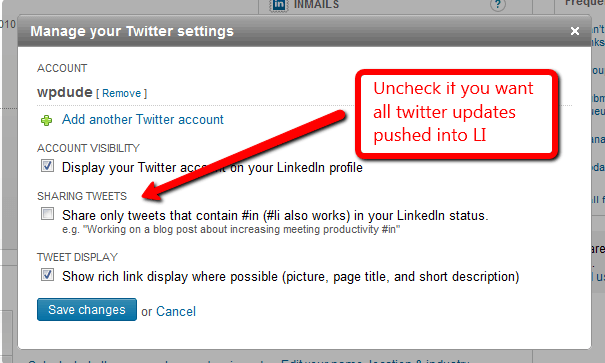
    You need to add your Twitter account details, then set your update options.

    That’s integration number two complete, when you add a post it is pushed to Twitter which pushes an update to LinkedIn.  If you add an update to LinkedIn, it pushes an update to twitter. BI-directional fun for all the family ensues.

    Facebook Twitter Application.

    The last link in the chain is Facebook.  To make this integration we are going to install a Facebook application which will link our Fb and Twitter accounts in a two way stream of fun and frollicks.

    The twitter FB application is available at http://apps.facebook.com/twitter/

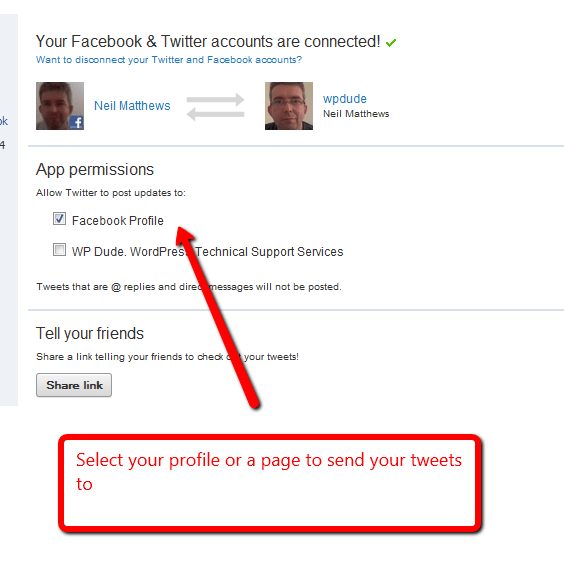
    Once you have added the application to your FB profile, you are asked to enter your Twitter ID and password.  Then any updates you make on twitter will add an entry on your profile.

    You can integrate with your profile or a particular page, this will depend upon how you want to push updates into FB.

    That’s integration number three complete, any updates in Twitter are pushed into FB.  And any FB updates are pushed back into Twitter.

    If you have configured Twitter tools to pull in updates, you may be seeing updates you made on FB pulled into twitter and then into your sidebar, pretty neat huh?

    What’s Next

    Next in the series will be a video post where I show you the social media hub in action, and an invitation to a live event to help build your social media hub.

    See you then.

    If you would like to be notified when the next post in this series is available, why not sign up for my mailing list and I will send you an email when the post is ready.

    Image by dhdesign


  • Building A Social Media Hub

    Building A Social Media Hub

    I’m a firm believer that your WordPress site should serve as the hub of you social media activities.  Over the course of three blog posts I will be telling why I think you should have WordPress as the hub, and social media as spokes on a wheel.  I will tell you how to configure your site and push updates to your social media presences

    In this post lets set the groundwork for building your social media hub on WordPress.

    Homebase and Outposts

    I’ve written about the idea of homebases and outposts in the past, but I think it is worthwhile rehashing this concept as it is at the core of my social media hub concept.

    Darren Rowse of Problogger fame first brought this idea to my attention, and it goes like this; your homebase is a property that you own, it’s somewhere that you crate your unique content and publish whatever you like.  No-one but you has control over that site but you.

    An outpost is someone elses property that you go to and market your unique content.  This could be a social media site, guest posting on another blog, videos your create hosted on YouTube or one of many other outpost marketing strategies.

    Create Your Content In WordPress and Syndicate To Outposts

    Taking the homebase and outpost idea, let’s pad this out and explain what this means for WordPress site owners.

    Your homebase is a self hosted WordPress site.  Sorry wordpress.com site owners, you are still publishing your content on an outpost, you are creating content on someone elses property.

    On your self hosted WordPress site you have total control over what you can create, when it is published any editorial control over that content.  You control the comments, and feedback to your content.

    You don’t have that on an outpost, with my social media hub concept you have complete control over your message. something you do not have if you are trusting your unique content to be hoisted on an outpost.

    Social Media Sites  Should Never Be Your HomePage

    You should NEVER make your homebase on someone elses property.

    You do not have control over your content on an outpost, you have no say over the editorial policy, you don;t have control over whether or not you are kicked off an outpost. You have no control over what shoddy ads are being displayed next to your content (and you are not earning any money from ad clicks, I’m lo0king at your Facebook).

    I hear people say that they are making their Facebook presence their homebase, because that is where  the people are – WRONG, syndicate your content to your Facebook page but make your permanent homebase your WP site.  Why? Because if for whatever reason you piss Facebook off and go against their T & Cs they can ban you from the site and with one fell swoop remove your content, your audience and your influence.  With a homebase this cannot happen.

    The Big Three

    I’m going to focus on the big three networks throughout this series, they are Facebook, Twitter and LinkedIn.  In the rest of this series I will show you how to create a social media hub with WordPress at the centre syndicating your content

    Sorry YouTube, I’m not talking about you in this series, I’ll focus  on you with a multi media series soon.

    Create A Social Media Hub

    When you create a social media hub it very easily allows you to market the content and drive traffic to your homebase.

    Create your content once on the hub, and push it out to multiple social media sites and enjoy the benefits of viral sharing and distribution,  this in turn creates more traffic to your site and hopefully exposure to your products or services you sell via your site (or ad clicks if you are a problogger).

    The Outpost Time Suck

    Spending a lot of time marketing your content on social media is a huge time suck, if you stick with me throughout this series I will show you how to configure your site to automatically update all three social media sites very quickly. I will also show you how to aggregate all your social media updates back to your site so all of your audience be they site visitors or social media friends

    Next Up

    In the next post in this series I will tell you how to link you WordPress to automatically integrate with your social media presences.  This is a much more practical post where I will show you what plugins, configurations and Facebook applications to use.

    If you would like to be notified when the next post in this series is available, why not sign up for my mailing list and I will send you an email when the post is ready.


  • Get A Sneak Peak Inside of the WP Owners Club

    Get A Sneak Peak Inside of the WP Owners Club

    I’ve added a new video to my WP Owners Club page so you can get a sneak peak inside of the club house.

    What is the WP Owners Club

    The WP Owners Club is my training and support community where I teach sites owners how to get the best from our favourite open source blogging and website building platform.

    It’s a members only part of this site where you can really get a good understanding of how WordPress works.

    Training and Support Community

    The site has three main components

    Live training events – I host regular live training workshops using a webinar format to teach people about a particular WordPress topic, and example is my recent WordPress performance tuning workshop.

    An ever growing repository of training videos – I’m building an ever growing library of training videos so you can review live events in your own time.

    Support – members can get unlimited support on all aspects of WordPress via my members only forum.

    Check Out The Video

    You can learn more about the WP Owners club including details of how to join from this page.

  • Performance Tuning Workshop Available To Download

    Performance Tuning Workshop Available To Download

    If you were not able to join my live performance tuning workshop of Thursday, all it not lost, I have a recording of the workshop available to download and watch in your own time.

    The live session was great and the feedback from the people who attended was that the workshop was really helpful with lots of information to help speed up people’s sites. Many of the attendees have already gained speed improvements using my methodology.

    In the live session we reduced site load time from 12 seconds down to 2.5 seconds.

    Why Performance Is Important

    If your WordPress site is running slowly you could be impacting your business in a number of ways. Performance is important for two key reasons:

    User Satisfaction – if you site loads slowly, your site visitors will become frustrated and click away before you can present your call to action to them.

    Search Engine Rankings – site load speed is one of the factors which helps to rank your site, a slow running site will not rank as well as a speedy site regardless of your content.

    What’s In The Workshop?

    You will learn my methodology for performance tuning your site, this is what I do when I’m speeding up my clients sites, it’s tested in the field and really works.

    My Methodology

    I will be teaching the performance tuning methodology I use to fix my clients slow loading site, this includes:

    Baselining performance

    You need to know how fast your site is running so you can monitor your improvements as you performance tune your site, I will show you the tools I use to see how long a site takes to load and where the bottlenecks are.

    Minimising overhead of plugins & Themes

    A bloated site with slow running themes and many plugins is a slow running site, this is the first stop on performance tuning your site.  I will show you how to rule out theme  and plugins as bottlenecks, and how to audit and tidy up plugin database debris.

    Checking Memory Allocation

    Does you site have enough memory available to it? I will show you how to diagnose memory bottlenecks and how to increase available memory.

    Installing and configuring Caching

    I will take you through the process if installing and configuring caching on your site to minimise the number of times a page needs to be build from scratch.  This will include

    • Page caching
    • Object caching
    • Database caching
    • Parallelising with a CDN (translation server up your content from multiple locations so it is streamed in parallel not serially)
    • Browser caching & compression with gzip
    • Minifying javascript and css files (translation make your javascript and css smaller and more streamlined)

    Hosting Considerations

    Some hosting packages are just not up to the job, I will take you through identifying your hosting package as the bottleneck to site performance

    Format

    The workshop was part presentation, part screen cast of me fixing the performance of a slow test site.

    Support

    As this is a complex topic I am also offering support to anyone who buys the workshop via a members only forum.

    Cost

    The workshop costs $77, for that you get over an hours worth of performance tuning training, support from me in the members only forum, and access to downloads.

    Guarantee

    The workshop comes with a no quibble guarantee, if you are not happy let me know and you can have your money back.

    Get Instant Access Now

    Click on the link below, make your payment and you will be redirect to a members only part of my site where you can watch the video and get the downloads.

    Image byuselessid