Neil Matthews

Blog

  • Plugin Review: Compfight

    Plugin Review: Compfight

    If you are anything like me,  finding free quality images for your blog posts is a real pain.  Enter Compfight an image search engine for Flickr.

    What Is Compfight?

    It is an image search engine that allows you to find images from the Flickr photo sharing service against a keyword that matches your content.

    That is Compfight.com. there is also a WordPress plugin for Compfight which allows you to do all of this inside of WordPress and to give the correct attribution to the person that created the image.

    http://wordpress.org/extend/plugins/compfight/

    Licensing

    All of the images are licensed under the creative commons license, so they are free to use as long as you give an attribution link back to the original creator of the image.

    There is a standard creative commons and a commercial license, since this is a business site I opted for the commercial license, this means the images are still free, but I have fewer images to choose from.

    Settings

    There are a series of settings you can make on the plugins to control which images are returned.  This is done from settings -> compfight.

    You can set the license as discussed above, set safe search so adult content is never returned, and lastly the most useful function is to set image sizes you want.  I use a standard image size for all my posts of 240 x 180 pixels, setting this as my preference ensures I am only shown images that fit in my theme correctly.

    Getting Images

    There is a new camera icon in the insert tool bar, click on that and you are granted access to a search panel.

    Click for larger image


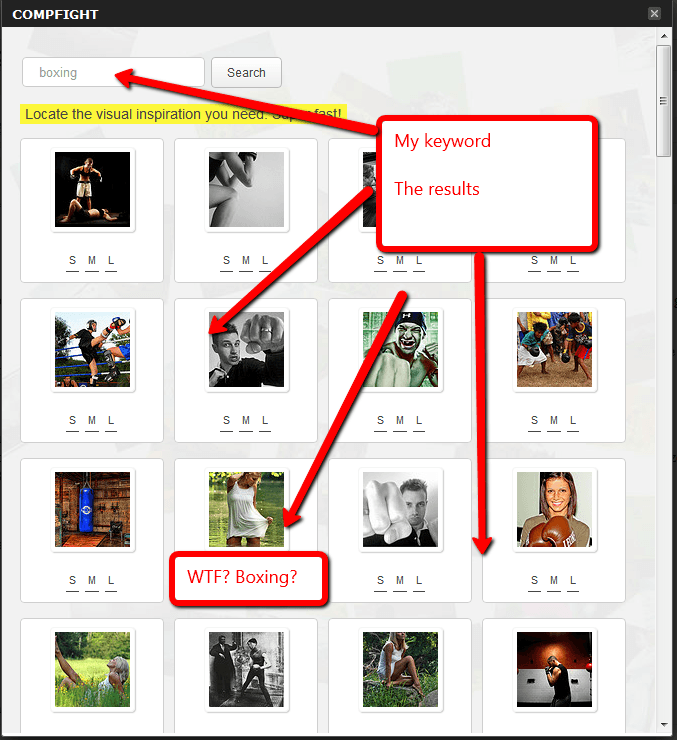
    Type your desired keyword in that panel and your search results are presented.  The algorithm may need some work, but it is far better than the existing search function that comes with Flickr.  If you have ever used that, you will know the search results are very random.
    Click for larger image

    Review the images retrieved for you, click on the one you like, with the size you like and it is automatically inserted into your post or page.  An automatic attribution link will also be added so you comply with the appropriate licensing.

    Major Downside

    One major flaw of the plugin, in my opinion, is that you cannot add an image to the featured image section of a post, only insert it into the body.

    The way my theme works is to take the featured image and show it next to a post and on the blog home page.

    As a result downloading files from compfight.com instead of using the plugin is far more effective for me.

    Wrap Up

    If you struggle to find high quality images to go with your high quality posts then this is a brilliant service or plugin for you .

    Image via Compfight by davehogg

  • The Rise Of WordPress Managed Hosting

    The Rise Of WordPress Managed Hosting

    I’m seeing an interesting development in the hosting world and that is the rise of specialised managed WordPress hosting. If you are having trouble with hacks, slow performance or poor support from your hosting company read on…

    What Is Managed Hosting?

    This is where a hosting setup is created and optimised just for WordPress sites.

    There are 1001 different types of hosting and website packages, a commodity hosting company like Godaddy or even the one I use Bluehost, is configured to keep as many people happy as possible.

    WordPress managed hosting companies focus on WordPress, and WordPress alone.  They provide a highly optimised service just for good old WP.

    Here are the ways managed hosting companies are optimised:

    Security

    Hacking of WordPress sites is a major problem, I’m called in all too often to tidy up hacked WordPress sites.  It’s expensive, time consuming and embarrassing for site owners.

    These hosting companies monitor for and repair any hack attacks as they happen.  They are also very tightly secured to stop the hackers getting access in the first place.

    All of the services I mention below also offer a full backup and recovery services.  There is no need to manage your own backup it’s done for you.  Peace of mind in a working archive of your site is priceless.

    Performance

    Many commodity hosting platforms are slow, they are slow because they share resources (often limited resources) with a large number of sites.  The web servers are not optimised or cached for WordPress requests.

    Once your site begins to get some traffic you need to upgrade and this begins to costs.

    These hosting services are optimised and performance tuned just for WordPress.  They are all very fast.

    Load time matters both to your site visitors and Google.

    Support

    Have you ever contacted your hosting support only to be treated like an idiot, or find that they have no understanding of your site config?

    WordPress managed hosting companies are staffed by WP techies who understand how WordPress works.  They will be able to help you solve your problems because they understand your platform.

    Plus there webservers are optimised for WordPress and only run WordPress so they will do exactly what it says on the tin – host a WordPress site correctly.

    Managed Migration

    All of the companies below offer a managed migration service, they will take your site and migrate it into their platform (for a fee) so you know the migration will go smoothly.  This is a sticking point with many people they don’t know how to move hosting so they stick with the shitty old system they are used to.

    The Downside

    Specialisation costs, these managed hosting companies have created a none standard environment.  Expect to pay 2-3 times the amount you would for a commodity hosting package.  If you have a more advanced hosting package you will find these companies comparable.

    Charge per domains is a common model whereas a standard hosting company lets you host as many domains as you like.

    The Players

    There are three key players that I can see at the moment and they are:

    • wpengine.com – my preferred company
    • page.ly (no link added I do not recommend this company see below)
    • websynthesis.com/ – this is operated by the people who built Genesis theme, and as a result it is super optimised for

    My Recommendation

    I was pretty blown away by what I saw at wpengine.com, I migrated a client’s site into their environment and immediately it was super fast and optimised for WordPress and their support was great.

    I’ve seen a lot of hosting companies and I am very, very reticent to recommend one but wpengine.com comes with my stamp of approval.

    When my Bluehost hosting is up for renewal I will probably be moving over to wpengine.com.

    If you have been hacked, your site is running slowly and want technical support from people who understand your site go for a WordPress managed hosting solution.

    A word about Page.ly – I had nothing but trouble working with their technical support and the domain getting “domain provisioning errors” this may just be my experience, but when someone is joining your premium hosting for the first time I expect it to work first time you dropped the ball Page.ly guys.  I’m more than happy to heare positive page.ly reviews from people in the comments, but I cannot recommend something that fell over (several times) during the migration.

     Image by bluesparrowhawk2008

  • 11 Principles to keep in mind while Designing a Great WordPress Theme

    11 Principles to keep in mind while Designing a Great WordPress Theme

    This is a guest post from Claudia Sommerfield see here bio at the bottom of the post.

    While creating web pages on WordPress, the assortment of capabilities can make you a proud owner of one of the best designed websites on the Internet. However, if you forget to look into some simple basics, you may find yourself on the receiving end. This makes it extremely vital to remember some vital points while designing a web page on the WordPress platform.

    Listed here are certain principles to follow before you design an awesome WordPress theme:

    1. Validate your code properly

    This is one of the basic principles to follow before designing a WordPress theme. You need to validate your work and ensure proper validation of the code too. HTML, CSS is the other areas to pay attention to where proper validation is concerned. This will be definitely appreciated by a knowledgeable surfer who is on the lookout for great and systematic validation of the WordPress themes.

    2. Make your design work across browsers

    It is always wise to make your WordPress theme work well in any of the popular browsers. You need to keep in mind the important browsers such as Internet Explorer, Firefox, Opera while preparing your WordPress theme. It is a well known fact that compatibility with popular browsers will fetch you an increasing number of visits across various browser platforms.

    3. Comment your code regularly

    This is a healthy practice in WordPress theme especially if you have made major modifications to your basic WP theme. This is akin to regularly servicing your code, so that you know what changes you have made along the way from the initial designing of the WordPress theme.

    4. Be original

    It is always wise to come up with something original if you want to attract visitors to your web pages. Internet surfers are more intelligent than you think and can easily identify a basic WordPress theme that is simply modified to the basics. This makes it unimpressive and the net savvy users may simply ignore your website. With thousands of websites built on the WordPress platform, you cannot expect web surfers to visit your page unless there is something eye catching or unique about your theme.

    5. Be prepared for a test run

    While formatting your content code, make sure it can handle all the default content of the Wordpress theme without any hassles. This can be achieved by a Test Run that will give an accurate feedback of your newly designed WP theme. If you feel that your design looks awkward in the Test Run then it definitely needs to be given a second look.

    6. Make content a top priority

    A beautifully designed WordPress theme with no quality content is like an empty vessel that makes more noise. Therefore, it is extremely important to put in some valuable content and quality stuff on your WordPress theme, if you want to run a long race. It is pointless having too many images with hardly any content to match it. Give top priority to the content on your WP.

    The latest trend is to make your WP theme widget ready to keep up with the stiff competition amongst good websites. Most of the techno savvy web users love to use widgets and are impressed if you provide them with the same. Widgets have become an important means of cross communication and reference on the Internet and need to be given their place.

    8. Customize the 404 page

    This is one of the most vital principles to be followed since any bad experience by the user will keep him or her away from further ventures to your website. You should make it a point to always customize the 404 page to improve the user experience. Remember, once bitten, twice shy!

    9. Provide Support and quick response

    It makes sense to follow user response in order to keep upgrading your themes. For this, you need to provide the user with a quick user response and adequate support. If you respond quickly, chances are that the ser will keep coming back to your page and remain there for a longer time. You can do this by constantly administering your web pages and regularly reviewing them.

    10. Customize unimportant pages

    To have a good WP theme, you need to customize all the easy pages such as main index templates, search result page, attachment template etc. Make a detailed check list and customize all the easy to forget and unimportant pages for a better user experience. All these pages are always required but remain in the background. However, lack of customizing these pages may result in shoddy work and keep visitors away from your website.

    11. Like it yourself

    Before finalizing your theme, make a trial run and visit it yourself through any browser to check whether you like it or not. Simply put, unless you like what you have designed, chances are that other users may not like it too. This will give you positive feedback and you can make the necessary changes that are required. Following this principle will definitely help you in bringing out the best in you and give way to an increased web viewership to your WordPress themes.

    To design a great and outstanding WordPress theme requires you to follow certain guidelines before you come up with the final theme. This will not only bring out the best in your creativity and innovation, but it will also help in attracting the choosy customers.

    About the author: Claudia is a blogger by profession. She loves writing on luxury and technology. She recently read an article on nautical theme that attracted her attention. These days she is busy in writing an article on facebook themes.

  • When Google Marks You As Suspect

    When Google Marks You As Suspect

    Did you know that when Google indexes your site and copies your content for the index, it also checks your site for malware?

    If you are marked as suspect,  you get a suspect site tag, and it will affect your sites rankings.

    A common side effect of a WordPress hack is malware being inserted into your site to download viruses or redirect your innocent site visitors to a nefarious site.

    Chaka Khan Let Me Rock You

    Singer Chaka Kkan’s site was hacked and marked as suspect, when this happens, you will see this additional line added to your search results


    Click for full size image

    Browsers

    Certain browsers like Google chrome and Firefox are keyed into this suspect site system and if you click through to a site marked with malware a huge red screen appears warning you that malware may infect your machine.

    Imagine if your clients or site visitors see that?  It only takes seconds to ruin your reputation and that definitely would ruin you.

    Check To See If You Are Marked As Suspect

    There is a very simple way to see if Google has marked you as suspect, and that is to use the following URL, replacing the red text with your own domain.

    http://www.google.com/safebrowsing/diagnostic?site=http://neilm.wpengine.com/

    What Do You Need To Do

    You need to clean the malware from your site and then ask Google to reconsider your site and remove the malware stigma.

    If you open a Google webmasters account from google.com/webmasters, under the diagnostics->malware tab is a reconsideration request form.

    Hack Recovery Course

    I cover this topic in much more depth in module nine of my hack recovery course.  Check out this page for full details WordPress Hack Recovery Course

  • Plugin Review: WordPress Editorial Calendar

    Plugin Review: WordPress Editorial Calendar

    I would like to give you a review of the WordPress editorial calendar,  an excellent new plugin I’m using.  Download it at the following URL WordPress Editorial Calendar

    WordPress editorial calendar; What Does It Do?

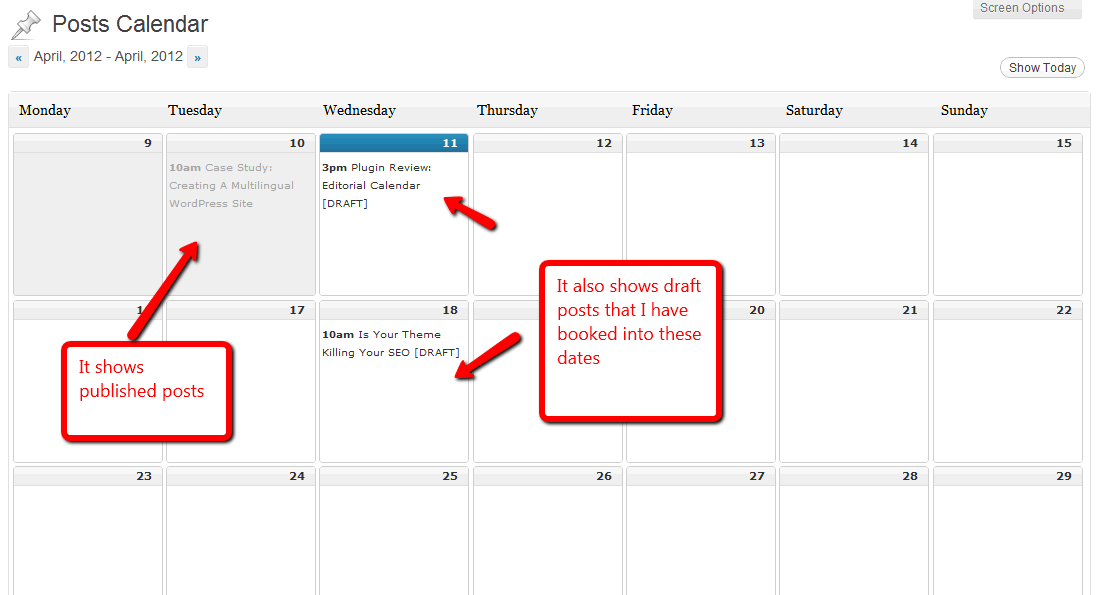
    The WordPress editorial calendar allows you to setup a schedule of posts to publish or write in the future.  It also allows you to create a schedule of posts that are in outline or draft that you intend to write at a later date.

    A new tab is added to the posts menu called calendar, and underneath that you have a wordpress editorial calendar layout of posts, these can be draft, scheduled or published.  You can editr you posts from this screen but I don’t recommend this, rather use editorial calendar as a drafting tool and edit your posts from the normal post editor.

    The Problem Is Solves

    I often get excellent ideas for a blog post and I immediately drop it into WordPress as a draft post, it will sit there for some time and often it is forgotten about.

    Once it drops off the front page of the list of posts, that idea is lost, but with editorial calendar I can set a time when I want to write that post and I’m reminded about it from the visual editor.

    I can drag and drop my ideas to different dates if I change my mind, a great post publishing tool all in all.

    If you have time sensitive offers or content that needs to go out at a particular time of the year the WordPress editorial calendar will be an excellent tool for you.

    Imagine sitting down at the start of the year and planning out all of your content and dropping it into the editorial calendar.

    Here’s What It Looks Like

    Click for full size image

    How I’ve Been Using It

    I use it to draft out an idea, and drop it into a publishing slot, you can then spread your ideas out over a period of time.

    I brainstorm lots of posts and leave them as drafts and the trouble I have is that they drop off the front page of the post editor and they are lost.

    I have not been scheduling my posts through it, but I can see how that would be very useful if I had time sensitive content that I could write now and drop into a calendar in the future (of course you can also use the schedule date function on the normal post editor).

    Get A Copy

    Editorial calendar is a free plugin available at the plugin repository at this URL

    http://wordpress.org/extend/plugins/editorial-calendar/

    Image by 42931449@N07

  • Case Study: Creating A Multilingual WordPress Site

    Case Study: Creating A Multilingual WordPress Site

    In this post I want to give you a case study on how to build a multi language blog to serve site visitors who do not speak your base language.

    I’ve been called in by a number of clients recently to build these types of sites and I want to share with you the easiest way to do this.

    (more…)

  • Plugin Review: Cart66

    Plugin Review: Cart66

    I’m building a new e-commerce setup here at wpdude to sell my downloadable video courses, and as part of that project I’m using a new plugin called Cart66.

    I thought a plugin review was due.

    (more…)

  • What Is A CDN?

    What Is A CDN?

    You may have heard talk about CDNs they are all the rage for websites.  In this post I’m going to explain what a CDN is and what it can do for your site.

    (more…)

  • Integrating WordPress With Email Systems

    Integrating WordPress With Email Systems

    Overview

    This is a protected post for members of the WP Owners Club.

    In this session I will show you how to integrate your email service such as Aweber or Mailchimp with WordPress.

    (more…)

  • How To Stop A WordPress Plugin Auto Updating

    How To Stop A WordPress Plugin Auto Updating

    Here’s the scenario,you’ve coded up a change in a plugin.  Three months later you are doing your regular plugin maintenance (you are keeping your plugins up to date aren’t you?  Security reasons you know) and you overwrite the customised plugin ARRGHHHH!!

    All your hard work is gone, you will have to recode the changes and I bet you have no documentation or memory of how you did it.

    (more…)

  • Share Worthy Content

    Share Worthy Content

    This is a guest post by Tommy Bussey The SEO Coach

    Social media is truly changing the way things are done online. Companies are beginning to truly wake up to the idea that it’s not enough anymore to just broadcast a message to an audience, and today, being successful on the web is all about how well you engage people in dynamic dialogue, which is driven by contributing to conversations, participating, and influencing the buzz that is going around for merging trends. So what makes for great share worthy content?

    (more…)

  • What Is RSS

    What Is RSS

    What is RSS and why is is important to a WordPress Site?

    (more…)