In this session I will show you how to configure your WordPress site so that it displays a cut down theme
As mobile usage grows and more and more people consume blog content on small screened devices we need to setup our sites to cater for their special browsing needs.
In this video posts I will show you how to build a multi language WordPress site using WPML a premium translation plugin.
WPML allows you to host multiple versions of your content, and provide a version of your site in a site visitors native langauge from a drop down button.
This video post will take you through a basic site build.
An important aspect of website development plan is to decide which features you are going to incorporate while constructing your website. Identifying these aspects would vary from one niche area based sites to other; however, there are several common features which are a must for every website category. It can be a time taking business to plan your competent website design by keeping all the elements in a careful balanced fashion. But with some of the top essential website features as discussed under, you can arm your site to bring the best outcome for your business. The below are the top essential website features which you cannot afford to miss.
The social sharing buttons
The social media has a great importance in the lives of millions of users. Hence incorporating this feature in your website is imperative. It has the capacity to give your website a better social media exposure. It can help you in rendering a path for visitors to your website to share your content to your plethora of friends. The more the number of share count seen over your site, the more good impression it gives about your website content to new visitors. Lastly, it also acts like an important SEO tool which helps in boosting your rankings over search engines like Google.
The mobile version of your site
With the popularity of devices like smartphones where you are competent to access internet, the mobile website is gaining lots of momentum. People prefer watching different videos, accessing social media, checking emails, etc. over their smartphone devices. Hence considering this paradigm shift, developing a mobile translation of your site right from scratch along with adding several new applications would certainly going to add a new edge to your website. This aspect is among the top feature which you cannot avoid missing in your website thus giving the mobile users an enhanced level experience and eventually increasing your site hits.
Adding up a Blog in your site
By incorporating a blog in your website can help you in boosting the search engine rankings for your site. It also helps you in giving your site content a new edge in terms of regular updates. The search engines like Google simply loves quality and updated content over sites coming via blogs. The content plays a good role in getting links to your site thus helping it promoted in a wide web spectrum. Once you decide to incorporate this important feature to your site, you are supposed to have several things to make your blog effective. These include having a comment scheme, a proper spam protection system, RSS feed, search engine optimized URLs, social sharing buttons, etc. Without having a blog, the quality content over your sites will hardly find its ways to new visitors.
Email subscription
The more big email subscription list you have, the greater is the opportunity you have for your sales conversion. Every website owners aspires from the visitors to buy something which he or she is offering or at least the visitor coming at their site must fill the contact form. However, if a visitor simply walks out without giving his or her contact info then you do not get the chance to contact them. Hence it is important to incorporate this feature by explaining that you would inform the visitors with the latest offers on your products or services in the coming future. In this way, you end up getting response to your email subscription which eventually plays an important role in expediting your sales conversion.
Wrapping up
In order to embark with an effective website design, adding these above discussed features could be called as a must for everyone. These would help you in giving your website a better exposure to your targeted audience irrespective of your website category. Hence at any point of time you cannot afford to miss these features while designing your site.
About The Author: Claudia is a writer. She loves writing, travelling and playing. Recently she did anarticle on website features. These days she is busy to write an article on essential website tricks.
On my site I have a number of banner ads which link to my WordPress technical support page. I wanted to see if I could measure performance of these banner ads.
There are a number of plugins out there which will track clicks on ads, but I wanted to use Google analytic s which I use for all of my other monitoring needs.
Here is a quick video posts to show you how to track clicks on your banner ads, be they internal links or off site links to affiliate or other sites.
I’ve been experimenting with various ways to increase email opt-ins here at wpdude.com and I thought I would share some of my findings with you.
Why Experiment?
People are suffering from information overload and just because you add an email opt-in to your sidebar does not mean you are going to get people to join your list, you need to stand out.
New techniques are becoming available to get your opt-in message in front of people in a more effective manner. If you have a valuable “thing” to swap in exchange for an email address be it an ebook, video or other valuable resource, you are going to be able to increase opt-ins and get your marketing message out.
Level playing field
I created a level playing field on my site, I’ve gone pretty minimal and removed all sidebars and opt-in forms to give my experiments the best chance of success. All opt-ins will come from the specific experiment. not my standard sidebar
I ran one test at a time in isolation to make sure I was testing just that technique. I also created separate email lists per experiment so I could measure effectiveness.
I also ran each experiment for only one week to judge effectiveness and to give myself objective results. The email ,list with the most sign ups after one week equals the most effective technique.
Here are the various methods I tested:
Home Page Gateways
If you have not heard of a home page gateway, can I direct you to mixergy.com, I’ll wait here while you check out their home page gateway.
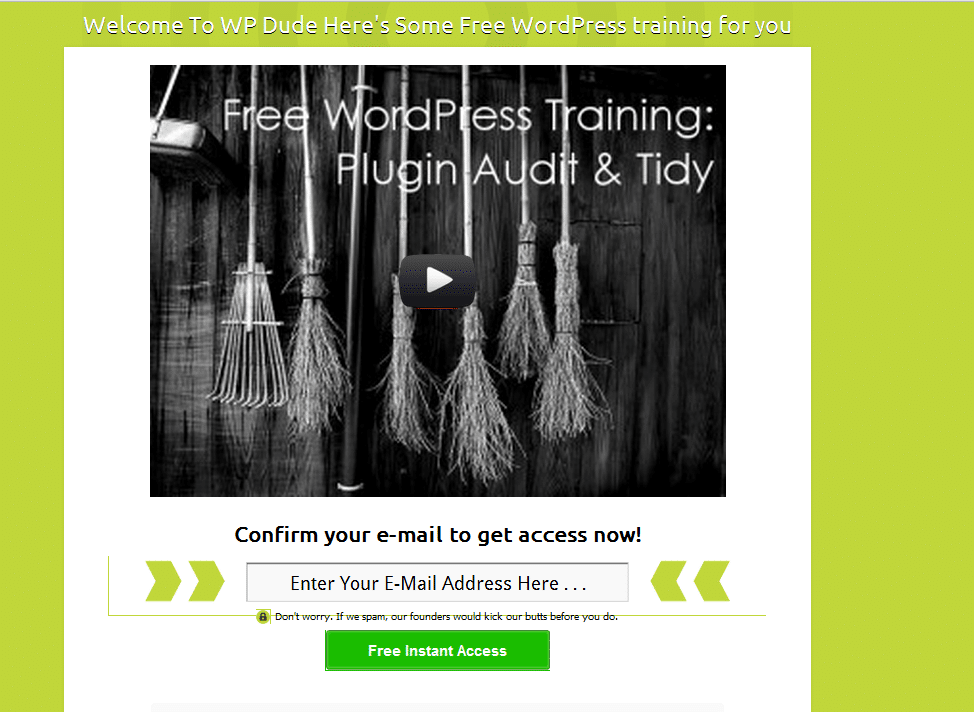
I setup a home page gateway on my own site using the plugin Welcome Gate, I’m sending you over to a marketers site, but he is one of the good guys so don’t worry.
Here is a screen grab of the welcome gate I setup.
Click For Full Size Image
You can use text or videos in your welcome gate (see video opt in plugins below). It works by storing a cookie on your browser, if the cookie is not present you are prompted to opt in before you are shown the home page.
You can add various options including a “skip this” step so people do not have to opt in.
My results were mixed, I got some opt ins, but it was not my most effective test, added to this I don’t like this technique so I’m loathe to put my site visitors through this experience. I would love to hear comments below from people using the technique who have had great results.
Popup Plugins
I first started using popups about 18 months ago with great results. I setup a free video download popup in exchange for an email address.
I was using the Popup Domaination plugin, software I no longer recommend so no link. They are an internet marketing company not a software development company. Their plugin broke after a WordPress update, their reply, update to the latest version (at a cost) to get the plugin to work – shocking support
I moved over to Pippity ( so incensed was I that they would not support their software). I’m glad I did, it is an excellent popup plugin. It has split testing and great metrics to judge how effective your popups are.
If you have a high value freebie such as an e-book or video download to offer popups are a great tool.
My results are more to do with my technical audience not being too happy with popups (I think) and I was seeing 3-4% opt in on my popups, okay but not great.
Site Top Drop Down
You’ve probably seen these before, a drop down banner at the top of the screen appears after a few seconds and grabs your attention.
Hello bar is free for a small number of impressions, you then need to move over to the premium version. The free impression level is not enough to give this system a test you only get 100 clicks.
Hello bar works by taking people through to a sub page with an offer or opt in. box I was seeing 0.33% click through, very very poor, hello bar does not work for my audience.
Video Opt In
This is a new one for me, if you go to this post, you can see the video optin in action. What Is WordPress Multisite
I’m using a brilliant (but premium plugin) called Lead Player. This is made by the same people who created the Welcome Gate plugin above.
It allows you to provide people with great free content but insert an optin for them to get the video goodies. I have a lot of video tutorials and some high traffic pages that match that content. I’ve put these video there and I’m seeing great results.
Using Leadplayer I can set the opt in to appear at the start, after a set amount of time or at the end of the video
It also has a call to action function to send people to a specific page too. I’m using the call to action to send people to my services page.
It integrates with all the main email providers and Google analytics, so I can see exactly how effective the plugin is.
The results have blown me away. I’m seeing 20% opt in rate. This is the current leader of my tests.
By adding real value through videos people are happy to opt in.
Free membership Site
This is my current experiment. I have a large number of video tutorials. I’ve put them in a membership site that is free to join.
Using the new membership site features of Premise I’ve built out a members only section of my site. Premise integrated with my email provider so all people who sign up are added automatically to my list.
I’ll write up a review of Premise soon, but in brief I’m liking the new membership site features.
I’m still mid experiment, but the massive value provided along with the free sign-up nature is working well. but my gut feeling is that video opt-in in combination with a membership site may be the way forward
Wrap Up
All of these techniques have improved signup rates, but the final two are showing great results for me. Be warned email op in techiques will always drop once people get tired of them
If you would like to see a live demo on how to setup these various options, I’m more than happy to run a webinar, let me know in the comments if that is of interest.
I wrote a post last week asking if people are interested in a WordPress performance tuning course, to learn how to speed up a slow loading site. It looks like that course has been given the green light.
I’m planning to teach people the process I use to speed up slow sites. Go and check out the post now if you missed it I’ll wait here for you WordPress Performance Tuning Course
I had a lot of response to the post and the email I sent out, so the course has been given the green light.
Format Survey
Before I start work on the content and inviting people to join me, I want to know what you think the best format for a course is.
I can offer the course in the following formats:
Live webinar
Self paced video tutorials
Self paced video plus Q & A webinar
Self paced video plus members only forum for questions
E-Book
Audio program
A note on webinars, timezone differences sometime cause issues with people wanting to join a live event, I’m based in the UK and I do webinars between 7pm-8pm which is the following times in other areas
Pacific Timezone USA – 11am – 12pm
Eastern Timezone USA – 2pm-3pm
Sydney Australia – 5am-6am
If you cannot attend for work reasons, or that it is stupid-o-clock where you live go for one of the self paced options.
Free Seat On Course
I’m running a competition alongside my survey and the winner will get a free seat on the new course. I’m asking you to simply answer the following question:
Explain why this training will help you
I’ll review the replies and the best answer will get a free seat on the course.
I get called in a lot to help speed up slow loading WordPress sites. This is important for both user perception and for search engine rankings(Google doesn’t like slow sites).
I thought it would be a good idea to create a video course to show people how to move through the step by step process I use to speed up slow loading sites.
This post is a toe in the water to see if this course is required. If I get enough response I’ll create the course and make it available as a downloadable video course.
What Will I Be Teaching?
I’ll be showing people who sign up my proven method for moving through a WordPress site and speeding up the various layers of a site..
This is what I have done on numerous client sites, I know it works, and I have been able to successfully get sites to run at a much faster speed.
Who Is It For?
This course will be for people who’s WordPress site is running slowly and need it to run more responsively.
This course is also for professionals who want to speed up their clients site. If you would like to supply this type of service this is for you
It will require a certain level of technical knowledge so this is not for the absolute beginner.
Planned Modules
Here are the seven modules I’m planning on covering:
Performance Tuning Methodology – I will take you through my proven methodology to speed up sites layer by layer
Finding theme bottlenecks – This module takes you through performance tuning your theme.
Finding plugin bottlenecks – plugins often don’t play well together I’ll show you how to troubleshoot your plugins.
Finding WordPress Core & Database bottlenecks – the final layer to test is WordPress itself and the database.
Trouble shooting your hosting account – sometimes cheap hosting is the root of your problem I’ll show you how to check this out
Cache plugins & CDN Usage – in the final module I will show you how to speed up your site with cache plugins and offload content with a CDN
Do You Want To Know More?
If I get enough response I will be inviting a small group of pioneer members to work with me very closely. I’ll build the course out and make it available as a stand alone product.
Would you be willing to join me for this course. All I’m asking for right now is your email address, join the list below to let me know the level of interest.
This is a guest post by Tay Omojokun, the developer of this plugin so he may be a little biased in his reporting, take it away Tay:
EmbedPlus: Advanced YouTube Embedding in WordPress
Bloggers looking to customize video embedding in WordPress should check out a unique plugin for YouTube offered by EmbedPlus. Beyond the basic ability to embed a YouTube video using links, EmbedPlus adds several customizable features that the standard YouTube player does not provide. Below is a couple of screenshot illustrating some of these features.
Features
Here are the important features listed:
DVD-like controls
Chapters (custom and social)
Instant Replay
Slow Motion
Looping (scene and whole video)
Video Reactions/Comments (optional)
Reddit (Highest scoring submissions)
Google+ (Most recent posts)
Twitter (Most recent posts)
Digg (Most “Dugg”)
YouTube (Most recent comments)
Timed-Annotations (with link support for calls-to-action)
Demo
Before installing the plugin, take a look at the demo provided on the EmbedPlus homepage that enhances a popular TED Talk video on deep sea creatures. There, you can directly play with the listed features and see how they might help engage your visitors. For example, as the home page demo and screenshot above show, the annotations feature can be used to support calls-to-action that can motivate visitors to take part in a given campaign (e.g. mail list signup).
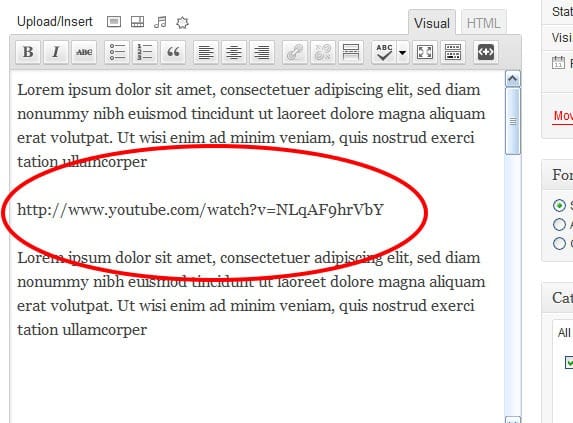
To install the plugin, simply download it from here and within seconds, you’re up and running. Using it becomes a matter of just pasting links in the rich-text editor as displayed below.
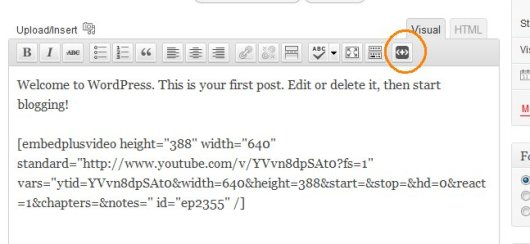
To make customizations like annotations and chapters, simply click the added EmbedPlus button on the editor toolbar and a wizard is launched right within your WordPress interface. After entering your edits (e.g. chapter times), you’ll get short code to paste on your blog that encapsulates them. Below, you’ll see a screenshot of the wizard’s start button and an example short code that is generated at the end of the wizard.
The EmbedPlus team is eager to get feedback here. You’ll see a Google chat badge that the team will be checking for questions, frequently and periodically.
Neil’s Two Pennys’ Worth
I wish I had seen this plugin when I was first building my coaching videos. They are an hour long and the ability to skip to a chapter would be brilliant for my coaching clients. Is it youtube Only?? Perhaps I could chunk up my videos and upload them to youtube so I can save on Amazon S3 costs.
I used a random number generator to select the winners because there were so many great answers, They came out with comment number 7 and comment number 12, so Metta Zetty and Brian C are the winners congratulations.
Nick over at Elegant Themes has offered you, the good readers of WP Dude two free passes to all of their premium themes for a year.
This amazing prize valued at $39 … sorry I lapsed into cheesy game show host for a moment 🙂
I’ve Worked With These Themes In The Field
A number of my clients have used Nick’s themes on their own projects and I have spent time under the hood building child themes from them, so I know the quality of the coding is sound.
I’ve worked with Simplepress (not to be confused with the forum plugin) and Chameleon and both are very good themes, but more importantly they look great. Check out the portfolio the team at elegant themes has put together.
They have over 70 very well designed WordPress themes just waiting for our lucky readers to win.
How To Win Free Theme Membership
Simple leave a comment below on why you think premium themes have changed the face of website design I will pick the two best comments and the winners get access to all of the beutiful designs at Elegant Themes .
Did you know that you can use the Google suggest function on a search to improve SEO and match blog post titles to what people are actually searching for?
Match Your Blog Post Titles To Real Searches
Imagine this, you go to Google and search for something, and the title of the page that is returned exactly matches what you have typed in. That is the link you will click first not some related search result Google has seen fit to provide you with.
Using the technique I’m about to explain that is what you can do for all your blog posts.
Use What People Are Searching for, Not What You Think They Are Searching for.
You may spend hours crafting quality content, but if you don’t match your SEO settings such as title and meta description to what people are actually typing in as search queries there is very little chance you will get click throughs from Google and Co.
What you think people will be searching for when trying to match up your content and what they actually type are sometimes completely different.
Google suggest give you real time data on what people are typing.
How It Works
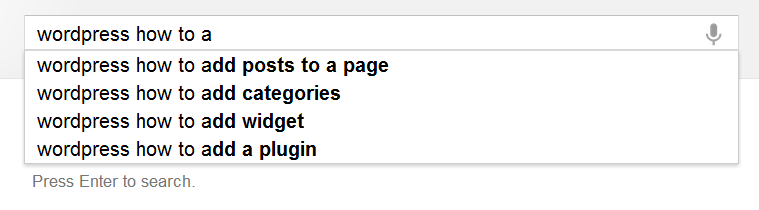
If you go to a Google search page and start typing, you will see a suggestion appear, see this screen grab where I started to typing in “WordPress How To”. The top four most searched for queries are shown to me.
I can see that “WordPress how to use” is the top search and I could use this as my post title, and match my content directly to the most popular search. Google indexes my content and serves it up (hopefully) when that query is typed in.
Using This Technique To Plan Content
Not only can I use this technique to give my post a relevant title, I can also use this to plan my content. If, for example, I was writing a series of WordPress how to articles, I can get a series of relevant posts titles using this technique, but adding a – z onto the end of my “WordPress how to” query and I suddenly get 26*4 article suggestions.
WordPress How To A give me these, continue with WordPress How To B, etc etc.
Caveat
As with all SEO techniques, make sure you are writing for humans first and for the search engines second, if you post titles don’t make sense, people will notice and assume you are gaming the search engines rather than creating content for people. Here is an example, if I’m writing my WordPress how to series, by adding some abbreviation (human readable, but ignored by the search engines) I can make the post title make sense.
“WordPress How To: Add A Widget”
instead of
“WordPress How To Add A Widget”
Hat Tip
A huge hat tip to Skelliewag who first suggested this technique in one of her blog posts. Sorry I cannot find the original, but she proposed that you use this when creating a brand new blog to get traction with posts that match what people are search for in your niche.
WordPress SEO Workshop
I’m running a WordPress SEO workshop on Thursday 21st June where I will show you how to use this technique along with many other tips and techniques.
The workshop is no cost, but seats are limited, check out this post for details.
WordPress is a great tool for publishing your content, but out of the box it is NOT 100% optimised for SEO or Search Engine Optimisation.
I thought it would be a good idea to create a video course to show people how to move through the step by step process I use to setup my clients sites for the best SEO.
This post is a toe in the water to see if this course is required. If I get enough response I’ll create the course and make it available as a downloadable video course.
What Will I Be Teaching?
I’ll be showing people who sign up my step by step approach to making your site as appealing to the search engines as possible.
This is what I have done on my own and numerous client sites, I know it works, I’ve got multiple posts at position one in Google. These posts send me a ton of free traffic.
Who Is It For?
This course will be for people who’s want more organic traffic to their site through on-site white hat only techniques (no spamming or underhand tactics here).
It’s not technically demanding, but it involves a number of techniques that change the way your site talks to the search engines.
The Format
I will be building a members only site where you can get access to the video tutorials, supporting content and support from me.
Planned Modules
Here are the five modules I’m planning on covering:
SEO Overview – what is it and how it can help you bring more people to your site
WordPress SEO Config – the WordPress config changes and plugins that make all the difference
Optimising Posts and Pages – how to ensure your message is correctly understood by the search engines, whilst maintaining human being readability
Keyword Research – learn what keywords people are searching for in your niche, and plug them into your site.
Monitoring Your Efforts – once you’ve done all the hard work, how can you be sure your changes have made a difference, I’ll show you how to monitor your SEO efforts.
UPDATE: Course Running This Week
You can sign up for this no cost webinar from the register link below
I’ve worked with a number of clients when providing WordPress technical support who need secure post or pages on their WordPress site to collect sensitive information. In this post I want to show you how to setup HTTPS on WordPress.
What Is HTTPS
HTTP stands for hyper text transfer protocol, or the standard way web pages are transferred between your browser and the web server you connect to. HTTPS is HTTP with SSL or secure socket layer. This is an encrypted and secure way of sending data between your browser and the web server.
Enough with the “bibbling” techie speak, what does that mean? It means that the information in your web page is sent back to the web server over an encrypted channel rather than in the clear so hackers cannot intercept that data and use it for nefarious reasons.
Why Would I Want To Use It?
If you are capturing sensitive information on your post or page and then sending it back to the web server in a normal fashion that information will be sent in “the clear” and as a result it can be intercepted by sniffers or people who setup software to capture internet data and try to extract relevant items such as credit card or login details.
wherever you need to capture sensitive information, you need to use https not http.
Two Examples
You are running a health clinic and part of your process is to collect details of the patients symptoms in a web form before booking an appointment. Sending confidential patient information in the clear is a terrible idea.
You capture credit card information on a form before sending it to your payment processor. Part of your agreement will be to have your pages secured via https before you can accept payments.
Prerequisite: The Certificate
The first thing you will need is a certificate on your hosting platform. This post is a bit of a cop out onm that respect, because this is the hardest part of this process, but each hosting company does it a little differently, so I cannot give you detailed information.
Bluehost for example allows you to buy a certificate for approx. $50 per year, and Godaddy also has a certificate add-on/upsell.
If you have your own VPS you will need to create a CSR (certificate signing request) and send that off to a certificate authority and have a custom certificate for your domain created.
As you can see there are many different ways to get and install a certificate, please consult with your hosting company to find the best way to get an SSL certificate, they will be able to help.
What The Certificate Does
The certificate allows you to negotiate a secure channel between your browser and the web server by sending and receiving encryption keys. I’m not going any deeper than that, but if you want a more thorough understanding check out this article http://www.domainledger.com/secure-ssl-certificate.html
Posts and Pages Via SSL
Once your certificate is installed and working we can start securing WordPress resources.
You can check HTTPS is working by typing in https://yourdomain.com. If it returns a valid certificate you will see a padlock in your browser bar.
To secure particular post or pages I like this plugin.
It very simply and neatly adds a force https check box on the post editor. Click on this and the plugin will redirect any visitors to this page to the https version rather than http.
There are also additional options to make your entire site run over https, but unless you are running a bank via WordPress the performance hit will slow down your site considerably as each page will need to be encrypted.
Admin Via SSL
Another option you may want to consider is securing the admin dashboard of your site. All passwords and admin commands are sent in the clear. You may want to consider forcing all admin work over HTTPS.
Please note the above plugin also does this, but here is an alternative using wp-config.
By adding two commands to the wp-config file you can secure the admin or login areas.
If you need to collect sensitive information on a WordPress please consider installing a certificate and forcing HTTPS on your posts, pages or admin dashboard.



![[Video] Monitoring Banner Ad Performance With Google Analytics](https://dev.neilmatthews.com/wp-content/uploads/2012/09/47714548_ec7f95c846_m.jpg)