Neil Matthews

Blog

  • Comm100

    Comm100

    This is a guest post by Kevin Gao from Comm100, see Kevin’s Bio at the bottom of this post

    One of the first things many people do when starting up a new WordPress website is to begin building a communication channel with web visitors. This almost always involves putting a generic contact form on a “Contact Us” page. Indeed, contact form is an effective way of letting your web visitors keep in touch with you, but there are also other options available to WordPress powered websites such as live chat plugin.

    What is Live Chat Plugin?

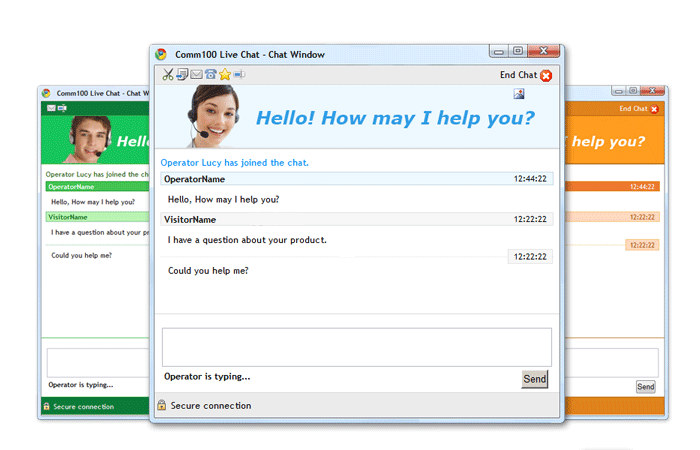
    Live chat plugin, as the name suggests is a plugin that embeds live chat feature into your WordPress powered websites. By adding a live chat plugin, you can keep connected with web visitors and offer real time assistance to them. Whatever your WordPress powered website is, a commercial site or a personal blog, there is a good chance that your website can be enhanced by live chat plugin. Here I’ll take  Comm100 Live Chat WordPress Plugin as an example to explain how live chat plugin can benefit your blog or online business.

    1. Reach Your Visitors in a Timely Manner With Comm100 Live Chat, your visitors can start a chat with you immediately and they don’t need to provide their emails or any other details as when filling in contact forms to connect with you. Even when you are offline, your visitors can leave messages and these messages can be directly delivered to your inbox. For a business website, this can help you improve you conversion and customer satisfaction. And for personal bloggers, the ability to make it easier for your readers to reach out can strengthen your relationships with them and enhance the personal aspect of your website.
    2. Track Your Visitors in Real Time Along with providing live support to your web visitors, Comm100 Live Chat also keeps you updated about your web visitors’ footprints and activities. You can see where your web visitors come from, what they are viewing currently, how long they have stayed on your website, what keywords they use, how many times they have come and many more. This can give personal bloggers a bird’s-eye-view of the blog readers. As for online businesses, you can easily have an insight of what your web visitors are interested in and identify your potential customers, thus formulating your marketing campaigns and carving your offers in a better way to win more customers.
    3. Invite Your Visitors Proactively Instead of re-actively waiting for web visitors to connect with you, proactive invitation allows personal bloggers to engage readers proactively to exchange thoughts and ideas, exploring ways of improving blogs. This feature is especially useful for
      online businesses as you can not only spot the best prospects, but also have the ability to actively reach out to them. For example, when you notice your web visitors have been on a certain page for a while without taking any action, chances are they
      are interested in your products on the page or need help with something. If you can get them into a live chat, you will have a great opportunity to turn them into your customers. To make things easier, the invitation can be done automatically
      based on rules you predefine. There are a lot of parameters such as visit times, referring page, search keywords etc. available for you to design your invitation program based on your own needs. By far, the most important practice of proactive invitation is to treat it like a science ¨C to test a wide variety of implementations, make changes, and continue measuring.

    Wrap it up:

    Live chat plugin can be an alternative to engage your web visitors beyond the traditional emails and contact forms. Whether you are a personal blogger looking to connect with your audience or a business owner using WordPress to build your website, live chat plugin should be able to help you.

    Author Bio:

    Kevin Gao is the founder and CEO of Comm100, a leading provider of live chat software for business. As a software developer as well as a small business expert, he’s always ambitious to revolutionize the way of online customer service and communication.
  • Multi Language Contact Forms

    For the vast majority of us, our website is a marketing tool and we want to generate leads from it for our business.

    The main way most people do this is via some sort of contact form, but how do you make multi language contact forms?

    I’ll teach you how I do it for my clients.

    Gravity Forms

    I use WordPress for all my client sites, so if you are into one of the other content management systems then this post is probably not for you.  As an aside, give WordPress a go for your multi language sites, the support for multiple languages is great.

    The process starts with a top quality contact form plugin.  I use gravity forms.  It’s a premium plugin and prices start at $39,  but this plugin is so useful I use it on all my sites and my clients’ sites too and the investment is well worth while.

    Not only will it solve your multi language issues, but it will link to your email provider, create quotes in things like Freshbooks, add the users to your CRM, the list goes on and on it’s the best contact form out there full stop.

    Multi Language Contact Forms Add-On

    I use a plugin called WPML for all of my multi language sites.  It’s a great tool and speeds up the development process greatly.

    The good people at WPML have also developed a multi language add on for gravity forms which makes it very easy to translate your forms. The addon is free and available here Gravity Forms multilingual.

    Making Your Form Fields Available To Translate

    The main thing the plugin does is to make your form fields available to translate.

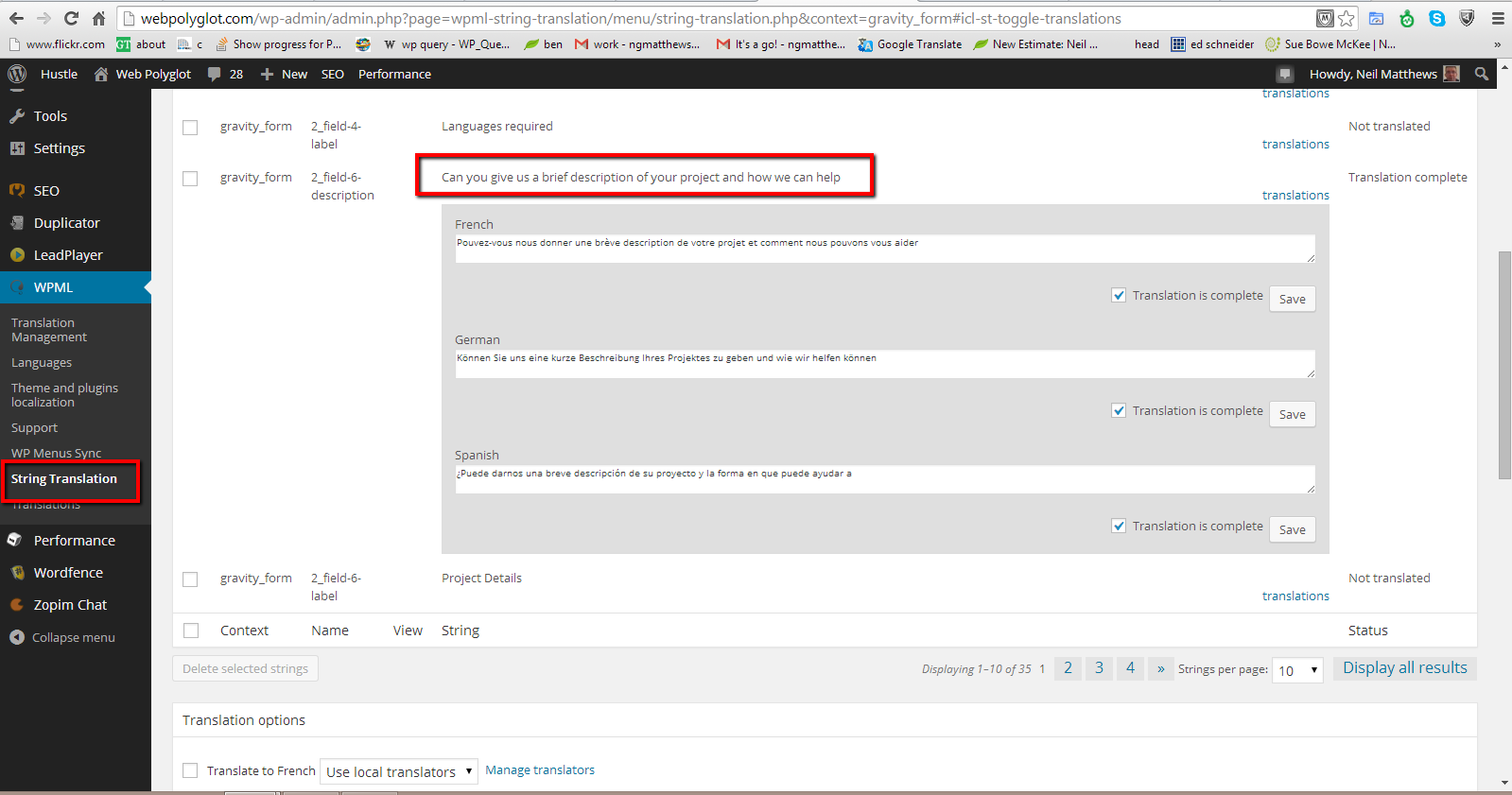
    As an example I have description on my hire us form that says  “Can you give us a brief description of your project and how we can help”.

    In WPML there is a string translation section, I simply go into that and search for the string above and I can add my French, German and Spanish translations.

    Click for full size image
    Click for full size image

    Sending Your Forms Out To Translation

    Another benefit of WPML is that you can send the content of your website out to freelance translators.  They receive text files and translate then, sending them back to your site in a seamless process.

    You can also do this with your forms so you can build multi language forms even if you have no language skills for your target translation.

    Route Responses Based Upon Language

    So you form is up and running in multiple language and the stream of leads is coming in as expected now what?

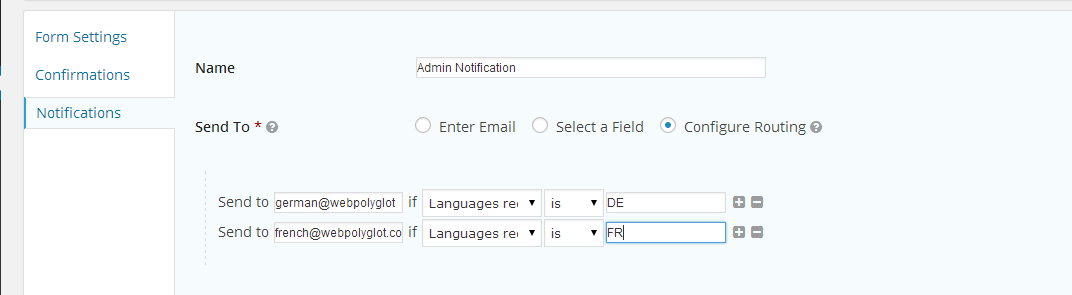
    You can route your leads to different addresses based upon the language selected when the form was completed.

    This is great if you have multiple team members dealing with leads from different countries.  Here’s a screen shot of the routing screen where I send forms to different addresses.

    Click to see full size image
    Click to see full size image


    The Only Thing Missing

    The only thing missing from this process is the ability to send form entries out for translation as we can for the forms themselves.

    My quick and dirty solution is to run any forms sent to me that are not English through translate.google.com.   The results are weird but I always get the gist of what is required.

    If anyone from WPML reads this please leave a comment to let me know if translating entries is on the development plan .

    Wrap Up

    For most websites, collecting leads is the main function, make sure this crucial part of your process is translated and easy for your site visitors to contact your business.

    What not jump over to my hire us page and see the contact form in action at the bottom of the page.

    Photo Credit: Robots are Stupid via Compfight cc

  • We Are Launching Our New Ongoing Maintenance Program

    We Are Launching Our New Ongoing Maintenance Program

    I’m happy to announce that we are launching our new ongoing WordPress maintenance service today.

    If you would like me and my team to look after your site then this is the service for you.

    Ongoing Maintenance

    As you are no doubt aware WordPress is not a static thing and needs constant maintenance and management, that is why we created this service to look after clients sites on an ongoing basis so you can concentrate on running your business not managing a website.

    Here’s What We Offer

    Here’s an overview of the service we are offering.

    • Full backups (including offsite storage)
    • Security & Hack protection
    • Uptime Monitoring (and fixes if you crash)
    • Updates (WordPress plugins and themes)
    • Email support (got questions about wordpress or your site we can help).
    • Troubleshooting any issues that occur

    Full Details

    If you want full details including pricing and how to subscribe check out this page

    Hire A WP Dude>>

    Photo Credit: Josep Ma. Rosell via Compfight cc

  • Are Attachment Pages Affecting Your SEO

    Are Attachment Pages Affecting Your SEO

    Something  WordPress does by default that Google does not like for SEO reasons came to my attention recently. In this post I want to tell you about a potential SEO hit you may be taking but you may be completly unaware of. Are attachment pages affecting your SEO

    Attachment Pages

    Every time you upload and attach an image to a post or page it creates a new page called an attachment page.  For example the image attached to this post creates this page.

    https://dev.neilmatthews.com/?attachment_id=8978

    The problem is that Google can also index these pages and add hundreds of very low quality pages into the index for your site.

    Thin Content

    If you add 1-2 images per post that is an additional 100-200% of pages that are classed as thin content by Google.

    On these pages you will see  a single image, a few lines of title text and that is all, if Google sees your site stuffed with thin content pages it will assume your site is of low quality and apply a penalty.

    To add context it is recommended that there are at least 300 words per page to keep Google happy.

    How To Fix It

    The way to fix this problem is to create a redirect from your attachment pages back to the parent page where the image is attached.

    Enter WordPress SEO Plugin

    I strongly recommend you install and configure the WordPress SEO Plugin by Yoast, http://wordpress.org/plugins/wordpress-seo/ .

    One of the functions of this plugin is to redirect to the parent page.

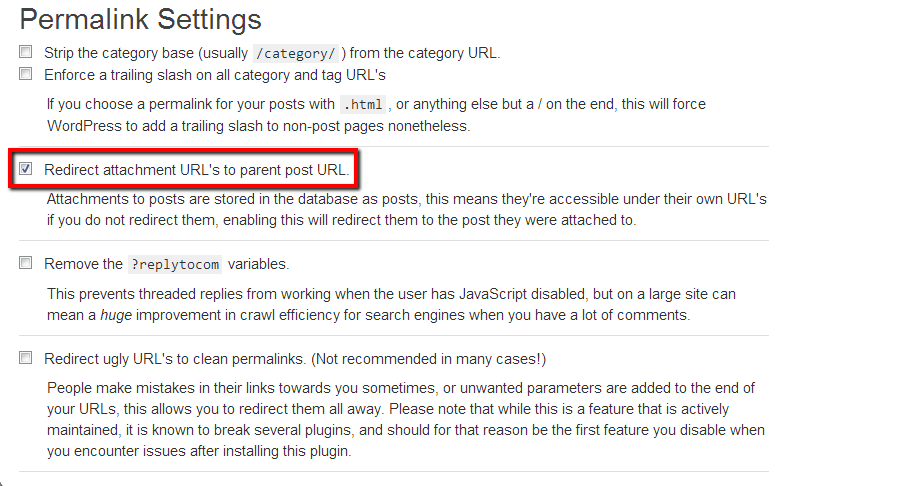
    Go to SEO -> permalinks and on that page check Redirect attachment URL’s to parent post URL

    imageattachments


    What happens is that the plugin sets up a 301 redirect from the attachment page which in turn tells the Google index that the page has been moved and to update the index to point at the parent page thereby removing all the unwanted image attachment pages from your index.

    It’s a five second fix that could increase your traffic.

    Wrap Up – Are Attachment Pages Affecting Your SEO

    My organic traffic has taken a hit in recent months due to the recent Panda update at the end of May and I’m slowly working through the cause, I’ll be writing more about my findings in later posts that will hopefully help you if you have seen a reduction in traffic.

    Further Reading

    Here is a very good article which I’ve been using in my reasearch.

    http://arwebzone.com/google-panda-effect-on-wordpress-causes-and-solutions/

    Photo Credit: Keith Marshall via Compfight cc

  • We Do Do Apps

    We Do Do Apps

    I’m often been asked by clients:

    “Do you do apps?”

    In the past my answer was always “no” we didn’t have the in-house experience or expertise to develop apps for Iphone, Ipad and all of the Android devices out there.  This is always something I regret having to say.

    Apps Are The Future

    The more I use apps myself the more important I see them becoming to us as a community than consumes digital information.

    We want our info on our devices in a way we can use on our devices, not a cut down website with poor functionality.  We want to swipe and pinch and double tap just like we do on our other apps.

    I decided about six months ago that I wanted to offer app development services to my clients to compliment the web development work we do.

    I’ve been forming a team behind the scenes of app developers and designers.  And we have been quietly working on a few app projects and it is working really well.

    So now when someone asks:

    “Do you do apps?”

    The answer is:

    “Yes, we do do apps!”

    There’s An App Inside Everyone

    It used to be that there was a novel inside everyone, now whenever I mention app development, everyone has a great app idea inside them, the problem is getting it out and getting it coded, this is the problem we are trying to solve by offering app development services.

    Most People Don’t Know Anyone Developing Apps

    If you ask someone

    “Do you know a website developer”

    Most people can refer you, but if you ask:

    “Do you know an app developer”

    Not many people do know any app developers, it a new growing field, not as widespread as web development yet, but growing.  Hopefully when someone asks or you decide to develop an app you will think of us.

    Most People Have No Idea Of The App Development Process

    This is another stumbling block, most people simply have no idea how an app is developed, and this brings me to the real crux of this blog post.

    I’m running a webinar next week to show potential “Appreneurs” how we develop apps here at wpdude.

    If you are interested in the idea of developing your own App and would like to understand the development process, then this webinar is for you.  I’ll show you our process and answer any of your app development questions.

    Book Your Seat

    The webinar is no cost, but seats are limited to 100, so click on the button below for full details, and I hope to “see” you on the webinar.

     Book Your Seat>>


    Photo Credit: Daniel Y. Go via Compfight cc

  • How To Verify Your WordPress Site On Pinterest

    How To Verify Your WordPress Site On Pinterest

    How To Verify WordPress On Pinterest

    In this video post I will show you how to verify WordPress on Pinterest.  It’s a short three minute tutorial to take you through adding a meta tag to  your site.

    Verifying your site shows that you are a trustworthy source, for more details check out the Pinterest page on this subject.

    http://business.pinterest.com/verify/

    Video

    [leadplayer_vid id=”51B993ABC4295″]

    Files Mentioned

    header.php

    Step By Step Guide – how to verify wordpress on pinterest

    1. Login to Pinterest
    2. Click Profile
    3. Click Pencil
    4. Click verify by meta tag
    5. Copy tag
    6. Paste Tag into header.php or script area
    7. Click on verify website

    Photo Credit: Jon McGovern via Compfight cc

  • The Art of Integration

    The Art of Integration

    I use a number of third party software as a service  (SaaS) products in my business, but something I always ask before I signup for a product is:

    “Will it integrate?”

    What do I mean by integration?  I mean can I collect data once and then have it passed between all solutions.  The idea of re-keying data to make the various systems of your business it time consuming and for me deadly boring, I want to integrate WordPress with these systems.

    Rather than creating a bunch of new tasks to manage your shiny new SaaS I suggest you check out any integrations they have on offer before taking he plunge with the new tool.

    Most of the popular software as a service providers understand their system will not solve everyone’s so they will provide a number if integration with other solutions where data can be freely shared and not re-keyed.

    To give you a feel for integration here is how I use it across the services in my business.

    Mailchimp

    I use mailchimp as my email service provider, I want to capture leads directly from my website without keying them in and I also want to capture details from my contact forms.

    Mailchimp of course provides signup form code to add to your site, but there are also a host of plugins such as this one to integrate with your site.

    http://wordpress.org/plugins/mailchimp/

    I don’t use this plugin, I use gravity forms (see below).

    I never have to key in email addresses into Mailchimp because of these integrations.

    Checkout Mailchimp’s integrations.

    Freshbooks

    This is at the core of my business it allows me to send out estimates and invoices, it tracks all important financial information for me  It allows me to record expenses and produce reports I use to create my accounts.

    The idea of typing in client details every-time I have a new request for work does not appeal, so I found an integration with Gravity forms that allow me to capture potential customer information from that form and pass it directly to Freshbooks creating a new client entry and a new blank estimate which I can fill in and send to the client.

    This may not sound much but please bare in mind I’ve sent out thousands of quotes over the years, and multiplying five minutes for each quote by thousands is hundreds of hours saved.

    I can also push data from Freshbooks into mail chimp and basecamp for cross integration too.

    Freshbooks has a huge number of other integrations, check them out over at freshbooks.com

    Basecamp

    I use Basecamp to manage all of my projects, a new request is sent automatically into basecamp using their email integration (sent from gravity forms) so a new entry for a potential project is created, if that project comes to fruition I can simply move the project details into it’s own project at the click of a button and add additional information for me or my team to work from.

    No re-keying and all details kept in once place.

    Checkout Basecamp they are the “Daddy” of integration and have a huge number of add-ons as they call them.

    Contactually

    This is a new product I’m using as my customer relationship management software.  In it I keep all details of my clients and I use it to follow up and keep in contact with people.

    It’s a great system for keeping in touch and generating new business (I’m pretty new to CRM systems and this has helped me to book myself solid recently).

    Contactually links to mailchimp, I can import Freshbooks from CSV exports (not a direct integration but it’s a new SaaS and they are developing it well) and most importantly it connects to my primary email system Gmail and pulls in details of everyone I have contacted so I can tag and categories the email addresses.

    If I had to do any of this manually by typing in email addresses (which some CRMs ask you to do) I would not have adopted it.

    The fact I have all my email addresses bucketed and ready for use without typing in addresses has saved me hundreds of hours, and lets be honest here I would have done the first fifty then gotten bored and given up, another tool unused – well done contactually.

    Check out Contactually

    Gravity Forms

    Not necessarily a product, but Gravity forms and their understanding of the need to integrate is at the heart of everything I do,  even the signup form in my sidebar is a gravity form er form pretending to be a signup graphic.

    If you request WordPress technical support from me, you will be sending your details via GF this send to Basecamp, Freshbooks and adds you to a Mailchimp list.

    You need to buy the developers edition of Gravity Forms to take advantage of these add-ons but the investment of $150 a number of years ago has saved me hundreds of hours in lost time re-keying data.

    There Is Always The API

    Most of the good SaaS systems have an API of application programming interface.  Using this there is always the chance you could write  your own integration if one does not exists off the shelf, or if you have a particular requirement.

    This is something I have done for my clients in the past.

    Wrap Up

    How are you integrating WordPress with the software tools that power your business?  Let talk about it in the comments.  Are you struggling with an integration, perhaps I can help I’ll answer your questions in the comments.

    I’m a huge believer in working smarter, I want to automate before I do it myself or ask a member of ,my team to do it.  I advise you learn the art of integration for your own systems.

    Photo Credit: ernest figueras via Compfight cc

  • [VIDEO] How Google Sees Your Site Load Speed

    [VIDEO] How Google Sees Your Site Load Speed

    Google has added page load speed into it’s SEO algorithm, but do you know how Google sees your sites’s load speed?

    This video post will show you a very useful Google tool so you can see how their system sees the performance of your site and provides recommendations on how to speed it up.

    [leadplayer_vid id=”51B19C28B977A”]

    Check Your Site Performance

    Here is the link as promised in the video.

    https://developers.google.com/speed/pagespeed/insights

    Related Posts

    Here are some other posts about improving site load times

    What Is A CDN

    Slow Sites Turn Off Customers

    WordPress Performance Tuning Tips

    Per

    Need Help Speeding Up Your Site?

    I’ve got a fixed price WordPress performance tuning package, get a no obligation quote from my WordPress Technical Support page

    Photo Credit: atzu via Compfight cc

  • This Two Minute Security Fix Could Save Your Site

    This Two Minute Security Fix Could Save Your Site

    How To Rename Your WordPress Admin User

    I’m going to review a very simple plugin called Admin Renamer, but it could add a powerful new layer of security to your WordPress site for only two minutes of effort.

    I will show you how to rename your WordPress admin user for an additional layer of security against hackers.

    What Is Admin Renamer Extended?

    It is a plugin that will change the user name of your admin accounts from admin to wpdudeadmin for example.

    Why Do I Need It?

    The majority of WordPress sites I work on use the default super user login of “admin”. I know this and so do the hackers.  They already have half of the problem solved trying to get into your site.

    There is a hack attack doing the rounds right now that uses a bot network to perform a brute force attack on WordPress sites by entering admin then trying a dictionary of common passwords.  It is working, people are getting hacked by having a default admin user name.

    If you change your admin to something else, you are removing a backdoor from your site and increasing your security controls.

    You cannot do this from the user menu for the main admin user, in the past when I have done this for clients I have manually edited the various database tables ( it’s not easy there are a number of entries to edit) this plugin has changed a 20 minute job into a 2 minute one.  There is no excuse for not implementing this very simpel changed.

    Download The Plugin

    You can get a copy of the plugin here

    http://wordpress.org/plugins/admin-renamer-extended/

    Adding The Security Layer

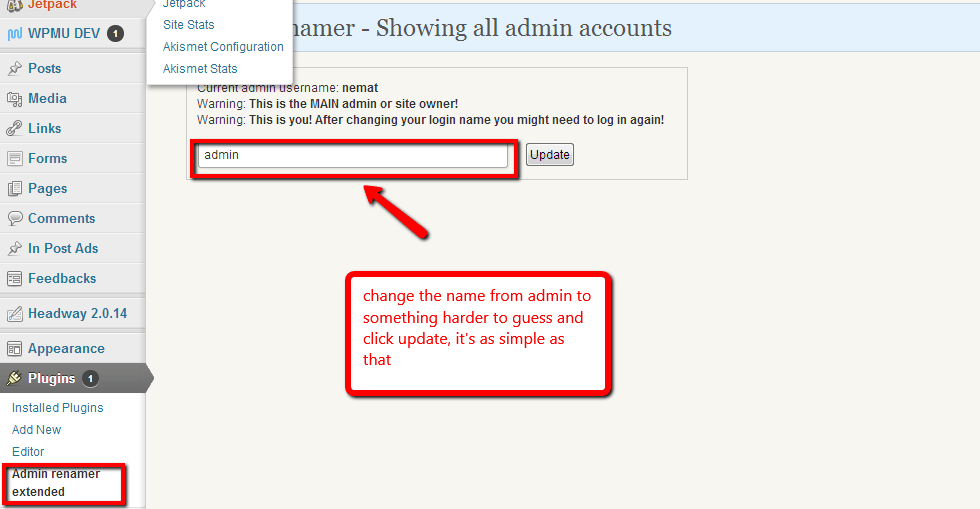
    The process of changing your admin user is incredibly simple, install the plugin and then go to plugins -> admin renamer extended.

    There is a simple box which will show al your admin users, change the name and click on update, job done.  Two minutes of effort one huge leap in security.

    Click For Full Size Image
    Click For Full Size Image

    Bonus Tip

    Always opt for a hard password for your admin users, don’t go for something simple like password or abc, these are in the dictionaries of the hackers and they will repeatedly try and try again with a bot network with different passwords.

    When you change the password of a user, WordPress has a password strength indicator, never settle for a weak password.  Always add numbers and special characters like &%£~@! to make passwords harder.

    Bonus Plugin

    I’m sounding like an infomercial now (for $29.99 we will double it up and give you a bonus set of faux leather gimp masks; his and hers) .

    A great additional plugin is Login Lockdown, which will lock down the login system after three failed login attempts, here is my review of that plugin.

    https://dev.neilmatthews.com/plugin-review-login-lockdown

    Wrap Up

    This brute force attack has been doing the rounds for some time, I urge you to go and make this change now before you are attacked.

    Oh and don’t forget to backup before you do this, you are messing with the database after all.

    Photo Credit: Diego3336 via Compfight cc

  • Canadian Site Owners Legal Requirement

    Canadian Site Owners Legal Requirement

    I came across this excerpt the other day which states that site owners from Canadian French provinces must provide their content in French.  Here is the article:

    Businesses operating in Quebec who maintain Web sites may need to ensure that the contents of their Web sites comply with Quebec’s language laws. Article 52 of the Charter of the French Language requires that catalogues, brochures, leaflets, commercial directories and all other publications of that nature be in the French language. A translation may be provided as long as French is given equal prominence. The Office de la langue francaise (OLF) has taken the position that this definition is broad enough to include content placed on Web sites, sent by fax or electronic mail.

    Micro-Bytes, a computer retailer located in Pointe Claire (Quebec), received a warning letter from the OLF in late May, advising that the company’s Web site violated Quebec’s language law. In response, Micro-Bytes removed most of the content from its site until it was able to prepare French language translations.

    According to a notice issued by the OLF on June 21, 1997, all companies which have a place of business or an address in Quebec are required to provide Quebec consumers with a French language version of any commercial publication. A company which does not have a base of operation in Quebec (i.e., no place of business nor an address in Quebec) will not be compelled under Quebec laws to use French on its Web site. Any entity with substantial links to Quebec should also consider whether they must comply.

    Exemptions may apply to non-commercial messages such as those of a religious, political, ideological or humanitarian nature which may be published in a language other than French. Cultural or educational products may also be advertised exclusively in the language used in the product without a French version.

    I wonder how many people know they may be breaking the law by not translating a site?

    This is something I was aware of in the UK, where all government website have to be in Welsh as well as English, but not commercial ones.

    Are there language laws like this where you live?  I would love to hear more in the comments.

    Photo Credit: Ian Muttoo via Compfightcc

  • [Webinar Replay] Multi Langauge Multi Currency E-Commerce

    Here is the replay of a webinar I ran on Tuesday 21st May all about building a multi language multi currency website.

    Video

    [leadplayer_vid id=”519CEA3235E2D”]

    Downloads

    Download the presentation slides
    WooCommerce
    WooCommerce Multilanguage
    WPML

    Wrap Up

    If you need help building your Multi Language Multi Currency site please contact me to get a no obligation quote.

    Photo Credit: bradipo via Compfight cc

  • Which Languages Do You Need?

    Adding additional languages to your website comes at a cost to translate content (the service I use starts at $0.09 per word so additional content soon adds up ) and at a resource cost on your website in memory and database usage.

    I always advise only to add the languages you really need to keep cost and performance optimal.

    How Do  You Know Which Languages You Need?

    How can you find out definitely what languges you need to support?

    You may feel you need to support Chinese but if no-one from China is visiting, then the investment is an unecessary one.

    Enter The Analytics Package

    Digging into your analytics will tell you exactly where your site visitors are coming from and what languages you need to support.  My preferred analytics package is Google Analytics.

    Browser Language

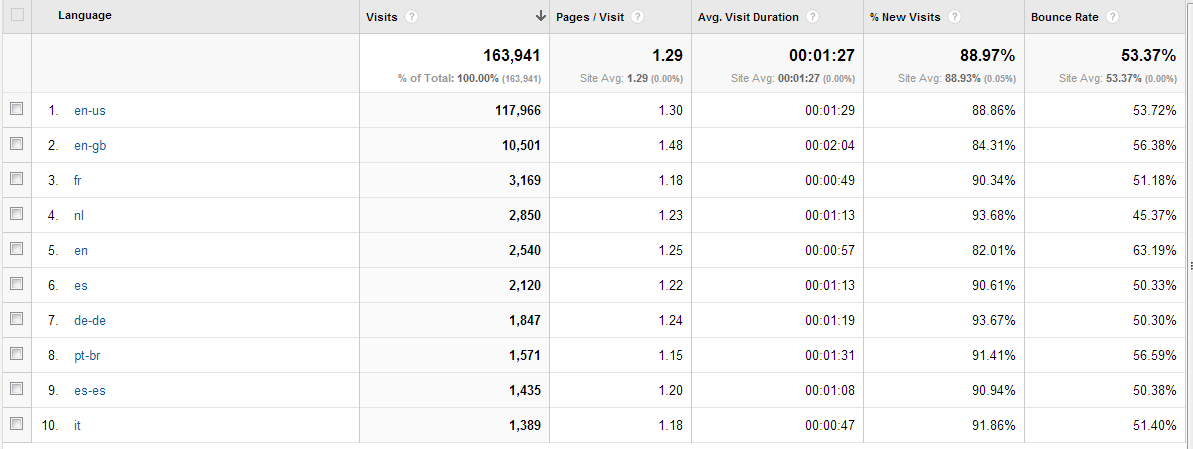
    The first analytic I look at is browser language, this is the language your site visitor set for their browser and it tells you exactly which language they are most comfortable browsing in.

    Here is an extract from my WPDude.com site.

    Click for full size image
    Click for full size image


    Here is a link to a list of browser country codes to help you translate which code matches which language.

    Location Of Visitors

    The second metric I like to focus on is the geographical location of your site visitors.   Stats packages are able to take the IP address of your site visitor and match it to a country.

    Taken to the next level you can match to particular cities or provinces.  This could be very useful in certain location for example Canada where certain areas have higher French Canadian populations.

    Again here are the stats from WPDude.com

    Click for a full size image
    Click for a full size image


    Don’t translate Everything

    Use the stats but feel free to dismiss them too. Use knowledge of your business along with the stats to make your descision.

    You may think that I would want to support a foreign translation for site visitors from India as this is my third most common country of origin, but I would reject this for a couple of reasons

    1. India is huge and has a huge number of languages and dialects, so many in fact their lingua Franca of business in English.
    2. I’ve never successfully sold any services into India from WPDude.com,  This is not a market I’m interested in.

    Matching business knowledge and the stats I would say I need to support the western European languages of French, German and Spanish, all countries I have been able to sell services to.

    Wrap Up

    Supporting additional languages can be resource and monetarily expensive, do some research and only support the languages you really need.

    Take into account business experience and build your supported language list from there.

    Photo Credit: alexanderdrachmann via Compfight cc