Neil Matthews

Blog

  • How To Manage Multiple WordPress Sites

    How To Manage Multiple WordPress Sites

    My team and I manage many WordPress sites on a day-to-day basis because of our maintenance service, and I have tested most of the tools out there to help speed up the process.

    In this post I want to show you how to manage multiple WordPress sites and  what to look for in a site management tool.  I’ll also let you know which one I selected.

    Tools I Have Tried

    I’ve had a go at them all, we have given a test drive to:

    What Functions I Look For

    These were my criteria when selecting my tool:

    Automatic Backups – I want daily database backups and weekly full backups that send the files offsite to a cloud backup location like Dropbox or Google drive.

    One Click Plugin Updates – I want to be able to quickly update plugins across all sites from a central console.

    One Click WordPress Updates – and the same with WordPress updates.

    Security monitoring – I want to monitor the sites for security and potential hack attacks.

    Uptime Monitoring – I want to know when the sites are down so I can pro actively fix them.

    Database Optimisation – I want to keep my clients databases optimised and running quickly.

    Reporting – I want a tool to keep my clients up to date with the updates I’ve done on their sites.

    What We Use

    We opted for Managewp over the other two, it’s more expensive than InfinteWP but at the time of testing the backups were far more reliable.  They are both great tools that do the same thing, but reliable backups are a must.

    I remember as an eager young techie, my boss said to me “You are only as good as your last backup”. That stuck and the more robust backup of managewp won the day.

    WPRemote didn’t get much of a look in to be honest, their pricing structure ruled them out almost immediately.

    Wrap Up

    I think if you have five or more websites to manage then Managewp is an excellent tool for you, or you could outsource the maintenance of your site to us 🙂

    Photo Credit: Gabriel Rojas Hruska via Compfight cc

  • Multi Language Social Media

    So you’ve gone to all the trouble of building a multi language website, now you need to start brining people to your funky new site.

    Social media, as we know, is a great way to get your message out there.  In this post I want to talk about how you can create a multi language social media presence.

    I’m not going to go into the mechanics of social media marketing, that’s far beyond the scope of this post, but I will talk about how you can segment your social media efforts over different languages.

    There are two main ways you can approach multi language social media, they are multiple accounts or single account multiple languages.

    Multiple Social Media Accounts

    The first approach is to have multiple social media accounts, one per language you support.

    For example I could have the following twitter accounts @webpolyglot, @webpolyglot_ft, @webpolyglot_de.

    Linking People To The Correct Account

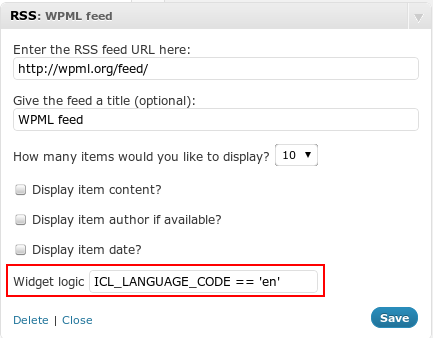
    The way I like to code up social media widgets to point to a specific URL is to use a great plugin called widget logic https://wordpress.org/plugins/widget-logic/.  So I will build the site using WordPress, install WPML the multi language plugin then setup a series of social media widgets and control which one is shown dependant upon the language code that is set.

    With WPML when a language is selected, a constant called ICL_LANGUAGE_CODE is set, we can test this with widget logic to decide if a widget should be shown.


    wpml-language-code

    Pros And Cons Of Multiple Accounts

    The benefits of multiple accounts is they are dedicated to one language.  People will be more likely to share your content if it is in the languages your followers and their peers use

    The downside of this approach is you are diluting your social media efforts, the reach of a tweet for example doesn’t go as far if you only have 100 followers in Italian.

    Single Account with Content In Multiple Languages

    The second is to have a single social media account and to have multi lingual staff look after that account.  This could be a single polyglot or it could be a team of people looking after updates for a particular language.

    You could send out a tweet in English, then French then Spanish, or you could batch Facebook updates in English, then a little later translate those updates to French.

    Schedule Your Content To The Appropriate Timezone.

    If your multi language work is for a particular geographic area, perhaps you could schedule updates to happen at a particular time.  If you support Japanese and all your tweets go out during European working times, you are defeating the point a multi language social media.

    Pros And Cons Of  A Single Account

    You may need multiple people to have access to one account which can cause scheduling issues and update confusion.

    People may be turned off by updates in a language they do not understand, and you could see follower loss as a result.

    On the plus side there is a single account with a much larger reach to  your message gets out there more easily.

    Social Media Landing pages

    On most social media accounts,  you can setup a landing page where people go to, to learn more about your “thing” make sure you have these in multiple languages, and if you go the multiple account route, link to a landing page in their language.

    Wrap Up

    Next up I’ll talk about running ads in multiple languages so you can bring paid traffic to your site in multiple languages.

    Need help setting up multi language social media?  Get a no obligation quote.

    Photo Credit: ePublicist via Compfight cc

  • Plugin Review: Jetpack Availabiliy Monitoring

    Plugin Review: Jetpack Availabiliy Monitoring

    One of the most useful suite of WordPress websites tools comes bundled under the plugin Jetpack.  In this post I want to talk about one feature of the many available and that is availability monitoring.

    You can download Jetpack from this URL http://wordpress.org/plugins/jetpack/.

    What Is Availability Monitoring

    Availability monitoring is the process of checking your site is up and reporting if it goes down.

    There are many tools out there such as Uptimerobot that do this, some premium some free,  but Jetpack is a very lightweight and simple way to monitor the availability of your site for free.

    Why It’s so Important

    The majority of site owners I know do not spend 100% of their time on their site.  Unless they have an availability monitor they don’t know when their site is down.

    More importantly the message sent out to potential clients or customers about their products and services is impacted if your site is down when they visit, you only get one chance to impress and a down site will ruin that chance.

    Examples:

    I’ve had my site down when running pay per click campaigns, every click through to my down site was costing me money, and there was no way to recoup that money via leads.

    I’ve had a client running their site on a poor quality hosting supplier, the availability monitor proved how poor their service way.

    How Jetpack Monitoring Works

    The good people at WordPress.com will ping your site on a recurring basis testing to see if it is up and running, if it detects error messages or the correct responses are not sent, an email is activated saying your site is down.

    The point of this is that it’s an external site that is checking your site just like a user would.  It’s not something internal on your site that will fail when the rest of the site is down.

    Your site will be pinged again and alerts will be sent every few minutes saying you are still down until your site comes back up.  Then you get an all clear message.

    See this page for full details http://jetpack.me/support/monitor/

    How To Setup Jetpack

    Install and config the plugin from the URL at the top fo this page.

    Create an account and WordPress.com and sync jetpack with that account.

    Go to Jetpack -> settings, scroll down to monitor and activate it.  Set your email address and it’s as simple as that.  Here is a quick video to show you how.

    [youtube http://youtu.be/5KgoQWMBiOc]

    Wrap up

    Jetpack has a host of really useful tools like an improved spell checker which used to be known as After The Deadline , Infinite Scroll and Carousel to name just three, Jetpack is something I recommend for all site owners.

    Photo Credit: sebilden via Compfight cc

  • Doing Business Across Languages

    Doing Business Across Languages

    So you have setup your multi language website and you are taking orders for your products or services from multiple territories.

    But are you really setup to do business across languages?

    The Website Is Just A Gateway

    Your multi language website is just a gateway to new markets, there are some back end issues to consider once you open your business up to people who speak a different language to you.

    Handling Multi Language Leads

    You work in English, have a French version of your contact form and your potential customer has the audacity of filling that form in using French, what do you do?

    Do you staff your sales department with bi-lingual skills or do you have some sort of translation service on hand ready to field your requests and replies.

    This all adds to your bottom line.

    Customer Service

    When customers come to you for customer service, there is normally a problem.

    Imagine the scenario of an unhappy customer on the phone and no-one can speak their language.  They have a problem and that is exacerbated but a break down in communication.

    My suggestion are the many translation conference call services that are out there.  You dial in to the conference call, add your customer and a translator on the other end acts as a go between.

    Here is a UK based company that does exactly that http://www.absolutetranslations.com/en/telephone_interpreting_services_company, but you may want to find a company local to you that does the same thing.

    Contracts

    Are your business contracts valid across borders, do you need to get a local lawyer to draw up contracts for different territories you do business in?

    I’m in no way qualified to give out legal advice to please consult with a professional in the target market or a local law firm experienced in import / export law.  Which leads me to…

    Import / Export Rules

    If you supply a physical product can you export them to your country of choice?

    If you send staff to perform services can they can visas to enter that country?

    What’s the point in selling into a country and the expense of writing up a website if you cannot deliver your products or services?

    Local Tax Rules

    Do you understand the local tax rules of selling into your target market?

    There are certain countries which have tax withholding rules, which mean they have to keep a portion of your payment and return that as tax to their local government.

    You could find your self with a nasty shock when a large chunk of your payment is withheld as tax.

    Understanding these rules means you can price your services appropriately.

    What I Do

    The first thing that I do is to tell potential clients that all correspondence and phone calls will be conducted in English.  this sets an expectation.  I have high school French language skills and Italian / German holiday skills (I can buy a meal and book a hotel room).  I cannot conduct business in any language other than English.

    If I get a foreign language request, I send it out to my translators at ICanlocalise.  I do this pretty easily because my website it plumbed into their translation system.  I create a draft post, and send it out for translation, I get the reply  and create another post with my reply, also stating that I prefer to use English if possible.

    All of my contracts are written with England and Wales as the jurisdiction,  I have no idea if they will stand up to scrutiny in a foreign court, but in all my years in business I have not had to test that.  I mitigate this risk by taking deposits on my projects.

    I sell knowledge services so there is no import export restrictions on that yet.  I’m sure our governments would love to tax what is between our ears:).

    Wrap Up

    Setting up a multi language website is just the first step in doing business across languages, be prepared and have your back end in place too.

    Photo Credit: Glyn Lowe Photoworks. via Compfight cc

  • How To Build A WordPress Development Environment

    How To Build A WordPress Development Environment

    A number of our maintenance clients have asked us to build development environments for them, I thought it would be a good idea to outline how we create development environments, in case you wanted one too.

    What Is  Development Environment?

    A development environment is a clone of your live site that you can work on without impacting your live site.  You could use your development site for any of the following reasons:

    • Installing and testing new themes without changing live.
    • Adding new plugins and testing if they work with your live site.
    • Coding up changes to themes or plugins, such as CSS tweaks.
    • Load testing your site with thousands of users

    The point is, it’s a clone of your live site you can play with and not harm your live site.  This is a tried and tested principle of software development, you develop and test in the development environment, then promote to live once you are happy.

    The Process.

    I’m going to teach you how to build a development environment in the following format.

    Your live site is at yourdomain.com.  We are going to build a completely separate site at yourdomain.com/development.

    Step 1: Create A New Database

    We are going to build a  new database for development so any impact on the database does not affect your live site.

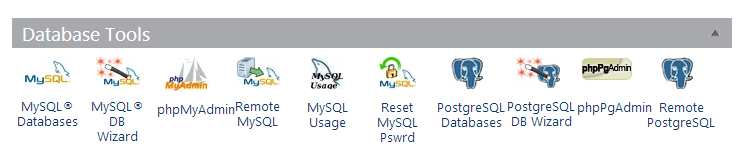
    To create a new database login to you hosting account and look for the control panel.  Under there will be a number of database tools.  I cannot give you exact details as each hosting company does things slightly differently.  If you host uses cPanel, which the majority do, the tools will look like this.

    dbwizard
    Click for full size image


    Run the MYSQL DB Wizard, this will step you through creating a new database.  Remember to note the database name, user name and password you will need them later in the process.

    Step 2: Clone Your Live Site

    The next step is to clone your live site, I like to use a plugin called duplicator to do this.

     https://wordpress.org/plugins/duplicator/

    Install the plugin and create a duplicator package, this is an archive of all your files and your database.   Here is a quick video to show you how to create an archive with duplicator.

    [youtube http://youtu.be/eiiKFhDfGZw]

    Step 3: Build The Development Area

    Connect to your site using ftp and create a subdirectory called development.

    Upload the installer.php file you just created along with the archive files you have downloaded to the subdirectory /development.

    In a web browser open the file yourdomain.com/development/installer.php.  This will run a script to duplicate your site to /development.

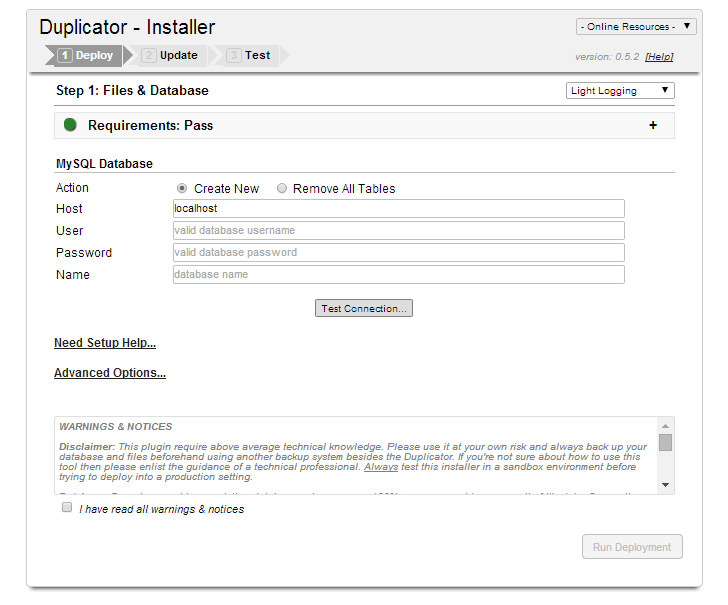
    The first thing the script asks for are the database details you created in step one .

    Click for full size image
    Click for full size image

    Once you can connect to the database click run deployment and the script runs duplicating your site.

    What is so cool about duplicator is it changes all the URLs in your site so if anything was pointing to yourdomain.com/image.png it would be changes to yorudomain.com/development/image.png.  In the past I used to write database scripts to do all this for me.

    That’s it, your site is cloned.

    Mark It As Private

    The last thing to do is mark your new development site as private.   You have cloned all your post and pages so you don’t want Google slapping you with a duplicate content penalty do you?

    On the new development site go to settings -> reading search engine visibility and click on “Discourage search engines from indexing this site”

    Click for full size image
    Click for full size image

    Test To Your Hearts Content

    You now have a clone of your live site that you can mess around with to your hearts content.  Sometimes these sites are called sandboxes after the kids play area where you can mess around, build castles, poor water everywhere and not worry about your live site.

    Wrap Up

    Want you own development site but are not confident to do it?  Why not join our maintenance program and we can build one for you.

    Photo Credit: ansik via Compfight cc


  • Multi Language Website Readiness Review

    I’m offering a new service called the “Multi Language Website Readiness Review” and I want to tell you more about this service and why it can help people thinking about building a multi language website.

    What Is It?

    This service is part consultation, part technical review of your website.

    I will book a Skype call with you to discuss your potential multi language website build, get details of your project and an understanding of your problems.

    I’ll ask for access to your current website to technically review it and see if you are ready for a site that can support multiple languages.

    Is This Service For Me?

    This service is for people considering building a multi language website.

    You have a problem in your business that needs your website to support multiple languages it could be:

    • Expansion into a new territory
    • Making your site more usable for existing clients in different countries/territories
    • Statutory Requirement to make your site multi lingual

    If this is you then the service can really help.

    What WIll I Get?

    The output of this consultation and technical review is a detailed report.  The areas I will cover are:

    • Can your current infrastructure work with multi language, do you need to invest in new technology?
    • Cost benefits analysis, will the investment in development create at least a x2 return on that investment?
    • Detailed breakdown of the investment cost to implement a multi language website?

    You also get the consulting call where you can pick my brains about multi languages websites.  This is a two way consulting call, not just me collecting details of your project.  If you have any questions or concerns about supporting multiple languages, prepare them for our call.

    Why Do I Need A Readiness Review?

    I’ve created this low cost service so people can get a real feel for the investment they need to make to build a multi language website.

    Many clients I work with greatly underestimate the work and requirements for this type of site, use this entry level service to avoid costly mistakes down the line.

    The areas people are not aware of are

    • Infrastructure – do I need new coding or hosting
    • Translation costs, many people have no idea what professional translators costs, and how much content they have.
    • Development costs to make a website work with multiple languages.
    • On-going costs, websites are not static, how can you keep your site up to date in all languages.
    • Hidden costs, what happens when I start to get lots of new leads from customers using foreign languages.

    Cost

    This service is a fixed price package of GBP 99.00

    Book A Review

    If you would like to book a review please complete the form below.

    [gravityform id=”3″ name=”Readiness Review” title=”false” description=”false”]

    Photo Credit: kevin dooley via Compfight cc

  • What Are Tweaks?

    What Are Tweaks?

    In my maintenance service package I talk about site owners having a number of tweaks per month over and above the standard maintenance work we do.  These tweaks can be called down as and when required, but what are tweaks?

    In my mind they are small packages of development work to enhance your site.  In this post I want to clarify what tweaks are to potential maintenance clients.

    Example Tweaks

    Probably the best way to show you what a tweaks are is to list out some examples we have done for our current clients:

    Install and Configure Plugins

    We have been asked by our maintenance clients to install and configure plugins that are too complex for them.  We have installed simple plugins like widget logic, up to more complex ones like s2member.

    We have been asked to replace plugins that no longer work as expected, for example one client was using a search plugin that was no longer supported, we swapped that our for Google search.

    Fix plugins that have stopped working; our client spotted that a post rotator plugin was not working after an update to WordPress. We fixed a jquery conflict.

    The list goes one.

    Managing Complex Content

    We don’t look after your normal posts and pages content, but some plugins such as e-commerce have very complex content in them, we have added new products to plugins if our client is struggling.

    Theme Changes

    We are often asked for small tweaks to our clients site theme, we will happily make small changes to css to change colours fonts etc.

    We have also been asked to completely replace themes with new ones.

    Theme Updates

    When a theme has been customised it’s a tricky thing to apply the latest theme update, we will get the latest theme files, apply updates and re-apply customisation.

    Building Development Environments

    We have been asked to clone live sites and build development environment so our clients can test things out without impacting their live sites.

    Errors On The Site

    When a client spots an error on their site and reports it to us we raise a tweak call to fix these too.  Errors such as warning notes appearing, malware reports, missing PDF files.  Again the list of errors goes on and on, as long as it’s an error to your existing site we can fix it.

    Fix Database Issues

    One of our new clients, had an absolutely enormous database due to spam comments that weren’t being deleted we fix that database issue and optimised their database for performance.

    Fix Menus

    We have been called in to setup and fix menus, such as creating new menu areas, adding new menu items or changing text.

    Add Third Party Scripts

    We have been asked to install third party scripts, for example Google Analytics javascript code and Facebook like widget code.

    Consulting

    Client will ask us what is the best way to do X, and with our years of experience we can suggest a solution.

    We Spot Errors Too

    As part of our maintenance work we often spot errors and fix them too, we will raise them and treat them like a tweak but they are not part of your monthly draw down of work.

    Some of the things we have spotted are

    • Backups not working
    • Security issues
    • User permissions wrong
    • Hosting run out of disk space
    • Issues with domain registration

    What Are Not Tweaks

    Anything that involves a large amount of development work such as coding up a plugin, or creating a custom theme.  These would require a separate project over and above your maintenance agreement.

    Just ask us, we will let you know if it is a tweak or not,

    How Tweaks Work

    When you sign up for our maintenance service, over and above plugin updates, backups, WordPress updates, security monitoring and database optimisation, we will give you access to a support email address.

    Send you tweak request to that address and Rod will raise and manage a tweak project and our team will fix your problem.

    Wrap Up

    If you would like to take a test drive of our maintenance service and have us do some tweaks to your site then why not check out our 30 day free trial.  There is no credit card required and nothing to cancel if you don’t want to go forward.

    Sign up for a free trial now>>

    Photo Credit: Elsie esq. via Compfight cc

  • Is Your Email Newsletter Mobile Optimised?

    Is Your Email Newsletter Mobile Optimised?

    Many of us have an email provider such as Mailchimp or Aweber attached to our WordPress sites.

    Are you sending out an image heavy, highly styled newsletter or are you optimising for mobile devices?

    Would it surprise you to hear that a large percentage of your newsletter readers are using mobile devices?

    Are you yourself reading lots of email on a small hand held device, and do you find it frustrating?

    I think it’s very important to optimise your email newsletters for mobile.

    Optimise For Mobile Devices

    What do I mean by optimising for mobile?  I mean that when someone opens your email newsletter on their phone, they can very easily read and understand your message.

    They are not bombarded by huge images.

    They don’t have to re-size and swipe left and right to read your message because your template is too wide.

    It means removing a barrier to entry so your message (be it information or sales) gets to people on whatever device they choose to use.

    Cut The Fluff

    Here are the things that will drive your mobile readers mad:

    • Sidebars
    • Wide formats that requires swipes left and right to read
    • Tiny fonts
    • Huge images taking up all the screen

    Cut out everything that you don’t need in your email, it should be a short message that leads people to a bigger call to action on a blog post, landing page or sales page.

    Test It

    Once you have optimised your email for mobile, please read it on your mobile device.

    Test it, make sure it looks good and is easy to read on a small screen.

    Test it on larger tablet screens too, doe it still look good.

    Finally test is again on a desktop screen, is it responsive to a bigger screen too, you don’t want to alienate the rest of your readers.

    What I Did

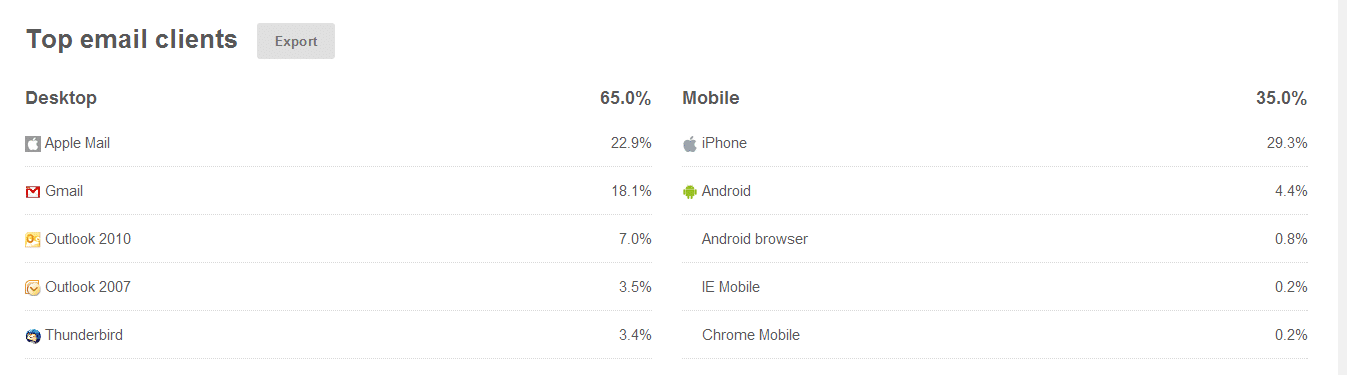
    I found out from stats in Mailchimp that over 35% of my readers were on mobile devices, that is a third of people who would struggle to read my newsletter.

    Here’s a screen shot to show the break down.

    click for larger image
    click for larger image

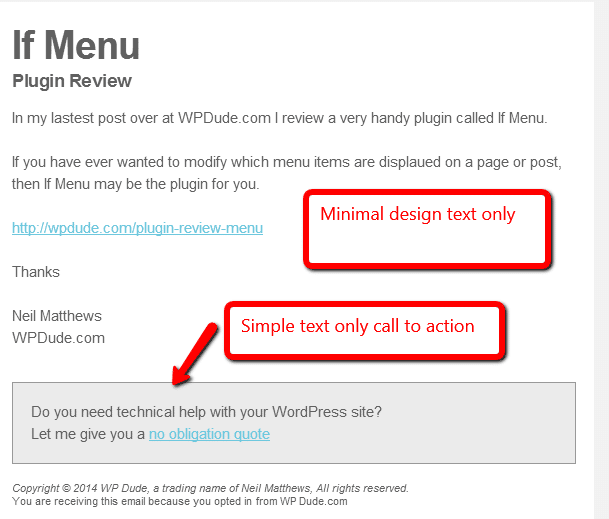
    So I redesigned the template on my newsletter, I cut out the sidebar and the images, leaving only a minimal template that shows off a header, a brief description of my post or offer and link to my main site.

    I also have a call to action to sell my services

    This is plain black and white and shades of grey text, nothing fancy but it is very easily read on all types of device.  Here’s a screen dump of my new template.

    Click for full size image
    Click for full size image

    Remember A Responsive Website

    What’s the point in making your email template readable, but when your reader clicks through to your main site you have an unresponsive main website that they cannot easily read on their phone.

    Select a theme that is responsive or go for one of the many mobile ready plugins such as wp-touch that do the job for you https://wordpress.org/plugins/wptouch/

    What You Should Do

    My advice to you is look at the various templates your email provider has and select a responsive one, Mailchimp and Aweber both have these and I’m pretty sure the other main email providers will too.

    If they don’t there is always the option to have a text only email.

    Wrap Up

    We are moving away from our desktops at a rapid pace, responsive websites and native iPhone/iPad and Android apps are taking over from our websites.  We need to embrace the mobile device or our desktop optimised websites will not serve us.

    Photo Credit: zappowbang via Compfight cc

  • Plugin Review: If Menu

    Plugin Review: If Menu

    I found a really useful plugin last week while working on a problem for a client.  The plugin is called If Menu, I’m going to review the plugin and tell you why it’s so useful.

    Conditional Menu Items

    Using If Menu you can use conditional logic to decided if and when a menu items is displayed.

    This allows you to decide what pages or conditions a menu item is displayed on.

    This is really useful if you want your menus to be different for pages or posts or different site visitors.

    How It Works

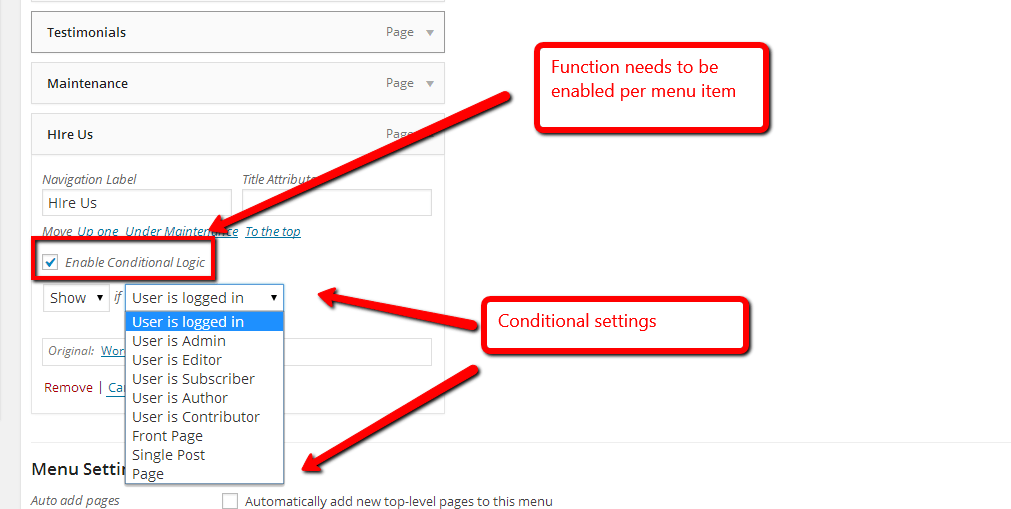
    Once installed there is a new drop down on each menu item, you can select which conditional logic to apply to that item.

    This is an opt in, you need to click a check box next to the menu item in question.

    There are two states, you can either hide or show a menu item, and the conditions are:

    • User Logged in / Out
    • Is a particular user level e.g.. admin, editor, subscriber
    • Is the front page – so hide or show menu items on the home page (great for landing pages)
    • Is a single page
    • Is a single post
    Click For Full Size Image
    Click For Full Size Image

    My Clients Requirement

    The site in question is a membership site and certain menu items should only appear for logged in users.  Using If Menu we set those items to “show” if a user is logged on.

    Extending The Plugin

    At first glance I was a little bit disappointed with the range of conditions available, I would have liked to see an option to only show a menu item on a particular page or post, but there is a relatively simple way to extend the plugin by writing your own filter to add new conditions.  It’ requires coding but the logic can be extended.  See this page for details.

    http://wordpress.org/plugins/if-menu/faq/

    Wrap Up

    If you want to control your menu items then If Menu will be a great extension to your site.

    If you want a more complex implementation get a quote from us to write the additional filters.


  • Retainer Packages Available

    Retainer Packages Available

    I’m often asked if I offer monthly retainer packages, and the answer is yes I do.

    I’ve never had a formal page detailing my retainer packages so I’m going to write one up first as a blog post then move it over to a full time page.

    What Is A Retainer Package

    It’s when you have an on-going requirement for WordPress development and  support and would like to retain my services for a prolonged period of time.

    I’ll set aside X hours for you per month and you pay a recurring invoice for that number of hours each month until your project is completed.  Tell me how many hours you need and we can setup a recurring payment.

    I Offer This On A Limited Basis

    I only book about 30% of my time out to retainer clients so I have time to manage my team, grow my business and take on one off projects too.

    I limit myself to five retainer clients per month.  I have two slots currently available.

    What Do you Get As  A Retainer Client

    I offer the following benefits to my retainer clients:

    • Discounted rates – because you are buying my time in bulk I offer a discounted rate.
    • Priority On Your Projects – I’ll set aside time for your project.
    • Direct Access to project updates on Basecamp  – I will give you your own secure area on my project management tool where you can send me tasks to do on your site, this will also be the central place all updates will be stored.
    • Access to a timesheet to check on your available hours – I’ll give you a link to my Freshbooks account so you can see what I have been working on and how many hours you have left on your retainer.
    • Free Maintenance And Updates – all my retainer client also get free access to my maintence service.  My team will backup your site, monitor and maintain security.  Update WordPress and any plugins as updates become due and give you a weekly report.  That’s a saving of $39 per month.
    • Skype access so you can ping me about your projects

    Retainer Packages

    I have retainer packages of 5, 10 and 15 hours respectively.  The more hours  you buy the more discount is available, get a quote below.

    Frequently Asked Questions

    Q) Can I have you working on multiple sites?

    Y) Yes you buy a a package of hours not dedicated to any one site.

    Q) What if I go over my X hours?

    Y) You can buy an additional package or I can bill you on a per hour basis, this is all at the same discounted rate.

    Q) Is there a minimum number of months I need to commit to?

    A) No, you can take on a one month retainer and end it after your hours are used.

    Q) Do I pay up front?

    A) Yes it’s like a pre-paid mobile phone contact, you buy X hours and use those until they are done.

    Q) Is there a minimum usage?

    A) I record time in in 15 minute increments I’ve found that allows you to call down small jobs like a plugin install and not burn through your hours too quickly

    Q) Can I roll over hours I don’t use in a month?

    A) No they don’t accumulate, but that being said if you go over your X hours and didn’t use all last months I’m not  going to nickel and dime you for an hour here or there.

    Q) What about when you are on holiday / vacation?

    A) I do take time off, but I will let you know well in advance, and there are other members of my team available to deal with any emergencies that might crop up while I’m away.

    Still Interested in A Retainer Package?

    If you are interested in a retainer package complete the form below and I’ll prepare a quite for you.

    [gravityform id=”90″ name=”Retainer Package” title=”false” description=”false”]

    Image of Don Quixote and His Loyal Retainer Sancho Panza  by Picasso

  • Have You Heard About BuddyPress?

    Have You Heard About BuddyPress?

    There’s a really great plugin out there called BuddyPress which has been active for a few years, but to my surprise not many people know about it.

    I’m going to tell you all about BuddyPress and what it can do for  your site. https://buddypress.org/

    Your Very Own Private Social Network

    Buddypress allows you to build your very own private social network on WordPress.

    Buddypress is a plugin you add to your site and it extends WordPress allowing you to create your very own social network to rival Facebook.

    The plugin was started by the People behind WordPress but it has morphed off into it’s own open source project,but it is still tied very closely to WordPress.

    buddypress_logo[1]

    Why Reinvent The Wheel; Facebook Duh!

    I know you are probably thinking why would I re-invent the wheel with my own social network, when there’s this 500 kilo Gorilla in the room called Facebook already?

    Facebook is okay but there are times when you want Facebook functions without the Facebook baggage.  I’m thinking:

    • Ads
    • Trolls
    • No control over users
    • None ownership of your content
    • Potentially being kicked off for not following their orders T & Cs
    • Policy updates for example limiting users, charging to promote content etc.

    Facebook is good, but Facebook owns the pitches, ball, players and rules of the game, and they can change any and all of those when they see fit.  Having your own controlled social network make sense.

    Features of BuddyPress

    Once you have installed BuddyPress, here are the functions you will get.

    • User  profiles
    • Groups for users to join
    • Activity Steam (think Facebook wall or twitter feed)
    • Notifications of member interactions
    • Forums
    • Friending people
    • Private messaging
    • Share text, video, audio and images

    Nothing radical here is you have used any of the other platforms, but this is on your own site.

    Themes

    One thing to be aware of is that you will probably need a none standard theme for a decent looking Buddypress site because of the new functionality you have added.

    If you look at themeforest.net there is a whole category dedicated the BuddyPress compliant themes http://themeforest.net/category/wordpress/buddypress . It’s probably a good idea to have a look at the sites to see some of the BP features too.

    Making It Pay

    You can also make your new niche social network a paid one.  Membership plugins like s2member or WPMUDEV Membershipo Pro allow you to charge people on a one off or recurring basis to join you

    If you can add member benefits you could use BuddyPress as an income generator.

    The Downsides

    The downsides of BuddyPress are that the documentation is not up to the level of WordPress yet and it is very technical.

    I don’t say that as a criticism of the great people developing BuddyPress, but the less technical documentation that was developed for WordPress hasn’t been created yet.

    You need to be a “code monkey” to extend and make it do anything unusual.  There are plugins but not to the same degree as WordPress.

    How You Could Use BuddyPress

    Here are some of the ways BuddyPress.org suggests you can use their plugin

    • A campus wide social network for your university, school or college.
    • An internal communication tool for your company.
    • A niche social network for your interest topic.
    • A focused social network for your new product.

    Wrap Up

    Looking to create your own niche social network, then you should  check out BuddyPress.org.


  • Automating Testimonial Collection

    Automating Testimonial Collection

    I’m a big fan of client testimonials as social proof you can do what you say you can do.  I’ll not rehash the whole subject here, but I wrote a post called the Power Of Testimonials.

    I’m also a big fan of automating repetitive tasks, and typing in testimonials I’ve solicited for clients manually is a big old pain in the backside, so I looked at automating the whole process.

    A Tale Of Three Plugins

    I’m using three  plugins to automate the whole process:

    1) Testimonials By WooThemes

    I’ve selected this testimonials widget over the plethora of others out there because it is compatible with my theme and it’s incredibly easy to add testimonials to pages, sidebar and the home page too.

    Before anyone starts I know there are other testimonials plugins that offer this functionality out of the box, but none fitted with my theme as well as this plugin.

    2) Gravity Forms

    Ah probably my favourite plugin, and so well worth the investment in a developers license all those years ago.  Gravity form does so many automated tasks excellently, like add emails to Mailchimp, adding client details to Freshbooks.  But it also allows us to add testimonials with it’s post creation functionality.

    3) Gravity Forms + Custom Post Types

    This final plugin is the key, it allows the gravity forms functionality that adds posts add custom posts types.

    How It Works

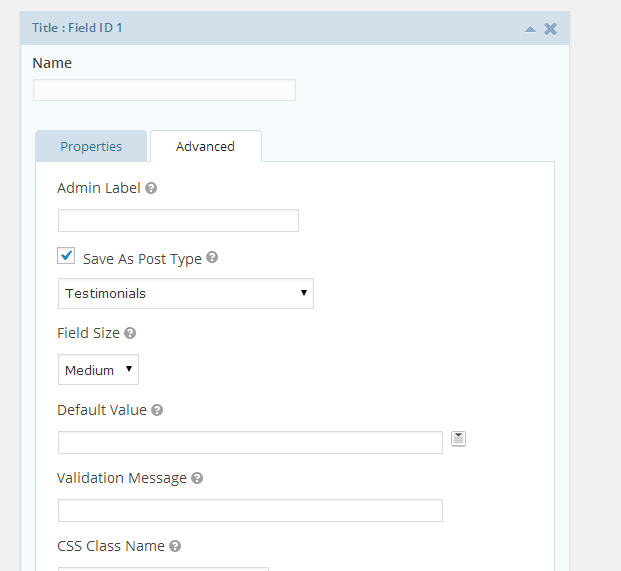
    I’ve set up a form on this page https://dev.neilmatthews.com/add-testimonial using gravity forms, but it is a special type of form.

    When someone adds an entry it creates a draft post on my site, but not just any old post a custom post type of testimonial.  So entering data on that form automatically generates a testimonial entry on my site that I need to review and publish.

    Click for full size image
    Click for full size image

    No more re-entering text, automated testimonials woo-hoo!

    Automating The Ask

    I’ve als0 automated the request for a testimonials.  I use Freshbooks for my invoicing, and there is an automated email sent out to clients when their invoice is paid.  I’ve added the following text.

    If your project is complete and you enjoyed working with me a testimonial is always appreciated, you can leave one automatically here https://dev.neilmatthews.com/add-testimonial

    Automation Rocks

    Whenever I find myself grumbling about a routine task in my business processes I always looks for at three things remove, automate, systematise.

    Can I remove this from my business – answer no testimonials are very important, can I systematise it so it can be outsourced, well yes I could but why pay a VA to add testimonials when it can be automated.

    Results no more tedious copying and pasting of testimonials plus more testimonials coming in because I’ve automated the ask and don’t forget to do it.

    Wrap Up

    What are you automating in your business?  I’d love to hear what you have done in the comments.

    Photo Credit: studentofrhythm via Compfight cc