Neil Matthews

Blog

  • Jing Makes Me Sing

    Jing Makes Me Sing

    One of the tools I use every single day to help communicate with clients and my team is Jing, in this post I want to talk about Jing and explain how incredibly useful it is to communication when clients or team members work remotely from each other.

    What Is Jing?

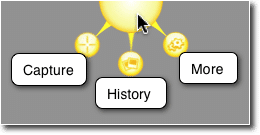
    more-ballJing is a small free  utility that once installed sits on your desktop as a small yellow sun like icon.  When you click on it a selection tool appear so you can grab a screen shot or record a short video of what is on your screen.

    You can get a free download from this link https://www.techsmith.com/jing.html

    Screen Grabs

    The first function is to create a static screen dump, this is one I took while writing this post.

    http://screencast.com/t/31xxbUuN

    Once captured the screen dump can be saved locally or much more usefully uploaded to a cloud server and and share (see link above)

    Annotating Screen Dumps

    Once a screen dump has been captured we can also add annotation or highlighting to make it more obvious as to what we are taking about

    http://screencast.com/t/In6YIAiL9

    Videos

    The other great feature of this utility is that we can create short video screen casts of  what we are doing.

    http://screencast.com/t/YkPny4HA0Fl

    http://screencast.com/t/In6YIAiL9

    Videos With Audio

    Finally we can also add an audio narration of what we are doing to make things even more clear.

    http://screencast.com/t/ho2vvp6ZP

    Storage Space

    As everything is uploaded to the screen cast servers for sharing, we cannot expect unlimited space, at the time of writing there is “GB of free storage and the ability to buy additional space.

    I’ve been using this for years and I can only remember one time when I ran out of space, I went into my screen cast account and deleted everything more than 3 years old.

    I recommend Jing as a tool to communicate in the short term not for creating long term training or support videos / screen grabs.

    Usages

    Here are some of the ways I use Jing everyday.

    • Showing team members where a problem is, if it’s a complex bug, I will record a video to show exactly what needs to be fixed.
    • Clarifying issues, for example 10 minute ago one of my team members was asking about a license key, I had no idea what he meant so he sent me this http://screencast.com/t/otRN43G1fsmj
    • I use Jing for short client training video when I am handing over a change to their site training I record a video to show them how to do things
    • Clients send Jing messages to me to show me an issue they are having when they retain us for WordPress Technical Support issues, a picture is worth a thousand words, a video a million, when you are remote it makes it much easier to troubleshoot an issue.

    The list goes on, the underlying take away is Jing give great clarity to issues that a text based message cannot

    Camtasia

    If you want to record longer videos and edit them, the big brother of Jing is called camtasia, I use this for my long form  training videos that I want to record and edit before uploading to Youtube.

    Wrap Up

    When you work remotely from clients or team members the ability to send visual clues rather than text messages will stop the headaches of misunderstanding.

    If you want to send me a jing screen cast or screen dump of your WordPress issues I would happily send you a no obligation quote.

    Photo Credit: davidcrow via Compfight cc
     

  • It’s Not Just Backups and Updates …

    It’s Not Just Backups and Updates …

    As we have developed our maintenance service WP Insure we have added some additional features that are pretty hard to describe in sales copy.

    Over and above our maintenance services of backup, updates, monitoring and security we also offer little support jobs we call tweaks.

    Our clients will call in support for a tweak usually when something goes wrong with their site.  In this post I want to talk about the hard to describe feature of our plan.

    The Tweakmeister

    There is a dedicated member of the team at WP Dude (John) who looks after tweaks for our client sites.  If anything goes wrong or you need help it’s probably him you will be dealing with.

    Clients get access to a members only help desk where they can send in their issues.  They send the tweak into that and we take care of it.

    Example Tweaks

    Here is a short list of the kind of things we will do for our clients.

    Memory Full – we’ve been called in when memory capacity is exceeded when new plugins are added or the site becomes busier, we will update memory settings to make more available to WordPress

    .htaccess issues – .htaccess is a configuration files that is used by WordPress in a number of ways, it holds permalink details, redirection details, cache plugin details, the list goes on, we are at hand to make changes to this file

    Email Consulting  – sometimes our clients want to know what is the best way to do “X” on a WordPress site, we act as consultants via email to our clients.  We’ve worked on thousands of WordPress sites and have probably done what you want to do on other sites.

    Hack Recovery – we have recovered hacked client sites before.

    Database Optimisation – many site owners are not aware they need to optimize their WordPress database on a regular basis,  tables fill up , junk gets left over from unused plugins, it’s good practise to spring clean your database regularly, we do this as a matter of course.

    Crash Recovery  if your site goes down we will recover it.  Nothing more to say on that point.

    Plugin Install and Config – We’ve helped clients with troublesome plugin installs.  This tends to be complex plugins such as e-commerce or multi language plugins.

    Premium Theme installs  – the call usually sounds something like “I just bought a new theme and installed it and it looks nothing like the demo”.  We are available to wade through the documentation, find out about short codes and custom post types to make your site look like the one on the advert.

    Hosting migration – We’ve already got the tools in place to clone your site to a new hosting company if you are our maintenance client.

    Backup Restores – Should anything go wrong and you need to roll back to an earlier point in time, we can do it with one click.

    Weird PHP errors – Once we get into trouble shooting PHP ( the scripting language used by WordPress), most site owners don’t want to know, we will look into the issues, be it file upload size too small, headers already sent errors, just send it to the help desk.

    Plugins broken after updates – Sadly this is a fairly frequent issue, WordPress is updated but the plugin is not and it breaks, we roll back updates, work with plugin developers to find solutions or install alternative plugins that do the same job but work.

    Theme tweaks  – want to change the colours, use a snazzy new font, we are the team to tweak your CSS file of your theme.

    Training – In the same vein as email consulting we also create small training videos for our clients to show them how to so that thing they need to do, We record screencasts using Jing and send them over to clients.

    Script Integrations – we’ve linked up WordPress sites with third party scripts such as Facebook, Pinterest, Zapier and Google Analytics.

    The list goes on – just ask we can probably do it for you (the not so small print we don’t do custom theme development, custom plugin development or graphic design as part of the maintenance plan).

    Outsource Your Technical Hassles

    When you sign up for our maintenance plan you are getting access to a team of WordPress experts.  Outsource the worry of maintaining and supporting your site to us. Concentrate on the real work of building your business.

    Wrap Up

    Our maintenance service is not just backups and updates it is support when things go wrong, or just when it gets too technical for non-techie site owners we are there.

    If you are looking for hassle free technical support for your WordPress site, then we are the team, for full details and a 30 day free trial check out our maintenance service WP Insure.

  • Satisfaction Lies in the Effort

    Satisfaction Lies in the Effort

    Lorem ipsum dolor sit amet, consectetur adipiscing elit. Morbi sagittis, sem quis lacinia faucibus, orci ipsum gravida tortor, vel interdum mi sapien ut justo. Nulla varius consequat magna, id molestie ipsum volutpat quis. Suspendisse consectetur fringilla suctus. Pellentesque ipsum erat, facilisis ut venenatis eu, sodales vel dolor.

    Morbi sagittis, sem quis lacinia faucibus, orci ipsum gravida tortor, vel interdum mi sapien ut justo. Nulla varius consequat magna, id molestie ipsum volutpat quis. Suspendisse consectetur fringilla luctus. Fusce id mi diam, non ornare orci. Pellentesque ipsum erat, facilisis ut venenatis eu, sodales vel dolor.

    • This is a unorder list. Lorem ipsum dolor sit amet, consectetur adipiscing elit. Morbi sagittis, sem quis lacinia faucibus, orci ipsum gravida tortor, vel interdum mi sapien ut justo.
    • Nulla varius consequat magna, id molestie ipsum volutpat quis. Suspendisse consectetur fringilla luctus.
    • Fusce id mi diam, non ornare orci. Pellentesque ipsum erat, facilisis ut venenatis eu, sodales vel dolor.

    Lorem ipsum dolor sit amet, consectetur adipiscing elit. Morbi sagittis, sem quis lacinia faucibus, orci ipsum gravida tortor, vel interdum mi sapien ut justo. Nulla varius consequat magna, id molestie ipsum volutpat quis. Suspendisse consectetur fringilla luctus. Fusce id mi diam, non ornare orci. Pellentesque ipsum erat, facilisis ut venenatis eu, sodales vel dolor.

    Morbi sagittis, sem quis lacinia faucibus, orci ipsum gravida tortor, vel interdum mi sapien ut justo. Nulla varius consequat magna, id molestie ipsum volutpat quis. Suspendisse consectetur fringilla luctus. Fusce id mi diam, non ornare orci. Pellentesque ipsum erat, facilisis ut venenatis eu, sodales vel dolor.

  • Photography is the Science

    Photography is the Science

    Lorem ipsum dolor sit amet, consectetur adipiscing elit. Morbi sagittis, sem quis lacinia faucibus, orci ipsum gravida tortor, vel interdum mi sapien ut justo. Nulla varius consequat magna, id molestie ipsum volutpat quis. Suspendisse consectetur fringilla suctus. Pellentesque ipsum erat, facilisis ut venenatis eu, sodales vel dolor.

    Morbi sagittis, sem quis lacinia faucibus, orci ipsum gravida tortor, vel interdum mi sapien ut justo. Nulla varius consequat magna, id molestie ipsum volutpat quis. Suspendisse consectetur fringilla luctus. Fusce id mi diam, non ornare orci. Pellentesque ipsum erat, facilisis ut venenatis eu, sodales vel dolor.

    • This is a unorder list. Lorem ipsum dolor sit amet, consectetur adipiscing elit. Morbi sagittis, sem quis lacinia faucibus, orci ipsum gravida tortor, vel interdum mi sapien ut justo.
    • Nulla varius consequat magna, id molestie ipsum volutpat quis. Suspendisse consectetur fringilla luctus.
    • Fusce id mi diam, non ornare orci. Pellentesque ipsum erat, facilisis ut venenatis eu, sodales vel dolor.

    Lorem ipsum dolor sit amet, consectetur adipiscing elit. Morbi sagittis, sem quis lacinia faucibus, orci ipsum gravida tortor, vel interdum mi sapien ut justo. Nulla varius consequat magna, id molestie ipsum volutpat quis. Suspendisse consectetur fringilla luctus. Fusce id mi diam, non ornare orci. Pellentesque ipsum erat, facilisis ut venenatis eu, sodales vel dolor.

    Morbi sagittis, sem quis lacinia faucibus, orci ipsum gravida tortor, vel interdum mi sapien ut justo. Nulla varius consequat magna, id molestie ipsum volutpat quis. Suspendisse consectetur fringilla luctus. Fusce id mi diam, non ornare orci. Pellentesque ipsum erat, facilisis ut venenatis eu, sodales vel dolor.

  • Ignore Cleaning Up Spam At Your Peril

    Ignore Cleaning Up Spam At Your Peril

    There is a small maintenance task that most WordPress site owners ignore at their own peril!

    That is the task of cleaning up spam comments.

    The Problem

    As we all know there are spammers out there trying to leave comments on our WordPress sites in the hope of getting a link back to their hapless sites and improve search engine ratings.

    At the time of writing I have had 242,034 spam comments blocked by my anti spam plugin.  I’m pretty mean I disable comment on my posts after 14 days so there are very few posts to leave spam comments on.  So my spam issue whilst huge is pretty small compared to some people.

    The problem is those spam comments all take up valuable resources on your site and if they are not cleaned down it can crash your site.

    Spam Bots

    Spam is automated via scripts and if a spam bits finds a chink in your armour, you can be sure they will blast your site with repeated spam attempts.

    This automation can lead to problems with massive database tables, I’ve seen sites with millions of rows in their comments tables because spam comments have been left in the system.

    Impacts Site Performance

    Massive databases are very often the root cause of many slow loading WordPress sites.

    If we go back to the Spam bots above, as they continue to smash your site with spam, they hit an already slow loading database and the problem becomes  a vicious cycle.

    Case Study – The Site that Crashed

    One of our maintenance clients came to us with stability issues, they could not quiet put their finger on why, but their site kept behaving erratically.  They had 60K+ spam comments in their queue.

    This in turn had created a database table that was 130MB in size and had  become corrupt.  As comment crons tasks were running, it was causing his site to crash.

    I fixed the table with phpmyadmin, removed the spam comments and optimized the database, weird unstable issues vanished.

    What To Do

    Enough with the waffle already how do I fix it?

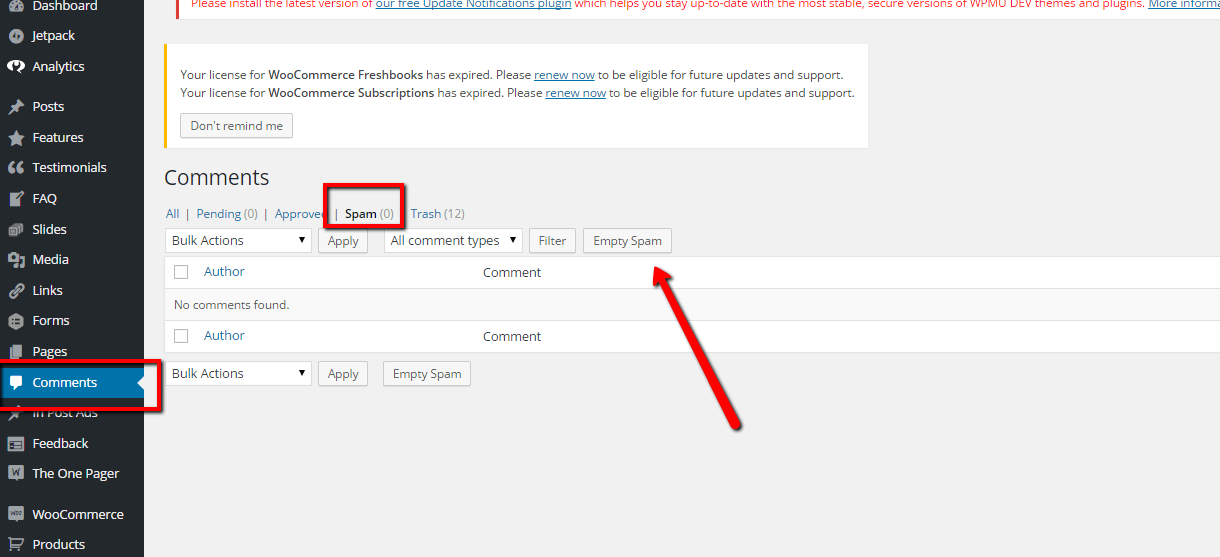
    Empty you spam and purge all spam comments. See screen shot

    Click for full size image
    Click for full size image

    If you have a huge number of spam comments, this might time out and you will have to click empty spam a number of times.

    The optimize your database to remove references I like a tool called wp-optimize to do this, check out this post for details on optimising.

    Wrap Up

    Why not take a 30 day free trial of our maintenance service, we will clear up your comment spam and harden your security just as a thank you for signing up.


  • Imagination Encircles the World

    Imagination Encircles the World

    Lorem ipsum dolor sit amet, consectetur adipiscing elit. Morbi sagittis, sem quis lacinia faucibus, orci ipsum gravida tortor, vel interdum mi sapien ut justo. Nulla varius consequat magna, id molestie ipsum volutpat quis. Suspendisse consectetur fringilla suctus. Pellentesque ipsum erat, facilisis ut venenatis eu, sodales vel dolor.

    Morbi sagittis, sem quis lacinia faucibus, orci ipsum gravida tortor, vel interdum mi sapien ut justo. Nulla varius consequat magna, id molestie ipsum volutpat quis. Suspendisse consectetur fringilla luctus. Fusce id mi diam, non ornare orci. Pellentesque ipsum erat, facilisis ut venenatis eu, sodales vel dolor.

    • This is a unorder list. Lorem ipsum dolor sit amet, consectetur adipiscing elit. Morbi sagittis, sem quis lacinia faucibus, orci ipsum gravida tortor, vel interdum mi sapien ut justo.
    • Nulla varius consequat magna, id molestie ipsum volutpat quis. Suspendisse consectetur fringilla luctus.
    • Fusce id mi diam, non ornare orci. Pellentesque ipsum erat, facilisis ut venenatis eu, sodales vel dolor.

    Lorem ipsum dolor sit amet, consectetur adipiscing elit. Morbi sagittis, sem quis lacinia faucibus, orci ipsum gravida tortor, vel interdum mi sapien ut justo. Nulla varius consequat magna, id molestie ipsum volutpat quis. Suspendisse consectetur fringilla luctus. Fusce id mi diam, non ornare orci. Pellentesque ipsum erat, facilisis ut venenatis eu, sodales vel dolor.

    Morbi sagittis, sem quis lacinia faucibus, orci ipsum gravida tortor, vel interdum mi sapien ut justo. Nulla varius consequat magna, id molestie ipsum volutpat quis. Suspendisse consectetur fringilla luctus. Fusce id mi diam, non ornare orci. Pellentesque ipsum erat, facilisis ut venenatis eu, sodales vel dolor.

  • This Post Looks Beautiful even with Long Interesting Title

    This Post Looks Beautiful even with Long Interesting Title

    [vc_row][vc_column][vc_column_text]

    Lorem ipsum dolor sit amet, consectetur adipiscing elit. Morbi sagittis, sem quis lacinia faucibus, orci ipsum gravida tortor, vel interdum mi sapien ut justo. Nulla varius consequat magna, id molestie ipsum volutpat quis. Suspendisse consectetur fringilla suctus. Pellentesque ipsum erat, facilisis ut venenatis eu, sodales vel dolor.

    Heading 2

    Morbi sagittis, sem quis lacinia faucibus, orci ipsum gravida tortor, vel interdum mi sapien ut justo. Nulla varius consequat magna, id molestie ipsum volutpat quis. Suspendisse consectetur fringilla luctus. Fusce id mi diam, non ornare orci. Pellentesque ipsum erat, facilisis ut venenatis eu, sodales vel dolor.

    • This is a unorder list. Lorem ipsum dolor sit amet, consectetur adipiscing elit. Morbi sagittis, sem quis lacinia faucibus, orci ipsum gravida tortor, vel interdum mi sapien ut justo.
    • Nulla varius consequat magna, id molestie ipsum volutpat quis. Suspendisse consectetur fringilla luctus.
    • Fusce id mi diam, non ornare orci. Pellentesque ipsum erat, facilisis ut venenatis eu, sodales vel dolor.

    Heading 3

    Lorem ipsum dolor sit amet, consectetur adipiscing elit. Morbi sagittis, sem quis lacinia faucibus, orci ipsum gravida tortor, vel interdum mi sapien ut justo. Nulla varius consequat magna, id molestie ipsum volutpat quis. Suspendisse consectetur fringilla luctus. Fusce id mi diam, non ornare orci. Pellentesque ipsum erat, facilisis ut venenatis eu, sodales vel dolor.

    Heading 4

    Morbi sagittis, sem quis lacinia faucibus, orci ipsum gravida tortor, vel interdum mi sapien ut justo. Nulla varius consequat magna, id molestie ipsum volutpat quis. Suspendisse consectetur fringilla luctus. Fusce id mi diam, non ornare orci. Pellentesque ipsum erat, facilisis ut venenatis eu, sodales vel dolor.

    [/vc_column_text][/vc_column][/vc_row]

  • Another Interesting Single Post

    Another Interesting Single Post

    Lorem ipsum dolor sit amet, consectetur adipiscing elit. Morbi sagittis, sem quis lacinia faucibus, orci ipsum gravida tortor, vel interdum mi sapien ut justo. Nulla varius consequat magna, id molestie ipsum volutpat quis. Suspendisse consectetur fringilla suctus. Pellentesque ipsum erat, facilisis ut venenatis eu, sodales vel dolor.

    Morbi sagittis, sem quis lacinia faucibus, orci ipsum gravida tortor, vel interdum mi sapien ut justo. Nulla varius consequat magna, id molestie ipsum volutpat quis. Suspendisse consectetur fringilla luctus. Fusce id mi diam, non ornare orci. Pellentesque ipsum erat, facilisis ut venenatis eu, sodales vel dolor.

    • This is a unorder list. Lorem ipsum dolor sit amet, consectetur adipiscing elit. Morbi sagittis, sem quis lacinia faucibus, orci ipsum gravida tortor, vel interdum mi sapien ut justo.
    • Nulla varius consequat magna, id molestie ipsum volutpat quis. Suspendisse consectetur fringilla luctus.
    • Fusce id mi diam, non ornare orci. Pellentesque ipsum erat, facilisis ut venenatis eu, sodales vel dolor.

    Lorem ipsum dolor sit amet, consectetur adipiscing elit. Morbi sagittis, sem quis lacinia faucibus, orci ipsum gravida tortor, vel interdum mi sapien ut justo. Nulla varius consequat magna, id molestie ipsum volutpat quis. Suspendisse consectetur fringilla luctus. Fusce id mi diam, non ornare orci. Pellentesque ipsum erat, facilisis ut venenatis eu, sodales vel dolor.

  • We Are Oh so Vulnerable To The WordPress Vulnerabilities

    We Are Oh so Vulnerable To The WordPress Vulnerabilities

    This week has been a big week for security flaws showing up in WordPress.   There have been a number of WordPress vulnerabilities surfacing.

    Firstly we had news that a huge number of plugins were using a feature of WordPress incorrectly due to poor documentation and exposing WordPress sites to script injection hacks. You can get full details here http://wptavern.com/xss-vulnerability-affects-more-than-a-dozen-popular-wordpress-plugins

    The plugins in question were big name ones.   Plugins that I use on almost every site I build, so this was a BIG  issue.

    Secondly WordPress itself released a security patch to close another loop hole that had been found. Again full details here http://wptavern.com/wordpress-4-1-2-is-a-critical-security-release-immediate-update-recommended

    We spent a lot of time updating and testing sites this week.

    I recommend you finish reading this post, backup your site and apply any updates your site needs now.

    I Cannot Stress The Importance Of Updating

    I recommend to all site owners that they apply updates to WordPress, plugins and themes as they are made available.  The eco-system of WordPress is vast with a huge combination of plugins, themes and versions of WordPress, you need to keep everything up to date to keep hackers at bay.

    I check client sites daily for updates, over and above updating I also harden security on WordPress sites.

    My Security Regimen

    Here’s what I do to my clients sites and my own.

    • Take daily backups so i can recover in the event of a hack
    • Update everything regularly (we check daily on our sites)
    • Delete unwanted / unused plugins, just because they are not active does not mean hackers cannot exploit code
    • Install a security monitoring solution to spot hack attempts and send alerts. My current favourite it iThemes Security
    • Harden security to stop hackers making changes – again use iThemes security to do this

    Check Out WP Insure

    Yes this was all a thinly veiled sales pitch, our WP Insure service which was designed to keep your site up to date and secured.We keep everything update to date, harden security and monitor your site for any issues. Why not take our a 30 day free trial to test drive our service.

  • Our Process For Working On Your Site

    Our Process For Working On Your Site

    Last week I wrote about the process we use for Working on Projects Across Timezones, in this post I want to talk about our process for working on your site.

    Service Delivery

    Once we have accepted your project, the invoice is paid and we have all the login details we need, the next step is to actually deliver the service you paid for.

    To ensure we deliver the same quality over and over again we have built a process that all our developers work to.

    Schedule Work

    The project manager looking afer your job (look at me pretending to be Billy Big Biscuits, you all know it’s me Neil doing that work 🙂 but one day there will be more than one project manager) will schedule the work, it’s added into our team diary in Trello.

    We assign the job to a team member,  and on the scheduled day work begins.

    Starting Work Email

    The first thing we do is send you an email letting you know we are starting work on your project.

    We feel this is important because we work across timezones and you may have no idea when we are working on your site.

    We introduce the team member working on your site and ask that you stay off the site while we are making changes to stop any conflicts.

    You Are Only As Good As Your Last Backup

    A mentor of mine from the bad old days in corporate IT, hammered this statement into me over and over, you are only as good as your last backup.

    The first thing we do when working on your site is take a full backup.  We then test that backup to make sure we can recover from it.

    We know we can get your site back to the way it was before we got our sticky fingers on it if there are any issues.

    Maintenance Mode

    If we are doing a job on your site that will impact on site visitors we will put your site into maintenance mode.

    We like this plugin https://wordpress.org/plugins/wp-maintenance-mode/ what it does is put up a maintenance mode screen that is shown to visitors visitors that are not logged in.

    We can see the changes being made and can test everything behind a firewall so you visitors never see a sub -standard in process build.

    If you run any advertising or promotions to bring in visitors it’s a good idea to stop these for the duration of our project or your fees will be wasted.

    Cloning Site

    If we are doing custom development work, we like to clone your site to a staging area and do all the work there.

    This means we never impact your live site.

    Development is exactly that, a series of changes that can crash your site or cause issues. Doing it on a staging area is industry best practise.

    Once we are done and you have tested and approved the work, we make that staging site live.

    Do The Work

    Depending upon the type of job we have internal processes.  We have procedures to:

    • Troubleshoot crashed sites
    • Fixed and harden hacked sites
    • Performance tune a site
    • Install and configure a multi language site
    • Build a new site

    I’m always looks at the trends of work we get in and will create new procedures if required.

    Want to see our troubleshooting methodology video?

    End Of Day Update

    If you live on the west coast of the US, mid morning is end of business for me in the UK.  We make sure we keep our clients appraised of the work done on their project at the end of the day if the job is rolling over to the next day.

    We send out a small email saying what is complete, and what we still need to do.

    Project Complete QA Time

    Once we have completed your job, we move into QA or quality assurance mode.

    We will write up a report of what has been done, and how we did it.

    We pass the site back to you for review and comment.  It’s at this stage you review the work and let us know if you are happy or if you want additional changes to be done.

    If there is additional things to be done, we cycle back into service delivery mode.

    We won’t close a project until you are 100% happy.

    This is an area I’m constantly reviewing to make sure we deliver with excellence but still take on new work.  I’m currently assigning one new task per team member per day and leaving them scope to work on QA tasks too for on-going jobs.

    Project Closed

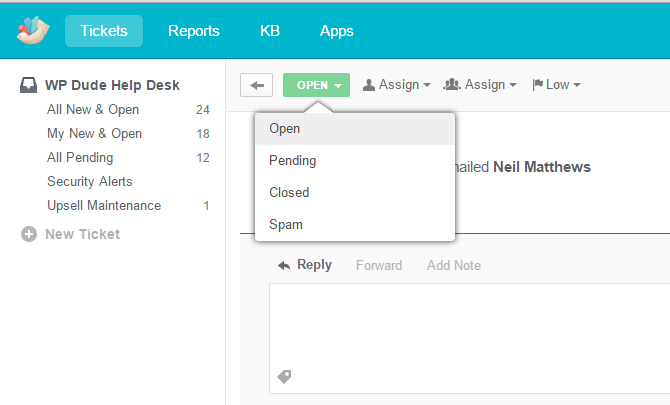
    Once you are happy we mark the project as closed.  We all don ceremonial gowns and process towards the stone alter where we burn the papers containing your passwords .. nah not really I just click the button marked close

    Click for full size image

    Follow Up

    After three days your closed job is moved to a new queue where we do a quick courtesy follow up.

    We check in to make sure everything is still as it should be and that we have not missed anything. If there are problems we cycle back to service delivery.

    We also offer a free trial of our maintenance service WP  Insure as a thank you for working with us.

    We mark your job as checked and it is deleted (passwords gone for security reasons).

    Outro

    Hopefully this post has given  you a glimpse behind the curtains of how we work on your site and increases your confidence in working with us.

    If you want to work with us the first step is to tell us all about your issue on our WordPress technical support page.


  • How We Manage Projects Across Timezones

    How We Manage Projects Across Timezones

    One of the biggest problems inside of WP Dude is managing projects and people across multiple time zones. In this post I was to tell you about the systems we have put in place and how we manage projects across timezones.

    The Issue

    We have clients from every continent except Antarctica, but the majority of our work comes from the US.

    I’m based in the UK and I have developers in the UK and the Philippines.

    Often there is only a small online overlap between me, my clients.

    My developers in south east Asia are clocking off just as I come online in the morning.

    As a result there can be prolonged periods of quiet time when emails are not answered or answers to questions cannot be obtained.

    Too Many Dropped Balls

    As we have become busier, more and more projects were being juggled and we began to metaphorically drop the balls.

    Projects schedules were missed.

    Quotes were not sent out.

    Clients were not updated on progress of the projects.

    This will only get worse as our business grows even more so we needed a solution.

    The System

    We have a system for managing all our projects across timezones and making sure you the end client knows exactly where we are with your project.

    1. The Request

    The first stage of a project is the request.  A client requests one of our $99 jobs and a ticket is raised in our Groove helpdesk.  At that point an automated email is sent out saying:

    Thanks for contacting us about your WordPress issue, as you no doubt realise this is an automated email to let you know your request has been received.

    We aim to get back to you within 24 hours.  Our office hours are 8-am – 6pm Monday to Friday, if you contact us outside of those hours it may take a little time to get back to you, and we ask that you are patient with us.

    We look forward to working with you.

    We are setting expectation here and letting potential clients know we will get back to them within a day.  My first task of the day is to pickup and requests that have come in overnight.

    2. Do We Want The Job?

    At heart I’m a people pleaser and I try to say yes to everything, but that has to change as WP Dude grows.  We now have a rejection system.

    We don’t accept sites that are the three Ps  Porn, Pharmaceuticals or Pyramid schemes.

    We only take on small jobs now, so no custom theme development, no custom plugin development and no graphical design.

    We work via email so the many requests that come in simply saying “Call me (999) 999-99999” (yes some people are that rude) are rejected.

    Going with my gut is also something I’m going more now.  I can read between the lines on some requests and I know that project is not a great fit for us and I’ll politely decline.

    We reject projects with a polite canned response email. Saying no is hard but I want us to deliver with excellence to the people we say yes to.

    3. Getting More Information

    Sometime the request is a little too vague and we need more information, so step three is sending a canned response asking for more details.  This job is then marked pending and we have a process to check back in on these projects and follow up if we don’t get the info we need to start work.

    4. The Quote

    Even though we have fixed price jobs I still send out a quote.  This contains our terms and conditions, accepting the quote then accepts our T & Cs.

    Like step 3, jobs are marked as pending until the quote is accepted.

    When you the end client accepts the quote we get a notification in Groove which marks your job as live.  This is an integration in Zapier between Freshbooks and Groove.

    5. Login Details & Invoicing.

    Once you have accepted our quote we transfer that to an invoice and send it for online payment.

    At that point we also send out a canned response asking for login details.

    I need the following login information so I can begin work.

    admin level WordPress user ID and passwordI recommend that you change the password for the duration of this assignment, to do this visit the dashboard of your blog and click on users->authors & users -> click on edit for the appropriate user and at the bottom of the page is a change password option.

    FTP login ID, password and URL

    This information should come from your hosting provider, this will enable me to upload and download files should I need to .

    I may not need all of the passwords but I find if I have all of them to hand it speeds up the process.

    I will begin work once I have this information.

    The project is live at this stage so it remains open while we wait for the login details.  We are notified when login details are received.
    I’m at a cross road with points 4 & 5 I could automate these even more by taking payment when the request is sent, please leave feeback in the comments below about whether you feel better about a less automated payment process?

    6. Scheduling

    At this point we drop your project into our team diary and schedule the work.  We use a series of Google Calendars to schedule everything across the team.

    We send out a small  canned response saying when your work will be done. This may sound like a small item, but for some reason I completely missed this out of the project flow and many clients were left wondering when their actual project would be worked on.

    7. Starting Work

    We send out a courtesy note when we start work to ask our clients not to do anything on their site until we have completed our work.

    My name is %{agent_firstname} and I’m one of the Developers at WP Dude.

    This is a quick courtesy email to let you know I will be working on your project and that I am starting now.

    To avoid any conflicts can I ask you to please not add any new content or make changes to your site until the work is complete.

    I’ll be back in touch soon with a progress update

    Depending upon who is working on your project you may have a new team member working with you so a quick introduction is on order.  It is also a confirmation that the work is getting done.

    7. Service Delivery

    I’ll write up another post about actually doing the work at a later date, but this is where the work gets done.

    8. Quality Assurance

    Once we have done the work, we send it back to you the client for approval or updates. We will never close a project until you are 100% happy.

    This is complex part of our system  we send out another canned response saying it’s ready for review and it may be some time before the clients response.

    If there are additional QA tasks to perform we loop back to service delivery mode.  We need to build slack into our scheduling at point 6 to allows for QA work and not have it impact new jobs.  This is still something I’m struggling with and I’m looking at now. The need to quickly work on new projects but still attend to QA work is hard.

    9. Close project

    Once everything is done to your satisfaction we internally close the project down, delete any password we have.  Everyone puts their feet up and has a nice cup of tea 🙂 I wish.

    10. Follow Up

    We have a timed rule that after 72 hours your closed job is dropped into our follow up queue, we reach out and ask if everything is still okay.  It’s not uncommon for something to be missed in the QA or something else comes to light after a few days of use.

    We send a canned reponse checking in we also use this touchpoint to offer a 60 day free trial of our maintenance service as a thankyou and as a upsell.

    It’s been a couple of days since we completed your WordPress project, this is a courtesy check in to make sure everything is working as expected.

    This is an automated message, but if you reply to this email it will re-open your project and we will fix any issues you are having.

    As a thank you for selecting WP Dude as your WordPress support and development team, we would like to offer you a 60 day free trial of our WordPress maintenance service WP Insure.  For full details please visit https://dev.neilmatthews.com/wp-insure.

    Wrap Up

    Systematising and automating our process has saved my sanity I’m sure.

    Creating a repeatable process is key to expanding the team, it’s not in my head any-more.

    If you would like to see the system in action go to this page and leave a stage 1 request.

    Next up in the series about telling you how we work, I’ll show you how we attempting to deliver our service with the same quality over and over via a repeatable process.


  • Plugin Review: WP Awesome FAQ

    Plugin Review: WP Awesome FAQ

    I was looking for a frequently asked question (FAQ) plugin so I could display the questions and answers of regularly asked questions people send to me before buying a WordPress support job from us. I looked through a number of FAQ plugins and eventually settled on WP Awesome FAQ.

    In this post I’ll tell you why I selected it.

    What Is  A FAQ

    An FAQ are those questions you find potential customers asking over and over again.

    These are obviously questions you have not addressed correctly in your sales copy and are creating objections in your clients mind before they buy your product or service.

    Creating a list of frequently asked questions (and of course answers) helps to overcome those potential custom objections and cuts down your customer support time.

    What I Needed In An FAQ Plugin

    I always approach hunting for a new plugin with a series of requirements in the back of my mind.  I wanted the following:

    • Easily create a series of FAQs on the back-end of WordPress
    • Ability to add new FAQs as they become available after client questions
    • An accordion functions to hide answers people don’t need so people can quickly scan through the questions
    • Short codes to embed the FAQ on sales pages and other pages

    WP Awesome FAQ Does All This

    As you might be guessing WP Awesome FAQ does all this and a little more, it also has FAQ categories so I can control which FAQs are displayed  and where.

    Downsides?

    I’m not 100% thrilled with the styling of the drop down content, for example I have some bulleted lists in there and the bullet point is dropped, I’m going to have to spend some time recoding the styling to get it 100% as I need it.

     See It In Action

    I’ve got the FAQ plugin installed on my home page, click through and have a look

    As you can see the shortcode presents a list of FAQs click on one and it opens up in accordion stylie for you to see the answer to your question.

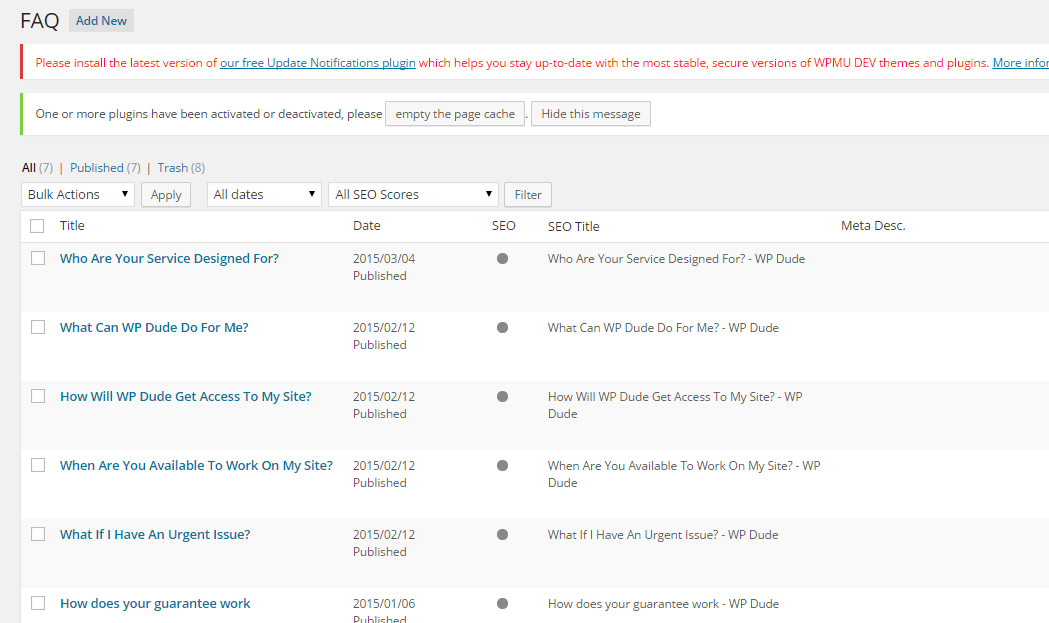
    Here is a screen dump of the back end editor for your FAQs

    faq
    Click for full size image


    Outro

    Awe – noun – a feeling of reverential respect mixed with fear or wonder

    Can a plugin be really awesome?  Nah, but this fills the functionality hole on my site to perfection.

    If you have any questions about our services not covered in our FAQ please ask away and I’ll add them in.