Neil Matthews

Blog

  • My Musings On Lead Magnets

    My Musings On Lead Magnets

    I’ve been musing about lead magnets lately and if they are worth while for my business.  My conclusion is NO.

    At present if you visit my site there is no email signup to get a download or drip email course, and this is intentional because lead magnets don’t appear to generated much business for me.

    What Are lead Magnets

    Lead magnets are free giveaways that a site owner gives you in exchange for your email contact details.

    The thinking is that the site owner can build up rapport over a period of time, send out email newsletters proving their expertise, it’s all part of the content marketing dance.

    Once trust is established you can ask the site visitor for a sale.

    What I’ve Tried

    Over the years I’ve tried a number of lead magnets including:

    • Simple offer to join my newsletter for updates
    • Drip campaigns with email training
    • Infographics
    • Free site checkups
    • Ebooks

    The take a large initial investment of time to create but I don’t think I’ve had a return on that time investment with the number of signups which convert into client sales..

    Who Downloaded My Lead Magnets Most?

    Casual site visitors did not result in huge numbers of email signups whatever I tried.

    The people who did download my stuff were existing clients, people who come to me for help already not new clients.  That sounds a little bitter when I reread this, I’m more than happy to provide content for free for my clients, but the real aim of a lead magnet is to bring new people into your sales funnel.

    The One Lead Magnet That Did Work

    Then it occurred to me, the one lead magnet I have, that has worked consistently over time.  As a result I have gone all in on generating contacts via this and dropping lead magnet freebies.

    My lead magnet is providing no obligation quotes.

    Why I Didn’t See This As  a Lead Magnet

    I was not seeing the act of generating a quote as a lead magnet, rather i was seeing it as the start of the sales process, but after some thought it is a type of lead magnet.

    I can capture a persons email address, I can provide value to them with a customised email on how I their issue can be fix t and the cost to do that.. This is not scaleable

    like a download or a drip email, it needs an individual touch, I get that, but it’s gotten way better results than my infographic.

    It is a self qualifying system, if a site visitor is reading my content and would NOT hire a WordPress developer then they are unlikely to make a request. So my time is spent educating real prospects on my process.

    This lead magnet has generated over 6000 signups over the years why fix something that is not broken.

    How I Get Leads

    I’ve recently added a new theme to my site and it’s sole purpose is to funnel people into my “lead magnet”.  My site  has one call to action, ask for a quote.

    I funnel people into that lead magnet with the following CTA (call to actions).

    • Home page – two calls to action, details of the services I provide.
    • Sidebar – get a no obligation quote widget
    • In post ads – after X posts there is a link to y quote page
    • Blog post footer, I add a link in each post
    • Highlighted menu item, top right

    All of these drive people to my WordPress Technical Support page where people are offered a no obligation quote, and a small description on how I have fixed issues like this in the past and how I will fix their problem.

    If you are reading this via email or RSS come on over to my home page to see this in action.

    Wrap Up – My Musings On Lead Magnets

    There are people who swear by the lead magnet model and freebie giveaway, but it has not worked for me. What has your experience been of this highly touted approach to marketing, I would love to know in the comments section.

    If you need help with your WordPress site, why not signup for my no obligation quote lead magnet, I’ll send you a price and details on how I can fix your site.

    Photo Credit: Mario’s Planet Flickr via Compfight cc

  • Gravity Forms Dynamic Content

    Gravity Forms Dynamic Content

    Last week I wrote about a client project where I setup gravity form routing, today I want to write about gravity forms dynamic content.

    We can dynamically pass data into a form to add to an entry, this is how you can do this.

    What Is Dynamic Content?

    Dynamic data is content that changes each time the form is loaded, it can be used on the display of the form or on the notification sent out when the form is completed.

    An example; my client has a single form but wants to send a different PDF to form completors based upon which page they complete the form on, so we dynamically pass this data into the form so the notifications can be different.

    Types Of Dynamic Content

    There are two ways to pass data into a form and use them dynamically, query strings an via the shortcode.

    Query String

    A query string is a piece of data passed into the form on the URL of the page, here is an example.

    https://dev.neilmatthews.com/wordpress-technical-support?referrer=somedata

    In this example we are passing in a parameter name called referrer, and the data will be “somedata”.

    The time you would use query string is if there is a single contact form page and you want to vary the data.

    Shortcode

    We can also pass data into the form via the shortcode we use to embed the form, again here is an example.

    gravityforms id=1 field_values='referrer=somedata'

    Again we are passing in some referrer data and that is “somedata”.

    You would use the shortcode id if you had one form used on several pages and wanted different data based upon where it is embeded.

    Setting Up  A Field For Dynamic Content

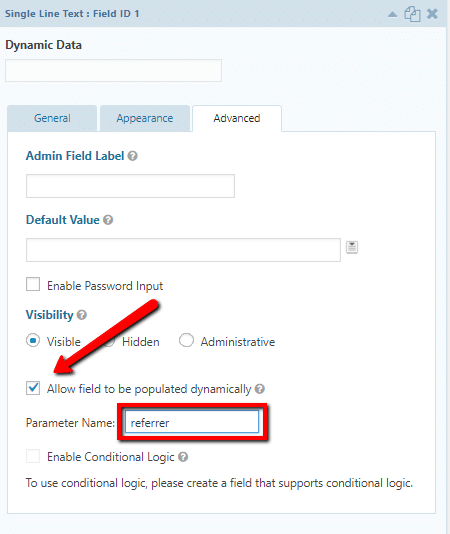
    When you add a field into a form you can make it populated dynamically.

    Go to the advanced settings and there is a check box to make it dynamic then you add the parameter name you want to collect data from.


    gravity forms dynamic data

    You can have multiple dynamic data fields on a site.

    Using Dynamic Data

    Once you have captured your dynamic data you can use it in logic on the form for example to set prices, or pass it into notifications.

    In my example above I passed a download link to the customer notification email

    Wrap Up – Gravity Forms Dynamic Content

    If you need to pass data into your form before it is submitted dynamic data fields is the thing you need.

    If you need help setting up a complicated gravity forms get a no obligation quote.

    Photo Credit: Diari La Veu – http://diarilaveu.com Flickr via Compfight cc

  • Routing Gravity Forms Notifications A Case Study

    Routing Gravity Forms Notifications A Case Study

    I was working on a client project recently where they wanted to send notifications to different teams depending upon a selection made in the form, in this post I want to talk about routing gravity forms notifications.

    The client is a property developer and they need to route emails to the sales team of each scheme   This is where we are two countries divided by a common language, I think this would be described as a housing sub division in USA speak.  When I read route it sounds like root in my head not rowt.

    What Is Routing?

    Routing is the process of testing fields from your form and then sending notifications to different emails based upon form content.

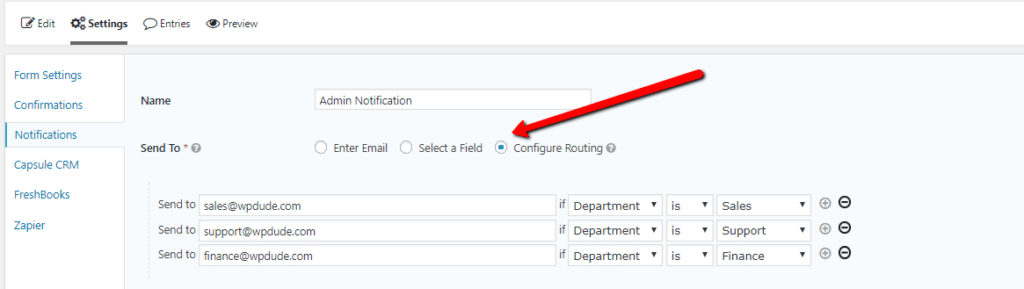
    I’ve created a test form on my site to highlight this.  There is a drop down for department.  The options are sales, support and finance.

    Once the form has been built move over to the notification section of the gravity form setup, that’s where the routing magic happens.  On “send to”, click routing then you can add the options to route to an email address based upon the drop down value.

    routing gravity form


    Bonus Tip

    If you want the email to also go to a central place such as a CRM system or a central support desk, add a BCC email address.

    Wrap Up – Routing Gravity Forms

    The same project also needed a PDF download based upon the scheme, but I’ll tell you how to dynamically pass data into a form in my next post.

    Gravity form never ceases to amaze me with it’s great features and integrations, if you are still dabbling with free form plugins like Contact form 7 please give Gravity Forms a look.

    If you need help developing a complex gravity form setup, get in touch for a no obligation quote.

    Photo Credit: Pikaluk Flickr via Compfight cc

  • Managing Holidays When You Work Globally

    Managing Holidays When You Work Globally

    A big US holiday is bearing down on us next week and it has prompted me to write a post about managing holidays when you work globally.

    I’m based in the UK, the majority of my clients are from the US and Canada.  My team are based in the Philippines, there are a lot of holidays to manage.

    Know When The Holidays Happen

    I was tripped up on Monday this week it was a an End of Ramadan holiday in the Philippines. I was sending over project updates when a very polite response came in along the lines of “You do remember we are on holiday today?”.  No I had not remembered.

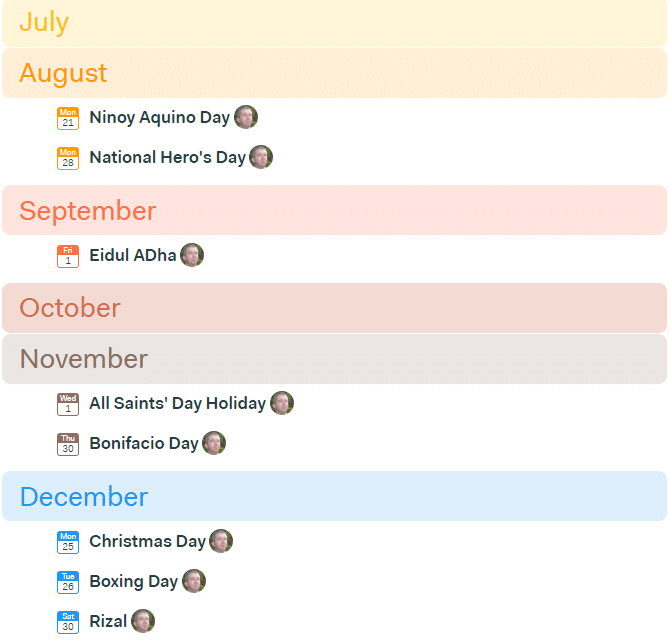
    The most useful tool I have found is to import national holiday calendars into my Google calendar profile, there are public holiday lists for most countries, I have created a short video to show you how to add international holidays.

    Client Communication

    I’ve not found any issue telling clients I’m unavailable due to a national holiday.  Clear client communication that you are not available on August 28th because it’s a bank holiday in the UK is usually enough.

    If you go off on holiday and a client is left in limbo with a=unanswered emails can cause issues.

    Team Communication

    We have a central team calendar and I’ve added all the national holidays of the UK and Philippines into it (implemented last Tuesday ahhem! ) so we can see when holidays are coming up and when me, or my team members will not be available.

    When I’m out the office I tell my team and let them know I’ll not be around for IM and everything will go into out project management system.

    Likewise if my team are unavailable and a project is open I ask for an update so I can deal with client requests.

    Use The Space

    Rather than seeing this is an issue I suggest you embrace the space holidays create in your calendar, for example each year I take a day out on the US holiday of Thanksgiving as a planning day.  I know client emails will be slow and I can afford not to book any work in.

    It’s become an annual ritual that I really look forward to each year.

    Highlight The Benefits

    You can also highlight the benefits to clients that you can be working on their issue while they are enjoying a well deserved holiday.

    People like the idea that changes can be made when their sites are not busy on a holiday.

    What Do The British Call The Fourth Of July?

    Well this Brit calls it Tuesday this year where he will have time to catch up with some admin and work on a French client’s site.

    Wrap Up – Managing Holidays When You Work Globally

    It’s never been a big deal managing my time, my teams time and client communication across countries as long as you

    There have been occasions when I have fired off an email and I can hear the crickets chirping, it’s at times like this I consult my holiday calendar only to find the recipient is probably not available.

    If you need help with your WordPress site get a no obligation quote.

    Photo Credit: shock264 Flickr via Compfight cc

  • Compressing Images For WordPress

    Compressing Images For WordPress

    A lot of my clients have been getting reports from Google about page speed performance recently.  This tells me Google are taking site performance as an increasingly important factor in their ranking algorithm.

    You can get a feel for your site performance by running a test from Google Page Speed Insights.

    One of the indicators nearly every site is being flagged with is image optimisation or image compression.  In this post I’ll talk about some options you have to compress your images.

    Compression Types

    There are two types of image compress lossy and losslessly.  These are not real words I’m 100% sure but they are used routinely when talking about image compression.

    Lossy – this is a compression type that will reduce your file size and impact a little on quality.

    Losslessly – this compression type removed meta information and compresses the file but retains quality.

    Resizing Images

    No amount of compression is going to fix a massive image 5000 pixels wide that is uploaded to your site.

    Before you add an image into your site, scale it down using your image manipulation software.

    Compression Plugins

    There are a number of plugins out there which compress images as they are uploaded to WordPress.   I highly recommend you install one to compress files as you upload them automatically.

    wp-smush – I’ll not talk too much about this plugin in this post I wrote a full write up Can I Smush It, Yes I Can

    kraken.io – this is a new premium service to me, it has a plugin like wp-smush that comprsses images as you upload them, but it also has an online service where you can compress images offline before uploaded.  I’m using this for my clients when I speed up wordpress sites.  This has a free trial plan and starts at $5 per month based on the amount of images compressed per month.

    Online Image Compression Services

    Sometimes images are outside of your media library and cannot be compressed by plugins.  Examples of this are images held inside of your theme directory or inside of plugins.

    For a number of clients I have been using a great free service called Compressor.io.

    Simply upload your image, select the compression type lossy or lossless and your image will be compressed.  Download it and re-upload it to your theme or plugin directory.

    I’ve been getting some really good results with this tool.

    Wrap Up – Compressing Images For WordPress

    Google are taking image compression as a ranking indicator, I strongly advise you to compress your images.

    I offer a fixed price top to bottom performance tuning service, including image compression,  if you would like a quote please let me know.

    Photo Credit: will668 Flickr via Compfight cc

  • Help Scout Review: How I Use Help Scout As A Project Management Tool

    Help Scout Review: How I Use Help Scout As A Project Management Tool

    I migrated my help desk away from Groove last year with a deep heart, it was great, but the mobile support was shocking.  Here is my Help Scout review.

    If my team and I were not on a desktop it was almost impossible to update tickets.

    I thought it was time to write up a review about the replacement system I now use Help Scout.

    Why I Use A Help Desk

    I’ve tried a number of solutions to manage the work at WP Dude. Project management software like Basecamp and Trello, email systems like Sortd, task managers like Asana, but I found that the nature of the work we do does not lend itself to that type of software.

    We do small technical support jobs and maintenance, I don’t want my clients signing up for software they will not know how to use, and probably never use again.  I want what we do to appear seamless, I want it to look like we are exchanging emails, no signup required.

    I’ve got a team of three so we need to co-ordinate and share work between us.  Our work cannot be stuck in someone’s email account, everything needs to be in a central place.

    The last reason I use help desk software is that I can build in processes via canned responses (more on that later).  We have a standard way we work, I have built a project management system using a series of canned responses.

    If you raise a technical support project via my gravity form or, if you are a maintenance client and send me an email at [email protected] , it will land in our help desk.

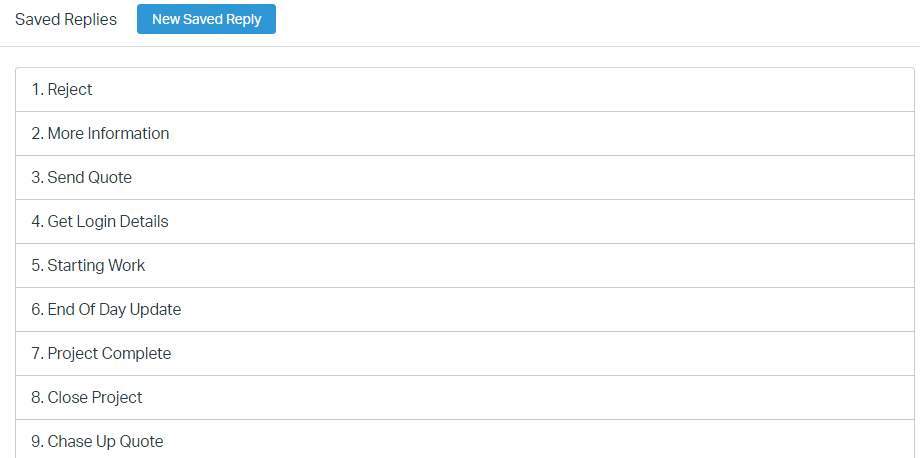
    Canned Responses

    The most useful thing about a help desk is that we can create a process for our clients via canned responses, Let me step you through it.

    A new project request hits my help desk …

    1. Do I want the project? If not I send a polite “no thanks” canned response
    2. Is there enough information to send a quot? If not send “ask for more information canned response”
    3. I want to take the project, send a “quote” canned response
    4. When the quote is accepted, send “get login details & deposit payment” canned response
    5. Just before starting work send “starting work” canned response
    6. Once the work is done send “project complete” canned response
    7. “Close project” canned response when everything is done

    I have others but as you can see I have a process built into the help desk so we handle all projects in the same way.

    click for full size image

    Gravity Form Support

    Help Scout has support for gravity forms, which is great for me, all of my contact forms are powered by Gravity forms.

    When a client submits a request it is automatically added into Help Scout, previously with Groove I had to create an integration using Zapier.

    Assigning Tickets

    A great feature of Help Scout is the ability to assign tickets to team members and have it drop off my queue.

    There is a lot of psychological baggage with a huge, long list of to-do items, when I assign a ticket to a member of my team it goes into their queue and off mine, until they need to pass it back to me.  That feels like a load off my shoulders.

    Once assigned I get an overview of who is doing what and who is available for new tasks.

    Mobile App – Woo Hoo!!

    Help Scout has a great mobile app.  I can work when I’m not at my desktop.

    Using the app and canned responses I can reply to clients, assign to team member and keep things running when out of the office

    Huge Number Of Integrations

    Help Scout has a huge number of integrations https://www.helpscout.net/help-desk-integration/

    I integrate with Freshbooks so I have an overview of a clients financial account next to a ticket

    I integrated with a number of chat software solutions such as Chatra so chat history was raised as a ticket.

    I use the beacon software from Help Scout on my WordPress site (see the question mark icon bottom right) so people can ask my pre-sales questions and that is sent into Help Scout automatically.

    Internal Knowledge Base

    Help Scout has a knowledge base that you could use as a client facing self service solution, but I don’t use it that way, I have my processes and procedures in a private knowledge base for team access.

    I also have a library to technical how to documents on how to fix common WordPress problems that my team can tap into.  I add new ones as issue occur.

    Cost

    Help Scout is charged per seat.  The current cost is $20 per seat.

    Downsides

    With groove I was able to add a star to a ticket and it made it sticky and bubbled that ticket to the top of my queue, these tickets were the ones I was currently working on.

    I like to do that because I often send a project back to clients for review and there can be some time between communications I can start and un-star as a ticket is worked on or waiting for a response.

    There is no calendar, this is not a Help Scout issue but a help desk software issue, I would love to be able to add a calendar event to a ticket to say when we are working on that project, and to have a calendar view.

    Wrap Up – Help Scout Review

    I only recommend software I use all the time and help scout is at the core of my business, all client communication flows through Help Scout.  All delegation of work is through Help Scout.

    This gets a big thumbs up from me.

    No affiliate links were harmed during the filming of this Help Scout review. This Help Scout Review needs more keyword exposure for SEO 🙂

    Photo Credit: SSAVE w/ over 7.5 MILLION views THX Flickr via Compfight cc

  • Why I’m Breaking Up With WooCommerce

    Why I’m Breaking Up With WooCommerce

    Sorry Woo it’s me not you, we just cannot be with each other any more, this is why I’m breaking up with WooCommerce.

    It started out as a great thing, we made excellent e-commerce sites together and you still do that for other people, but there are some issues…

    Fragile

    When ever there is a major update to your software you break on me.

    It’s generally not you but your mates, the extensions that cause the crash, they are not sufficiently tested with the new you and major updates to yourself will inevitably cause a crash.

    I’ll have to restore to an earlier version of you and wait a couple of weeks for your mates development to catch up before I can apply that update.

    Cost

    Let’s face it you are not costly but your entourage costs a bomb, and we cannot do any real e-commerce without all your friends hanging around.

    Once I  have a payment gateway, a subscriptions, bookable products, integration with my accounting software and mailchimp costs are mounting up.

    For open source software you are very expensive.

    Complex

    Sorry to have to tell you this but you are very high maintenance.

    It started out that your deep complexity was something I loved about you, but once you have more than a handful of products the difficulty of variable prices, complicated shipping fees, issues with pending payments and email not being delivered, it just too much.

    Too Hard To Change

    If I want to make even small changes to the way you are it’s a nightmare.

    They say you cannot change the people around you, but you can change the people around you –  hat tip theminimalists.com

    Take that time we talked about your checkout and how I wanted to move some of the items around the page, you lost it on me, you started telling me I couldn’t simply edit the template files, nooo! I had to write scripts that interfaced with your hooks and actions.

    Anyone else would have some simple code but that’s not good enough for you.

    I Hate Your Friends

    I’ve touched on the extensions already but I’ve begun to hate some of your friends, they are dragging you down.

    They make money sitting on your coat tails but they have no personal development.  They said they would work with you but when you made that change they dumped on you and stopped working bringing the whole relationship to a crash.

    Some of the other are untested and of questionable quality, they tagged along from weird locations rather than the extension store (I’m looking at you Code Canyon) they worked for the you, several versions back, but didn’t change and are still on sale, what’s that all about.

    Is There Someone Else?

    No you are still the main player in my life, some of my friends are saying Shopify is a nice girl, and that Gumroad is sweet if you are selling virtual stuff but I have a lot of friends still living at WordPress and I need to stay there.

    Wrap Up – Why I’m Breaking Up With WooCommerce

    I hope we can remain friends after this break up, if you could just sort out your friends with perhaps a certification process where an extension is tested and proven to work with you I would be happy.  If you had an upfront costs and a simpler on-going support charge that was lower, again I would be happy.

    All joking aside Woocommerce is good but these are real bug-bears I have with using and working with Woocommerce what has your experience been?

    Photo Credit: cogdogblog Flickr via Compfight cc

  • Does Website Design Really Matter In An Increasing Mobile World?

    Does Website Design Really Matter In An Increasing Mobile World?

    Does website design really matter in an increasing mobile world?

    I’m asking this question to start a discussion, my quick answer is I just don’t know, my heart says I hope it does, but my experience  with emerging technology says no.

    I’m asking myself “Have I been spending too much time looking for the perfect responsive theme when it just does not matter?”  As I said I’m starting a discussion here, please let me know what you think, in particular if you are a designer I would love your input.

    We Are Moving Towards A Mobile World

    Like it or not we are moving towards a world where our WordPress sites are primarily accessed by people using mobile devices not desktop.  Space is limited and something will have to go.

    Will the design aspects of the WordPress theme we take for granted on a desktop machine be slowly phased out?

    Big menus, popups, slide in, video background.  Do those types of feature have a place on the phone screen as they do on the desktop?

    What Do I mean By Design?

    Lets separate out two areas of design:

    1. UX or the placement of buttons, menus images etc, I call that functional design I still think this is very important on mobile.
    2. Prettyfication, colours, fancy page transitions, image backgrounds, header background videos.  This is the aspect of design I think might be on the way out.

    Limited Screen Real Estate

    The reason I think design will be greatly reduced on mobile WordPress themes is simply one of space.

    My iPhone is 13cm across about 5 inches, that’s limited real estate.  We need to build function and brevity into that space not fancy schamncy design aspects.

    We are constrained and if we add too much the screen becomes cramped and the website unusable.

    AMP

    Google are evolving a new technology called AMP.  It stands for Accelerated Mobile Pages.  The point of this is to reduce download times and speed up the use of websites on mobile.

    Here is a link to one of  my posts on AMP https://dev.neilmatthews.com/cdn/amp

    All I can do is set colours, a basic logo and that’s it, Google doesn’t want any more, all they want is the content.  Your JavaScript pop-up won’t work on AMP, your sound effects on click, don’t even go there.

    This technology is what makes me think design is being curtailed on mobile.

    App Design

    Another thing that is making me think design on mobile is contracting is App design,  click on any of your favourite apps and you will see a consistent design across all of the top apps, a hamburger menu, a gear icon for settings, lots of white space and not too much design, there is not enough space for anything else, just design for function.

    My Experience Looking For  A new Theme

    I’ve spent a lot of time recently looking for a new theme and a big part of that was seeing how the theme looked on mobile.

    Lots of desktop theme were really appealing to me but when I flipped to responsive mode there were design aspects that made no sense, popover navigation menus, page rendering graphics.

    The experience from desktop was replicated on mobile and it looked rubbish.

    Wrap Up – Does Design Really Matter In An Increasing Mobile World?

    No definitive answers I’m afraid just what I’m seeing, and the start of a discussion.

    Google doesn’t want bells and whistles when delivering a mobile experience they want function.

    Our apps are spartan.

    Screens are limited in space.

    So my question to you again, how much does website design really matter in our increasingly mobile view? To the comments with you …

    Photo Credit: byronv2 Flickr via Compfight cc

  • µAgency

    µAgency

    In my last post about building a business you love to work in and on,  I wrote about the idea of a µAgency, today I want to expand on that idea and explain just what this concept is and how it could possibly work for you.

    Remember I operate a no-guru policy so I’m giving pointers only.

    Definition

    µ – Greek letter micro, which in our definition means very small.

    A micro agency is you the principal consultant plus another person, so it’s a team based agency but a very very small one, as small as you can possibly be and still be considered an agency.

    You will continue to deliver your existing services but you will add some additional complimentary ones that are not delivered by you.

    Who Is It For

    The µAgency is for freelancers who are ready to take their business to a new level but don’t want to work solely on their business, they still want to be in the business chipping away at their client’s coal face.

    You are not looking to build something huge, just an amazing lifestyle business that delivers your income goals, is fun to run and creates massive personal freedom.

    You’ve probably tried other leveraged income ideas, but they were not a great match with your services business (info products, affiliates selling), what I’m suggesting is a companion service that goes with your main “thing” but is not delivered by you.

    You are not a manager, have no desire to be a manager, you want the smallest team possible while delivering an excellent µService.

    You’ve Done Your 10,000 Hours

    As a freelancer you have served your apprenticeship and have done your 10k hours of work to be called a master craftsman/woman of your thing.

    You know how to do your thing, how to deliver excellent service.

    It feels like you need to find another person with your skill sets to expand your business, and the costs and risk are very scary to you.

    You have reach a plateau and are looking to develop your business but the idea of finding another you is very intimidating, what I’m suggesting with a µAgency is that you don’t need another you with all your skills and associated costs, build a small service your clients needs which can be delivered by a junior team member.

    What It Solves

    It solves a number of the issues we as /solo freelancers selling services suffer from.

    Break the time = money limit – there is an upper limit on your income because of the finite number of available hours you have, the µAgency gives you leverage by using other people’s time, software tools and processes.

    Flattens the feast famine cycle – much like the above point freelancers have a rollercoaster of income, sometimes there is a lot of work we need to take on because we know down the line there will be a famine time where work is scare and we have limited income, this idea helps to create a more level income stream.

    Take time off and still earn – your agency will be bringing in money regardless of whether you are working or not.  This will  allow you holidays, sabbaticals and leisure time oh my!

    Recurring Revenue – If you develop the product your agency delivers properly you can develop a recurring revenue from your  µAgency.

    What The µAgency is Not

    It’s not a get rich quick scheme, it needs to be carefully nurture and sold to existing clients.

    It’s not 100% passive, you need to put lots of time in at the front end developing your agency, and a certain amount of time monitoring and managing your agency as it goes along (don’t panic it’s not going to be a huge time suck).

    For everyone,  if you get a feeling of worth from a massive business, this is sooo not for you, if you want 100% passive income remember you are still the principal delivering your “thing” service.  If you want to sell your business again it’s going to be hard to sell a job.

    µAgency Evolution

    With all that being said are you ready to evolve from a freelancer / solopreneur into a  µAgency?

    You may be happy where you are as solo freelancer but here are some key indicators you are ready to start your  µAgency.

    • Your income has plateaued and you are booked solid, you cannot earn any more
    • You struggle to take time off
    • If you do take time of there is a massive struggle before hand to get everything in a row and generate enough income to cover your costs.
    • You have had a couple of bad weeks with no income
    • You cannot do that thing because you are tied to your job
    • You want to level the income rollercoaster
    • You want a more passive income steam
    • You want recurring revenue so the start of each month is not dialled back to zero each 1st of the month

    µRetainer

    The first step in your evolution is to start selling  µRetainers.

    One of the problems I wanted to solve was the up and down  of income as a freelancer, and the best way I saw to do this was selling retainers.  A retainer is a recurring revenue stream where services are delivered each month to your clients.

    I call it a micro retainer because you will be selling lots of small pieces of work to many clients, not a big chunk of your time to a single client.

    This has a number of benefits:

    1. It’s a small piece of work so it is usually cheaper than a normal engagement with you and easier to sell.
    2. It’s sold to lots and lots of clients so there is no single point of failure if a client decides to stop working with you, or you decide to stop working with them if they are a pain in the arse. Remember this is all about building a business you love to operate, not have painful clients dictate what you are doing.

    The µRetainer is not an À la carte service where your client can call down you or your team’s time as they see fit, no it is a defined piece of work that is done on a recurring basis the same way to all clients, I call this a µProductized Service …

    µProductized Service

    Remember the goal is not to sell your time, you know how to do that already, that is your bread and butter, you are looking to sell a productise service that your client needs and can be sold as a retainer.

    The anatomy of a productized service looks like this:

    • As a backend upsell, a complimentary service to your main “thing”
    • Very useful and important to your client
    • Can be driven by processes
    • Is teachable to team members
    • Is repeatable and standard for all clients
    • Does not need your 10,000 hours of experise
    • Needs to be done on a recurring basis
    • Easy to manage
    • Does not need lots of your time – you should be spending time serving your clients with your front end services, not your back end product
    • Leverage people. sofware tools and processes to make it almost hands off

    I don’t know what you business is so I cannot say what your service should be but hopefully this points you in the right direction.

    Selling µProductized Service

    You might think I’m putting the cart before the horse here, there is no team to deliver the service yet, but  you should sell some µRetainers and deliver the service yourself before building your team.

    You need to document and create processes for your service so it is delivered correctly by doing it yourself you can understand the service completly, create processes, find the pain points and solve any issues before delegating the work.  You also get to set the quality levels you require so the service is delivered to your standards and does not impact upon your reputation.

    Pre-selling the service and delivering it yourself proves there is a need for the work, there is nothing worse than sacking people because you cannot cover their wage cost.

    I suggest you sell your retainer as a back end service not a front end one. This give you a chance to evaluate a client in a one off project before you work with them for a prolonged period of time, no one wants to work with a douche for the long term.

    It is far easier to sell a retainer to a happy client than it is to pitch an ongoing service to a new client.  I had a dream that I could sell a recurring maintenance plan to cold clients, it was very very hard, I now sell this service on the back end.

    µTeam

    Once you have your µService idea and have sold enough micro retainers to cover a team members salary it’s time to build your µTeam.

    Let’s talk about the size of your team. I’m talking about part time or maximum of a single person full time making up your micro team. This keeps the agency tiny and limits the amount

    What does this mean, you need to package your service so a single person can do it and still meet your income goals.  There will be an upper limit to what they can do too, so look at processes, software tools and automation plus a person to do the work.

    I don’t recommend employing someone in the traditional sense that they become employees of your business.  Personally I run my business under a UK business structure of Sole Trader. If I take on a traditional employee I have to incorporate, pay additional taxes, national insurance, PAYE, pension plans, the list goes on.

    Screw that I want as simple as business structure as possible so I choose to work with like minded entrepreneurs who have started their own business and work as contractors.

    Recruitment is far beyond the scope of this article but I’ll cover my ideas of Nearsourcing in a future post.

    No µManagement

    The beauty of the µAgency is the is no µManagement, your job is not to be a manager of the agency, it’s to set it up, create processes and rules so the delivery of that service works without you.

    Automate it as much as possible with software and tools. You can do this during the phase when you are delivering the process yourself.

    Document how the service is done, down the to

    Recruit a self starter who can deliver the service to your vision without a lot of hand holding.

    So when you are bulding your productize service create processes that are repeatable and “checkable” so you can ensure the quality of the services being delivered by your team member are

    Delegate don’t abdicate (hat tip to e-myth) make sure you are checking the work down regularly and it’s to your standards. That does not take a lot of your time.

    Remember your job is still to deliver you high end, front end services, the µService is a back end add-on delivered by your team member.

    Example My µAgency

    My µAgency is based around my productized service offering WP Insure.

    WP Insure is an ongoing maintenance plan where we look after the ongoing maintenance needs all WordPress sites.  It costs $29 per site per month, I have over 100 sites under maintenance. So I have lots of small payments from many sources on a recurring basis.

    We do the following:

    • Fix on fail – if anything breaks we fix it
    • Backups
    • Updates
    • Monitoring
    • Reporting
    • Email Support

    I use managewp software to control this work and I have my team member(s) monitoring the work fixing any exceptions and providing fix on fail services.

    I have help desk software where alerts are sent if we spot an issue automatically and an email address [email protected], to which my WP Insure clients can sends their fix on fail requests that we did not spot.

    I have two part time team members making up a single e-team member.  These are two contractors I worked with on a previous iteration when I was trying to build a maximal agency, but that is yet another story.

    I’ve built processes around canned responses in the help desk (which I use for my front end services too ) so issues are handled in the same way each time.

    We send weekly reports to my clients to update them on the work done.

    Payments are via a recurring invoice sent automatically from my Freshbooks account, Freshbooks also sends out automated reminders to prompt people to pay their bill if they forget.

    Inside the help desk is a knowledge base where I can distil my experience into solutions for fix on fail scenarios.  As time has gone on I need to create less and less of these articles.

    I spend very little time delivering WP Insure services, my team does the work.  I spend very little time managing my team they are self starters and know how to get things done. We communicate via our help desk when they need my help./

    I may sound cold about my team, but they know they can hit me up on Skype if they have an issues or need to chat.

    Wrap Up – µAgency

    None of this is new, the problems a µAgency solve are not new to freelancers.

    I’ve distilled the advice from a number of books and courses into my own best fit agency model, one that solves client problems, solves my freelancer problems and matches my temperaments, little team management, under control for my control freak tendencies makes money for me on a recurring basis, flattened my feast famine cycle, it’s a great model for me and I hope it can be useful for you.

    What do you think?  Is it a good fit for you.  What µRetainer could you offer your clients that could be outsourced?

    Should I ® µAgency, this could be the bestseller I’ve always wanted to write and my path to Gurudom 🙂

    For the geeks, you can use the html entity to show the micro sign µ

    Photo Credit: artsci.salon Flickr via Compfight cc

  • µAgency

    µAgency

    In my last post about building a business you love to work in and on,  I wrote about the idea of a µAgency, today I want to expand on that idea and explain just what this concept is and how it could possibly work for you.

    Remember I operate a no-guru policy so I’m giving pointers only.

    Definition

    µ – Greek letter micro, which in our definition means very small.

    A micro agency is you the principal consultant plus another person, so it’s a team based agency but a very very small one, as small as you can possibly be and still be considered an agency.

    You will continue to deliver your existing services but you will add some additional complimentary ones that are not delivered by you.

    Who Is It For

    The µAgency is for freelancers who are ready to take their business to a new level but don’t want to work solely on their business, they still want to be in the business chipping away at their client’s coal face.

    You are not looking to build something huge, just an amazing lifestyle business that delivers your income goals, is fun to run and creates massive personal freedom.

    You’ve probably tried other leveraged income ideas, but they were not a great match with your services business (info products, affiliates selling), what I’m suggesting is a companion service that goes with your main “thing” but is not delivered by you.

    You are not a manager, have no desire to be a manager, you want the smallest team possible while delivering an excellent µService.

    You’ve Done Your 10,000 Hours

    As a freelancer you have served your apprenticeship and have done your 10k hours of work to be called a master craftsman/woman of your thing.

    You know how to do your thing, how to deliver excellent service.

    It feels like you need to find another person with your skill sets to expand your business, and the costs and risk are very scary to you.

    You have reach a plateau and are looking to develop your business but the idea of finding another you is very intimidating, what I’m suggesting with a µAgency is that you don’t need another you with all your skills and associated costs, build a small service your clients needs which can be delivered by a junior team member.

    What It Solves

    It solves a number of the issues we as /solo freelancers selling services suffer from.

    Break the time = money limit – there is an upper limit on your income because of the finite number of available hours you have, the µAgency gives you leverage by using other people’s time, software tools and processes.

    Flattens the feast famine cycle – much like the above point freelancers have a rollercoaster of income, sometimes there is a lot of work we need to take on because we know down the line there will be a famine time where work is scare and we have limited income, this idea helps to create a more level income stream.

    Take time off and still earn – your agency will be bringing in money regardless of whether you are working or not.  This will  allow you holidays, sabbaticals and leisure time oh my!

    Recurring Revenue – If you develop the product your agency delivers properly you can develop a recurring revenue from your  µAgency.

    What The µAgency is Not

    It’s not a get rich quick scheme, it needs to be carefully nurture and sold to existing clients.

    It’s not 100% passive, you need to put lots of time in at the front end developing your agency, and a certain amount of time monitoring and managing your agency as it goes along (don’t panic it’s not going to be a huge time suck).

    For everyone,  if you get a feeling of worth from a massive business, this is sooo not for you, if you want 100% passive income remember you are still the principal delivering your “thing” service.  If you want to sell your business again it’s going to be hard to sell a job.

    µAgency Evolution

    With all that being said are you ready to evolve from a freelancer / solopreneur into a  µAgency?

    You may be happy where you are as solo freelancer but here are some key indicators you are ready to start your  µAgency.

    • Your income has plateaued and you are booked solid, you cannot earn any more
    • You struggle to take time off
    • If you do take time of there is a massive struggle before hand to get everything in a row and generate enough income to cover your costs.
    • You have had a couple of bad weeks with no income
    • You cannot do that thing because you are tied to your job
    • You want to level the income rollercoaster
    • You want a more passive income steam
    • You want recurring revenue so the start of each month is not dialled back to zero each 1st of the month

    µRetainer

    The first step in your evolution is to start selling  µRetainers.

    One of the problems I wanted to solve was the up and down  of income as a freelancer, and the best way I saw to do this was selling retainers.  A retainer is a recurring revenue stream where services are delivered each month to your clients.

    I call it a micro retainer because you will be selling lots of small pieces of work to many clients, not a big chunk of your time to a single client.

    This has a number of benefits:

    1. It’s a small piece of work so it is usually cheaper than a normal engagement with you and easier to sell.
    2. It’s sold to lots and lots of clients so there is no single point of failure if a client decides to stop working with you, or you decide to stop working with them if they are a pain in the arse. Remember this is all about building a business you love to operate, not have painful clients dictate what you are doing.

    The µRetainer is not an À la carte service where your client can call down you or your team’s time as they see fit, no it is a defined piece of work that is done on a recurring basis the same way to all clients, I call this a µProductized Service …

    µProductized Service

    Remember the goal is not to sell your time, you know how to do that already, that is your bread and butter, you are looking to sell a productise service that your client needs and can be sold as a retainer.

    The anatomy of a productized service looks like this:

    • As a backend upsell, a complimentary service to your main “thing”
    • Very useful and important to your client
    • Can be driven by processes
    • Is teachable to team members
    • Is repeatable and standard for all clients
    • Does not need your 10,000 hours of experise
    • Needs to be done on a recurring basis
    • Easy to manage
    • Does not need lots of your time – you should be spending time serving your clients with your front end services, not your back end product
    • Leverage people. sofware tools and processes to make it almost hands off

    I don’t know what you business is so I cannot say what your service should be but hopefully this points you in the right direction.

    Selling µProductized Service

    You might think I’m putting the cart before the horse here, there is no team to deliver the service yet, but  you should sell some µRetainers and deliver the service yourself before building your team.

    You need to document and create processes for your service so it is delivered correctly by doing it yourself you can understand the service completly, create processes, find the pain points and solve any issues before delegating the work.  You also get to set the quality levels you require so the service is delivered to your standards and does not impact upon your reputation.

    Pre-selling the service and delivering it yourself proves there is a need for the work, there is nothing worse than sacking people because you cannot cover their wage cost.

    I suggest you sell your retainer as a back end service not a front end one. This give you a chance to evaluate a client in a one off project before you work with them for a prolonged period of time, no one wants to work with a douche for the long term.

    It is far easier to sell a retainer to a happy client than it is to pitch an ongoing service to a new client.  I had a dream that I could sell a recurring maintenance plan to cold clients, it was very very hard, I now sell this service on the back end.

    µTeam

    Once you have your µService idea and have sold enough micro retainers to cover a team members salary it’s time to build your µTeam.

    Let’s talk about the size of your team. I’m talking about part time or maximum of a single person full time making up your micro team. This keeps the agency tiny and limits the amount

    What does this mean, you need to package your service so a single person can do it and still meet your income goals.  There will be an upper limit to what they can do too, so look at processes, software tools and automation plus a person to do the work.

    I don’t recommend employing someone in the traditional sense that they become employees of your business.  Personally I run my business under a UK business structure of Sole Trader. If I take on a traditional employee I have to incorporate, pay additional taxes, national insurance, PAYE, pension plans, the list goes on.

    Screw that I want as simple as business structure as possible so I choose to work with like minded entrepreneurs who have started their own business and work as contractors.

    Recruitment is far beyond the scope of this article but I’ll cover my ideas of Nearsourcing in a future post.

    No µManagement

    The beauty of the µAgency is the is no µManagement, your job is not to be a manager of the agency, it’s to set it up, create processes and rules so the delivery of that service works without you.

    Automate it as much as possible with software and tools. You can do this during the phase when you are delivering the process yourself.

    Document how the service is done, down the to

    Recruit a self starter who can deliver the service to your vision without a lot of hand holding.

    So when you are bulding your productize service create processes that are repeatable and “checkable” so you can ensure the quality of the services being delivered by your team member are

    Delegate don’t abdicate (hat tip to e-myth) make sure you are checking the work down regularly and it’s to your standards. That does not take a lot of your time.

    Remember your job is still to deliver you high end, front end services, the µService is a back end add-on delivered by your team member.

    Example My µAgency

    My µAgency is based around my productized service offering WP Insure.

    WP Insure is an ongoing maintenance plan where we look after the ongoing maintenance needs all WordPress sites.  It costs $29 per site per month, I have over 100 sites under maintenance. So I have lots of small payments from many sources on a recurring basis.

    We do the following:

    • Fix on fail – if anything breaks we fix it
    • Backups
    • Updates
    • Monitoring
    • Reporting
    • Email Support

    I use managewp software to control this work and I have my team member(s) monitoring the work fixing any exceptions and providing fix on fail services.

    I have help desk software where alerts are sent if we spot an issue automatically and an email address [email protected], to which my WP Insure clients can sends their fix on fail requests that we did not spot.

    I have two part time team members making up a single e-team member.  These are two contractors I worked with on a previous iteration when I was trying to build a maximal agency, but that is yet another story.

    I’ve built processes around canned responses in the help desk (which I use for my front end services too ) so issues are handled in the same way each time.

    We send weekly reports to my clients to update them on the work done.

    Payments are via a recurring invoice sent automatically from my Freshbooks account, Freshbooks also sends out automated reminders to prompt people to pay their bill if they forget.

    Inside the help desk is a knowledge base where I can distil my experience into solutions for fix on fail scenarios.  As time has gone on I need to create less and less of these articles.

    I spend very little time delivering WP Insure services, my team does the work.  I spend very little time managing my team they are self starters and know how to get things done. We communicate via our help desk when they need my help./

    I may sound cold about my team, but they know they can hit me up on Skype if they have an issues or need to chat.

    Wrap Up – µAgency

    None of this is new, the problems a µAgency solve are not new to freelancers.

    I’ve distilled the advice from a number of books and courses into my own best fit agency model, one that solves client problems, solves my freelancer problems and matches my temperaments, little team management, under control for my control freak tendencies makes money for me on a recurring basis, flattened my feast famine cycle, it’s a great model for me and I hope it can be useful for you.

    What do you think?  Is it a good fit for you.  What µRetainer could you offer your clients that could be outsourced?

    Should I ® µAgency, this could be the bestseller I’ve always wanted to write and my path to Gurudom 🙂

    For the geeks, you can use the html entity to show the micro sign µ

    Photo Credit: artsci.salon Flickr via Compfight cc

  • Build The Business You Love, Not The One Gurus Tell You To

    Build The Business You Love, Not The One Gurus Tell You To

    One of THE most rewarding things I have ever done was starting my own business. Can I suggest you build the business you love not the one sold by Gurus.

    It has given me the opportunity to live life on my own terms and not dance at the end of a leash for an employer.  I’ve got huge amounts of personal freedom and complete control over my income and time.

    I’ve spent nearly nine years doing this self employed stuff, and on the way I’ve listened to a lot of Gurus telling me how I should build a business.  I’ve learned the hard way to listen to my gut and build a business I love not what they tell me I want.

    What lots of Gurus tell us is based on their temperament, what excites them, so I suggest you read their words, but adapt to your own world view.

    When you make a company, you make a utopia.  It’s where you design your perfect world. – Derek Sivers Anything You Want

    I Always Wanted To Be Self Employed

    I have an authority issue, I don’t like being told what to do, as a result I was a spiky employee, if a boss looked at me the wrong way it would set my back up.

    I was always really good at my job, so I was never sacked but I was such a pain in the ass that I never progressed and moved up the ladder.

    Lacking the progress that was clearly my manifest destiny 🙂 I started looking at how I could start my own business, but this was the early 90s and starting a business required a business plan, capital (I didn’t have any) or lending, premises and a staff.  I was not interested in any of that.

    Sooby Doo fast forward 10 -15 years.

    It was early 2008, and I mentally said “screw this”, opportunities were everywhere online, I decided to set out on my own, I left my corporate job and started doing some contracting gigs and in the background I began building wpdude.com.

    I was not climbing the corporate ladder so I decided to build my own.

    The Steep Learning Curve

    I was a skilled techie but had very little business understanding so I started to read and take online courses like it was going out of fashion.

    I never realised this before but I love learning about the mechanics of business.  Marketing, processes finance etc.  There is so much to learn and so many business consultants selling their way.

    With every new guru I found, I would try and shape WPDude to match their vision.

    I would look at other businesses doing what I do and try to emulate their business model.

    I would create somebody elses idea of a great business not mine, and I would find very quickly that I hated doing it their way and a pivot would happen.

    Guilty As Charged

    Here are some shiny  new business models  I’ve done and dropped along the way

    Membership site – I started the WordPress owners club, a membership site with training and live webinars.  I’m an introverted techie, training is not my thing.

    Info products – I created a series of information products, they were good, but I work in technology and an info product is obsolete almost as soon as the e-ink is dry on an e-book. Info products need evergreen content to work.

    Building a big team – I built a big team to deliver my services.  I don’t like being a manager, I like things done my way, I had to sack a lot of people, not nice.

    Trying to emulate WP Curve – I saw the massive success and ultimate acquisition of WP Curve by Godaddy and thought, why can’t I have that, we do the same thing.  Jealousy crept in, then I realised they have 30-40 members of staff, layers of project managers, slick processes, nope not for me.

    Listen To Your Gut

    It’s a cliché I know, but your gut reaction to something is a great way to judge if a Guru’s advice will work with you and your business.

    IDEA:Employ a team of ten and a project manager to allow you to get out of the business and work on it not in it

    GUT: Erghh! rational mind translates to Neil, you are an introvert managing a huge team would be a huge stress to you.  You are a control freak giving over your client projects to a project manager would make the big vein in your  head throb.

    You Have Idiosyncracies Embrace Them

    We are not all the same, so the advice of one Guru may not work for you and your temperament.

    Embrace your differences and use them to grow a business tailor made for you.

    If live video streaming does not work for you don’t do it, you might be a better written communicator, do that.

    You might be a great manager, excellent, build a team to take your business forward.

    The Business I Love And How I’m Doing

    In no particular order here are some things I brainstormed during my annual planning day on Thanksgiving 2016.  I take a day off to plan out the coming year.  This years theme was building a business I want.

    I offer two key services, one off projects which are delivered by me and a recurring maintenance plan WP Insure delivered by my team.

    Recurring revenue – rather than just one off projects, I want to flatten the feast / famine cycle of project work and have recurring revenue streams.  I have this in my maintenance plan which is a recurring subscription service.  I’m looking at white labelling a WP Dude hosting service again this will be a recurring service.

    Retainers – instead of having large multi hour retainers for a few clients I have over 100 micro retainers with many clients delivering backups, updates and fix on fail services.  I have a pre-set income from this so the fear of starting from zero each month is removed.

    Time Off – I want the ability to take time of or even a prolonged sabbatical if I want to and still make money, this will be achieved via my maintenance plan delivered by team members other than me.

    Fun – I want running my own business to be fun, if something inside my business is a pain in the arse (types of work, clients, team members, the marketing channel De Jour) it gets dropped, I’m only doing things that are fun and I like.

    Income goals – I’ve set some income goals I want to achieve, I’m not going to be a millionaire and I don’t want to be, but I will be very comfortable when I reach my goals.

    Minimal – I subscribe to the minimalism philosophy of only having enough to meet my needs and desires, I’m not keeping up with the Jonses in my personal life so I’m not keeping up with them in my business life.  So minimal tools, minimum viable team to get the work done, minimal costs.  No looking at other businesses and judging myself against them, they don’t have a business I would love.

    Life long learning – I love learning so I want my business to be a conduit to learning.  I know I said I followed too many Gurus, but I’m not suggesting you stop learning.  I’m saying read what they have to say and apply it to YOUR perfect business.

    Space – I wrote about space earlier so I’ll not rehash here go and read my post SPACE.

    Professionalism – I want all my clients to have a very professional service delivery so I’ve documented a consistent way my services are delivered and how I communicate that delivery to my clients.

    Creative outlet – I want wpdude to be a creative outlet too.  The technical service delivery does not provide that outlet, but blogging, creating videos and marketing plans are all very creative and I get to scratch that itch.

    Variety – I want a variety of different work so I have opted on many small technical support jobs rather than very large build jobs taking multiple months. The Guru’s say create a productized service and deliver that over and over again, personally that sounds very dull.

    Life outside of the biz – wpdude has already delivered much of that for me, I get to pick my girls up from school, I’ve never missed one of their shows or sporting events.  I don’t work weekends, my phone get set aside in the evenings but I still need to work on this.  More discipline to finish by 5pm for example, my business is important to me but it is not the be-all end-all

    Meets my quirks – as I’ve already said I’m introverted so WPDude needs to meet my quirky needs, I’m not interested in Webinar marketing, that drains me entirely, I don’t want to be making phone calls all the time, so email and a helpdesk are my communications tools of choice.   I’m not interested in managing a huge team; check I’ve got a single team member doing processed orientated work so management is minimal.

    Position As Expert – I know I’m really good at this WordPerss stuff (my very British reserve is kicking in, it’s very hard to brag about my expertise) and I need to position myself as the expert, experiments in budget $99 per job services from another Guru have diluted my marketing.

    Sellable – this is a sticky one, I’m going to want to retire someday,but who wants to buy a job?  WPDude as it is, with me delivering the services is not that attractive, but several hundred maintenance clients with a team to deliver the service is.  That is my exit plan in the future.  It will be an organic growth on the back of a business I like running.

    The Micro Agency Is Born

    I’ll write more about this idea in my next post but I’ve stumbled over an idea or framework in which an online services business can thrive and still meet my needs. Grr I sound like a Guru myself now (the $999 programme will NOT be published this coming fall).

    I call it the Micro Agency because it’s a mix-up of a solopreneur freelancer and a very very niche agency.  Stay tuned for details.

    Wrap Up – Build The Business You Love

    Am I cured of Guru worship, hell no I often get a nagging feeling that I’m moving too slowly and if I could get 10 more members of staff and bill them out at X per day I can sell up and move to Tuscany.

    But ten more team members would give me ten more headaches, and ten times less calm, it’s not what I want, I’m building the business I want to please me, to meet my goals not some distant Guru who knows nothing of my personality.

    Are you building the business you love, comments below…

    Photo Credit: Lucas Lima 91 Flickr via Compfight cc
  • Navigating The Vastness Of Themeforest

    Navigating The Vastness Of Themeforest

    I was  in the market for a new theme to refresh the look and feel of WPDude, I was scouring Themeforest for a great new look and I thought I would share my experience.

    What Is ThemeForest

    If you have not used themeforest before, it is a marketplace for premium themes, both WordPress and stand alone website themes.

    You can browse and find some really good designs on their site.

    The Problem

    Themeforest is absolutely massive there are tens of thousands of themes available out there.

    Once you start browsing you can very quickly become overwhelmed.  This post is really to help you overcome the frustration of too many choices.

    Before You Start

    Don’t just start browsing, have a clear picture in your mind of the functionality you need.  Do you need a portfolio, do you need a team page, do you need services.  Have a brain storming session and throw all your requirements onto a sheet of paper.

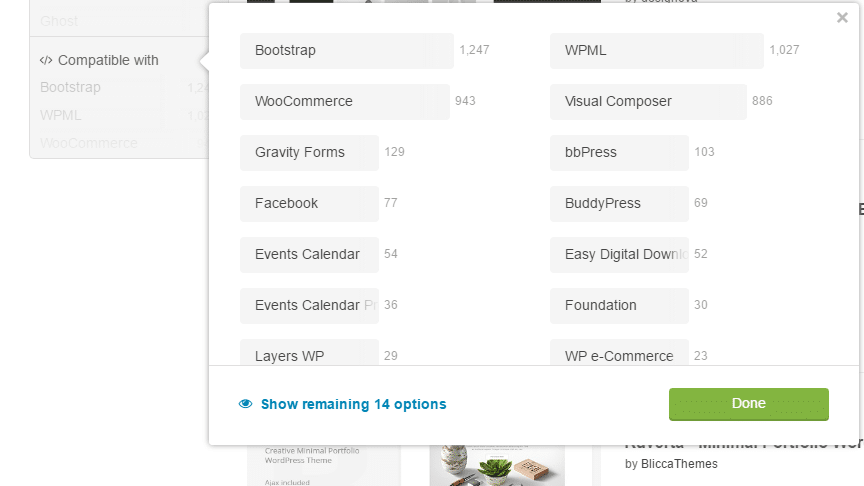
    If you have specific complex plugins like WPML or Woocommerce you will need to find a compliant theme.

    What I Am Looking For

    The main reason I am looking for a change is the mobile navigation of my current theme is not great, there is a massive header area that covers everything above the fold on mobile.

    I am looking for a minimal design, pretty monochromatic.  Lots of white space.

    I need a services function to highlight what I do for my clients.

    It needs to work with gravity forms, my testimonials plugin.

    Narrowing The Search

    You main job when you start looking for a new theme is to narrow the search to reduce overwhelm (and you will be overwhelmed with the huge choice of themes).

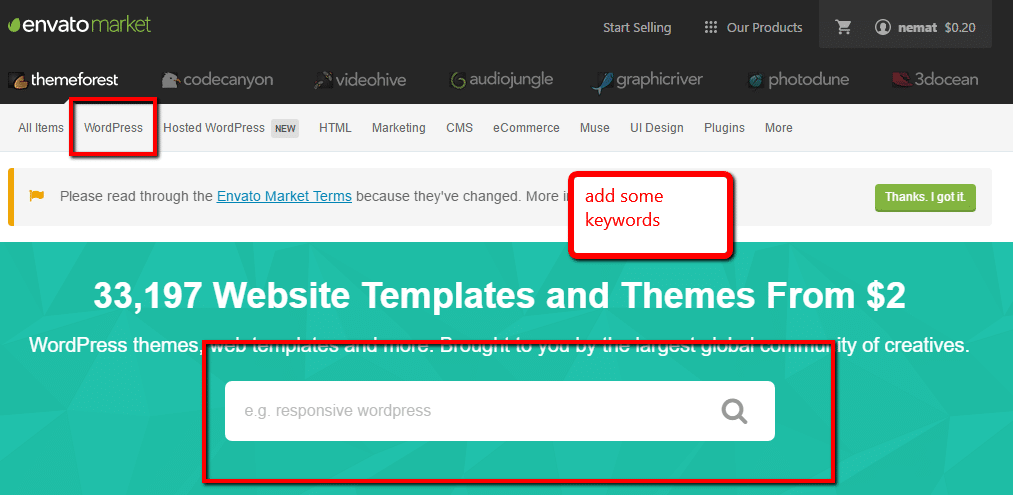
    The first thing to do is select WordPress naturally, then under the menu item are a series of pre-made types. If you are looking for a magazine style perhaps this is a good starting point.

    You can also use the search function and throw in some keywords, I went with wordpress minimal.

    Compatible With

    The next step in narrowing down your search is to use the compatible with option.  This is really important if you use pugins like woocommerce or buddypress which need very specific theme files.

    My Results

    I returned 2,398 results, erghh!!  I need more pruning.

    Live Demo

    We will be testing the theme before we buy it. so if the theme does not have a live demo ditch it.

    As you browse through your search results if you hover over a theme you like and it does not have a live demo i would consider this a red flag not to choose that theme.

    Thumbnails

    Each theme has a small thumbnail on the search results, this will allow you to get a feel for that theme

    A word to theme developers, give us a glimpse of your theme in the thumbnail don’t add some abstract links for “designery” nonsense, we are searching for a needle in a haystack, just give us a glimpse of your theme.

    Testing Your Theme

    Once you have found a theme you like click through and give it a test drive on the live demo.  Ask yourself the following questions.

    • Do you like the design?
    • Does it have all the features you need?
    • Does it work on mobile?
    • It is fast enough?
    • Is it compatible with your current site’s plugins?
    • Is support good? Look at the developers support forum, are thye responsive, look at the updates are they still developing this theme.

    Mobile

    Get out your phone and your tablet and test the demo site on multiple devices, does it still look good on a mobile device.  Remember mobile usage is growing and you must have a site that looks good on mobile and desktop.

    Run the demo site through this google checker https://search.google.com/search-console/mobile-friendly.

    Performance

    Will the new theme load quickly and perform well.

    Run the demo site through Google page speed insights at https://developers.google.com/speed/pagespeed/insights/

    Bookmarking

    If after all that testing you have a potential candidate, please please remember to bookmark it on Themeforest.

    You will be looking at an awful lot more themes so create a shortlist by bookmarking the theme and add it as a favourite.


    Congratulations

    You have your new theme, buy and download the files (but don’t get me started on Themeforest’s ridiculous credits and charges for using PayPal).

    You Pay Before You Test

    Themeforest (rightfully so) has a no refund policy if you don’t like the theme so you need to play with and learn to love the demo or you will pay for a theme you might not want to live with.

    I spent an entire evening navigating and getting a feel for my new theme before committing to it.

    Making It Look Like The Demo

    This is often the most disappointing aspect of your new them, you install it and it looks nothing like the one on the demo.

    Before you buy check to see if there is a demo install option where you can make your site look like theirs.  Dig into the downloads most themes come with an import file.

    Staging Site

    I highly recommend you install your new theme on a staging site before you make it live so you can tweak and get the look just as you want it.  Moving themes is not as quick as you may think, you may need to setup new custom posts, portfolios, the list goes on, you don’t want you live site looking like a shambles while you build it out.

    Check out this post on the options for a staging site. How To Build A WordPress Staging Site

    Wrap Up – Navigating The Vastness Of Themeforest

    In the end I went for the Breal theme.  What do you think?

    It’s hard to see the wood for the trees in the virtual Themeforest, it’s a good idea to have a plan before you start searching for a new theme or you will experience analysis paralysis.

    UPDATE: The new theme was not gelling with me, so I rolled back my search continues.

    Photo Credit: Henry Hemming Flickr via Compfight cc