Neil Matthews

Blog

  • Thanksgiving Business Planning

    Thanksgiving Business Planning

    Each year on the US Thanksgiving holiday I take a day out to plan for the coming year.

    I’m based in the UK, and I don’t celebrate the holiday, but most of my clients are US based so it’s a very quiet day and the ideal opportunity to plan 2018.

    A lot of you may be getting into planning mode for next year so I thought I would share my process.

    The Run Up To Thanksgiving

    At the start of November, I begin to get excited about my planning day, it’s something I really look forward to for some bizarre reason.

    I start scribbling lots of notes about how I would like next year to be, and throw them into a folder, this is a kind of planning brain dump which I will read through and use to set my plan.  As I go into my planning session I have a rough idea of how 2018 will look, the planning day will set that in concrete with a formal plan and actionable items will come from that.

    This pre-planning phase takes place over a couple of weeks in November. I have a stack of notes about 50 pages high with ideas.

    Some hints, a re-brand is in the planning, I’m looking into the way I do my quotes and my blogging next year will have a new theme.

    My folder of planning notes

    Business & Personal Planning

    My planning day is not just about how I want to see my business in 2018 but also personal goals.

    I’ll not talk much about my personal goals in these posts because, erm, they are personal, but I’ll share my business plans on my next blog post.

    The tools I use for my planning session are pretty basic, a pad of A4 paper, pens and coloured pencils and Evernote to write up my formal plan.  Nothing fancy.

    Re-read my 2016 / 2017 Diaries

    On the morning of my planning day, I skim over my late 2016 & 2017 diary to date over breakfast, to see what went well, and what went wrong during the past year.  I’ll look at the work I’m doing and issues I have had.

    I re-read my previous years planning from the same process to see how on target I am (erm did you see any info prods from me this year? I’m not on target for that part of my previous plan).

    Get Out Of The Office

    This is a hugely important part of the process, I get out of my home office and do the planning offsite.

    The change of scenery makes the process like a holiday for me, almost a day off from client work.

    I don’t answer any emails on my planning day.  I don’t do any client work other than to ensure my ongoing maintenance clients are all okay and their updates were done and backups have worked and nothing has crashed.

    I have two locations for my planning day, the first is a coffee shop within walking distance of my home and the other is my local pub, where I have lunch, and a celebratory pint once I’m done planning, it’s thirsty work after all.

    Being in a new location really does create a divide between the planning process and normal day to day client activities, so I heartily recommend getting out of your normal working environment to do this process.

    Morning Routine

    My morning routine starts at the coffee shop or rather two coffee shops.  It’s not very glamorous, but the nearest coffee place is in Washington motorway services.  So I have a coffee shop on the northbound side and another on the southbound side.  I’ll spend a couple of hours in each shop.  I do my business planning on one side of the motorway (freeway for my US chums) and personal planning on the other.

    For the history buffs Washington is the family home of the famous George Washington, here’s a picture of his ancestral home.

    What Went Well & Wrong in The Last Year

    This is the first part of my day, I do a retrospective on what worked and what failed last year.  I make notes on doing more of the stuff that went well and creating controls on how to stop messing up again next year.

    If you are not making mistakes you are not trying new things, so I don’t beat myself up on mistakes, I learn from them.

    It’s also a chance to look at things that went well but I’m not that keen on doing any more.

    Business Planning

    Next, I move onto how my business will look next year.  Next year’s focus is how my business can serve me, not creating some mythical business from an e-book with someones else’s vision of a great business.

    I look at major projects I want to start, hint I want to write a book.

    I look at changes in how my business works, my marketing, the services I deliver and how they are delivered and my µAgency to deliver those services.

    I set income goals and other targets.

    I look at how to automate and streamline my business.  I think about any new tools I need.

    I look at any legislative changes required.

    Personal

    The second part of the morning is all about my personal goals for next year.

    I like to do both these planning sessions at the same time so my business can facilitate the lifestyle I want, not be an all-consuming thing with a personal life stuffed in at the end of the day.

    Lunch & Afternoon

    As lunchtime approaches, I take the mile or so walk from the coffee shops up to my local pub the Mill House.  This again is part of my routine, I can mull on my plan created in the morning during the 30 or so minute walk to my lunch destination.  Does it sit well with me and will it serve me well during the next year?

    The walking/thinking/meditative state really helps to make my mind up about the plan I created in the morning.  I get to think it through and see any problems.

    For the history buffs, the Mill house started life as a water-powered grain mill in the 18th century, became an Inn in the late nineteenth century.  It’s reputedly haunted and it is my local pub, I love it.

    MIll House Pub

    The Action Plan

    The afternoon is spent creating an actionable plan to implement what I have planned on paper during the morning session.

    I document this in Evernote.  I set deliverables timescales and targets.

    Targets

    I like to create a series of targets from my planning so I can judge how well I performed against my plan, some are hard targets such as a £income goal, others are soft targets such as how I want my business to look and service me, here are some of my planned targets.

    • Income goal
    • Maintenance clients signed up
    • Team size and formation
    • Take time off an maintain income level
    • Sabbatical next summer

    Not To Do List

    This is a new thing for me for 2018, I’m also creating a not to do list, things I have done by habit over the years and need to stop doing.

    Things like impulsively buying domain names for projects I might, and usually do not, end up starting is definitely going on the not to so list,  wpzaps.com for example?

    2018 Theme

    I like to boil everything down into a yearly theme.  This year is all about reducing stress so working in wpdude (or whatever it will be called next year ????) is a pleasurable thing for me.

    Congratutorial Pint

    It would be rude not to have a pint or two of beer after all that thirsty work planning my year, now the hard work begins to implement my plan. The Deuchars IPA is especially fine at the Mill House.

    Wrap Up – Thanksgiving Business Planning

    Happy Thanksgiving to my US readers, I’m thankful you have given your most precious and finite resource; your time, to reading this post from across the pond.

    I hope you have enjoyed the rich history lessons from my part of the world :).

    I’ll update you on my plans in my next blog post.

  • Review of Grammarly

    Review of Grammarly

    On this day, at the 11th hour on the 11th day of the 11th month of 1918, the Great War ends.

    This coming Sunday, the 12th of November we observe Remembrance day in the UK (and other Commonwealth Countries) so in the spirit of peace and reconciliation, I want to end my war with the Grammar Nazis.

    To do this I’ve started to use a tool called Grammarly which will hopefully pick up more of my spelling and grammar errors and stop the Grammar Nazis in their tracks.

    What Is Grammarly?

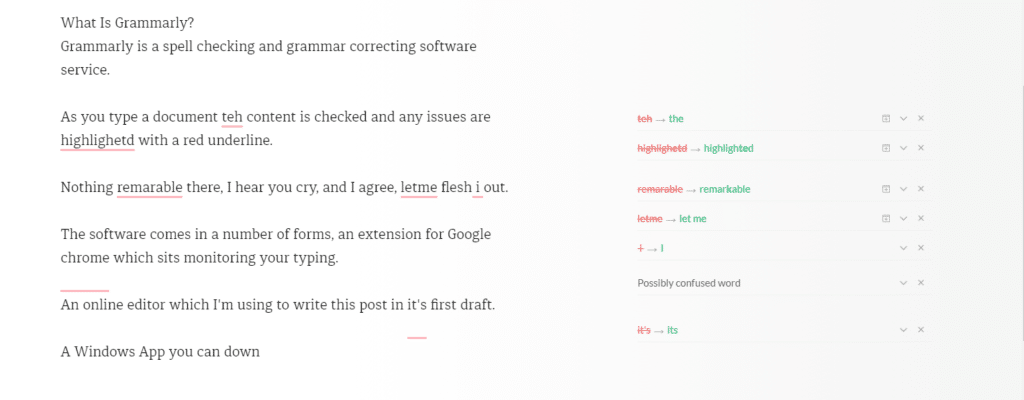
    Grammarly is a spell checking and grammar correcting software service. grammarly.com

    As you type a document the content is checked and any issues are highlighted with a red underline.

    Nothing remarkable there, I hear you cry, and I agree, but let me flesh it out.

    The software comes in a number of forms, an extension for Google Chrome which sits monitoring your typing.

    An online editor which I’m using to write this post in its first draft.

    A Windows App you can download and run on your PC that acts as an editor.

    I’ll probably stick with the Chrome extension, but I thought I would use all the tools in the spirit of a full review of Grammarly.

    review of grammarly
    Click for Full-Size Image

    Freemium

    The software is free with a set of premium upgrades. The premium version is not cheap at £22.84 per month. I’m using the free version (cheap or frugal, you decide).

    The premium version has advanced features such as plagiarism checks, style guide and word choice tools.

    Why It Beats The Native WordPress Spell Checker

    The A.I. behind the scenes is far better than the native WordPress spell check, it’s picking up far more grammar issues with my writing.

    It has dictionary and grammar guides for British English which is different from US English used in many spell checkers.

    The punctuation correction is amazing, it spots missing commas before I do a read through which really helpful.

    It picks up on a lot of words I use which should be hyphenated, for example, I use the word setup a lot which should be hyphenated to set-up.

    I miss full stops (periods to my American chums) at the end of sentences an awful lot it turns out.

    It’s Not Just For WordPress

    It’s not just for my blog posts, any typed content in your browser can be checked, it’s working wonders for my email.

    Wrap Up – Review Of Grammarly

    A gushing review I’m sure you will agree. I’m a fan but would I pay £20 plus per month for the premium version? Probably not.

    Check out https://grammarly.com

    Photo Credit: Infomastern Flickr via Compfight cc.

    I’m doing the SEO density dance for Review of Grammarly.

  • Do You Need WordPress Web Push Notifications?

    Do You Need WordPress Web Push Notifications?

    As you are wondering the world wide interwebs, you may have noticed a new thing, websites are asking if you want push notifications when the site update. In this post I’m going to talk about WordPress web push notifications and do you need them.

    What Is WordPress Web Push Notifications

    When you visit a site with a supported browser such as Google Chrome a popup will appear on your screen asking if you want to get notifications.

    Already I’m annoyed yet another popup! I’ve gone for a simple red icon bottom right of the screen.

    You don’t need to enter any details, just click on the popup and it is saved.  This is saved in your browser settings.  A unique ID from your browser is sent to your push notification supplier, in my case OneSignal.com.  That’s the sign-up process.

    There is a console on OneSignal where I can send out a WordPress web push notification to my subscribers.  The push appears bottom right of my browser and looks like this.

    wordpress web push notification

    Setting Up WordPress Web Push Notifications

    I’m not going to recreate the wheel, here is a great tutorial to make your site use push notifications.

    http://www.wpbeginner.com/wp-tutorials/how-to-add-web-push-notification-to-your-wordpress-site/

    My Opinion

    This is just my opinion, and my feeling, but I don’t want all the sites I follow jumping onto my browser screen shrieking that there is a new blog post, I prefer to coral all my blog posts into my feed reader or get them in my inbox for later reading.

    Do we need another notification?  Think about your mobile phone, it beeps at me too many times, and I’ve deactivate a lot of mobile push notifications.

    Browser notifications are intrusive, they popup and demand your attention when you are working at your desktop, flow is broken no matter how focused you are.

    I’ve effectively used web push for my helpdesk software notification and live chat software which is client related.  I need that alert, but do I want an alert jumping onto my desktop when Johnny posts about his new pet cat?  No I don’t.

    Experiment

    I’m adding push notification onto WP Dude until Thanksgiving 2017.  This will allow you, the reader, to see push in action if you have not seen it, and get an update about my blog posts to see if you like it.  I might even try to sell you some services, how annoying.

    I’ll be monitoring sign ups to see how effective this technology is for marketing.  I’ll look at sign up rate and click through from my push notifications.

    I don’t like the technology so as I sit writing I don’t think I’ll keep it, but I may be surprised by how effective it is. I’m open to this experiment.

    Can I ask you to sign-up to test the system? Click on the red icon bottom right.

    I’ll write a follow up post at the end of the experiment.

    Wrap Up – WordPress Web Push Notifications

    As you can no doubt tell I’m not a fan of this technology.  It is far too intrusive in my humble opinion.  I’m prepared to have my opinion changed if it is effective, but there’s no lead magnet delivery in exchange for sign-up.

    Photo Credit: lenswrangler Flickr via Compfight cc

  • What Is Two Phase Authentication?

    What Is Two Phase Authentication?

    What is two phase authentication?  I’ll tell you, it’s an additional control you can add to you WordPress site to increase security.

    Phase One

    The first phase of authentication is your standard WordPress login user ID and password.

    Phase Two

    You are asked to enter a code which is sent to a device, usually your mobile phone.

    Types Of Phase Two Authentication

    There are a number of ways the code for phase two here are some examples:

    • An app that give you a code
    • You are sent a text message with a code

    Phase Two Has An Expiration Date

    The code sent your device has an expiration date, usually just a few minutes.  This means you have to act quickly and login with your code.

    If you try to use an expired code, you will not be able to authenticate correctly.

    Always With You Device

    The beauty of this process is that the code is sent to a very personal, always with your device, your mobile phone.

    A hacker could crack your user ID and password but they would have to go to another extreme level and find you and then steal your device to complete the process.

    I like to think of security as a series of layers of control, the more layers the more annoyance you give to the hacker.

    My Preferred Tools For Two Phase Authentication

    My preferred tool is from Google and it’s called Google Authenticator, it is an app you install on your phone and a plugin you install on your site.  Here are the links.

    https://en-gb.wordpress.org/plugins/wp-google-authenticator/

    Android App

    Apple App

    VIDEO – Two Phase Authentication In Action

    Here is a video walk though of me creating a user with 2 Phase authentication.


    Wrap Up – What Is Two Phase Authentication?

    It’s an additional level of authentication.

    Just because you have 2 phase authentication activated, does not mean you are 100% safe, if the hacker has ftp access they can deactivate the plugins or create a new user which is not authenticating.

    As I said previously I think of security as a multiple layer cake, the more layers, the tighter the security.

    Do you need help hardening the security of your WordPress site, why not get a quote.

    Photo Credit: drpeterrath Flickr via Compfight cc

  • Why Has MY Site Been Hacked?

    Why Has MY Site Been Hacked?

    “Why has my site been hacked?”. I hear this a lot from site owners who’s site has been attacked, and I inevitably tell them.

    “IT’S PROBABLY NOT PERSONAL”

    People feel violated about a hacked, and they have a need to know why this particular blog has been targeted.  In this blog post I want to shine a light on the motivation behind a hack.

    Why Sites Get Hacked?

    Sites are hacked for a number of reasons, here are the tops reasons I see:

    • For kicks – there is an intellectual challenge to hacking a site, and some people do it for kicks, they will leave a little defacement on your site. It’s not a direct attack it’s just a game to them.
    • For SEO – the hackers create links back to their site to improve their own SEO.  The more links the more Google will rank your site, so hackers add links.
    • For Traffic – the hackers add redirects to their site for more traffic and more business.  They capture hard-earned traffic from your site and send it to theirs.
    • Phishing – a hacker installs phishing sites on your site to con people into giving over their details.   The illegal activity is done on your site, not on one that can be traced back to the hacker.
    • It’s an attack – I said it’s probably not personal but sometimes it is a direct attack on your business.  I’ll talk about this a little later.

    Who Does The Hacking

    So the question is who is hacking your site, there are a few groups of people who attack sites.

    Black Hat Hackers

    These are the hard core hackers that find and open up new ways to exploit sites.  These people are frankly brilliant, their technical skills are high, they dig into code and server configurations looking for a route in.

    These people find the route into WordPress sites and pass it to the hacking community.

    Script Kiddies

    A derogative term for someone using the techniques found but a black hat hacker and exploiting them.  They don’t have any real skills, they just reuse other people’s work.

    In my experience these are the majority of hackers I come across.

    Brute Force Bots

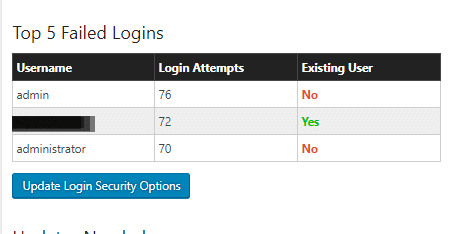
    Sometimes it’s not that clever and it’s simply a bot going to your login form and trying common user name and password combinations over and over again.

    Install Wordfence and you will see this is a very common thing.  Here is a screen dump of login attempts on my site.

    why has my site been hacked

    Vulnerabilities In Core, Plugins and Themes

    The main way people get into word press sites is through a bot network brute force or by exploiting vulnerabilities in WordPress core, themes or plugins.

    Using scanning tools they will look for a file on your site from a vulnerability, find it then exploit your site.

    There is a great tool called wpscan which can be integrated into systems to scan for issues, I have tools for my maintenance clients to do this, then I close the vulnerability.

    They keep a database of vulnerabilities which makes very interesting reading, I can bet a plugin or theme you have used is in the database. https://wpvulndb.com/.

    Remember that person I mentioned earlier, the back hat hacker, they are probing all the time for vulnerabilities and are always one step ahead of things.  The hacker does not add entries into this database, the security community needs to find these and publish them so the hacker is always ahead of the game.

    WordPress Is A Low Hanging Fruit

    WordPress powers 27%+ of the internet, it’s a low hanging fruit, finding a vulnerability in WordPress opens the door to more hacking potential than some obscure website scripting system.

    This is why WordPress does get hacked, more people are investing time finding loop holes.

    Unless It Is Personal

    I said it’s probably not personal, but sometimes it is.

    Look at your content, is it controversial?  Look at what your business does, would it upset people?  If the answer is yes hackers may be coming at you personally.

    I’ve seen LGBGT and religious sites get attacked.  I’ve helped a site supporting Charlie Hebdo with a request security review because they knew they were about to court controversy.

    Politics, religion, money difference of opinion opens you up to hackers.

    What You Can Do About It

    Here are some tips to keep your site protected.

    • Have full backups which you save offsite so you can recover from a hack.
    • Keep your site updated to close the vulnerabilities as they are found and fixed.
    • Harden security on your site, here is a great guide https://build.codepoet.com/tag/hardening-wordpress/
    • Install plugins like WordFence of iTheme security to monitor for attacks.
    • Use a decent hosting company, cheap hosting often does not have the best techs on their team to keep the servers secure.
    • Harden the passwords you use and change them often, consider implementing two phase authentication (I’ll write about this in my next post).
    • Give me a shout, I offer security hardening and monitoring as part of my maintenance plan or as a one off package.

    White Hat Hacking

    I hack people’s sites all the time in my capacity as a WordPress consultant.  I need to get access to fix things, it’s not hard you only need a little bit of access.

    It’s white hat and is benign, if I can do it then you can bet a black hat hacker on the edge of the technology can get in.

    Wrap up – Why Has MY Site Been Hacked?

    It’s probably not personal, it’s some punk kid in their bedroom getting access to your site for kicks probably, unless it’s not :).

    Photo Credit: nielskirkedal Flickr via Compfight cc

    SEO bullshote why has my site been hacked? No really why has my site been hacked?

  • When A Grammar Nazi Goose Steps Over Your Work

    When A Grammar Nazi Goose Steps Over Your Work

    You’ve just published your latest blog posts.  You are pretty happy with your work.  You are hoping it has communicated an idea you have well. A few moments later, PING! you get a message from the Grammar Nazi, reaching out from over the interwebs to chastise you.

    Here’s how I handle this type of particularly persnickety person.

    What Is  A Grammar Nazi?

    A grammar Nazi is someone who reaches out to a creator in a critical way.  They are obsessed with proper use of grammar and spelling, they fell almost physical pain if somethng is not right, and their major failing IMHO is their need to reach out and correct people, often in a deriding fashion.

    They will point out the typos in your content, grammar issues and other faults.

    They usually think they are doing a great service cutting you down to size, but more often it’s pretty hurtful.  There is very little thought given to the feelings of the recpient, as the image above suggests, they have found an error on the internet and they must correct it.

    Now I’m Holding My Hands Up

    I have shockingly little patience for spell checking, there have been many times when I’ve clicked publish and there are typos or grammatical errors.

    My thinking is, have I communicated my idea, have I created value with my content? Sloppy yes, but to shake your fist at me across the internets,  I think that is a little harsh.

    For the perfectionists out there this will cause the big vein in your head to pound, but hear me out, sometimes the reaction can be offensive and hurtful, I’m sharing my side of the story.

    Sometimes It’s A Genuine Offer Of Help.

    Not all communications I get are nasty, the vast majority are genuine offers of help “Hey dude there is a typo on the last line of your sales page”.

    I’m fine with that, if you have sent me that type of message I’m not getting at you, but there is a certain type of person out there, when confronted with a typo will erupt and e-march into your country.

    Sometimes It Is just Nasty

    It happens all the time.  Should you have the audacity to press the publish button, and things are not 100% correct.

    Here are some that stick in my mind.

    1. “You need to get your shit together!” said the Nazi, he told me he liked my content but there were some typos that I needed to address and get my Sh1T together or no-one would take me seriously. FFS it’s just a blog post not the declaration of Independence.
    2. I sent out an email blast, and the reply was “DO YOU EVEN SPEAK ENGLISH” I checked the blast and there was some missing punctuation.  Ouch, I followed your link and you were not creating anything.
    3. A copy writer sent me a harsh critique of my blog post and then tried to sell me his services.  Hell no!

    I’ve had dozens of other free critiques on the same line.

    How I Handle Their Missives?

    I have a two ways to handle a Grammar Nazi nowadays, in the past I would have girded my loins and gone into battle, but age has mellowed me.

    Stage one take a deep breathe, and remind myself, this is of absolutely no consequence.

    If they are mean, they are off the team, I unsubscribe them and never send them any of my future updates. It’s as simple as that, I have no time for angry people.  They are not getting the content I gave up my most finite resource for, time.  They are also banned from hiring me, but to date I’ve not had a Grammar Nazi also be a client.  They tend to lurk and consume free stuff not hire me.

    If the notification is in a nice spirit a simple “thanks for the heads up” reply is what they get.

    No drama, which leads me to my final piece of advice …

    Don’t Feed The Trolls Grammar Nazis!

    The last thing you should do is engage, don’t get angry, don’t confront, don’t even reply.

    Take a deep breathe, accept the criticism.  If you want, make their suggested change, if not so what, it’s your blog post.   You owe those sort of people nothing.

    To paraphrase, no-one raised a statue to a grammar Nazi.

    My favourite thing to do is just leave the offending typo for a few days, you know they will be watching, and you know their OCD will be making them uncomfortable 🙂

    Wrap Up – What To Do When The Grammar Nazis Goose Step Over Your Work

    I’ve been guilty of pointing out typos in the past, once you get a grammar Nazi on your case you realise how unpleasant that can be.  My plea to you is think before firing off your grammar critique and word it nicely, don’t be the Grammar Nazi.

    If you need help banning a Troll or Grammar Nazi from your site I have ways and means, get a no obligation quote.

    I is not goin to chaneg this sentance no mattir wot you sez, if you get the meaning that is all that iz importint

    Bonus reading Eats Shoots and Leaves.

  • R.I.P. WordPress Comments

    R.I.P. WordPress Comments

    Are WordPress comments dying?

    I think they are, lets have a discussion about this.

    What I’m Seeing

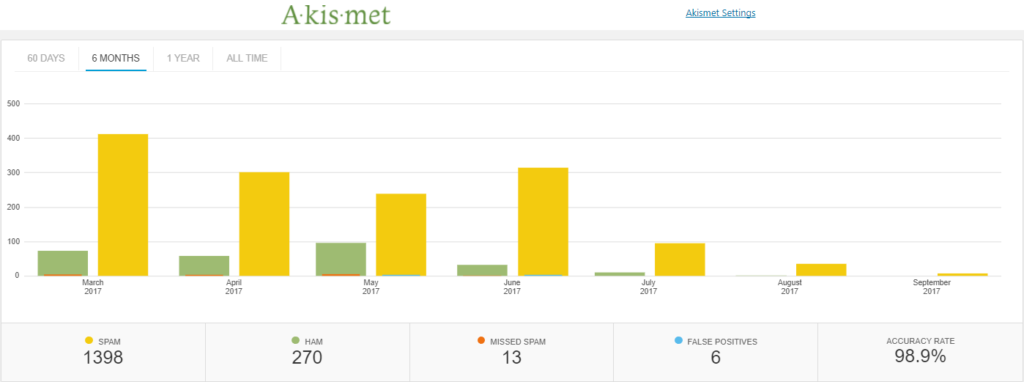
    I’m getting fewer and fewer comments on my blog posts.  I’m not suggesting I’m the greatest writer, generating thoughtful work that the whole internet wants to engage with, but I can see that I’m getting fewer comments on each post I publish.

    Personally I am not leaving any comments on blog posts anymore.

    Spam is going down.  I am seeing a trend on my comment spam that shows attempts to leave comments on my site that are spammy.  Here is a six month graph from Akismet,

    RIP wordpress comments
    click for full size image

    People are installing plugins to move comments away from their sites into the wider social sphere such as this one https://wordpress.org/plugins/comments-from-facebook/, or the are moving to centralised commenting systems such as Disqus.

    This is not a scientific study, but I’ve just visited Problogger, one of the most popular blogging sites out there and a post from the 4th (2 days ago at the time of writing) has zero comments, and other posts have less than 10 comments, in the past each post on Problogger would receive hundreds of comments.

    Why I Think This Is Happening

    People are still distributing great content they like, and sharing it with their circle, but they are sharing and discussing from social media hubs such as Facebook or twitter.  The distribution hub has also become the discussion hub in my opinion.  They will click through read your content and return to the distribution channel to comment.

    Dude! People need to keep their social feeds current, they need to be adding more content into the howling storm of the internet,why would they leave a comment on your backwater of the internet when they could leave a comment on their social media site of choice and build their own profile (please like my post).  Who is going to see their insightful thoughts on your site, 🙂

    My previous statement is a little tongue in cheek, but I do think people want their discussion to be seen more widely, where will this happen on social or at your site?

    Comment links are no follow so there is no benefit SEO wise for leaving comments.

    Comments were often used as a method to engage with the author, but this can be done on social more effectively.

    Wrap Up – R.I.P. WordPress Comments

    I think comments have moved to the distribution channel not the source.  I don’t think this is a bad thing, as long as discussion is happening does it really matter where is it hosted?

    What do you think? These are only my opinions,

    <irony>Let me know in the comments</irony> or the social platform of your choice @nmatthews on twitter, or on Facebook.

    Need help with your WordPress site? Get a no obligation quote.

    Photo Credit: benekliz Flickr via Compfight cc

  • WoodPecker Review

    WoodPecker Review

    I’ve been trialling a new tool to reach out to old clients this month and I wanted to share my Woodpecker Review.

    What Is WoodPecker?

    It’s an email outreach system where you can contact people on your list.

    It has a drip facility where you can send a series of emails, if someone replies they are taken out of the drip.

    It sends like a human would, a few requests per day not a bulk outreach.

    It sends from your gmail account.

    It monitors replies, auto replies, bounces and cleans your list up.

    I’m using woodpecker to reach out to old clients I have not contacted in some time, so it’s a “warmish” email to generate leads.  My main goal is to send out new quotes for WordPress technical support.

    Setup

    I exported all the entries from my gravity form database.  This contains a list of people who have contacted me in the past to get a quote for WordPress technical support.

    I took their name, email, WordPress site URL and the body of their last request (more about this a little later).

    The import process was really simple and I was able to quickly build a database of prospects to contact.

    It sanitised my contacts and removed duplicates.

    Campaigns

    At the core of Woodpecker is a campaign. A campaign is one ore more emails that are sent out to your list.

    You can control when the email is sent and upon which day.  I’m sending Monday to Friday 9am – 7pm my time.  I’ve set a block of time so I’m available to reply to any responses I get in a timely manner.  I’ve excluded weekends for the same reason.

    The campaign has a sending limit of 25 people per day.  The reasons for this are:

    1. It looks more like a human is sending the messages.
    2. It does not get me banned from gmail for sending too many emails, they limit to 250 per day.
    3. I am able to cope with the number of replies, generating quotes and the work this creates.

    A campaign can contain a series of emails, they are sent out in a drip fashion.  A really useful feature is that if someones replies they are not sent the nexy email in the series.

    I’m trying to generate leads, if I get the lead I don’t want to bug the client with another email.

    A gentle drip with a nudge is a great way to get on the radar of busy people who may need help but

    Personalisation

    The key to this type of outreach is personalisation.  I’ve got the persons name, website and their last interaction with me.  Using this information I can make the outreach much more personal.

    I’m personalising the email like this:

    Subject

    Do you need any help with {WEBSITE URL}

    Body

    Hi {FIRST NAME}

    I’m reaching out to see if you need any help with your WordPress site {WEBSITE URL}.
    If you do simply reply do this email with details of your project and I’ll send you a no obligation quote.
    Thanks
    Neil Matthews
    WPDude.com
    You are getting this email because you have requested a quote or worked with me on a previous project, see your last request to my business:
    {{SNIPPET_1}}

    The last bit is important for cold outreach, some people on my list have not been in contact for a few years and they might not even remember working wiht me

    Where It Beats Other CRMs I’ve Used

    There are a number of really good features which makes Woodpecker stand out from the crowd of other CRMs

    It manages bouces – people change emails all teh time, and old emails bounce, Woodpecker detects this and marks the contact.  This makes the quality of yoru prospect list that much better.

    It has an easy to use drip campaign system, that stops on reply.

    It has a unsubscribe feature.  CRMs don’t allow your list members to opt out for some reason, I’ve spent a lot of time managing contacts that don’t want or need my services.

    Stats, Woodpecker has really good stats on the performance of your campaign.

    Why This Beats Mailchimp Or Other Email Provider

    Setting up automation in mailchimp will give me the same results but they are really difficult to create in my experience.

    Mailchimp sends in one big batch, whereas Woodpecker is more graceful and sends in small batches which allows for control over creating quotes and replying properly to client requests.

    Integrations

    Although I’m not using the integrations, Woodpecker works with Zapier so potentially I could automate reachout to clients by adding people who reequest a quote to a campaign to reach out every 6 months or so.

    Pricing

    It’s about the same as other CRMs I’ve used in the past I’m on the $40 per month plan.  There is a $50 plan for the integration option.

    One thing I did not like was their charge per email I want to send from. Two emails = 2 x $40.

    Does It Work?

    I’m running two campaigns in tandem to test if Woodpecker works for my offerings,  One campaign is for a one off project quote, the other is for my maintenance service.

    I’ve generated 16 leads for quotes and several have been confirmed into live projects.

    I’ve had 21 requests for details of my maintenance plan and 9 signups.

    Does it work, YES!

    Downside

    I did not validate my list very well and I’ve reach out to people who have unsubscribed or do not wish to work with me.

    I’ve had a couple of angry replies, sorry about that if you are reading this, I hold my hands up I’m at fault there.

    14 Day Free Trial

    Woodpecker has a 14 days free trial, I would recommend you run a test campaign to see if this service will work for you.

    Wrap Up – WoodPecker Review

    I’m enjoying this, it is automated unlike my old CRM, it looks at replies and bounces and auto updates my list which was a huge time suck and it works, I’ve generated leads and new business.  It’s still early days but I’m liking what I have seen so far.

    I think the data I’m collecting on who opens and replies will make my future campaigns even more effective.

    Long term I think this will be a very useful tool to automate reach out to past clients to keep my name in their mind if they need WordPress help.

    If you are a service business with a list of past clients, reaching out to them regularlly with a check in to see if they need help is a no brainer.  This software automates that.

    Disclosure, all links to woodpecker are affiliate links and I’ll get a referral fee if you become a paying customer.

    Photo Credit: mjeedelbr Flickr via Compfight cc

    SEO nonsense to increase Woodpecker review density, woodpecker review 🙂

  • Why You Need To Store Your Backup Archive Off Site

    Why You Need To Store Your Backup Archive Off Site


    You are only as good as your last backup!

    That’s the phrase that was drilled into me over and over when I was a young systems engineer looking after huge corporate databases.

    Backup was such an important thing to us, we had rotas where it was someone’s sole job was to ensure backups were taken, they were valid and they were stored correctly.

    Part of that storage was to bundle up magnetic tapes into a fireproof box and send it offsite to a secure storage location.  It was physically offsite.

    As the owner of a WordPress site you need to ensure your backups are also stored off site but in the sense they are stored virtually off your website.

    The Majority Of Backups I See

    You do have a backup plugin installed don’t you?

    The majority of the backup plugins I see installed are taking backups each day or each week.  These backup archives are then stored locally under wp-content.

    Why Store Offsite

    Let me paint a doomsday scenario.  Your site has crashed.

    All of the files on your site have been deleted.

    Your archives are gone.

    Your hosting company cannot help you.

    You are stuffed!

    That’s why we keep a copy of your archive offsite so we can restore in a worst case scenario situation.

    Off Site Storage Options

    Your offsite storage options will be dictated by the backup plugin you use, but here are some of the more common options:

    Dropbox – not only can you save the pictures from your phone but you can also save you backups there too.  Large sites can be into the GB sized archives

    Amazon S3 – the good folk at Amazon not only sell you everything under the sun, but you can also rent part of their storage too.  It’s cheap and secure.

    Microsoft Azure – always late to the game it seems, but Microsoft have storage solution too.

    FTP – You can setup a manual process to FTP your archive files to a second location offsite.  Not my preferred method but definitely.

    Email – if your archive is small you can attach it to an email and send it to yourself each day.  Gmail for example, only allows a max file attachment of 25MB, so email will not be the best for a large site.

    Recommended Plugins/Services

    Here are some plugins that offer an offsite storage solutions that I recommend.

    • Backwpup – free
    • BackupBuddy – premium plugin
    • Managewp – freemium service
    • Vaultpress – premium service.

    What We Do For Our Clients

    We manage the backups for hundreds of our clients, we take a daily full backup of their site and we store it off site on Amazon S3 servers.  The backups are secured and encrypted.

    We get to select where, geographically we save the backups, so we store them as close to the clients physical location as possible.  We can select Amazon data centres in North America, Europe, the Far East or Australia.  This speeds up upload and restore times.

    We’ve had to restore from this solution numerous times and it works.  That’s the important part of backup, not taking a backup, not saving it offsite, being able to restore when the SHTF.

    Wrap Up – Why You Need To Store Your Backup Archive Off Site

    I would like you to review your backup solution today and make sure you are also storing you backups offsite, you will thank me if things go pear shaped.

    We have backup solutions starting at $9 per month, can we backup your site for you?  Get in touch.

    Photo Credit: Dave ‘FBI’ Gibbons Flickr via Compfight cc

  • The Difference Between Categories And Tags

    The Difference Between Categories And Tags

    There are two main ways to categorise WordPress blog posts, tags and categories, in this post I want to explain the difference between categories and tags.

    In this post I want to explain the differences between category and tags.

    What Are Tags & Categories?

    Both are ways to group related posts together, if someone is interested in your post about a cat, drop it into a tag or category about cats and people can find more content on your site about kitties.

    Adding a post into a cat or tag, adds it to the category page linking all the other posts together for example, I’m putting this post in General Blogging, you can also see it in this page https://dev.neilmatthews.com/category/general-blogging

    The Cook Book Analogy

    The best analogy I have heard for the difference between categories and tags is the cook book.

    Imagine the front of a cook book there are chapter listings with page numbers, think of categories are chapter lists.  The chapters in our analogy are breakfast, lunch, dinner and snacks.

    Now think of your blog post as a recipe, our post is a breakfast dish huevo rancheros, it is in the chapter / category breakfast.

    At the back of the book is an appendix, the appendix lists all the recipes by their main ingredients, this is a tag and helps to give much more detailed information about a post.  We would tag huevo ranchero with eggs, peppers, totillas etc.

    Both do the same thing to help you find a recipe but they both do it in slightly different ways. Tag are more detailed where as categories are more general.

    Do You Need Both?

    Each post needs to go into at least one category, that is why there is a default uncategorized category that all posts are added to by default, but you do not need to use tags, they are optional.

    What Is Best For SEO

    Having both for SEO is best, it increases the number of indexed pages you have in Google.  for each category or tag you add a new archive page is added, s there would be oursite.com/category/breakfast and oursite.com/tag/eggs, oursite.com/tag/tortillas.  The more tags and categories we have the more keyword rich links we have.

    Are There A Limit To The Number Of Tags / Categories

    Technically no, but there is a suggestion to limit the number to no more than 15 for anti-spam and seo reasons.

    Wrap Up – The Difference Between Categories And Tags

    Further reading, here is what the good people at WordPress.com have to say on this subject Categories Vs Tags.

    Photo Credit: ubrayj02 Flickr via Compfight cc

  • Blogging With The WordPress iPhone App

    As part of my holiday blogging efforts I decided to write a blog post 100% with the WordPreas iPhone app.

    You can download the WordPress app from your App Store of choice there is an iOS and android version.

    Writing Experience

    As you would expect the writing experience is the same as writing a text message.

    If you have young nimble fingers, used to sending large amounts of mobile text, you will be able to quickly knock out a blog post.

    This correspondent's fat middle age thumbs are not as Rapide as they could be but I'm coping writing this post.

    Personally give me a keyboard for anything over a short form post like this one.

    Adding Images

    You can post images from your camera which is a huge benefit for personal bloggers.

    You can add them inline and also save a featured post image.

    I'm in a water park as I write this so here is a random image of my kids.

    I'm going to download an image from compfight save that to my phone and add it as a featured image.

    Error correction

    Something really positive is the predictive text editing as my fat man fingers mash out this post, it's correcting as I go I've not had to type an apostrophe yet.

    When I create a typo the content is underlined, tap on it to correct.

    Downside

    If your theme has features that need to be set from the editor you cannot do that from the app, it's completely theme agnostic.

    It also ignores any plugins you have that add posts options, for example I use Yoast SEO to set my post options, I'll have to wait until I get home to optimise this.

    The menu was not very intuitive and I had to google how to add HTML for the image credit at the bottom of the post.

    People get really stroppy if you don't camel back WordPress but the app does not pick that up just saying some I don't plan to correct those typos.

    Wrap Up – WordPress iPhone app

    The app has surpassed my expectations, I've written a decent enough length post from my phone and yet another shackle of desktop work has been shed.

    If you need help with your WordPress site please request a quote when I get back on the 5th 😀

    Photo Credit: imherbsoap Flickr via Compfightcc

  • Scheduling Posts To Publish In The Future

    Scheduling Posts To Publish In The Future

    As you read this post I’m on holiday (vacation for my American chums) in Spain.  I’m probably on a beach, or taking a boat ride on the glorious Mediterranean sea.

    This post was written on the 19th July, but using a technique built into WordPress,  I can schedule the post to publish in the future (or was it the past because I did this work last week, even Dr Who will get a headache with this).

    In this post I want to take you through the process of scheduling posts for future publication.

    Setting Publish Date

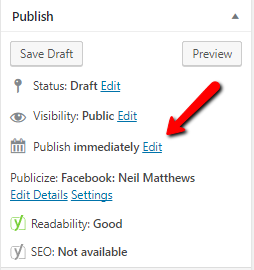
    On the right hand side of the post editor you will see this section


    Where is says publish immediately, click on edit and you can set the time and date.  Click on the schedule button and your posts will go live on that date and time.

    The WordPress cron or scheduler is a little weird, a person needs to visit your site to kick off the schedule checker, so it might not be exactly the time you say, rather when the next visitor hits your site after the date and time set.

    Wrap Up – Scheduling Posts To Publish In The Future

    Scheduling posts is a great way to keep your content fresh even when you are not available to click publish. anyway I’m off for a glass of sangria, this relaxing ain’t going to get done by itself.

    I may be on holiday but I’m still sending out quotes for projects when I get home, get a no obligation quote to fix thay annoying WordPress issue now.

    Photo Credit: Winniepix Flickr via Compfight cc