Neil Matthews

Blog

  • Sometimes YOU Need To Be YOUR Own Client

    Sometimes YOU Need To Be YOUR Own Client

    Once you have been working as a client service Freelancer for some time, you reach a point where you have a full roster of clients and things are rolling along nicely.

    A byproduct of your success is that you get less and less time to work on your own internal projects.  In this post I want to suggest that sometimes you should be setting aside time for your internal projects as if you were your own client.

    “Work expands to fill the time available for its completion” – Parkinson’s Law

    Parkinson’s law says work expands to fit the time, if you don’t add your own work into that pile, your client work will expand to fill ALL of your time.

    You can tell when I have a lot on, blog posts don’t come out, and I don’t get to work on my own stuff.  This post explains how I’m planning to combat this.

    Sometimes you need to be your own client:

    Have A Deadline

    Step one to being your own client is a deadline.  Set a deadline and keep to it.

    This week I have half a day on Thursday to work on my own projects.  It’s booked out in my Weekly plan and my daily plan for today.

    Have Deliverables

    It’s tempting to say, I’ll do my marketing automation project (see below) in this “me as a client slot”, but that is too vague. Create real actionable items so the work gets done in the time you have available.

    I have three entries this morning

    1. Write “Sometimes YOU Need To Be YOUR Own Client” blog post, publish and promote.
    2. Create module 6 of Diary Mapping – write script, record, publish in Teachable
    3. Create module 7 of Diary Mapping – write script, record, publish in Teachable

    If I don’t get all of those done, I can roll them forward to “me as a client” slot next week.

    If I try to cram too many items into my project time I need to learn to drop some times.

    Keep To It

    The easiest thing in the world is to cancel your own project work, if client work runs over or you are running behind on tasks.

    Treat yourself as an annoying squeaky wheel client that is checking in and demanding work gets done.  Don’t put it off, get it done!

    “You” Projects Are Valuable & Important

    You’ve identified this work because it’s important to your business in the long term.

    Don’t teat that new client request that has just come in as a higher priority than you, schedule the new client project appropriately but don’t give it a higher priority than yourself.

    Me As A Client

    I have three things I want to do in Q1 2019 and I’m booking out time for them each week.  I’m doing it on a Thursday.

    Sometimes it may be half a day, sometimes a full day.  I want to do the following three things this quarter:

    1. Write a blog post each week
    2. Complete my Diary Mapping premium course
    3. Setup marketing automation for my WordPress consulting work.

    These are all action items from my annual planning session I did back in November.

    I’ve been setting up out of office notifications on my email to let people know I’m unavailable, and I will be slow to reply to them.

    Internal Guilt Trip

    I’ve been doing Thursday, with me as a client, throughout December and I have experience some internal resistance and guilt about this.

    My monkey brain is shouting “You should be working on client X’s project they are paying you!”.

    My rational mind needs to learn to quiet the monkey brain and tell it, “This is for the long term good, it’s only a few hours of your time, you can get to client X after lunch, you are beautiful, you are loved.”.

    Well perhaps not the last two, but you should not feel bad about working on your internal projects in parallel with client projects.

    That’s What Weekends & Evenings Are For Dude!

    .. I hear you cry, but I’m too exhausted by client work (which already pushes into my evenings) and my weekends are a time to recharge and do fun things.

    Why should my own projects be scheduled at sub-optimal times?

    Wrap Up

    I’m going to be using this technique to get my internal projects done this year.  Thursday is Neil time and it’s none negotiable :).

    Does anyone else have any particular techniques they use to ensure their own non-client facing work gets done, discussion in the comments please.

    Photo Credit: willbuckner Flickr via Compfight cc

    It’s a metaphor Dude! You create a parking slot in your weekly plan and you say No Parking to client projects in that slot.


  • Diary Mapping

    Diary Mapping

    Back in 2012 I was spinning lots of plates and a number of them were crashing down around my ankles.

    I was suffering from to-do overload and I realised I needed a new way to manage my to do list.

    I was and still am a huge fan of mind maps and I was wondering if I could merge that with the to-do list in my diary.

    2013 came around and I implemented a system I have come to call Diary Mapping.

    It’s a simple visual method of managing my to-do list. It;s analogue and manual and requires a thoughtful approach to task management.

    I’ve created a free overview course to give you an insight into my system, with a premium course to come.

    The free version is the what  and the premium version is the how to.

    Checkout out the introductory course at DiaryMapping.com

  • Freelancer Feast And Famine

    Freelancer Feast And Famine

    If you work for yourself, you will be well aware of the freelancer feast and famine cycle.

    You take on a project and get a payment.  You then do your thing, for your clients, and there is no further payment or new projects until you complete that piece of work.

    We get the feast a deposit payment and final payment then there is the famine phase where we get no more cash until the work is done.

    Here’s What It Looks like

    This is very much simplified and does not take into account reserves (but I’m all about the dramatic charts 🙂 )

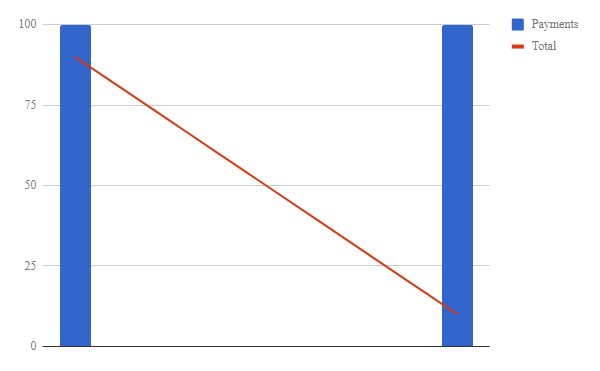
    1. A project is approved and a deposit payment is taken.
    2. You work on the project
    3. At the same time as you are working, you are accruing expenses and your payment is being eroded.
    4. At the end of the project you get the final payment and hopefully your expenses have not exceeded your deposit payment.
    5. In the ideal world you have a new project in the pipeline and your final payment and a new deposit payment makes it bumper feast but that is not always the case.

    Here’s the basic chart, $100 deposit, $10 expenses per day and a final payment of $100 after 10 days.

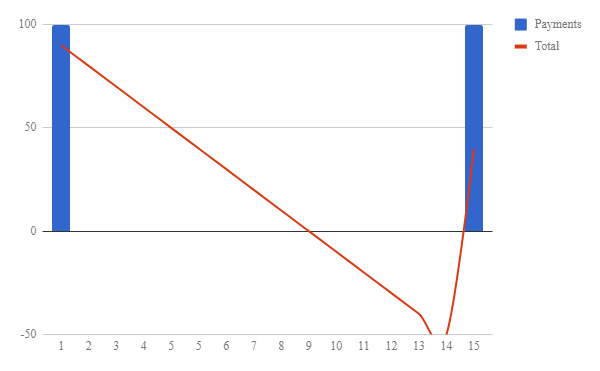
    This is a pretty precarious model.  If you over-run, before the project is complete you go negative.

    If you client is slow in paying the final payment, again you go negative.

    Here’s the same data but with a 5 day overrun or late payment.


    Smoothing The Freelancer Feast And Famine Cycle

    My idea of a µAgency helps to smooth the feast famine cycle by having lots of small µRetainers from my clients paying for a small service.

    What I suggest is you add a new recurring retainer to your existing client work and charge a large number of your clients, a small fee for a service they need on a recurring basis.

    In my case I provide an ongoing maintenance plan for my clients where they get backups, updates and fix on fail if things break on their site.

    I have a lot of clients on that plan paying me a small fee each month, add that to my project work income, and my income chart looks different to the ones above.

    I cannot do a lot of this work as I’m booked out on projects so I have a team member delivering this service.

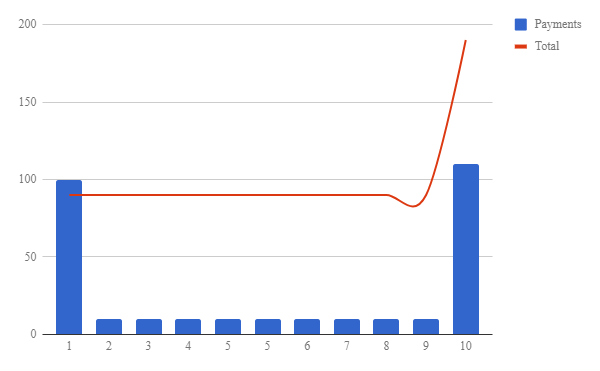
    If I add in $10 of retainers each day, the graph looks much different.

    freelancer feast and famine

    You can see the retainers have flattened the curve significantly and the final payment on the project puts us into profit,

    My thinking is that you should have enough small of µRetainers to cover your “nut” or your basic monthly income costs, then all project work you do on top of that is just a bonus.

    If Only There Was A Course About µAgency!

    Well slap my thighs and call me Rodger, if I haven’t already built a course to do that.

    The stars must be aligning, the teacher appears when the student is ready!

    I’m building two courses on the µAgency:

    Understanding the µAgency – this is a free course to help you understand the what of a µAgency.

    Build Your Own µAgency – this is the how to, so you can create your own small firm.  This will costs £99 and is under construction and will be released in the next few weeks.

    Both courses are available at my new site https://MicroAgencySchool.com

    The transformation these courses are designed to give you, is one from solo freelancer to agency owner in a control and managed fashion.  I’ll lead you past the pit falls that befell me when trying to build an agency.

    Wrap Up – Freelancer Feast And Famine

    I’m going to bang on about the µAgency for a few more posts, apologies if this is not your thing.  Normal programming will return shortly.

    I’ve looked long and hard for training on how to take the first step from online solopreneur to agency owner and believe me, they are few and far between, and NONE take you through the first initial steps like I am.  That’s why I’m doing this.

    Check out my free training over at https://MicroAgencySchool.com.

    Photo Credit: devinlynnx Flickr via Compfight cc

  • Attack Of The Clone

    Attack Of The Clone

    Several years back, I had an amazing idea.  If I could find a clone of myself, I could double the income coming into my business.  This was when my business suffered the attack of the clone.

    How hard could it be ..

    The Back Story

    I was booked solid.  I had a full roster of stand alone projects.  I had about 50 maintenance clients demanding my attention.

    I realised it was time for me to move from being a freelancer to running a firm.  If I could find someone with my skill set I could bring in even more projects, load up my maintenance plans and roll naked in pound notes.

    Recruiting Locally

    I started my search locally looking for a clone of myself to help in my business.

    I’m not cheap (you need to buy me a beer and a steak dinner first) and I found recruiting a clone of me is even more expensive. On top of salary  I would have to incorporate (UK sole traders cannot employ staff), I would need to make pension contributions, national insurance employer payments and bring a whole pile of grief and accountant bullshit (sorry my accountancy clients but your forms and terms make my head spin) into my life, hell no!

    The few people I know with my level of WordPress skills laughed when I tried to recruit them, why would they join a startup agency when they could work at big agencies or run their own very successful freelance businesses.

    I Had To Go Offshore

    I looked offshore to recruit remote contractors.

    I tried India, Tim Ferris tells us India is the way, I’ll not go into details here, but there is a cultural norm with Indian techies that makes them hard to work with, in my experience.

    I went to South East Asia and the Philippines. I very quickly had a team of three people working with me.

    I was bringing in more money, more clients and more stress for myself with a full client workload and a new unexpected job managing a team and ensuring sales were at a level to cover my additional costs.

    Then the sh1t hit the fan and cash flow dried up and I was not earning enough cash to pay my team and myself so they were all let go.

    Time goes by, rinse and repeat I recruited another team.

    Then the sh1t hit the fan and an unexpectedly large tax bill forced me to let go of my team.  I did not have the cash flow in place to cover this unexpected expense and pay their invoices.

    Time goes by, rinse and repeat I recruited another team ….

    I had three failed attempts at building an agency. The attack of the clone became the attack of the clone x3.

    Back To the drawing board

    I went back to being the solopreneur.

    It was fine for a while but I had more maintenance clients and just as much project work. Very quickly I was full fit to bust with work again.

    I knew I needed help but I also knew I could not clone myself and try to build an agency again.

    I took myself off and had some deep thinking time, that’s where I formulated the idea of a µAgency.

    I Now Run A µAgency

    I wrote a post outlining my ideas about a µAgency last year I’ll wait while you check that post out.

    I’ve built a micro agency where I concentrate on the one off projects and have a single team member to run my maintenance plan.

    It works really well, I have a recurring income steam that takes very little of my personal time to run and I have a lot more time to take care of my one off projects.

    I can take time off my business and still earn an income.

    I have a µAgency business that is resilient because it has lots of small µRetainers bringing in income each month.

    I’ve decided to share how to build a micro agency with other freelancers.

    Who Is A µAgency For?

    It’s for solo freelancers looking to make the leap from freelancer to firm.

    It’s for freelancers taking the first step (or even their only step) to building a firm.

    I want to show freelancers how to take baby steps and build an agency that will work and not break due to cash flow issue or other unexpected issues.

    I want to show freelancers how to build a tiny agency that will not consume them with management time.

    I want to show freelancers how to build a recurring income that does not take their time.

    I want to show freelancers how that can take time off from work and still have money coming in.

    From Freelancer To Firm

    I’ve built a new site called MicroAgencySchool.com where there are courses to teach you how to build a µAgency.

    There is a free introduction course which teaches you what a µAgency is and a premium course launching later this year to show you how to build that agency step by step.

    From freelancer to firm is the tag line I’m using with my courses.  That’s the transformation I’m trying to help you make.  I want to show you how to move from being a solopreneur to a tiny agency owner without making the mistakes I did.

    I’m Not A Guru

    In the post I talk about not being a guru but I’m passionate about helping people grow their online business so I’ve created a these courses to help people understand what a µAgency is.

    Wrap Up – Attack Of The Clone

    Let me be Yoda to your Luke Skywalker and show you how to build a micro agency.  Check out my free course over at the MicroAgencySchool.com

    If you like what you see, you can check out the premium course which will step you though building your own µAgency coming later this year.

    Photo Credit: Zellaby Flickr via Compfight cc

    doing the seo dance – attack of the clone

  • Keeping Up With The eJoneses

    Keeping Up With The eJoneses

    I’ve got a bit of an issue, I’m always keeping up with the eJoneses.

    What do I mean by that?  I’m always looking at other peoples online business and comparing it to mine and trying to compete or copy what they are doing.

    Let me tell you ladies and gentlemen this is a route to ruin and unhappiness.  I say sod the eJoneses and build a business you love!

    Other Peoples Businesses

    We peek over the virtual white picket fence and see other people with X employees, product Y, Service Z and think we need to do that to keep up with them.

    We never stop to think are X, Y and Z a good fit for me? We never stop to think is this just the latest shiny object?

    Derek Sivers said in his excellent little book Anything You Want .

    When you make a company, you make a utopia,  It’s where you design your perfect world.

    I highlight your because when you are a solopreneur, you are building something that is great for you, not someone else, not a board of directors or share holders and it’s definitely not for Mr Jones down the .com street.

    Build A Business YOU Love

    I’ve talked about this in the past but we are in a unique period in history where we don’t had to grimly plod down to the dark satanic mills and work for the landed gentry anymore.  We don’t need oppressive jobs, we can strike out on our own.

    If you have a little chutzpah we can build our own online freelance business that is a perfect  fit for you.

    Some Examples Of Keeping Up With The eJonses

    Here are some examples of my trying to keep up with other peoples business ideals.

    wpcurve – I saw this amazing business boom and eventually exit to Godaddy, I can build a business like that at wpdude.com I thought, but I don’t like managment, managing people sucks, I want the right sized business a µAgency of me plus another person to cover maintenance work. I don’t want to build a big team.  I tried but hated it, and wpdude.com has been sunset and NeilMatthews.co has risen.

    dropshipping – this is the new kid on the block, find products that can be sourced from manufactures in China, set up an Amazon of shopify store and sell those good. Have the manufacturer deliver them and make money while you sleep, gave it a go, made a few quid, boring as hell, why would I want to spend time on that?

    App Development – I still think this has legs, but I was losing focus on my key WordPress consulting business to focus on building apps as well, it had to go (for now anyway).

    Not To Do List

    I have a way to combat trying to keep up with the eJoneses, and that is my not to do list.

    I have a highly coloured mind map on my wall right in my eye-line and is has my not to do items on it, here’s the list.

    • App development
    • Build an agency (I’ve spent a lot of time building a multi person agency that I hated working in )
    • Buy any new domain names (sound familiar to anyone 🙂 )
    • Focus on selling my business
    • Jump between ideas
    • Go off plan (I make a plan each November)
    • Spend time on tools (I can spend a lot of time messing with new tools / software)
    • Low end productized services (I was trying to create something like wpfixit.com)

    If I’m going off piste I look at my not to do list and bring myself back on course.

    Wrap Up – Keeping Up With the eJoneses

    Build the business you want, not the one you think you need because someone else is doing it that way.

    Have fun building your business and don’t be afraid to pivot away from a product or service that you don’t enjoy delivering or creating.

    Just because Ms Jones has 100 clients does not mean you need 100 clients, 20 of them may be douche nozzles and need to be sacked.

    Build a business YOU love.

    I’ll be writing a lot more about small business in the lead up to the launch of my new course Micro Agency School.

    How have you been guilty of keeping up with the eJoneses, comments below please.

    Photo Credit: kuyabic Flickr via Compfight cc

    Doing the seo dance – Keeping Up With The eJoneses

  • WordPress Is Not The Only Game In Town

    WordPress Is Not The Only Game In Town

    I’m going to be black balled from the Guild of WPers when I publish this post, but here we go anyway! WordPress is not the only game in town, sometimes WordPress is not the best tool for every project {sharp intake of breath from the audience}.

    If there is a pre-made website solution for a particular project you are planning, then please look into that before you try and build a custom solution from WordPress plugins and a theme.

    WordPress is of course open source and free but any complex problem you are trying to solve probably needs some custom plugins and a decent looking theme and that’s not free.

    Don’t get me wrong I’m a huge fan of WordPress and I’ve based my business around it but I have found certain situations pre-made single solutions software as a service is better.  Here are some examples:

    Training – If you are looking to create a members only training site, there are plugins out there but they are pretty complex and expensive. There are software solutions to create your training business (more later).

    Helpdesk – the plugins out there are not that great, and require a lot of setup, it’s far easier to assign a custom domain to Helpscout.

    E-Commerce – I’ve talked about my love/hate relationship with  WooCommerce in Why I’m Breaking Up With WooCommerce if you want a simple robust e-commerce site look to Shopify, I built a test drop shipping store in a few hours.

    CRM / Project Management – this is an area that plugin developers have not touched in my experience Basecamp and the rest do a better job.

    .com vs .org – WordPress itself has two versions, if you want a simple blogging solution look to WordPress.com rather than creating a custom site with WordPress.org.

    Case Study – A Course Website

    I’m build a course to expand upon my idea of a µAgency, the free introduction course will be coming out soon and the paid version a little later this year. I was looking into the best plugins to use for a learning management system or LMS.

    Here are my requirements:

    • Protected course material (video)
    • Student registration
    • Payment gateway
    • Email Integration to up sell courses and keep in contact with students
    • Responsive out of the box
    • User only forums for questions about content
    • Integrates with Freshbooks so my accounts are done automatically
    • Nice to have – affiliate program so students can refer me and earn a fee.

    WordPress solution

    For a WordPress solution I would need:

    • Custom theme $50,
    • Learndash plugin $150 (learn dash has zapier integration for Freshbooks)
    • Private video subscription with Vimeo $100 per annum,
    • wp affiliate plugin $99 per annum

    So the total cost to build this site per year would be about $400 plus my time to bring all these disparate systems together and build the site.

    While searching for LMS plugins I saw some ads for Teachable.com a single solution website builder, I decided to investigate.

    Teachable solution

    For a teachable solution I would need:

    • 1 subscription to teachable $39/month

    All of my requirements are built in plus some additional item such as author sharing, automatic affiliate payments.

    Teachable is designed out of the box to sell courses. That’s all it does it has design back end features I need.

    I signed up for a free account and my site was built, I added a few stock photos and voila a “school” in their terms to sell courses, it looks good has lots of great features and will enable me to build my course with ease.

    They host my videos securely, manage students have back end email facilities, affiliates with auto payments, they handle refunds and payments through their system and give me a monthly payout.

    The have zapier integration so I can add invoices to my system to automate my accounts.

    Neil is a happy chappy, site built in about an hour, custom domain assigned.  My course structure is built I just need to drop in my videos.

    I’m busy creating my content once that is done I’ll sign up for a premium subscription at $39 per month or  $468 per annum, so the price is similar but the effort was way less.  That payment is monthly rather than a large up front payment for plugins.  One sale per month will pay for this project.

    Wrap Up – WordPress Is Not The Only Game In Town

    Choose the best tool for the job, if you need a hole in a wall choose a drill if you need to dig a hole it’s a spade.

    WordPress will do the job, but sometimes the effort outweighs results. I love WordPress and I’ll always provide WordPress technical support, but sometimes I tell my clients no, use this instead.

    MicroAgencySchool.com will be opening it’s doors soon. I could have built it with Learndash but the quickest route to market is Teachable. I’m using the correct tool!

    Are there any single solution website builders you prefer over WordPress? Discussion in the comments below.

    Photo Credit: grahamsholt Flickr via Compfight cc

  • Plugin Quality Control

    Plugin Quality Control

    How can you know if that new plugin you are about to install is of a high quality? How can you setup some kind of plugin quality control process to ensure all new plugins that are added to your site won’t break things?

    In this video post I’ll show you how to check the quality of any plugins you are about to use.

    Anyone can create a plugin an upload it to the WordPress plugin, there are approval processes but there is no rigorous checking of the codes compatibility with themes and other plugins, so sadly it’s a very common thing that I see that a plugin will crash a site.

    Use the techniques in my video to create some plugin quality control.

    Video

    The Process

    • Install from the WordPress dashboard, their search rules out a lot of plugins that are not being actively developed.
    • Visit the plugin page on WordPress.org to get a full list of stats.
    • Check last update to ensure the plugin is actively developed, plugins not actively developed can hold vulnerabilities or bugs.
    • Check the plugin is tested to your version of WordPress, check the plugin is compatible with your version if you are using an older version of WordPress.
    • Review the ratings avoid all 5 stars and lots of 1 & 2 stars. Look at the reviews to see what people are complaining about.
    • Look at the support forum ensure the plugin developer is actively engaging in support, avoid plugins where there are zero replies.

    Links Mentioned

    WordPress Plugin submission guide

    Contact form 7 Plugin Page

    Wrap Up – Plugin Quality Control

    Plugins clash with themes, and other plugins all the time, installing the wrong plugin will bring your site down and end up with you visiting this page to ask me for help.

    Do yourself a favour and do some plugin quality control before you click that install button.

    Photo Credit: classroomcamera Flickr via Compfight cc

  • Guten Tag Gutenberg

    Guten Tag Gutenberg

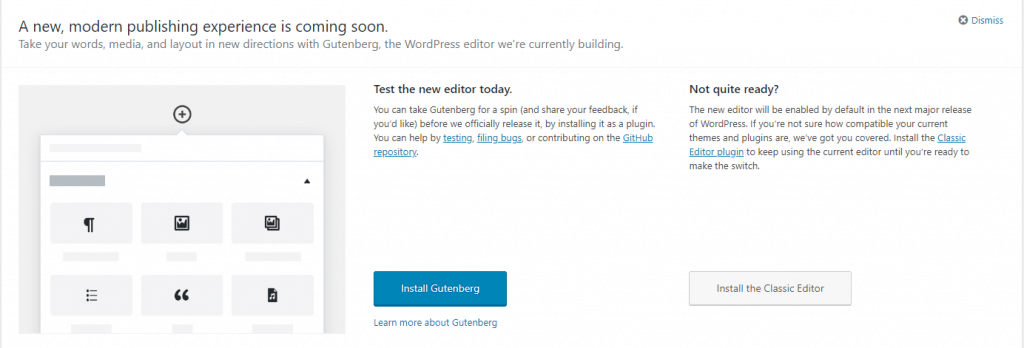
    You have probably seen the Gutenberg prompts on your website, letting you know that a new editor is coming to WordPress.

    In this post I want to tell you what Gutenberg is, how it will impact your WordPress site, and how to negate any problems it introduces.  Lastly I’m offering a testing service for you to trial the new editor in a safe environment.

    What Is Gutenberg?

    It’s a replacement for the standard WordPress text editor, it provides a visual way to drag and drop sections of content and arrange them on your page.

    If you have used one of the new themes on the market you will already be familiar with the idea of a visual editor.

    At the core of this process is the idea of a block.  You can drag and drop blocks and then put content into the block.

    There are text blocks, heading blocks, video blocks, galleries, images, the list goes on.  As Gutenberg matures more and more blocks will become available.

    For example gravity forms has developed a Gutenberg block so you can add and display a contact form with this new system https://docs.gravityforms.com/gravity-forms-gutenberg-block/.

    In the past a plugin developer may have created a shortcode to display content on the front end, in the future they will be encouraged to develop a content block.

    Blocks will be responsive out of the box, so you don’t need to worry about the size of the screen your site is being viewed on.

    You can easily add columns to your post or page.  So a three column row with different blocks will be easily achieved.

    Gutenberg is a visual builder so the design you make on the page will be reflected on the front end, not something we currently have with the

    Gutenberg will be merged into WordPress at version 5 coming later this year, but it’s a very big change so you should be ready for it.

    gurtenberg

    What If It Breaks My Site

    There is a high probability that some of the themes out there are not going to be compliant, this has been taken into account and at version 5 you can install a plugin which will revert to the classic editor.  You can download it from here:

    Classic Editor

    Video Demo

    Here’s a walk-through of what you can expect with the new editor.

    My Thoughts On Gutenberg

    I have my usual grumpiness about major changes being forced upon us (I’m still not happy with the theme customizer people), why Gutenberg cannot just stay as a plugin is beyond me.

    I’m glad there is a planned roll back route with the classic editor being made available as a plugin.

    But overall I think this will be a good thing.  I’ve been using visual editors with the modern themes for some time now and they are great.  They allow positioning and formatting of content in a much more visual manner.

    Here’s a quote from the WordPress site

    Gutenberg is more than an editor. It’s also the foundation that’ll revolutionize customization and site building in WordPress.

    I see a major shake up in the theme world coming because of Gutenberg.

    Staging Service

    I’m offering a staging and migration service if you want to test Gutenberg in a safe development environment.

    • I will, migrate your current live site into the test environment.
    • Activate the new editor.
    • Give you access to test your site and try Gutenberg.
    • Offer support for any issues you may have and offer suggestions as to whether the classic editor would be a good icea until your theme is made Gutenberg compliant.
    • You have access to that development area for one day.

    I’ve build 5 test beds that will be available on a first come first served basis, let me know if you want to book a slot.

    This service costs £29 for a day’s hire of my staging environments.

    My existing maintenance clients will get access to this service for free.

    If you want to book the staging areas, drop me a link from my WordPress technical support page.

    Wrap Up – Guten Tag Gutenberg

    Winter’s Gutenberg is coming I recommend you test your theme with the new editor to ensure this big update doesn’t break anything.

    It’s going to easier to build great looking posts and pages with Gutenberg, but expect some snagging issues once it’s first released while your themes and plugins are made compliant.

    Photo Credit: Guy dicarlo Flickr via Compfight cc

  • I’m Sorted With Sortd

    I’m Sorted With Sortd

    For the past three months or so, I’ve been using a new tool to manage my projects, this one seems to fit all my needs.  It’s called Sortd.

    I’ve written in the past about the project management methodology Kanban in my post – Kanban Saved My Sanity,

    Sortd uses this methodology and mixes it with my prime communication medium; email.

    What Is Sortd

    Sortd is a Google chrome extension that works with Gmail.

    It turns your inbox into a manageable Kanban board of tasks to be derived from your emails.  Rather than having a huge list of email, that is constantly growing, Sortd turns your inbox into something much more sane, a calmed inbox.

    How It Works

    Once the extension is installed, you can drag and drop emails out of your inbox into a Kanban board, if the email needs to be actioned and scheduled as a project.  If the email is a standard notification or does not need action it can be archived, all emails requiring work are put into the Kanban boards.

    My Kanban setup is to have a board and in the board are lists Quote Sent, To Do, In Progress and Blocked.  Emails become cards or tasks and are moved through the various project management stages.

    The benefits of this approach is that I can reply to my clients without leaving my inbox.  You will see in the accompanying video what I mean but you can also do the following

    • Rename email subjects so they mean more to you in your project management
    • Snooze messages so you can get inbox zero
    • Add private notes to an email that are not see by your client, fo example I save passwords against an email as a note
    • Set due dates for a project and see all work in a date view.

    Add to that the power of Gmail such as canned responses and I have a complete project management system in my inbox.

    Where Other Systems Break Down

    I don’t like to try and force clients to use project management systems.  Any friction in the project process will break things down.  All of the ones I have seen require a client to register.

    I love Trello, but you need to create new boards and register clients.

    I love Basecamp too but the effort to setup a project outweighs a lot of my smaller

    Sortd is a friction less system, you take your clients emails and organise them

    Pricing

    Sortd has a freemium pricing model, the single private board version (which was more than enough for a solo freelancer) is free.

    When you start sharing boards and assigning tasks to a team you need one of their premium levels. They costs from $2 per user/month to $5 per user /month which is amazing value compared to project management systems which typically start at $20 per user per month.

    https://www.sortd.com/pricing

    I’m Early in the team adoption and it seems to be working well.

    Video Sortd In Action

    Here’s a video of me showing how I use Sortd on a test email account.

    What Worries Me About Sortd

    I’m not sure about whether or not it is still being actively developed, I don’t get many updates from the development team so this is a real worry.

    Wrap Up – Sorted With Sortd

    I’m in control of my projects with the same tool I use to communicate with my clients (Gmail) and IM my team (Google handouts).

    Sortd is a winner in my book, I just hope they keep up development, fingers crossed.

    Photo Credit: shauspan Flickr via Compfight cc

  • This is a Sticky Post

    This is a Sticky Post

    Lorem ipsum dolor sit amet, consectetur adipiscing elit. Morbi sagittis, sem quis lacinia faucibus, orci ipsum gravida tortor, vel interdum mi sapien ut justo. Nulla varius consequat magna, id molestie ipsum volutpat quis. Pellentesque ipsum erat, facilisis ut venenatis eu, sodales vel dolor.

    Header one

    Header two

    Header three

    Header four

    Header five
    Header six

    This is default paragraph. Morbi sagittis sem quis lacinia faucibus, this is a text link orci ipsum gravida tortor, vel interdum mi sapien ut justo. Nulla varius consequat magna, id molestie ipsum volutpat quis. Suspendisse consectetur fringilla luctus. Fusce id mi diam, non ornare orci. Pellentesque ipsum erat, facilisis ut venenatis eu, sodales vel dolor. Suspendisse consectetur fringilla luctus.

    Single line blockquote:

    Stay hungry. Stay foolish.

    Multi line blockquote with a cite reference:

    People think focus means saying yes to the thing you’ve got to focus on. But that’s not what it means at all. It means saying no to the hundred other good ideas that there are. You have to pick carefully. I’m actually as proud of the things we haven’t done as the things I have done. Innovation is saying no to 1,000 things. Steve Jobs – Apple Worldwide Developers’ Conference, 1997

    Unordered Lists (Nested)

    • List item one
      • List item one
        • List item one
        • List item two
        • List item three
        • List item four
      • List item two
      • List item three
      • List item four
    • List item two
    • List item three
    • List item four

    Ordered Lists (Nested)

    1. List item one
      1. List item one
        1. List item one
        2. List item two
        3. List item three
        4. List item four
      2. List item two
      3. List item three
      4. List item four
    2. List item two
    3. List item three
    4. List item four

    HTML Tags

    These supported tags come from the WordPress.com code FAQ.

    Address Tag

    1 Infinite Loop
    Cupertino, CA 95014
    United States

    Anchor Tag (aka. Link)

    This is an example of a link.

    Abbreviation Tag

    The abbreviation srsly stands for “seriously”.

    Acronym Tag (deprecated in HTML5)

    The acronym ftw stands for “for the win”.

    Big Tag (deprecated in HTML5)

    These tests are a big deal, but this tag is no longer supported in HTML5.

    Cite Tag

    “Code is poetry.” —Automattic

    Code Tag

    You will learn later on in these tests that word-wrap: break-word; will be your best friend.

    Delete Tag

    This tag will let you strikeout text, but this tag is no longer supported in HTML5 (use the <strike> instead).

    Emphasize Tag

    The emphasize tag should italicize text.

    Insert Tag

    This tag should denote inserted text.

    Keyboard Tag

    This scarsly known tag emulates keyboard text, which is usually styled like the <code> tag.

    Preformatted Tag

    This tag styles large blocks of code.

    .post-title {
    	margin: 0 0 5px;
    	font-weight: bold;
    	font-size: 38px;
    	line-height: 1.2;
    	and here's a line of some really, really, really, really long text, just to see how the PRE tag handles it and to find out how it overflows;
    }

    Quote Tag

    Developers, developers, developers… –Steve Ballmer

    Strike Tag (deprecated in HTML5)

    This tag shows strike-through text

    Strong Tag

    This tag shows bold text.

    Subscript Tag

    Getting our science styling on with H2O, which should push the “2” down.

    Superscript Tag

    Still sticking with science and Isaac Newton’s E = MC2, which should lift the 2 up.

  • Good King Website-Las

    Good King Website-Las

    I cannot believe another year has sped past us.

    It’s the time of year when I write my annual post about installing festive plugins to decorate your website.

    There are dozens of plugins which allow you to jazz up your site, here are my favourites.

    WP Super Snow

    Have a flurry of snowflakes falling over the header of your website.

    https://en-gb.wordpress.org/plugins/wp-super-snow

    Xmas Lights

    Get a string of twinkly lights for the header of your website

    Xmas Lights

    Christmas Music

    Drive your site visitors to the very edge of madness with Jingle Bells on a recurring loop.

    https://en-gb.wordpress.org/plugins/christmas-music/

    Christmasify

    If you want to go the whole hog we have music, snow, Santa, festive fonts, the full monty.  Please send me a link if you use this one on your site please please, please.

    Christmasify!

    Xmas Decoration

    My preferred plugin is Xmas decoration, it adds a classy Christmas garland to the top of your site, a festive splash of colour on my minimalist site.

    Xmas Decoration

    Video

    Let’s pull that all together and see what it looks like

    Wrap Up

    If you cannot have some website fun at this time of year when can you.  Merry Christmas or Happy Holidays, whichever you prefer.

    Photo Credit: RomanK Photography Flickr via Compfight cc

  • The Rebranding of WPDude

    The Rebranding of WPDude

    I hinted at a rebranding of my business last week, in my post about Thanksgiving Business Planning.

    I’ve gone through with my rebrand and I wanted to explain why I’ve done this.

    So drum roll, WPDude has become bada-bada-bada-bada-bada-bada-bada NeilMatthews.co, the crowd erupts into spontaneous applauds 🙂

    Dooooood!

    I cannot even say the word dude without wincing.  It’s not a word I ever use in normal day to day conversation.  Why would I brand my business as that?

    Well, back in 2008 when I started this journey, a 6 letter domain name was hard to find, so I leapt at the chance for this domain. WPDude was born without too much thought.  Let that be a lesson to you kids out there, choose your domain name wisely.

    I’m 46 years old for flip sake, I’m not a dude I’m a grown ass adult. The dude had to go.

    I’m going to paraphrase a comment from a client.

    I thought I was hiring a kid to fix my website, much to my pleasure I found out it was a middle aged man, I felt much better knowing that

    Tagline

    My tagline has changed to, from “Your WordPress Help” to “I Fix WordPress Sites”, you cannot be any clearer than that.

    The majority of my work is stepping in when a site breaks or needs complex work.

    Clients Want My Skills

    My clients pay me for my particular set of skills, people hire Neil Matthews, not some comic book character called WPDude.

    Working under a personal brand

    I still have a backend team looking after maintenance work, but I am their client, not you.  I act as a middleman on all communication

    I’m not building a business to Sell

    I wrote about building a business you love, in it I talk about how difficult it will be for me to sell my business.  Who wants to buy a job.

    I’ve embraced this and I now know I probably won’t sell this business, so why brand it as something other than me that can be sold.

    What Does WP Mean Anyway

    There is a dance you have to dance when you work in the WordPress arena, you cannot use the trademarked term WordPress in your domain name you have to use WP instead.

    You will see a lot of people using WP in their domain name, but does anyone know what that means outside of the WordPress community, I doubt it.

    Here is the memo just in case you missed it https://wordpress.org/about/domains/.

    Flexibility

    Moving to NeilMatthews.co allows me more flexibility in the work I do, for example, I’m interested in writing more about building a µAgency I’ve got a book in me on this subject. Not branding myself as a WordPress only grants me more flexibility to do this type of work.

    Apps are rising, my ability to sell app development services is also something I am interested in you don’t hire a WordPress dude to develop your app.

    I cannot see this happening, but WordPress could drop out of favour for a new tool, rebranding NeilMatthews.co gives me redundancy against that.

    I want to write about topics outside of WordPress on my blog, some of my most well-received posts are about building online business.  Not having a WordPress moniker allows me to do this.

    It’s Scary

    I flipped the switch yesterday, and I’m anxiously watching my stats and signups

    Guess what, nothing has changed, requests for work have dropped in everything is fine. All the stress and worry about a change like this has dissolved.

    Wrap Up – The Rebranding of WPDude

    My primary business is still WordPress support and development, I’m not changing that, I just want to step out from the WPDude brand and work as myself, Neil Matthews.

    So I’m a card-carrying solopreneur now, thanks for your attention, announcement over.