
Neil Matthews

Blog

  • How To Improve Email Deliverability

    How To Improve Email Deliverability

    How To Improve Email Deliverability

    How To Improve Email Deliverability

    I’ve been having deliverability issues with one of my email addresses [email protected].  I would send a client emails from that address and get no reply.

    I was not getting a reply because it was not being delivered. Not great I’m sure you will agree.  These were clients who had requested quotes, approve things and paid, then it would look like I had disappeared down a block hole with their cash.

    I would get in contact using my gmail account and the conversation would continue.  I’m red faced and my reputation is dented.

    The Investigation

    I began looking into why this was happening and it turns out big email providers like gmail or yahoo like you to jump through some hoops to prove your email is valid.  If you don’t jump through those hoops your emails may be discarded and never get to the intended recipients.

    Let me introduce you to some new terms SPF, DKIM and DMARC.

    These are the hoops you need to jump through.

    How To Check If Your Domain Is Okay

    Here’s a tool to check to see if your site / email has any reputation issues.

    mail-tester.com

    With this tool our send an email from your address to a special email.  The email is accepted by them and a report on your deliverability is created.

    I’m not using neil@neilmatthews.co so I’ve decided to run neil@neilmatthews.com through this process and ensure my new email is valid.  The results were unsettling.
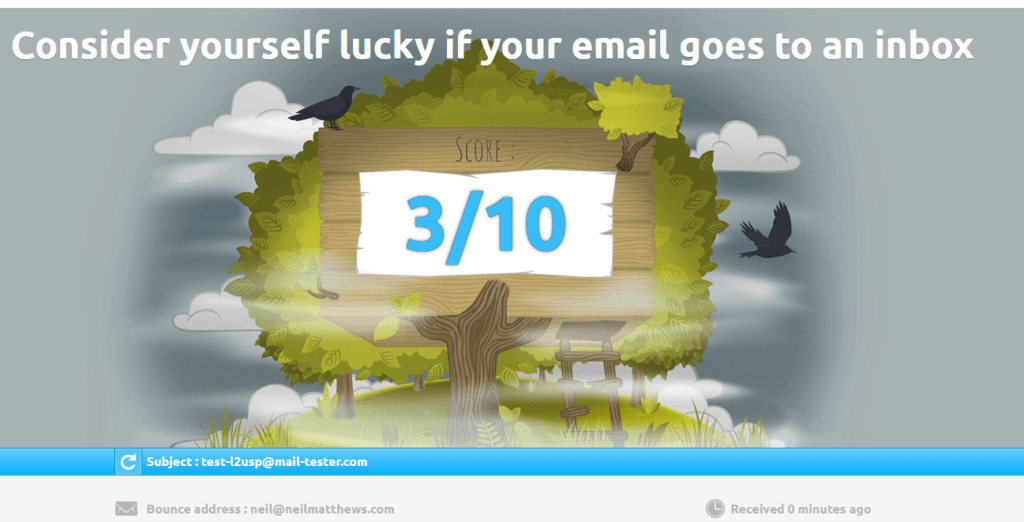
    The issue is I have an invalid SPF record, no DKIM or DMARC records setup.  The rest of this post will be about setting up these records and hopefully I will have a much better score for my email by the end of this post

    Warning you only get three free tests per day of this tool, use them wisely.

    SPF – Sender Policy Framework

    SPF or sender policy framework is an entry on the DNS of you hosting server that says an IP address is valid to send on your behalf.  You can send an email with a from address of [email protected] from any server, but we are going to add a control that says only email sent from my servers IP are valid.

    To add this record we need to login to our hosting panel and find the DNS entries (see link below to explain how to do it for your host).  I’m with bluehost.

    So I need to add an SPF record which say include any IP from bluehost.com to allow as a sender

    v=spf1 a mx ptr include:bluehost.com ?all

    Don’t worry about the content of this record,.  on the link below you will find out what to add to the entry.

    If I used another email service.  that sends emails on my behalf would need to add this too, for example if I used Sendgrid for transactional emails.

    Here’s a very useful guide on a host by host basis https://www.mail-tester.com/spf/

    Here’s a video of me adding an SPF record to bluehost.


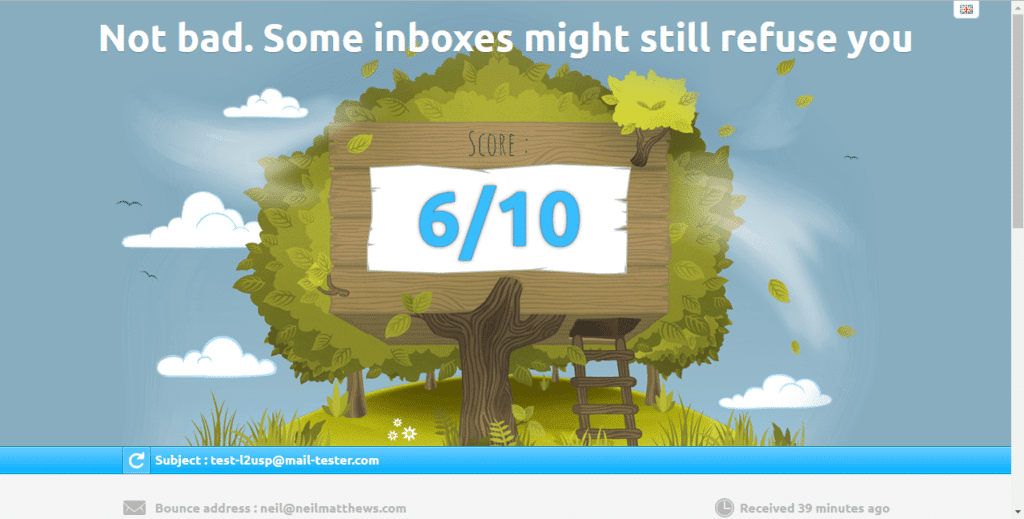
    My score after adding an SPF record.
    DMARC – Domain-based Message Authentication, Reporting, and Conformance

    We need to add another record to our DNS server a DMARC record

    This record tells the remote server what to do with an email if it does not authenticate correctly.  The options are none, reject or quarantine.  I’ve set my own DMARC record to be quarantine.

    We add a record for the domain _dmarc  with an entry like this v=DMARC1; p=quarantine.  Here’s a video of me adding a DMARC record.


    DKIM – Domain Key Identified Address

    Things are getting a little more squirrely here.  We are going to create a public private key pair to add some encrypted tests for our email domain.

    I found a number of documents to create your own DKIM records but to be honest I could not get them to work.

    In the end I contacted Bluehost support and asked them to create the key pair and add a DKIM record for me.

    There is a new txt record that looks like this

    _domainkey

    v=DKIM1;p=MIGfMA0GCSqGSIb3D{ A CHUNK OF THE KEY HAS BEEN DELETED FOR SECURITY REASONS }XxuU4iy1CI6KWLRhwIDAQAB


    The Results

    Here are my final results things are looking good.

    UPDATE – Mailchimp

    As I went to send this email to my mailing list I realised I need to add an SPF record for mailchimp too.  I added this record:

    v=spf1 include:servers.mcsv.net ?all

    I also needed to add a cname record to setup DKIM for Mailchimp.

    Check out this docuemnt for full details https://mailchimp.com/help/set-up-custom-domain-authentication-dkim-and-spf/

    Wrap Up – How To Improve Email Deliverability

    My domain is now setup and hopefully I won’t lose any more emails.

    If you need help setting up email deliverability for your domain jump over to the work with me page.

    Photo Credit: IISG Flickr via Compfight cc

    Doing the seo dance how to improve email deliverability

  • New Mini Course – How Slow Is Your Site?

    New Mini Course – How Slow Is Your Site?

    I’ve created a new (free) mini course where I teach you how to create a baseline on the speed of your WordPress site.  It’s called “How Slow Is Your Site”.

    A baseline is an objective score on how fast/slow your site loads as opposed to a subjective one; it feels like it is loading slowly.

    Once we have that baseline we can do some performance tuning work and test to see if things are getting faster with our efforts.

    The course takes less than 30 minutes to complete and the outcome is an understanding of why your site is loading slowly.

    This information can then be use when you start to performance tune and speed up your site (or sent to your local friendly WordPress consultant to do if for you).

    Sign Up For The Mini Course

    To get instant access to the course complete the form below

    [gravityform id=”138″ title=”false” description=”false”]

    Photo Credit: *_* Flickr via Compfight cc

  • How To Redirect To Another Page After A YouTube Video Finishes Playing

    How To Redirect To Another Page After A YouTube Video Finishes Playing

    How To Redirect To Another Page After A YouTube Video Finishes Playing

    How To Redirect To Another Page After A YouTube Video Finishes Playing

    I was asked by a client if this was possible to redirect to another page after a YouTube video finished playing (and it is).  In this post I will teach you how to redirect to another page after a YouTube video finishes playing.

    The example below from my homepage video show that.

    What It Does

    Once a video is started code is added to your WordPress site that monitors for the completion of the video.  At that point more code is activated that tells your browser to redirect to another page of your choosing, in my use case I want to send people to the work with me page to request a quote.

    Why Do It?

    You can add a call to action at the end of your video such as saying “Get a no obligation quote now” and rather than having people click on a button or link, they are automatically taken to that page.

    So people see your video message and they are taken directly to another page where they can complete an action.  Dynamic call to action, in action 🙂

    How It Does It

    YouTube has an API which we can tap into.

    The videos on your site send signals that can be accessed and one of them is video completed.  We monitor for this action with some javascript code and on this event trigger a javascript redirect with the window.location function to redirect to a URL of your choosing.

    The Code

    To make this work, embed the YouTube video in a post or page in the normal fashion via an iFrame.  In the code of your website just before the closing /body tag add the following script

    If that last sentence made absolutely no sense scroll down the the wrap up section and check out the done for you part.

    Video Embed

    
    <iframe class="player" src="http://www.youtube.com/embed/sOS9aOIXPEk?autoplay=1" frameborder="0" width="560" height="315"></iframe>


    Script
    <script>
    var tag = document.createElement(‘script’);
    tag.src = “https://www.youtube.com/iframe_api”;
    var firstScriptTag = document.getElementsByTagName(‘script’)[0];
    firstScriptTag.parentNode.insertBefore(tag, firstScriptTag);

    var player;
    function onYouTubeIframeAPIReady() {
    // first video
    player = new YT.Player(‘player’, {
    events: {
    ‘onReady’: function(){ alert(“Ready!”); },
    ‘onStateChange’: onPlayerStateChange
    }
    });
    }

    function onPlayerStateChange(event) {
    if (event.data == YT.PlayerState.ENDED) {

    window.location = ‘https://dev.neilmatthews.com/wordpress-technical-support/’;
    }
    }
    </script>

    Example

    Here’s my home page “work with me” video with a redirect.

    Wrap Up – How To Redirect To Another Page After A YouTube Video Finishes Playing

    Done for you, if you would like to to setup a video from YouTube on your WordPress site that redirects to another page after it’s completed click on over to the Work With Me page and get a no obligation quote.

    Photo Credit: Mitchell Haindfield Flickr via Compfight cc

    Doing the seo dance How To  Redirect To Another Page After A YouTube Video Finishes Playing

  • WP Rocket Review – Speed Up Your Site With This Plugin

    WP Rocket Review – Speed Up Your Site With This Plugin

    wp rocket review

    WP Rocket Review

    I do a lot of performance tuning work for my clients.  Speeding up a slow loading site is one of my favourite type of job. Here is my WP Rocket review.

    In the past I would use the W3 Total Cache plugin, but I’ve moved over to WP Rocket, this post explains why I think this is the best cache plugin out there.

    Why Load Speed Is Important

    There are two key reasons why you need to have a fast loading site

    1. Site visitors; if your site loads slowly, visitors will become frustrated and click away, there will be no add to cart
    2. Google; part of the ranking algorithm is site load speed, if you don’t load quickly, Google will reduce your rank.

    Is Your Site Running Slowly?

    Jump on over to GTMetrix and put your sites domain name into the tool and analyse.  If you score is not As and Bs  you have a problem.

    https://gtmetrix.com

    What Is A Cache Plugin

    At it’s most basic a cache plugin loads up your website pages and makes a static version of them.

    When a site visitor comes to your site, the cache plugin serves up this pre-built page rather than serving up a page generated for each visitor.

    Serving up a static version of a website page is much faster than running scripts, accessing the backend database and serving up the page.

    WP Rocket ( and the other cache plugins) do this but they also offer more services than just caching.

    Why I’m Converting To WP Rocket

    After using this plugin on a couple of client projects, I’ve also installed it on my own sites.  It’s really good.  Here are the reasons I’ve stumped up the cache cash to use WP Rocket.

    I used to recommend W3 Total cache, but WP Rocket is better.

    It Does All The things The Other Plugins Do And Then Some

    Just to get this out of the way, WP Rocket does page caching, minify of CSS and Javascript, browser caching and CDN support.

    These are the standard features of all cache plugins, but WP Rocket has some extras and they are why I’m swapping.

    Super Simple To Setup

    Unlike other plugins (I’m looking at you W3 Total Cache), it’s really simple to setup.

    You step through a series of pages and click on check boxes to enable features in the plugin.  There are big warning boxes if you click on something that could break your site.

    You don’t need to know which expired cache heading you need to select, just click on a button.

    Separate Desktop & Mobile Cache

    This is huge.  It’s a problem I see a lot with the other cache plugins and I often have to disable caching on mobile devices.

    Here’s the issue.  Site visitor A visits your contact page on desktop and a cache is created.  The cache is of the css and setup for a desktop visitor.  Visitor B visits your contact page on their phone, the site says there is a cache of that page and serves that up to speed up the process BUT is serves up the desktop code to a mobile.

    The page looks terrible, it does not render for a phone and visitor B leaves your site confused and unable to contact you about a possible project.

    Does The Job Of Five Plugins

    WP Rocket replaces five other plugins that I usually use to speed up sites,  Fewer plugins means fewer resources used which is good performace tuning

    1. W3 Total Cache – cache plugin
    2. Autooptimize – Javascript and CSS optimisation
    3. WP Optimize – database optimization plugn
    4. Resmush IT – image optimisation
    5. Jetpack – it replaces the jetpack lazyload image optimisation and CDN
    6. Heatbeat Control – the plugin

    One Plugin to rule them all and in the performance bind them – JRR Tolkien

    Fixes Nagging Issues With Common Remote Scripts

    One of the really annoying things I see when optimising sites is that common scripts we add to our site are not optimised.  This includes Google analytics and the Facebook pixel.

    WP Rocket realised this was a problem and it has a feature to optimise and serve these scripts locally.

    Built In Image Optimisation

    WP Rocket integrated with the Imagify service.  This is the material for another blog post, but in short, you can oslleslly compress your images inside the

    Heartbeat Control

    Another plugin can be discarded with WP Rocket.  It has in built Heatbeat API control.

    The WordPress Heartbeat API is a great feature that provides real-time communication between the server and the browser when you are logged into your WordPress admin panel. It uses the file /wp-admin/admin-ajax.php to run AJAX calls from the browser. By default, AJAX requests are sent every 15 seconds on post edit pages, and every 60 seconds on the dashboard.

    Controlling the heartbeat API limits how often admin-ajax is run.  The admin-ajax can take a lot of time to load.

    Super Charge WP Engine

    If you use WP Engine for you hosting, many cache plugins are disabled.  They have built in caching out of the box.

    WP Rocket is compatible with their server level caching and adds even more speed to a WordPress site hosted by wpengine.

    JQuery Not Optimized

    I often disable javascript optimisation on sites that use Jquery for things like home page sliders, if jquery is loaded in the footer or optimized it breaks jquery and the slider will not work correctly.

    WP Rocket allows us to optimise JS but ignore jquery with the click of a button – genius.

    My Results

    Here are my scores from GTMetrix, I’m really happy with the results, the B score from YSlow is due to me not having a CDN in place, I’m currently getting that in place so it will be much faster soon..

    wp rocket review


    Wrap Up – WP Rocket Review

    If you want a really good cache plugin for your site then I recommend WP Rocket.

    If you need help speeding up your WordPress site I have a fixed price performance tuning package.  Get a quote to see how much it would cost to speed up your WordPress site.

    Photo Credit: Greenwich Photography Flickr via Compfight cc

    Doing the seo dance WP Rocket review.

  • Plugin Review: reSmush.it Image Optimizer

    Plugin Review: reSmush.it Image Optimizer

     reSmush.it Image Optimizer

    Plugin Review: reSmush.it Image Optimizer

    I’ve written a few posts in the past about optimising images (lets get this out in the open up front, I’m British there is no Z in optimise in my dictionary).

    As part of a performance tuning process we should losslessly compress your images.  This is the process of making an image as small as possible while maintaining quality.

    If you run your site through gtmetrix.com there is a very good chance that one of their performance tuning recommendations is to optimise images, but what does that mean?

    We can reduce the size of the image by scaling it down.  Do we really need an image that is 6000px wide when the majority of monitors are less than 2000px wide.  Probably not so we can use image tools to sale the image size down that will reduce the file size.

    We can also compress the file by removing meta data and useless information in the file itself.  This a lossless compression.

    Enter The Plugins

    There are a couple of plugins out there that do this, but they have been hit and miss in my opinion.

    Some use a fremium model and large images are not compressed or the number of images you can compress per month are curtailed.

    I’ve recommended the following plugins with these freemium issues before

    reSmush.it Image Optimizer

    Enter my new favourite image compression tool reSmush.it Image Optimizer

    reSmush.it : The original free image compressor and optimizer plugin

    This is a great find, it does not limit the number of images you can compress in one sweep, so just click on the optimise button and let it run overright and your images will be compressed.

    There is a size cap of 5MB on this plugin which is pretty large for a blog post image, as you can see I have two files over that size.  In those cases I can use compressor.io to manually compress those images.

    What About New Images?

    As you upload new images to your site, they are automatically compressed, so the drawn-out process of optimising existing images is a one off process.

    Here’s a screen grab of the featured image I added to this post showing automatic compression.


    544 images How Long Did It Take?

    For the purposes of this post, there were 544 images that needed to be optimised.  I clicked on the button and continued to write this blog post.

    The total compression time was 1:45. It’s an intensive process and will take a lot of time.

    Wrap Up – Plugin Review: reSmush.it Image Optimizer

    Site load speed is very important, a slow site causes site abandonment from potential customers and clients.  Google penalises slow loading sites, so please add image optimisation to your performance tuning regimen.

    Optimising your images is a quick win and super simple with reSmush.it Image Optimizer

    Photo Credit: quinet Flickr via Compfight cc

  • Just a Single Post

    Just a Single Post

    Lorem ipsum dolor sit amet, consectetur adipiscing elit. Morbi sagittis, sem quis lacinia faucibus, orci ipsum gravida tortor, vel interdum mi sapien ut justo. Nulla varius consequat magna, id molestie ipsum volutpat quis. Suspendisse consectetur fringilla suctus. Pellentesque ipsum erat, facilisis ut venenatis eu, sodales vel dolor.

    Morbi sagittis, sem quis lacinia faucibus, orci ipsum gravida tortor, vel interdum mi sapien ut justo. Nulla varius consequat magna, id molestie ipsum volutpat quis. Suspendisse consectetur fringilla luctus. Fusce id mi diam, non ornare orci. Pellentesque ipsum erat, facilisis ut venenatis eu, sodales vel dolor.

    • This is a unorder list. Lorem ipsum dolor sit amet, consectetur adipiscing elit. Morbi sagittis, sem quis lacinia faucibus, orci ipsum gravida tortor, vel interdum mi sapien ut justo.
    • Nulla varius consequat magna, id molestie ipsum volutpat quis. Suspendisse consectetur fringilla luctus.
    • Fusce id mi diam, non ornare orci. Pellentesque ipsum erat, facilisis ut venenatis eu, sodales vel dolor.

    Lorem ipsum dolor sit amet, consectetur adipiscing elit. Morbi sagittis, sem quis lacinia faucibus, orci ipsum gravida tortor, vel interdum mi sapien ut justo. Nulla varius consequat magna, id molestie ipsum volutpat quis. Suspendisse consectetur fringilla luctus. Fusce id mi diam, non ornare orci. Pellentesque ipsum erat, facilisis ut venenatis eu, sodales vel dolor.

  • How I Automate Collecting Social Proof

    How I Automate Collecting Social Proof

    How I Automate Collecting Social Proof

    I’ve automated the way I collect social proof from a client I have completed a project with. I thought a post on how I automate collecting social proof may be of interest to you fellow online workers.

    What Is Social Proof

    Wikipedia has this to say about social proof:

    Social proof, a term coined by Robert Cialdini in his 1984 book, Influence, is also known as informational social influence. It describes a psychological and socialphenomenon wherein people copy the actions of others in an attempt to undertake behavior in a given situation.”

    I’ll not re-invent the wheel you can read the full article here social proof, I’ll wait here until you come back.

    My definition is a little less wordy, “Proof from real people to show potential clients you can do what you say you can do and that you are not mental to work with”.

    What Social Proof Do I Collect?

    I collect three types of social proof, case studies, testimonials and referrals.

    Testimonials

    These are self explanatory, I ask if people enjoyed working with me and can I have a small statement  on how working with me was, and the results we achieved together.

    Case Studies

    I don’t actual collect a case study, rather I solicit approval from my client that I can write up a case study for the project we have just worked on.

    If they say yes, then I write up a blog post on the project we have worked on and publish that on my site.

    Referrals

    I ask my clients if they know someone who would benefit from my services and for them to make an invite.  I have a form that sends a message to the new potential client making an invite.

    If someone recommends you to friends, colleagues or family, that is a high level of trust and great social proof.

    My Automated Process For Social Proof

    Here’s how I automate collection of the above types of social proof.

    I’ve got a password protected form hidden on my site that is pretty simple, it asks for the email address of the client and there is a check box that says case study.  This is the only part of the process I cannot automate because of the way projects work.  I complete the form once a project is complete and the magic happens.

    The form is connected to Mailchimp and it adds one of two tags to a clients profile.  Case study or social proof.  If the case study checkbox is selected then the tag is case study else it is social proof.

    Tags in mailchimp are pretty powerful, when a tag is added you can automatically add a person into an email sequence.  Let me walk you through those tags.

    When a person is added to the social proof tag, the email automation sequence looks like this:

    • Wait 3 days
    • Send email checking in on the project we have just completed and make sure there are no issues we have missed.  On all the emails I let people know it’s an automation, but a reply will come to “real Neil”.
    • Wait 7 days
    • Send an email asking for a testimonial on the project we have just worked on, this points them to a form they complete which automatically adds a new testimonial into my system as a draft, I review this and make it live.  The testimonial is added to this page.
    • Wait 23 Days
    • Send an email asking if they know anyone else that would be a good fit to work with me, invite the client to complete a form where I’ll send a message to the new potential client.  In exchange for this referral I give both current and potential client a discount on their next project.
    • Remove tag from client

    When a person is added to the case study they are added to an automation that looks like this.

    • Wait 3 days
    • Send email checking in on the project we have just completed and make sure there are no issues we have missed
    • Wait 3 days
    • Send an email saying this project was pretty unique and that I would like to write it up as a case study, is that okay with the client?  If they are okay with that I write up a case study
    • Wait 7 days
    • Send an email asking for a testimonial on the project we have just worked on, this points them to a form they complete which automatically adds a new testimonial into my system as a draft, I review this and make it live.
    • Wait 23 Days
    • Send an email asking if they know anyone else that would be a good fit to work with me, invite the client to complete a form where I’ll send a message to the new potential client.  In exchange for this referral I give both current and potential client a discount on their next project.
    • Remove tag from client

    Both types of tagged client are then moved into a 90 day recurring check in where I check to see if they need any help with their site.

    The Why Behind This Automation

    Why do I use this automation?  Two reasons, I’ll forget if I don;t automate it and I’ll not do it manually because I’m lay and always have too many other things to do.

    This automation is improving my marketing by getting new referrals and adding lots of juicy social proof to my site in the.

    Wrap Up – How I Automate Collecting Social Proof

    I recommend building a series of small automation in your business like these, they stream line your processes and make you look professional in the eyes of your clients.

    If you need help building these type of automation let me know, I’ll do the tech work required get in touch


    Doing the seo dance –  how I automate collecting social proof


  • Do You Need A Virtual CTO?

    Do You Need A Virtual CTO?

    Do You Need A Virtual CTO

    Do you need a Virtual CTO also know as a Virtual Chief Technology Officer?

    I’m offering a new consulting service that I’m calling the Virtual CTO package.  Let me tell you more about it.

    What Does A Virtual CTO Do?

    If you’ve worked with me in the past, you probably came to me with an IT issues you wanted me to fix.

    The Virtual CTO flips that on it;s head a little and I become an integral member of your team to build an IT strategy to deliver your business goals.

    You get access to my years of IT experience and knowledge to make IT work for your business.

    Why I Want To Be Your CTO.

    My favourite types of projects are consulting ones.  I’m called in with a problem to solve, I find a technology solution and implement that.

    Being your CTO is like a large ongoing consulting project where we have a series of business goals we need to achieve and lots of IT problems to solve.

    What We Will Do Together

    If you retain me as your virtual CTO we’ll do the following together …

    1) Create A Technology Strategy For Your Business

    We’ll get together in a virtual meeting a create a technology strategy to match your business goals.

    W’ll look at your business goals and we’ll create a plan to use technology to hit those business goals.

    I’ll document that and create an action plan.

    We’ll costs out the strategy to meet your budget, then the hard work begins.

    2) I’ll Implement That Strategy

    I’ll work to implement that strategy so we can hit your business goals together with tech.

    Some of the items I’ll do myself but we may need to outsource other aspects, but we’ll cross that bridge when we come to it.

    I’ll either do or manage the process to get our technology strategy full functional.

    3) Get Results

    The result of this ongoing consulting project is IT that works for your business.

    We can use IT to automate, streamline, scale and increase your bottom line.

    My Credentials To Be Your CTO

    I’ve worked in IT all of my career, that’s over twenty years.  I’ve spent a lot of time in large corporate IT departments before starting my own IT business.

    Here are some of the big corporate IT companies I’ve worked with PWC (Acconting), UK National Health Service, Nissan (Automotive), Santander (Banking), Aviva (Insurance).

    I’ve started my own IT company WPDude.com (as you probably know), more than 10 years ago.

    Here are some bullet points on my experience:

    • I’ve built websites (more than I care to remember)
    • I’ve built apps
    • I’ve built teams
    • I’ve outsourced work
    • I’ve built processes to make business run like clock work
    • I know how to market an online business
    • I know how to sell online
    • I can integrate across technologies
    • I can automate
    • I can program
    • I’ve built sales funnels
    • I’ve built ad campaigns
    • I’ve built lead magnets
    • and lots lots more …

    In short I can make IT work for your business.

    An Example

    Here’s a hypothetical example of what we could do together.

    You own an online e-commerce business that sells physical goods. We get together and create a strategy plan.  Your business goal is to increase sales from your WooCommerce store.

    We find that shipping is a bottleneck, that getting repeat business is an issue and cart abandonment is a problem.

    Our action plan looks like this:

    Outsource shipping to fulfilment by Amazon, implement extensions in WooCommerce to automatically send new orders to Amazon to send our from their warehouses for us.

    To get repeat business we implement an automated funnel in Mailchimp to reach out to current customers every 30 days with alerts about new products that we have that match the ones they have already purchased.

    We install tools that monitor for an alert to cart abandonment.  If a user adds an item to their cart and begins the checkout process and then abandons it we know about it.  We send an automated reminder to that person using WooCommerce extensions and Mailchimp.

    It will have details of their cart, and a nice 10% discount if they complete checkout, a single click brings them back to your store with their cart intact to checkout to increase sales.

    Who Is This For?

    This is for owners or CEOs of small online business that need help implementing an IT strategy.

    You are growing an online business but technology is getting away from you, you don’;t have time to know all the tech out there and don’t want to.  you don’t have time.

    You have money to invest in a team and technology but not the time to do it yourself.

    Your Investment

    If you hire me as your Virtual CTO it’s a monthly ongoing retainer model.  The minimum amount is five hours per month at my consulting rate of £50 per hour.  That’s £250 per month.

    If you want to get things done more quickly you can increase my retained hours.  If our strategy action plan calls for more work again you can increase that minimum.

    I have limited time available for this type of work, so I have opened up four Virtual CTO client slots.

    Limited Lifetime

    I don’t see this as a continuous engagement, rather we’ll build the strategy, implement it and there will be a natural end to the consulting and we’ll end the retainer.

    Application Process

    As mentioned I only have four two (slots are going quickly)  available slots for this type of work, so I have an application process, complete this form and tell me how I can help your business and we’ll book a call to start a conversation to see if I’m a good fit to  work with you as your Virtual CTO.

    Wrap Up – Do You Need A Virtual CTO

    I’m excited to work with people as their virtual CTO, if you need direction to get IT working for you get in touch.

    Apply for my Virtual CTO program.

    Photo Credit: ajmexico Flickr via Compfight cc

  • How To Customise Your WooCommerce Checkout Fields

    How To Customise Your WooCommerce Checkout Fields

    How To Customise Your WooCommerce Checkout Fields

    In this video I talk about how to customise your WooCommerce checkout fields.  These are the pieces of information collected on your WooCommerce checkout page.

    If like me you sell virtual products, all of the physical delivery details are not required and may add to cart abandonment.  I suggest you trim the fields that are not required on your checkout.

    Video Notes

    Past the following code in the theme functions file, go to appearance -> editor and open functions.php.

    You can remove some of the field exclusions if you want to keep them in

    add_filter( ‘woocommerce_checkout_fields’ , ‘nm_simplify_checkout_virtual’ );

    function nm_simplify_checkout_virtual( $fields ) {

    unset($fields[‘billing’][‘billing_company’]);
    unset($fields[‘billing’][‘billing_address_1’]);
    unset($fields[‘billing’][‘billing_address_2’]);
    unset($fields[‘billing’][‘billing_city’]);
    unset($fields[‘billing’][‘billing_postcode’]);
    unset($fields[‘billing’][‘billing_country’]);
    unset($fields[‘billing’][‘billing_state’]);
    unset($fields[‘billing’][‘billing_phone’]);
    add_filter( ‘woocommerce_enable_order_notes_field’, ‘__return_false’ );

    return $fields;
    }

    If you are a Wuss there is a plugin to do the same 🙂

    Flexible Checkout Fields for WooCommerce – WooCommerce Checkout Manager

    List of checkout fields

    Wrap Up – How To Customise Your WooCommerce Checkout Fields

    If you need help customizing your WooCommerce checkout please do get in touch.

    Doing the seo dance again how to customise your WooCommerce checkout fields.

    Photo Credit: Barta IV Flickr via Compfight cc

  • Automate Your WooCommerce Marketing With Mailchimp

    Automate Your WooCommerce Marketing With Mailchimp

    In this video post I show you how to automate your WooCommerce store marketing with Mailchimp.

    Do this work once to bring back customers to your WooCommerce store, up-sell more products and recover abandoned carts.

    Links in Video

    emilianofelicissimo Flickr via Compfight cc

  • Case Study: Password Protected Podcast

    Case Study: Password Protected Podcast

    In this video walk-through I’ll take you through a password protected podcast setup I created for a client in WordPress.

    The site is Qiological.com owned by Michael Max

    Plugins / Extensions Used

    Here is a list of the plugins / extensions used in this project.

    Photo Credit: seefit Flickr via Compfight cc

  • Give Away The What And Charge For The How To

    Give Away The What And Charge For The How To

    I’ve been using a marketing technique for many years, where I give away the “what” and charge for the “how to”. Using marketing content I’ll teach people the “what” and I’ll sell services or training to give the “how to”.

    Marketing content can be your blog posts, your YouTube videos or your free downloadable e-book.

    Then charge for the how to;  the technical implementation, details on how to do the “thing”.

    The “What” Shows You Are An Expert

    When you can articulate how something works with the “what” free content you are showing yourself as a subject matter expert.

    You can educate your audience that there is this “thing” and it may be useful to them in some way.


    The How To Makes The Denaro

    In the what phase you may show how to do the “thing”, but it might be too technical for many people, or people just don’t have the time to do it.

    Or, the how may be a new concept, people don’t understand yet, their appetite is whetted by the what and they choose to learn more.

    At this point, the person you marketed too for free can choose your premium option and pay for your services or premium products.

    EXAMPLE: Diary Mapping

    Here’s a real life example of this with my DiaryMapping.com course, which goes fully live today (what’s the chances of me writing this post on the day I go live, you can’t plan things like this).

    Diary Mapping brings in new potential students with a free Understanding Diary Mapping course and if they want to go deeper there is a premium How To Diary Map course for $9.00.

    The “What “For Free

    I’ve created a free course that brings the new concept of a diary map to people.

    I’m using this free “what” guide to introduce my concepts to people at no risk.  I’m explaining what Diary Mapping is, the terminology and how it can help people to tame their to-do list.

    If a potential student is interested they can move onto the how to, if it’s of no interest, no problem they can move onto the next thing in their day and ignore the premium course.

    The How To For A Fee

    I have a second premium course on the same site which goes much more deeply into the how to Diary Map subject.

    I explain how to build a diary map, how to control their to do list etc.

    The people who pay for this have been through the free “what” phase and have realised this is useful to them.

    It’s not too pushy and it gives a way to test what you have before anyone buys.

    Wrap up – Give Away The What And Charge For The How To

    Giving away the how and charging for the how to has worked for me in WordPress consulting jobs, Courses and other areas of my business.

    Give it a go, and remember to check out my free Understanding Diary Mapping course to see this process in action