Neil Matthews

Blog

  • What Is Lazy Loading

    What Is Lazy Loading

    In this blog post I want to talk about a technique to speed up your site by lazy loading images and or videos.

    What Is Lazy Loading

    It’s a technique to speed up the loading of a web page by deferring images or videos that are displayed “below the fold”.  These images are not loaded as part of the initial page load and are only loaded as the site visitor begins to scroll down the page.

    This makes the initial page smaller by not downloading the image and as a result makes the page load faster.

    You might have noticed lazy loading on websites that show a blurred or low resolution version of images until you scroll over them and the full image is show.

    What Is Below The Fold

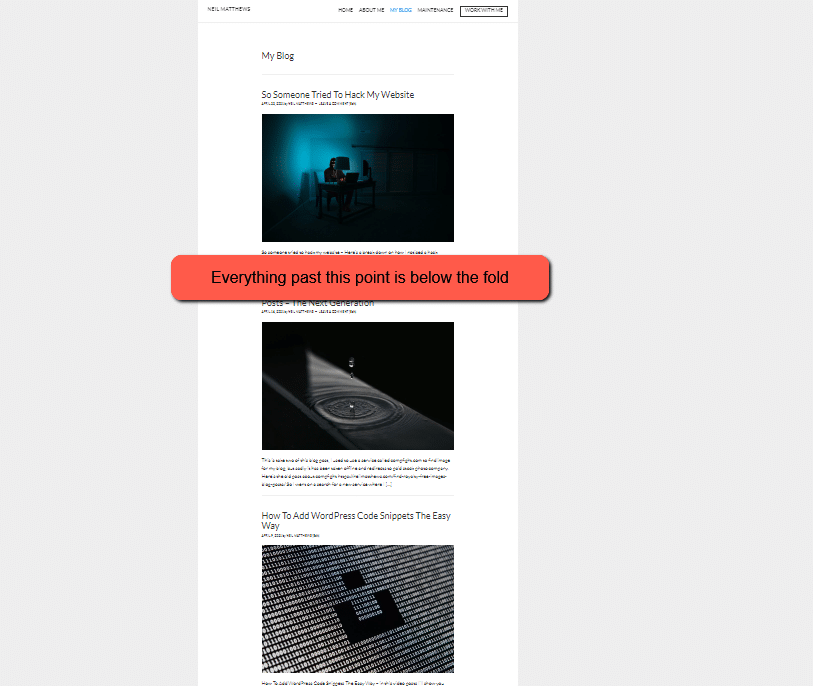
    That is the part of the web page that is offscreen when a page loads, here’s a zoomed out view of my blog page the line marks the “below the fold” part of my page.  I think the term comes from newspaper publishing where the less important stories are show below the fold of the newspaper.


    what is lazy loading


    How to Add Lazy Loading

    WordPress added this feature for images after version 5.4 natively, but there are plugins which also extend this function

    My preferred tool is WP Rocket, this also offers lazy loading for videos, it will load an image place holder for videos rather than downloading the video from YouTube for example, the video is rendered when the site visitor gets to the placeholder image.

    There is a free version of their lazy loading so you don’t need to buy the full plugin:

    LazyLoad Plugin – Lazy Load Images, Videos, and Iframes

    There is not much to do other than load and activate the plugin to be honest so I’ll not dig to deeply into the actual implementation of the plugin.  Once activate attribute are added to your images.

    How Lazy Loading Is Activated

    Lazy loading is done at the browser layer and is an attribute on the IMG tag, <img loading=lazy>.

    When the browser sees this attribute while loading the image the image is ignored and loaded when the site visitors scrolls over the image.

    Wrap Up

    So lazy loading is a way to speed up your web page load speed by deferring image or video loading.  I recommend you implement this as part of your optimization toolkit.

    Is your website loading slowly?  Get in touch I’ve got a free speed audit where I’ll record a video to show you why your site is loading slowly.

    Photo by Priscilla Du Preez on Unsplash

  • So Someone Tried To Hack My Website

    So Someone Tried To Hack My Website

    So someone tried to hack my website, here’s what I did.

    Thursday afternoon, I started to get an influx of dodgy contact form entries, this made me suspicious and I started an investigation on my own site.

    I’ve got security hardening in place so happily the hacker was not able to get into my site.

    Here’s a video of my investigation and how I cut the script kiddie off at the knees.

    Video

    Plugins And Software Mentioned

    The security plugin I use is Wordfence and my CDN / Firewall software is cloudflare.

    Wrap Up – So Someone Tried To Hack My Website

    The moral of the story is to harden security before the hackers turn their attention to your site.  Get a decent security pugin in place and consider cloudflare for the nuclear option to block an entire country.

    If you need help hardening the security of your WordPress site, click here to get a no obligation quote.

    Photo by Clint Patterson on Unsplash

  • How I Find Royalty Free Images For My Blog Posts – The Next Generation

    How I Find Royalty Free Images For My Blog Posts – The Next Generation

    This is take two of this blog post, I used to use a service called compfight.com to find image for my blog, but sadly it has been taken offline and redirects to paid stock photo company.

    Here’s the old post about compfight https://dev.neilmatthews.com/find-royalty-free-images-blog-posts/

    So I went on a search for a new service where I could search for free images for my blog posts.

    My search found unsplash.com which I’ve found to be even better than compfight.com

    Here’s a video tour of unsplash.

    Video

    Wrap Up – How I Find Royalty Free Images For My Blog Posts

    Like I said this is even better then the original service I used Compfight, and I’m really happy with my find, happy image searching to you all.

    If you need help with your WordPress site please head over to the work with me page to get a no obligation quote.

    Photo by Ryan Kwok on Unsplash

  • How To Add WordPress Code Snippets The Easy Way

    How To Add WordPress Code Snippets The Easy Way

    In this video post I want to show you how to add code snippets the easy way to your WordPress site.

    You’ve probably seen recommendations to add code to your functions.php file to fix an errors on your site, to add functionality or to make a change of some sort.

    You will be presented with a wall of php code and you are told to add this to your functions.php file.  All well and good if you are a developer but what if you are not that technical and don’t want to mess with code files.

    There are some issues with “simply adding code to functions.php”, here is what you need to be aware of:

    • If there are errors in the code, you can crash your site.
    • When you change your theme the code also needs to be migrated.
    • A site with lots of snippets can become a pain to manage and remember what each piece of code does

    Video Demo – How To Add WordPress Code Snippets The Easy Way

    In this demo I’ll show you how to use this plugin to add code

    The Plugin

    Here’s a link to the plugin I used
    https://en-gb.wordpress.org/plugins/code-snippets/

    The Code Snippet

    And if you want to change your add to cart button to buy now, here is the code.

    // To change add to cart text on single product page
    add_filter( 'woocommerce_product_single_add_to_cart_text', 'woocommerce_custom_single_add_to_cart_text' );
    function woocommerce_custom_single_add_to_cart_text() {
    return __( 'Buy Now', 'woocommerce' );
    }

    Wrap Up – How To Add WordPress Code Snippets The Easy Way

    To wrap up this plugin is great when you are developing a site and need to manage lots of custom code, and not have it break your site during testing.

    A highly customised site with lots of snippets can become messy when a few months later you cannot remember what each piece of code does, so descriptions and tagging make things much easier to maintain.

    If you are still not happy adding custom code to your WordPress site you can always hire me to do it for you.

    Photo by Alexander Sinn on Unsplash

  • All I Want To Do Is Send An Email

    All I Want To Do Is Send An Email

    All I want to do is send an email, am I asking too much?

    I’ve got a bit of a bug bear, a Bette Noire, something that is really p*ss*ng me off.  All I want to do is send my past/current clients an email.

    I’m looking at you Mailchimp, Constant Contact, Active Campaign, et all, we are all too lardy dah to be an email service anymore, we all want to be a marketing platforms.

    Here’s What I Need From My Email Service Provider

    I’m a simple man, I have the following needs from my email people:

    • I want to send broadcasts when I write new blog posts and I have an offer to make.
    • I want to reach out to my past clients every 90 days using automation.
    • I want to segment my list with tags so I can email appropriate people.
    • I want to send out an email sequence to clients whom I’ve just completed a project with.  I want to check in after a few days, ask for a testimonial, ask for a referral and upsell my maintenance plan.

    That’s it, but I’m struggling to find a service provider that give me this, they all want to be more more more.

    What I’m offered

    The majority of email service providers out there are suffering from a need to play a bigger game, they cannot be “just email” they all have FOMO.

    They want to offer me:

    Websites – you can build a simple website to do your thing on these platforms now.

    Landing pages – okay I get that a simple squeeze page to collect addresses is a good thing. but nothing I can’t do on my website

    Popups – get in peoples face on each turn on your website to grab that email.

    Social Media ads – create lookalike audiences from your email list to advertise on Facebook

    Ecommerce – link your e-commerce platform to your email service provider for cart abandonment, product recommendations it’s good but I do services I don’t need this.

    Complex automation – multi step tag and jump automations, link clicking page visiting spying on your customers.

    Web Personalisation – change the content of your website depending upon a customers journey through your email list

    CRM – they all claim to act as a contact management platform but none do it very well.

    This is just a few of the offerings, all things I really don’t need.

    I Can’t Opt Out, I have To Pay For The Bloat

    The trouble is I need a fraction of these features but I’m paying for a marketing platform I don’t need.

    If I could add these features to my plan in an add-on fashion that would be great but I’m paying for the support and development of huge platforms that I simply don’t need.

    Keeping Up With The eJonses

    The trouble is,  once Johnny Mailchimp has the ability to create a look-a-like audience for Facebook advertising Jenny Constant Contact and Faye Active Campaign need to follow like sheep and add in Facebook advertising to their portfolio.

    I get a feeling these services are all looking at each other. They have this massive sense of FOMO and instead of providing an excellent streamlined product for their customers they are in an arms race with one another.

    Let Me Take You Back to the 90s

    I’m showing my age, but I was an IT technicians working for a large accounting firm.  I was looking after the PCs of a bunch of accountants.  They loved their spreadsheet software those bean counters did.

    Lotus 1-2-3 and later excel was installed onto a PC from a stack of 3 1/2 inch floppy disks.

    Those software companies also played the game of keeping up with the eJonses and I remember those stacks of floppy disks growing year on year and installation time taking longer and longer, we don’t need to return to those days of software bloat.

    I attach and image of a 3./5 inch floppy disk for the young-uns reading this.

    all i want to do is send an email


    Be Less Mailchimp and More Basecamp

    Basecamp the project management people (and recently an excellent attempt at email at hey.com) have a product development philosophy to not add every feature a user asks for.

    They are not bound to any huge clients forcing them to add bloat.

    They create software that does just enough to get the job done, nothing more nothing less.  Our SaaS providers should take a look a them and fix the problem they set out to solve and not more.

    Basecamp’s book Rework is a great read on this topic.

    Enter Creativemail

    I’m trialling an alternative to those big email providers called Creativemail.

    They provide a plugin for WordPress which give you cut down version of the constant contact on your WordPress site.

    Creative Mail – Easier WordPress & WooCommerce Email Marketing

    I came across this when I was building a development site and Bluehost did their annoying trick of auto-installing plugins.  I’m not usuauly a fan of this tactice but I was grabbed as soon as I saw this plugin.

    It styles itself as email for WordPress and WooCommerce.

    It’s a fraction of the price of my old email provider $29 as opposed to $79 for a list the size of mine.  There is  a free plan to test is out.

    It is really minimal and allows you to send broadcast emails, have automations (including time based).  It allows you to setup an RSS feed automation.  It seems to meet my minimal email needs.

    Email collection is via the common WordPress contact forms Gravity forms, Contact Form 7 Ninja Forms etc.  There doesn’t seem to be an HTML form you can paste into your site.

    It’s too minimal at the moment, there are no tags, but I can move a user to a new list and do tagging style automations in that way I think tags will come.

    There are no custom fields so I’m storing my clients websites URLs in a physical address field, and I’m storing my 90 day reach out trigger date in a birthday field

    I’ve not looked into the WooCommerce integration in depth, but you can use Creativemail to send you standard store emails and do some automation and cart abandonment work.

    If like me you are looking for a more simple this is worth a look.  That’s not a recommendation at this point I’m just trialling things at the moment, If I decide to use this full time I’ll create a video tour.

    Wrap Up- All I Want To Do I Send An Email

    Post cards! Post cards, why in all things digital would I want to send someone a post card from my email service provider?  I would love to have been able to sit in on that brain storming meeting.

    “I tell you what none of our competitors are doing ” said Freddy Marketing.

    “What’s that Fred?” Replied Lisa CEO.

    “Do what we do now, but send it out via snail mail and make it really expensive!”

    SILENCE FOR A FEW SECONDS OF CONTEMPLATION

    The room erupts and Freddy Marketing is carried out of the meeting room on the shoulders of his colleagues.

    AND BREATHE.

    Can you suggest a more streamlined service provider answer in the comments please.

    Envelope Photo by Anne Nygård on Unsplash
    Floppy Disk Photo by Brett Jordan on Unsplash
  • Post With Interesting Picture

    Post With Interesting Picture

    Nullam dictum felis eu pede mollis pretium. Integer tincidunt. Cras dapibus. Vivamus elementum semper nisi. Aenean vulputate eleifend tellus. Aenean leo ligula, porttitor eu, consequat vitae, eleifend ac, enim. Aliquam lorem ante, dapibus in, viverra quis, feugiat a, tellus. Lorem ipsum dolor sit amet, consectetur adipiscing elit. Morbi sagittis, sem quis lacinia faucibus, orci ipsum gravida tortor, vel interdum mi sapien ut justo. Nulla varius consequat magna, id molestie ipsum volutpat quis. Suspendisse consectetur fringilla luctus. Fusce id mi diam, non ornare orci. Pellentesque ipsum erat, facilisis ut venenatis eu, sodales vel dolor.

    Cras fermentum purus sit amet metus posuere vestibulum. Cras ipsum libero, lacinia id nibh nec, vehicula facilisis tortor. Etiam sed tincidunt metus. Cum sociis natoque penatibus et magnis dis parturient montes, nascetur ridiculus mus. Praesent ac dictum dui, eget imperdiet lacus. Suspendisse varius sapien sed justo ullamcorper dignissim nec vel erat. Pellentesque et eros scelerisque, pretium ex et, fringilla urna. Sed at interdum tortor, vel molestie orci. Etiam placerat tortor id odio ornare, vitae vulputate leo egestas. Donec tempus leo et ex luctus, in cursus ligula vulputate.

    Nam ligula nibh, lacinia ac accumsan at, congue eget dui. Cras a lorem tincidunt, laoreet orci nec, venenatis est. Pellentesque velit felis, dictum pulvinar laoreet quis, ornare id diam. Donec pharetra ante at augue dictum, vel tincidunt tortor luctus. Maecenas nisl sem, accumsan sit amet leo molestie, tristique tristique ex. Phasellus malesuada nibh eu diam sagittis sagittis. Sed dui est, laoreet eu ex non, fermentum interdum odio. Vestibulum consectetur rutrum metus, ut mattis nunc lacinia eget. Etiam id sem feugiat, auctor mi eget, aliquet eros. Pellentesque et ornare nulla. Sed sed convallis magna.

  • How To Speed Up Font Loading

    How To Speed Up Font Loading

    In this video post I want to show you how to optimize your fonts and load them locally. In this tutorial we will show you  how to speed up font loading.

    The problem is that google fonts are loaded from remote servers for each page load, they are not cached or set with headers, if we load them locally we can speed up page load.

    Video Tutorial

    Plugin Used

    We use the following plugin in this video:

    https://wordpress.org/plugins/host-webfonts-local/

    Wrap Up

    This does not work with every theme so please test thoroughly after installing this plugin

    If you need help speeding up your WordPress site check out our services.

    Photo Credit: Andrei! Flickr via Compfight cc

  • Communication Tubes,  Get Rid Of Them – Remote Work Tips

    Communication Tubes, Get Rid Of Them – Remote Work Tips

    communication tubes

    In this remote work tip video I want to talk about communication tubes, what they are and why they are toxic for remote team communications.

    In the video I talk about Basecamp, my preferred project management tool, you can get a free account for up to three projects at basecamp.com, no affiliate links just a great tool I use all the time.

    If you need help setting up remote work arrangements for your team get in touch.

    Photo Credit: Matt From London Flickr via Compfight cc

  • Be The Best Remote Worker You Can Be

    Be The Best Remote Worker You Can Be

    I’m thinking about starting a new remote work training community, it’s going to be called “Be The Best Remote Worker You Can Be”.

    I think remote work will be the norm for some time to come due to the current erm “situation” and having the best skills to do that work will make you stand out.

    Even when we are allowed out of lock down, people will have seen the benefits of remote work and there will not be a clamour to resume the daily commute to play office politics, remote work is here to stay in my opinion.

    That’s why I think remote work training would be useful.

    Why I’m qualified to build this community

    I’ve been working remotely full time for more than 10 years (since May 2008 to be exact).

    I’ve delivered thousands of projects to my clients, and I’ve only met one of them physically in all that time.

    I’ve built a 100% remote team to deliver service to clients so I understand the challenges of managing a remote team.

    I understand the mentality, tools and skills needed to be an effective remote worker.

    What I think this community looks like

    It’s a members only community with online training modules and a forum to ask questions.

    I’ve brainstormed some of the training modules (see below) but this will evolve over time as I see the problems people are having.

    • Building Your Workspace
    • Communication touch points (probably the most important skill to learn)
    • Managing Your Workload (covering overload and underload)
    • The self discipline of remote work
    • Tools for remote work
    • Working in a shared space (kids, spouse)
    • Remote work / life divide (not balance, divide)
    • The remote manager

    Who Is This Community For?

    It’s for people working in a digital role that can be performed remotely, online over the internet.

    It’s for people who have been told to remote work due to the pandemic.

    Interested?

    At the moment I’m judging interest in this community and I would ask you to complete this form if you are interested in learning to  “Be The Best Remote Worker You Can Be”.

    [gravityform id=”140″ title=”false” description=”false”]

    Photo Credit: trendingtopics Flickr via Compfight cc

  • What Is Browser Caching

    What Is Browser Caching

    what is browser caching


    What Is Browser Caching

    In this video post I explain what browser caching is and how it can speed up your website.

    I’ll also explain why your Web Developer is always telling you to clear your browser cache: )

    Video


    Wrap Up – What Is Browser Caching

    If you need help speeding up your WordPress site by implementing browser cache (amongst other things) get in touch and I’ll send you a quote for my fixed price package to speed up your slow loading WordPress site.

    Photo Credit: trendingtopics Flickr via Compfight cc

    Doing the seo dance – what is browser caching.

  • What Is Minify?

    What Is Minify?

    what is minify

    What Is Minify?


    In this post I want to answer a question, what is minify?

    If you have taken my free mini course How Slow Is your Site you will probably have seen that one of the results is to minify javascript and CSS.  In this post I want to explain what Minification is and why you should be doing it.

    Minify or Minification

    Minify sometimes called minification is teh process of compressing javascript or css files.


    These files are often static and once written they don’t need to be touched,

    Write a script For People To Read

    When you are developing a script of CSS style sheet you need to code it in a human readable format.  Lots of white space and  carriage returns.

    Tabs to indent things to make sense BUT all the space and carriage returns also add invisble characters to your code.  For example a carriage return adds the control+M or ^M hidden character to your file.

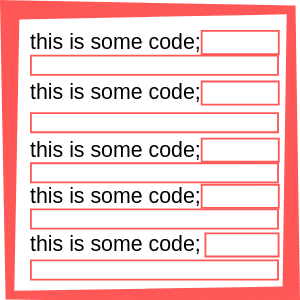
    This takes up space and adds time to your download.  See this diagram, the red boxes are all hidden characters that add size to your file.


    Now this makes 100% sense when developing your code it needs to be human readable, but when you package up your theme or plugin and deploy it for people to run, we don’t need that overhead.

    Deploy That Script For Computers To Run

    Computers don’t need that white space,  that’s a human weakness, and the reason the computers will rise up and become our digital overlords.

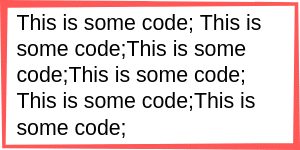
    When the scripts is ready for prime time is should be compressed and the red boxes removed.  This is what a compressed file would look like, and you can see from the graphical representation the same information is conveyed in less space.

    what is minify

    You may think a few characters is not a big deal, but multiply all the scripts and stylesheets from all the plugins and theme on your site and this can add up to a lot of hite space that needs to be downloaded for each site visitor.  It created a real load on your site.

    Not All Scripts Are Deployed Minified.

    Our problem begins.  Not all scripts and style sheets are not minified.

    Why Minify?

    We need to minify for the following reasons

    • The file is compressed
    • This reduces  size
    • The file is quicker to load

    We need to speed up our site to keep the SEO gatekeepers at Google happy and for the real people visiting our sites.  Slow sites are very annoying and will make people abandon carts of leave your site in frustration.


    How To Minify Files

    There are a couple of ways you can minify the files on your site.

    Manually

    There are a number of tools out there to compress and minify your scripts manually.  I like this one

    https://www.minifier.org/

    Copy the contents of the script or CSS in question ( again check my mini course you will be give a list of files that need to be minified). paste them into the tool and download it.

    Replace the uncompressed file with the minified file.

    This may be a bit much for normal site owners, so there is always a plugin …

    Plugins

    Of course there are plugins out there to minify your scripts.

    Add one of these to your site and check the documentation on how to minfy your sites.

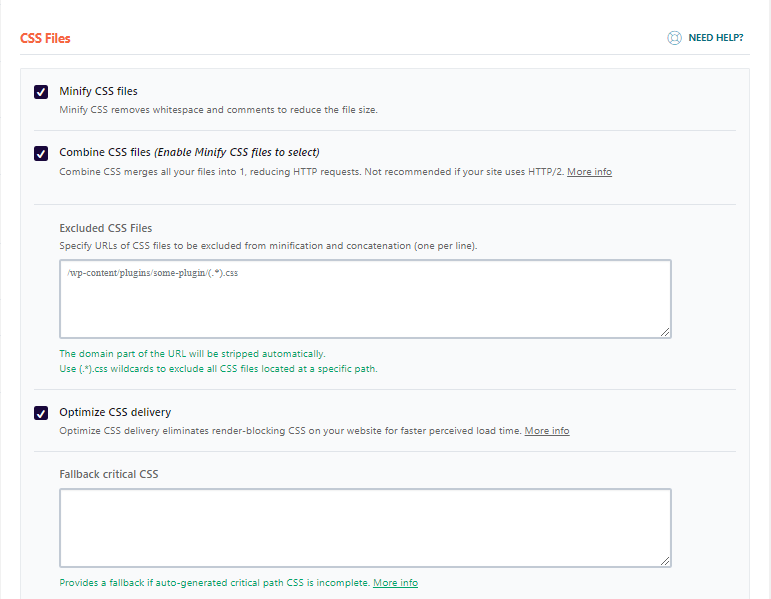
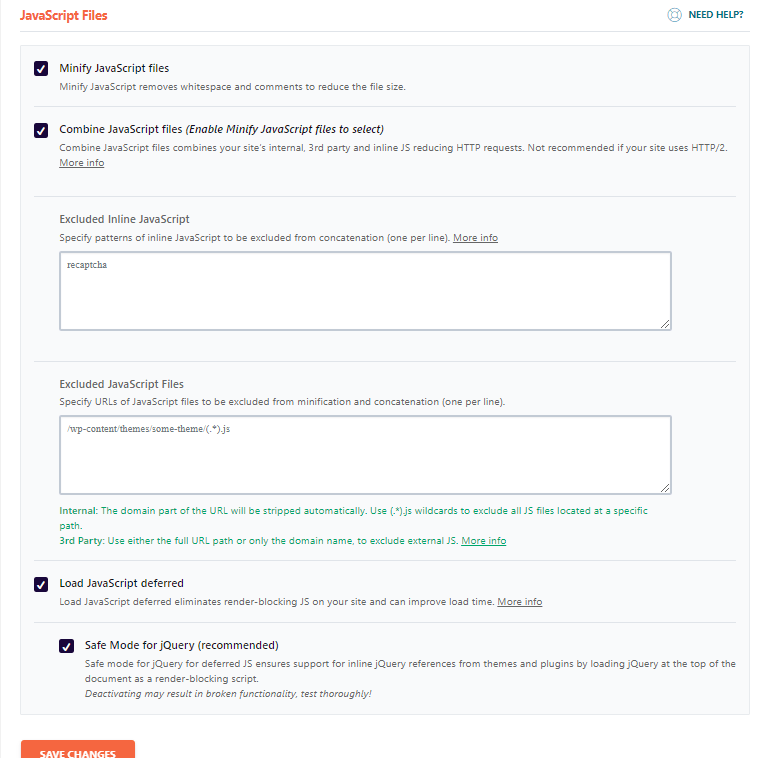
    W3-Total-Cache is complex, but WP-Rocket is super simple with two check boxes

    Careful now, it can break things!

    Once you have minified check your site, this process can sometimes make things break.

    Locate which scripts or style sheet is acting up and exclude it from the minification process.

    Wrap Up – What Is Minify?

    Minification should be one of your performance tuning ingredients.  Performance tuning is a recipe, you need a pinch of this and a cup of that.  If you have minification, caching, CDN and optimized images it’s gonna taste real good.

    If you would like me to speed up your slow loading site, get in touch and I’ll send you a no obligation quote.

    Photo Credit: rvandermaar Flickr via Compfight cc

  • Giving Upwork Another Go

    Giving Upwork Another Go
    Giving Upwork Another Go
    Giving Upwork Another Go
    I’m currently giving Freelancer job boards another go. This is something I have sworn off many years ago, so why am I giving Upwork another go?

    Race To The Bottom

    Freelancer sites always felt like a race to the bottom in my mind. Cheap clients looking to offshore to the cheapest possible service providers.

    How can I compete on cost against WordPress developers in India or the Philippines where there cost of living is so much less than mine.

    When I submitted proposals I got little response, my proposal was lost in the sea of other replies.

    My Hiring Bias

    I’ve recruited from these sites before and the deluge of cookie cutter and frankly shite replies really turned me off from the sites.

    When I posted a job I would get hundreds of barely qualified responses.  These freelancers and agencies setup automated replies and treat prospecting like a numbers game.  The more proposals for low cost services I can sling out the more chance they will get a hit.

    I don’t want to work in that infrastructure.

    I have A Client Roster

    I have my own roster of clients I can market to directly so why would I need to get new one? Simple my clients don’t always need WordPress support service from me and there are times (like now) where the top of my funnel is sparse.

    There is a freelancer feast and famine cycle and I’m not in famine, but I need a little snack.

    I don’t want you to feel sorry for me, I have Q1 2020 fully booked I have always enough reserves in the bank and I have enough work on my books to see me through, but I always like to have a full funnel.  It makes me feel more secure.

    I need a constant trickle of new clients coming into the top of my funnel to keep my client roster full and that’s what I’m using Upwork for.  I’m trying to fill my books for the rest of the year.

    Paid Advertising

    I tried some paid advertising but that is notoriously hard and expensive to get new service clients.  You need to build long nurturing sequences and lead magnets.  It’s a lot of hard work and it’s expensive

    I’ve got some work this way but at a cost.  I know this work is an investment, once I have a new client I can market to them for almost nothing but there is still a substantial up front cost.

    Nurturing Exiting Clients

    I have this down pat, weekly blog articles to keep me at the top of my clients minds. I have an automated email reach out every 90 days to check in to see if you need my help.

    But if my existing client base does not have any requirements for me, then no number of emails will fill that funnel.

    Why I’m Giving It Another Go

    I read a book The Million Dollar Freelancer: Work From Home, Set Your Own Hours & Become Rich.  In it the author, Daniel Hall was advocating using freelancer sites and in particular the market leader Upwork (which was formed by the merger of two sites oDesk and Elance) to get new work.

    It was at this point I shouted “effing bollocks!” at Daniel Hall via my Kindle (my wife looked up and gave me that has he eventually lost it look).  Everyone with a few weeks of freelancing experience knows these sites are rubbish, don’t they?

    I was about to abandon his book then, but I decided to carry on to see what he had to say and I’m glad I did. His recommendation was to treat the prospecting process much more professionally.  Here are my takeways from Daniels book.

    Go Where The Jobs Are

    Freelancer sites are where the work is at.  Clients are actively seeking freelancers.  They have projects that need to be done.

    My reluctance to go to these and being aloof is like a gold miner going to the Jewellers to get gold rather than grabbing his pick and shovel and starting to dig in the mine that is upwork.

    Niche Down

    I’m not searching for generic WordPress jobs, I’m looking to niche down on Upwork and solve the tricky problems that not many people can solve.

    I’m looking for jobs on WordPress performance tuning.  One of my specialities.  It’s hard work, and as a results attracts premium prices.

    I can stand out above the crowd by niching down like this.

    Treat Your Proposal Like A Landing Page

    I was also guilty of sending generic proposals, and that’s probably why I had little response.

    But a take away I took from the book was to treat your proposal more like a landing page, answer objections, show social proof then tailor your proposal to each job.

    Here’s what I’m doing:

    1. Created a very flexible template I can modify to each job
    2. Added a client testimonial to the proposal and link to my full range of testimonial;s
    3. Show my expertise in performance tuning with links to my site
    4. Create a video audit of performance tuning and upload that to YouTube
    5. Create a custom response to their proposal

    So this comes from a template but is highly customised per project.

    How I’m finding Work

    I’m approaching this like a professional sales process.  Leads come in that need to be qualified and then a detailed and tailored proposal is created.  From that a sales call is made.

    This will take a lot of time. so I needed to add a little automation.

    I’ve setup a search in Upwork for keywords that suggest someone needs help speeding up their WordPress site.

    From that I can get an RSS feed

    I’ev posted that RSS feed in Zapier so when there are new leads an automation is created

    I created a new Trello board, the new leads are placed into that board and I movede them through the lists new lead, proposal sent, interview/sales call,  proposal won, proposal lost or rejected.

    I can move my leads through a process much more smoothly.

    Results When Giving Upwork Another Go
    I’m impressed, this morning when I woke up I had 13 “leads” in my Trello board. I spent a good hour filtering and creating proposals for these leads, it has not cost me anything like paid ads, only my time.

    I did the same thing yesterday and I have two sales calls setup.  I’m, happy with that result.

    Filtering Is Important

    A lot of the leads are poor.  They are bringing back hits that have nothing to do with my skills, a quick scan and I move these cards to my rejected column in Trello.

    Then I looked at the prices and request, some were too low or the job too big for the payment offered. These were moved to rejected.

    Then there are the job specs that make you spidey sense tingle, you can tell who will be a pain in the ass to work with “You will need to share your screen with me” or “I need pizzaz”.  go with your gut and filter those jobs.

    For the rest I move them to proposal sent and create a custom proposal for the project.

    Eating Sh1t While I Build  My Portfolio

    Your work history is gold on these platforms.  I currently don’t have any feedback or portfolio and as a result Upwork is taking a big slice of my fees, there is a sliding scale when you are new to prove yourself which comes down as you do more work.

    I need to build that portfolio and body of clients   Daniel talks about this and 10 jobs with 5 stars positive feedback is the goal, from there things get beter

    Eventually I can move them out of the Upwork infrastructure into my standard client roster, but until that point it’s a little painful.

    Resilience Is Key When Giving Upwork Another Go

    Another thing Daniel Hall said in his book was this takes time.  You will need to send a lot of proposals at first.

    Once you have built momentum then you start to get private invites to jobs and don’t need to jump through the proposal hoops.

    Wrap Up – Giving Upwork Another Go

    I’m quietly confident this new approach to prospecting on Upwork will help me fill my funnel.

    The advice from the book The Million Dollar Freelancer: Work From Home, Set Your Own Hours & Become Rich. is well worth a look

    Photo Credit: Alan_D Flickr via Compfight cc

    Doing the SEO dance Giving Upwork Another Go