Neil Matthews

Author: Neil Matthews

  • WordPress 2.7 Performance Issues

    tortoise

    Just a quick posts to talk about a number of issues I have seen with slow wordpress performance after a 2.7 upgrade.

    What I Have Seen?

    When you access the front end of the blog, things run especially slowly.  On a number of blogs I have seen the theme load but no posts.

    When you attept to connect to the backend i.e. wp-admin the problem is not re-created.

    Theme Schmemes

    The problems I am seeing are with themes which have not benn upgraded to make use of the new 2.7 functionality.

    I assume that they are trying ot run a previous version function, and when this does not work, the system retries for a period before failing.

    Testing For A Dodgy Theme

    There is a very quick test to see if your theme is causing your issues. Simply change your theme to the wordpress default theme, and test your blog again. If performance improves the theme is the culprit.

    If you are running a cache program disable is to ensure nothing is cached and the latest file are being served up.

    What to Do?

    Go back to the web designer who developed your theme and check to see if this is a know issue. It is quite probable that a 2.7 version of the theme has been released.

    Download this latest version and upload it to your blog, fingers crossed the problem will be solved.

  • Blog Security: Part 1 Physical Access

    photo by mattimattila
    photo by mattimattila

    In the wider computer system community, security can be divided into five topics.  In this multi part series I would like to talk about these five areas and how corporate IT concepts can be applied to your blog.  The five subject headings are:

    • Logical Access
    • Physical Access
    • Segregation of Duties
    • Program Change Control
    • Continuity of Data Processing

    In the first part of this series, I will discuss logical access.

    What Is Physical Access Control

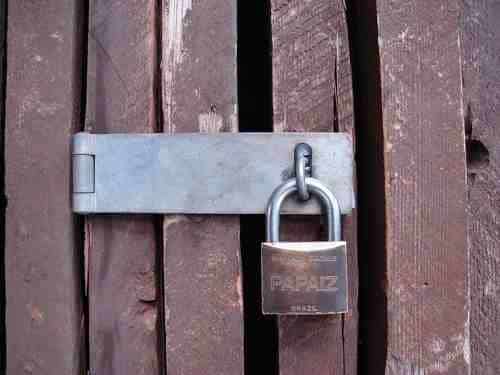
    Ensuring only authorised people can physically touch or be near to your server hardware.  In corporate IT, this is done by creating secured data centres with swipe card access and high security setups.

    I have worked with police IT departments where physical security is so important servers are hosted in armoured bomb proof data centres.  Your blog may not need a earth rampart around it,  but you should consider physical access controls if you are serious about blog security.

    What Can Someone do to your Service with Physical Access?

    With physical access comes physical damage or theft of hardware.   Dropping of power sources or removing of network cables.  Pulling out of hard disk drives or just running amok with a crow bar on your servers.

    With physical access comes threats to your finally crafted blog.

    Is It Really A Problem for a Blogger?

    Not really, the vast majority of us have our blogs hosted on hte physical hardware of hosting providers.  The problem of physical access control has been outsources to a thrid party.

    Ask Questions of Your hosting Provider

    How secure is their data centre, who has access to the servers which host your blog controlled.

    Ask these questions so you can be aqssured of decent physical access controls. If you are not happy with the answer from your host look around and take your blog elsewhere.

    If You Host Your Own Blog

    Well done, you are in the major leagues, Restrict access to your hardware, consider keeping your server is  a locked room or a purpose madeserver vault.  There are many of these locable, heavy duty server cabinets on the market.

    In Conclusion

    I think physical access control is not a major problem for bloggers, but check with your hosting provider to ensure your server is secured.

    Next in the series

    In the next part of this series, I will talk about logical access controls

    Previosuly – Series Introduction

  • The Five Factors of Blog Security

    padlock

    In the past I have worked in corporate IT as a computer auditor and security consultant.

    I thought I would take the lesson leanred from “enterpirse class” computing and teach you,the owner and author of a blog, how these principals can be used for a smaller but no less important computer sytem, your pride and joy blog.

    When I was auditing big enterprises, the security came in five catagories, they are:

    • Physical Access
    • LogicalAccess
    • Program Change Control
    • Segregation of Duies
    • Continuity of Data Processing

    Whilst on first impressions these may not seem appropriate for a blog, I think they are and in a series of posts I would like to take these subjects and show you how to apply them to your blog.

    If the security of your blog is compromised your work may be driven off line.  If your blog is used for professional reasons, you risk loosing money.

    Over a series of five posts I will be taking you through the five factors of blog security, I hope y0u enjoy this comparison of large computing and the perceived small time activities of bloggers.  Please leave comments if you feel

    I start the series tomorrow with a post on logical access control, why not subscribe to my RSS feed to catch all of the episodes.

    [private_WordPress Owners Club]

    WordPress Owners Club Restricted Content

    [/private_WordPress Owners Club]

  • CASE STUDY:Redirection Problems Using WordPress Options

    photo by beatboxbadhabit
    photo by beatboxbadhabit

    I was working with a client who wantedto redirect their blog from one domain to another, they has some issues with the process they used.

    The Problem

    At attempt to redirect the blog has been done byamending the site URL and the home page in the blog options within wordpress.

    This redirected as expected, but it also prevented login to the site.  When they tried to login to blog/wp-admin, they were redirected to newblog/wp-admin.  This made the admin section of the blog unaccessible.

    The Solution

    It was down and dirty database edit time.  I gained access to the hosting account and using phpmysqladmin I was able to edit the tables and revert back to the original blog URL and home page.  I also noted that the .htaccess file had a redirect to the wrong directory, so I amended this also.

    I installed the appropriate 301 redirection plugin and gave my client instructions on the best way to migrate domains.

    If you want to redirect your blog I recommend leaving your old blog intact and using a 301 redirection plugin.  I detail this in my case study post  Migrating From One Domain to Another

  • CASE STUDY: Password Reset Not Working

    photo by tomasrotger
    photo by tomasrotger

    I was approached by a client who was having problem with the wordpress password reset.

    The Poblem

    My cient was attempting to change his password from the normal password change screen under wp-admin.  When he attempted to reset his admin user password, a new password was sent, but the new password did not work.

    As a side note, his ISP had reported that certain scripts on his blog were open for vulnerabilities.

    My Solution

    I suspected that the blog had been hacked and the password reset was sending to some nefarious web troll.

    What I did was to white-hat hack the database, and using techniques I don’t want to document here, I was able to get a new MD5 encrypted password.  I then updated the database with that password so I was able to login with an admin level password.

    The next stage of the fix was to restore the wordpress code base, I took a copy of wp-config.php, backed up all of the existing files before deletingthe blog root, wp-admin and wp-includes, next I refreshed the blogs code base with a mint copy 0f wordpress 2.7 and re-installed wp-config.php.

    The Outcome

    The blog was back online and in full working order.  My client was happy and I am now on his blogroll.

  • Case Study:Problems with the WP 2.7 theme uploader

    Photo by joeshlabotnik
    Photo by joeshlabotnik

    A client approached me asking to help him install a theme.

    The Problem

    The theme was failing with the following error when he attempted to upload the zip file.

    Folder already exists.: Please Read This First – Double Here To Read ME.txt

    I think my client was attempting the upload using the new theme upload function in wordpress 2.7.

    My Solution

    I have not used the upload theme function in wordpress 2.7, I am sooo 2.6 when is comes to themes so I planned to unpack the theme and FTP it to the wp-content directory and then activate the theme. This is where I found the problem.

    The theme was packaged with several colour variations and three plugins to make it work.  In other words instead of a single theme, there were 6 or more themes plus several plugins all packaged together.

    I assumed therefore that the theme upload function cannot handle multiple themes and plugins.  I uploaded the files manually using my ftp client, activcated the plugins and set one of hte themes as teh active one.

    The client went away happy that his newly created blog was ready to tell the world and his friends about me.

    I f you need some website design help, check out Willdfire marketing,

  • Write Now Post Later

    Photo by Bexross
    Photo by Bexross

    One of the functions of WordPress many newbies miss is the post later function.

    What is The Post Later Function?

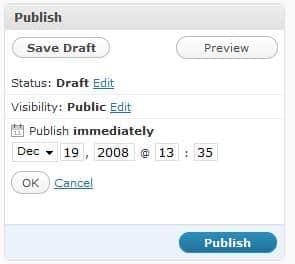
    In a nutshell it allows you to write a post, and set a publish date some time in the future or even the past (more on that later).

    Why Would You Use That?

    Rather than rattling out a large number of posts and publishing them all in one go, you can write a post, set a date in the future to make your article available.

    Some people also use this function topublish at an optimum time.  For example if the blogger lives in one time zone and the majority of his or her readers live in another, it makes sense to publish in line with the reader time zone.

    How Do I use the Function

    Here is a screen dump from a wordpress 2.7 blog (this on in fact).  By default the publish time is set to immediately, but if you click on edit, you can set the date and time of  publication.

    publishlater

    Going Back In Time

    You can also set posts to be published in the past, I have used this for blogs which are building an archive of how to articles that don’t want to interupt the flow of more topical posts.

  • QuickPress and WP 2.7

    Photo by dorothyhess-pictures
    Photo by dorothyhess-pictures

    One of the new features of WP 2.7 is QuickPress, a small visual editor on the dashboard.

    I am using Quickpress to rattle off this post, as you can imagine it does not replace the main user interface to write content, but if you need to write a quick note for your blog, this is probably the place.

    Downsides, it does not have a facility to add categories or to use custom fields, something I need to do with the theme I use.

    All in all I will probably not use QuickPress to write posts, rather I will use it to quickly capture ideas as a draft post.

  • Should You Update Your Version of WordPress?

    I’ve been rattling on about the update to version 2.7 on twitter and in a post here on my blog, I just thought I would write up a post saying why I think it is important to keep your code up to date.

    Bugs

    Each new release will include a number of bug fixes.  These fixes tend to be rolled out as a 2.7.x update rather than a major staging update.

    What do I mean by that, 2.6 was a major staging update, and so is 2.7.  I will be expecting 2.7.1 in the not too distant future when the bugs found by releaseing the code to the general populace come to light.

    Security

    There are hackers out there constantly probing and testing hte security of WordPress blogs.  Since there are millions of them in existence, it is fairly easy to test the security measures of WP.

    Keeping your code base at the latest level ensures that any security breaches found in the code can be patched and the hackers can be kept at bay (at least for a short while until they find the next vulnerability).

    New Features

    This is for the geeks out there who need the latest and greatest features.  WordPress is not a static platform, it is constantly upgraded and improved.  Upgrade to the latest version and there will be a suite of new toys to play with.

    Support

    If you keep your code level too far behind you risk putting the level of support available to you down a peg or two.  WordPress is a whole community of people developing plugins and themes, most of this development is done near or close to the latest version.  You may find that your favourite plugin stops working if you do not keep up to date.

    Downsides of Keeping up with the Jones

    All the latest bells and whistles of an update also come with a cost.  There are two main downsides:

    Compatibility issues – your update may cause your plugins or theme to stop working.

    Introduction of errors – as you update code, there is an increased chance of corrupting your wordpress install or your backend database.  Always backup before you upgrade.  I will cover this in depth in future posts

    Auto Update in 2.7

    Just a quick note on the new autoupdate feature of WP 2.7.  We have had the ability to download and automatically update plugins for some time now.  This has been updated to include the code base as well.   I haven’t seen this in action yet, but I look forward to this and blogging about it very soon.

    My Thinking on Updates

    I don’t take part on beta schemes on my production blogs, they are too “bleeding edge”, but I am considering creating a devblog.wpdude.com to play with new features.  But what I will do is upgrade or patch my wordpress code to the latest version when it is made generally available to the community.

  • Case Study: Migrating from One Domain to Another

    photo by u07ch
    photo by u07ch

    A client of mine wanted to migrate their blog from one domain fraudlent-clicks.com to ClickQualityConsultant.com.  They had received some negative feedback on the use of fraudulent in their domain name, and this legitimate click fraud blog wanted a better image.  They were fighting the click fraud problem not promoting it.

    What Are the Issues?

    The fraudulent-clicks domain was already well established had a page rank and a sizeable number of pages included in the search engine index. This organic traffic was to be retained and forwarded to the new doimain.

    The Solution

    The second blog was built, and I used the migration tool to take all of the old posts into the new blog.  I gave particular attention to the permalink structure in the new blog to ensure it was the same as the previous one.

    Next I installed a redirection plugin to the old blog.  This allowed me to take pages form the old blog and using the 301 redirection method permanently redirect these pages to a new URL on the correct domain.

    Using 301 redirects tells the search engine that a page has been moved permanently and to update their index during the next crawl of your page, in the mean time any traffic landing at your old site will be redirected to the new site.

    Follow Up

    A month later I gained access to my clients Google webmaster tools to check how the old domain was fairing.  There were a couple of 404 issues, but these were quickly amended.  My client reported no real drop in organic traffic after this job.

  • Understanding the WordPress Database:Introduction

    [gravityform id=”5″ name=”Contact Me”]

    [private_database]

    At the core of your WordPress installation is a MYSQL database, in this part of the course, I want to teach you about the database, it’s function, it’s structure and how to keep it optimised.

    This is an advanced tutorial in the course and comes with screencasts to help explain the content in detail as part of the WordPress Owners Club.

    What Is The Database Used For?

    [/private_database]

  • Performance Tuning Your Blog: Introduction

    [private_performance]

    As your blog growns in popularlity and content size, you may suffer from performance problems loading up all of your excellent blog posts.  I will show you how to tune various parts of your blog to make loading faster.  I will also teach you about the dreaded slashdot effect and how you can guard against this phenomenon.

    A picture tells a thousand words, and a screen cast video is more like five thousands to help you understand an issue, there will be video on this tutorial as part of the WordPress Owners Club.

    Peak Performance to Protect Posts & Pages

    [/private_performance]