Neil Matthews

Author: Neil Matthews

  • Dealing With Comment Trolls

    Photo by Benimoto
    Photo by Benimoto

    There are a group of low life people out there on the tinterweb who like to leave hurtful and derogatory comments on people’s blogs in the hope it will elicit a reaction.  These people hide behind layers of anonymity and strike out at people for fun.

    This post gives you my coping strategy for trolls, check it out, it may work for you.

    You Are In The Public Domain

    Unless you click on the check box to stop your posts being added to Google, once you click on publish that post is in the public domain.  With that public nature you are inviting people to read and comment upon your posts.  You should never forgot this, anything you write is open for criticism, what annoys me is when people attack without just cause just to get a reaction from me.  This is know as a bite where I come from.

    Zero Tolerance Policy

    I have a zero tolerance policy for Trolls on my sites.  My blogs are exactly that, mine, they represent me and my business, if I don’t want to deal with a person I will not, I invite you to read and enjoy or disagree with what I write but I will not let you disrespect me.

    I would not invite someone who was unpleasant into my home or social circle the same goes with the community I build on my blogs through the commnenting function. That is why I have zero tolerance for trolls.

    Grow a Thicker Skin

    When I first started on my blogging journey, I used to let these scum bags bother me and effect the way I posted in the future, then I said no, this is my voice and I will write what the f*ck I like.

    I grew a thicker skin and will review troll comments for anything useful to help me develop as a blogger, else I shrug it off.

    Constructive Criticism

    I am not adverse to constructive criticism on my posts, but it must be that adding to my posts a simple “you suck” or even worse is not criticism or helpful.

    Add to the conversation as I said in my post 7 reasons to leave comments expand on it or even disagree but keep it civil and act like a member of the human race not a knuckle dragging numpty.

    A Mantra For You

    Whenever you get a troll, simply mark it as spam (hopefully there is some sort of AI in Akismet which will start marking the troll as a spammer) and delete it and say the following tantric soothing mantra:

    fuck you, you fucking fucker who the fuck do you think you are, you fuckwit!

    Say it with passion, say it out loud then drop the whole subject, they are not worth your sweat :-).  It helps to get the frustration out in the open.  I am sure there are some hippy words for this such as externalisation of rage.

    Parting Word

    I don’t get a lot of comment trolls (none here at WPDUDE but some on larger blogging sites where I guest post) and they sometime get my back up, but I have learned to grow a thicker skin and let it wash over me, trolls return to your spot under the bridge before I call in the Billy Goats Gruff.

  • What’s This WordPress Turbo Stuff

    Photo by Pilax
    Photo by Pilax

    If you look in the top right hand corner of your WordPress dashboard (for later versions of WP only) you will see a link marked Turbo, I thought I would spend some time explaining what this is and what uses it can be put to.

    What Is Turbo

    Turbo is WordPress’ implementation of Google gears, a technology which allows most of the static scripts, images and CSS files of your WordPress installation to be downloaded to your local machine and run locally rather than over the network.

    Come on The What is the Point, Speak English

    It makes your WordPress admin faster!

    If you have the majority of the file you need to add posts, moderate comments and all of those crucial admin tasks held locally on your machine, they run faster due to lack of network latency.  I’m sorry I cannot help but talk geek, but if you have to go off to the internet, collect the script files process them remotely on your hosting providers server, then return a result it will a slower than going to your local machine and doing the same.

    Can You Do Stuff Without A Network Connection?

    On of the great benefits of  working with Google gears on other systems such as Google docs or Gmail is that you can do a lot of tasks offline without a network connection, only when you need that connection (such as sending a mail) are things stopped.

    The answer to the question, unfortunately not, Turbo does not give you resilience for your network connection only increased performance.

    If you want to develop posts off line, you may want to check out Microsoft Live Writer which gives you a word processing environment to develop your posts offline plus a button to push the post to your blog for publishing.

    I am sure there are hundred of offline blog post writers, if you know of others please leave details in the comments section.

    A Cautinary Note

    Only use the Turbo function on a secured unshared computer, you will be downloading potentially security leaking scripts onto a share machine which could be used to hack your blog.

    Wrapping Up

    If you are experiencing performance problems using your dashboard consider hitting the turbo link and downloading the static content and scripts locally.

  • Feck Arse, and Google Cache

    Photo by James Cridland
    Photo by James Cridland

    Imagine the scene, your blog has gone to hell in a hand cart and all of your posts have been lost, your blog backup is FUBAR or you simply don’t have one!

    FECK ARSE

    All is not lost, the nice boys and girls at Google may have a solution for you.

    Enter The Google Cache

    Google holds a cached copy all of your web pages as part of its indexing and analysis process.  Now isn’t that hepful.  If you know how you can recover your lost posts from Google and re-enter them into your blog.

    Before you get all overexcited, this will only work for blog posts which have been published and then indexed by Google, so if you loose a brand new posts, it is probably gone, but anything a couple of days old will possbly be there.

    Recovering From The Cache

    Here is the fun bit, you can recover your lost posts by using some clever search phrases and selecting data from the cache.

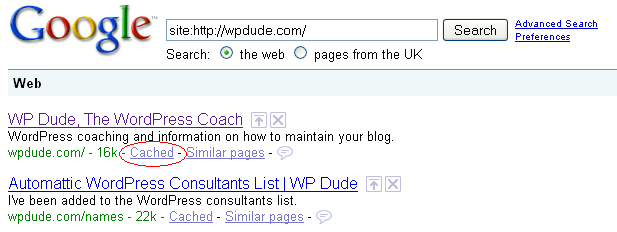
    Go to Google and type in site:{my domain name} for example site:wpdude.com

    This will bring back a list of all pages indexed by Google for your site.  If you look closely, there is a link marked cache next to each article, click on this and there you have it a copy of your post.

    googlecache

    Simple cut and paste the text into a new blog post and  re-publish it.  Take pains to have the permalink in the same format ot avoid duplicated content on the Google index.  The peeps at the Googleplex don’t like that.

    From FECK ARSE to WOOT!!! in a few easy steps.

    Now Says after Me..

    I {enter your name} do hereby swear to take regular backups.

  • 7 Reasons To Leave Blog Comments

    Photo By Tim Morgan
    Photo By Tim Morgan

    Consistently leaving high quality comments on other blogs is a great way to market and grow your own blog (and your personal brand). Here is my list of seven reasons why I think you should make commenting part of your blog development strategy:

    1.) Link Building

    As long as the blogger has not set nofollow tags on their comments, every little nugget you leave will be a link to your blog which will help with your SEO efforts.  The theory goes build as many links as possible from high quality sources and your SEO will improve.

    2.) Attract Attention

    If you are leaving comments on a bigger more established blog, there is a very good chance you will attract the attention of the blogger. Use this exposure to pitch guest post ideas, or gain attention by the blogger posting about one of your articles

    3.) Disagree or Add to the Post

    If you are able to disagree or add to a post, this will increase yoru profile as a subject matter expert. Adding quality comments arguing against or extending the origional post.

    I would add one thing to this, and that is be nice, coming across as a troll when you attack someone you disagree with is weak and pathetic, bring someone round to your side of teh argument with quality analysis no name calling.

    4) Extending the Converstation

    leaving comments extends the converstation, it helps to build a community on yourfavourite blog, and if you are conversing a lot, your profile can onlyy increase.

    5.) Give The  Blogger Some Support

    When a blog is new, it feels like you are posting into a void, no-one is leaving comments or giving you feedback.  If you come across a new blog give them a little boost by leaving them a comment, tell them you like their work and give supprot on their posts.,  Be nice youre-karma can only increase.

    6.) Increase your Profile

    I have already touched on the fact that commenting can increase your profile, the mechanics of this depend upon your chosen blog to comment upon, selecting high profile blogs in your niche, and adding valuable content can increase your profile to the readers of that blog, who in turn may visit your own blog and hopefully become one of your readers.

    7.) Make New Friends

    Lastly, leaving a comment is just like saying hello in the real world, it can be the start of a beautiful new realtionship, say hello today instead of skulking in the background.

    Wrap Up

    Add copious comments, DO NOT just say “nice post” that is sooo lame,  and it is obvious to everyone reading the comments that you are link building, add value, be useful and have a converstation.

    Got anything to add to this post, please leave a comment below, let’s chat!

  • How To Change Your Slug For SEO

    Photo by arnj
    Photo by arnj

    One of the most important things to change on your blog for seach engine optimisation or SEO is your slug.

    Just in case you have been living under a stone like our erstwhile friend the slug and do not kjnow what SEO is, then a quick definition is in order.  Search engine optimisation is the the process of making your blog or website as attrative to Google and it’s chums yahoo and MSN so that when someone type in a phrase, for example wordpress coaching (give it a go and see who is there) you come out on the first page near the top.

    What is A Slug

    The slug is the bit that follows your domain name and points to your post, for example:

    wpdude.com/this-is-a-slug

    By default on a WordPress blog, the slug looks something like this:

    wpdude.com/?p=22

    As far as a search engine is concerned this is not a very useful, it says nothing about the post, there are none of the key phrases people would type in to identify the post, in short, you are going to have a very hard job to drag people in from Google with a slug like that.

    Changing Your Slug To Something Useful

    All is not lost, you can change the default slug to something far more useful.  From your WordPress blogs’ admin console, scroll down to settings and  click on permalinks.

    From there select a custom permalink structure and set it to be /%postname%

    What this does is to change the default slug configuration to be the title of your post, for example this post would have the slug:

    how-to-change-your-slug-for-seo

    The search engine has been fed much more information about what my post is about.

    Removing Useless Words

    There is a school of thought in SEO circles that you should remove all useless words from your slug and leave only hardcore keywords.  The things to remove are “a, the, it, then” etc etc.

    There is a plugin to do this for you, imaginatively called Seo Slugs, download it and activate the plugin.  From that point forward your slugs will be trimmmed down by default. My new slug for this post now becomes:

    change-slug-seo

    The superflous words are cut down and hopefully Gooogle juice will flow in plenty.

    Quick Get The Table Salt It’s Eatin’ The Lettuces

    Don’t pour salt on your slug and kill it off, treat is nicely and you will be rewarded with organic search traffic from Google.

    Get creative, think what people will type into google to find a post like yours, and match this to your slug.

    The How To Video

    I have created a screencast video of me doing the config on a real WordPress blog, enjoy.

    [local /wp-content/uploads/2009/04/seo-slugs.wmv]

  • Rich Usini – imwithrich.com

    A couple of weeks ago, I was at my wits end.  My blog posts were not showing up in Firefox and I needed help, more than you can imagine.  None of the tech people that I know good provide me real assistance so, I used my good friend Google.  I found WordPress Dude, Neil Matthews.  His website was straightforward and I felt very comfortable after reading it.  I was not wrong!  Neil provided timely, knowledgeable assistance and has gotten things moving forward for me.  Neil provided me with various levels of sources for a Theme which I will be selecting and Neil will install for me.

    The thing I liked the most was the fact that Neil responded to e-mail quickly and provides quality. I am a generally impatient person and that was never put into play.  Anyway, my recommendation is HIGH.  If you would like to visit his website For WordPress HELP go to:

    imwihrich.com

  • Jason Lane – housingcrashhub.com

    Neil,

    I just wanted to say thanks for going above and beyond my expectations with our wordpress consultation the other day. You not only fixed my screw ups, but you also showed me where I was going wrong and how to properly operate the new blog template on a day-to day basis, as well as showing me some cool new tricks I probably never would have found out on my own. You’re obviously skilled and dedicated to what you do, and it comes through in your work… many thanks!”

    Jason

  • Mike Bluestone – missionpossibledp.com

    I must say that Neil AKA WP Dude is customer service oriented and commited to building a strong and honorable relationship with his clients.  I’m far from tech savy and was in need of assistance with updating my version of word press.  WP Dude went above and beyond the necessary, by updating all of my pluggins and widgets as well as went back in the following day and made some adjustments I mentioned in my list of questions.  WP Dude did not charge me and refused to accept additional payment for his additional work.

    Thanks again WP Dude and i will be sure to pay for your services throughout my blogging adventures.

    Feel free to contact me if you have any questions about WP Dude
    Mike Bluestone
    www.missionpossibledp.com

  • Yvonne Kraft – www.designkitchenideas.com

    After spending 3 months setting up my new site I was stuck on the last details to get the site up and running. I was thrilled to find Neil Matthews who took care of the technical stuff to make my site work better so I did not have to spend another 3 months learning things I did not even want to know. Now I can concentrate on writing content for my site instead of getting frustrated trying to figure out what Neil can do in an hour. And the fees are very reasonable as well.

    I highly recommend the services of WPDUDE and know you will be happy with the service.

    www.designkitchenideas.com

  • Integrating WordPress With Twitter

    Photo nicked from Twitter
    Photo nicked from Twitter

    I ran a poll last week asking if you were planning to , or already had integrated your blog with Twitter.  The results polarised into two camps, either you were already inhtegrating or you were looking into it.  This post is for the later group of readers.

    Why Integrate WordPress with Twitter

    Darren Rowse from Problogger brought to my attention the idea of a Homebase and Outposts approach to blogging and social media sites. This is something I strongly belive in this approach, read the post for a full descrption, but in brief it says that yoru home base (or blog) is your main property from where you do your main work, and the outposts are areas you push your work to.  Using twitter integration tools you can simplfy pushing blogs posts from your home base out to your outputs.

    The three main reason I integate with twitter are:

    • The main reason I integrate with Twitter is to market my blog content to a wider auduence, this is made much more steamlined with Twitter plugins.
    • Increasing productivity is another reaso0n to integrate, most bloggers spend a huge amount of time developing and marketing their site, if this can be made more efficient that time can be spent on other more important taks such as content development.
    • You do not own our content on Twitter/facebook or any of the other social sites, you need a place to call your own where you house your original content.  If you have a business blog, this will be where your call to action to generate income will be.

    Enter The Plugin

    There is always a plugin, and my Twitter integration plugin of choice that I use it Twitter tools by Alex King, it is a bi-directional post to tweet, tweet to post and tweet to widget fun fest

    Download Twitter Tools

    Download and install the plugin as you would any other, then the only other bit of configuration is to add your twitter user ID and password.

    If you use other plugins, please feel free to tell me about them in teh commnets of thsi post.

    Posts as Tweets

    The main feature I use in this plugin is the ability to push posts as tweets into Twitter.  Using this fucntionality I create a tweet which says “new at my blog Integrating Twitter with WordPress http://tinyurl.com/xyc” this tiny URL then send Tweepl back to the original post.

    You can push all posts to Twitter, or opt them out.  I only push out my key work in this way not every little post I publish on my blog.

    Tweets Summarised into A post

    The plugin allows bi-directional updates so you can then republish your tweets as a post.

    Due to the small nature of tweets you can opt to publish single tweets or a digest of daily or weekly tweets into a post.

    This is not a function I use, but If you are pushing out a lot of short valuable content into Twitter it will make sense to expose this to yoru non-twittering readers.

    Tweets in a Sidebar Widget

    Last but by no means least is the ability to push your tweets into a sidebar widget rather than a blog post.

    BONUS Integration

    I don’t want to sound like an infomercial, but you get all of the twitter integration plus a bonus Facebook integration when you read thsi post.

    Twitter has created a Facebook application.  If you install the app on your Facebook page it will pull your tweets and stick them on your Facebook  profile as updates.

    I have decided which outpost to concentrate on (Twitter) but I always like an automated outpost with which I can expand my blogs audience.

    UPDATE: WordPress Social Media Integration Training

    I have recorded a video training session of this social media integration methodology for my WordPress training and support community the WP Owners Club.

    I’ve got a 14 day free trial at the moment, why not take out trial membership and check out the training, here’s what you need to do

    1) Sigup for a 14 day free trial account at wpownersclub.com/sign-up

    2) Go to http://wpownersclub.com/integrating-social-media-with-wordpress and watch your training


  • POLL RESULT: Are You Integrating Your Blog With Twitter?

    Photo By a Barber Shop
    Photo By a Barber Shop

    I have been running a poll this week on my blog (and on Twitter) asking the question, are you integrating your blog with twitter?

    The results were quite interesting, approximately 50% of respondants were already integrating their blog posts into twitter using plugins, another 50% were looking into how to do this, and one grumpy Guss said NO, I’m not integrating.

    So with this in mind, in the very near future I will be writing the definitive guide  (not to put too much pressure on my shoulders) on how to integrate your blog with twitter.  Post to tweets, tweets to posts, widgets full of Twittering and a bonus guide on how to integrate all of  this into your facebook account.

    Stuff that one one in your pipe and smoke it 🙂

    Can I suggest you subscribe to my RSS so you don’t miss out on this earth shattering experience.

  • What Is Comment Spam?

    Photo by arndog

    Photo by arndog

    You may have noticed very weird comments appearing on your blog.  The comments usually don’t make sense and they link to bizzare domain names.  These comments are probably spam left by people (or automated spam bots) in an attempt to increase the target domains visibility on the search engines.

    Why Do People Commit Comment Spam?

    In one word links.  Every comment on a blog creates a a link back to the target blog.  The game is to create as many links back to a site as possible in an attempt to improve organic rankings on search engines.  This is a black hat SEO technique.

    What Do Links Mean?

    It sounds like a game show host’s catch phrase, what do links mean? (audience reply) Google Juice! One of the measures of a site to improves it’s position on the search engines is the number of links it has from other sites.

    How Much Of A Problem is It?

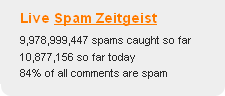
    The numbers are huge, a picture tells a thousand words, so see this screen from Akismet (more about this later).

    spamzeitgeist

    How To Spot Comment Spam

    It is usually very easy to spot comment spam, the comment usually is meaningless or off topic, the domain names will be random connections of letters or look very suspect.

    What Can You Do About It

    As always if there is a problem in WordPress, there is a plugin to solve it.  In this case my preffered anti spam plugin is Askimet.

    This excellent little plugin analyses all comments left on your blog and any suspect ones are quarantined in a holding area to be deleted (automatically after 30 days if you configure it so) or to be marked as not spam (or ham as it is know).

    The system reports back to a central database so the spam engine is always adapting to new methods of spamming.

    Review Your Commenting Configuration

    Another way to control comment spam is to ensure you control who can comment and how.

    From your WordPress dashboard review settings -> discussion

    Review these configurations and tighten these controls if you are suffering from a lot of comment spam.

    Conclusion

    If 80% of comments left on blogs are spam, there is a huge problem which must be helping sites gain traction on the search engines.  Help to can the spam by installing pluigns such as Akisment and delete all spam on site.