Neil Matthews

Author: Neil Matthews

  • Hiding WordPress Pages

    I recently wrote a blog post on changing the order of your WordPress pages, as an extension to this post I thought I would write a little article on how to hide your blog pages if you don’t want them to appear on your main navigation bar.

    Why Hide Pages

    There is a good chance that you do not want to have every page you have created shown on your sites navigation section.  You may have private pages, that you only want to direct certain people to, or you may have so many pages that your navigation will overwhelm users.

    Using the techniques below you can decide which pages your site visitors will see.

    Examples of My Hidden Pages

    I hide a number of pages on my Nav bar to keep my sites look and feel clean.  I do this because when people are visiting your site for the first time I think it can be overwhelming if there is too much information.  I also want to funnel people onto certain pages of my site so if I can keep their attention away from certain pages unless I want them to go there that is very useful.

    I also have a number of hidden pages which run scripts for example I have conversion tracking pages for affiliate and payment processors.  I don’t want these to appear on the navigation bar.  I only want them to be used after a Paypal payment or to record an affiliate visit.

    Here is one of my hidden pages

    https://dev.neilmatthews.com/welcome

    I use this as my sneeze page from twitter or other social sites.

    How To Hide Your Pages

    There are two main ways to hide your pages, editing your theme, or using theme functionality or using a plugin.

    Theme Specific

    If your theme already has functionality to exclude pages just follow your theme instructions (mine does, so does Headway and Thesis) .  But if you are not lucky enough you may need to hack your theme code.

    DISCLAIMER: I am not responsible for any crashed sites because you edited your code incorrectly.  If you don’t have the techie credentials don’t do this or get some WordPress help from  someone who does.  Please progress to the plugin section below if you are not a code monkey – thankyou and have a nice day

    Inside of your theme files, most likely the header.php file there will be some code which lists your pages, it will probably look like this:

    <ul>
      <?php wp_list_pages(); ?>
    </ul>

    To exclude a page, you need to add some parameters to the wp_list_pages function, and that is an exclude command with the post ID of the page to hide.  To find a page’s post ID, go to the  page editor and take notice of the URL in your browser bar.  Below is an example of my about page, as you can see my post ID is 2.

    https://dev.neilmatthews.com/wp-admin/page.php?action=edit&post=2

    Now add this parametre to your wp_list_pages function as shown below:

      <?php wp_list_pages('exclude=1,2,3'); ?>

    Where 1,2,3 are a comma delimited list of all the pages you want to hide.

    Bonus Hide

    If you take advantage of the parent/child page functionality of WordPress you can set your list page function to only show top level pages by adding the depth parameter.

     <?php wp_list_pages('exclude=1,2,3&depth=1'); ?>

    Plugins

    If coding your theme is a bit too much, don’t worry there is nearly always a plugin to solve every problem.  My favourite is the Exclude Pages plugin.  This adds a checkbox to the bottom of each page in the editor which allows you (as the name suggests) to exclude that page.  You can download it from the following link:

    http://wordpress.org/extend/plugins/exclude-pages/

    K.I.S.S (Keep It Simple Stupid)

    Don’t bombard your blog readers with a huge number of pages that they may never need to see, keep your site design neat and tidy.  Less is always more in my book

  • Skinning Headway; The Future of Theme Design

    The new breed of framework themes such as Headway and Thesis are going to change the way new WordPress themes are designed.

    In this post I want to tell you why I think this is and how it will effect your theme purchasing or theme development habits in the future.

    Most of my experience is with Headway, so I will concentrate on this theme, but I am sure Thesis has the same functionality, please feel free to comment all Thesis fans.

    So What’s The Buzz With The Framework Themes?

    Framework theme is the name I give to the new breed of themes which allow a designer to skin with their own look and feel whilst using the underlying code to provide the functionality they want without a complete redesign and new theme development.

    You cannot fail to have missed the buzz about Headway or Thesis in the Blogosphere and on Twitter, people are all saying which is the best and how fabulous both products are.  In truth both are excellent themes, they allow people without any CSS or coding skills to develop a highly personalised blog look and feel.

    An example of this can be seen from the following sites, which are all built around the headway theme, but look very different.

    They are all the same base theme, but they have been designed to the owmers specification, and they are all very different.

    Why I think This Will Chaneg the Future of Theme Design

    The functionality I really want to talk about, is the ability for people to Skin the Headway theme and then to pass the skin onto another person using Headway theme and to completely change the look and feel of the base HEadway appearance.  In the examples above, these are custom configuration jobs, but their modifications could be put into a skin and easily re-distributed.

    How A Skin Works

    A skin is a set of custom style sheets,  images and function code which can be packaged up and installed very easily into an existing Headway config.  These sets of files will be developed by traditional web designers, packaged up and installed into a Headway install, from the skin configuration options in headway select that skin and a whole new custom look and feel will be given to headway.

    Where Designers Come In

    In the future a designer will create a skin for Headway (or thesis I am sure it’s the same from their camp) rather than developing a theme from the ground up.

    How do I know this is happening?  I asked. I put a query out on twitter and several design companies came back and confirmed my suspicion that this was their way forward.  One designer was quite sad about this as it took a lot of the challenging (read fun for a geek) work away from the whole theme development process.

    I think the role of a web designer will be to think about design rather than underlying code and functiuonality.

    Do I think this is a good thing?  Yes I do, there are going to be some pretty fantastic looking sites coming out if all of the time is spent on the presentation of a site rather than the gadgets which power a site.

    I Still don’t get Why It Is So Radical

    Most of the hard work is already done by Headway.  All a designer needs to do is create their look and feel, do the designing, logo creation, wizzy look and feel effects, style the widgets and gee-gaws.  Thrust them into a headway theme skin and send it off to their client.

    Development time is hugely reduced, quality is the same, theme designers can earn the same cash for less time investment, or they can reduce their costs to make custom themes much more accessible to bloggers.

    Premium skins rather than themes

    It is my opinion that people will be asking for custom or premium skins in the future rather than a whole new premium or custom themes.

    As a client you will go to your designer and say “My framework of preference is Headway, I have spent time learning how to use the back-end functionality of my theme but I want a custom look, create me a skin please”

    As a designer you will spend you time building premium skins and selling them to existing Headway customers, or developing your own premium skin shop where you develop mulitple skins and sell them many times using the same model as premium themes.

    What Is This Skin Market Worth

    I have been thinking about this a lot, if you have already forked out $87 dollars for your basic Headway theme, you are not going to want to spend premium theme money on a skin.  I can see skins being sold for $50 – $80 as a premium skin or $400-$500 dollars for a custom skin.  Much less than a premium or complete custom designed theme.

    This reduction in cost will come from efficiencies in development time.

    How Must Will it Cost A Designer To Get Into This Market?

    For a web designer to get into this market they will need to buy a Headway developers license.  At $164 the barrier for entry into this new market is very low, your first skinning gig will probably pay for your investment.  Add onto this, the fact that dev. license holders can provide their clients with a copy of the Headway free of charge means their is no initial theme investement for their clients.

    Here is what the Headway team say about their dev license:

    If you are a developer or need/want to install Headway on multiple websites, the Headway Developer Option is for you. The Headway Developer Option allows you to install Headway on any number of websites that you or your company operates or developed. You are also allowed to remove the footer attribution/credit with the developer option (woot!).

    UPDATE: I missed something in the small print you need to buy an add-on license for each client site you develop at the cost of $40 per site, here is the small print, thanks to James NomadRip for the heads up

    Install on unlimited websites that you or your company owns. If you develop client sites on Headway you must pay [or have your client pay you] an additional $40 per add-on license.

    Will There Be A Skin MarketPlace?

    I was pondering on whether there would be a central place to sell skins using the same business model as ThemeForest.net , a market place for premium themes.

    I have been in twitter/email communication with Grant Griffiths one of the people behind Headway.  I was keen to see if there would be and official Headway sanctioned skin marketplace.

    His answer was that a couple of domains have been purchased for a Headway Skin marketplace.  He is hoping to build a community of web designers who would market their skin designs from there.

    I can only see this as a bright future for people wanting to develop skins for Headway.

    All Aboard

    The skinning express is about to leave, get your development license now, get your skills up to speed and be part of this new theme design revolution.

    I don’t plan to do any more bespoke development, all future sites for me and my clients will be skinned via Headway.

    Get A Copy Of Headway Developers License

    Want To Learn How To Create A Skin?

    I am in the process of creating a video tutorial course to show you how to create your very own headway skin, please leave your email details and I will notify you when the course is ready.  This is a premium course and will cost in the region of $147


    join our mailing list
    * indicates required


    My Skin Site

    With the release of Headway 1.6, Skins have taken a massive leap forward, I have joined forced with talented designer Jonathan Woodward  to start creating some exciting new Headway skins, check out our Headway Skin Site

    PremiumHeadwaySkins.com
  • Proving Your Credentials Through Your Blog

    Your cannot move on the Internet at the minute without the word authority or trust popping up. Using blog posts to prove your credentials or authority in a particular niche is a great way to build your business.

    What’s The Problem?

    If you work over the net delivering goods or services, there is a chance that your clients will never meet you except via emails or possibly telephone calls.  You need to have some social proof that you can do what you say you can do.

    Your clients will be handing over their cash to a total stranger in exchange for your goods or services.  They need proof you are qualified to deliver on your sales copy’s promise.

    This is where blogging comes in, if you can write an in-depth blog post about a topic in your niche that solves peoples problems there is a good chance that you can do it for real for them too as part of your service offering.

    Writing Blog Post To Prove You Have the Stuff

    To prove your credentials through your blog you need to write a lot of blog posts on your subject which can solve peoples problems.  This is important, it’s not about writing blog posts which market your service, it’s about writing blog posts that help people solve a problem for free in the hope that you can prove you have the stuff to help them in the future.

    Use Tools to Market Your Posts

    Once you have written your post, if  you market that article correctly, you can get other people to sing your praises . This (often informal) testimonial again proves you have the stuff.  This can be in the form of a link to your blog post, re-publishing your content, voting on social media such as Digg or re-tweeting your blog post on Twitter.

    My particular preference is to market my blog posts on twitter, the type of testimonial I am looking for is a re-tweet.  This is an informal testimonial but it gets my name in front of an audience who may not know about my WordPress expertise.

    Check out my post on how I market my blog posts on twitter.

    The Search Engines Want To Link To Authorities

    The job of the search engines is to provide the most authoritative result to any particular search query.  Writing an excellent blog post which generates links and traffic is a good way to get Google and Co to see you as an authority.

    Blog posts are particularly well suited to rank on search engines because of the density of keywords that can be placed in a post and the ease of tweaking SEO configurations on WordPress means it is relatively easy to make your blog posts rank well.

    Getting on the first page of Google is yet more excellent social proof that you know your subject inside out.

    Wrap Up

    Write in-depth about your professional niche to prove your credentials and show you are an authority in your subject.  If done well this is excellent social proof to potential clients that you know your stuff.

  • Mining Twitter for Blog Readers

    When you first start a new blog, and no one knows about it, it can seem a thankless task crafting beautiful blog posts. Having no-one to read them but your mother and your cat, let alone throw you the life line of a nice psot comment is a hard feeling, that is why so many blogs are started then dropped after a few months.

    Here’s a little tip there are seams of readers on twitter always on the lookout for new content just waiting to be mined

    What is Twitter Mining

    It’s about looking for places on twitter where large numbers of potential readers congregate.  It’s about knowing who is big in your niche with lots of followers and then introducing yourself to these people.

    You introduce yourself by following these people.

    Here’s An Example

    I write about the blogging niche, with a particular bias towards WordPress.  I know who the big people in my niche are, they write about similar things to me, so I would go to their followers page, this is the seam.  As an example the  Darren Rowse from the Problogger site’s followers can be seen at:

    http://twitter.com/problogger/followers

    Look at the people there, check out their profiles, see what they are tweeting about and if they look like a good match for what your blog is about follow them.

    There will be a temptation to follow thousands of people, but my advice is to only follow a few and build a real rapport with these people.  This is far more likely to make them loyal readers.  A thing to note if you start to mass follow you will be marked as a spammer.

    Once you have followed someone, there will be an inital sizing up of you to see if your are worth following back, so make sure you are adding value to twitter whilst you are mining for new readers.

    Follow is Like A Handshake

    You may think this seems a little spammy, but as the great Gary Vaynerchuck says “It’s not stalking it’s a darn handshake” http://garyvaynerchuk.com/post/78972633/its-not-stalking-its-a-darn-handshake.  A follow is like shaking someones hand and having some small talk, if you are interesting (in your tweets and blog content) the converstation will become deeper.

    Building on The Follow

    Once you have followed someone, you may picque their interest.  They will visit your twitter profile.

    Make sure you are linking back to your blog from your profile.  I recommend that you link to a sneeze page on your blog rather than the front page of your site.

    A sneeze page is a special page on your site which tells new visitors what your blog is all about, in that hope that they will be propelled deeper into your site like a sneeze.

    Darren Rowse of Problogger wrote an excellent article on a sneeze pages at, something that will propel people deeper into your blog archive http://www.problogger.net/archives/2009/04/23/create-a-sneeze-page-for-your-blog/

    You can see the page I link to from twitter at wpdude.com/welcome, note I don’t advertise this along the top navigation of my site, this is not for everyone only people coming from other social media sites.

    Start Mining

    Grab your miner’s lamp, heft your pick and shovel and go looking for those readers, they are unlikely to come to you when your blog is a fledgling.

  • How To Change the Order of Your WordPress Pages

    By default your WordPress pages are displayed in alphabetical order.  Sometimes this is not what a blogger wants, here is a quick hack to change the order of your pages.

    Why Change the Order of Your Pages?

    You may want to change the order of your pages to make more important pages stand out, for example on my site, I want hire me to be on the right so it is more prominent or you may want to improve your sites usability by clustering like pages together.

    Sometimes you just want to rebel, the OCD of developers may get you down, ordering everything and indexing and categorising can overwhelm the more free spirited.

    The Out of the Box Hack

    Here is how you can modify the order that your pages are displayed.

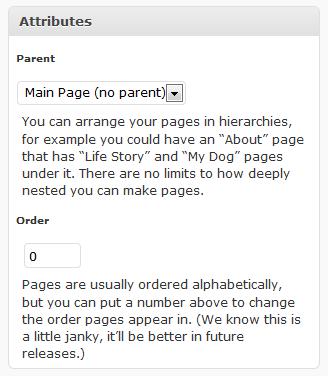
    From the edit pages section, select one of your pages and you will see the following attribute box on the right of your page copy:

    pageorder

    As you can see their is a numeric option for the page order.  By default all pages are set to zero, but if you set a value for each page you can control the order.  e.g. about =1, contact =2, testimonials =3 and this order will be displayed on your page layout.

    As it says above, this is a little bit “janky” if you add new pages you will need to  modify the order again.  If you want a simple page order change this hack does exactly what it says on the tin.

    Mirror Mirror on the Wall What’s the Best Page Order Process of All

    You oh Dude tell everyone the out of the box hack which is fine, but lo what’s this I see, a plugin is more fair than thee.

    If you are looking for something a little more polished then why not check out the My Page Order Plugin http://wordpress.org/extend/plugins/my-page-order/

    You Are A Free Spirit

    Don’t let the “Man” tell you which order your pages should be in.  Go out make a stand and break their structured universe 🙂

  • Indirect Blog Monetisation

    Yesterday I made the following comment on Twitter, I thought I would follow it up with a full blog post explaining what I mean

    If you can write a decent blog post on a subject, you can probably do it for someone, for a fee, that’s one way blogging can make you money

    What I mean here is that you can indirectly monetise your blog, it’s not always about adsense clicks or ad sales.

    What Is Indirect Blog Monetisation

    Indirect Blog monetisation is about making money because of your blog not through it.  You write your blog posts to create authority in your niche and to direct your blog readers to a desired monetisation method. Some examples of indirect blog monetisation are:

    • An online store behind your blog
    • Consulting / coaching
    • A Service business for example WordPress services, more about that later
    • Speaking
    • Book sales
    • Freelance writing

    To Quote Darren Rowse and Chris Garrett from their book Problogger Secrets fort Blogging Your Way To A Six Figure Income, you should look at indirectly monetising your blog if you meet one of these criteria :

    • I blog to help me promote my business
    • I blog because I want to promote my writing
    • I blog because I want to make myself know

    Is It Better Than Direct Monetisation?

    I cannot answer that one, I would love to be a Problogger, so my ideal is to directly monetise my blog, but the time when I can make a living just from writing blog posts is away in the future, right now I am making about 95% of my income from indirect methods.  But what I can say is that indirect methods are far better when you are growing your blog.  You need to look at your own desires to answer this question.

    To earn a decent living as a problogger, you need traffic, and you ain’t going to get that for a few months or even years when you first start a blog.  Therefore my roundabout answer is yes indirect monetissation is better for the new blogger whilst they are building their profile.

    My Example of Indirect Monetisation

    The best way to illustrate indirect monetisation is with a case study of my business.

    You may see ad banners and affiliate reviews  on my site but they are secondary to my main income stream which is my WordPress services business.  My blog is to attract people to my site and give me the opportunity to present my offering through my sales page.  I offer WordPress technical support services to bloggers wanting to concentrate on content creation and leave the backend technical stuff to someone else.  I have the technical expertise to fix your problems more efficiently than many bloggers, this then frees up time for their main task of writing excellent blog posts.

    My blog posts help to provide organic search engine traffic, give me something to add value to my social media streams ; twtitter and Facebook, but most importantly they allow me to show my expertise at WordPress.  As I said on twtitter, if I can write a competent blog post on how to do something then I can probably do it, that is why many of my blog posts are case studies if my services – how I solved a problem or telling people how to do something.  I am providing social proof of my expertise.

    Many of my readers are not my customers, and that is fine. I run with a freemium model, I write my blog posts for all to enjoy, for free, and that is great I love doing that, but if you need more than my writing, my direct help, or you know someone else who does.  Then though my blog post and your exposure to my soft sell marketing you will know where to come.

    As I have mentioned my sales funnel is all about the soft sell.  Prove my authority and then give a call to action at the top of my site, the less than subtle hire me button.  I have a footer on my rss feed suggesting people may want to hire me, and another at the bottom of each post.  It’s not too pushy but it lets people know there is more than just a series of blog posts to this site.

    Can You Retrospectively add Indirect Monetisation

    I think yes, add a services page detailing your offering, then inform your readers via your email list or a blog post to your RSS subscribers and there you go.  Be preapred for some backlash, there is still a movement that believes blogs should be non-commercial.  You may loose readers.

    Another thing I would recommend is to look at your existing ads / adsense config.  Are your advertising services which are in conflict with your offering, you may want to remove them.  If you look at my affiliate reviews and banner ads, they are for things I do not offer, so I feel they are complimentary.

    Jobify Your Passion

    There is a good change you love the niche you are writing about, if you could take that to the next level and jobify your passion what would that mean to you?

    As with all blogging activities, indirect blog monetisation is not a get rich quick scheme.   It takes hard work and dedication, I am worse off since I started wpdude.com leaving my very lucrative corporate freelancing gig, but I love what I do, I get to interact with some cool people running excellent blogs.  I’m not going back to a corporate gig again.

    If any of this break free and work for yourself resonates with you, I heartily recommend a couple of unconventional work products:

    F2 Firefly Manifesto By Jonathan Fields

    A Brief Guide to World Domination by Chris Guillebeau

    So What Are You?

    Direct or Indirect let me know, also another of my indirect methods is WordPress coaching (can you see what I’m doing here) if you want a one-on-one session to talk about how to market your services through a WordPress blog please contact me.

  • Promoting Your Blog Posts on Twitter

    If you follow me on Twitter (@wpdude) you will know that I promote my own blog posts there. I do this because of the large audience looking for and consuming blog posts on the topics I write about.

    Twitter is a great place to promote your blog and the business behind it.  Here are the ways I promote my blog posts on Twitter.

    As a Blog Post Is Written

    When I publish a post to my blog, I also automatically publish a tweet which links back to my blog post,  to do this automatic integration I use Twitter tools, I wrote a blog post on the subject called Integrating WordPress and Twitter.   The tweet will look something like this:

    New blog post: WordPress Membership Plugins http://bit.ly/Y1is8

    I usually write and publish my blog posts mid morning UK time, the majority of my followers are not in this time zone, so I usually post a second announcement of my blog posts at my peak Twitter time which is about 19:00 UK time.  I am not always available at this time to do a manual update so I write and schedule a tweet using the Tweetlater service. This excellent tool allows you to write your tweet and to schedule it at a time of your choosing.

    As I can craft my own tweets, I usually add more information than the “new blog post” title of the twitter tools integration, here is what I used for the same membership plugin post:

    Thinking of starting a #wordpress membership site? Check out my post on what to look for in a membership plugin http://bit.ly/Y1is8

    One From My Archives

    Another technique I use is a “one from my archives” tweet.  When I do this, I pull up a post from my blog archives which has not seen the light of day for some time and promote it again on twitter.

    I do this to breathe life into the post and to keep adding value to my followers with new (to them) content.  Not everyone has been reading your blog from day one and there may be a real wealth of blog posts to pass onto your Twitter followers.

    I only do this with posts I am really happy with and feel adds real value.

    In Reply to the Conversation

    If you see a question in your twitter stream that you have addressed in a blog post, bring it to that twitterer’s attention.  For example I often see questions on how to integrate WordPress and twitter, so I @reply to that person with a link to my blog post on the subject.

    This is excellent blog marketing, your site had an answer to their question as they asked it.  What is the bet that they will be crawling around your archive in the very near future.

    Search.twitter.com

    The next technique I use is far more proactive and may not be for everyone, but you can search for questions you already have the answer to.  This is an excellent tool for finding prospective clients without being too in their face.  The best type of marketing in my opinion.

    From the twitter search page search.twitter.com type in a phrase you know you have an answer for.  Again back to my example I could be searching for “integrate wordpress and twitter”.  If someone is asking this of the twitterverse, and I can answer this with a link to my blog post I am immediately establishing my authority and expertise with this person.

    I would ask you to be wary of pushing your affiliate link filled posts when proactively searching or replying to the conversation.  If all you do is push your money making links into people stream you will be marked as a spammer and unfollowed.

    Measuring the results

    Everyone’s blog is slightly different, so what works for me, might not work for you.  The answer to this is to test the results of your tweets and see what gets a click through.

    To do this I use the URL shortening tool bit.ly. It records how many people have clicked on the link for more details and who actually clicks through to your site.  It also gives you a breakdown of the timing of the most clicks.  This can help you to find your optimum tweeting time.

    Does This Replace RSS?

    No, Twitter is too dynamic and people could easily miss your updates, if people really want to engage with your content they will still subscribe to your RSS feed.

    Consider these techniques as a promotional activity not a content delivery system.

    What Is The Key To Twitter?

    The key to Twitter is adding value.  If you can bring your blog post to a persons attention when they have a problem you are providing excellent value.

    You may feel a bit sleazy about marketing yourself like this, but don’t be. There is a saying where I come from “Shy bairns get nowt”  translation  “Shy babies get nothing.”  I am one of the most introverted people I know and self promotion does not come naturally, but if you are adding value and you are helping people I don’t see a problem with pushing your blog post across people twitter stream for their attention.

    If you liked this post, please get in touch on twitter @wpdude to talk some more.

    Further Reading

    Why Bloggers Need Twitter by Hunter Nuttall – a free ebook and excellent resource

  • WordPress Membership Plugins

    WordPress membership plugins and the sites they help  you to build are the new hip way to make money as a blogger.  This is largely thanks to the hugely successful programs from Yaro Starak  Membership Site Mastermind and Brian Clark Teaching Sells.

    In this post I want to talk about what WordPress membership plugins do, the criteria I use when selecting a plugin and lastly I stack three popular plugins up against each other using my criteria to see how they perform.

    What Is A WordPress Membership Plugin?

    A WordPress membership plugin is an extension of your existing blog which allows you to protect certain areas of your blog and only let registered users read or download content. You can then charge for that content, whilst giving away other posts for free.  This is also know as the freemium business model.  This is great as you can prove your authority over time with quality free blogs posts and then create a premium section.  Your existing readers are already sold on your knowledge and are likely to take up the premium section.

    Why is this good for bloggers?  Well you can create your own products to monetise your site rather than relying on adsense or other peoples affiliate programs.  This creates an income and increases the value of your blog if you want to sell it on in the future as a going concern.

    The plugin will deal with the complex process of signing up new users, integrating with a payment processor such as Paypal, granting access to content and protecting content if someone leaves your membership site.

    These plugins are inevitably premium and you should expect to pay in the region of $50-$100 for your membership site config.

    What To Look For In A WordPress Membership Plugin

    I have worked with quiet a few membership site plugins,  here is my shopping list of features you should look for:

    Payment Processing

    You want to look for a plugin which can handle the major payment gateways, by that I mean Paypal,1Shopping Cart, Clickbank etc.  Your plugin developer should already have done the hard work integrating with a credit card processor, you should only need to supply your credentials so money is deposited to your account.

    You should also look for a membership site plugin which will deal with cancellations of the recurring payment on you site and automatically remove premium content from users who do this.  An example of this is Paypal IPN integration.  If a user creates a subscription and then cancells it, there should be a system in place for paypal IPN to contact you site and mark a user as unsubscribed and be removed from access to your system.

    Affiliate Marketing.

    Ideally the plugin you choose should allow you to record affiliate sales.  Affiliate sales are when you partner with other site owners to promote and sell your membership site.  In return you will pay them a commission for each sale made.

    Affiliate marketing is one of the most powerful way to market your site to a wide audience, and since a membership site is a write once, sell many model, you can quite happily sell in bulk and pay your affiliates a decent commission.

    The way an affiliate marketing system works is that your partner will signup and be given a specific URL to direct people to your site e.g.

    wpdude.com/?aff=bob

    Your affiliate software will pickup that the visitor is from Bob’s site and setup a cookie, if a sale is made, another script is run, if the cookie is set then a sale is attributed to bob.

    The thing to look out for in your membership plugin is the ability to run that second script which records the sale. There is an alternative to this, and that is to use a payment processor which has an inbuilt affiliate system such as Clickbanks or 1shoppingcart

    For more details on affiliate marketing, I suggets you read Darren Rowse’ category on affiliate programs http://www.problogger.net/archives/category/affiliate-programs/

    Protecting Content

    Your membership site must have the ability to protect content from none paying site visitors, this is an obvious thing, but content can be protected in a number of ways.

    Protection of pages – restrict if a visitor can see a particular page

    protection of posts – have the ability to mark a particular post as premium content

    Partial protection of posts – Does you plugin have the ability to provider a teaser of a page or posts content and have the rest password protected.

    Categories – Other things you may want are to protect whole categories

    Downloads – If you site has multimedia content, you may want to protect what can be downloaded from your site, check to see of your plugin of choice can protect a link to a file on yoru system.

    Membership Levels

    You may want various levels of content protection in your program for example there may be some free basic protected content and then a gold level membership.

    Another area to consider are free trials, does your plugin give you x days free before locking down asking for payment?

    Integration with email autoresponders

    Conventional internet marketing wisdom says get someone onto your email list and you can convert that users much more easily, so is there the ability to integrate your membership site with an autoresponder?

    Sequential content delivery

    Membership sites attempt to retain members for as long as possible and recharge them with a recurring subscription fee.  I like a membership site config which allows me to drip feed users with content allowing a controlled delivery of content rather than informaiton overload which can cause people to drop off your membership site.

    After sales support

    These types of plugins are complex.  You need to have confidence in the after sales support of the team who developed the plugin.  You are fundamentally changing the way your site works when you install a membership site plugin, can you be confident that there is support at the end of an email to help you out of your site goes phutt once the plugin has been installed.

    The Plugins I have used And How they stack up

    I have worked with three of the top wordpress membership plugins, they are:

    • Your Member
    • WP-Member
    • WishList Member

    Here is a matrix of how they stacked up using my critera above:

    Your Member Wp-Member Wishlist Member
    Price $50 $44.99 $97
    Payment processing all main suppliers covered all main suppliers covered all main suppliers covered
    Affilaite Marketing You can run scripts on payment completion You can run scripts on payment completion You can redirect to a specific page which can contain your
    code upon payment completion
    Protect Pages Yes Yes Yes
    Protecdt Posts Yes Yes Yes
    Particl Protection Yes Yes Yes
    Pay per post Yes Yes No
    Download protection Yes Yes Yes
    Autoresponder support need to code or use their premium autoresponder plugin No Yes – aweber and autoresponse plus
    Sequential content delivery Yes, No Yes
    Multiple levels of membership Yes Yes Yes
    Support Not the fastest, but answers were there after a couple of
    prompting emails.The support forums are a bit cumbersome
    I have not used their customer support Excellent customer support, my query was answered quickly
    and the resolution was excellent
    URL newmedias.co.uk wpmember.com member.wishlistproducts.com
    Misc. Notes Stouts lads from the north of England just like me. Caused me problems creating a page with the same name as a
    deleted protected page, Annoying nvaligation nosises on their site:)

    My Recommended Plugin

    I recommend wish list members, it is a very close call with Your Members, but the after sales support is more slick.  It is the most expensive, but the native Aweber support makes up for that cost.

    Need Help Building A WordPress Membership Site?

    If you need help integrating your blog with a membership site plugin, I would be happy to give you a quote, please visit my service page and let me know your requirement.

  • WordPress Performance Tuning Tips

    Here are my top five WordPress performance tuning tips.  If you have a poorly performing blog, you may want to try some of these procedures.

    What Do I Mean By Poor WordPress Performance?

    I don’t mean that you have no readers or comments or that your content is not very good, that is up to you 😉 what I mean is that your pages are rendered very slowly and the usability of your site to open posts or pages, search for content or pull things back from your archives makes your visitors experience very poor and possibly turn them off from yoru site altogether.

    There is also a school of thought in SEO circles that slow loading sites are not as well regarded as a fast loading site.  So poor performance could be effecting your search engine ranking.

    Before we begin

    All of this is information is fairly technical, please backup your site before your begin. I offer a wordpress performance tuning service if you would prefer to hand this over to me. request a quote from my WordPress Technical Support page for details

    Here we go, my top 5 tips for improving WordPress performance:

    1. Install a Cache Plugin

    Cacheing in computer speak is when you take information usually recovered from back end database and hold it in memory or on disk.  When the information is next requested it is served up from the very fast memory/disk store rather than recovering it from the slower backend storage.  The cache is held for a set lifetime and then renewed once the cache has timed out.  This means only one access of the backend is requried for a set period of time.

    Think of your blog home page, it is fairly static so loading all of the logo images, blog posts, CSS files etc etc into memory and serving them up can save a lot of time.

    The plugin I recommend is wp-super-cache, this can be downloaded from http://wordpress.org/extend/plugins/wp-super-cache/

    UPDATE: I now recommend w3-total-cache it’s mninify and CDN capabilities knock the socks of wp-super-cache http://wordpress.org/extend/plugins/w3-total-cache/

    A word of warning on using a cache, if you use dynamic content on your pages for example an adrotator where each page load should show a differnt banner ad, using a cache will cause this to fail and only show one banner.  wp-super-cache w3-total-cache has the ability to mark certain scripts or comands as not for cache.

    2. Activate the Inbuilt WP Object Cache

    WordPress comes with it’s own inbuilt object cache. this allows you to save certain database queries to disk, and recover them much more quickly than accessing the database.

    To activate the inbuilt cache you need to edit the file wp-config.php.  This will be held in the root of your blog installation.  To activate the object cache, add the following line ot your wp-config.php file:

    define(ENABLE_CACHE, true);

    3. Reduce Plugins

    Everytime we add a plugin to our blogs, we add an overhead.  Every bell and whistles on your home page needs ot be rendered and displayed.  This will slow down your blog.  My recommendation is to remove all plugins which are not entirely needed on your site.

    I wrote an article about performing a plugin audit earlier this year, why not use that as a tool to find out if you need a particular plugin

    Database SQL Cache

    The query cache holds regularly run queries in memory to speed up the return of database results.  We are getting into real techie land here, and that is to check if your back end MYSQL database has a query cache installed and how big it is.

    If you are not happy messing about with your database why not submit a technical support request to your hosting company to do this for you.

    To find out you have a query cache installed and it’s status, run the following queries from a MYSQL tool such as PHPMYADMIN

    SHOW VARIABLES LIKE ‘have_query_cache’;

    This will return a yes or no value, if it is no ask your hosting company to activate a cache.

    To show the status of the cache run:

    SHOW STATUS LIKE ‘Qcache%’;

    This second command will tell you how the cache is being used and if it needs to be tuned.  Here is an excellent resource from the MYSQL site which tell syou much more about query cache settings and configuration.

    http://dev.mysql.com/doc/refman/5.1/en/query-cache-status-and-maintenance.html

    5. Look to Your Hosting

    This is my last but least popular recommendation, and that is to look at your hosting provider.  You may be in the enviable position that your blog has grown so popular that you have out grown your hosting account, or you may be  too cheap, I bet that $3 per year hosting account doesn’t look so good now it takes ten minutes to load your blog.

    If you are still having performance problems after the first four steps, look to upgrade your hosting to a more powerful setup, this will cost more money, so you will need to weigh this against the value of your blog.

    Checking Performance Improvements

    You need something to prove that the performance changes you have implemented have provided an increase in speed, you can spend lots of money on traffic analysers to look at the underlying http calls and see response time, me,I go for cheap and cheerful everytime, I use the basic (read free) version of httpwatch a browser plugin which shows your page being rendered and what is taking the time, a very useful tool.  The key point is I can use it to do a before and after comparision of page load time.  It also shows me which components are being cached.

    Wrap Up

    Performance tuning any computer system is a dark art, where you tune in one place you can introduce new bottlenecks elsewhere.  This list is not exhaustive, there are tweaks to php.ini, your web server config file, or you could be having performance problems due to incompatible plugins or themes making outdated DB calls.

    My advice change one thing at a time and roll it back if you see no improvement.

    UPDATE: WordPress Users And Roles Training Available

    I have recorded a video training session on WordPress performance tuning for my WordPress training and support community the WP Owners Club.

    I’ve got a 14 day free trial at the moment, why not take out trial membership and check out the training, here’s what you need to do

    1) Sigup for a 14 day free trial account at wpownersclub.com/sign-up

    2) Go to http://wpownersclub.com/performance-tuning-workshop and watch your training


  • Case Study: Cut and Paste from Word Processor

    One of my clients approached me to say that his visual editor was not working since he created a new page on his blog. It was fine when he created new posts and pages, the problem only happened when he tried to edit one particular page.

    The Problem

    I reviewed the page in question and it looked fine but when I switched to the html mode I saw what the problem was, the page was packed full of spurious html code.  A quick check with my client revealed that he had written his page copy in a word processor then cut and pasted it into the page.

    Why is this a problem?  Because it brings over a whole host of html encoding, and this encoding was causing problems with the text editor.

    Think for a minute that the text editor is also an html page inside of your blog, add additional codes and you can screw up the web page.  Some og the html code was effecting the way the editor worked and the page could not be edited.

    What’s The Solution?

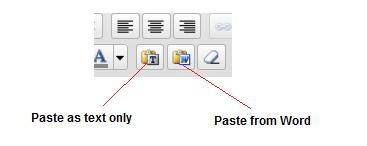
    The solution to this problem is to only paste text into the WordPress, and fortunately WordPress has a solution for you.  If you check out the toolbar you will see two clipboard icons, one with a T and one with a W (see image below).

    This takes the contents of the clipboard and pastes them into the editor.  The T clipboard takes the clipboard content and strips all encoding pasting only text, the second clipboard takes the contents and teats them as a word document, converting this to the appropriate HTML retaining any enhancements you have made; bold, italic, H1-H6 headings etc.

    paste

    Writing Your Posts OffLine

    If you prefer to write your posts offline, you may want to check out my post How to Write WordPress Posts Remotely this shows you a number of techniques to write posts outside of your visual editor without the need to cut and paste text.

    Testimonial

    So happy was my client he gave me the following testimonial:

    Neil Matthews came to the rescue with my WordPress problem. He was not only swift, professional and courteous, but he was very determined to do whatever it took to make my website work again (I had some major issues not working on my WP site).

    Neil would constantly check in with me to show me that he had identified the issues and was working on them, not just leave me wondering and hoping that he was “on it.” He went above and beyond my expectations and treated me the
    way a customer wants to be treated — like a real person who is in a bad situation and needs help right away. He DID NOT just treat me like some anonymous customer out in cyberspace who he just wanted to collect a payment from for the minimal amount of effort and move on to the next guy.

    Thanks, Neil. I will definitely be calling on you in the future with any WP issues (even though I hope I don’t have any more).

    Doug R, Los Angeles, CA – USA


  • WordPress SEO Secrets Review

    I was planning to develop an information product to teach WordPress blog owners all about SEO with a particular emphasis on how to setup the various plugins and settings of WordPress.

    As part of my research I began to look at the various products already out there, I was feeling quite good, the majority of products were generic seo not wordPress specific so I thought I had a good chance of finding a market niche.

    That was until I found out that Michael Martine of Remarkablogger fame had already beaten me to the market with his e-book and webinars product WordPress SEO Secrets.

    I was very downhearted I had done a lot of research for my own e-book and so I decided to download and read Michael’s work to see if I was going to continue with my info product, and the answer is no.

    Mr Martine has done such a thorough job I don’t see the point in writing a wordpress seo book, I am just going to tell you about his instead and encourage you to buy it if you are looking to improve your WordPress seo.

    Who Is Michael Martine

    Michael is one of those bloggers who is always being talked about by other cool bloggers.  He gets mentioned in one of those name dropping list, you know what I mean:

    I was tweeting with Naomi, Dazza, Dav-o, Yaro and Mike the other day and we decided to re-write the paradigm of how you live

    He gets mentioned a) because he knows his shit b) The content he produces for free on this blog and for a fee via his information products is first rate.

    I’m a subscriber to his blog and I rate what he has to say very highly.  This is why I was a little down when I saw I woudl be competing with him in WordPress seo info product circles.

    Who Is SEO Secrets For?

    I’ll cut and paste the section from the book that tells  you exactly that:

    WordPress SEO Secrets is for bloggers using WordPress. No other blogging systems are covered
    in this book. You still might get some great info if you‘re using Blogger or TypePad, but none of
    the step-by-step instructions cover those blogging platforms. Only WordPress. Why? Because
    WordPress is far more customizable and controllable than the other guys. Between the zillions
    of themes for its design and bazillions of plugins for its functionality, WordPress WINS for SEO.
    Period.

    WordPress SEO Secrets is for beginners who aren‘t afraid to learn new stuff and get their hands
    dirty. I‘m not going to talk down to you, but I am going to assume you‘re computer and internet
    literate. You should know a little HTML. If you have already been learning about SEO,
    WordPress SEO Secrets will help fill in some gaps at both the conceptual and at the practical
    levels. If you‘re more advanced, it will at least confirm what you already know (hopefully with
    some great tips and tools you hadn‘t yet encountered).

    WordPress SEO Secrets – Michael Martine

    My Review

    So here us my review of WordPress SEO Secrets., all links are affiliate links, I think I deserve a few quid for my research 🙂

    The product comes in two formats, the book only version, which I bought, costs $47 or the book and a series of acompanying audio and video walkthroughs of how to implement the changes required which costs $127.

    The book is only 38 pages long (mine was going to be 39, so much more value) but it is packed with focused WordPress seo tips.  It talks about the plugins you need for best result,  something I touched upon in my All In One SEO Pack review.

    WordPress SEO Secrets also goes into some detail about changing your permalinks, keyword density in posts and it also talks  about offsite SEO techniques, keyword research and the various tools available to help your SEO efforts.

    The most striking thing about this book is the ongoing statements that SEO should be secondary to quality content, I cannot agree more, you are not writing for a search engine or for a click, you are writing for real people.  If you can solve someones problem, then they are engaged and more likely to come back and click on your adsense links, buy your info product or take out your wordpress coaching services.  Write for people first then tweak it for the search engines to give your content a nudge in the right direcion..

    Did I learn something new from this e-book? The answer is  yes.  Something I had not considered but will now is my outbound linking strategy, if you link to poor quality sites you will, by association, be treated as a poor quality site, if you link to authoratitive and quality sites, that will rub off on you too.

    Are there any downsides to this book, yes, you need a certain level of technical skill to implement any of the changes recommended, my second small concern is that whilst it has razor sharp focus on WordPress SEO, some of the more general SEO topics are treated lightly.  My recommendation, read Naomi Dunfords Seo School first (Parental guidance she swears like a trooper), this can be your SEO primer, then move onto the more involved aspects of WordPress SEO Secrets. which is designed specifically for WordPress owners.

    Here is my key recommendation, I use the techniques Michael talks about here at wpdude and I know they work, I rank for the keywords I want.  I was planning to write this very same information product, I coach my clients on wordpress seo using these techniques.  This is what you need to do.

    Funny story – I bought a copy of the e-book, but unfortunately I had set a cookie on my affiliate link before I bought it.  This then generated a commission sale for me.  Not long after the download an email drops into my box from Mr Martine, clearly unhappy that I had used my own affilaite link to buy his product and thereby get a discount.  He wanted to know what was going on.  Tail between legs I ‘fessed up what I was doing.  He seemed okay with that, but that is definetly not the way you want to be having first contact with an influential member of your niche.

    Back To The Drawing Board

    So it’s back to the drawing board researching my own info product, but if you want to learn how to optimuse your wordpress blog to get the maximum amount of organic search traffic then I recommend WordPress SEO Secrets.

    It comes with a 100% money back guarantee, so there is nothing to loose, only organic search traffic to gain.

  • Integrate WordPress, Twitter and Facebook

    Integrate WordPress, Twitter and Facebook

    A few months ago I wrote about Integrating WordPress with twitter, today I want to expand on that and tell you how you can integrate WordPress, Twitter, LinkedIn and Facebook in one seamless operation.

    UPDATE June 2012: Video Tutoral

    Feel free to read the whole blog post, but I’ve created a free video tutorial to show you how to do all this.


    [leadplayer_vid id=”50350ABA9C653″]


    OutPosts and Home Base

    I am a firm believer in Darren Rowse’s idea of home bases and outposts. My home base is here at wpdude.com where I bring you my blog posts and hopefully interest you in some WordPress Technical Support I own this property and I can do whatever I want here.  The content is mine.

    The outposts I use are Twitter, Facebook and LinkedIn. I don’t own the content I create on twitter et al and I could be thrown off the site if I contravene any of their rules or regulations, so the activity I do there and the content I create, whilst still important, is expendable if I choose not to continue tweeting or stumbling.

    What I hope to accomplish at the outposts is to meet other people build relationships and if they care,for them to visit my home base site.

    The problem is social media is that it can be a huge time suck.  I want to concentrate on my home base and update my outposts as easily as possible.

    Create Quality Content And Syndicate

    What I want is to create quality content then syndicate it to as wide an audience as possible as easily as possible.  To do that I do the following:

    • Create blog posts here at wpdude.com
    • Syndicate news of the bl0g post via twitter tools
    • Integrate my twitter updates with Facebook using the twitter Facebook Application.
    • Integrate my LinkedIn updates with Twitter  so my updates are posted there too.
    • Concentrate all of my social media efforts on Twitter using Tweetdeck, knowing it will be replicated on Facebook and LInkedIn

    Integrate WordPress and Twitter

    I use twitter tools  to integrate WordPress and twitter, I’ve already written a detailed blog post about that, you can read it here.  The key to my whole integration policy is to push once to twitter and then to link FB and LinkedIn to my twitter account to pull in that information.

    Read this post on details of installing and configuring twitter tools see Integrating WordPress with Twitter

    Integrate WordPress and linkedIn

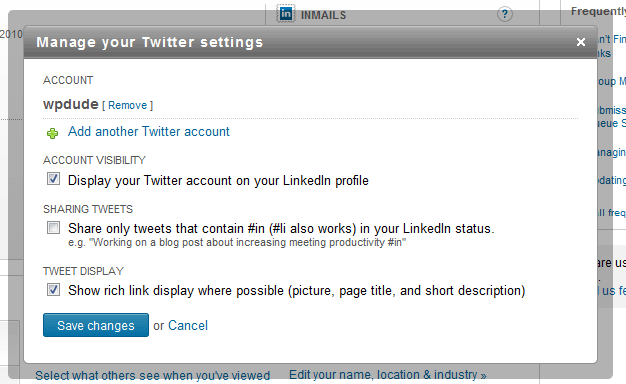
    Half of the hard work is already done if you integrate  WP and Twitter as I suggest above.  inside of your LinkedIn profile it a twitter option, you can set this to automatically pull your tweets into your LinkedIn account.  NOTE uncheck the box using the #in hashtag so all tweets go into twitter.

    Twitter Facebook Application

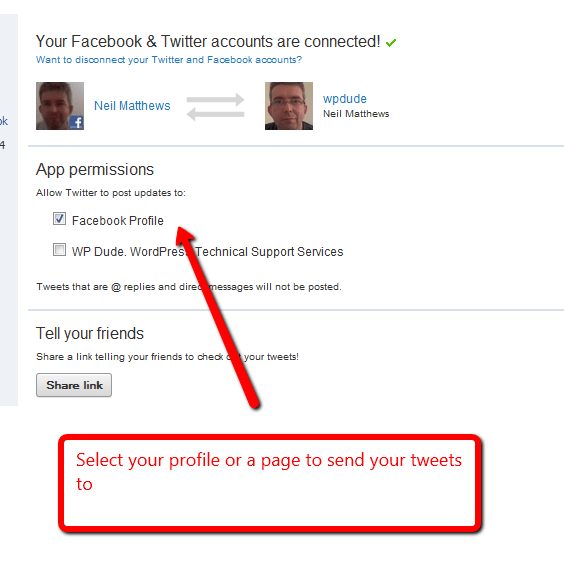
    The twitter Facebook application takes your tweets and adds them as an update on your Facebook profile.  YOu can also set those updates to go to a particular page if you prefer

    The twitter FB application is available at http://apps.facebook.com/twitter/

    Once you have added the application to your FB profile, you are asked to enter your Twitter ID and password.  Then any updates you make on twitter will add an entry on your profile.  This is a two way integration so any updates you add to FB will also be pushed to Twitter.

    Free Video Tutorial

    I’ve got a video tutorial to show you how to do this in my members only site,


    I’ve got a free video tutorial to show you how to do all of these tasks.