Neil Matthews

Author: Neil Matthews

  • Zferal For New Referral Program

    Zferal For New Referral Program

    I’ve been trying to find a suitable system for my referral program for some time now and I think I have found it in Zferral.

    What I Need From A Referral Program

    I need a couple of things, this is why my search has taken so long

    1) The ability to reward my existing clients with a reward for the referral, many people have suggested they would prefer free support rather than money.

    2) The ability to provide a monetary reward to internet marketers who want to refer me.

    Enter Zferral

    Zferral is a software as a service system which allows you to create an affilaite program.

    There is no need for sofyware isntalls and it is a fraction of the cost of services such as Commision Junction.

    Zferral is brilliant it allows me to deal with both types of reward, monetary and none monetary.  So I am currently offering a referral fee of $10 per wordpress technical support quotation request or 30 minutes of free technical support. The referrer can choose which campaign they prefer.

    Zferral also allows me to supply twitter links, banner ads and the ability to create an automated email list of affiliates so I can send out updates to my “team” to tell them how best to promote my service.

    Sign Up For My Referral Program

    If you are interested in taking up wither of my offers, please visit my affiliate page for more details

  • Plugin Review: My FTP

    Plugin Review: My FTP

    One of my favourite tools as a WordPress techie is a tiny plugin called MY FTP, is has helped me too many times to remember, I thought a quick post on this excellent utility would be a good idea.

    Here is the download link http://wordpress.org/extend/plugins/myftp/

    What Is MY FTP

    It is a plugin that creates an FTP console inside of your WordPress dashboard.  FTP standard for file transfer protocol, and once this bad boy is installed you get the ability to navigate your WordPress file system, upload files and even edit files.

    One limitation of MY FTP is that it uploads only, there is no download function.

    The Real Power of MY FTP

    The real power of MY FTP is not it’s FTP capability, rather it is that is allows you to edit WordPress files without the need to have FTP credentials.

    Imagine you need to edit the wp-config file and don’t have ftp access to a site, just install MY FTP and there you go, open up the file browser, navigate to the file in question and click on the edit button, excellent.

    Imagine you need to add some plugin code to a theme file, but cannot get access to that file because it is buried deep in the file system, bingo fire up MY FTP browse to that file and make your changes.

    Installation

    The plugin has a standard installation, either search for “my ftp” note the space there is a clone with no space from the plugin dashboard or download it from http://wordpress.org/extend/plugins/myftp/

    A Word Of Warning

    Absolute power corrupts absolutely, you can really screw up your site with MY FTP if you don’t know what you are editing. Use it with caution, if you don’t know what you are doing, call in the experts, you have been warned.

    Wrap Up

    As I have said MY FTP has gotten me out of all sorts of technical support pickles, check it out.

    Image by trainor

  • What Is A Theme?

    What Is A Theme?

    In a back to basics post, I want to answer the question “What is a theme?”.

    I am very guilty of assuming everyone understands the WordPress concepts of themes, plugins, updates and all that jazz, so I am taking a step back and writing a series of posts to describe the building blocks upon which WordPress is built.

    So What Is  A Theme?

    In a nut shell it is the front end look and feel of your site.  When a person visits your site they do not access the backend dashboard, all they see is the front end of your site and the content you have published.

    The way people see your content, the layout, the typography, the colours, the logos, the banner ads, they all go to make up the theme.

    It Is  A Layer Above Your Content

    A number of people find it hard to grasp the idea that themes are independent of your content.  Themes sit above your posts, pages and comments.  Themes pull your content from a database and display it, they do not create or amend any of your data, it is purely a way to show your data to the outside world.  As we techies call it, a Presentation Layer.

    If you change a theme, your content is still there, all you are changing is the look and feel, one of our clients was very concerned that if she changed her theme, her posts would need to be re-entered.  This is not the case.

    What Types Of Theme Are There?

    I like to classify themes into four separate categories:

    Free themes – there are hundreds of free themes available to download and install on your site, there is a free theme directory on the WordPress site at http://wordpress.org/extend/themes/.

    Premium Themes – there are many companies out there developing premium, very professional themes to modify your look and feel.  Because these have been designed and coded to a more professional and higher standard than standard free themes, they have a charge associated with them.  This is usually in the range of $50-$100.  Some examples of premium themes developers are woothemes.com or themeforest.net

    Theme Frameworks – the next step up is a theme framework, these are premium themes, but they are different from the category above in that the theme is not static, you can change the look and feel of your site to create a DIY custom theme.  Examples of theme frameworks are Headway and Thesis.  I use Headway on this site because of the ease with which I can create my own custom look and feel.  These tend to cost $80-$200 depending upon the license version you buy.

    Custom themes – the luxury end of the market is to get a custom theme designed for you.  This is the high end, and will cost you several thousand dollars, but you will get exactly what you want.  Custom theme design is a combination of excellent graphical design skills and custom coding skills to bring  your idea to life.

    What Can My Theme Look Like?

    The sky really is the limit, if you can design it, you can probably code it up as a theme.  Take a look at the home page of Headway they have a theme gallery of the implementations made with headway, they are all completely different, this is the point of a theme, it creates a layer of abstraction between your front end and your back end content data so it can be displayed in any way you like.

    What Comprises A Theme

    A theme is made up of a number of script files and CSS style sheets.  They will also include custom images.

    Typically there will be a script to display:

    • Header
    • Footer
    • Home page
    • individual blog posts
    • individual pages
    • Archives page; categories, archives or search results

    Unless you are happy coding php script files, you probably want to leave theme files alone.  The good new is there are thousands of themes out there pre-written to choose from, there are also many people providing WordPress technical support who are only too happy to help you install and amend your theme.

    How Are Themes Delivered?

    When you download a theme it will come as one zip file.  This is a package inside of which will be stored all your script files, css files and images.

    Installing A Theme

    To install a theme you can either manually upload and activate the theme or use the theme upload function.

    From your dashboard go to appearance -> themes and then click on install theme

    Click to see full size image

    You can also manually unpack the theme zip file and upload it to wp-content/themes/{themename}

    Switching Themes

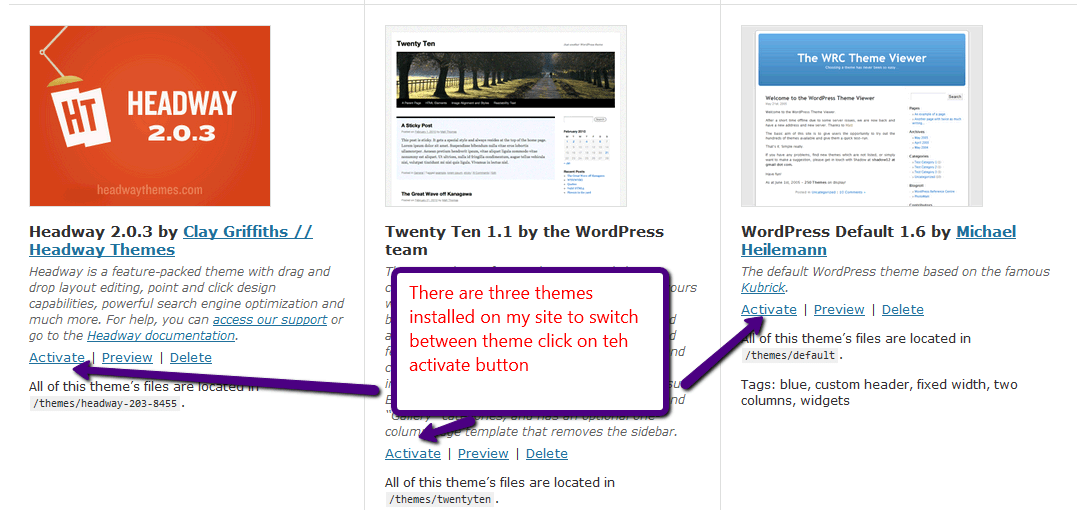
    Once your theme is installed, you have the option to activate it.  You can store many themes on your site at once, but there can only be one active at a time.  You can switch between themes at will.

    To activate or switch a theme again go to appearance-> themes where you will be displayed a list a available themes

    click for larger view

    You can also preview a theme before activating it.

    Themes In A Nutshell

    So that is your noobs guide to themes, this incredibly flexible way of displaying content on the front end of your site is one of the reason WordPress has gained such support and is used so widely.

    If you have any theme questions I have not covered, please ask them in the comments section.

  • Webinar: Create A Custom WordPress Theme With Headway

    Webinar: Create A Custom WordPress Theme With Headway

    I would like to invite you to a webinar on Wednesday 17th November at 12:00-13:00 Eastern, 9-10am Pacific, 17:-18 UK.  The webinar is entitled:

    “Create A Custom WordPress Theme With Headway”

    The Headway theme framework allows you to create a custom look and feel for your WordPress site without the need for programming skills, a designer or knowledge of the complicated theme layout system.  I use headway on my own site and many of the client sites I have worked on.

    Having a unique look and feel for your site can make you stand out from the thousands of other blogs out there.

    The webinar is no cost, but seats are limited, sign up now to avoid disappointment.

    Book your seat

    https://www2.gotomeeting.com/register/285289987

    On this session I will show you:

    • What is Headway
    • How it can be used to create a custom theme
    • Installing Headway
    • The visual editor to create a custom look
    • Demo of the headway theme framework
    • Q & A

    Book your seat

    https://www2.gotomeeting.com/register/285289987

    I look forward to seeing you on the call.

  • Webinar: How To Backup A WordPress Site

    Webinar: How To Backup A WordPress Site

    One of the problems I see with many people’s WordPress site is that the do not do a backup or they do not do a complete backup.  It’s often overlooked and it’s not until that stomach churning moment when you need to restore yoru site do you realise your archive does not existing or is incomplete.

    Join my no cost webinar to learn how to backup your site correctly.  Seats are limited so join now

    Wednesday 10th November 10-11am Pacific, 1-20pm Eastern and 6-7 UK (duration 30 mins)

    Learn how to correctly backup your WordPress Site on my webinar, I will show you

    • Why a backup is important
    • What Needs to be backed up
    • How to backup A WordPress site
    • Demo
    • The WP Owners Club
    • Q & A

    https://www2.gotomeeting.com/register/216842098

    This is a free sample of the coaching work I am doing in my members only site the wp owners club, try the coaching format to see if it suits you.

    Photo by Tim Evans on Unsplash

    I used to have another image I downloaded from Flick from topgold but it looks like it was someone elses and a lawyer sent me a cease and disist note, cheers that was your image I’ve taken it down

  • WordPress; It’s Not Just Blogging Software

    WordPress; It’s Not Just Blogging Software

    In this series of posts I want to tell you why I think WordPress is a valid business tool as a website content management system and not just a blogging platform.

    People Think It’s Just  A Blog

    Too often people dismiss WordPress as “oh, just that blogging platform, I couldn’t run my website on that.”

    Throughout this series of posts I want to dispel that myth and many others which are stopping businesses taking up WordPress as a serious website content management tool.

    Business Is Scared Of Open Source

    It has been my experience that a lot of businesses are scared of open source solutions, they like the idea of accountability,  that there is someone to shout at if things go wrong, that there is someone there to cover IT arses if things to t*ts up.  You don’t get that with open source, there is no expensive support contract, and no one to haul across the coals if things go wrong.

    I used to work in a multinational that was happy to pay it’s content management provider 10k per processors per year for software, let’s just look at that again, 10 thousand GBP, about 15 thousand USD per processor (each server was multi processor) per year for a solution that was not too dissimilar from WordPress.

    I know many businesses are coming around to open source, but it is my experience that they are still the minority, please feel free to contradict me in the comments, this is my opinion, and the corporations I have worked in were just not into free software.

    The small and micro business, which make up the majority of my clients are more than  happy to use free open source software, but why not medium to large?

    It’s Small Business Software, It Won’t Scale

    Yes it is, if it’s installed on small business hosting, which is what the majority of bloggers use, but if you need a high volume CMS solution, you simply need to look to a service like VIP hosting from Automattic, the people who developed WP http://vip.wordpress.com/

    You can scale your site up to millions of hits per day and have the good people who wrote the software support it for you.  WordPress scales.

    It’s Insecure

    WordPress has it’s fair share of security issues, but it is not inherently insecure.  It is a victim of it’s own success, there are millions of WP sites, find a vulnerability on WordPress and you have the keys to millions of sites.

    I’ll add to this and say the majority of hacks I see are not due to WordPress, they are issues with

    • Insecure hosting
    • Badly configured sites
    • Sites not updated when a security flaw is identified

    Solutions To All The Problems

    There is a vibrant community developing the core of WordPress and tens of thousands of plugins

    • Need a mailing list sign up – there’s a plugin for that
    • Need members only content – there’s a plugin for that
    • Need a job board – there’s a plugin for that too, the list goes on and on

    WordPress is an evolving beast there are features being added all the time, it gets better with each new plugin I find and release I install.

    Unique Design

    If people think they cannot get a unique look and feel for their WordPress site, they are highly mistaken.  Hire a good designer, I recommend Jonathan Woodward by the way – http://jonathanwoodwardstudio.com.

    WordPress theme design can create a unique look and feel for your site, be it an avant garde art site or a conservative business site, a good designer and coder can create the look you need.

    There are excellent companies out there developing premium themes, Headway, Woo themes and Thesis to name just three.   For a small cost you can get a very professional looking theme.

    Multi User

    You can have a content creation team of any size, if you leverage WordPress users and roles you can have many people adding and editing content for your site securely and with pre defined permissions on what they can and cannot do.set

    Support Is Plentiful

    There are a lot of people out there who can support your WordPress site.  You are not buying into a niche service that will cost you thousands of dollars per day for support.

    Just look at me as an example, I’m based in the UK, but have clients throughout the world.  The beauty of WordPress is that it can be administered from the same interface that is used to display content to your users.You don’t need contractors in your office behind your firewall to do work for you.

    Most Importantly Of All

    It’s cheap as chips, the hosting is standard and easy to obtain, the software is free, themes can be free or a premium theme can be obtained for a few tens of dollars.

    If that is not reason enought for business to start using WordPress as their CMS I don’t know what is.

    What It Can be

    In the rest of this series I want to take a look at the other things WordPress can be other than a blog, including:

    • A fully grown CMS
    • An e-commerce Site
    • A multi Media Platform
    • A Membership site

    Leave links to sites in my comments section of WordPress isntalls doing ununsual non-blog things.

  • WP Owners Club Launched

    WP Owners Club Launched

    I’m pleased to announce that my WordPress coaching and training program the WP Owners club has been officially launched.

    What Is The WP Owners Club

    The WPOC is a group coaching and training program where you can learn to use WordPress with me as your coach and tutor.  The training comes in a number of formats on my members only site.  The formats are:

    • Weekly Live Webinars – I will be hosting weekly live webinars to teach you about a particular aspect of WordPress, this is an excellent way to learn as it has interactive Q & A along with the presentation
    • Knowledge Base of Video Tutorials – I am building a large knowledge base of video tutorials all about WordPress, use these self paced videos to teach yourself more about WordPress.
    • Forum – I have a members only forum where you can ask your WordPress questions of me and get the support and training you need if it is not covered in my webinars or video tutorials.

    Want More Information

    I have created a video where you can meet me and take a look inside of the WP Owners Club, come on over and check the video out on my Group Coaching Page

    I hope to see you inside of the club house.

    Image by stevendepolo

  • The WordPress Owners Club Opens Thursday

    The WordPress Owners Club Opens Thursday

    I’m pleased to announce that my WordPress group coaching program is going live on Thursday 28th October and I would like to invite you to a webinar on Thursday to show you around my coaching program and to answer any questions you may have.

    Webinar Details: Thursday October 28th 10-11am Eastern (30-45 minutes)

    https://www2.gotomeeting.com/register/232186155

    Introducing the WordPress Owners Club

    My group coaching program is called the WordPress Owners Club, and it is a members only site where you can learn all about building your WordPress site, keeping it secure and administering it going forward.

    Who Is It Aimed At

    It is aimed at beginner to intermediate WordPress site owners who are keen to learn how WordPress works, and how to develop their own sites with the help of an expert coach (that would be me).

    There will be a wide variety of content for site owners at all levels delivered in a number of formats.

    Group Coaching Format

    The WordPress Owners Club is a members only site, but the coaching comes in a number of formats:

    Weekly live webinar – learn aspects of WordPress in a live tutorial with Q & A

    Video tutorials – review self paced video tutorials on a wide variety of topics

    Forum – Ask questions of me in the forums,get replies or have you questions elevated to video tutorials or webinars.  This is your coaching on demand resource, if it’s not in the video knowledge base or planned as a webinar, ask it in the forums.

    How Much Will it Cost?

    The WPOC is a monthly club membership, this will be only $44 per month.  For that you get a weekly webinar, access to the video tutorials, on demand coaching in the forums and bonus items that will only be available to people joining this webinar.

    The Webinar Agenda

    Thursday October 28th 10-11am Eastern (30-45 minutes)

    In this webinar I will show you:

    • What is the WordPress Owners Club
    • How the coaching works
    • The Weekly Webinar
    • Video Tutorials
    • How the forum system works
    • Demo – look inside the club house.
    • Early bird bonus
    • Q & A

    Join the Webinar

    I will be offering special bonuses to people who join the club from the webinar, so signup for the webinar now.

    Space is limited, I only have 100 seats on my webinar system. Reserve your Webinar seat now at:

    https://www2.gotomeeting.com/register/232186155

    I look forward to speaking with you then.

  • How My WordPress Coaching Works

    How My WordPress Coaching Works

    I’m moving away from doing WordPress technical support to concentrate on WordPress coaching and consulting work.  I’m doing this because this is the aspect of my business that I like best and it gives me a great feeling of satisfaction to pass on my technical expertise.

    Here is a quick video of me explaining how my coaching service works, if you want more details of the full service, please head over to my services pages.

    I show how gotomeeting works, and how I can coach your through your WordPress issues.  You also get a chance to see me in the flesh (that’s the first time in years I have worn a shirt to work when I recorded the video 🙂 )

    [media id=10 width=600 height=400]

    Image by ell-r-brown

  • Webinar: Making Your WordPress Site iPhone Ready

    Webinar: Making Your WordPress Site iPhone Ready

    I’d like to invite you to a webinar entitled

    “Making Your WordPress Site iPhone Ready”

    Thursday 21st October 13: – 14:00 Eastern (45-60 minutes)

    It is no cost but lines are limited.

    https://www2.gotomeeting.com/register/681953786

    In this webinar I want to show you how to use plugins to optimise your site for people following your content on an iPhone or other smart phone.  The webinar will give you an insight on how popular mobile internet has become, installing and configuring plugins to optimise your site and using emulators to test the results.

    Here is a taste of what I will cover …

    • Why making your site mobile ready is important
    • How to analyse your mobile traffic
    • How to use WP Touch
    • How to use emulators to test your site
    • Demo
    • Q & A

    Follow the presentation using your computer and speakers or using the telephone. All the details are sent to you after you register using the following link …

    https://www2.gotomeeting.com/register/681953786

    Looking forward to seeing you on the call 🙂

  • A New Look For WP Dude.com

    A New Look For WP Dude.com

    I’ve just completed the rebrand of my site with a brand new shiny custom designed theme.  If you are reading this via RSS, come on over and take a look.

    Why The Change?

    I have been running a custom version of the Headway theme for some time, but it was designed by me and looked exactly what it was an amateurs attempt to create a custom theme, not very slick, and miles of text on a green page.

    I’m making some business changes so I needed a new theme to match my business, so I bit the bullet and made a re-design.

    Service Changes

    I’ve changed my service offering too, I’m moving away from the implementation type work I have done in the past to focus on my coaching, consulting and training services.  I needed a more prominent way to market these services and products, this is the major reason for the design.

    You will see from the home page, I have three main offering, they are:

    Coaching – one on one session where I show you how to solve your WordPress problems using screen sharing technology.

    Group Caoaching – this is my new offering, soon to open, this will be a combination of members only site, video tutorials, email access to me and live coaching via webinars.

    Information Products – I will creating a series of self paced training tutorials, and making them available in my new store page.

    Bring In A Pro

    If you want a quality look and feel I think you need to bring in a professional I did just that.  I hired Jonathan Woodward to create a new design for me.

    This was an eye opening process, I’ve never commissioned any design work before, luckily Jonathan has worked with many noobs like me, and he has a very thorough design brief process, and very professional over my little melt down when I asked for a change, I thouigh was minor but in fact required additional art work design (you live and learn).

    Implemented By Another Pro

    I cannot be complexly hands off in my new design, I took Jonathan’s design and I did the implementation in Headway (version 2 BTW, it’s excellent) I’m very pleased with my site, even if I say so myself.

    It may look simple, but there is a lot of custom coding and integration to get a look like this.

    Email Freebie.

    I’ve also created a downloadable freebie to entice you to join my email list, and that is some free video coaching called the Seven Step WordPress Security Audit.  I will show you how to close down the seven most common security loopholes in WordPress.  Just pop your email address in the forms provided and you can get the download.

    Tell Me What You Think

    I would love to hear what you think about the new design, and my planned new services offerings.

  • How to Get WordPress Support for $10

    How to Get WordPress Support for $10

    I would like to invite you to my latest WordPress group coaching webinar entitled,

    “How to Get WordPress Support for $10 per hour”

    This webinar is on Tuesday 12th October at 12:30 – 13:30 Eastern and will last from 45-60 minutes.

    This is a no cost webinar, but pace is limited.

    Reserve your Webinar seat now at:
    https://www2.gotomeeting.com/register/858993634

    This webinar is about using the oDesk system to recruit and work with quality contractors, many of whom will be only too happy to work for $10 per hour.

    In this session I will show you

    • What ODesk is
    • How to create projects on oDesk
    • How to recruit contractors
    • How to monitor their work
    • How to ensure you only pay for the hours worked
    • Q & A Session on oDesk

    If you are looking for cheap high quality people to support your WordPress sites, then this Webinar should not be missed.

    To book a seat on this webinar, goto https://www2.gotomeeting.com/register/858993634 and leave you email and name.

    I look forward to seeing you on the call 🙂