Neil Matthews

Author: Neil Matthews

  • Using Twitter As A Testimonial Engine

    Using Twitter As A Testimonial Engine

    I’ve just found a nifty thing about twitter in Jade Cravens Twitter mini guide (aff) and thought I would share it.

    Not a lot of people know this but you can store up certain tweets in your twitter feed and use them as a type of testimonial list

    The Favourite Function

    When you mark a tweet as a favourite it is stored in a permanent store against your twitter account, you can then direct people to that URL and use people’s comments as a series of 140 character testimonials.

    Your Testominal Engine URL

    If you go to http://twitter.com/{YOURID}/favourites you can get a list of tweets that you have marked as a favourite.

    How To Create A Testimonial Engine

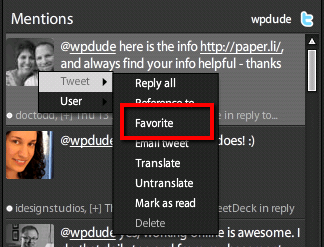
    Every time you get constructive feedback via a tweet from a customer or client, simply mark this as a favourite.   How you do this depends upon your twitter clients, for example I use tweetdeck and there is a favourite menu option.

    From twitter.com, when you hover over a tweet, a favourite icon appears to click.

    Why Haven’t I Been Doing This For Years

    Doh! I would have a testimonials list as long as my arm.  Here are the few I have collected recently

    http://twitter.com/wpdude/favourites

    It’s Easy To Get Tweetstermonials

    I just made that up, I should register that domain name and make my millions.

    If you ask your clients for testimonials (you are asking your client for testimonials aren’t you) there may be some resistance to knock up half a page of copy, but a 140 char tweet takes no time so there is less resistance.

    Can I Have A Tweetstermonial Please

    If we have worked together recently or you like the content I produce jump onto twitter and send me a tweet @wpdude and I will add you to my tweetstermonials list.

    For more great Twitter tips, check out Jade Craven’s Twitter Mini Guide (aff)

    Image by 78989709@N00

  • Two Very Different Ways to Use WordPress as an Amazon Associate

    Two Very Different Ways to Use WordPress as an Amazon Associate

    This is a guest post by Areej from WinkPress.com.

    When most people hear WordPress, they think “blog.” But WordPress is more than a tool for making blogs. If you understand how WordPress works, you know that it can make any type of website–even a website like Amazon.com!

    Two different types of Amazon Associates can both use WordPress effectively.

    Bloggers who’re using WordPress have a plethora of Amazon Associate tools at their disposal. WordPress is their best choice. Similarly, affiliate marketers who’re building Amazon niche stores also have access to tools that could transform WordPress into an Amazon.com replica. That’s why WordPress is also their best choice.

    Here’s why WordPress’s flexibility makes it the best choice for the Amazon Associate blogger and affiliate marketer.

    The Amazon Associate Blogger

    WordPress (mostly) makes blogs, right? If you blog, you can complement your posts with related Amazon products–it could be additional reading, a movie, an instrument, an electronic gadget, what have you. Log-in to Amazon Associate Central and handpick products to promote. Take the embed code and insert it in your post.

    If you don’t want to handpick products for a post each time, you can still make money with Amazon. Use Amazon’s Omakase widget. It’s contextual, like AdSense. Amazon knows who your visitor is because they have cookies in her browser. They also have robots that scan your post content. Based on this data, Amazon displays relevant ads your visitor is most likely to buy!

    Use Amazon contextual ads any where on your blog–WordPress won’t mind. Inserting ads in posts and the sidebar is easy. But for other spots you may find yourself limited by your understanding of WordPress templates. It’s not hard to understand, though.

    There are plugins that make product insertion even easier. Choose a frequently updated and improved Amazon plugin, like WordPress-Amazon-Associate or Amazon Product in a Post.

    At any rate, displaying Amazon products in WordPress posts is not a feature that will impress many people. Don’t get me wrong, WordPress does this better than any other blogging platform. But the beauty of WordPress is in its ability to transform itself into something very different!

    The Amazon Associate Niche Store

    You can use WordPress to build money-making Amazon niche stores that look nothing like blogs–and who wants to make an online store that looks like a blog? Nobody. Yet, people still do. I guess they’re unaware of WordPress’s flexibility.

    Just because it is WordPress, doesn’t mean it has to display a chronologically ordered list of posts on the front page.

    “Posts” — in WordPress — don’t have to be blog posts. A “post” can be anything: a personal profile, a product page, an image, a song, a podcast, or any other digital entity. Posts are the building blocks of a WordPress site. For an Amazon Associate who is building a niche store, a post is a product.

    Product title is post title. Product description is post description. Product image is post featured image. Additional product images become a WordPress gallery. Your affiliate link is in the clickable image and the “Buy from Amazon.com” button.

    So, fill up WordPress with products in this way then arrange them in online store layout and you’ll have yourself a proper Amazon niche store–powered by the most versatile and search engine friendly CMS.

    If you’re discouraged by the seemingly tedious process, don’t be. There are plenty of Amazon WordPress plugins whose sole intention is helping Amazon Associates build niche stores filled with products in a matter of minutes!

    But a good plugin alone will not change how WordPress looks–WordPress also needs a magazine theme. Haven’t you noticed this? The front page of magazine themes look a lot like online store layout. Next time you’re building a online store with WordPress, use a magazine theme.

    You know — you could choose a web script that only does Amazon niche stores, and such a script does exist. But it won’t do it as well as WordPress combined with a good plugin and theme. Or you can choose a blogging platform that just does blogs, but I hope by now, I don’t have to tell you that you’re better off with WordPress.

    Areej is the coauthor of WinkPress.com–a web resource about leveraging WordPress and its tools for online publishing. She enjoys anime and dreams of becoming a pianist.

    @rejo311

  • New Year Blog Tidy Up 2011 Version

    New Year Blog Tidy Up 2011 Version

    This time last year I wrote a post on a doing a new years blog tidy up, you can read it here https://dev.neilmatthews.com/year-blog-tidy/.

    I think the post still stands and I want to update it by telling you about a new plugin I have been alerted to.

    Plugins Garbage Collector

    The plugin I have found is called Plugins Garbage Collector, it can be downloaded from http://wordpress.org/extend/plugins/plugins-garbage-collector/

    It’s an incredibly useful plugin that helps to find redundant tables in your database which can then be tidied up.

    What It Does

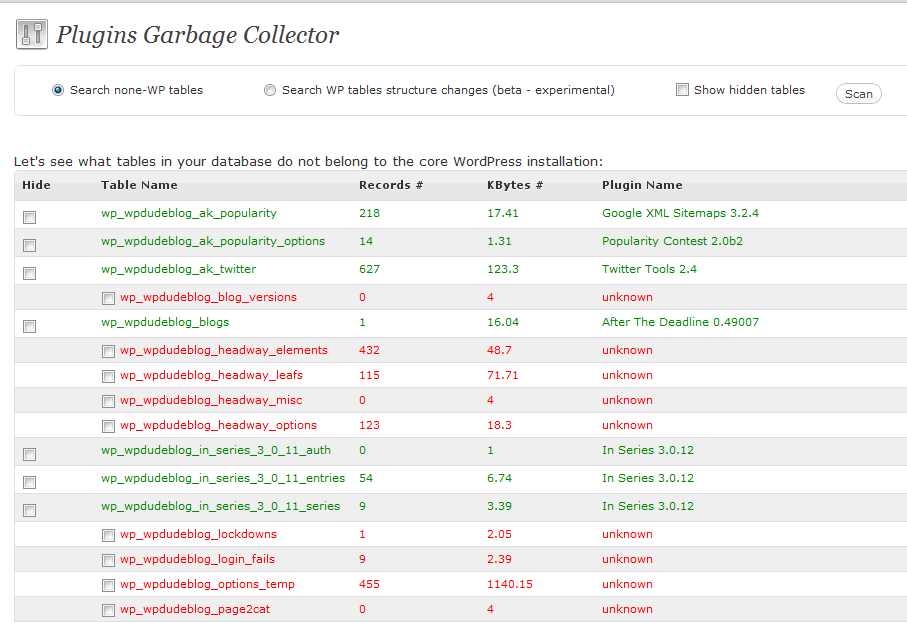
    This clever little plugin references your installed and active plugins looking for table references, it then matches known and used tables up.  The remaining tables are marked as suspect and a list of tables you can delete are offered.

    Running The Clean Up

    A new menu option is added to tools-> Plugins Garbage Collector, click on scan and a list of suspect tables is presented.

    Click to see full size image

    Select the tables you want to remove and click on the delete button at the bottom of the page.

    Backup Backup Backup

    It does without saying (hopefully!)  that you should backup your database before running a plugin which will delete data from your site’s database tables.

    For example the tables used by my theme headway have been flagged up, if I deleted them my site’s look and feel would be corrupted.

    Follow the wise words of Spiderman “with great power comes great responsibility”.

    Wrap Up

    If you need help identifying if your tables are valid or not give me a shout. Hat tip to Michael Martine at Remarkablogger who brought this to my attention.

    Image by paulk/

  • Add A Follow Me Sidebar Widget

    This is something I am asked to do all the time by clients, I thought I would write this up for the more DIY orientated amongst you.

    What We Are Going To Do

    We are going to setup a series of sidebar widgets that will link to twitter, facebook and linkedin.  This can be used for any other social media site such as YouTube by simply changing the image and URLs used.

    Social Media Images

    The first thing we need is a series of social media images, there are hundreds available to download, do a google search for social media images and you can find many that will match your site.

    Here is a zip file for you to download with various sizes and platoforms

    social media logos>>

    Create a text Widget

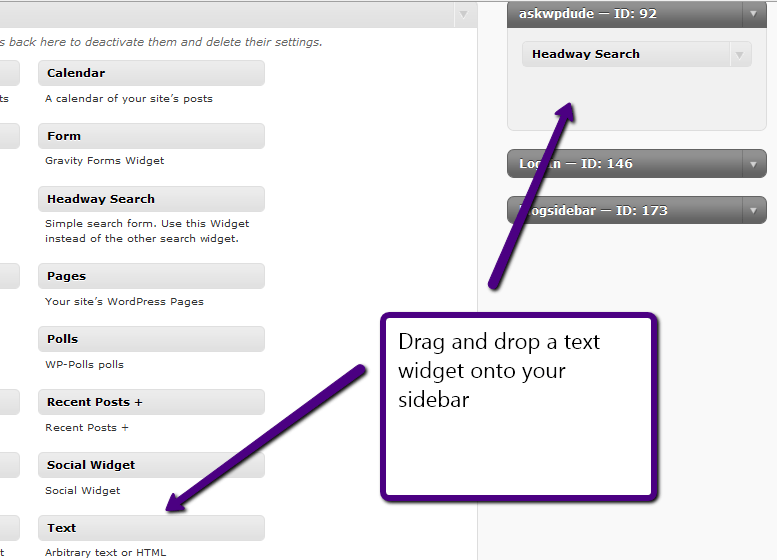
    Once you have decided which logos you like you need to add them into your sidebar, so go to appearance-> widgets and drag a html/text widget onto your sidebar

    Insert The HTML Code

    We need to add some HTML code into the text widget, I’ve done all the hard work for you all you need to do it cut and paste this into your text widget created above.

    <!-- Twitter -->
    <a href="http://twitter.com/wpdude">
    <img src="https://dev.neilmatthews.com/wp-content/uploads/2010/10/twitter_sidebar_green.png"/></a>
    <!-- Facebook -->
    <a href="http://en-gb.facebook.com/people/Neil-Matthews/1105047622">
    <img src="http://dev.wpdude.com/wp-content/uploads/2010/10/facebook_sidebar_green.png"/></a>
    <!-- Linked In -->
    <a href="http://uk.linkedin.com/pub/neil-matthews/23/324/a87">
    <img src="http://dev.wpdude.com/wp-content/uploads/2010/10/linkedin_sidebar_green.png"/></a>

    Set The Widget Title

    Set the title of the widget, it seems like most peoople use follow me or elsewhere online

    Add your Own Profile URLs

    The html code provided links to my social profiles you will need to edit these and replace them with your own details. The red items after a href

    Point To Your Chosen Images

    Again I am pointing to my chosen images, upload your desired image through the media uploader and link to that instead (red item after img src)

    That’s It

    I hope that has helped you to build out wordpress as your social media hub.

    Image by 42106306@N00

  • My New Service Packages

    My New Service Packages

    UPDATE: I’ve caused a ton of confusion with this page and I have taken it down while I re-write the copy

    As a complement to my by the hour services that I have been offering for a number of years, I have decided to build a number of packaged solutions to help solve a number of common WordPress issues

    If you check out my new services page you can see what I plan to offer as well as my by the hour support.

    I’m going to do mini launches of each new service so as not to overwhelm people, this week it’s my WordPress site review service

    What Is A WordPress Site Review

    This is where I gain access to your site and review how you have configured WordPress.  Because WordPress is so complex and big, many people are unsure if they are using WordPress to the optimum level, I check over their config and produce a report recommending any changes I see.

    The review covers the following areas

    • Your Theme – how is is configured, and what is it telling your site visitors, is your call to action being displayed.
    • Your Plugins – Are you using the best plugins to support your site and business.
    • Your Security – Is Your site secure and safe from hackers.
    • Your SEO – Will you attract the maximum number of search engine visitors due to your SEO configuration.
    • Your Site Speed – Site visitors and search engines are turned off my slow loading sites, can you WordPress install be faster.
    • Your On-Going maintenance – are you maintaining and keeping your site up to date.
    • And more – any other issues I find will also be highlighted.

    Want More Details?

    If you want more details or would like to book a review please visit my WordPress site review page.

    Coming Next

    The WordPress security review, keep the hackers out of your site

    Image by massagetherapyfoundation

  • Neal Finkle – WealthPilgrim.com

    Neil literally saved my site. I spent 2 years of hard work building up traffic and revenue them some low-life hacker infected it with a pharma hack. Almost immediately my traffic fell 85% and I lost all my rankings.
    I paid 2 other consultants to fix the problem and they were stumped. Neil was recommended by Chris Garrett or Problogger fame and I am super grateful. Neil took over and fixed the problem quickly. He cared about what I was going through. He was fast, professional and got the job done. I would recommend him highly and would only use Neil for any problem w/my site. Thanks Neil.

    Neal Finkle – WealthPilgrim.com

  • No More One to One Consulting

    No More One to One Consulting

    About three months ago I stopped offering one-on-one hourly WordPress coaching services so I could concentrate on building up my team of “techies” to help service the wordpress technical support side of my business.

    I was not happy about this, I love working one on one with people like this,  but I needed to concentrate on building that side of my business.

    Now that I have built my team and it is running very smoothly I am re-opening the coaching side of my business, but with a difference.

    I will no longer be offering hourly consulting instead I’ll be working with a small handful of people (six to be exact) for six months at a time

    I will do everything in my power to help you build a top class WordPress site or improve your existing one.

    I know this might not be the right coaching model for everyone, but it definitely makes more sense for me.  I can still manage the technical support side of my business whilst providing a top class coaching service to those who need it.

    Anyway, if you’re potentially interested in snagging one of the six spots now then email me at [email protected] and I’ll send you more information.

    I look forward to working with you

    Neil Matthews

  • Could Twitter Search Be The Most Powerful Business Tool?

    Could Twitter Search Be The Most Powerful Business Tool?

    I’m stepping away from WordPress in this post, I hope you don’t  mind, I want to talk about twitter for a moment.

    Your WordPress site is probably acting as a hub with spokes connecting your social media profiles at twitter, Facebook et al so the link is not that tenuous.

    I want to explore why I think twitter search or search.twittter.com could be one of the most important tools for businesses to find new leads and monitor customer satisfaction.

    Search.Twitter.Com

    Search.twitter.com allows you to perform a search on the live twitter stream.

    What’s the big deal about that, and why should it matter to businesses?  I’ll tell you why, it gives you real time access to the problems and frustrations that people are having right now!   I’ll let that sink in for a moment, you have access to something so frustrating to the person involved that they have gone online and expressed their annoyance with a tweet.

    If you can step in with a solution to that problem you are going to be seen as a pretty cool dude.

    It’s About Making A Connection Not Spamming

    Let’s make it plain and clear here, making connections with strangers through twitter search should be done gently.  It’s about making a connection, it’s about starting a conversation, it’s not about giving someone a hard sell just because you have foundd their tweet.

    Let make a real life analogy.  You are sitting in a bar and you can overhear the conversation of the people on the next table.  They don’t know you.   The conversation turns to automobiles, you overhear that the people on the other table need a new car.  It just so happens you are an auto-dealer, you jump up, push your business card at the target and start your hard sell.  They were talking to a friend not you.  Now imagine twitter being the same you need to be subtle.

    Tools To Monitor Search

    You can go to search.twitter.com and do manual searches, but if you want to continually monitor the twitter steam for particular queries you will need a different tool.

    I use tweet deck, a free tool which allows me to setup a series of searches which I can monitor throughout the day, and if I can be of help, I respond to that tweet.

    Another tool I have been trialing is Sprout Social, an  online tool which also allows you to setup searches for phrases.

    Give An Answer To A Question

    I often see queries about WordPress that I am in a position to answer.  People may ask what is the best plugin for this or can I recommend a solution for that, I am more than happy to jump in with an answer. A quick reply or a link to the appropriate plugin is usually very well received, and it is a great way to open an online conversation.

    Send A Link To A Post

    Again this is another full post, but twiter is an excellent way to market your blog one qualified reader at a time.

    If someone is asking a question that you have the answer to, then send them a link to a blog post, which answers that problem.  This may then make them dig deeper into your blog archives and perhaps become an email or RSS subscriber

    Don’t Spam But If Your Product Or Service Fits

    Don’t make your first contact with someone be a pitch, that’s not social, that’s just slimy but I add this caveat, if someone explicit asks for your products or services you can get away with your first contact being a pitch, but be pleasant about it.  Here is an  example

    Potential lead: Do you know anyone in the north east of england supplying WordPress technical support

    In reply: Hi, I’m based in Newcastle, and WordPress is all we do, check out our site wpdude.com/wordpress-technical-support

    The person is asking explicitly for what we do, so I point them to our sales page, no pressure selling.

    Monitor Your Brand

    If you monitor twitter search for your brand of product, you have an excellent opportunity to put right any negative feedback before it build any momentum.

    For example if someone went onto twitter and said “those idiots at wpdude wrecked my site” (not that this has ever happened) I would be able to quickly engage with that person, find out what the problem was and put out that fire by fixing the problem before my reputation is brought down by one tweet.

    That imaginary tweeter goes from frustrated to listened to and helped in a short space of time.

    I’ve done this a couple of times and when a representative gets back to me I’m usually overwhelmed and my attitude is given a 180 degree spin from unhappy to satisfied customer.  @zendesk, @socialsprout and @gotomeeting are three fairly big companies who do this, I have tweeted about problems with their systems and have received support, I’ve gone so far as to mention them in a blog post, their customer service standards are in my mind even now.

    It goes the other way if someone says something good about you, monitoring for your brand or products/.services means you can favourite the tweet and build up a series of tweet testimonials which you can send people to, but more about that in another post.

    My Examples

    This is how I use twitter search for my wordpress technical support services.  I have a number of searches setup which match what I do.  So if someone types in “wordpress help” or “wordpress problem”.  I am monitoring for it, and if I can help I send them a link to a solution, answer their query if it will fit into 140 chars or invite them to email me via my contact form for a longer answer if it takes more than 140 characters.

    Please note I don’t jump in and say Yep I can fix it, go to my services page and I will prepare a quote, I give away freely without expectation.  I am looking to build up my credibility as a WordPress thought leader.  Once that link is established in peoples mind, they may come back to my site and explore the fact that I provided support services.

    To be really successful on twitter you need to give before you receive, it’s not about pushing your message 100% it’s about making connections.  Being social, these relationships may then develop into projects, they may also blossom into an online referral engine where people send others your way for services or products.

    A great quote from the book Un-Marketing (amazon aff link) is this:

    You wouldn’t open a business bank account and ask to withdraw $5000 before depositing anything.  The banker would think you are loony.  Yet people go onto social media, open their account, send out a few pitches for their mediocre e-book, and then complain to me that “this social media stuff does not work”.

    Twitter search Would Be A Huge Timesuck

    Yes it could be if all you do is answer question after question all day long and never do you day job (unless fielding twitter tech support questions is your thing, and many businesses are recruiting for just such roles)

    I treat it as a 10-20 minute networking session one time during the day, I will go through my twitter searches responding and helping if I can.  It is an excellent way to start a conversation, and to reinforce the point that I’m an expert in my chosen field.

    Wrap Up

    Are you using WordPress as the hub of your social media?  I recommend you do, check out this posts, it’s on the front page of Google and has become quiet popular.

    Let me know in the comments if you would like me to write more about social media and integrating WordPress with it.  It’s a subject I’m pretty keen on and I will happily write about it if you want me to.

    If you need help building your social hub with WordPress at the centre give me a shout.

    Image by nathanmac87

  • WordPress Technical Support Sale Ending Soon

    WordPress Technical Support Sale Ending Soon

    Over the holiday period I ran a sale and dropped the price of my wordpress technical support services to get past the notoriously slow period throughout November and December.

    This is a quick post to say I will be raising my hourly rate back to the normal price point very soon.

    If you want to lock in a block booking of time at my sale price rate now is the time to do it.

    I’m selling packages of time which you can buy now and call down at any time during this year in increments of 20 minutes.

    The Package

    I’m selling blocks of five hours of time at $50 per hour, using my extensive mathematical training gained at school tha tells me the price is $250.

    If you would like to pre-order a block of time please contact me

    Image by roland

  • Plugin Review: Widget Logic

    Plugin Review: Widget Logic

    Here’s a very hand little plugin for you, it’s called widget logic http://wordpress.org/extend/plugins/widget-logic/ and it lets you control where or when a particular sidebar widget is displayed by adding some conditional logic to the widget config.

    WTF Give me Some Examples

    It’s probably easier to use examples to explain what the plugin can do:

    • You may only want an email sign up widget to appear on the home page
    • You may only want your twitter link to display on a blog post not a page
    • You may want your categories widgets to appear on your contact page (running out of examples already)

    WordPress Conditional Logic

    Sorry but this plugin requires a little understanding of WordPress conditional logic to work, but once you have mastered that you can control which widgets appear where.  Full details of WordPress conditional logic can be seen using the following links

    http://codex.wordpress.org/Conditional_Tags

    Some Examples

    Here are some examples of the logic in action

    • is_home() – this will check for the home page
    • is_page(‘contact’) – check for the page called contact
    • is_sigle() – this will check for an individual blog post

    Hello Operator

    There are a number of operators available in WordPress so you can join logical statements to create more complex tests, here are some example operators.

    • && – and
    • || – or
    • ! – not

    So you could say I want to display a widget on the home page or the contact page, the statement would look like this

    is_home() || is_page(‘contact’)

    Installation & configuration

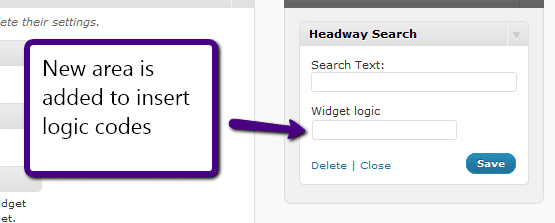
    The plugin is install as any other plugin, once activated a new form field is added to the bottom of your sidebar widgets.

    Compose a logical statement and add it to the widget logic form field and you will only see that widget when the conditions are met.

    Wrap Up

    Widget logic is an excellent plugin to help control where widgets are displayed, if you are using WordPress as a CMS, and not a blogging platform this is an excellent tool to add to your toolbox.

    If you need help building your logical statement you know which link to follow hint this one https://dev.neilmatthews.com/wordpress-technical-support

  • 2011 Webinars

    2011 Webinars

    I’m in planning mode for early next year, and one of the things I am planning to do is run a series of free webinars to teach people how to solve particular problems in WordPress.

    If you haven’t been on one of my webinars before, let me explain how they work. A webinar is a live events held over the internet where I can share my computer screen with you and show you how to solve a WordPress problem.

    Can I ask you to participate in my survey so I can find the problems people are having with WordPress.

    Can you leave your replies as comments on this post answering the following questions.

    1. What free WordPress webinar would you love for me to create JUST for you?
    2. What is your biggest fear or frustration when using WordPress?
    3. What is your ideal, perfect outcome when you return to your site after the webinar?

    If your problem is a big sticking point for a number of people I will build that into a webinar.

    Thanks in advance for any time you spend on this survey

    Thanks

    Neil Matthews

    Image by iuniquefx

  • WishList Member 2-4-1 Sale

    WishList Member 2-4-1 Sale

    I received an email today from the good people over at Wishlist telling me that they are having a sale on of their excellent Wishlist member plugin.

    What Is WishList Member

    It’s a membership plugin for WordPress that allows you to protect certain posts or pages on your site for members only. The visitors needs to login to see that content.

    You can integrate WishList member with payment processors such as Paypal so you can charge for your content, I’ve used it on some of my own projects and I heartily recommend it.  In my opinion it is the best membership plugin out there.

    It’s a premium plugin so there is a charge, but the offer is buy one license get one free.

    Check It Out

    To take advantage of the 2 for 1 sale you need to use this link

    WishList Member 2 For 1

    Already Got WLM

    My team and I are experienced working with WLM so if you need help integrating with a payment processor or email list, give us a shout out over at our service page

    Disclosure

    I’m not bound by the FCC draconian reporting measures being British, but I always think transparency is key, so yes this is my affiliate link, but you already knew that didn’t you.