Neil Matthews

Author: Neil Matthews

  • My Musings Over At Neil-Matthews.com

    My Musings Over At Neil-Matthews.com

    I mentioned a couple of weeks ago that I was spinning off a new site to write about building digital careers or Digital Personas as I call them over at neil-matthews.com

    Here is a link list of the things I am writing about:

    I’m hoping you can stop by and take a look.

    Image by regi_a

  • Plugin Review: WP-Overview

    Plugin Review: WP-Overview

    This one is for the techies out there, WP-Overview is an excellent plugin which give you an overview of the memory usage and configuration of your site.  This in turn helps you to diagnose any problem you may be having.

    What It Does

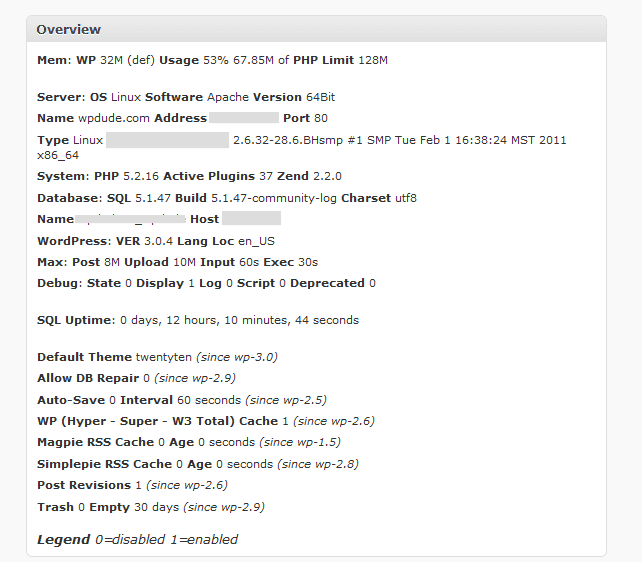
    Once you have installed WP_Overview it give you a new dashboard widget which gives you a point in time report on memory usage, and various other configuration options for your site.

    Download WP-Overview

    You can get a copy of wp-overview from the following URL

    http://wordpress.org/extend/plugins/wp-overview-lite/

    Installation

    There is no special inssallation instructions for this plugin simply upload or search for wp-overview

    Here’s What You Get.

    Here is a screenshot of wp-overview from my site.  I’ve blank out some of the sensitive information

    Click on image for full size view

    How I Use WP-Overview

    I use it on performance or memory troubleshooting projects.  This give me a feel for the available memory and how much is being allocated to WordPress.

    WP Troubleshooting

    There will be a detailed video on using wp-overview in my WP Troubleshooting course along with detailed instructions on how to diagnose memory errors.

    Image by wilcozpics

  • Survey: Would A Forum Be Of Use

    Survey: Would A Forum Be Of Use

    I would just like to perform a quick survey of the readers of wpdude.  I would appreciate 20 seconds of your time to complete the survey

    Helping Intermediate/Advanced Users

    The majority of the products and services I have here are for beginners or for people wanting to hand over the support of their site to me.

    I know from other feedback that there are a number of more advanced WordPress users also reading my blog and I was wondering how I can help that segment of my readership.

    My idea is to create a members only forum for more advanced users where they can get WordPress support from me to find solutions to the problems you are having.

    This would obviously take a lot of my time so I would need to charge a membership fee.  I am thinking that founder members of the community could get forum support from me for $15 per month.

    Feedback Please.

    Please complete the survey below and let me know if this is of interest to you.

    [gravityform id=56 name=WPDudeForum]

  • Case Study: Change Your URL Kill Your Site

    Case Study: Change Your URL Kill Your Site

    I get the odd email from anxious people wanting to hire me because they have changed the domain name of their site and suddenly they cannot login in any more.

    Here’s What They Do

    They think that by changing the site URL and leaving the files where they are, they can change the URL structure of their site, this is wrong, you need to copy your files to the new location before you make the changes.  If you don’t WordPress redirects requests to fields that do not exist and your site will crash.

    These are the options under settings->general

    Here’s The Fix

    To get your site back online you need to edit the wp-config.php files, this is in the root of your WordPress install, and add the following two lines with your original URL. These options overwrite anything in your database added by accident.

    define(‘WP_SITEURL’, ‘http://{your original URL.com}’);
    define(‘WP_HOME’, ‘http://{your original URL.com}’);

    Connect to your site with ftp, or use the file manager in your hosting account, and edit the file wp-config.php

    Now You Need to Edit the Database

    If you want to revert back to your previous entries permanently you need to edit your database.  If you go to settings -> general now, you will see that your site and blog URL options are greyed out you cannot change these back.

    Load up phpmyadmin or other tool provided by your hosting company, and open up the wp-options table and look for the siteurl and home options, edit these and roll back to the old URL.

    WPTroubleshooting Will Feature This Fix

    If you sign up for my WPTRoubleshooting members only course, I will be adding a screen cast video on fixing this issue very soon.

    Image by rhysasplundh

  • Introducing Neil-Matthews.com

    Introducing Neil-Matthews.com

    In my post building a digital career, I hinted at the fact that I was planning on building a new site on the domain name neil-matthews.com, I’ve pulled off the wrappers off that site and I would like to announce it here first.

    What Neil-Matthews.com is about

    I’m going to be writing all about the idea of a digital persona on neil-matthews.com, a topic that doesn’t really sit that well on a WordPress site so I have branched my writing off onto another site to allow me to write about WordPress here and a wider range of online topics at neil-matthews.com

    What Is A DP

    I’ve created a sticky post explaining what I think this is on the home page of Neil-Matthews.com but in brief I think of it as your online presence.

    It is part technical; your website config, hosting provider, your email list setup etc, and it is part content, the blog posts you write, the email newsletter you send out and the products and service you may or may not supply within that persona.

    The point is, I truly belive that people should be investing time building a DP so they can work effectively online in the future.  The contents of your DP will help people to know like and trust you, help to build your authority and develop whatever business(es) you want inside of your DP. Using online tools you can build a career and support yourself in an unconventional manner outside of the traditional employment setup.  I’ve been doing this for years and I truly believe it is the components of my digital persona that allow me to work like this.

    I’ve seen people build amazing digital careers working online, but only if their DP is in place and configure correctly. That is what I will be writing about and that will be the focus of the services and products I will produce at n-m.com

    What Does That Mean to WPDude.com

    Nothing really, I consider wpdude.com to be one of the assets in my digital portfolio, read Adding Assets to Your Digital Persona for more details.  I will be running wpdude.com as normal, I will still  be supplying WordPress technical support services and blogging here, I’m just creating additional streams of work outside of the WPDude brand to work on none WordPress projects.

    I’ve wanted to work under my own name for some time and to write on topics outside of WordPress, this site will give me that forum.  I’m going to be 40 on the 25th February and I just don’t feel like a dude anymore 🙂

    Come On Over

    I don’t expect this to be for everyone reading wpdude.com, which is fine,  that’s why I’m splitting the steams, but I would like to think it would appeal to many of you, so I hope to see you over there.

    Neil of wpdude.com and neil-matthews.com

  • FireBug, A CSS plugin for Firefox

    FireBug, A CSS plugin for Firefox

    One of the most useful plugins I have ever found is one called Firebug,  Let me quickly qualify this by saying this is a Firefox plugin not a WordPress plugin

    What Does FireBug Do?

    It gives you a visual representation of the CSS that is used to code your site.  It shows you which css files particular components use.

    In other words it is a brilliant tool to help you write and code up WordPress themes.

    It’s not the easiest thing to explain so I have recorded a quick screen cast video of me using Firebug where all will (I hope) become clear.

    Download Firebug

    You can download and install Firebug from this location http://getfirebug.com/

    What I Use It For

    I use it all the time to edit CSS on clients sites, for example they may come to me and say I want to increase the font size on my sidebar.  Using firebug I would scan through the css, find the item to change, perhaps test the change dynamically in Firebug and then edit the CSS file directly.

    Screen Cast Video

    [media id=15 width=512 height=384]

    Wrap Up

    It’s a brilliant tool I use daily on my client’s sites give it a go.

  • The WordPress Pharma Hack

    The WordPress Pharma Hack

    I’ve been called in a couple of times recently by clients to fix hacked sites.  What makes it worse is that they were victims of a very pernicious attack know as the Pharma Hack.

    I want to make you aware of this hack and give you tools to find if you are a victim and how to fix it.

    What Is The Pharma Hack

    When your site is infected with this hack, you will be inadvertently giving links to Pharma sites selling Viagra and Cialis and other disco drugs.  Not the most professional thing for people to see in Google linked to your site.

    The hack is a black hat SEO attack, these people are trying to increase links to their site for the keywords viagra, cialis et al.

    Your post descriptions in Google will contain references to drugs rather the the real title you set for you post.

    Why Is It So Tricky

    It cloaks itself from the site owner very carefully, unless you regularly check your site’s index on google you will not see the  effect of this hack, to the site owner it looks very much like business as usual.

    It searches for your most high ranking pages and only links from them.  It selectively decides which pages to infect, why bother with low ranking posts!!

    It has many layers and if one is compromised, the others enable the “hack owners ” to re-actiave the scripts on your site.   It infects the following layers

    • WordPress core files
    • Plugins
    • Uplaods direcotry
    • Databse wp-options table

    This is cunning coding, if these people put this type of skill into useful projects they would make a million.

    Identifying If You’ve Been Attacked

    The quickest way is to run a check on your site to see if you have been infected,  is to check on your site’s index in Google.  Run the following search in Google:

    site:{yourdomain.com} viagra

    If you see unusual meta descriptions in Google linked to legitimate blog posts then you have probably been hacked.

    What Can You Do?

    There is a very detailed fix supplied by Securi.net, but in essence you need t:

    • Clean up WordPress
    • Clean up your plugins
    • Clean up your uploads directory
    • Edit your database to remove rogue entries

    All of this is pretty technical stuff, you need to understand how WordPress works at a pretty low level to fix this, miss just one infected component and your site will be re-infected.

    UPDATE: Dec 2011

    I’ve written a follow up post on cleaning up your index in Google after the hack Refreshing The Google Index After Pharma Hack

    Need More Help Fixing Your Hacked Site?

    I’ve create a WordPress Hack Recovery Course

    Image by mightyohm

  • Teri Ryan teriryanwrites.com

    I’ve turned to Neil for assistance several times now – sometimes desperately – and he always resolves my issue entirely. Thus far, he has provided invaluable assistance to me in coding, security, marketing consulting and WordPress training, and I will be back for more. I’m a big believer that efficiency leads to profitability, and am grateful Neil operates his business the same way. He responds promptly, says what he’ll do to fix or help, then does what he said he’d do. He is entirely trustworthy. This is exactly the kind of service you need, whenever you need it. (I also get a giggle knowing that my WordPress support comes from the one and only “WP Dude.”) I give Neil my highest recommendation.

    Teri Ryan teriryanwrites.com

  • Building A Digital Career

    Building A Digital Career

    I’m going to extend the focus of wpdude in the coming months and start to write about some of the things I am passionate about outside of the tech arena.  I hope they are of intetest, it not just tell me to shut the F!!K up in the comments.

    Today I want to talk about building a digital career.

    What Is A Digital Career

    I think of it as digital entrepreneurship, running your own business (probably as a solopreneur) online.  This means you sell your products or service solely online via online marketing practices such as email lists, search engine marketing and social media marketing.

    I class myself as having a digital career, all of my clients come to me via the internet, I fix their sites over the internet, take payment and communicate via the tinterwebs.  Everything I do is online.

    There are a growing band of people building their own fulfilling digital careers and I think it is in the realms of possibility for many people out there to cut the corporate leash and strike out alone

    In My Experience Corporations Crush The Spirit

    Working in a corporation was, to me, one of the worst things ever.  I did it for 16+ years.  It was what was done, you went through school, got into a good company worked your way up, took shit for 30-40 years retired and died not long afterwards.

    I saw freelance contractors in corporations, but they were just another cog in the wheel, taking the same nonsense as permies.

    You put your poor old body through the daily commute, crawl into your cubicle or desk and attend to the days nonsense.  Take abuse from management, attend stupid meetings, the annual appraisal, the networking and brown nosing to wriggle your way up the ladder, only to be told your position is going to be outsourced for a couple of pence per hour.

    That’s a gross generalisation I know there are many people who love their jobs and the sense of identity it give them, so the rantings in this post are not for you, but if you crave some freedom read on.

    Working For Myself Is The Best Thing I Ever Did

    Stepping away from the culture of meetings, human resource departments, set annual leave, control over your daily life, and an expectation that you would make yourself available 24/7 for phone calls was a joyous thing for me.  I remember carrying a box of stuff to my car on that Friday with a huge smile on my face.

    I setup on my own, and while it has not been all plain sailing, I don’t regret a thing, I have grown as a person, I am much more happy, and I love being my own boss.  The simple joys of nipping off for a two hour coffee break with a friend, having a huge amount of time with my two amazing daughters, deciding which projects I take and which I don’t all get marked on the plus side of building a digital career.

    I sent out a tweet the other days saying something like:

    “Sent an invoice to a client in Australia, spoke to a potential client in Sweden, working on a client project from Boston, working online rules”

    I got several replies confirming how cool the whole working online thing is.  That is why I love the idea of building a digital career and would like to help other people do it.

    You Can Reach Millions Of People Cheaply

    The internet has changed the way people do business, 10-15 years ago you would need a huge advertising push to start a new business.  you would need dozens of contacts a business plan, startup capital and take huge risks.

    Starting a digital business could cost as little as $100-200

    • Hosting $50
    • Theme $50
    • Domain name $10
    • WordPress Free

    Hang Up Your Shingle

    It doesn’t have to be complicated, create your website, sell your time as a service business and bingo you are ready to take orders.  Setup your paypal account and hey-presto you are taking money.

    You don’t need a business plan, an exit strategy business cards or a smart new suit, you just need a service or product people value enough to cough up cash for.  And I bet most people have the skills to do that.

    I had an argument with a friend about this, he is a fireman, and he says he cannot setup as a freelance solo fireman, true he cannot so I told him to be creative, what is he great at, answer he plays the game Eve and is very very good, he can write an e-book on eve strategies and sell that online from a blog on the subject.  The point is you don’t have to think of your core employee skills as your route to a digital career.

    Start On The Side

    You don’t even need to quit your day job to start your new business, you can do it on the side.  Offer something that is not dependant upon you providing one-to-one time, my tech support services could be done over the weekend, as long as a client has his or her expectations managed they don’t care when the work is done.

    A great story I heard is from Dave Navarro from http://www.rockyourday.com/ he used to give consulting calls from his car during his lunch hour.  A brilliant way to start on the side.

    It Can Evolves As You Do

    Your digital career is not set in stone, you can change and evolve as you grow and learn.  This post is part of my evolution, I’m keen to help people to build a digital career of their own.  If I get enough positive feedback I might spawn a new site, neil-matthews.com has been purchased and is awaiting it’s purpose.

    If you decide to add a new set of services or products to your portfolio you can.  In the old world you were (for example) an accountant, your joined a firm, counted up and divided by a number till the end of your career, you could retrain, and move over, but could you be an accountant on a Monday and a marketing chap on Wednesdays, no you could not, but a digital career means you can pursue a number of avenues, take on new challenges.

    Corporations Don’t Mean Security

    I think anyone who has watched the recent corporate meltdowns has to agree that working for the man is not that secure anymore.  It only takes one mouse click on a spreadsheet to turn you from dedicated employee to redundant, and will that nameless, shameless bean counter give a rats arse about you, no, that’s why self serving digital career building is so important.

    Even if you are not working full time a diversified income stream is very useful.  It helps to even out the bumps in the road and pay for extra luxuries.

    Build  A Business Not A Job

    You don’t have to just swap one time for money job for another, when you build a digital career, you can build a true business.  I have a list of clients, they come back to me time and again for more and more work, that’s a business not a job.  I have developed a new product wptroubleshooting which can be sold again and again with little or no input from me, a digital career allows that, a corporate job does not.  I’m looking to expand my portfolio into digital career consulting and products.

    These are assets and can be sold when you move on or grow board, you cannot say that about the paper shuffling you are doing today.

    What Do You Think?

    Are you investing time and effort into building your digital career?  Do you think the internet is freeing us from corporate bullshit and allowing people to blossom?

    Have I sparked up an appetite for digital entrepreneurship in you, if I have let me know in the comments and I will write more about the subject.

    Image byvancouverfilmschool

  • My WordPress Troubleshooting Methodology

    My WordPress Troubleshooting Methodology

    When I am called in by clients using my WordPress technical support services for a crashed site, I have a particular troubleshooting methodology I use which incrementally removes layers from a WordPress site so I can pin point the root cause.

    I want to tell you about my methodology and give you a chance to learn more about it my my new mini course WP Troubleshooting

    How My Methodology Works

    WordPress is built up of many layers, core WordPress files, plugins and themes.  I like to strip away and isolate the various layers of WordPress so I can find which layer, be it themes, plugins or the core files is causing the problem.

    I do it in a top down manner eliminating each layer and testing as I go in this order.

    One: Disable / TroubleShoot Plugins

    Because the majority of problems I see are with plugins, I start at this layer first.  I disable all of the plugins on a site, and check to see if the issue is resolved.  If it is I can fairly confidently say the problem is with a plugin.

    Next I re-enable the plugins one at a time, checking after each enable to see if the problem comes back, when it does I have isolated the problem plugin.

    I then re-enable all of the other plugins and test again (just in case there are multiple plugins causing the issue)  if the problem is gone I have isolated and identified the problem plugin.

    Two:Disable / Troubleshoot Themes

    If after disabling all of the plugins I still have an issue, I then move down a layer to the theme files.

    To troubleshoot a theme, I disable the currently active one and enable a default theme supplied with WordPress.  These default themes are approved by the team who developed WordPress and should not cause any issues (unless you have edited them and introduced errors).

    So I enable a default theme and re-test the site, if it is okay, I re-enable he plugins and (you guessed it ) re-tested, if at that point there are  no errors, I can safely say the problem is with the theme and I begin to investigate the theme.

    Three: Re-Install a Clean Version of WordPress

    At this point, the plugins are offline, I’m working with a default theme.  My final option is to re-install a clean version of WordPress.

    I have seen occasions when WordPress files do become corrupted, or deleted, this can cause problems with a site.

    I can a clean copy of WordPress from wordpress.org.  I download it, unpack it and attach to the site in question via FTP.

    I then do the following:

    • Take a copy of wp-config.php (just in case it gets overwritten)
    • Rename wp-includes
    • Rename wp-admin

    The renames ensure that you have a completely clean copy of the WordPress core files and everything you upload is in play.  I have seen times when a file is corrupted, and it cannot be overwritten by the upload which means the corrupt file is still present on your site.

    Then I test, hopefully this has solve your problem.

    What Type Of Errors Can This Solve

    I use my methodology to solve all kinds of issues, in particular the following problems:

    • The dreaded WordPress “white screen of death”
    • Header already sent errors
    • Plugin and Theme Fatal errors
    • Out of Memory Errors
    • … many other WordPress problems too

    What About When The Dashboard is Unavailable

    Sometimes if you experience any of the above errors, the dashboard is also unavailable so you cannot disable the plugins or themes, there is a way around this, you need to FTP to your site and manually disable the theme or plugins, all of this is explained in detail in my course.

    Backup First

    I always recommend that you take a full backup of your site (whatever condition it is in) so that you can restore back to a point in time before you began troubleshooting just in case you introduce more errors.

    Want To Learn More About My Methodology?

    I have created a WordPress troubleshooting course over at wptroubleshooting.com this includes detailed video tutorials to teach you how to trouble shoot crashed WordPress sites using my methodology.

    It’s a members only site with screencast videos, downloadable resources and support from me via comments.  If you would like to learn my methodology in more details please visit wptroubleshooting.com

  • Open Discussion: How Can You Use Comment Email Addresses

    Open Discussion: How Can You Use Comment Email Addresses

    Let’s start the week with a little bit of open discussion.  I want to pose the following question:

    “How can you use a commentors email address?”

    Let’s step through the process, to leave a comment on a WordPress site you need to leave your email address.  Is this an indication you want to be contacted, have you given your email address over to be contacted by the site owner?

    The email addresses are sitting there in your WordPress database, with a little effort they can be exported and use by the site owner to send content or offers to the email address holder.

    Have They Opted In?

    Has a commenter opted into your stream of messages by leaving their email address?  Have they given their permission to be contacted?

    This is a grey area, in my heart of hearts I think they have opted in to discuss a particular post and not to be added to your full list.

    But … they have shown interest in your site, they are engaged enough to leave a comment, what if you have some excellent content only available to your email list members.

    Can You Ask for Further Permission?

    Is it acceptable to export their email addresses and then request their permission to contact them further?  How would you feel if you got a message like this

    Hi {name}

    I’m contacting all of the people who have left comments on my site to tell you about a free download I have created.   My ebook entitled “The ten best widgets in the world” is available to download at no cost by joining my email list.  You can do this from this link>>

    Once they are on your list that is definite permission.

    Using Email Addresses

    A client of mine wanted to use the email addresses of his commentors to market an upcoming publication.  The site has an active discussion going on in the comments, these people are invested in the site and enjoy the content being created.

    I’m pretty sure they would be interested in the offer being made.

    Export Emails

    I used this plugin to extract all of the email addresses from the comments database so they can be imported into an email service such as Mailchimp.

    http://www.joeswebtools.com/wordpress-plugins/export-emails/

    I tested the process using my own site, I extracted a CSV of everyone who has commented on a post, took that list over to Mailchimp and imported it to make sure the process works.

    I now have 124 email addresses in Mailchimp in an unused list.  I know these are people who are interested in WordPress, to be blunt, these all meet my target demographics and are potential clients, there are several potential projects in there, should I mine that data,

    What Is The Agreement

    How would you feel if you got an email from a site you had commented on?  To me this does not feel right, let’s get this discussion moving in the comments (honest I won’t add you to my list, you will need to opt in first) how can you use an email address?

    Image by estark

  • The Store Is Open

    The Store Is Open

    I’m quietly opening the doors of my online store this afternoon with the general release of my first mini course, WP Troubleshooting.

    What’s Am I Selling In My Store

    I’m going to build a series of mini courses from my store.  The course will solve particular WordPress problems.

    The mini guides will be held in their own micro sites where you can watch the video tutorials, download text and PDF documents and get support from me via forums or comments

    How Much Will The Mini Courses Be?

    I’m planning to charge 20-40 dollars per course depending upon the subject matter and th amount of time to create the content

    Come On In

    Come on in, browse the aisles hopefully I will have a course for you.wpdude.com/store.