Neil Matthews

Author: Neil Matthews

  • From Freelancer To Firm,

    From Freelancer To Firm,

    At WPDude we have gone from being a one person freelance setup to being a firm of four people over the last year or so.  We can provide WordPress technical support as an agency rather than one person.

    During that time I have had to learn the hard way how to make this pretty difficult transition.  If you are about to embark on this process, here are the top eight things I wish I had known before I started.

    1) Everything Slows Down

    One of the things I was very proud of as a freelancer was my quick turn around time.  I could get a quote out and turn around to start work in a couple of days.

    Once you are dealing with a team, everything slows down, there is more communication, there is more time assigning work, there is more time dealing with other people’s agendas, life styles etc etc the list goes on.

    Build some slack into your schedule and expect things to slow down.  Do yourself a favour and reduce your stress level by knowing things will slow down and learn to go with the flow a little.

    Set client expectations (sorry any clients reading I know I’ve been a little poor at this) and let them know things are working a little different from when you were a freelancer and there is an x day lead time now you are a firm.

    2) Get It Out Of Your Inbox

    If it is in your inbox, it might as well be lock away in your head.  You need to get all client and team communication out of the inbox and into a central place that you and the team can access at any time especially when people are not available.

    A few days ago we finally went 100% communication via Basecamp our project management tool for all team conversations. I’m looking at the best way to make all client communication 100% via basecamp too, but that is proving a little tricky, but I hope to be there soon.

    The point being now we have a centralised place where all communication between the team is visible and no crucial items like files or code are held in an inbox.

    3) Systemise Everything

    This is a real pain in the arse as we say in the UK (feel free to say ass my American chums).  It’s the least exciting thing I have ever done, but creating a system for how you work, the expected outcomes, output and feedback is huge.

    It is incredibly dull, very long winded but it pays off sooo much in the long run.  Each of our projects is systemised, at any point I can dip in and see progress through that system.  Everything is done the same way each time which not only provides a consistent quality across all work but it also allows us to onboard new staff members or contactors very easily.

    It’s not a cast in stone thing and it is evolving but is allowing us to take on more work and perform that work much more smoothly.

    4) You Are 100% Responsible

    This is a mindset I would like all freelancers cum business owners to adopt when they are starting out.

    When I say you are 100% responsible this means that any failure from the team is your failure and you cannot blame them.

    This may sound a little weird to some people but if all you do is spend your time chewing out your staff this will drive you mental and cause huge levels of stress.

    Take 100% responsibility for the issue, think I am to blame for this, how could I have stopped this happening.


    Nine times out of ten you will see that you didn’t explain something correctly or you did not set expectations properly or you just have not put across how high priority that work was.

    This list goes on and on, but taking 100% responsibility and systemiseing work or creating new documentation to stop the issue happening again is a great mindset.

    Remember you are learning to be a business owner so  you will make mistakes.

    5) Learn To Let Go

    I was a terrible micro manager at first (I still am heart, sorry to any members of the team reading this for last Monday and my knee jerk reaction)  I was fretting and sweating, where is my update, what can I tell the client, why have they not completed that task yet, it’s only a 20 minutes job!!!!

    Learning to let go and trust your team to get the job done is huge.  This is a skill that will stop the ulcers growing.

    This all goes back to your system, build the system, make sure there are enough checkpoints to ensure you can be happy with progress and let go.

    6) Delegate Don’t Abdicate

    On the other side of letting go is learning to delegate but not abdicate.  You need to pass work over and trust your team to do it, BUT you need check points in place to ensure the work has been done correctly.

    I have an end of day update process where all projects my team are working are update with a few paragraphs of progress report.  At a glace I can see where we are.

    I’ve delegated the work but I have not abdicated my responsibility to my clients.

    7) Some Clients Will Be Upset, Get Over It

    If a client is used to dealing with you as a freelancer and has a high level of access to your time, some clients  will expect this relationship to continue.

    Some even start to push at your boundaries and demand that you work on their projects not your team.  It’s a weird thing but once you setup boundaries a certain type of person automatically pushes against them.

    Be aware of this and be prepared to let certain clients go.  You have adopted an agency model to allow you to grow and you cannot grow if you are stuck catering to needy clients.

    8) Work On Your Business Not In It.

    Once you have a team in place it’s a good idea to stop working IN your business and start working ON it.

    You have an agency with staff now that needs a constant stream of work to pay their wages. Learning to work on your business to develop it rather than fulfilling service or product requests is a hard thing to do for the freelancer.

    There is a mindset that you can do it in 5 minutes, why not just log in and do it,  but you are paying someone to do those things for you. Learning to let go and pass the small jobs back it a skill unto itself.  Those five minutes soon add up and you find that teh work of running an agency and working on your business does not get done.

    There is a term amongst British workers who have move to management that they are “off the tools”.  Once you start a firm, get off the tools as fast as you can.

    My final point here if for a much more detailed future blog post but you need to learn how to deal with you new found time freedom.  This is one of the weirdest things I’ve come across, learning how to stop being twitchy once you have some free time.

    Wrap Up

    There are very few resources on moving from a freelancer to a firm and I was considering starting a new blog to cater for people planning to make that move.

    I’ve felt the pain and I feel I have a lot of information to share, so if you are interested in make the move from solo freelancer to full blown firm, can I ask you to do ONE thing, click through on the link below and leave your email address.  If there is enough interest I’ll start up the blog and start sharing my story.

    Click here if you are interested in more Freelancer2firm.com

    Photo Credit: bibendum84 via Compfight cc

  • [Video] Google Content Experiments

    [Video] Google Content Experiments

    It’s been a while since I last created a video post, so I thought I would show you how to setup WordPress to work with Google content experiments for your site.

    What Are Google Content Experiements

    Google content experiments(GCE)  are a way to split test content on your site and find out what works and what does not work on your site. This is part of the free Google analytic service.

    For example you may have a sales page with an image on it.   Does the sale page work better with the image or without it.  If you don’t have objective data, you are only making a guess.  Using GCE you can test which page performs the best by setting up an experiment and sending 50% of your traffic to one page and 50% of traffic to another.  Then using a system inside of your Google  analytics account called goals you you can test which page give you the most conversions.

    Check out my video tutorial.

    Video

    [leadplayer_vid id=”512F3F28CBCD0″]

    Links

    Here are the links I talk about in the video

    Google Analytics

    Content Experiments for WP plugin


    Wrap Up

    Do you find these type of video tutorials useful, let me know in the comments and I’ll create more.

    Photo Credit: blondyimp via Compfight cc

  • Plugin Review: BackWPup

    Plugin Review: BackWPup

    I want to take you through a review of a plugin I highly recommend called backwpup.  This is a plugin which takes regular scheduled backups of your site.

    http://wordpress.org/extend/plugins/backwpup/

    I used to go on about the benefits of backupbuddy but I’ve gone off that plugin because I’ve seen it failing to take backups 0n a number of sites due to size, timeouts and other php issues.  This is not something you can have working some of the time an not others when you are talking about backups so I went looking for an alternative.

    Backwpup also has the added bonus that it is free, the other quality backup plugins and services are usually premium.

    You Are Taking Backups Aren’t You?

    It still amazes me to see the number of sites that are not taking backups in the mistaken understanding that their hosting company is doing it for them.  This is not always the case you should always take a backup.

    Install a backup plugin now and starting taking your own backups on a regular basis.

    File And Database Backups

    It is very important to remember that WordPress is made up of two components  the database which contains all your data and variable settings and the file base which contains your WordPress scripts, themes, plugins and any uploaded media such as images, videos, pdf etc.

    Many plugins backup the database, but only a few do both, backwpup is one of those.

    Scheduled Jobs

    The plugin allows you to schedule backup jobs which run automatically, if you are anything like me, you will forget to run backups and right when you need an archive you wont have one.

    I recommend have a backup routine of daily database backups and weekly full backups of database and file base.  BackWPup allows you to do this.

    Offsite backups

    Another great facility is the ability to push your archive files off your site.  This means you have an offsite copy of your data in case anything catastrophic happens to your hosting account.

    With an offsite backup you can always rebuild your site.

    BackWPup allows you to push your archive to an ftp site, amazon s3, your drop box account and a number of other services.

    Alerting

    The system has email alerts if anything goes wrong, please please check your backups, during my days in corporate IT I can remember three or four times when I came to do restores only to find the archives had failed and we were not aware of that.

    The alerting email systems tells you about completed backups but also reports on an issues found during the backup.

    Restoration

    Backwpup comes with a restoration script, fingers crossed I’ve not had to restore a backup yet, and I haven’t use this script so I cannot comment on how good it is.

    The documentation suggests it will take the database files and restore them automatically for you.  It’s very important to know how to recover in the event of a failure.

    Wrap Up

    If you don’t have a backup schedule in place or you only have a partial backup I recommend you download and install BackWPup.   I’m using it on all my sites now, and with my clients too.

    http://wordpress.org/extend/plugins/backwpup/

    Photo Credit: Daniel Leininger via Compfight cc

  • Tiger Stripe Studios

    Tiger Stripe Studios

    Someone I’ve been working with for many years now  is Jonathan Woodward.  He is a designer and illustrator.

    I’ve worked with him as his client, he has been my client and we’ve worked together on a number of joint ventures.  He designed this site and a couple of others for me.

    Jonathan has developed a new type of design package I just wanted to tell you about.

    Graphical Subscriptions Services

    Jonathan has setup a great new design service for people who need lots of ongoing graphical work.  It’s a subscription based service where you call down on your designs as you need them on a monthly retainer

    Check Out His Portfolio

    If you are looking for ongoing design help, I really suggest you check out his portfolio at Tiger Stripe Studio.

    The image I use on this post is one of Jonathan’s excellent illustrations.


  • What Are Custom Post Types

    What Are Custom Post Types

    You may have heard of a custom post types for WordPress and wonder what they are all about (or is that just me, I sometimes forget the real people who live outside tech-land sometimes don’t think in geek), but what are custom post types.

    In this post I’ll give you a run down about custom post types and how they can help you.

    What Are Custom Post Types

    You can extend the way data is saved in your WordPress database by adding custom post types.  Instead of the standard post or page layouts, you can extend the database and store data in a way that is more meaningful to you and your requirement.

    An example is probably required here.  Imagine you want to extend your site and have custom posts types of events.  An event has a title, details, location and a date.  This is a little different from a standard post, so we need a custom post type.

    Lets Step through this example and talk about how this events custom post.

    How To Create Custom Post Types

    There are a number of ways you can create custom post types:

    Code them up in your theme – you can write a function for your themes function.php file which creates a new custom post type.

    Write a plugin – you can write a custom plugin which creates your custom post type and loads them up when the plugin is activated.

    Plugins – there are plugins out there there that allow you to create your own custom post types.  They allow you to create CPT without the need to understand the coding required.  My favourite is this GUI custom post type creator.

    http://wordpress.org/extend/plugins/custom-post-type-ui/

    All of these approaches do the same thing.  Some code will be created and this will  run when you site loads, new posts types are created and a menu item added to allow you to add content.

    They use the register post type function, here are full details if this your thing.

    http://codex.wordpress.org/Function_Reference/register_post_type

    Adding Custom Post Type Data

    Once your code has been added, there will be a menu option to add, edit and amend your custom post type data.

    You will get a version of the post editor that allows you to add your content.  It is the same editor we use for posts and page so there is not learning curve to add custom content.

    Displaying Custom Post Type Data

    Depending upon how your current theme is coded, your existing archive templates will display custom post types, but if you want something specific you will need to code up a template or add a custom query to existing pages templates.

    For example if you want to show custom post types on your home page rather than blog posts, you would need a custom query loop.

    If you don’t have the coding skills to write your own custom templates, Loop Buddy may be of help.

    Re-Using Existing Post Functionality

    We can re-use existing post functionality in our custom post types, for example if you want comments on your data, you can re-use that functionality.  This is setup when you create your custom post type.

    Extending Post Data With Custom Fields and Meta Boxes

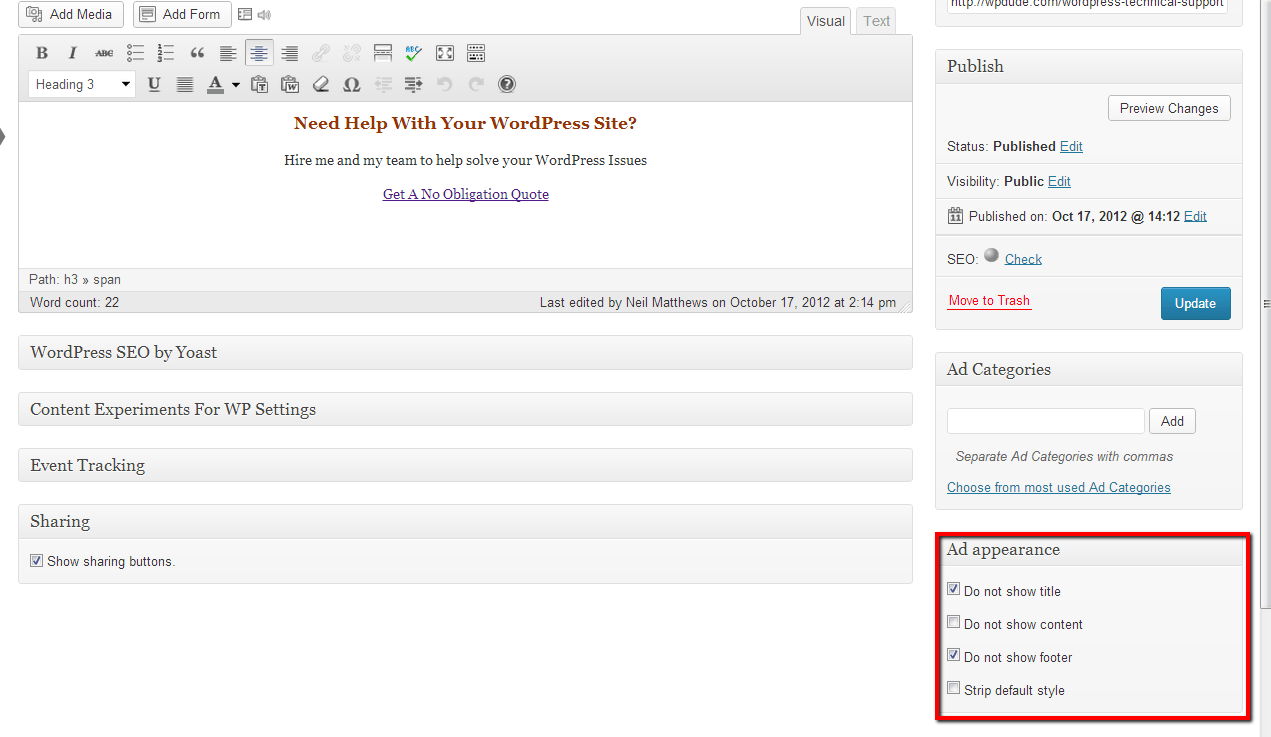
    You can also add new data types of your custom post types and have meta boxes.  Here is an example from a plugin I use called In Post Ads which has some custom meta boxes.

    Click to see full sized image
    Click to see full sized image

    As you can see a custom meta box has been added which gives us a series of check boxes.

    It’s Not For The Feint Hearted

    As you can no doubt guess adding custom post types requires a certain level of technical skill to code up theme files, plugins or to create templates to display content.

    Some Examples I Have Built

    The way you can use custom post types is limited only by your imagination.  Here are some of the projects I have worked on:

    • Events – the event has custom coding to have an event date and sort on that date, as opposed to the published date which will not show future events
    • Guides – I wrote a custom plugin to add and manage downloadable PDF guides
    • Bibliography – I wrote custom code to modify a bibliography for scientific journals and publications.  This has lots of custom meta for citations and references.

    Wrap Up – What Are Custom Post Types

    Custom post types move WordPress away from being just a blogging platform to being a fully functional content management system.

    I don’t want to throw too much at you in one post, but next up I’ll talk about custom taxonomies.  You can create custom ways to organise your custom post types.

    If you need help adding a custom post type config to your site jump over to my WordPress technical support page and I’ll give you a no obligation quote.

    What are custom post types,  well this is an SEO excise to improve keyword density.

    Photo Credit: L. Marie via Compfight cc

  • Case Study: Creating A Multiple Territory Website

    A client of mine was running their business in multiple geographic locations and they needed help to make their website service all of their markets seamlessly.  This is a case study on how I did this.

    What They Wanted

    They were running their business in multiple territories.  USA, UK, Australia and New Zealand and they wanted an easy way to display territory specific copies of their posts and pages both for content management simplification and for their site visitors.

    They wanted to consolidate the three sites they currently supported into one.

    The Solution

    The solution for his was a little out of the box, I used a multiple language plugin called WPML.  This is usually used to display content in different languages but instead of installing multiple copies of the same copy in different langues.

    How It Works

    WPML give you the ability to store multiple versions of the same post or page and display it according to a language ( or in this case territory) selected by your site visitor .

    An example;  the contact page, we had three versions,  it contained address, telephone and a Google map for each regional office in New York, London and Sydney.  There were also three contact form 7 forms to send to the appropriate staff in each region.

    This is a very simple way to manage what used to be three complex websites with just one site and three copies of the content.  My client now manages one set of updates, one set of themes and plugins, a great time saving and a neat way to ensure site visitors get the correct content.

    I’ve created a video showing the multiple language setup here, not quiet the multiple territories but you will get a feel for what the plugin can do.

    Location detection

    I also took advantage of the location detection features of WPML.  It looks at your IP address and browser location settings and makes a best guess as to a visitors location.

    The appropriate local site is selected and displayed.

    Some Of The Challenges

    Here are some of the challenges I was able to overcome:

    • Images with currency – some of the images used had US dollar amounts on them,  we needed GBP and AUD NZD images too. WPML allows you to translate or territorialise images so the correct one
    • Home page slider – the home page slider used American english for some words, but in the UK and Australasian sliders that was not appropriate, so we were able to translate and host multiple sliders
    • Multiple english versions – I was able to setup three versions of english on the site en_US en_GB and en_AU and treat them as three different languages thereby setting up three different territories.

    It’s Not Just A Blog

    There are dozens of other applications WordPress can be used for over and above a blogging platform, and here is yet another one.  Are you using WordPress in an unusual fashion that would make a good case study let me know.

    When you think out of the box a little, there are plugins out there you can re-appropriate to do unusual jobs.

    Wrap Up

    If you want help creating a multiple territory website, contact me from my Quotation and get a no obligation quote.

    Next up I’ll write a very similar case study on running a multiple currency on-line shop using some of the same tools and techniques.

    Image by stevensnodgrass


  • Case Study: Creating A Multiple Territory Website

    Case Study: Creating A Multiple Territory Website

    A client of mine was running their business in multiple geographic locations and they needed help to make their website service all of their markets seamlessly.  This is a case study on how I did this.

    What They Wanted

    They were running their business in multiple territories.  USA, UK, Australia and New Zealand and they wanted an easy way to display territory specific copies of their posts and pages both for content management simplification and for their site visitors.

    They wanted to consolidate the three sites they currently supported into one.

    The Solution

    The solution for his was a little out of the box, I used a multiple language plugin called WPML.  This is usually used to display content in different languages but instead of installing multiple copies of the same copy in different langues.

    How It Works

    WPML give you the ability to store multiple versions of the same post or page and display it according to a language ( or in this case territory) selected by your site visitor .

    An example;  the contact page, we had three versions,  it contained address, telephone and a Google map for each regional office in New York, London and Sydney.  There were also three contact form 7 forms to send to the appropriate staff in each region.

    This is a very simple way to manage what used to be three complex websites with just one site and three copies of the content.  My client now manages one set of updates, one set of themes and plugins, a great time saving and a neat way to ensure site visitors get the correct content.

    I’ve created a video showing the multiple language setup here, not quiet the multiple territories but you will get a feel for what the plugin can do.

    Location detection

    I also took advantage of the location detection features of WPML.  It looks at your IP address and browser location settings and makes a best guess as to a visitors location.

    The appropriate local site is selected and displayed.

    Some Of The Challenges

    Here are some of the challenges I was able to overcome:

    • Images with currency – some of the images used had US dollar amounts on them,  we needed GBP and AUD NZD images too. WPML allows you to translate or territorialise images so the correct one
    • Home page slider – the home page slider used American english for some words, but in the UK and Australasian sliders that was not appropriate, so we were able to translate and host multiple sliders
    • Multiple english versions – I was able to setup three versions of english on the site en_US en_GB and en_AU and treat them as three different languages thereby setting up three different territories.

    It’s Not Just A Blog

    There are dozens of other applications WordPress can be used for over and above a blogging platform, and here is yet another one.  Are you using WordPress in an unusual fashion that would make a good case study let me know.

    When you think out of the box a little, there are plugins out there you can re-appropriate to do unusual jobs.

    Wrap Up

    If you want help creating a multiple territory website, contact me from my WordPress technical support page and get a no obligation quote.

    Next up I’ll write a very similar case study on running a multiple currency on-line shop using some of the same tools and techniques.

    Image by stevensnodgrass


  • Start 2013 With A New Custom Theme

    Start 2013 With A New Custom Theme

    Start 2013 with a brand new custom look and feel for your WordPress site.

    Have you ever wanted a custom theme for you WordPress site, in this post I will talk about a new service for design I’ve found and how you can use our development skills to make that site a real live WordPress theme.

    I’ve worked with a couple of clients who have used this service and the designs were great plus the output for my development team was first class.

    Create a custom design

    We don’t offer custom design services here at WPDude. but we have partnered with our friends at DesignContest.com to help you get the custom theme of your dreams.

    How Design Contest Works

    You submit your brief to Design Contest, then the designers there will compete to win your business.  You will see multiple designs, based upon your brief, then simply choose the one you love.

    It’s risk free you only pay if a design you want is created for you.   Designs start at $499

    Go check out their site for more details DesignContest.com

    From Design To Custom Theme

    This is where we come in, once you have your winning design from design Contest, pass it over to us and we can make it into an actual WordPress site.   We will:

    • Setup a development environment on dev.wpdude.com/yourproject, copying over all of your existing post and pages so you can see your site develop with real content.
    • Build out the theme to your new design.
    • Involve you at all stages to test and approve the site
    • Once you are happy we will make it live on your live domain name
    • Test again to make sure everything is as expected.
    • Provide any training or support you need to get the most from your new custom site.

    If you already have a design we can do this without the help of Design Contest.

    What It Costs

    We are having a New Year special, all new site builds come at the fixed price of $999. Note this does not include the Design Contest costs.

    Paypal Bill Me Later

    Any custom work you commission is not cheap,  as you can see from the costs above, that is why I have teamed up with Paypal and their Bill me Later program. Using this feature of Paypal you can spread the cost of your new theme over six months at 0% APR (I sound like a car salesman 🙂 ) .  So if you want a custom theme but think the cost is prohibitive, you can use this service.

    Limited Number

    Building custom themes takes a lot of time, so we can only take on a small number per month.  If you are interested in a new theme for the new year, let us know from the form below and we will start the process.

    We will work with you to get the design you want via designcontest.com  as your project manager, then make it a real life theme.

    [gravityform id=”92″ name=”WordPress Helpdesk Request – Copy 1″ title=”false” description=”false”]

  • Plugin Review: Serverbuddy

    Plugin Review: Serverbuddy

    One of the key tools in my WordPress technical support toolbox is Serverbuddy, this great little plugin helps to analyse your hosting configuration which in turn can help you trouble shoot problems with your WordPress install.

    You can check out this plugin from the following link:

    http://wordpress.org/extend/plugins/serverbuddy-by-pluginbuddy/

    What Does It Do?

    It analyses your server environment and it tells you if you have an optimum configuration to run WordPress on.

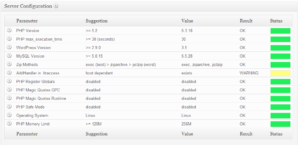
    Once you have installed the plugin, a new option is available under tools -> serverbuddy.  When you review that panel you are given an overview of your servers settings with a green, yellow or red lights depending upon whether or not your site is optimal or not.

    Any red or yellow indicators should be fixed, and server buddy will give you directions to do that.

    click for full size image
    click for full size image

    Types Of Things It Can Be Used For?

    It’s got a load of uses, but here are some suggestions.

    General health check – is your  WordPress running on an optimial configuration.

    Memory problems – you can see how much memory is allocated to WordPress, if this is lower than the recommended amount you may get issues.

    Security – server buddy checks for insecure file permissions.

    Disk space issues – you can get a map of where the big files or the large number of files are living and delete where applicable if you are running out of disk space.

    PHP settings – you can see the php settings assigned to your site, for example if you want to upload big files you might want to check out upload_max_filesize.

    Cron Jobs – cron jobs are scheduled jobs that run on your site, an example might be check for plugin updates.  If you are seeing problems at a particular time of day, perhaps a scheduled job is causing that problem

    One for The Techies

    This plugin is really one for the techies out there, so this may not be everyone’s cup of tea (as we say in England), but I think it is worthwhile for everyone to do a general health check to see their server config is acceptable for a WordPress site.  Install it and make sure everything is green.

    Image by johnseb


  • How I Blog For My Business

    How I Blog For My Business

    Originally published at wpdude.com

    I’m not a problogger by any stretch of the imagination, I blog to support the WordPress Technical Support business I run here at WPDude.

    After four years of blogging I’ve been able to switch off all paid advertising and support a team of two (soon to be three techies) in more work than they can handle, all because of blogging.  This post talks about how I’ve done this.

    It’s Sure As Hell Not Get Rich Quick

    Flip back to the previous paragraph.  Four years of blogging to get where I am.

    If you think blogging is going to generate a ton of leads overnight, I’m sorry to upset you, blogging is a slow but sure marketing method. Once you get traction, and the search engines have a body of work for you, it’s a very low impact, always on and free form of marketing.

    Blogging is passive (except the actual writing part) so I can market to people without actively being engaged, I can prove the expertise of me and my teams in WordPress through my posts and hopefully be in that persons mind when they need to engage a team to help with their site.

    You need to be into blogging for the long haul, if you are still with me then please read on.

    Blogging And SEO

    As I write this I have 299 posts published on WPDude, that’s 299 chances to lure people into my site with a bite sized piece of my knowledge and a chance for me to expose them to my sales page.

    I’ve written about a broad spectrum of WordPress topics so I can bring people into my sphere of influence and hopefully help them with my free content, and if they need it, help them on a paid basis too.

    The large number of posts match to a large number of search queries and a wider range of people’s WordPress problems.

    I have a couple of posts that bring me a lot of traffic, but I also have many many posts that bring a small trickle of traffic.  I’m pretty sure that the large body of work I have has contributed to my sucess with the search engines.

    As I have blogged for such a long time, I’ve established authority with Google (I think – who really knows what they think) and it looks like I get good rankings for most things WordPress I talk about.

    I’m not going in depth about seo in this post other than to say I use WordPress SEO by Yoast.  I write for people first then tweak slightly for search engine happiness.  Which leads me nicely to …

    Who I Write For

    Whenever I write a new blog posts I’m always thinking “Will this benefit the type of people who buy my services?”.  So for this posts for example I’m thinking, my clients have blogs, but they also have businesses, so they are using blogging as a lead generation strategy, bingo a match I can provide you free useful information and keep my name at the front of your mind.

    I made the mistake in the early stages of this site of writing technical articles about WordPress, I was getting great traction with the WordPress development community, but they are not the type of people who want to do business with me, they can fix their own sites.

    If you have one take away from this post, always think about your client when you post a blog.

    What I Write

    I write about things that will keep my clients informed about WordPress, show them what can be done with their sites and keep them abreast of the latest developments.

    I always write from experience.  This is important, everything I write about I’ve used or done for real in my business of for my clients.  There is not theory, it’s all experienced based.

    I like to write plugin reviews of new and interesting plugins I find that may be useful to my audience.

    I also write articles on fixing the types of problems I see in the field, I call these case studies and they are great. They showcase my expertise while informing the reader, an under the radar marketing technique.

    I write how to articles which will step you through fixing a problem.  These are good for showing your expertise and also showing your reader what can be done on their site.  If it is slightly technical it also shows your reader their knowledge gap, a gap they might like to plugin with expertise for hire,

    I write direct sales articles when I’ve got a course or a special offer on.  This is where investing in you blog pays off, you have an audience willing to read your stuff, then when you have a sales or offer to give, your people will be engaged.  For example every year I run a holiday sale.  I’m based in the UK and we don’t celebrate Thanksgiving so I run a sale to plug that gap when I usually don’t get any work.

    I also go off topic sometimes and write about online business, something I’m passionate about.

    Blogging And Email Marketing

    My blog feeds my email list too.  It makes being on my list a worthwhile thing.  I send out free updates to inform and educate then once in a while I send out a marketing offer.

    Another thing with email and blogging is that it keeps your name and business in the fore front of peoples minds, Whenever I send out an email broadcast about a new posts I usually get a reply asking for a quote or two to fix a problem on someone’s site.

    Guest Posting

    I blog not only on my own site,  but I guest posts on other people sites too in an effort to increase my profile.  If you guest posts for someone with a bigger audience it’s a great way to expand your reach.  Busy bloggers or business owners are always happy to accept a high quality guest post.

    This is something I’ve picked up again with a passion, tapping into someone else’s already established audience is a great way to boost your own profile.

    I also accept guest posts here if you are interested.

    Exposing Your Sales Funnel Through Blogging

    This is where I’m spending a lot of my time at the moment, I’m analysing my traffic and finding ways to introduce people new to my blog to my sales page (It’s up at the top right in big red letters Hire Me, just in case you were wondering.)

    It’s no good having a ton of traffic if people are completely missing the fact this is a business blog not a hobby blog or a pro-blog looking for advertising clicks.

    Here are some of the techniques I use.

    • Constant reference, in a subtle way to my service.  I’ve done this in the first paragraph.
    • Differentiated menu items.
    • In posts ads.  I’m testing a plugin at the minute that inserts ads after x paragraphs.
    • Banner ad at the bottom of my posts.
    • Sidebar banner ads.
    • Reference to my services in the email update I send out about posts.  I have image banners.
    • RSS footer links to my sales page.
    • Hello bar, popups and welcome gates oh my (these may or may not be active when you visit due to split testing)
    The idea is to provide people free content but also alert them to the fact they can hire me and my team.  Don’t be shy, this is a business.  It makes me shake my head when I see business blogs with nothing but a lonely services link at the top of their page.

    Frequency Of Blogging

    I post once per week, and a little more if I’ve got some sort of launch on.  That’s all I need.  I’m not running a magazine style site where I need constant eyes on my sites for advertisers, I need a constant trickle of people into my sales funnel to keep me and my team busy.

    I like to write longish posts so it takes me a couple of hours to write up, check and send out an email alert about a new posts.  Not a bad time to results ratio in my opinion.

    Blogging Mistakes

    I made a couple of blogging mistakes in my early days, here are a few:

    RSS over Email – I just presumed that because I like RSS over email that everyone else will too, and I put off starting an email list for about 18 months (fool of a wpdude).  Get your email list up and running now.

    Losing momentum – as the work starts to come, blogging gets dropped off, I had too much work for clients and my blogging efforts dropped off, big mistake. When the projects are done I had to turn back to paid advertising rather than have a steady stream of leads ready to turn into projects.

    Blog on home page – I know I’m still making this mistake but your home page should advertise your business not your blog.  I’m working on this at the minute.

    Giving a damn about non-clients trolls – I used to get caught up in criticism about my blog posts from people who would never buy my services (other techies for example) or from out and out trolls.  You need to spend your time on clients, not these type of people. Actively direct them away from your blog, these are not paying your way they are wasting your time.

    I would love to hear you blogging mistakes in the comments.

    Wrap Up

    All of my business comes from new clients finding me via my blog or from referrals from people who have used my services,  this is a great place to be in.  It takes a long time and perseverance, but it’s well worth the blogging journey.

    Can I leave you with a tongue in cheek quote

    Advertising is Like Sex: Only Losers Pay for it. – Chris Guillibeau $100 Startup


    Image by 66356408@N07

  • Blogging From Experience

    Blogging From Experience

    I made a commitment to myself earlier this to only blog from experience.  What does that mean?  It means that everything you read here at wpdude.com is something I’ve done.  No theory, no hypothetical situations, just things I really have experience with.

    As a result I think my writing has improved, I think I can help you the reader and I’m definitely getting more feedback and shares when I blog from experience.

    In this post I want to talk about what blogging from experience means to me.

    People Want Real Not Hypothetical

    I’ve been guilty in the past of blogging about things I’ve not tried, but things I’ve read about or know about in theory.  The trouble is people see through the fact you’ve not done it.  You cannot point to concrete things you have done and as a result I’ve found that those type of posts don’t resonate with people and I don’t get much feedback in the way of comments or share on social media.

    Types Of Posts I’m Writing

    I’m writing the following types of post now from my own experience:

    Case studies – I write up real world problems I have solved on my own site or on my clients sites.

    Plugin reviews – I’ve stopped writing plugin reviews for plugins I have not used for a prolonged period of time on my site.  In the past I’ve been guilty of writing plugin review for premium plugins I’ve only used for a very short time in the hope of chasing the dollar.  I cannot write about something I’ve not used in depth with any authority.

    Online marketing strategies I have used on my own site – I love writing about online marketing, but I’ll only write about things I’ve tested here at wpdude.com.  For example  I don’t  think I’ve ever written about any Facebook strategies here at wpdude.com.  Why?  I don’t actively use Facebook  I don’t like the site very much in fact and I’m not interested in investing lots of marketing time there, contrary to what the social media gurus tell me.  So no real experience, no blog posts about FB.

    People Want Real World Scenarios

    People want actionable information, not fluff and theory.  They want to follow step by step processes that are know to work (in my opinion anyway).  They want to be follow the example of someone who has done what they want to do and has real world results.

    There Is A Lot Of Stuff Out There

    There are millions of blogger out there all vying for attention, all spinning the same yarn,  the only way I can see to differentiate myself is by telling my own personal story from my own personal experience.

    What’s the point in adding to the info din unless it is with information you can stand behind?

    Are You Blogging From Experience?

    Are you telling your real story or faking it till you make it?

  • The Power Of Testimonials

    The Power Of Testimonials

    I’m a great believer in getting and using testimonials from my clients as part of my marketing.

    This post is a combination of internet marketing techniques and WordPress plugins to show you how to make the most of client testimonials.

    How Do I Know The Power Of Testimonials Work?

    You may be a little cynical about testimonials, I think we have been yellow highlighter-ted to death by internet marketers with shiny testimonials about sub standard info products.  But if you use testimonials ethically from real clients whom you have helped, I think they works really well.

    Social proof is one of those triggers all marketers talk about along with risk reversal and scarcity.  If you can prove you know what you are talking about and are not a nightmare to work with via testimonials you are one step closer to making a connection with a stranger from internet-land.

    How do I know people read testimonials and that they work?

    When someone submits a request for WordPress technical support, I use a plugin that tracks the referring page, and I see dozens of requests coming in to me where their referring page is my testimonials page, which means right before they submit a request, they are reading client testimonials and get a good feeling for me.

    If you go to my sales page, there is a testimonial, which also links to my main testimonials page.  This is how I showcase my social proof.

    How I Use Testimonials

    I use/show testimonials in a number of ways:

    On my sales page – I have a single testimonial at the bottom of my sales page, this then links to my main testimonials page.

    From my menu bar – I make a big deal of highlighting and drawing people into my testimonials from the main menu.

    From my sidebar – I have a rotating sidebar widget which shows random testimonials.

    On demand – if people ask about a certain type of project and I have a testimonial from someone that I did that type of work for, I point people at that.

    Asking for Testimonials

    You should not be shy about asking for a testimonials.  If you do good work and your clients are happy they are usually more than happy to provide a testimonial for you.

    The best time to do this is at the end of a project when the client has a warm glowing feeling about you and your service or product.

    I usually add a line on my final invoice saying something along the lines of “if you were happy with the service, a testimonial is always appreciated”.  It will surprise you how many testimonials you get with this simple automated technique.

    The Unspoken Benefit of the Testimonial Leaver

    You as a purchasor of professional services should see the leaving of testimonials as a matter of course, but ask for  a link back to your site.

    Not only does this increase the number of links back to your site (something Google loves) but it opens up the audience of your suppliers site to your site.

    People do follow the links from my site back to my clients I can see that from my analytics, so use testimonials for your suppliers as a marketing tool

    The Testimonial Plugins

    There are a lot of plugins out there that help to collect and display plugins.  I currently use  wp-testimonials.  It allows me to collect testimonials, display them as a widget or use shortcodes to embed them into a page as I do from the menu above.

    Check out the other testimonial plugins available http://wordpress.org/extend/plugins/tags/testimonials

    It has it’s short comings, clients cannot add testimonials automatically , they need to send the message to me to add, the styling is not that great and it has not been updated in a long time.

    The same thing goes for many of the other testimonial plugins I have tested, they are good but are not 100% right for me, that is why … dun dun durr fanfare …

    I’m Writing An All Singing All Dancing Testimonial Plugin

    Because I cannot find the perfect solution for my testimonial needs, I’m writing my own.  Here are the main features I’ll be adding

    • Back end management of testimonials as custom post types
    • Form for clients to submit their own testimonial
    • Shortcodes to display one or more testimonials
    • Testimonial sliders, again via shortcodes
    • In theme function support for the above two
    • Widgets to show testimonials in sidebar plus rotating them
    • Gravatar support & client image / logo support
    • Do follow link back to your client as a thank you.
    • Multiple styles to change the look and feel of the testimonials
    That’s phase one only, I have a load of really great ideas to expand and develop this plugin.

    What Would You Like To See In A Testimonial Plugin?

    I’m programming my plugin from scratch so what featured would you like to see in a testimonials plugin?

    Oh, oh I’ve just had a brilliant feature idea, popup youtube video testimonials so people can wax lyrically about you via video, please add yours below.

    Wrap Up

    I seriously recommend that you get a testimonial showcase up and running to provide social proof you know what you are doing and that clients are more than happy to recommend you.

    Image by vestman