Neil Matthews

Author: Neil Matthews

  • The Art of Integration

    The Art of Integration

    I use a number of third party software as a service  (SaaS) products in my business, but something I always ask before I signup for a product is:

    “Will it integrate?”

    What do I mean by integration?  I mean can I collect data once and then have it passed between all solutions.  The idea of re-keying data to make the various systems of your business it time consuming and for me deadly boring, I want to integrate WordPress with these systems.

    Rather than creating a bunch of new tasks to manage your shiny new SaaS I suggest you check out any integrations they have on offer before taking he plunge with the new tool.

    Most of the popular software as a service providers understand their system will not solve everyone’s so they will provide a number if integration with other solutions where data can be freely shared and not re-keyed.

    To give you a feel for integration here is how I use it across the services in my business.

    Mailchimp

    I use mailchimp as my email service provider, I want to capture leads directly from my website without keying them in and I also want to capture details from my contact forms.

    Mailchimp of course provides signup form code to add to your site, but there are also a host of plugins such as this one to integrate with your site.

    http://wordpress.org/plugins/mailchimp/

    I don’t use this plugin, I use gravity forms (see below).

    I never have to key in email addresses into Mailchimp because of these integrations.

    Checkout Mailchimp’s integrations.

    Freshbooks

    This is at the core of my business it allows me to send out estimates and invoices, it tracks all important financial information for me  It allows me to record expenses and produce reports I use to create my accounts.

    The idea of typing in client details every-time I have a new request for work does not appeal, so I found an integration with Gravity forms that allow me to capture potential customer information from that form and pass it directly to Freshbooks creating a new client entry and a new blank estimate which I can fill in and send to the client.

    This may not sound much but please bare in mind I’ve sent out thousands of quotes over the years, and multiplying five minutes for each quote by thousands is hundreds of hours saved.

    I can also push data from Freshbooks into mail chimp and basecamp for cross integration too.

    Freshbooks has a huge number of other integrations, check them out over at freshbooks.com

    Basecamp

    I use Basecamp to manage all of my projects, a new request is sent automatically into basecamp using their email integration (sent from gravity forms) so a new entry for a potential project is created, if that project comes to fruition I can simply move the project details into it’s own project at the click of a button and add additional information for me or my team to work from.

    No re-keying and all details kept in once place.

    Checkout Basecamp they are the “Daddy” of integration and have a huge number of add-ons as they call them.

    Contactually

    This is a new product I’m using as my customer relationship management software.  In it I keep all details of my clients and I use it to follow up and keep in contact with people.

    It’s a great system for keeping in touch and generating new business (I’m pretty new to CRM systems and this has helped me to book myself solid recently).

    Contactually links to mailchimp, I can import Freshbooks from CSV exports (not a direct integration but it’s a new SaaS and they are developing it well) and most importantly it connects to my primary email system Gmail and pulls in details of everyone I have contacted so I can tag and categories the email addresses.

    If I had to do any of this manually by typing in email addresses (which some CRMs ask you to do) I would not have adopted it.

    The fact I have all my email addresses bucketed and ready for use without typing in addresses has saved me hundreds of hours, and lets be honest here I would have done the first fifty then gotten bored and given up, another tool unused – well done contactually.

    Check out Contactually

    Gravity Forms

    Not necessarily a product, but Gravity forms and their understanding of the need to integrate is at the heart of everything I do,  even the signup form in my sidebar is a gravity form er form pretending to be a signup graphic.

    If you request WordPress technical support from me, you will be sending your details via GF this send to Basecamp, Freshbooks and adds you to a Mailchimp list.

    You need to buy the developers edition of Gravity Forms to take advantage of these add-ons but the investment of $150 a number of years ago has saved me hundreds of hours in lost time re-keying data.

    There Is Always The API

    Most of the good SaaS systems have an API of application programming interface.  Using this there is always the chance you could write  your own integration if one does not exists off the shelf, or if you have a particular requirement.

    This is something I have done for my clients in the past.

    Wrap Up

    How are you integrating WordPress with the software tools that power your business?  Let talk about it in the comments.  Are you struggling with an integration, perhaps I can help I’ll answer your questions in the comments.

    I’m a huge believer in working smarter, I want to automate before I do it myself or ask a member of ,my team to do it.  I advise you learn the art of integration for your own systems.

    Photo Credit: ernest figueras via Compfight cc

  • [VIDEO] How Google Sees Your Site Load Speed

    [VIDEO] How Google Sees Your Site Load Speed

    Google has added page load speed into it’s SEO algorithm, but do you know how Google sees your sites’s load speed?

    This video post will show you a very useful Google tool so you can see how their system sees the performance of your site and provides recommendations on how to speed it up.

    [leadplayer_vid id=”51B19C28B977A”]

    Check Your Site Performance

    Here is the link as promised in the video.

    https://developers.google.com/speed/pagespeed/insights

    Related Posts

    Here are some other posts about improving site load times

    What Is A CDN

    Slow Sites Turn Off Customers

    WordPress Performance Tuning Tips

    Per

    Need Help Speeding Up Your Site?

    I’ve got a fixed price WordPress performance tuning package, get a no obligation quote from my WordPress Technical Support page

    Photo Credit: atzu via Compfight cc

  • This Two Minute Security Fix Could Save Your Site

    This Two Minute Security Fix Could Save Your Site

    How To Rename Your WordPress Admin User

    I’m going to review a very simple plugin called Admin Renamer, but it could add a powerful new layer of security to your WordPress site for only two minutes of effort.

    I will show you how to rename your WordPress admin user for an additional layer of security against hackers.

    What Is Admin Renamer Extended?

    It is a plugin that will change the user name of your admin accounts from admin to wpdudeadmin for example.

    Why Do I Need It?

    The majority of WordPress sites I work on use the default super user login of “admin”. I know this and so do the hackers.  They already have half of the problem solved trying to get into your site.

    There is a hack attack doing the rounds right now that uses a bot network to perform a brute force attack on WordPress sites by entering admin then trying a dictionary of common passwords.  It is working, people are getting hacked by having a default admin user name.

    If you change your admin to something else, you are removing a backdoor from your site and increasing your security controls.

    You cannot do this from the user menu for the main admin user, in the past when I have done this for clients I have manually edited the various database tables ( it’s not easy there are a number of entries to edit) this plugin has changed a 20 minute job into a 2 minute one.  There is no excuse for not implementing this very simpel changed.

    Download The Plugin

    You can get a copy of the plugin here

    http://wordpress.org/plugins/admin-renamer-extended/

    Adding The Security Layer

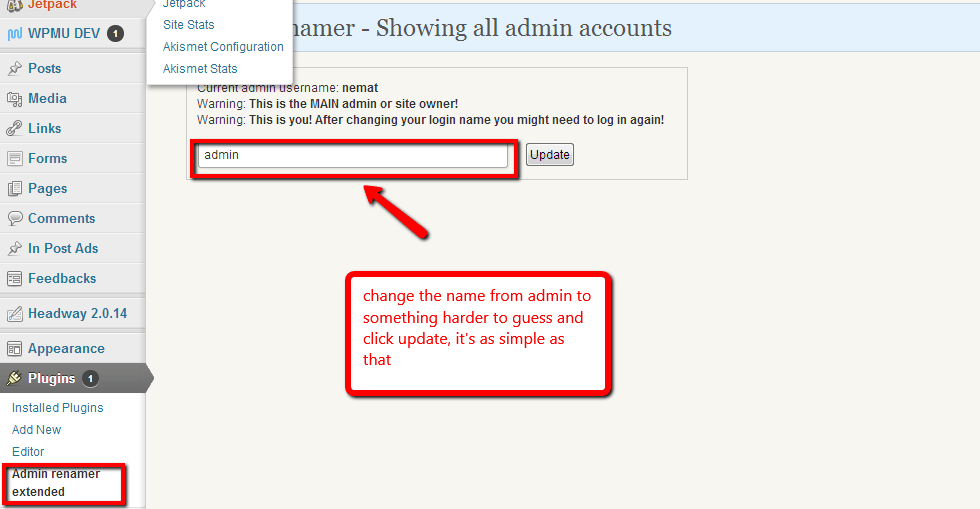
    The process of changing your admin user is incredibly simple, install the plugin and then go to plugins -> admin renamer extended.

    There is a simple box which will show al your admin users, change the name and click on update, job done.  Two minutes of effort one huge leap in security.

    Click For Full Size Image
    Click For Full Size Image

    Bonus Tip

    Always opt for a hard password for your admin users, don’t go for something simple like password or abc, these are in the dictionaries of the hackers and they will repeatedly try and try again with a bot network with different passwords.

    When you change the password of a user, WordPress has a password strength indicator, never settle for a weak password.  Always add numbers and special characters like &%£~@! to make passwords harder.

    Bonus Plugin

    I’m sounding like an infomercial now (for $29.99 we will double it up and give you a bonus set of faux leather gimp masks; his and hers) .

    A great additional plugin is Login Lockdown, which will lock down the login system after three failed login attempts, here is my review of that plugin.

    https://dev.neilmatthews.com/plugin-review-login-lockdown

    Wrap Up

    This brute force attack has been doing the rounds for some time, I urge you to go and make this change now before you are attacked.

    Oh and don’t forget to backup before you do this, you are messing with the database after all.

    Photo Credit: Diego3336 via Compfight cc

  • Canadian Site Owners Legal Requirement

    Canadian Site Owners Legal Requirement

    I came across this excerpt the other day which states that site owners from Canadian French provinces must provide their content in French.  Here is the article:

    Businesses operating in Quebec who maintain Web sites may need to ensure that the contents of their Web sites comply with Quebec’s language laws. Article 52 of the Charter of the French Language requires that catalogues, brochures, leaflets, commercial directories and all other publications of that nature be in the French language. A translation may be provided as long as French is given equal prominence. The Office de la langue francaise (OLF) has taken the position that this definition is broad enough to include content placed on Web sites, sent by fax or electronic mail.

    Micro-Bytes, a computer retailer located in Pointe Claire (Quebec), received a warning letter from the OLF in late May, advising that the company’s Web site violated Quebec’s language law. In response, Micro-Bytes removed most of the content from its site until it was able to prepare French language translations.

    According to a notice issued by the OLF on June 21, 1997, all companies which have a place of business or an address in Quebec are required to provide Quebec consumers with a French language version of any commercial publication. A company which does not have a base of operation in Quebec (i.e., no place of business nor an address in Quebec) will not be compelled under Quebec laws to use French on its Web site. Any entity with substantial links to Quebec should also consider whether they must comply.

    Exemptions may apply to non-commercial messages such as those of a religious, political, ideological or humanitarian nature which may be published in a language other than French. Cultural or educational products may also be advertised exclusively in the language used in the product without a French version.

    I wonder how many people know they may be breaking the law by not translating a site?

    This is something I was aware of in the UK, where all government website have to be in Welsh as well as English, but not commercial ones.

    Are there language laws like this where you live?  I would love to hear more in the comments.

    Photo Credit: Ian Muttoo via Compfightcc

  • [Webinar Replay] Multi Langauge Multi Currency E-Commerce

    Here is the replay of a webinar I ran on Tuesday 21st May all about building a multi language multi currency website.

    Video

    [leadplayer_vid id=”519CEA3235E2D”]

    Downloads

    Download the presentation slides
    WooCommerce
    WooCommerce Multilanguage
    WPML

    Wrap Up

    If you need help building your Multi Language Multi Currency site please contact me to get a no obligation quote.

    Photo Credit: bradipo via Compfight cc

  • Which Languages Do You Need?

    Adding additional languages to your website comes at a cost to translate content (the service I use starts at $0.09 per word so additional content soon adds up ) and at a resource cost on your website in memory and database usage.

    I always advise only to add the languages you really need to keep cost and performance optimal.

    How Do  You Know Which Languages You Need?

    How can you find out definitely what languges you need to support?

    You may feel you need to support Chinese but if no-one from China is visiting, then the investment is an unecessary one.

    Enter The Analytics Package

    Digging into your analytics will tell you exactly where your site visitors are coming from and what languages you need to support.  My preferred analytics package is Google Analytics.

    Browser Language

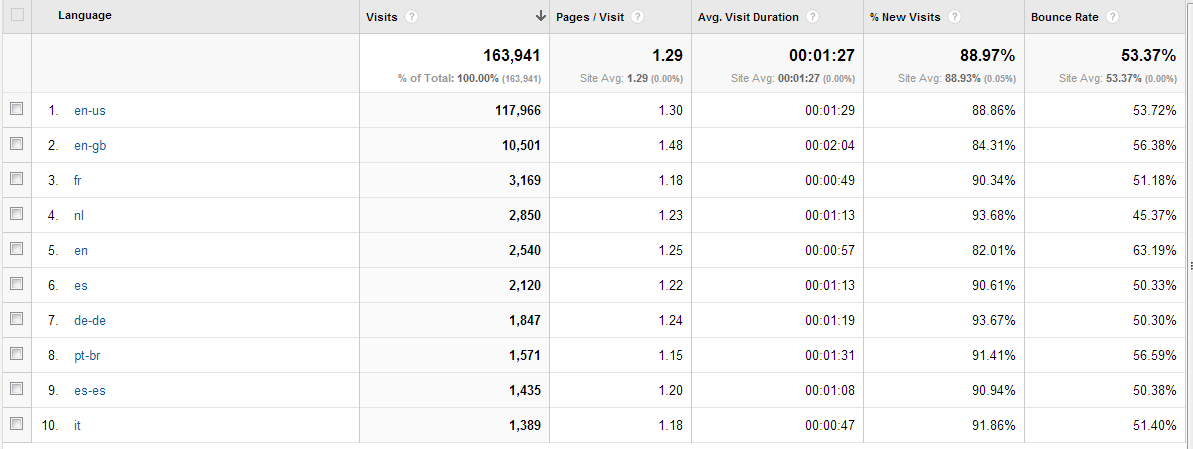
    The first analytic I look at is browser language, this is the language your site visitor set for their browser and it tells you exactly which language they are most comfortable browsing in.

    Here is an extract from my WPDude.com site.

    Click for full size image
    Click for full size image


    Here is a link to a list of browser country codes to help you translate which code matches which language.

    Location Of Visitors

    The second metric I like to focus on is the geographical location of your site visitors.   Stats packages are able to take the IP address of your site visitor and match it to a country.

    Taken to the next level you can match to particular cities or provinces.  This could be very useful in certain location for example Canada where certain areas have higher French Canadian populations.

    Again here are the stats from WPDude.com

    Click for a full size image
    Click for a full size image


    Don’t translate Everything

    Use the stats but feel free to dismiss them too. Use knowledge of your business along with the stats to make your descision.

    You may think that I would want to support a foreign translation for site visitors from India as this is my third most common country of origin, but I would reject this for a couple of reasons

    1. India is huge and has a huge number of languages and dialects, so many in fact their lingua Franca of business in English.
    2. I’ve never successfully sold any services into India from WPDude.com,  This is not a market I’m interested in.

    Matching business knowledge and the stats I would say I need to support the western European languages of French, German and Spanish, all countries I have been able to sell services to.

    Wrap Up

    Supporting additional languages can be resource and monetarily expensive, do some research and only support the languages you really need.

    Take into account business experience and build your supported language list from there.

    Photo Credit: alexanderdrachmann via Compfight cc

  • Can Your Database Handle Multiple Languages?

    One of the problems I have come across when building multi language website are database configurations that cannot support the new languages people are planning to add.

    In this post I want to give you a case study of a site that could not support Chinese and how I fixed it.

    The English and Chinese Site

    I was called in by a client to configure a site that would work in English and Chinese    All was going fine, the tools I use to host multiple languages were in, I was ready to start adding content and multiple menus when we found our problem …

    The  Problem

    Whenever we added Chinese content into the site, instead of displaying the correct characters, it displayed a line of question marks instead ??????????

    The Cause

    When I looked under the hood I realised we were using database collation of a type that did not support double space characters such as Chinese or Japanese and would only allow us to use Latin character sets.  Which would be fine for English, French, German etc but no use for a more complex languages.

    The Solution

    We needed to change the character set of your database from something that will not support double character languages like Chinese to a character set that will, always my preferred and default selection is utf8.

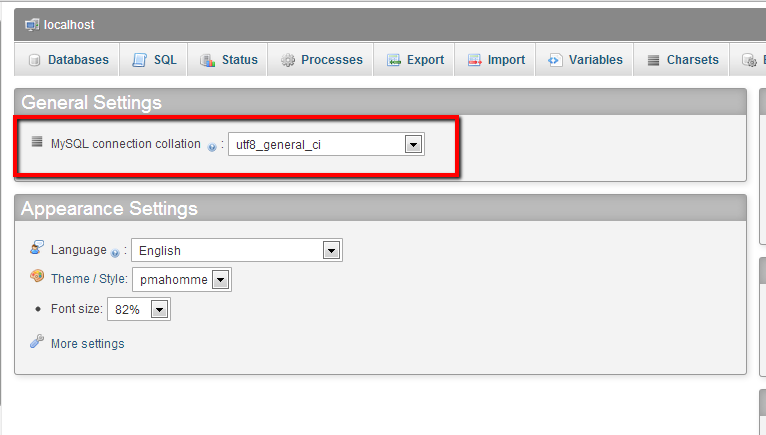
    The majority of sites I work with use MYSQL so I’m assuming that is the case with your multi language site.  You can change your You can do this through phpmyadmin very simply by opening the database in question  going to the general settings and changing your database collation (see screen dump).

    Click for full sized image
    Click for full sized image

    Please backup your database before you do anything like this – you have been warned.

    As a matter of course I set-up all new sites with a collation of UTF8.

    Can Your Database Handle Multiple Languages?

    The quick test is to cut and paste this simplified Chinese sentence into your site (for those interested I think it says can  your database handle multiple languages)

    你的数据库可以处理多种语言

    If it shows up okay then you are good to go, if it shows ???????? you have a database issue.

    Wrap Up

    Often working with multiple languages throws up unexpected issues we don’t expect, if you are used to working with Latin languages this is an issue you would never expect.

    If you need help with your multi language build, please contact me to get a no obligation quote.

    Photo Credit: darkmatter via Compfight cc

  • Post Without Sidebar

    Post Without Sidebar

    Morbi sagittis, sem quis lacinia faucibus, orci ipsum gravida tortor, vel interdum mi sapien ut justo. Nulla varius consequat magna, id molestie ipsum volutpat quis. Suspendisse consectetur fringilla luctus. Fusce id mi diam, non ornare orci. Pellentesque ipsum erat, facilisis ut venenatis eu, sodales vel dolor. Nunc volutpat odio sit amet, consectetur adipiscing elit.

    Nulla varius consequat magna, id molestie ipsum volutpat quis. Suspendisse consectetur fringilla luctus. Fusce id mi diam, non ornare orci. Pellentesque ipsum erat, facilisis ut venenatis eu, sodales vel dolor. Nunc volutpat odio sit amet, consectetur adipiscing.

    Morbi sagittis, sem quis lacinia faucibus, orci ipsum gravida tortor, vel interdum mi sapien ut justo. Nulla varius consequat magna, id molestie ipsum volutpat quis. Suspendisse consectetur fringilla luctus. Fusce id mi diam, non ornare orci. Pellentesque ipsum erat, facilisis ut venenatis eu, sodales vel dolor.

    Lorem ipsum dolor sit amet, consectetur adipiscing elit. Pellentesque dictum tincidunt enim, vitae eleifend magna bibendum in. Ut at nunc vitae odio consequat euismod eget eget nunc. Nunc at enim placerat, sodales nisl ac, posuere ipsum. Aliquam vel justo sed nisl vulputate sodales. Donec ac mattis dui. Suspendisse ultricies nulla vel pellentesque imperdiet.

    Maecenas eget tincidunt neque, quis pellentesque ante. Nulla pharetra nulla at euismod tristique. In hac habitasse platea dictumst. Praesent laoreet, eros nec laoreet ullamcorper, neque orci molestie diam, quis facilisis arcu arcu at est. Ut et sem pharetra, eleifend purus quis, vehicula leo.

    Etiam nec erat tellus. Mauris et vulputate velit. Nulla varius consequat magna, id molestie ipsum volutpat quis. Suspendisse consectetur fringilla luctus. Fusce id mi diam, non ornare orci. Pellentesque ipsum erat, facilisis ut venenatis eu, sodales vel dolor. Nunc volutpat odio sit amet, consectetur adipiscing elit.

  • Webinar Replay

    A big thank you to everyone who joined the live event on Tuesday, if you were unable to attend, here is the replay.

    The Replay

    [leadplayer_vid id=”516EE2055C35A”]

    Links Mentioned In The Webinar

    • wpml.webployglotcom
    • http://codex.wordpress.org/Right-to-Left_Language_Support
    • translate.google.com
    • dev.wpdude.com

    Download Slides

    Presentation slides

     
    Photo Credit: alshepmcr via Compfight cc

  • 5 Little Used WordPress Widgets that Your Blog Should Have

    5 Little Used WordPress Widgets that Your Blog Should Have

    This is a guest post by Ken Myers, see Ken’s Bio at the of this post

    WordPress is one of the most common and versatile content management systems on the Internet. It is a way to publish your content very quickly and has the ability to utilize a great range of plugins in order to make the experience for the visitor a good one. However, there are many WordPress sites across the Internet that don’t fully explore the possibilities this CMS has to offer. Many plugins and widgets go unnoticed that could greatly increase the efficiency of your site.

    1. FreeBlogApps.com – The RSS reader can keep mobile device and computer system users apprised of new posts that are submitted on your website. FreelogApps.com helps you create those RSS feeds which can be added as a widget to your blog for all to see and install. The RSS reader is downloaded from the provided link and installed on the mobile device. This simple yet effective app is linked to the content on your website and provides a real-time update of the posts you or other authors submit.

    2. Pinterest Pinboard – Link your Pinterest imagery to your blog with the Pinterest Pinboard Widget. Any time a new pin is added to your Pinterest account, it is immediately reflected onto your webpage. Technically, the widget allows you to enter any Pinterest account in order to display his or her pins. The settings are simple as you can adjust how many thumbnails of the images the widget is wide and how many to show in a row. If your marketing plans include the use of Pinterest, this could be a viable method to link your blog visitors to your imagery for increased exposure.

    3. Top 10 – Display the most popular of content listed on your website. Visitors who found your
    site through search engines can be enticed to read other posts that are deemed as the most popular by your general audience. This widget will count the number of times a post is accessed and display the most popular. Settings can be altered to reduce the number of posts that are
    displayed and a timeline can be added for additional control.

    4. K-news – Providing a newsletter for your subscribers is made easy with the K-news WYSIWYG editor. Colors, images, themes, and more can be added to manually create newsletters or automatic creation from the system using the most recent blog posts. There are a
    variety of tools and settings that make K-news quite an amazing subscription widget to add to
    your WordPress website.

    5. Video Sidebar – This widget allows users to easily add video content from a wide range of websites including YouTube, Vimeo, MySpace, MetaCafe and more. Any video can be added as long as the information is correct such as YouTube’s video ID. Sizes can be modified within the ettings of this widget in order to maximize the sidebar widths of your blog. This widget could be used to further promote your own videos on your website.

    As plugins and widgets are developed quite often by the WordPress community, it is always in your best interest to keep a watchful eye on current developments. Although you may settle on a widget that is close to what you truly want, there may be someone out there who develops one that fits your theme and vision perfectly. Never settle when there is a possibility to increase your efficiency.

    Author Bio:

    Ken Myers is the founder of http://www.longhornleads.com/ & has learned over the years the importance of focusing on what the customer is looking for and literally serving it to them. He doesn’t try to create a need, instead he tries to satisfy the existing demand for information on products and services.

    Photo Credit: marfis75 via Compfight cc

  • Post With Trendy Fullwidth Preview

    Post With Trendy Fullwidth Preview

    Morbi sagittis, sem quis lacinia faucibus, orci ipsum gravida tortor, vel interdum mi sapien ut justo. Nulla varius consequat magna, id molestie ipsum volutpat quis. Suspendisse consectetur fringilla luctus. Fusce id mi diam, non ornare orci. Pellentesque ipsum erat, facilisis ut venenatis eu, sodales vel dolor. Lorem ipsum dolor sit amet, consectetur adipiscing elit. Morbi sagittis, sem quis lacinia faucibus, orci ipsum gravida tortor, vel interdum mi sapien ut justo. Nulla varius consequat magna, id molestie ipsum volutpat quis. Suspendisse consectetur fringilla luctus. Fusce id mi diam, non ornare orci. Pellentesque ipsum erat, facilisis ut venenatis eu, sodales vel dolor.

    Cras fermentum purus sit amet metus posuere vestibulum. Cras ipsum libero, lacinia id nibh nec, vehicula facilisis tortor. Etiam sed tincidunt metus. Cum sociis natoque penatibus et magnis dis parturient montes, nascetur ridiculus mus. Praesent ac dictum dui, eget imperdiet lacus. Suspendisse varius sapien sed justo ullamcorper dignissim nec vel erat. Pellentesque et eros scelerisque, pretium ex et, fringilla urna. Sed at interdum tortor, vel molestie orci. Etiam placerat tortor id odio ornare, vitae vulputate leo egestas. Donec tempus leo et ex luctus, in cursus ligula vulputate.

    Nam ligula nibh, lacinia ac accumsan at, congue eget dui. Cras a lorem tincidunt, laoreet orci nec, venenatis est. Pellentesque velit felis, dictum pulvinar laoreet quis, ornare id diam. Donec pharetra ante at augue dictum, vel tincidunt tortor luctus. Maecenas nisl sem, accumsan sit amet leo molestie, tristique tristique ex. Phasellus malesuada nibh eu diam sagittis sagittis. Sed dui est, laoreet eu ex non, fermentum interdum odio. Vestibulum consectetur rutrum metus, ut mattis nunc lacinia eget. Etiam id sem feugiat, auctor mi eget, aliquet eros. Pellentesque et ornare nulla. Sed sed convallis magna.

    Nulla et commodo elit, eget convallis mi. Donec congue sit amet est vel mollis. Vivamus scelerisque et sem vel volutpat. Integer quis enim a nunc tristique imperdiet vel in lorem. Sed nec eros at felis dapibus euismod nec at mi. Aliquam pharetra lacus malesuada, euismod magna quis, tempor augue. Aenean fermentum et est ac dictum. Curabitur cursus diam eu dolor elementum aliquam. Donec semper massa ac nunc ullamcorper, eget mattis ipsum tempor. Aliquam sollicitudin placerat leo nec elementum. Pellentesque vehicula velit consectetur sodales tempus. In vulputate quam nec tortor mollis, quis ullamcorper velit posuere.

  • Consulting As An Online Business Model

    Consulting As An Online Business Model

    I’m just about to launch a new consulting service and I thought I would write a little bit about the pros and cons of consulting as an on-line business model for anyone considering consulting as a profession.

    I’ve not done a lot of consulting in the past year or so due to the time pressures of building my team up, but now the team is in place and bedded in I have more time to offer these types of services and I’m really excited about getting back in the saddle.

    I love getting on skype with people and talking through their problems rather than being at the end of an email, but if you are considering this for your online business here are the pros and the cons.

    What Do I Mean By Online Consulting?

    On-line consulting rather than in person means getting on the phone / Skype and solving peoples problems with your own experience.

    Clients find you on-line via your website, become accustomed to your knowledge perhaps through blog posts or free reports.  They like what you have to say then realise they can go deeper with you via a consulting session where you can address their very specific issues for a fee.

    They book a slot and you get together and talk through your clients issues.

    There may be recordings or follow up reports.

    You bill the client, everyone is happy.

    The point is it is all done remotely, no onsite meetings  no need to change out of your Scooby Doo jammies (or is that just me?).

    Here’s how I like to conduct a consulting session:

    We book a slot that is good for us both, we call up using Skype.  I like skpe because I can make calls anywhere for free and  because it has screen sharing functions that we can use to look at your website and point at areas where there are problems.

    I record the session and create a PDF of any action points to pass to the client as a tangible record of our session (this also means you don’t need to take notes and can focus completely on our session).

    The Argument For The Pro Consulting Lobby

    Here are the plus points of consulting:

    Zero Barriers To Entry – you can setup a consulting practice in a few hours, I wrote about this in my post Recipe: The Three Hour Business there are few costs involved (website, domain name).

    As long as you have a Paypal account and Skype you can setup as a consultant.  It’s a great way to make your first online sales.

    Zero Time To Market – if you are creating products or other tangibles it can take lots of time.  For example if you decide to get into the ebook market, it takes time to write and edit your ebook, consulting takes no time, you can be earning as soon as your website is live.

    Easier Service Delivery – all you need to do is listen and answer your clients questions.   Getting knowledge out of your head is much easier than say, coding up a website.

    A quick caveat here, you must have the appropriate communication skills to convey complex knowledge you have gained over the years in a palatable and understandable manner.  If you are a techie that bibbles in binary, consulting may not be for you.

    No revisions – unlike say graphic design, once you have delivered an hours consulting that is probably it (apart from sending recordings, and associated reports).  A graphic designer may have to do endless rounds of revision and hand hold clients for a long time to earn their cash.  Consulting has none of that.

    And The Argument Against

    Here are the arguments against consulting:

    Consulting Is Not Very Scalable – you cannot scale selling your time by the hour.  Once you reach a ceiling of x hours per day that is essentially your income limit.

    It’s impossible to sell eight hours a day of online consulting, you need down time between calls, you need to follow up and perhaps provide recordings and other materials.  There are only so many hours you can sell consulting 1-1.  You need to look at more passive alternatives where you can leverage your time better to scale as a consultant.

    People Don’t Know What Help They Need – If I said I was a WordPress consultant, you would say “ooookay, so what!” if I say “I’m a wordpress consultant that can talk you through the problems of creating an e-commerce store” that is much more specific and people get the help you can offer.

    You need to spell out what you offer and how it can help rather than offering your time as a generic “Biz Consultant”.

    That’s why I like to offer specific consulting packages with a defined deliverable that people can understand and relate to their own problems.

    Zero Barrier To Entry – this is a pro and a con, if it takes no time to hang up your shingle as a consultant there is nothing to stop anyone doing this.  You need some way to differentiate yourself from the competition.

    People Have never Hired For What You Do – This makes selling consulting very difficult, if you have never hired a consultant and don’t know what they can do for you, shelling over a couple of hundred quid (or bucks to my American chums) for something as intangible as hiring someone’s brain for an hour is hard to swallow.

    You need to convince people how your years of experience can save them time and heartache.    This is not an easy thing.

    Closing Remarks

    I really enjoy consulting and I’m not trying to put anyone off but it needs to be part of a wider product offering of active consulting and passive products or a hybrid of the two.  This will allow you  to scale and stop you pulling your hair out.

    If you can do that then consulting and sharing your knowledge and experience with clients is a great business model

    Stay tuned for my new consulting service next week…..

    Photo Credit: Vincent_AF via Compfight cc