Neil Matthews

Author: Neil Matthews

  • Our No Fix No Fee Guarantee

    Our No Fix No Fee Guarantee

    When you work exclusively on-line as I do at WPDude.com, creating comfort with your clients so they will pay you is a huge thing.

    Once people have worked with you once, they see you are legitimate the task is not so big, but bringing on board new clients who have never worked with you is a tough thing, you need to create a feeling of ease.

    One of the ways I create client comfort is with our no fix no fee guarantee.

    How Our Guarantee Works

    It’s pretty simple, if after we have accepted your project and taken our standard 50% deposit we find that we cannot fix your problem,  I will refund your deposit payment.

    Times When I Have Invoked The Guarantee

    I’ve refunded clients for a few reasons, and they are:

    • We misunderstood the request, we recently worked on a plugin configuration project but the client wanted a plugin redevelopment
    • The site configuration does not allow us to create a fix, an example of this was with a performance tuning project, we simply could not speed up the site due to the hosting configuration.
    • The estimate we gave was wrong for the job, sometimes I’ll send out a quote believing the problem was X but in fact it it Y, where  Y is a much larger project, rather than trying to weasel out of a fixed price deal, I will give a refund.
    • We don’t have the technical skills to fix the problem, very rarely do we see this, but one time I was working on a custom plugin coding issue, and I simply did not have the technical chops to solve this woocommerce issue.  So I found a WooCoomerce extension expert, refunded the deposit and sent my client to someone who could fix it for them.

    Has A Client Asked for It?

    I’m struggling to think of a time when a client has initiated the guarantee, it has mostly been from our end.

    A number of clients double check this is true when ordering services from us but I cannot remember anyone asking for their money back.

    How Often Have We Done This?

    Unscientifically I’ve logged into Paypal and searched for the number of refunds I have made since 2008, the total was 17.

    This is a tiny tiny percentage of the jobs we have completed I’m happy to say.

    Other Ways We Create Comfort

    Our guarantee is not the only way we create client comfort, here are some of the other methods we use

    • Deposit / final payment, the final payment is only due when the client is completely happy
    • Client testimonials, we can prove we know what we are doing and our current clients like us
    • Blog full of case studies, I write up lots of real world case studies of problems we have solved
    • Fixed price quotes, no price creapage
    • Longevity, we’ve been doing this since 2008 we are not a fly by night organisation

    Does Comfort Work?

    I think so, this week I sent out my 4000th quote, so we must be doing something correct and creating ease and comfort in our potential clients.

    Wrap Up

    How do you overcome any objections with your online clients?   I would love to know other techiques people use.

    Photo Credit: Spin Spin via Compfight cc

  • Experiments With SumoMe

    Experiments With SumoMe

    I’ve been experimenting with a suite of marketing tools called SumoMe and I wanted to share my findings with you.

    What Is Sumo Me?

    Think of SumoMe as a series of small apps for your website that do a number of marketing and analytic tasks for you.

    You can install as few or as many of the apps as you like.

    You install the sumo me plugin, then very quickly you can create an account from inside WordPress (hat tip to the Sumo team this is one of the most seamless  SaaS sign-ups I have ever experienced).

    The apps can be classified into three sections email collection, analytics and sharing.

    Email Collection

    Sumo me comes with four ways to entice people to leave their emails

    • List builder – an email popup with some clever intent code so it pops up when people leave
    • Scroll box – a popup that shows when people are reading your content and are actually engaged.  So it shows when people scroll down 80 % of a post for example
    • Smart Bar – an email request bar along the top of your site
    • Welcome Mat – a full screen pop down that appears after 60 seconds (this is the feature I’m currently experimenting with).

    All methods have a series of pre-made templates that look great so it’s a very simple matter to get your opt-ins setup very quickly.

    All of these apps connect very easily to a huge number of mail apps. I’m linking it to Mailchimp.

    Analytics

    Sumo me also has a series of analytics tools so you can see how people are interacting with your site.

    • Google analytics – as you can imagine this just pulls your GA details into WordPress so you can see them rather than going to Google.  My thought was Meh! so what.
    • Content analytics – this is a good one, it allows you to measure how far into your content people are going, are they truly engaging or clicking away after a few paragraphs, powerful stuff.
    • Heat Maps – see where people are clicking on your site.  It provides a visual representation of what people are clicking.
    heat_map
    Click for full size image

    Sharing

    Sumo Me comes with a couple of apps to share content and images.

    • Share – this imaginatively named tool is a share bar, it  adds a floating share bar to your site, you should see that to your left if you area reading this from our site.
    • Image Share – allows site visitors to share your images with their peeps.  I’m not into pInterest but I imagine this will work well with that crowd.
    • Highlighter – allows site visitors to highlight text from your site and share that.

    I’ve only lightly touched on the share tools so I’ve not much to report on how effective they are.

    Free & Premium

    Sumo Me comes with free versions of all it’s apps and premium versions with added bells and whistles, I’m running with the free versions during my experiment.

    My Results

    In a word I’m impressed.  Here are the things that stood out for me:

    Sumo Me doesn’t bring anything new to the table in terms of functionality, there are any number of popup and sharing tools out there, but what it does win with is its analytics.

    The heat map tool is great, it is giving me real insight into what people are clicking and where I need to focus my attentions.  I can see redudant links and areas of my site I can removed.

    The graphs I get to show number of popups shown versus signups are great.

    To get a feel for how far down a page (in particular my sales page) people go is useful, and a new area for me. I’m thinking about putting contact forms at the top rather than at the bottom so people don’t abandon so quickly.

    I have had an increase in signups on both wpdude.com and webpolyglot.com. Webpolyglot.com has had better results but I think that is due to a better lead magnet on that site over wpdude.  I’m planning to split test wpdude with a different free offer to see if I can get more signups.

    It works well with paid facebook ads, I’ve been testing paid ads from Facebook (more about that in later posts) and Sumo Me works well with people clicking over from

    There are a lot of apps so I suggest testing one at a time so you don’t bombard your visitors with welcome mat popups, normal popups and sweep ins.

    The A/B testing is really really good too, I can see what works and what does not.

    A very neat thing is I can switch off double optin, so no need for the site visitor to click on a confirmation email, once they signup they are on your list.

    Wrap Up

    If you want more insight into your marketing efforts I would give Sumo Me a go.


    Photo Credit: hitthatswitch via Compfight cc

  • Have We Reached Peak Podcast?

    Have We Reached Peak Podcast?

    If you are considering starting a podcast to market your business? I encourage you to read this post, I think we have reached peak podcast.

    Peak podcast is a term I’ve concocted from another phase peak oil:

    Peak oil, an event based on M. King Hubbert’s theory, is the point in time when the maximum rate of extraction of petroleum is reached, after which the rate of production is expected to enter terminal decline.

    I think we have reached a saturation point of podcasts where the ecosystem cannot take any more episodes.  There is not enough attention to go around.

    Podcast Engagement

    People are starting podcasts because it is a truly amazing way to interact with your audience. No one can deny that, people look forward to their next installment, people make connections with the podcasters on an almost personal level.

    If you subscribe to a podcast and listen you are giving your most finite resource time away to the team your time.

    And this is why soooo many people are starting podcasts, it is excellent marketing.

    Sinking Feeling From Your Feed Reader

    I’ve started to get a sinking feeling when I open my feed reader and yet another blogger is changing medium from text to podcast.

    I subscribed to your blog to read text, don’t flip medium on me.

    Can’t You Just Play It In The Background

    Yes I can but when I multi task there  is no real engagement with the content, I miss details and I don’t get the benefit fo the topic being discussed.

    Perhaps that’s just me, b ut multi tasking is not something I’m great at. I need to give my whole attention to what I’m listening to.

    Podcast Is Not Scannable

    There may be an overview of the episode content, but bullet points dont give me the feel for the content, not like scanning a blog post which I can skip over very easily.

    I Don’t Have Any More Time For More Podcasts!!

    This is the crux of the problem I only have so much time per week to give over to podcasts.

    I like to listen to them and engage with the content. I cannot give any one else 30 minutes of my time, my time is already allocated to my wife and kids, my team, my clients and all the other 1001 things we all need to do.

    Podcast treats

    I consider my podcasting time a treat, I end the week on Friday a little early and I take 60 – 90 minutes of downtime to listen to and enjoy my chosen podcasts.

    I limit my podcasting intake to two excellent podcasts,

    The Unpodcast 

    The Fizzleshow

    I’m so deeply engaged with these podcasts I will sh!t in the tall cotton and climb Moron Mountain to listen to their work (see you need to be part of the community to understand that).

    These two companies get 90 minutes of my time per week, I buy their stuff I love what they do.

    You, as a noob to podcasting why would I give you that time?  How can I create more time for you and  your new podcast?

    The answer is I can’t that’s why I’m at peak podcast, and I’m asking are we all at peak podcast?

    Over To You

    This is just my opinion but I think you have missed the boat on podcasting, there are too many, there is not enough attention left, we are at peak podcast.

    What do you think, lets extend this to the comments I would love to hear your take on this.

    Photo Credit: mtneer_man via Compfight cc

  • Can I Smush It, Yes You Can!

    Can I Smush It, Yes You Can!

    Large images slow down the load speed of your WordPress site.

    Clients and Google don’t like slow sites, clients get impatient and click away, Google will affect your rankings if you have a slow site.

    There is a way to compress your images and make them smaller so they load more quickly.  You can do this with the plugin WP Smush https://wordpress.org/plugins/wp-smushit/

    We were asked to tune the performance of one of our maintenance clients sites and one of the things we did was optimize his images.

    How Do I Know If I Have The Issue

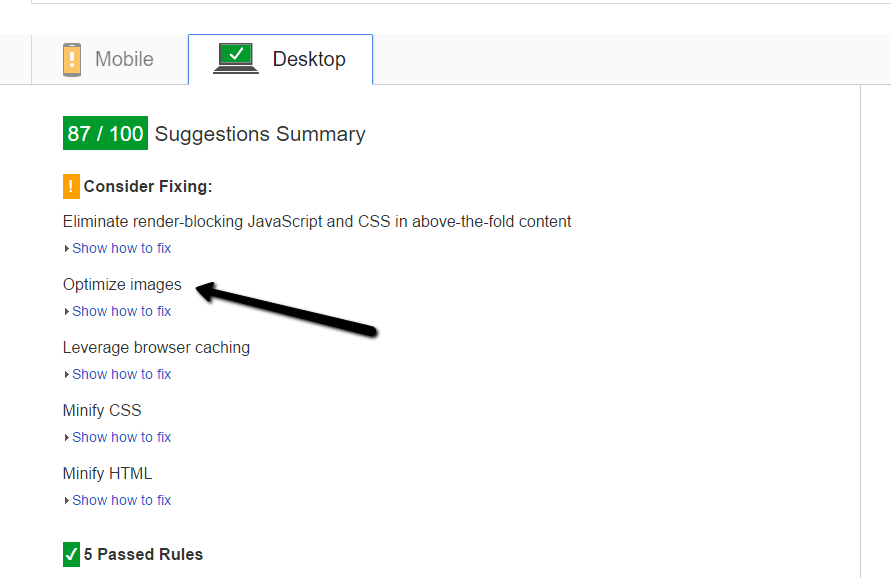
    A quick test to see if you have image load problems is to go to the Google page speed insight page and test your site

    https://developers.google.com/speed/pagespeed/insights/

    If you are told to optimize your images, WP Smush will help.

    pagespeed

    What It Does

    WP Smush losslessly (is that even a real word) compresses your images files.

    Say again; WP Smush removes all the unnecessary stuff contained in your images files such as date and time stamps, device used to take a picture etc, there is a lot of meta data in an image that can be stripped out without affecting image quality, that is why it is lossless compression.

    How It Does It

    Once you have installed WP Smush a new menu item is added under media -> wp smush.

    In there you can batch smush your existing images.

    It’s a pretty slow process, so settle down for the long haul with a nice cup of the beverage of your choice.

    The free version smushes 50 files per pass, the pro version smushes everything in one go.  I’m cheap so I just clicked the smush button 16 times.

    Ongoing Smushing

    As you add new image into your site, they are smushed automatically on upload so the initial bulk smush is a one off process.

    The Result

    Our clients site load speed increased a lot.

    Performance tuning WordPress sites is a bit of a dark art not a science, with a mixture of cache plugins, CDNs, smushed images and decent hosting you can get great speed gains.

    WP Smush is definitely now part of my tuning tool box.

    Wrap Up

    If you need help speeding up your WordPress site check out our maintenance plan, as a matter of course we optimize our clients site speed.

    Photo Credit: Dorsetfella via Compfight cc

  • Plugin Review: Download Monitor

    Plugin Review: Download Monitor

    One of our maintenance clients came to us with a little challenge and asked us to recommend a plugin that counts downloads of PDF files they make available to their customers.

    Added this she wanted to know which individual logged in users also downloaded the file.

    This type of detailed knowledge of what people are doing with your downloads is important in many ways, how are clients using your information?  Is it useful enough that people even want to download it.

    We went on a search and found Download Monitor to fit the bill.

    What Is Download Monitor

    It’s a plugin that lets you create a series of downloadable files in the backend of WordPress.

    It controls who can download them, any user or logged in users.

    It creates a shortcode so you can embed those files in posts or pages

    Finally any most importantly it allows us to log and record downloads as a total per file and by user.

    Adding A File

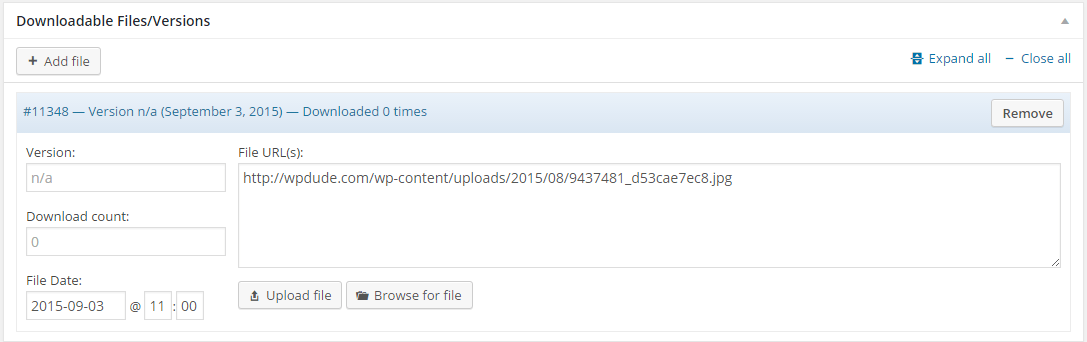
    Adding a download file is much like creating a new blog post, give it a title, add some descriptive text about the file to be displayed.

    Then you upload the actual media file.

    Click for full size image
    Click for full size image

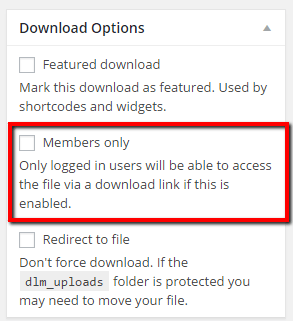
    Once added you can set various options for the file, one very useful one is to restrict logged in users to download only.

    Click for full size image
    Click for full size image

    Embedding A File / Download Links

    The file to be downloaded can be added as a shortcode into a post or page  as an example.

    [download id="11347"]

    Or you can send out a special download link to the file rather than a direct link so downloads can be recorded, here is an example of this.

    https://dev.neilmatthews.com/download/11347/ (don’t click the plugin has been deactivated)

    Logs

    This was the main feature my client needed, a log of who had downloaded a file.  We can see a log of total downloads or we can see a list of individual downloads by user

    Click For Full Size Image
    Click For Full Size Image
    total_downloads
    Click For Full Size Image


    All of this data can be downloaded as a CSV file for deeper analysis.

    Wrap Up

    If you want insights into what is being downloaded by your site visitors or logged in customers Download Monitor is the best out there.  We tested about 12 other plugins and this came out tops for reporting.  Many can create the total download number but none gave us per user logs.

    One of the services we offer to our maintenance clients is a plugin finding and testing service, why not give us a go.

    Photo Credit: 5500km via Compfight cc

  • Plugin Review: Revive Old Posts

    Plugin Review: Revive Old Posts

    Lets admit it, feeding the social media beast with new content is a huge time suck.

    I don’t have time to be continually sending links to Twitter, Facebook et al, so I’ve been experimenting with an automation tool to keep a continual stream of content going into my social media accounts.

    That tool is a plugin called Revive Old Posts https://wordpress.org/plugins/tweet-old-post/

    How Revive Old Posts Works

    Once installed a number of links are created to the application programming interface (API) of the social media platform of your choosing.

    The free version gives you Twitter and Facebook, the pro version gives you Linked In, Tumblr and Xing (no I’ve got no idea either).  I’ve only used the free version so I’m not going to dig into pro features at all.

    Twitter is a simple setup, login to your account and authorise the app

    Facebook is a bit more complex, you need to create an app on Facebook and link your website to it, sounds complex but there is a pretty good step by step guide to get you setup.

    Scheduling Posts

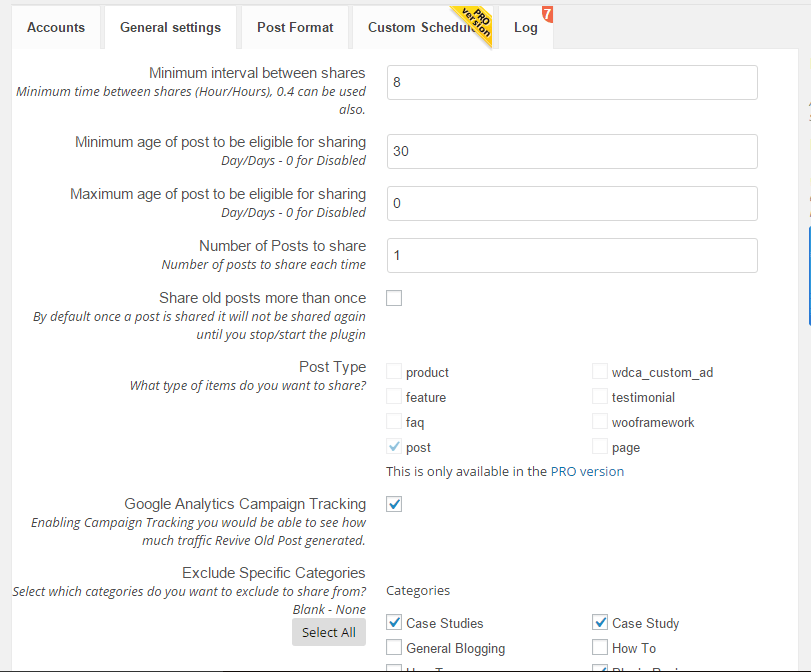
    Once you have linked up your accounts it’s time to select your content and set a schedule.

    You can select posts pages or any custom posts types.

    You can select one or more categories for your posts.

    You can set minimum age of your content, so, for example only post content more than 30 days old.

    You can set how many to post.

    You can set the hourly interval between posts.

    Click for full size image
    Click for full size image

    The Pros

    The plugin works flawlessly, posts were pushed up to Twitter and Facebook as expected.  I cannot fault the plugin.

    The Cons

    If you have hundreds of posts, not all of your content is suitable for automatic revival. I had posts about offers I’m no longer offering pushed up.

    I had posts about plugins that have been sunsetted and are no longer available. I had old members only content pushed to Facebook.

    I had to go through a laborious process of setting up a category of classic posts I wanted to revive.  It was pretty tedious but only a one time thing.

    I was running a test using webpolyglot too and I don’t have a huge number of posts so the revivals were getting a little repetitive.

    People know it’s old stuff so you had better be present to make some in person social posts or it looks a little canned.

    Don’t go mad, one post a day is more than enough.  I had it scheduled to push every 7 hours and there was a lot of automation and not much social chatter it didn’t look great.

    As you can see the cons are about content not Revive Old Posts the plugin.

    Wrap Up

    If like me you are too busy doing client work to spend huge amounts of time feeding content to the social media beast revive old posts is a great tool,

    Spend a little time to curate your old content to only push your best stuff out.  Then sit back and enjoy one less thing on your daily to-do list.

    Will I continue using Revive Old Posts? Yes, but I’m planning on creating a group of my top 50 posts and pushing them out one per day as part of my broader Facebook marketing plan.

    Photo Credit: bbaltimore via Compfight cc

  • Jing Makes Me Sing

    Jing Makes Me Sing

    One of the tools I use every single day to help communicate with clients and my team is Jing, in this post I want to talk about Jing and explain how incredibly useful it is to communication when clients or team members work remotely from each other.

    What Is Jing?

    more-ballJing is a small free  utility that once installed sits on your desktop as a small yellow sun like icon.  When you click on it a selection tool appear so you can grab a screen shot or record a short video of what is on your screen.

    You can get a free download from this link https://www.techsmith.com/jing.html

    Screen Grabs

    The first function is to create a static screen dump, this is one I took while writing this post.

    http://screencast.com/t/31xxbUuN

    Once captured the screen dump can be saved locally or much more usefully uploaded to a cloud server and and share (see link above)

    Annotating Screen Dumps

    Once a screen dump has been captured we can also add annotation or highlighting to make it more obvious as to what we are taking about

    http://screencast.com/t/In6YIAiL9

    Videos

    The other great feature of this utility is that we can create short video screen casts of  what we are doing.

    http://screencast.com/t/YkPny4HA0Fl

    http://screencast.com/t/In6YIAiL9

    Videos With Audio

    Finally we can also add an audio narration of what we are doing to make things even more clear.

    http://screencast.com/t/ho2vvp6ZP

    Storage Space

    As everything is uploaded to the screen cast servers for sharing, we cannot expect unlimited space, at the time of writing there is “GB of free storage and the ability to buy additional space.

    I’ve been using this for years and I can only remember one time when I ran out of space, I went into my screen cast account and deleted everything more than 3 years old.

    I recommend Jing as a tool to communicate in the short term not for creating long term training or support videos / screen grabs.

    Usages

    Here are some of the ways I use Jing everyday.

    • Showing team members where a problem is, if it’s a complex bug, I will record a video to show exactly what needs to be fixed.
    • Clarifying issues, for example 10 minute ago one of my team members was asking about a license key, I had no idea what he meant so he sent me this http://screencast.com/t/otRN43G1fsmj
    • I use Jing for short client training video when I am handing over a change to their site training I record a video to show them how to do things
    • Clients send Jing messages to me to show me an issue they are having when they retain us for WordPress Technical Support issues, a picture is worth a thousand words, a video a million, when you are remote it makes it much easier to troubleshoot an issue.

    The list goes on, the underlying take away is Jing give great clarity to issues that a text based message cannot

    Camtasia

    If you want to record longer videos and edit them, the big brother of Jing is called camtasia, I use this for my long form  training videos that I want to record and edit before uploading to Youtube.

    Wrap Up

    When you work remotely from clients or team members the ability to send visual clues rather than text messages will stop the headaches of misunderstanding.

    If you want to send me a jing screen cast or screen dump of your WordPress issues I would happily send you a no obligation quote.

    Photo Credit: davidcrow via Compfight cc
     

  • It’s Not Just Backups and Updates …

    It’s Not Just Backups and Updates …

    As we have developed our maintenance service WP Insure we have added some additional features that are pretty hard to describe in sales copy.

    Over and above our maintenance services of backup, updates, monitoring and security we also offer little support jobs we call tweaks.

    Our clients will call in support for a tweak usually when something goes wrong with their site.  In this post I want to talk about the hard to describe feature of our plan.

    The Tweakmeister

    There is a dedicated member of the team at WP Dude (John) who looks after tweaks for our client sites.  If anything goes wrong or you need help it’s probably him you will be dealing with.

    Clients get access to a members only help desk where they can send in their issues.  They send the tweak into that and we take care of it.

    Example Tweaks

    Here is a short list of the kind of things we will do for our clients.

    Memory Full – we’ve been called in when memory capacity is exceeded when new plugins are added or the site becomes busier, we will update memory settings to make more available to WordPress

    .htaccess issues – .htaccess is a configuration files that is used by WordPress in a number of ways, it holds permalink details, redirection details, cache plugin details, the list goes on, we are at hand to make changes to this file

    Email Consulting  – sometimes our clients want to know what is the best way to do “X” on a WordPress site, we act as consultants via email to our clients.  We’ve worked on thousands of WordPress sites and have probably done what you want to do on other sites.

    Hack Recovery – we have recovered hacked client sites before.

    Database Optimisation – many site owners are not aware they need to optimize their WordPress database on a regular basis,  tables fill up , junk gets left over from unused plugins, it’s good practise to spring clean your database regularly, we do this as a matter of course.

    Crash Recovery  if your site goes down we will recover it.  Nothing more to say on that point.

    Plugin Install and Config – We’ve helped clients with troublesome plugin installs.  This tends to be complex plugins such as e-commerce or multi language plugins.

    Premium Theme installs  – the call usually sounds something like “I just bought a new theme and installed it and it looks nothing like the demo”.  We are available to wade through the documentation, find out about short codes and custom post types to make your site look like the one on the advert.

    Hosting migration – We’ve already got the tools in place to clone your site to a new hosting company if you are our maintenance client.

    Backup Restores – Should anything go wrong and you need to roll back to an earlier point in time, we can do it with one click.

    Weird PHP errors – Once we get into trouble shooting PHP ( the scripting language used by WordPress), most site owners don’t want to know, we will look into the issues, be it file upload size too small, headers already sent errors, just send it to the help desk.

    Plugins broken after updates – Sadly this is a fairly frequent issue, WordPress is updated but the plugin is not and it breaks, we roll back updates, work with plugin developers to find solutions or install alternative plugins that do the same job but work.

    Theme tweaks  – want to change the colours, use a snazzy new font, we are the team to tweak your CSS file of your theme.

    Training – In the same vein as email consulting we also create small training videos for our clients to show them how to so that thing they need to do, We record screencasts using Jing and send them over to clients.

    Script Integrations – we’ve linked up WordPress sites with third party scripts such as Facebook, Pinterest, Zapier and Google Analytics.

    The list goes on – just ask we can probably do it for you (the not so small print we don’t do custom theme development, custom plugin development or graphic design as part of the maintenance plan).

    Outsource Your Technical Hassles

    When you sign up for our maintenance plan you are getting access to a team of WordPress experts.  Outsource the worry of maintaining and supporting your site to us. Concentrate on the real work of building your business.

    Wrap Up

    Our maintenance service is not just backups and updates it is support when things go wrong, or just when it gets too technical for non-techie site owners we are there.

    If you are looking for hassle free technical support for your WordPress site, then we are the team, for full details and a 30 day free trial check out our maintenance service WP Insure.

  • Satisfaction Lies in the Effort

    Satisfaction Lies in the Effort

    Lorem ipsum dolor sit amet, consectetur adipiscing elit. Morbi sagittis, sem quis lacinia faucibus, orci ipsum gravida tortor, vel interdum mi sapien ut justo. Nulla varius consequat magna, id molestie ipsum volutpat quis. Suspendisse consectetur fringilla suctus. Pellentesque ipsum erat, facilisis ut venenatis eu, sodales vel dolor.

    Morbi sagittis, sem quis lacinia faucibus, orci ipsum gravida tortor, vel interdum mi sapien ut justo. Nulla varius consequat magna, id molestie ipsum volutpat quis. Suspendisse consectetur fringilla luctus. Fusce id mi diam, non ornare orci. Pellentesque ipsum erat, facilisis ut venenatis eu, sodales vel dolor.

    • This is a unorder list. Lorem ipsum dolor sit amet, consectetur adipiscing elit. Morbi sagittis, sem quis lacinia faucibus, orci ipsum gravida tortor, vel interdum mi sapien ut justo.
    • Nulla varius consequat magna, id molestie ipsum volutpat quis. Suspendisse consectetur fringilla luctus.
    • Fusce id mi diam, non ornare orci. Pellentesque ipsum erat, facilisis ut venenatis eu, sodales vel dolor.

    Lorem ipsum dolor sit amet, consectetur adipiscing elit. Morbi sagittis, sem quis lacinia faucibus, orci ipsum gravida tortor, vel interdum mi sapien ut justo. Nulla varius consequat magna, id molestie ipsum volutpat quis. Suspendisse consectetur fringilla luctus. Fusce id mi diam, non ornare orci. Pellentesque ipsum erat, facilisis ut venenatis eu, sodales vel dolor.

    Morbi sagittis, sem quis lacinia faucibus, orci ipsum gravida tortor, vel interdum mi sapien ut justo. Nulla varius consequat magna, id molestie ipsum volutpat quis. Suspendisse consectetur fringilla luctus. Fusce id mi diam, non ornare orci. Pellentesque ipsum erat, facilisis ut venenatis eu, sodales vel dolor.

  • Photography is the Science

    Photography is the Science

    Lorem ipsum dolor sit amet, consectetur adipiscing elit. Morbi sagittis, sem quis lacinia faucibus, orci ipsum gravida tortor, vel interdum mi sapien ut justo. Nulla varius consequat magna, id molestie ipsum volutpat quis. Suspendisse consectetur fringilla suctus. Pellentesque ipsum erat, facilisis ut venenatis eu, sodales vel dolor.

    Morbi sagittis, sem quis lacinia faucibus, orci ipsum gravida tortor, vel interdum mi sapien ut justo. Nulla varius consequat magna, id molestie ipsum volutpat quis. Suspendisse consectetur fringilla luctus. Fusce id mi diam, non ornare orci. Pellentesque ipsum erat, facilisis ut venenatis eu, sodales vel dolor.

    • This is a unorder list. Lorem ipsum dolor sit amet, consectetur adipiscing elit. Morbi sagittis, sem quis lacinia faucibus, orci ipsum gravida tortor, vel interdum mi sapien ut justo.
    • Nulla varius consequat magna, id molestie ipsum volutpat quis. Suspendisse consectetur fringilla luctus.
    • Fusce id mi diam, non ornare orci. Pellentesque ipsum erat, facilisis ut venenatis eu, sodales vel dolor.

    Lorem ipsum dolor sit amet, consectetur adipiscing elit. Morbi sagittis, sem quis lacinia faucibus, orci ipsum gravida tortor, vel interdum mi sapien ut justo. Nulla varius consequat magna, id molestie ipsum volutpat quis. Suspendisse consectetur fringilla luctus. Fusce id mi diam, non ornare orci. Pellentesque ipsum erat, facilisis ut venenatis eu, sodales vel dolor.

    Morbi sagittis, sem quis lacinia faucibus, orci ipsum gravida tortor, vel interdum mi sapien ut justo. Nulla varius consequat magna, id molestie ipsum volutpat quis. Suspendisse consectetur fringilla luctus. Fusce id mi diam, non ornare orci. Pellentesque ipsum erat, facilisis ut venenatis eu, sodales vel dolor.

  • Ignore Cleaning Up Spam At Your Peril

    Ignore Cleaning Up Spam At Your Peril

    There is a small maintenance task that most WordPress site owners ignore at their own peril!

    That is the task of cleaning up spam comments.

    The Problem

    As we all know there are spammers out there trying to leave comments on our WordPress sites in the hope of getting a link back to their hapless sites and improve search engine ratings.

    At the time of writing I have had 242,034 spam comments blocked by my anti spam plugin.  I’m pretty mean I disable comment on my posts after 14 days so there are very few posts to leave spam comments on.  So my spam issue whilst huge is pretty small compared to some people.

    The problem is those spam comments all take up valuable resources on your site and if they are not cleaned down it can crash your site.

    Spam Bots

    Spam is automated via scripts and if a spam bits finds a chink in your armour, you can be sure they will blast your site with repeated spam attempts.

    This automation can lead to problems with massive database tables, I’ve seen sites with millions of rows in their comments tables because spam comments have been left in the system.

    Impacts Site Performance

    Massive databases are very often the root cause of many slow loading WordPress sites.

    If we go back to the Spam bots above, as they continue to smash your site with spam, they hit an already slow loading database and the problem becomes  a vicious cycle.

    Case Study – The Site that Crashed

    One of our maintenance clients came to us with stability issues, they could not quiet put their finger on why, but their site kept behaving erratically.  They had 60K+ spam comments in their queue.

    This in turn had created a database table that was 130MB in size and had  become corrupt.  As comment crons tasks were running, it was causing his site to crash.

    I fixed the table with phpmyadmin, removed the spam comments and optimized the database, weird unstable issues vanished.

    What To Do

    Enough with the waffle already how do I fix it?

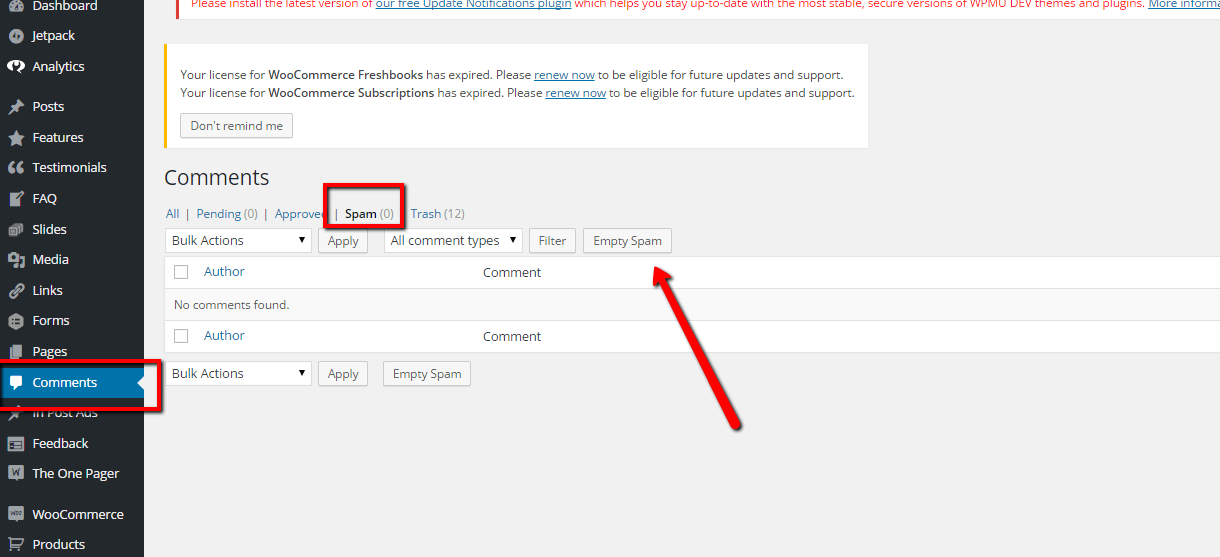
    Empty you spam and purge all spam comments. See screen shot

    Click for full size image
    Click for full size image

    If you have a huge number of spam comments, this might time out and you will have to click empty spam a number of times.

    The optimize your database to remove references I like a tool called wp-optimize to do this, check out this post for details on optimising.

    Wrap Up

    Why not take a 30 day free trial of our maintenance service, we will clear up your comment spam and harden your security just as a thank you for signing up.


  • Imagination Encircles the World

    Imagination Encircles the World

    Lorem ipsum dolor sit amet, consectetur adipiscing elit. Morbi sagittis, sem quis lacinia faucibus, orci ipsum gravida tortor, vel interdum mi sapien ut justo. Nulla varius consequat magna, id molestie ipsum volutpat quis. Suspendisse consectetur fringilla suctus. Pellentesque ipsum erat, facilisis ut venenatis eu, sodales vel dolor.

    Morbi sagittis, sem quis lacinia faucibus, orci ipsum gravida tortor, vel interdum mi sapien ut justo. Nulla varius consequat magna, id molestie ipsum volutpat quis. Suspendisse consectetur fringilla luctus. Fusce id mi diam, non ornare orci. Pellentesque ipsum erat, facilisis ut venenatis eu, sodales vel dolor.

    • This is a unorder list. Lorem ipsum dolor sit amet, consectetur adipiscing elit. Morbi sagittis, sem quis lacinia faucibus, orci ipsum gravida tortor, vel interdum mi sapien ut justo.
    • Nulla varius consequat magna, id molestie ipsum volutpat quis. Suspendisse consectetur fringilla luctus.
    • Fusce id mi diam, non ornare orci. Pellentesque ipsum erat, facilisis ut venenatis eu, sodales vel dolor.

    Lorem ipsum dolor sit amet, consectetur adipiscing elit. Morbi sagittis, sem quis lacinia faucibus, orci ipsum gravida tortor, vel interdum mi sapien ut justo. Nulla varius consequat magna, id molestie ipsum volutpat quis. Suspendisse consectetur fringilla luctus. Fusce id mi diam, non ornare orci. Pellentesque ipsum erat, facilisis ut venenatis eu, sodales vel dolor.

    Morbi sagittis, sem quis lacinia faucibus, orci ipsum gravida tortor, vel interdum mi sapien ut justo. Nulla varius consequat magna, id molestie ipsum volutpat quis. Suspendisse consectetur fringilla luctus. Fusce id mi diam, non ornare orci. Pellentesque ipsum erat, facilisis ut venenatis eu, sodales vel dolor.