How can you know if that new plugin you are about to install is of a high quality? How can you setup some kind of plugin quality control process to ensure all new plugins that are added to your site won’t break things?
In this video post I’ll show you how to check the quality of any plugins you are about to use.
Anyone can create a plugin an upload it to the WordPress plugin, there are approval processes but there is no rigorous checking of the codes compatibility with themes and other plugins, so sadly it’s a very common thing that I see that a plugin will crash a site.
Use the techniques in my video to create some plugin quality control.
Video
The Process
Install from the WordPress dashboard, their search rules out a lot of plugins that are not being actively developed.
Visit the plugin page on WordPress.org to get a full list of stats.
Check last update to ensure the plugin is actively developed, plugins not actively developed can hold vulnerabilities or bugs.
Check the plugin is tested to your version of WordPress, check the plugin is compatible with your version if you are using an older version of WordPress.
Review the ratings avoid all 5 stars and lots of 1 & 2 stars. Look at the reviews to see what people are complaining about.
Look at the support forum ensure the plugin developer is actively engaging in support, avoid plugins where there are zero replies.
Plugins clash with themes, and other plugins all the time, installing the wrong plugin will bring your site down and end up with you visiting this page to ask me for help.
Do yourself a favour and do some plugin quality control before you click that install button.
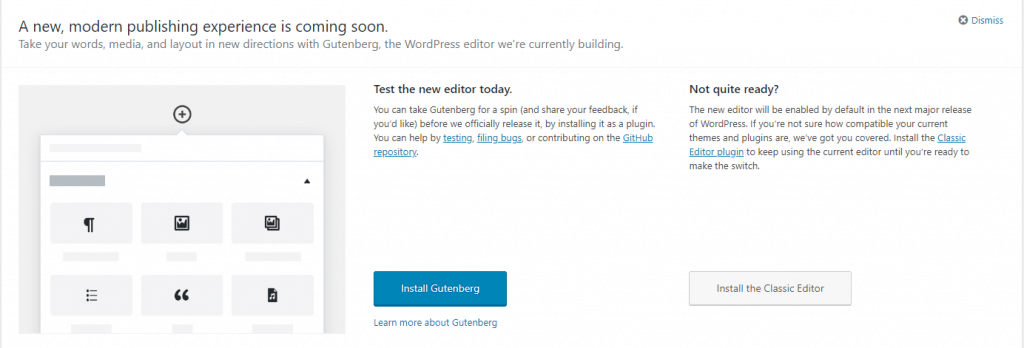
You have probably seen the Gutenberg prompts on your website, letting you know that a new editor is coming to WordPress.
In this post I want to tell you what Gutenberg is, how it will impact your WordPress site, and how to negate any problems it introduces. Lastly I’m offering a testing service for you to trial the new editor in a safe environment.
What Is Gutenberg?
It’s a replacement for the standard WordPress text editor, it provides a visual way to drag and drop sections of content and arrange them on your page.
If you have used one of the new themes on the market you will already be familiar with the idea of a visual editor.
At the core of this process is the idea of a block. You can drag and drop blocks and then put content into the block.
There are text blocks, heading blocks, video blocks, galleries, images, the list goes on. As Gutenberg matures more and more blocks will become available.
In the past a plugin developer may have created a shortcode to display content on the front end, in the future they will be encouraged to develop a content block.
Blocks will be responsive out of the box, so you don’t need to worry about the size of the screen your site is being viewed on.
You can easily add columns to your post or page. So a three column row with different blocks will be easily achieved.
Gutenberg is a visual builder so the design you make on the page will be reflected on the front end, not something we currently have with the
Gutenberg will be merged into WordPress at version 5 coming later this year, but it’s a very big change so you should be ready for it.
What If It Breaks My Site
There is a high probability that some of the themes out there are not going to be compliant, this has been taken into account and at version 5 you can install a plugin which will revert to the classic editor. You can download it from here:
Here’s a walk-through of what you can expect with the new editor.
My Thoughts On Gutenberg
I have my usual grumpiness about major changes being forced upon us (I’m still not happy with the theme customizer people), why Gutenberg cannot just stay as a plugin is beyond me.
I’m glad there is a planned roll back route with the classic editor being made available as a plugin.
But overall I think this will be a good thing. I’ve been using visual editors with the modern themes for some time now and they are great. They allow positioning and formatting of content in a much more visual manner.
Here’s a quote from the WordPress site
Gutenberg is more than an editor. It’s also the foundation that’ll revolutionize customization and site building in WordPress.
I see a major shake up in the theme world coming because of Gutenberg.
Staging Service
I’m offering a staging and migration service if you want to test Gutenberg in a safe development environment.
I will, migrate your current live site into the test environment.
Activate the new editor.
Give you access to test your site and try Gutenberg.
Offer support for any issues you may have and offer suggestions as to whether the classic editor would be a good icea until your theme is made Gutenberg compliant.
You have access to that development area for one day.
I’ve build 5 test beds that will be available on a first come first served basis, let me know if you want to book a slot.
This service costs £29 for a day’s hire of my staging environments.
My existing maintenance clients will get access to this service for free.
Winter’s Gutenberg is coming I recommend you test your theme with the new editor to ensure this big update doesn’t break anything.
It’s going to easier to build great looking posts and pages with Gutenberg, but expect some snagging issues once it’s first released while your themes and plugins are made compliant.
For the past three months or so, I’ve been using a new tool to manage my projects, this one seems to fit all my needs. It’s called Sortd.
I’ve written in the past about the project management methodology Kanban in my post – Kanban Saved My Sanity,
Sortd uses this methodology and mixes it with my prime communication medium; email.
What Is Sortd
Sortd is a Google chrome extension that works with Gmail.
It turns your inbox into a manageable Kanban board of tasks to be derived from your emails. Rather than having a huge list of email, that is constantly growing, Sortd turns your inbox into something much more sane, a calmed inbox.
How It Works
Once the extension is installed, you can drag and drop emails out of your inbox into a Kanban board, if the email needs to be actioned and scheduled as a project. If the email is a standard notification or does not need action it can be archived, all emails requiring work are put into the Kanban boards.
My Kanban setup is to have a board and in the board are lists Quote Sent, To Do, In Progress and Blocked. Emails become cards or tasks and are moved through the various project management stages.
The benefits of this approach is that I can reply to my clients without leaving my inbox. You will see in the accompanying video what I mean but you can also do the following
Rename email subjects so they mean more to you in your project management
Snooze messages so you can get inbox zero
Add private notes to an email that are not see by your client, fo example I save passwords against an email as a note
Set due dates for a project and see all work in a date view.
Add to that the power of Gmail such as canned responses and I have a complete project management system in my inbox.
Where Other Systems Break Down
I don’t like to try and force clients to use project management systems. Any friction in the project process will break things down. All of the ones I have seen require a client to register.
I love Trello, but you need to create new boards and register clients.
I love Basecamp too but the effort to setup a project outweighs a lot of my smaller
Sortd is a friction less system, you take your clients emails and organise them
Pricing
Sortd has a freemium pricing model, the single private board version (which was more than enough for a solo freelancer) is free.
When you start sharing boards and assigning tasks to a team you need one of their premium levels. They costs from $2 per user/month to $5 per user /month which is amazing value compared to project management systems which typically start at $20 per user per month.
Lorem ipsum dolor sit amet, consectetur adipiscing elit. Morbi sagittis, sem quis lacinia faucibus, orci ipsum gravida tortor, vel interdum mi sapien ut justo. Nulla varius consequat magna, id molestie ipsum volutpat quis. Pellentesque ipsum erat, facilisis ut venenatis eu, sodales vel dolor.
Header one
Header two
Header three
Header four
Header five
Header six
This is default paragraph. Morbi sagittis sem quis lacinia faucibus, this is a text link orci ipsum gravida tortor, vel interdum mi sapien ut justo. Nulla varius consequat magna, id molestie ipsum volutpat quis. Suspendisse consectetur fringilla luctus. Fusce id mi diam, non ornare orci. Pellentesque ipsum erat, facilisis ut venenatis eu, sodales vel dolor. Suspendisse consectetur fringilla luctus.
Single line blockquote:
Stay hungry. Stay foolish.
Multi line blockquote with a cite reference:
People think focus means saying yes to the thing you’ve got to focus on. But that’s not what it means at all. It means saying no to the hundred other good ideas that there are. You have to pick carefully. I’m actually as proud of the things we haven’t done as the things I have done. Innovation is saying no to 1,000 things. Steve Jobs – Apple Worldwide Developers’ Conference, 1997
Unordered Lists (Nested)
List item one
List item one
List item one
List item two
List item three
List item four
List item two
List item three
List item four
List item two
List item three
List item four
Ordered Lists (Nested)
List item one
List item one
List item one
List item two
List item three
List item four
List item two
List item three
List item four
List item two
List item three
List item four
HTML Tags
These supported tags come from the WordPress.com code FAQ.
These tests are a big deal, but this tag is no longer supported in HTML5.
Cite Tag
“Code is poetry.” —Automattic
Code Tag
You will learn later on in these tests that word-wrap: break-word; will be your best friend.
Delete Tag
This tag will let you strikeout text, but this tag is no longer supported in HTML5 (use the <strike> instead).
Emphasize Tag
The emphasize tag should italicize text.
Insert Tag
This tag should denote inserted text.
Keyboard Tag
This scarsly known tag emulates keyboard text, which is usually styled like the <code> tag.
Preformatted Tag
This tag styles large blocks of code.
.post-title {
	margin: 0 0 5px;
	font-weight: bold;
	font-size: 38px;
	line-height: 1.2;
	and here's a line of some really, really, really, really long text, just to see how the PRE tag handles it and to find out how it overflows;
}
If you want to go the whole hog we have music, snow, Santa, festive fonts, the full monty. Please send me a link if you use this one on your site please please, please.
I’ve gone through with my rebrand and I wanted to explain why I’ve done this.
So drum roll, WPDude has become bada-bada-bada-bada-bada-bada-bada NeilMatthews.co, the crowd erupts into spontaneous applauds 🙂
Dooooood!
I cannot even say the word dude without wincing. It’s not a word I ever use in normal day to day conversation. Why would I brand my business as that?
Well, back in 2008 when I started this journey, a 6 letter domain name was hard to find, so I leapt at the chance for this domain. WPDude was born without too much thought. Let that be a lesson to you kids out there, choose your domain name wisely.
I’m 46 years old for flip sake, I’m not a dude I’m a grown ass adult. The dude had to go.
I’m going to paraphrase a comment from a client.
I thought I was hiring a kid to fix my website, much to my pleasure I found out it was a middle aged man, I felt much better knowing that
Tagline
My tagline has changed to, from “Your WordPress Help” to “I Fix WordPress Sites”, you cannot be any clearer than that.
The majority of my work is stepping in when a site breaks or needs complex work.
Clients Want My Skills
My clients pay me for my particular set of skills, people hire Neil Matthews, not some comic book character called WPDude.
Working under a personal brand
I still have a backend team looking after maintenance work, but I am their client, not you. I act as a middleman on all communication
I’m not building a business to Sell
I wrote about building a business you love, in it I talk about how difficult it will be for me to sell my business. Who wants to buy a job.
I’ve embraced this and I now know I probably won’t sell this business, so why brand it as something other than me that can be sold.
What Does WP Mean Anyway
There is a dance you have to dance when you work in the WordPress arena, you cannot use the trademarked term WordPress in your domain name you have to use WP instead.
You will see a lot of people using WP in their domain name, but does anyone know what that means outside of the WordPress community, I doubt it.
Moving to NeilMatthews.co allows me more flexibility in the work I do, for example, I’m interested in writing more about building a µAgency I’ve got a book in me on this subject. Not branding myself as a WordPress only grants me more flexibility to do this type of work.
Apps are rising, my ability to sell app development services is also something I am interested in you don’t hire a WordPress dude to develop your app.
I cannot see this happening, but WordPress could drop out of favour for a new tool, rebranding NeilMatthews.co gives me redundancy against that.
I want to write about topics outside of WordPress on my blog, some of my most well-received posts are about building online business. Not having a WordPress moniker allows me to do this.
It’s Scary
I flipped the switch yesterday, and I’m anxiously watching my stats and signups
Guess what, nothing has changed, requests for work have dropped in everything is fine. All the stress and worry about a change like this has dissolved.
Wrap Up – The Rebranding of WPDude
My primary business is still WordPress support and development, I’m not changing that, I just want to step out from the WPDude brand and work as myself, Neil Matthews.
So I’m a card-carrying solopreneur now, thanks for your attention, announcement over.
Each year on the US Thanksgiving holiday I take a day out to plan for the coming year.
I’m based in the UK, and I don’t celebrate the holiday, but most of my clients are US based so it’s a very quiet day and the ideal opportunity to plan 2018.
A lot of you may be getting into planning mode for next year so I thought I would share my process.
The Run Up To Thanksgiving
At the start of November, I begin to get excited about my planning day, it’s something I really look forward to for some bizarre reason.
I start scribbling lots of notes about how I would like next year to be, and throw them into a folder, this is a kind of planning brain dump which I will read through and use to set my plan. As I go into my planning session I have a rough idea of how 2018 will look, the planning day will set that in concrete with a formal plan and actionable items will come from that.
This pre-planning phase takes place over a couple of weeks in November. I have a stack of notes about 50 pages high with ideas.
Some hints, a re-brand is in the planning, I’m looking into the way I do my quotes and my blogging next year will have a new theme.
My folder of planning notes
Business & Personal Planning
My planning day is not just about how I want to see my business in 2018 but also personal goals.
I’ll not talk much about my personal goals in these posts because, erm, they are personal, but I’ll share my business plans on my next blog post.
The tools I use for my planning session are pretty basic, a pad of A4 paper, pens and coloured pencils and Evernote to write up my formal plan. Nothing fancy.
Re-read my 2016 / 2017 Diaries
On the morning of my planning day, I skim over my late 2016 & 2017 diary to date over breakfast, to see what went well, and what went wrong during the past year. I’ll look at the work I’m doing and issues I have had.
I re-read my previous years planning from the same process to see how on target I am (erm did you see any info prods from me this year? I’m not on target for that part of my previous plan).
Get Out Of The Office
This is a hugely important part of the process, I get out of my home office and do the planning offsite.
The change of scenery makes the process like a holiday for me, almost a day off from client work.
I don’t answer any emails on my planning day. I don’t do any client work other than to ensure my ongoing maintenance clients are all okay and their updates were done and backups have worked and nothing has crashed.
I have two locations for my planning day, the first is a coffee shop within walking distance of my home and the other is my local pub, where I have lunch, and a celebratory pint once I’m done planning, it’s thirsty work after all.
Being in a new location really does create a divide between the planning process and normal day to day client activities, so I heartily recommend getting out of your normal working environment to do this process.
Morning Routine
My morning routine starts at the coffee shop or rather two coffee shops. It’s not very glamorous, but the nearest coffee place is in Washington motorway services. So I have a coffee shop on the northbound side and another on the southbound side. I’ll spend a couple of hours in each shop. I do my business planning on one side of the motorway (freeway for my US chums) and personal planning on the other.
For the history buffs Washington is the family home of the famous George Washington, here’s a picture of his ancestral home.
What Went Well & Wrong in The Last Year
This is the first part of my day, I do a retrospective on what worked and what failed last year. I make notes on doing more of the stuff that went well and creating controls on how to stop messing up again next year.
If you are not making mistakes you are not trying new things, so I don’t beat myself up on mistakes, I learn from them.
It’s also a chance to look at things that went well but I’m not that keen on doing any more.
Business Planning
Next, I move onto how my business will look next year. Next year’s focus is how my business can serve me, not creating some mythical business from an e-book with someones else’s vision of a great business.
I look at major projects I want to start, hint I want to write a book.
I look at changes in how my business works, my marketing, the services I deliver and how they are delivered and my µAgency to deliver those services.
I set income goals and other targets.
I look at how to automate and streamline my business. I think about any new tools I need.
I look at any legislative changes required.
Personal
The second part of the morning is all about my personal goals for next year.
I like to do both these planning sessions at the same time so my business can facilitate the lifestyle I want, not be an all-consuming thing with a personal life stuffed in at the end of the day.
Lunch & Afternoon
As lunchtime approaches, I take the mile or so walk from the coffee shops up to my local pub the Mill House. This again is part of my routine, I can mull on my plan created in the morning during the 30 or so minute walk to my lunch destination. Does it sit well with me and will it serve me well during the next year?
The walking/thinking/meditative state really helps to make my mind up about the plan I created in the morning. I get to think it through and see any problems.
For the history buffs, the Mill house started life as a water-powered grain mill in the 18th century, became an Inn in the late nineteenth century. It’s reputedly haunted and it is my local pub, I love it.
MIll House Pub
The Action Plan
The afternoon is spent creating an actionable plan to implement what I have planned on paper during the morning session.
I document this in Evernote. I set deliverables timescales and targets.
Targets
I like to create a series of targets from my planning so I can judge how well I performed against my plan, some are hard targets such as a £income goal, others are soft targets such as how I want my business to look and service me, here are some of my planned targets.
Income goal
Maintenance clients signed up
Team size and formation
Take time off an maintain income level
Sabbatical next summer
Not To Do List
This is a new thing for me for 2018, I’m also creating a not to do list, things I have done by habit over the years and need to stop doing.
Things like impulsively buying domain names for projects I might, and usually do not, end up starting is definitely going on the not to so list, wpzaps.com for example?
2018 Theme
I like to boil everything down into a yearly theme. This year is all about reducing stress so working in wpdude (or whatever it will be called next year ????) is a pleasurable thing for me.
Congratutorial Pint
It would be rude not to have a pint or two of beer after all that thirsty work planning my year, now the hard work begins to implement my plan. The Deuchars IPA is especially fine at the Mill House.
Wrap Up – Thanksgiving Business Planning
Happy Thanksgiving to my US readers, I’m thankful you have given your most precious and finite resource; your time, to reading this post from across the pond.
I hope you have enjoyed the rich history lessons from my part of the world :).
On this day, at the 11th hour on the 11th day of the 11th month of 1918, the Great War ends.
This coming Sunday, the 12th of November we observe Remembrance day in the UK (and other Commonwealth Countries) so in the spirit of peace and reconciliation, I want to end my war with the Grammar Nazis.
To do this I’ve started to use a tool called Grammarly which will hopefully pick up more of my spelling and grammar errors and stop the Grammar Nazis in their tracks.
What Is Grammarly?
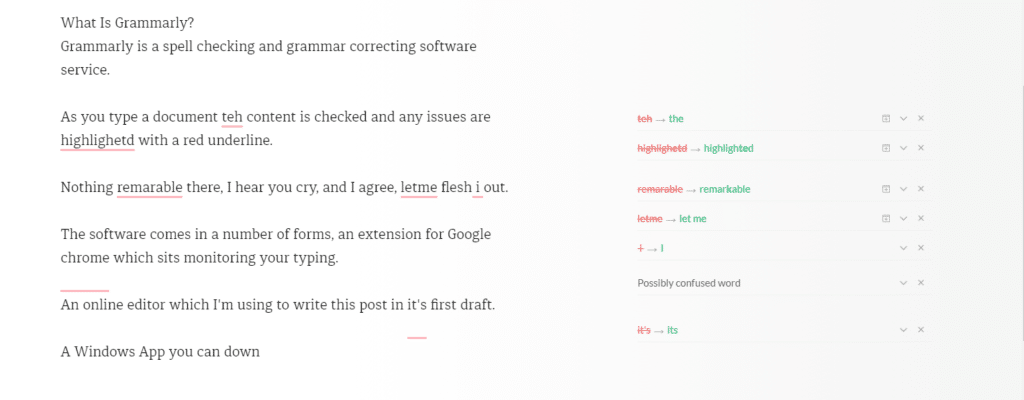
Grammarly is a spell checking and grammar correcting software service. grammarly.com
As you type a document the content is checked and any issues are highlighted with a red underline.
Nothing remarkable there, I hear you cry, and I agree, but let me flesh it out.
The software comes in a number of forms, an extension for Google Chrome which sits monitoring your typing.
An online editor which I’m using to write this post in its first draft.
A Windows App you can download and run on your PC that acts as an editor.
I’ll probably stick with the Chrome extension, but I thought I would use all the tools in the spirit of a full review of Grammarly.
Click for Full-Size Image
Freemium
The software is free with a set of premium upgrades. The premium version is not cheap at £22.84 per month. I’m using the free version (cheap or frugal, you decide).
The premium version has advanced features such as plagiarism checks, style guide and word choice tools.
Why It Beats The Native WordPress Spell Checker
The A.I. behind the scenes is far better than the native WordPress spell check, it’s picking up far more grammar issues with my writing.
It has dictionary and grammar guides for British English which is different from US English used in many spell checkers.
The punctuation correction is amazing, it spots missing commas before I do a read through which really helpful.
It picks up on a lot of words I use which should be hyphenated, for example, I use the word setup a lot which should be hyphenated to set-up.
I miss full stops (periods to my American chums) at the end of sentences an awful lot it turns out.
It’s Not Just For WordPress
It’s not just for my blog posts, any typed content in your browser can be checked, it’s working wonders for my email.
Wrap Up – Review Of Grammarly
A gushing review I’m sure you will agree. I’m a fan but would I pay £20 plus per month for the premium version? Probably not.
As you are wondering the world wide interwebs, you may have noticed a new thing, websites are asking if you want push notifications when the site update. In this post I’m going to talk about WordPress web push notifications and do you need them.
What Is WordPress Web Push Notifications
When you visit a site with a supported browser such as Google Chrome a popup will appear on your screen asking if you want to get notifications.
Already I’m annoyed yet another popup! I’ve gone for a simple red icon bottom right of the screen.
You don’t need to enter any details, just click on the popup and it is saved. This is saved in your browser settings. A unique ID from your browser is sent to your push notification supplier, in my case OneSignal.com. That’s the sign-up process.
There is a console on OneSignal where I can send out a WordPress web push notification to my subscribers. The push appears bottom right of my browser and looks like this.
Setting Up WordPress Web Push Notifications
I’m not going to recreate the wheel, here is a great tutorial to make your site use push notifications.
This is just my opinion, and my feeling, but I don’t want all the sites I follow jumping onto my browser screen shrieking that there is a new blog post, I prefer to coral all my blog posts into my feed reader or get them in my inbox for later reading.
Do we need another notification? Think about your mobile phone, it beeps at me too many times, and I’ve deactivate a lot of mobile push notifications.
Browser notifications are intrusive, they popup and demand your attention when you are working at your desktop, flow is broken no matter how focused you are.
I’ve effectively used web push for my helpdesk software notification and live chat software which is client related. I need that alert, but do I want an alert jumping onto my desktop when Johnny posts about his new pet cat? No I don’t.
Experiment
I’m adding push notification onto WP Dude until Thanksgiving 2017. This will allow you, the reader, to see push in action if you have not seen it, and get an update about my blog posts to see if you like it. I might even try to sell you some services, how annoying.
I’ll be monitoring sign ups to see how effective this technology is for marketing. I’ll look at sign up rate and click through from my push notifications.
I don’t like the technology so as I sit writing I don’t think I’ll keep it, but I may be surprised by how effective it is. I’m open to this experiment.
Can I ask you to sign-up to test the system? Click on the red icon bottom right.
I’ll write a follow up post at the end of the experiment.
Wrap Up – WordPress Web Push Notifications
As you can no doubt tell I’m not a fan of this technology. It is far too intrusive in my humble opinion. I’m prepared to have my opinion changed if it is effective, but there’s no lead magnet delivery in exchange for sign-up.
What is two phase authentication? I’ll tell you, it’s an additional control you can add to you WordPress site to increase security.
Phase One
The first phase of authentication is your standard WordPress login user ID and password.
Phase Two
You are asked to enter a code which is sent to a device, usually your mobile phone.
Types Of Phase Two Authentication
There are a number of ways the code for phase two here are some examples:
An app that give you a code
You are sent a text message with a code
Phase Two Has An Expiration Date
The code sent your device has an expiration date, usually just a few minutes. This means you have to act quickly and login with your code.
If you try to use an expired code, you will not be able to authenticate correctly.
Always With You Device
The beauty of this process is that the code is sent to a very personal, always with your device, your mobile phone.
A hacker could crack your user ID and password but they would have to go to another extreme level and find you and then steal your device to complete the process.
I like to think of security as a series of layers of control, the more layers the more annoyance you give to the hacker.
My Preferred Tools For Two Phase Authentication
My preferred tool is from Google and it’s called Google Authenticator, it is an app you install on your phone and a plugin you install on your site. Here are the links.
Here is a video walk though of me creating a user with 2 Phase authentication.
Wrap Up – What Is Two Phase Authentication?
It’s an additional level of authentication.
Just because you have 2 phase authentication activated, does not mean you are 100% safe, if the hacker has ftp access they can deactivate the plugins or create a new user which is not authenticating.
As I said previously I think of security as a multiple layer cake, the more layers, the tighter the security.
Do you need help hardening the security of your WordPress site, why not get a quote.
“Why has my site been hacked?”. I hear this a lot from site owners who’s site has been attacked, and I inevitably tell them.
“IT’S PROBABLY NOT PERSONAL”
People feel violated about a hacked, and they have a need to know why this particular blog has been targeted. In this blog post I want to shine a light on the motivation behind a hack.
Why Sites Get Hacked?
Sites are hacked for a number of reasons, here are the tops reasons I see:
For kicks – there is an intellectual challenge to hacking a site, and some people do it for kicks, they will leave a little defacement on your site. It’s not a direct attack it’s just a game to them.
For SEO – the hackers create links back to their site to improve their own SEO. The more links the more Google will rank your site, so hackers add links.
For Traffic – the hackers add redirects to their site for more traffic and more business. They capture hard-earned traffic from your site and send it to theirs.
Phishing – a hacker installs phishing sites on your site to con people into giving over their details. The illegal activity is done on your site, not on one that can be traced back to the hacker.
It’s an attack – I said it’s probably not personal but sometimes it is a direct attack on your business. I’ll talk about this a little later.
Who Does The Hacking
So the question is who is hacking your site, there are a few groups of people who attack sites.
Black Hat Hackers
These are the hard core hackers that find and open up new ways to exploit sites. These people are frankly brilliant, their technical skills are high, they dig into code and server configurations looking for a route in.
These people find the route into WordPress sites and pass it to the hacking community.
Script Kiddies
A derogative term for someone using the techniques found but a black hat hacker and exploiting them. They don’t have any real skills, they just reuse other people’s work.
In my experience these are the majority of hackers I come across.
Brute Force Bots
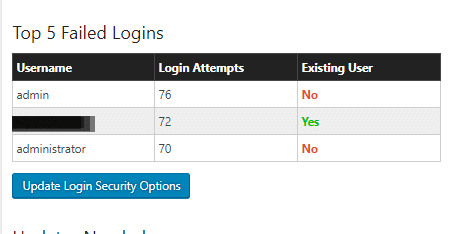
Sometimes it’s not that clever and it’s simply a bot going to your login form and trying common user name and password combinations over and over again.
Install Wordfence and you will see this is a very common thing. Here is a screen dump of login attempts on my site.
Vulnerabilities In Core, Plugins and Themes
The main way people get into word press sites is through a bot network brute force or by exploiting vulnerabilities in WordPress core, themes or plugins.
Using scanning tools they will look for a file on your site from a vulnerability, find it then exploit your site.
There is a great tool called wpscan which can be integrated into systems to scan for issues, I have tools for my maintenance clients to do this, then I close the vulnerability.
They keep a database of vulnerabilities which makes very interesting reading, I can bet a plugin or theme you have used is in the database. https://wpvulndb.com/.
Remember that person I mentioned earlier, the back hat hacker, they are probing all the time for vulnerabilities and are always one step ahead of things. The hacker does not add entries into this database, the security community needs to find these and publish them so the hacker is always ahead of the game.
WordPress Is A Low Hanging Fruit
WordPress powers 27%+ of the internet, it’s a low hanging fruit, finding a vulnerability in WordPress opens the door to more hacking potential than some obscure website scripting system.
This is why WordPress does get hacked, more people are investing time finding loop holes.
Unless It Is Personal
I said it’s probably not personal, but sometimes it is.
Look at your content, is it controversial? Look at what your business does, would it upset people? If the answer is yes hackers may be coming at you personally.
I’ve seen LGBGT and religious sites get attacked. I’ve helped a site supporting Charlie Hebdo with a request security review because they knew they were about to court controversy.
Politics, religion, money difference of opinion opens you up to hackers.
What You Can Do About It
Here are some tips to keep your site protected.
Have full backups which you save offsite so you can recover from a hack.
Keep your site updated to close the vulnerabilities as they are found and fixed.
Use a decent hosting company, cheap hosting often does not have the best techs on their team to keep the servers secure.
Harden the passwords you use and change them often, consider implementing two phase authentication (I’ll write about this in my next post).
Give me a shout, I offer security hardening and monitoring as part of my maintenance plan or as a one off package.
White Hat Hacking
I hack people’s sites all the time in my capacity as a WordPress consultant. I need to get access to fix things, it’s not hard you only need a little bit of access.
It’s white hat and is benign, if I can do it then you can bet a black hat hacker on the edge of the technology can get in.
Wrap up – Why Has MY Site Been Hacked?
It’s probably not personal, it’s some punk kid in their bedroom getting access to your site for kicks probably, unless it’s not :).
You’ve just published your latest blog posts. You are pretty happy with your work. You are hoping it has communicated an idea you have well. A few moments later, PING! you get a message from the Grammar Nazi, reaching out from over the interwebs to chastise you.
Here’s how I handle this type of particularly persnickety person.
What Is A Grammar Nazi?
A grammar Nazi is someone who reaches out to a creator in a critical way. They are obsessed with proper use of grammar and spelling, they fell almost physical pain if somethng is not right, and their major failing IMHO is their need to reach out and correct people, often in a deriding fashion.
They will point out the typos in your content, grammar issues and other faults.
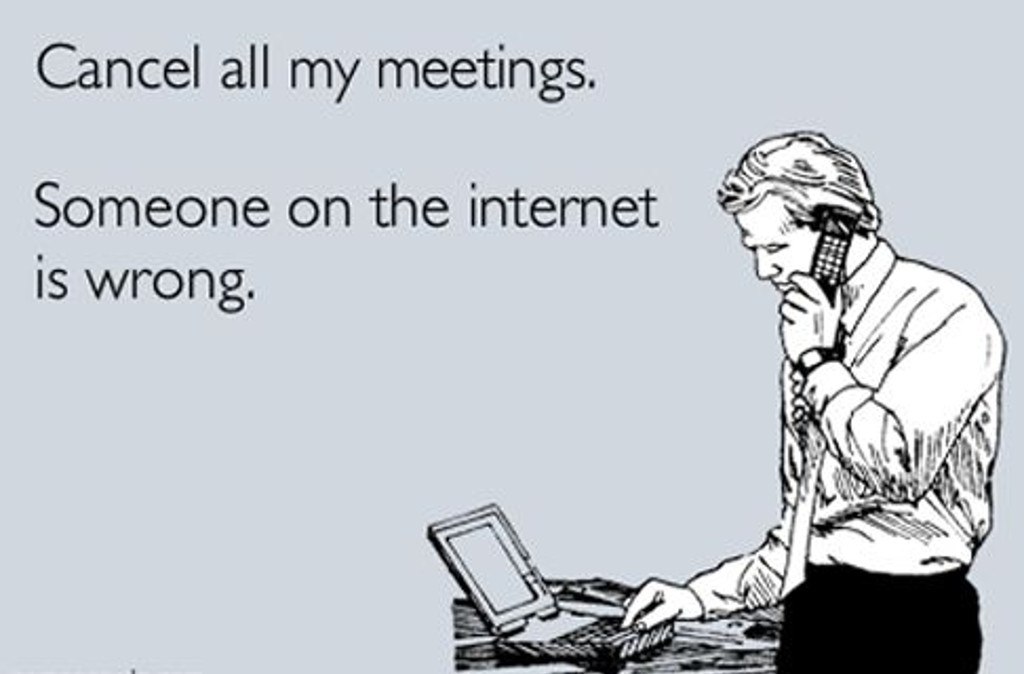
They usually think they are doing a great service cutting you down to size, but more often it’s pretty hurtful. There is very little thought given to the feelings of the recpient, as the image above suggests, they have found an error on the internet and they must correct it.
Now I’m Holding My Hands Up
I have shockingly little patience for spell checking, there have been many times when I’ve clicked publish and there are typos or grammatical errors.
My thinking is, have I communicated my idea, have I created value with my content? Sloppy yes, but to shake your fist at me across the internets, I think that is a little harsh.
For the perfectionists out there this will cause the big vein in your head to pound, but hear me out, sometimes the reaction can be offensive and hurtful, I’m sharing my side of the story.
Sometimes It’s A Genuine Offer Of Help.
Not all communications I get are nasty, the vast majority are genuine offers of help “Hey dude there is a typo on the last line of your sales page”.
I’m fine with that, if you have sent me that type of message I’m not getting at you, but there is a certain type of person out there, when confronted with a typo will erupt and e-march into your country.
Sometimes It Is just Nasty
It happens all the time. Should you have the audacity to press the publish button, and things are not 100% correct.
Here are some that stick in my mind.
“You need to get your shit together!” said the Nazi, he told me he liked my content but there were some typos that I needed to address and get my Sh1T together or no-one would take me seriously. FFS it’s just a blog post not the declaration of Independence.
I sent out an email blast, and the reply was “DO YOU EVEN SPEAK ENGLISH” I checked the blast and there was some missing punctuation. Ouch, I followed your link and you were not creating anything.
A copy writer sent me a harsh critique of my blog post and then tried to sell me his services. Hell no!
I’ve had dozens of other free critiques on the same line.
How I Handle Their Missives?
I have a two ways to handle a Grammar Nazi nowadays, in the past I would have girded my loins and gone into battle, but age has mellowed me.
Stage one take a deep breathe, and remind myself, this is of absolutely no consequence.
If they are mean, they are off the team, I unsubscribe them and never send them any of my future updates. It’s as simple as that, I have no time for angry people. They are not getting the content I gave up my most finite resource for, time. They are also banned from hiring me, but to date I’ve not had a Grammar Nazi also be a client. They tend to lurk and consume free stuff not hire me.
If the notification is in a nice spirit a simple “thanks for the heads up” reply is what they get.
No drama, which leads me to my final piece of advice …
Don’t Feed The Trolls Grammar Nazis!
The last thing you should do is engage, don’t get angry, don’t confront, don’t even reply.
Take a deep breathe, accept the criticism. If you want, make their suggested change, if not so what, it’s your blog post. You owe those sort of people nothing.
To paraphrase, no-one raised a statue to a grammar Nazi.
My favourite thing to do is just leave the offending typo for a few days, you know they will be watching, and you know their OCD will be making them uncomfortable 🙂
Wrap Up – What To Do When The Grammar Nazis Goose Step Over Your Work
I’ve been guilty of pointing out typos in the past, once you get a grammar Nazi on your case you realise how unpleasant that can be. My plea to you is think before firing off your grammar critique and word it nicely, don’t be the Grammar Nazi.
If you need help banning a Troll or Grammar Nazi from your site I have ways and means, get a no obligation quote.
I is not goin to chaneg this sentance no mattir wot you sez, if you get the meaning that is all that iz importint