// Hook in
add_filter( 'woocommerce_checkout_fields' , 'wooace_custom_override_checkout_fields' );

// Our hooked in function - $fields is passed via the filter!
function wooace_custom_override_checkout_fields( $fields ) {

	unset($fields['billing']['billing_company']);
	unset($fields['billing']['billing_phone']);
	unset($fields['order']['order_comments']);


     return $fields;
}

// Removes Order Notes Title - Additional Information & Notes Field
add_filter( 'woocommerce_enable_order_notes_field', '__return_false', 9999 );
// Hook in
add_filter( 'woocommerce_checkout_fields' , 'wooace_custom_override_checkout_fields' );

// Our hooked in function - $fields is passed via the filter!
function wooace_custom_override_checkout_fields( $fields ) {

	unset($fields['billing']['billing_company']);
	unset($fields['billing']['billing_phone']);
	unset($fields['order']['order_comments']);


     return $fields;
}

// Removes Order Notes Title - Additional Information & Notes Field
add_filter( 'woocommerce_enable_order_notes_field', '__return_false', 9999 );
In this video post I want to show you how to add code snippets the easy way to your WordPress site.
You’ve probably seen recommendations to add code to your functions.php file to fix an errors on your site, to add functionality or to make a change of some sort.
You will be presented with a wall of php code and you are told to add this to your functions.php file. All well and good if you are a developer but what if you are not that technical and don’t want to mess with code files.
There are some issues with “simply adding code to functions.php”, here is what you need to be aware of:
If there are errors in the code, you can crash your site.
When you change your theme the code also needs to be migrated.
A site with lots of snippets can become a pain to manage and remember what each piece of code does
Video Demo – How To Add WordPress Code Snippets The Easy Way
In this demo I’ll show you how to use this plugin to add code
And if you want to change your add to cart button to buy now, here is the code. // To change add to cart text on single product page add_filter( 'woocommerce_product_single_add_to_cart_text', 'woocommerce_custom_single_add_to_cart_text' ); function woocommerce_custom_single_add_to_cart_text() { return __( 'Buy Now', 'woocommerce' ); }
Wrap Up – How To Add WordPress Code Snippets The Easy Way
To wrap up this plugin is great when you are developing a site and need to manage lots of custom code, and not have it break your site during testing.
A highly customised site with lots of snippets can become messy when a few months later you cannot remember what each piece of code does, so descriptions and tagging make things much easier to maintain.
If you are still not happy adding custom code to your WordPress site you can always hire me to do it for you.
In this video post I want to show you how to add code snippets the easy way to your WordPress site.
You’ve probably seen recommendations to add code to your functions.php file to fix an errors on your site, to add functionality or to make a change of some sort.
You will be presented with a wall of php code and you are told to add this to your functions.php file. All well and good if you are a developer but what if you are not that technical and don’t want to mess with code files.
There are some issues with “simply adding code to functions.php”, here is what you need to be aware of:
If there are errors in the code, you can crash your site.
When you change your theme the code also needs to be migrated.
A site with lots of snippets can become a pain to manage and remember what each piece of code does
Video Demo – How To Add WordPress Code Snippets The Easy Way
In this demo I’ll show you how to use this plugin to add code
And if you want to change your add to cart button to buy now, here is the code. // To change add to cart text on single product page add_filter( 'woocommerce_product_single_add_to_cart_text', 'woocommerce_custom_single_add_to_cart_text' ); function woocommerce_custom_single_add_to_cart_text() { return __( 'Buy Now', 'woocommerce' ); }
Wrap Up – How To Add WordPress Code Snippets The Easy Way
To wrap up this plugin is great when you are developing a site and need to manage lots of custom code, and not have it break your site during testing.
A highly customised site with lots of snippets can become messy when a few months later you cannot remember what each piece of code does, so descriptions and tagging make things much easier to maintain.
If you are still not happy adding custom code to your WordPress site you can always hire me to do it for you.
I recently added WooCommerce to a site and part of the build was to use WooCommerce Fulfilment by Amazon I thought a case study to explain what that is all about would be useful.
What Is FBA?
Fulfilment by Amazon is a service unsurprisingly offered by Amazon, in brief you put your products in their warehouses and they will pick and ship your items for you when you send them an order.
The charge a fee for storage of your stock and another fee for shipping and handling, the prices are here if you are interested.
Let’s ignore their shocking staffing policies and realise that Amazon are pretty awesome at getting physical stuff from their warehouses to your door, so this seems to be a no brainer if you are looking to outsource your shipping and handling of products.
You can stock your products in multiple locations so if you sell Europe wide or Across all states in the US you can put your products in the East and West coast locations to speed up delivery time and reduce shipping costs.
You will send your stock into Amazon they will scan it in and store it in their warehouses.
How WooCommerce Fulfilment by Amazon Works
To make this work we need a premium addon for WooCommerce this costs $129 per site
The key to making this work is SKU code that matches on FBA and your WooCommerce product, when an order is created in Woo, it is automatically sent to FBA once payment has been approved.
You can switch FBA on and off, so perhaps you only need a few of your major sellers to be fulfilled you can do that,.
The stock levels in FBA and WooCommerce are automatically synced so you don’t create an order that cannot be fulfilled.
A really cool feature of this setup is that your customers can track their package from their account page. They login to their account and the two way sync of Woo and FBA will show your customers where their package is.
FBA creates a series of email alerts when items are shipped so you always know the status of your fulfilment, a brilliant feature for control freaks like me.
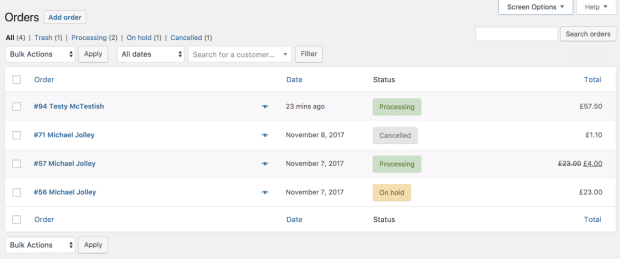
Fulfilment statuses are also synced back to your order dashboard in WooCommerce so you don’t have to login to two dashboard to monitor your orders.
Cancelling an order in Woo will stop the shipment, again only one dashboard is required.
Setup is fairly simple you add a couple of API keys from Amazon into the plugin are all that is required,
What Are The Benefits Of FBA
Time!
It frees up your time to not pack, ship and post your products.
Cost!
It frees you up from having to rent storage space or it gives you back your garage which is currently full of your stock.
Proven Systems!
You know that Amazons are Boss Level at shipping stuff to customers.
Wrap Up – Case Study: WooCommerce Fulfilment by Amazon, Never Lick A Stamp Again
Do people lick stamps anymore or do they all have an adhesive backing? Am I showing my age?
If you are getting to that point in your eCommerce journey that you are struggling to ship all your orders I would recommend FBA over getting your own storage space and staff to do the shipping and handling.
If you need help setting up a fulfilment or shipping service for your WooCommerce store give me a shout.
I recently added WooCommerce to a site and part of the build was to use WooCommerce Fulfilment by Amazon I thought a case study to explain what that is all about would be useful.
What Is FBA?
Fulfilment by Amazon is a service unsurprisingly offered by Amazon, in brief you put your products in their warehouses and they will pick and ship your items for you when you send them an order.
The charge a fee for storage of your stock and another fee for shipping and handling, the prices are here if you are interested.
Let’s ignore their shocking staffing policies and realise that Amazon are pretty awesome at getting physical stuff from their warehouses to your door, so this seems to be a no brainer if you are looking to outsource your shipping and handling of products.
You can stock your products in multiple locations so if you sell Europe wide or Across all states in the US you can put your products in the East and West coast locations to speed up delivery time and reduce shipping costs.
You will send your stock into Amazon they will scan it in and store it in their warehouses.
How WooCommerce Fulfilment by Amazon Works
To make this work we need a premium addon for WooCommerce this costs $129 per site
The key to making this work is SKU code that matches on FBA and your WooCommerce product, when an order is created in Woo, it is automatically sent to FBA once payment has been approved.
You can switch FBA on and off, so perhaps you only need a few of your major sellers to be fulfilled you can do that,.
The stock levels in FBA and WooCommerce are automatically synced so you don’t create an order that cannot be fulfilled.
A really cool feature of this setup is that your customers can track their package from their account page. They login to their account and the two way sync of Woo and FBA will show your customers where their package is.
FBA creates a series of email alerts when items are shipped so you always know the status of your fulfilment, a brilliant feature for control freaks like me.
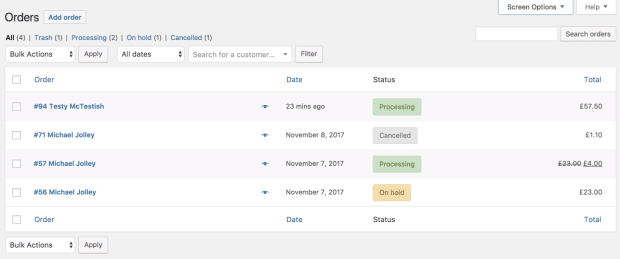
Fulfilment statuses are also synced back to your order dashboard in WooCommerce so you don’t have to login to two dashboard to monitor your orders.
Cancelling an order in Woo will stop the shipment, again only one dashboard is required.
Setup is fairly simple you add a couple of API keys from Amazon into the plugin are all that is required,
What Are The Benefits Of FBA
Time!
It frees up your time to not pack, ship and post your products.
Cost!
It frees you up from having to rent storage space or it gives you back your garage which is currently full of your stock.
Proven Systems!
You know that Amazons are Boss Level at shipping stuff to customers.
Wrap Up – Case Study: WooCommerce Fulfilment by Amazon, Never Lick A Stamp Again
Do people lick stamps anymore or do they all have an adhesive backing? Am I showing my age?
If you are getting to that point in your eCommerce journey that you are struggling to ship all your orders I would recommend FBA over getting your own storage space and staff to do the shipping and handling.
If you need help setting up a fulfilment or shipping service for your WooCommerce store give me a shout.
I recently added WooCommerce to a site and part of the build was to use WooCommerce Fulfilment by Amazon I thought a case study to explain what that is all about would be useful.
What Is FBA?
Fulfilment by Amazon is a service unsurprisingly offered by Amazon, in brief you put your products in their warehouses and they will pick and ship your items for you when you send them an order.
The charge a fee for storage of your stock and another fee for shipping and handling, the prices are here if you are interested.
Let’s ignore their shocking staffing policies and realise that Amazon are pretty awesome at getting physical stuff from their warehouses to your door, so this seems to be a no brainer if you are looking to outsource your shipping and handling of products.
You can stock your products in multiple locations so if you sell Europe wide or Across all states in the US you can put your products in the East and West coast locations to speed up delivery time and reduce shipping costs.
You will send your stock into Amazon they will scan it in and store it in their warehouses.
How WooCommerce Fulfilment by Amazon Works
To make this work we need a premium addon for WooCommerce this costs $129 per site
The key to making this work is SKU code that matches on FBA and your WooCommerce product, when an order is created in Woo, it is automatically sent to FBA once payment has been approved.
You can switch FBA on and off, so perhaps you only need a few of your major sellers to be fulfilled you can do that,.
The stock levels in FBA and WooCommerce are automatically synced so you don’t create an order that cannot be fulfilled.
A really cool feature of this setup is that your customers can track their package from their account page. They login to their account and the two way sync of Woo and FBA will show your customers where their package is.
FBA creates a series of email alerts when items are shipped so you always know the status of your fulfilment, a brilliant feature for control freaks like me.
Fulfilment statuses are also synced back to your order dashboard in WooCommerce so you don’t have to login to two dashboard to monitor your orders.
Cancelling an order in Woo will stop the shipment, again only one dashboard is required.
Setup is fairly simple you add a couple of API keys from Amazon into the plugin are all that is required,
What Are The Benefits Of FBA
Time!
It frees up your time to not pack, ship and post your products.
Cost!
It frees you up from having to rent storage space or it gives you back your garage which is currently full of your stock.
Proven Systems!
You know that Amazons are Boss Level at shipping stuff to customers.
Wrap Up – Case Study: WooCommerce Fulfilment by Amazon, Never Lick A Stamp Again
Do people lick stamps anymore or do they all have an adhesive backing? Am I showing my age?
If you are getting to that point in your eCommerce journey that you are struggling to ship all your orders I would recommend FBA over getting your own storage space and staff to do the shipping and handling.
If you need help setting up a fulfilment or shipping service for your WooCommerce store give me a shout.
If you are a solopreneur, there is more to taking a vacation (holiday as we call it in the UK) than just switching on your out of office message, in this post I’ll show you how to prepare your website for your vacation.
As a solopreneur, everything is on your shoulders, all email responses and communication come from you. Slow or no replies can come across as unprofessional so in this post I’ll take you through a couple of pointers to ensure you alert people you are not available.
Contact Forms
Where you have contact forms on your site drop in a bold highlighted section saying you are away and will get back to them when you get back before they submit their request, check out my work with me page as an example.
Switch Off Your Ads
OMG a few years back I was running paid ads and left them running when I was in Italy, there’s a couple of hundred quid down the toilet,
If you need to respond to contact from your ads then switch off the ads while you are away. People coming to you from paid ads are cold traffic and expect a certain level of service which will look poor if you leave them on hold for a week or more.
Disable Email Autoresponder
If you are running an autoresponder to sell your thing consider switching that off if you need to be around to fulfil the sale. I’m thinking service delivery of if you need to prepare a quote.
If you are selling stuff that doesn’t need you around have at it and leave your ads running and experience that earn while you are on the beach feeling.
Don’t forget to start your Out Of Office Message
I know I said it’s more than just an OOO message, but don’t forget to active it, I use Gmail and they have a great tool under stetting to reply to all emails with a set message.
Lock Your Site Like Your Would Your House
If you use the iTheme security plugin, there is a great feature called away mode. This stops any logins to your site until a specific time, set this to be your return date and no-one can login to your site until you get back.
A client of mine has a great technique, he switches on his out of office message two weeks early with a warning that he is out of the office in a couple of weeks then swaps the message to his true out of office while he’s away.
Me, I’m writing a blog post and I’ve personally emailed the people who have projects with me plus doing everything.
Let Your Team Know
If you have a team then let them know and expect them to pick up the slack. Have an expectation that you will not be contacted by your team, why else would you have a team if you are still micro managing their every move while on vacation.
Defend Your Boundaries
One last thing defend the boundaries you have set when you are on vacation and don’t reply to message that look like this.
I know you are on vacation but can you [insert client request]
You need rest and cannot hustle 24/7 so switch off and enjoy your time away.
Wrap Up – Prepare Your Website For Your Vacation
I’m on holiday next week, back in the office on the 2nd August as you can probably guess.
If you are a maintenance client I’ve got you covered send a message to [email protected] and my VA will look after you.
I’m looking forward to putting out the fires in my inbox when I get home 🙂
I’ve been thinking what is the best way to start a conversation with potential new clients that I’ve never worked with in the past, I’ve been thinking what is the best lead magnet for service businesses for cold traffic.
What Is A Lead Magnet
A lead magnet is an offer you give away for free to people visiting your site in exchange for their email address.
The lead magnet is meant to prove your expertise or value to someone you have not worked with (or sold to) in the past, so they can start down the process of know like and trust.
Know like and trust is a principal where you get to know a business, decide if you like the way they work and if they can be trusted.
You’ve probably all signed up for a PDF download, that’s a lead magnet, or signed up for a free video course or attended a webinar, all examples of lead magnets.
You get the freebie then there is usually a follow up email sequence to improve the know like and trust process.
Do Service Businesses Need Different Lead Magnets?
I’m selling a service, so I’ve been pondering if I need a different type of lead magnet than say someone selling products (information or physical).
To get people to work with me, I need to prove I’ve got the expertise and that I’m a good person to work with.
I’m not sure PDFs of videos are the best way to do this.
Things I’ve Tried
I’ve tried a lot of things over the years here’s what I’ve found
pdfs – I’ve written eBooks about WordPress and used them as a downloadable offer, they are good but don’t show what it’s like to work with me.
courses – I’ve created screen cast courses to teach people about how to do something in WordPress, the trouble with this is a person wanting to learn how to do thing X in WP doesn’t want to hire someone to do X so I’m attracting the wrong people
videos – I’ve created specific videos with a squeeze page to collect an email before the video can be viewed, same thing as the course
nothing – My quote is the lead magnet, this works but only for people who know me, have been referred to me or my website has done a good job a KLT.
blog updates – is that really valuable anymore? Get an email address in exchange for regular updates form my blog. This highlights my writing but not what my working procedures are like.
Other Type Of Lead Magnet
There are other lead magnets out there, that I’ve not tried but are worth a mention:
webinars – get people on a webinar and explain what working with you is like
trip wires – sell something at a low cost and upsell them to a more expensive item, for example sell a cheap productised service then offer a complex service.
free services – let people work with you for free to let them experience your service and gain KLT then upsell future services, the problem with this is it attracts low quality clients wanting free services and high levels of support for that freebie
What I’m Trialling Now
I’m trialling a new lead magnet and I would like to know what you think.
I’m building up a series of free audits where I’ll check your site over for problems and tell you how they can be fixed.
If I do a good job hopefully I can sell the services to fix the issues noted.
The benefits of this are that the audit has a predefine scope, it does not take too long to create an audit, it is very specific to that person’s WordPress sites. It proves my expertise and understanding of the problems specific to their site. I’ll include a narrative on how I will fix their site in the audit.
I’ve got two audits planned, a security audit and a performance audit.
With these audits I can the questions is your site secure or is your site fast enough.
I’m going to start with performance because all I need to do a speed audit is the URL, the barrier to entry is less, I don’t need a login to check performance. The performance audit is lower on the KLT ladder.
I’m going to run cold paid traffic to my audits. As usual I’ll report back if things work or not.
What I’m Offering
My free performance audit will be to show you how fast or slow your WordPress site is loading, I’ll run your site through a performance tool and discuss why it is slow, I’ll record a screencast video of me doing that audit and how your site speed can be improved.
You’ll get an experience where you get to see my expertise, get to know me (you’ll see this pretty face talking you through an audit) and a very tailored experience of your own site.
It’s small in scope (about 5 minutes per audit) it’s valuable to that person, they will see where their issues are, it’s very specific to that person, I’m showing issue on their live site not a video on how to find their issues.
Wrap Up – What Is The Best Lead Magnet For Service Businesses?
Answers in the comments, what do you think is the best lead magnet for freelance service businesses, what do you think of audits?
If you want a speed audit click through to my audit page and complete the form, I’ll review your site and create a video audit of why your site is running so slowly and what can be done to speed things up.
I love tech, I’ve made a career around it, here’s a light hearted post on how I was brought down by the device in my pocket, lets talk about the rise of our robot overloads or how the AI placed me under house arrest.
Some background for people outside of he UK, like many countries we have a COVID 19 app that is used to track and trace infections. It tracks proximity to other users of the same app and judges if you have been within 2 meters of another person for more than 15 minutes.
When someone reports an infection, the system does it’s things and tracks the people who the infected person has been in close proximity to. That person is then asked to self isolate for 10 day.
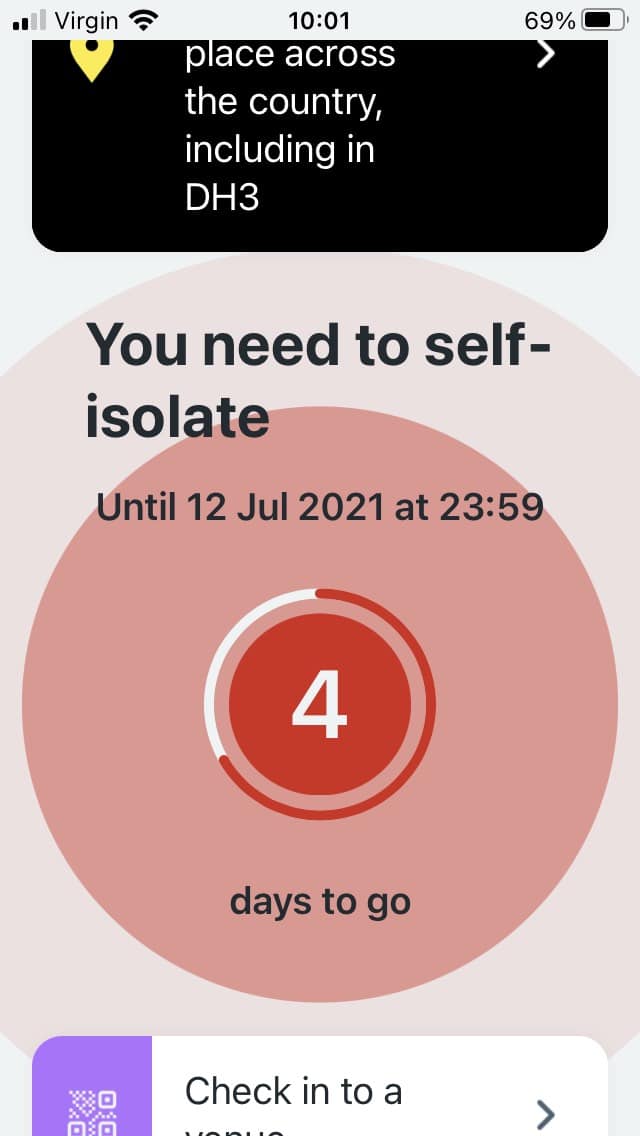
So Tuesday trundles around and I get a ping on my phone, It tells me I need to self Isolate for 10 days and my exposure had been on Friday 2nd July.
First Time At The Pub With The Boys In 18 Months!
I’ve not been out to a proper British pub with the boys (my friends) for more than 18 months and we went out for beers followed by a curry on Friday 2nd July, Are you beginning to see a pattern yet.
The pub we went to was really well organised, we were following the mask protocol. It was table service and the staff were all wearing masks.
We had our fill of beer then went down the street to a curry house, the town we went to, Chester Le Street, was empty, it looked like a zombie apocalypse had happened, this picture is Friday night in a usually busy town.
We were the only people in the restaurant. I had lamb madras in case you were wondering.
We Are Not At Risk!
The venues were well controlled, the town was virtually empty.
We are all double jabbed, two of us are taking regular lateral flow tests.
We wore our masks, we followed the protocols to keep ourselves safe.
The evil robot overlord does not give a shite, all it wants to do is ping with abandon and lock us all down. My feeling is they want to use us as batteries to power their AI and if we are all at home they know where to send the self driving human harvesting devices.
Here’s My Beef
I got pinged, Graeme got pinged, Chris did not.
Later that day on Tuesday my daughter got pinged but my wife and other daughter did not.
There is no human to contact to get more information about the ping, I don’t get to make an informed decision about this, just an arbitrary rule from a computer program.
A computer program that is buggy as hell in my technical opinion.
So I’m under self imposed house arrest until next Tuesday because my iPhone is a snitch.
The Problem With Technology
We build our technology thinking it’s bullet proof and every eventuality has been taken into account.
We need risk assessing humans behind the technology with a kill switch to disable the tech when things are wrong or in my case when the ping is to a very low risk person.
There always needs to be an option to speak to a real agent not just to the code.
I’m Not Really That Bothered
To be honest I’m looking forward to this weekend, I get to lie around the house and my wife will have to do the running around for me and the kids.
I’m staying in on Sunday to watch the final of the Euro 2020 championships, come on England!
All in all I’m looking forward to a nice relaxing time 🙂
How To Defeat The Robot
The solution is simple comrades.
Wrap Up – Rise Of Our Robot Overlords Or How The AI Placed Me Under House Arrest
So this morning I read this on the BBC website because the app is currently going Skynet and telling millions of people to self isolate.
“The department of health said the app is and always has been advisory” wtaf!
The tale of this story is that technology cannot think like a human.