By default your WordPress pages are displayed in alphabetical order. Sometimes this is not what a blogger wants, here is a quick hack to change the order of your pages.
Why Change the Order of Your Pages?
You may want to change the order of your pages to make more important pages stand out, for example on my site, I want hire me to be on the right so it is more prominent or you may want to improve your sites usability by clustering like pages together.
Sometimes you just want to rebel, the OCD of developers may get you down, ordering everything and indexing and categorising can overwhelm the more free spirited.
The Out of the Box Hack
Here is how you can modify the order that your pages are displayed.
From the edit pages section, select one of your pages and you will see the following attribute box on the right of your page copy:
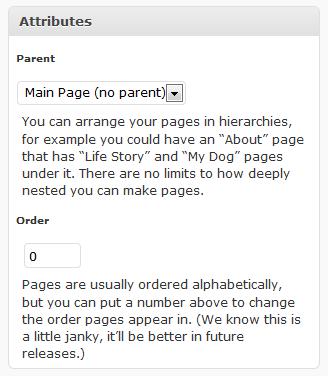
As you can see their is a numeric option for the page order. By default all pages are set to zero, but if you set a value for each page you can control the order. e.g. about =1, contact =2, testimonials =3 and this order will be displayed on your page layout.
As it says above, this is a little bit “janky” if you add new pages you will need to modify the order again. If you want a simple page order change this hack does exactly what it says on the tin.
Mirror Mirror on the Wall What’s the Best Page Order Process of All
You oh Dude tell everyone the out of the box hack which is fine, but lo what’s this I see, a plugin is more fair than thee.
If you are looking for something a little more polished then why not check out the My Page Order Plugin http://wordpress.org/extend/plugins/my-page-order/
You Are A Free Spirit
Don’t let the “Man” tell you which order your pages should be in. Go out make a stand and break their structured universe 🙂
Comments
9 responses to “How To Change the Order of Your WordPress Pages”
Ok… that hack works for pages, but what about for the categories. I have four basic categories and I am working for a very clean feel and look to the home page. I want those four categories to be in a non alphabetical order. Can that be done by a newbie, or do I have to dive into the code?
Thanks!!
From the people how bought you my page order plugin comes the new summer blockbuster My Category Plugin http://wordpress.org/extend/plugins/my-category-order/
Hope that helps
Neil
Thanks Neil I will give it a try!!
I use one called PageMash. You drag & drop pages in a tree structure and when you’re done, click Update and it’s good to go 🙂 – it’s so easy compared to what WordPress provides!
Hi Chris thanks for the pointer to PageMash – I’ve not used it so I cannot say anuthing about it, but its available at http://wordpress.org/extend/plugins/pagemash/
Hi Neil,
I am using a theme that does NOT contain the “wp_list_pages” code in the header. Instead, there is “echo listPages”.
Result? The pages ONLY appear in numerical order by Page ID…not too practical! I have not figured a way to fix this, since all solutions seem to use the “wp_list_pages” line that isn’t there.
Out-o-tha-box: FAIL
Plugin: FAIL
Any ideas?
I may come out sounding completely ignorant (okay blogwise I probably am), but is it okay to download the page orderer thing with a mac? Am I downloading it onto my computer or into wordpress? Have no idea how it works.
Thanks!
Hi Susie,
This would be a plugin you install onto your wordpress installation, the link allows you to download it then upload it to you blog.
I guess you are using the hosted version of wordpress at newdaynewlesson.wordpress.com, I don’;t think you can add this plugin so the first method of chanfing the page order would be best for you.
Neil
I’ve written a plugin called CMS Tree Page View (http://wordpress.org/extend/plugins/cms-tree-page-view/) what is a pretty good alternative to re-ordering your wordpress pages. Personally I think it’s even better than My page order.